Exposure of account recovery hint by querying by user email
The account recovery hint API allowed anyone to query a user's recovery key hint by providing their email address. An attacker could use this to enumerate accounts and craft more convincing phishing attacks.
 Originally disclosed on HackerOne
- Triaged in 11 days
- Fixed in 12 days
- Paid in 16 days
- Disclosed after 54 days
Summary by the program
The account recovery location hint was exposed by directly querying the recoveryKey API with a user email. The hint is used to remind the user where they stored their recovery key and leaking the hint does not pose immediate security risk on the user's account. However, the API could have been used for user account enumeration. The API was disabled since it is not yet used in the application UI.
The report
Summary:
Hey all!
Hope everything is good! While testing I noticed that I can issue queries to https://api.accounts.firefox.com/v1/recoveryKey/[email protected] to get a specific user Account Recovery Keys hint.
This does not seem like an issue on itself but could be used to escalate phishing attacks for example.
The page where you input the hint displays the following:
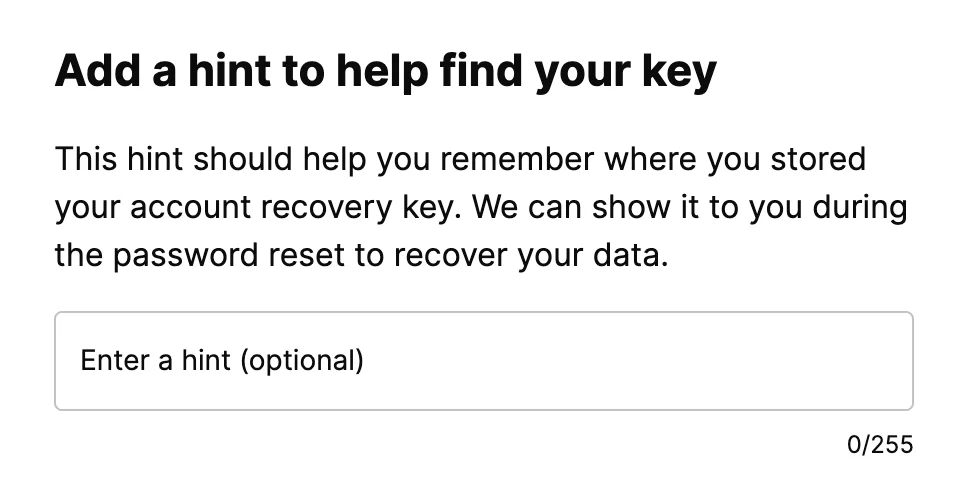
But I am considering this should not be public information, and only be available to a user by a email link.
Steps To Reproduce:
Go to https://api.accounts.firefox.com/v1/recoveryKey/hint?email=███████ and check my hint.
GET /v1/recoveryKey/hint?email=███ HTTP/2
Host: api.accounts.firefox.com
Sec-Ch-Ua: "Chromium";v="119", "Not?A_Brand";v="24"
Sec-Ch-Ua-Mobile: ?0
Sec-Ch-Ua-Platform: "macOS"
Upgrade-Insecure-Requests: 1
User-Agent: Mozilla/5.0 (Windows NT 10.0; Win64; x64) AppleWebKit/537.36 (KHTML, like Gecko) Chrome/119.0.6045.159 Safari/537.36
Accept: text/html,application/xhtml+xml,application/xml;q=0.9,image/avif,image/webp,image/apng,*/*;q=0.8,application/signed-exchange;v=b3;q=0.7
Sec-Fetch-Site: none
Sec-Fetch-Mode: navigate
Sec-Fetch-User: ?1
Sec-Fetch-Dest: document
Accept-Encoding: gzip, deflate, br
Accept-Language: en-GB,en;q=0.9
Priority: u=0, i
Impact
Leaking any user's Account Recovery Keys hint can be used to steal user's keys or craft more complex phishing attacks.
Context
Mozilla runs its Firefox Accounts service on accounts.firefox.com, with the backing API served from api.accounts.firefox.com. One of the account features is the Account Recovery Key: a key the user stores somewhere safe and which can be used to recover the account. To help the user remember where they put it, the service keeps a recovery key hint, a short reminder of the storage location.
The report concerns an API endpoint under /v1/recoveryKey/hint that returns that hint for a given account. The endpoint was reachable directly and took the account email as a query parameter, so a caller could ask the API for the corresponding hint by supplying an email address.
Setup
No special accounts, roles or tooling are described. The researcher tested against the production API with a browser-style HTTP client, sending a plain GET request to the hint endpoint with an email address in the query string. The only precondition was knowing the email address of the target account.
Finding it
While testing, the researcher noticed that a request to the following URL returned the Account Recovery Key hint of a specific user:
https://api.accounts.firefox.com/v1/recoveryKey/hint?email=[redacted]
The researcher considered that the hint should not be public information and should only be reachable by the account owner, for example through a link sent by email. On its own the leak did not look like a serious flaw, but it could be used to make phishing attacks more convincing.
The page where a user enters the hint displays the following:
Exploitation
Step 1: query the hint endpoint with a target email
The researcher sent the following request, substituting the target account's email address in the email parameter:
GET /v1/recoveryKey/hint?email=███ HTTP/2
Host: api.accounts.firefox.com
Sec-Ch-Ua: "Chromium";v="119", "Not?A_Brand";v="24"
Sec-Ch-Ua-Mobile: ?0
Sec-Ch-Ua-Platform: "macOS"
Upgrade-Insecure-Requests: 1
User-Agent: Mozilla/5.0 (Windows NT 10.0; Win64; x64) AppleWebKit/537.36 (KHTML, like Gecko) Chrome/119.0.6045.159 Safari/537.36
Accept: text/html,application/xhtml+xml,application/xml;q=0.9,image/avif,image/webp,image/apng,*/*;q=0.8,application/signed-exchange;v=b3;q=0.7
Sec-Fetch-Site: none
Sec-Fetch-Mode: navigate
Sec-Fetch-User: ?1
Sec-Fetch-Dest: document
Accept-Encoding: gzip, deflate, br
Accept-Language: en-GB,en;q=0.9
Priority: u=0, i
The request is a simple GET to /v1/recoveryKey/hint on api.accounts.firefox.com. The only input that matters is the email query parameter, which selects the account whose hint is returned. The remaining headers are ordinary browser navigation headers (Sec-Fetch-*, Upgrade-Insecure-Requests, Accept, Accept-Language, User-Agent); the request contains no cookie.
Root cause
The hint endpoint accepted the account email as the selector and returned the stored hint for that address. The hint is meant to be shown to the account owner, but the API treated it as public data keyed by email address. The program's summary notes the API could have been used for user account enumeration.
Impact
The hint is a reminder of where the user stored their recovery key. Leaking it does not by itself give access to the account, but the researcher noted it could be used to steal a user's keys or to craft more complex phishing attacks, for example by referencing the real storage location in a message that asks the user for the key. The program's summary adds that the API could have been used for user account enumeration. The exposure applies to any account whose email address the attacker knows.
Fix
The program disabled the API. Its summary states that the endpoint was not yet used in the application UI, so removing it did not affect the product.
Variants to test
- Look for other endpoints that take an email address as a query parameter and return account-specific data (hints, display names, recovery metadata) without a session. A positive result is a response containing data belonging to an account you are not logged in as.
- Check whether the same endpoint behaves differently for registered and unregistered addresses. A positive result is a distinguishable response (different body, status or timing) that confirms whether an account exists.
- Test whether the endpoint accepts other identifiers in place of the email, such as a user ID, and still returns the same data.
- Try the endpoint with no credentials at all, as in the report, and then with a session for a different account, to see whether authorisation is checked against the session or only against the supplied parameter.
Hunting notes
This kind of bug tends to sit in newer or secondary APIs that back a feature not yet wired into the UI, where authorisation checks are easy to forget because the endpoint is assumed to be internal. During recon, look for API hosts separate from the main application (here api.accounts.firefox.com alongside accounts.firefox.com) and for endpoints whose parameters are identifiers rather than opaque tokens. The signal is a request that succeeds with no cookie or bearer token and returns per-user data.
The researcher showed the exact request and framed the leak in terms of the phishing and key-theft scenarios it enables. The program accepted it as low severity, paid a 250 USD bounty, and noted the additional enumeration angle in its summary.
What happened, in plain words
Mozilla runs Firefox Accounts, the service you use to sign in to Firefox and Mozilla websites. The main website is accounts.firefox.com, and behind it sits a separate server, api.accounts.firefox.com, that does the actual work of storing and returning account data. A server like that, which answers requests with data rather than showing you a page, is called an API (application programming interface). Think of the website as a restaurant's dining room and the API as the kitchen: you do not walk into the kitchen yourself, the waiters carry your order there and bring back the food.
One Firefox Accounts feature is the Account Recovery Key. It is a long key that the user saves somewhere safe, and it can be used to get back into the account if the password is lost. So that the user remembers where they put it, the service also stores a recovery key hint: a short reminder, such as a note about which drawer or which password manager holds the key.
The researcher found that the API had a door for fetching that hint, at /v1/recoveryKey/hint, and that the door took the account's email address as a query parameter. Anyone who knew an email address could ask the API for the hint belonging to that account. The researcher reported it, the program rated it low severity, paid a 250 USD bounty, and the API was disabled.
The product and the feature
Firefox Accounts is the sign-in system behind Firefox and Mozilla's online services. Your account lives on accounts.firefox.com, and the data behind it is served by api.accounts.firefox.com.
The Account Recovery Key is a backup key. If you forget your password, this key can get you back into your account. Because it is long and easy to misplace, the service lets you record a hint: a short reminder of where you stored the key. The hint is not the key itself. It is a memory aid, meant to be shown to you, the account owner.
Finding it
While testing, the researcher noticed that a request to this address returned the Account Recovery Key hint of a specific user:
https://api.accounts.firefox.com/v1/recoveryKey/hint?email=[redacted]
Reading it piece by piece:
https://is the normal secure web protocol, the same one your browser uses for banking.api.accounts.firefox.comis the API server, the kitchen rather than the dining room./v1/recoveryKey/hintis the path, the name of the specific door on that server.v1just means version 1 of the API, andrecoveryKey/hintsays this door deals with recovery key hints.?email=[redacted]is the query string. Everything after the?is extra information handed to the door. Here the parameter is calledemailand its value is an email address. A parameter is simply a named input, like a field on a form.
The researcher's view was that this hint should not be public information. It should only reach the account owner, for example through a link sent to their email address. On its own the leak did not look like a serious flaw, but it could make phishing attacks more convincing.
The page where a user enters the hint looks like this:
Exploitation
Step 1: query the hint endpoint with a target email
The researcher sent the following request, putting the target account's email address in the email parameter:
GET /v1/recoveryKey/hint?email=███ HTTP/2
Host: api.accounts.firefox.com
Sec-Ch-Ua: "Chromium";v="119", "Not?A_Brand";v="24"
Sec-Ch-Ua-Mobile: ?0
Sec-Ch-Ua-Platform: "macOS"
Upgrade-Insecure-Requests: 1
User-Agent: Mozilla/5.0 (Windows NT 10.0; Win64; x64) AppleWebKit/537.36 (KHTML, like Gecko) Chrome/119.0.6045.159 Safari/537.36
Accept: text/html,application/xhtml+xml,application/xml;q=0.9,image/avif,image/webp,image/apng,*/*;q=0.8,application/signed-exchange;v=b3;q=0.7
Sec-Fetch-Site: none
Sec-Fetch-Mode: navigate
Sec-Fetch-User: ?1
Sec-Fetch-Dest: document
Accept-Encoding: gzip, deflate, br
Accept-Language: en-GB,en;q=0.9
Priority: u=0, i
Line by line:
GET /v1/recoveryKey/hint?email=███ HTTP/2is the request line.GETis the method, the verb that means "give me this". The path and query string say which door and which email.HTTP/2is the version of the web protocol being spoken. The email itself is blacked out in the report.Host: api.accounts.firefox.comtells the server which site the request is for. One physical server can host many sites, so this line says which one is wanted.Sec-Ch-Ua,Sec-Ch-Ua-MobileandSec-Ch-Ua-Platformare hints the browser volunteers about itself: which browser family, whether it is on mobile, and which operating system. They are informational only.Upgrade-Insecure-Requests: 1says the browser would prefer the secure version of the page if one exists.User-Agentis the browser's calling card: a long string naming the browser and version. Here it names Chrome 119 on Windows, even though the platform hint above says macOS, which is a normal mismatch when a request is replayed by a tool rather than sent by a real browser.Acceptlists the kinds of content the client is willing to receive, from HTML pages to images.Sec-Fetch-Site,Sec-Fetch-Mode,Sec-Fetch-UserandSec-Fetch-Destdescribe how the request was started.navigateanddocumentmean it looks like a person typing an address into the address bar and expecting a page.Accept-Encodinglists the compression formats the client can unpack, so the server can send the answer smaller.Accept-Languagesays which languages the client prefers.Priorityis a hint about how urgently the response is wanted.
What matters is what is missing. There is no Cookie header and no Authorization header. A cookie is a small piece of data your browser stores for a site and sends back with every request, and it is how a website usually recognises that you are logged in. An Authorization header is another way of presenting a credential, such as a token. This request carries neither header. The only input that mattered was the email parameter, which chose whose hint came back.
Why it worked
The hint endpoint used the email address to pick an account and returned the stored hint for it. The hint is meant for the account owner, but the API treated it as public data filed under an email address.
The program's summary notes the API could have been used for user account enumeration. That second use is called user account enumeration, learning which email addresses have accounts by watching how the service answers.
Impact
The hint is a reminder of where the user stored their recovery key. Leaking it does not by itself give access to the account. But the researcher noted it could be used to steal a user's keys or to craft more complex phishing attacks, for example by mentioning the real storage location in a message that asks the user for the key. A phishing message that says "the key you keep in the place your hint mentions" is far more convincing than a generic one. The program's summary adds that the API could have been used for user account enumeration. The exposure applied to any account whose email address the attacker knew.
The fix
The program disabled the API. Its summary states that the endpoint was not yet used in the application UI, so removing it did not affect the product. In other words, the door existed in the kitchen but no waiter had started using it yet.
Variants to test
- Look for other endpoints that take an email address as a query parameter and return account-specific data (hints, display names, recovery metadata) without a session. A positive result is a response containing data belonging to an account you are not logged in as.
- Check whether the same endpoint behaves differently for registered and unregistered addresses. A positive result is a distinguishable response (different body, status or timing) that confirms whether an account exists.
- Test whether the endpoint accepts other identifiers in place of the email, such as a user ID, and still returns the same data.
- Try the endpoint with no credentials at all, as in the report, and then with a session for a different account, to see whether authorisation is checked against the session or only against the supplied parameter.
Hunting notes
This kind of bug tends to sit in newer or secondary APIs that back a feature not yet wired into the UI, where authorisation checks are easy to forget because the endpoint is assumed to be internal. During recon, look for API hosts separate from the main application (here api.accounts.firefox.com alongside accounts.firefox.com) and for endpoints whose parameters are identifiers rather than opaque tokens. The signal is a request that succeeds with no cookie or bearer token and returns per-user data.
The researcher showed the exact request and framed the leak in terms of the phishing and key-theft scenarios it enables. The program accepted it as low severity, paid a 250 USD bounty, and noted the additional enumeration angle in its summary.
Glossary
- API: a server that answers requests with data rather than showing pages, used by websites and apps behind the scenes.
- Endpoint: one specific address on a server that performs one specific job, like one door in a building.
- GET: the web method that means "give me this", used when a browser or tool asks for a page or data.
- Query string: the part of a URL after the
?, carrying named inputs to the server. - Parameter: a named input in a request, like a field on a form.
- HTTP: the protocol browsers and servers use to exchange requests and responses.
- HTTP/2: a newer version of that protocol, noted in the request line.
- Header: an extra line in a request or response carrying information such as the browser type or a credential.
- Host: the header that says which site on a shared server the request is for.
- User-Agent: a header where the browser describes itself, including name and version.
- Accept: a header listing the content types the client can handle.
- Accept-Encoding: a header listing the compression formats the client can unpack.
- Accept-Language: a header listing the languages the client prefers.
- Cookie: a small piece of data stored by the browser for a site and sent back with each request, commonly used to recognise a logged-in user.
- Authorization header: a header used to present a credential, such as a token, to the server.
- Token: a piece of data that proves who you are, like a temporary pass.
- Session: the server's record that you are logged in, usually tied to a cookie.
- Authentication: proving who you are, for example by logging in.
- Authorisation: deciding what a proven user is allowed to do.
- Account Recovery Key: a backup key for a Firefox Account that can restore access if the password is lost.
- Recovery key hint: a short reminder of where the user stored the recovery key.
- Phishing: a message that pretends to be trustworthy to trick someone into handing over information or access.
- User account enumeration: learning which email addresses have accounts by observing how a service answers.
- Oracle: something you can ask questions and get answers from, which leaks information through those answers.
- Recon: the early stage of testing where you map out what a service exposes.
- Severity: how serious an issue is judged to be, here low.
- Bounty: a reward paid for a valid security report.
- UI: the user interface, the screens and buttons a person sees and uses.



