HTML Injection at https://stage.firefoxmonitor.nonprod.cloudops.mozgcp.net/user/unsubscribe
The unsubscribe page was suspected of reflecting unsanitised input into the HTML, allowing an attacker to inject client-side code. The reporter could not confirm execution because their IP was blocked, so the claim of script execution is unproven.

- Triaged in 14 hours
- Fixed in 7 days
- Paid in 7 days
- Disclosed after 7 months
Hello,
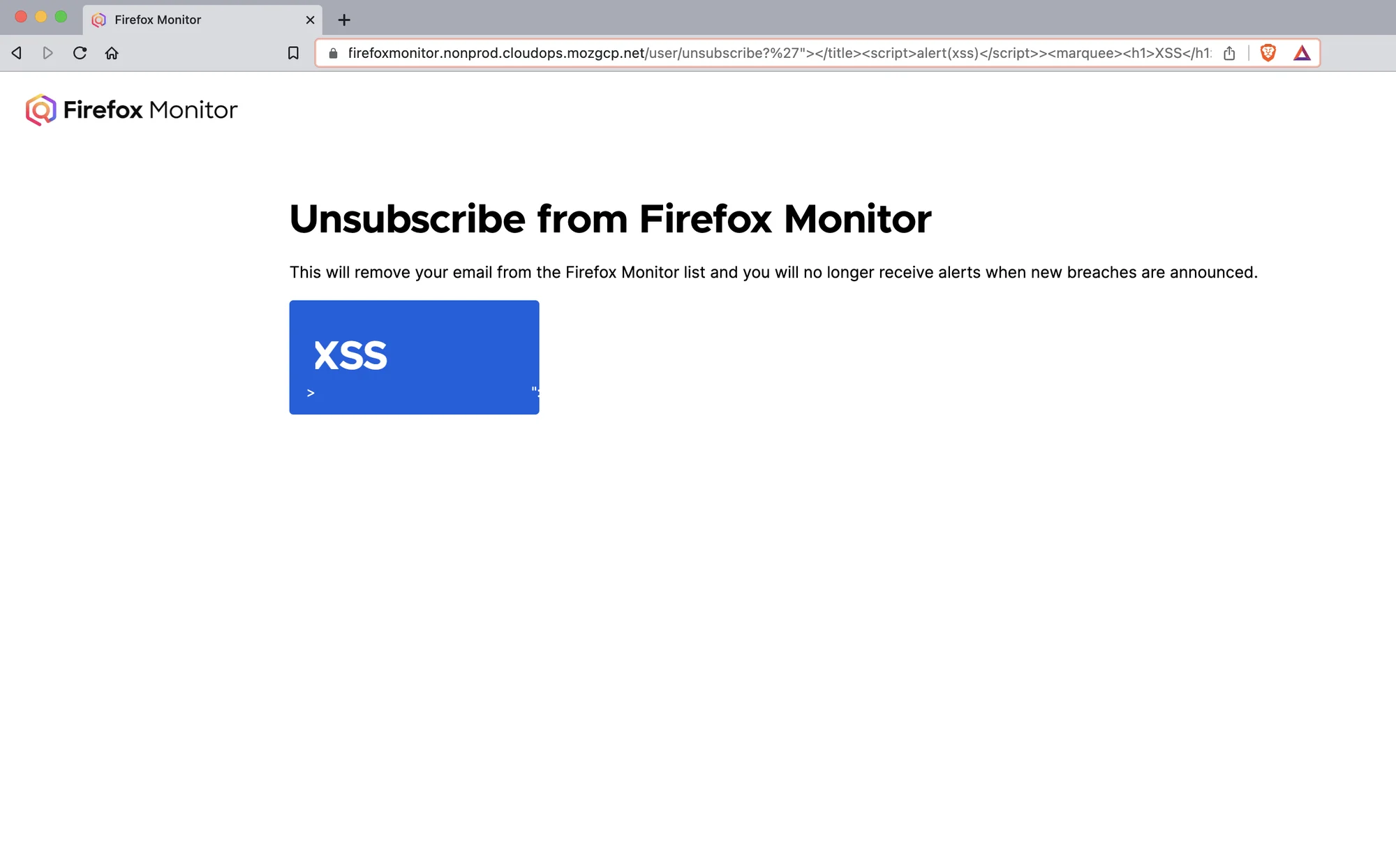
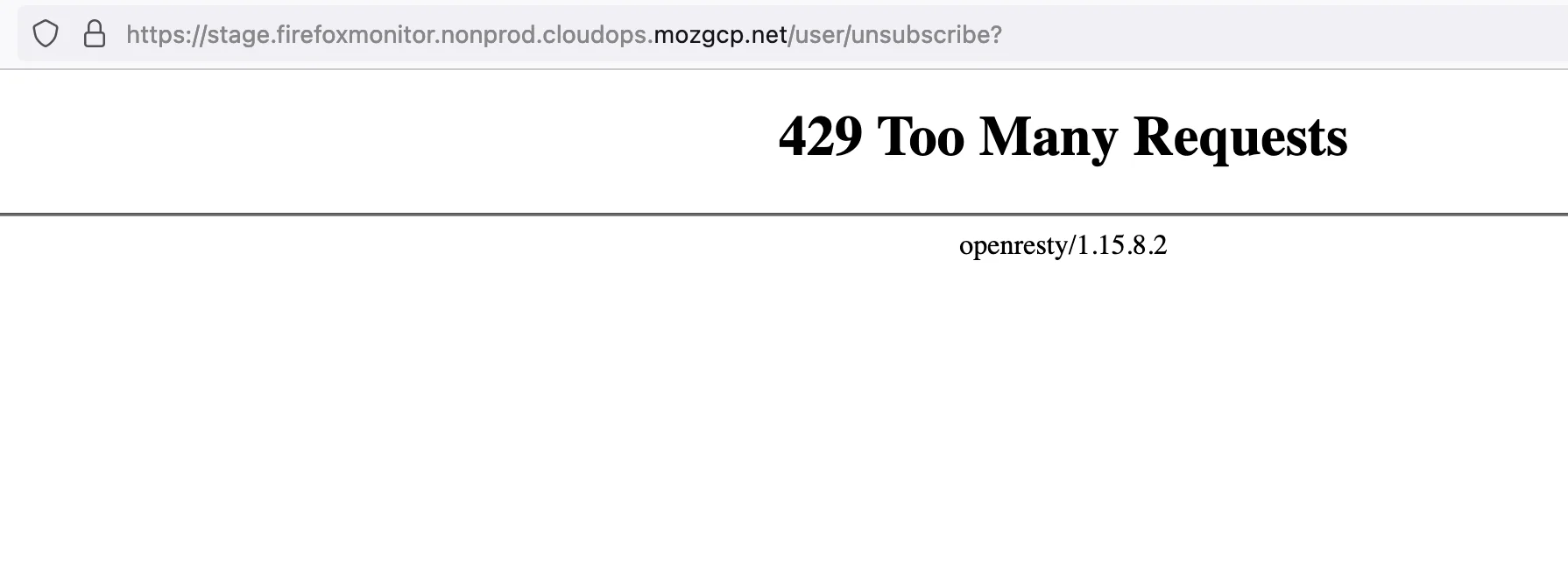
The "Unsubscribe" page seems to be affected by Cross-Site Scripting (XSS) .Unfortunately my IP was blocked and I couldn't go ahead with the test to find a real proof of concept. So I'll just stick to this
POC:
Cheers
Impact
An attacker could use this to inject malicious client side code, such as JavaScript, and execute it within the context of another user. This could possibly lead to user account compromises, user’s being socially engineered and many more attacks against the application’s users.
Attachments
What the report shows
The target is the unsubscribe page of the Firefox Monitor staging environment, at stage.firefoxmonitor.nonprod.cloudops.mozgcp.net, under the /user/unsubscribe path. The researcher reported that this page appeared to be affected by cross-site scripting.
The report is candid about its limits: the researcher's IP address was blocked, so the test could not be carried further to produce a real proof of concept. What is given is a single proof-of-concept URL:
https://stage.firefoxmonitor.nonprod.cloudops.mozgcp.net/user/unsubscribe?%27%22%3E%3C/title%3E%3Cscript%3Ealert(xss)%3C/script%3E%3E%3Cmarquee%3E%3Ch1%3EXSS%3C/h1%3E%3C/marquee%3E
Decoded, the query string is a sequence of closing and opening tags: a single quote, a double quote, a closing angle bracket, a closing title element, a script element containing alert(xss), a stray closing angle bracket, and a marquee element wrapping an h1 reading XSS. The payload is designed to break out of an HTML context, most plausibly a title element, and inject markup and script.
The report does not include the server's response, the rendered page, or any confirmation that the script executed. The two attachments are screenshots taken on 20 March 2023.
The impact section describes the general consequence: an attacker could inject malicious client-side code such as JavaScript and have it execute in the context of another user, which could possibly lead to account compromise, social engineering of users, and other attacks against the application's users.
The report was disclosed on 20 October 2023, rated low severity with a CVSS score of 3.1, classified as cross-site scripting, and paid a bounty of 500 USD. The report does not describe a fix.
Root cause
The report states only that the unsubscribe page appeared to be affected by cross-site scripting; it does not identify the cause. The payload's leading quote and angle-bracket characters suggest the input is placed inside an element, likely a title, but the report does not confirm this. The report does not identify the exact parameter or the code path, so the precise sink is not established here.
Impact
As the report frames it, the consequence is script execution in another user's browser within the application's origin. The report says this could possibly lead to account compromise, social engineering of users and other attacks. The report hedges this as something that could possibly lead to account compromise and other attacks; it does not demonstrate a specific exploit chain.
How this kind of bug works
HTML injection occurs when an application takes input from a request and writes it into the HTML of a response without context-aware encoding. The browser cannot tell developer-authored markup from injected markup, so any tags the attacker supplies become part of the document. If the injected markup includes a script element, an event handler attribute, or a javascript: URL, the result is cross-site scripting.
The context matters. Input placed between tags needs < and > to break out. Input placed inside an attribute value needs the matching quote character. Input placed inside a title, textarea or script element needs the corresponding closing tag. A payload that works in one context will usually fail in another, which is why testing starts with a harmless marker and escalates only once the surrounding context is known.
The defences are straightforward in principle: encode output according to the context it lands in (HTML body, attribute, URL, JavaScript, CSS), avoid inserting untrusted data into raw HTML altogether, and add a Content Security Policy that blocks inline script as a second layer. Server-side templating engines that auto-escape by default remove most of this class of bug, provided developers do not opt out of escaping.
How to test for it
- Map every place where a value from the request appears in the response: query parameters, path segments, form fields, headers such as
RefererorUser-Agent, and values stored earlier and rendered later. - Send a unique alphanumeric marker first and search the response body for it. This tells you whether the value is reflected at all and in what context.
- Inspect the surrounding markup. Note whether the marker sits between tags, inside an attribute, inside a quoted attribute, or inside a
title,textareaorscriptelement. - Send a context-appropriate probe: angle brackets for a text context, a matching quote plus an attribute for an attribute context, a closing tag for a raw-text element. Use a benign marker such as a distinctive string in a heading rather than an alert, so you can see rendering without tripping filters.
- Confirm execution only in a browser you control, and check whether a Content Security Policy or other control blocks it.
- Test the same input in stored contexts, where the value is saved and rendered to other users, since that raises severity considerably.
A positive result is your marker appearing as live markup: a new element in the DOM, an attribute you supplied on an existing element, or script that runs. Common false positives are markers that appear only HTML-encoded (harmless), reflections inside a JSON response consumed as data rather than HTML, reflections that are stripped by a sanitiser, and payloads that appear in the response but are never parsed because the content type is not HTML. Always verify in a browser rather than relying on the raw response alone.
How it is fixed
Apply context-aware output encoding at every point where request data is written into a response. Prefer templating engines with automatic escaping and do not disable it. Where users may supply rich content, run it through a well-maintained sanitiser with an allowlist of elements and attributes. Set a Content Security Policy that disallows inline script and restricts script sources, and set the correct Content-Type and charset on responses so browsers do not sniff markup unexpectedly.
Hunting notes
Reflection points that are easy to overlook include error and confirmation pages, unsubscribe and password-reset flows, search result pages that echo the query, and any page that reflects headers. Staging and non-production hosts are frequent sources, since they often run older code or looser configuration than production. Recon signals worth watching are hosts with stage, dev or nonprod in the name, parameters whose values reappear verbatim in the response, and pages that render inside title elements, where a closing tag is all that is needed.
To make a report land, show the exact request, the relevant part of the response, and a browser screenshot or short recording of execution. State the context and the minimal payload that proves it. If you cannot complete the test, say so plainly and provide what you have, as this report does; a clear, honest partial result with a reproducible URL is more useful to a triage team than an overstated claim.
What happened, in plain words
That page lives at a staging address, stage.firefoxmonitor.nonprod.cloudops.mozgcp.net, under the path /user/unsubscribe. Staging means a test copy of the site, not the one the public uses, a bit like a rehearsal kitchen rather than the restaurant itself.
The researcher reported that this unsubscribe page appeared to be affected by cross-site scripting, usually shortened to XSS. In plain terms, XSS is when a website takes something a visitor sends it and later treats that something as part of the page's own instructions, so the visitor's text can become code that runs in someone's browser.
The report is honest about its limits. The researcher's IP address was blocked, so the test could not be carried further to produce a real proof of concept. What we have is a single proof-of-concept URL:
https://stage.firefoxmonitor.nonprod.cloudops.mozgcp.net/user/unsubscribe?%27%22%3E%3C/title%3E%3Cscript%3Ealert(xss)%3C/script%3E%3E%3Cmarquee%3E%3Ch1%3EXSS%3C/h1%3E%3C/marquee%3E
Let us take it apart. Everything after the ? is the query string, the part of a URL that carries values to the page. Those values are written in percent-encoding, a way of spelling characters that are awkward in a URL. Decoded, the query string is a sequence of closing and opening tags: a single quote, a double quote, a closing angle bracket, a closing title element, a script element containing alert(xss), a stray closing angle bracket, and a marquee element wrapping an h1 reading XSS.
Why those characters? A web page is written in HTML, a language of tags such as <title> and </title>. If a page drops your input inside a tag, the only way to escape is to supply the characters that close that tag and start new ones. The payload is designed to break out of an HTML context, most plausibly a title element, and inject markup and script. The alert(xss) is a common test payload, but the report does not confirm that it executed.
The report does not include the server's response, the rendered page, or any confirmation that the script executed. The two attachments are screenshots taken on 20 March 2023.
The impact section describes the general consequence: an attacker could inject malicious client-side code such as JavaScript and have it execute in the context of another user, which could possibly lead to account compromise, social engineering of users, and other attacks against the application's users. Social engineering means tricking a person into doing something, such as trusting a link because it sits on a familiar site.
The report was disclosed on 20 October 2023, rated low severity with a CVSS score of 3.1, classified as cross-site scripting, and paid a bounty of 500 USD. CVSS is a standard scoring scale for how serious a flaw is. The report does not describe a fix.
In general, how this kind of bug works
HTML injection occurs when an application takes input from a request and writes it into the HTML of a response without context-aware encoding. Encoding means turning characters that have special meaning in HTML, such as < and >, into harmless stand-ins. The browser cannot tell developer-authored markup from injected markup, so any tags the attacker supplies become part of the document. If the injected markup includes a script element, an event handler attribute, or a javascript: URL, the result is cross-site scripting.
The context matters. Input placed between tags needs < and > to break out. Input placed inside an attribute value needs the matching quote character. Input placed inside a title, textarea or script element needs the corresponding closing tag. A payload that works in one context will usually fail in another, which is why testing starts with a harmless marker and escalates only once the surrounding context is known.
The defences are straightforward in principle: encode output according to the context it lands in (HTML body, attribute, URL, JavaScript, CSS), avoid inserting untrusted data into raw HTML altogether, and add a Content Security Policy that blocks inline script as a second layer. A Content Security Policy is a set of rules the server sends telling the browser which scripts it may run. Server-side templating engines that auto-escape by default remove most of this class of bug, provided developers do not opt out of escaping.
In general, how to test for it
- Map every place where a value from the request appears in the response: query parameters, path segments, form fields, headers such as
RefererorUser-Agent, and values stored earlier and rendered later. - Send a unique alphanumeric marker first and search the response body for it. This tells you whether the value is reflected at all and in what context.
- Inspect the surrounding markup. Note whether the marker sits between tags, inside an attribute, inside a quoted attribute, or inside a
title,textareaorscriptelement. - Send a context-appropriate probe: angle brackets for a text context, a matching quote plus an attribute for an attribute context, a closing tag for a raw-text element. Use a benign marker such as a distinctive string in a heading rather than an alert, so you can see rendering without tripping filters.
- Confirm execution only in a browser you control, and check whether a Content Security Policy or other control blocks it.
- Test the same input in stored contexts, where the value is saved and rendered to other users, since that raises severity considerably.
A positive result is your marker appearing as live markup: a new element in the DOM, an attribute you supplied on an existing element, or script that runs. The DOM is the browser's live model of the page. Common false positives are markers that appear only HTML-encoded (harmless), reflections inside a JSON response consumed as data rather than HTML, reflections that are stripped by a sanitiser, and payloads that appear in the response but are never parsed because the content type is not HTML. Always verify in a browser rather than relying on the raw response alone.
In general, how it is fixed
Apply context-aware output encoding at every point where request data is written into a response. Prefer templating engines with automatic escaping and do not disable it. Where users may supply rich content, run it through a well-maintained sanitiser with an allowlist of elements and attributes. Set a Content Security Policy that disallows inline script and restricts script sources, and set the correct Content-Type and charset on responses so browsers do not sniff markup unexpectedly.
In general, where to look
Reflection points that are easy to overlook include error and confirmation pages, unsubscribe and password-reset flows, search result pages that echo the query, and any page that reflects headers. Staging and non-production hosts are frequent sources, since they often run older code or looser configuration than production. Recon signals worth watching are hosts with stage, dev or nonprod in the name, parameters whose values reappear verbatim in the response, and pages that render inside title elements, where a closing tag is all that is needed.
To make a report land, show the exact request, the relevant part of the response, and a browser screenshot or short recording of execution. State the context and the minimal payload that proves it. If you cannot complete the test, say so plainly and provide what you have, as this report does; a clear, honest partial result with a reproducible URL is more useful to a triage team than an overstated claim.
Glossary
- HTML injection: writing untrusted input into a page's HTML so that it becomes part of the page's structure.
- Staging: a test copy of a site, separate from the public production one.
- Query string: the part of a URL after
?, carrying values to the page. - Percent-encoding: spelling awkward characters in a URL as
%plus a code. - HTML: the tag-based language that describes a web page's structure.
- Tag / element: a piece of markup such as
<title>; an element is the tag plus its content and closing tag. - Attribute: a setting written inside a tag, such as a quote-delimited value.
- JavaScript: the programming language browsers run to make pages interactive.
- Proof of concept (PoC): a minimal demonstration that a flaw is real.
- Payload: the crafted input sent to trigger a flaw.
- Context: where in the page's markup an input lands, which decides which characters can break out.
- Encoding / escaping: converting special characters into harmless stand-ins.
- Sanitiser: a tool that strips dangerous markup from user content.
- Content Security Policy (CSP): server-sent rules limiting which scripts a browser may run.
- DOM: the browser's live model of the page.
- False positive: a result that looks like a flaw but is not.
- CVSS: a standard scale for scoring the severity of a flaw.
- Bounty: a payment made for a valid security report.
- Social engineering: tricking a person into an unsafe action, often by abusing trust.
- Triage: the first review of a report to decide whether it is valid and how serious.





