Mail app - blind SSRF via smtpHost parameter
The Nextcloud Mail app did not validate the smtpHost parameter, allowing an authenticated user to make the server connect to arbitrary internal hosts and ports. By measuring response times, an attacker could probe which internal services were running.

- Triaged in 45 hours
- Fixed in 2 months
- Disclosed after 4 months
Summary by the program
Security advisory at https://github.com/nextcloud/security-advisories/security/advisories/GHSA-8gcx-r739-9pf6
The report
Hi everyone,
I would like to report here a Blind SSRF vulnerability through the Nextcloud Mail application.
Tested on latest Mail release : 2.0.1.
Steps To Reproduce:
This is a similar report to report #1736390, but this time on a different parameter. The vulnerable parameter is smtpHost.
The only difference here is that you have to enter the correct settings for the IMAP part first. The server will first check if the IMAP parameters are correct, before checking the SMTP parameters and thus allowing us to use this SSRF blind.
The POST request in question :
{"imapHost":"ssl0.ovh.net","imapPort":993,"imapSslMode":"ssl","imapUser":"redacted","imapPassword":"redacter","smtpHost":"127.0.0.1","smtpPort":8080,"smtpSslMode":"none","smtpUser":"xx","smtpPassword":"xx","accountName":"Test1","emailAddress":"[email protected]"}
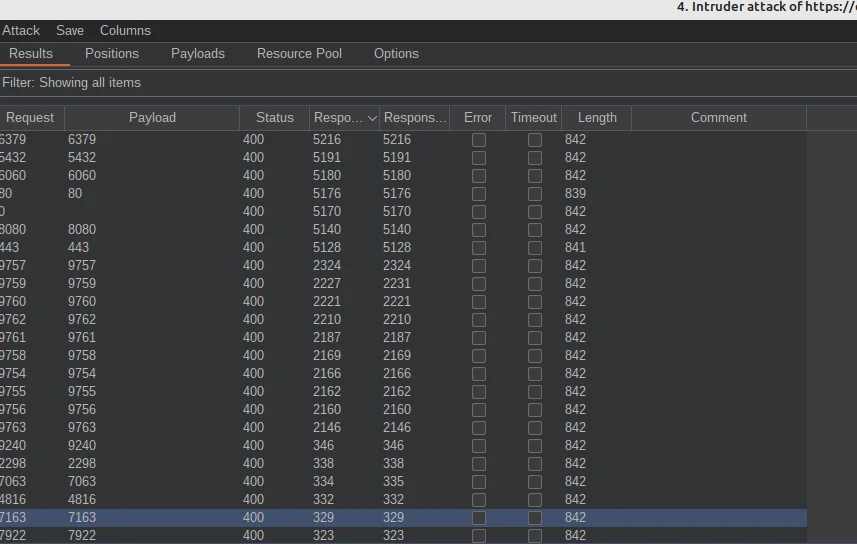
This does not change afterwards, we can probe accessible IPs/open ports based on the response time :
- For an accessible host/port: response time > 1000ms
- For a closed port/host that does not exist: response time < 100ms
{
}
Port 80 - response time : 5200ms - Apache2 service
Port 443 - response time : 5200ms - Apache2 service
Port 8080 - response time 5140ms - CrowdSec
Port 6060 - response time 5180ms - CrowdSec
Port 5432 - response time 5191ms -  PostgreSQL
Port 6379 - response time 5216ms - My Redis instance for Nextcloud
Impact
From OWASP :
SSRF flaws occur whenever a web application is fetching a remote resource without validating the user-supplied URL. It allows an attacker to coerce the application to send a crafted request to an unexpected destination, even when protected by a firewall, VPN, or another type of network access control list (ACL).
This vulnerability can be exploited by any user, regardless of their rights, as long as the mail application is installed and enabled. A malicious person can therefore retrieve the services running locally on the server, scan your internal network for interesting information about which IPs are responding, which services are running on each IP address, etc.
Regards, Supr4s
Not written yet. The AI write-up for this report has not been written yet. The Original tab links to the source.
How it worked
Impact
Any user with the Mail app enabled could scan the internal network and identify running services, though the attack is blind and only reveals timing information.
What the attacker needed
Mail app installed and enabled; a user account
How it was found
- Enter valid IMAP settings so the server checks them first.
- Set the smtpHost to an internal address and smtpPort to a target port.
- Submit the account configuration request.
- Observe the response time: over 1000ms means the host/port is accessible, under 100ms means it is closed or does not exist.
Explained by bugbounty.wiki with AI from the original and checked against quotes from it; it can still be wrong. Read the original before relying on a detail.
Not written yet. The AI write-up for this report has not been written yet. The Original tab links to the source.
A blind SSRF is when a website can be tricked into making requests to other computers, but the attacker cannot see the response. Here, the mail app let a user set the outgoing mail server address to any internal address, and the server would try to connect to it. Even without seeing the response, the time it took told the attacker whether a service was running there.
What is SSRF?
The server can be made to fetch an address the attacker chooses, reaching internal services, cloud metadata or other customers' data.






