XSS in Desktop Client in call notification popup
The Nextcloud Desktop Client did not neutralise the name of a group conversation before displaying it in a call notification popup. An attacker who could create or name a group conversation could inject markup that the desktop client rendered as HTML.
b911bade858ce8e6a0f50f8 Follow
 Originally disclosed on HackerOne
- Triaged in 8 hours
- Fixed in 24 days
- Disclosed after 2 months
Summary by the program
Security advisory at https://github.com/nextcloud/security-advisories/security/advisories/GHSA-92p9-x79h-2mj8
The report
Summary:
The Nextcloud Desktop Client application does not properly neutralize the name of a group conversation before using it.
Steps To Reproduce:
Server Machine:
- Install the
Nextcloud Serverapplication - Create an administrator account
- Create a user account
Client Machine:
- Install the
Nextcloud Desktop Clientapplication on a machine that is running theWindows 10operating system - Log in to the user account
Server Machine:
- Log in to the administrator account
- Install the
Nextcloud Talkapplication - Open the
Nextcloud Talkapplication - Create a group conversation with the name
{{media:3}} - Add the user to the group conversation
- Start a call in the group conversation
Client Machine:
- Observe that the name of the group conversation is treated as
HyperText Markup Language
Please do note that group conversation messages are also treated as HyperText Markup Language.
Supporting Material/References:
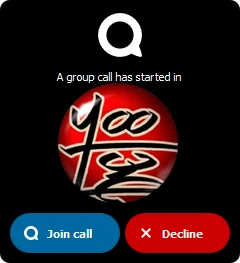
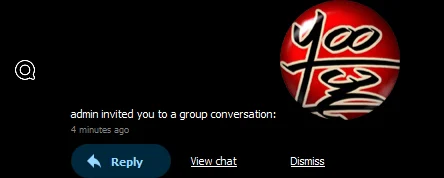
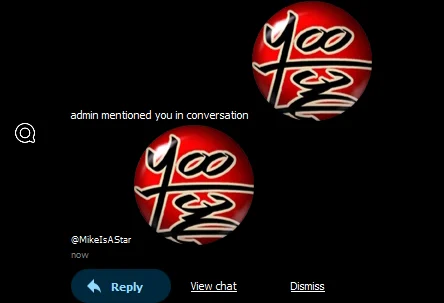
Impact
An attacker can inject arbitrary HyperText Markup Language in to the Nextcloud Desktop Client application.
Not written yet. The AI write-up for this report has not been written yet. The Original tab links to the source.
How it worked
Root cause
Likely the desktop client rendered the conversation name as HTML in the call notification popup without escaping or sanitising it first.
Impact
An attacker could inject arbitrary HTML into the desktop client's notification popup; the report also notes that group conversation messages are treated as HTML, but does not demonstrate script execution.
What the attacker needed
Nextcloud server with Talk installed; ability to create or name a group conversation; victim uses the desktop client; victim is in the conversation
How it was found
- Install and configure a Nextcloud server with an admin and a normal user account.
- Install the Nextcloud Desktop Client on Windows 10 and log in as the normal user.
- As the admin, install Nextcloud Talk and create a group conversation whose name contains markup.
- Add the normal user to that group conversation.
- Start a call in the group conversation.
- On the client machine, observe that the conversation name is rendered as HTML in the popup.
Explained by bugbounty.wiki with AI from the original and checked against quotes from it; it can still be wrong. Read the original before relying on a detail.
Not written yet. The AI write-up for this report has not been written yet. The Original tab links to the source.
A desktop chat app shows a popup when a call starts. The app took the conversation's name and displayed it as if it were a web page, so special text that means 'formatting' or 'code' was treated as instructions rather than plain text. That lets someone who controls the name slip their own content into the popup.
What is XSS?
Script an attacker supplies runs in another user's browser, on the target's origin, with that user's session.






