XSS in Desktop Client via user status and information
The Nextcloud Desktop Client did not neutralise a user's Full Name and Status Message before displaying them, so those values were treated as HTML. An attacker could inject arbitrary HTML into the desktop client's main dialog window.
b911bade858ce8e6a0f50f8 Follow
 Originally disclosed on HackerOne
- Triaged in 8 hours
- Fixed in 28 days
- Disclosed after 2 months
Summary by the program
Security advisory at https://github.com/nextcloud/security-advisories/security/advisories/GHSA-q9f6-4r6r-h74p
The report
Summary:
The Nextcloud Desktop Client application does not properly neutralize the Full Name and Status Message of users before using them.
Steps To Reproduce:
Server Machine:
- Install the
Nextcloud Serverapplication - Log into your account
- Navigate to your profile page
- Set the
Full Nameof your user to{{media:1}} - Set the
Status Messageof your user to{{media:2}}
Client Machine:
- Install the
Nextcloud Desktop Clientapplication onto a machine that is running theWindows 10operating system - Log into your account
- Open the main dialog window of the
Nextcloud Desktop Clientapplication - Observe that the
Full NameandStatus Messageof your user are treated asHyperText Markup Language
Supporting Material/References:
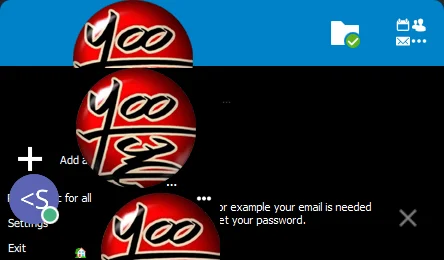
Impact
An attacker can inject arbitrary HyperText Markup Language into the Nextcloud Desktop Client application.
Not written yet. The AI write-up for this report has not been written yet. The Original tab links to the source.
How it worked
Root cause
Likely the desktop client rendered profile fields as HTML without escaping or sanitising them first.
Impact
An attacker could inject arbitrary HTML into the Nextcloud Desktop Client, though the report does not show script execution or any further consequence.
What the attacker needed
A Nextcloud account; control of your own profile fields; victim uses the desktop client
How it was found
- Install the Nextcloud Server and log in.
- Open the profile page and set the Full Name to a media placeholder.
- Set the Status Message to another media placeholder.
- Install the Nextcloud Desktop Client on Windows 10 and log in.
- Open the client's main dialog window.
- Observe that the Full Name and Status Message are rendered as HTML.
Explained by bugbounty.wiki with AI from the original and checked against quotes from it; it can still be wrong. Read the original before relying on a detail.
Not written yet. The AI write-up for this report has not been written yet. The Original tab links to the source.
A desktop app shows your name and status message. If it treats that text as a web page instead of plain text, someone can put markup in their profile and the app will render it, letting an attacker inject arbitrary HTML.
What is XSS?
Script an attacker supplies runs in another user's browser, on the target's origin, with that user's session.






