Graphql introspection is enabled and leaks details about the schema
The GraphQL endpoint allows introspection queries, which reveal the schema, types, fields, and available mutations. An attacker could use this information to craft unauthorised API calls, including modifying data.
 Originally disclosed on HackerOne
- Triaged in 2 days
- Fixed in 16 days
- Disclosed after 47 days
Summary:
Hi team ! i've found a misconfiguration in your graphql Api on the endpoint https://www.on-running.com/en-in/graphql in which an attacker is able to run a graphql interospection query to fetch schemas , types , fields , available query operations , after running interospection query on the graphql api endpoint , an attacker is able to list all type of available api calls , so he'll be able to perform unauthorised api calls due to this misconfiguration.
###Interospection query :
{"query": "query IntrospectionQuery {__schema {queryType { name },mutationType { name },subscriptionType { name },types {...FullType},directives {name,description,args {...InputValue},onOperation,onFragment,onField}}}\nfragment FullType on __Type {kind,name,description,fields(includeDeprecated: true) {name,description,args {...InputValue},type {...TypeRef},isDeprecated,deprecationReason},inputFields {...InputValue},interfaces {...TypeRef},enumValues(includeDeprecated: true) {name,description,isDeprecated,deprecationReason},possibleTypes {...TypeRef}}\nfragment InputValue on __InputValue {name,description,type { ...TypeRef },defaultValue}\nfragment TypeRef on __Type {kind,name,ofType {kind,name,ofType {kind,name,ofType {kind,name}}}}"}
Steps To Reproduce:
-
create an account on https://www.on-running.com
-
navigate to the endpoint https://www.on-running.com/en-in/graphql
-
visit to the endpoint and capture the request in burp proxy and send the request to repeater
-
now put the interospection query into the request body and send the request
5.after the in the response you'll get types of query operation's available , schemas so that by using these an attacker will be able to perform unauthorized call
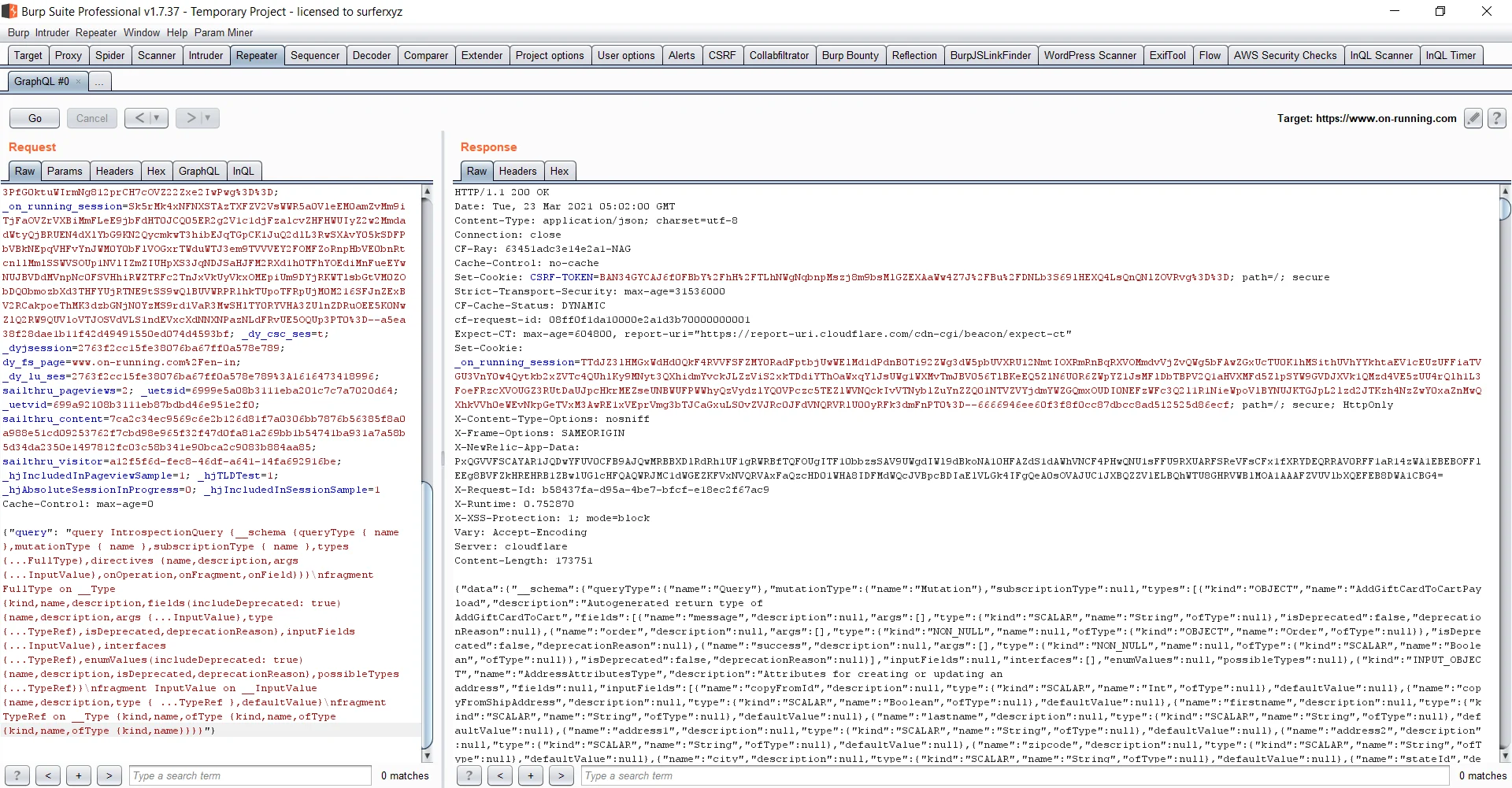
as a proof i'm performing a simple api call to check whether a user exist or not :
run the Query on the graphql api endpoint:
query {
	userExists(email:"code")
}
replace the code with an email address , then if the user with the email exist then it returns true if not the false.
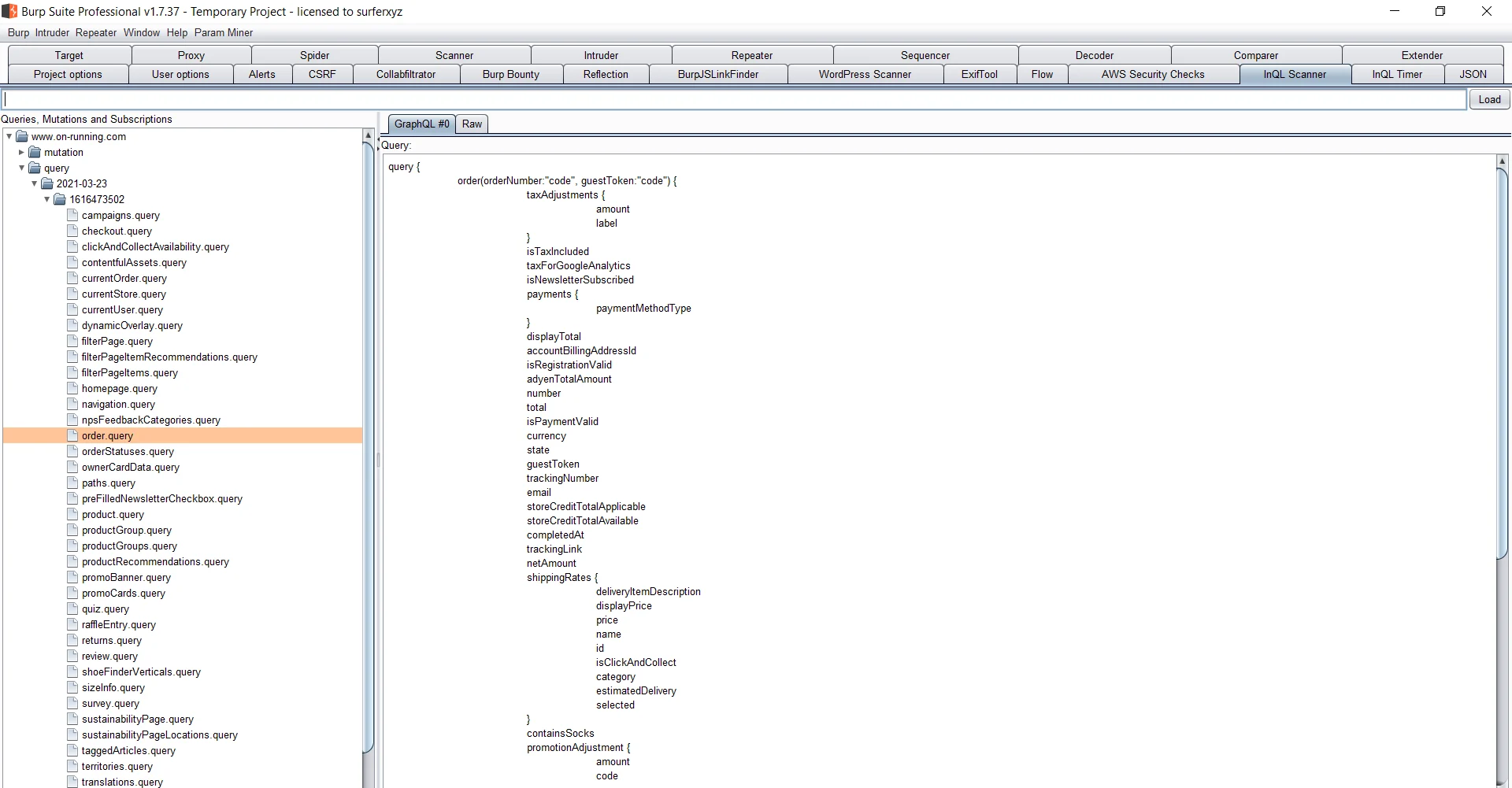
Similarly there are too many types of query operations available see in the below screenshot :
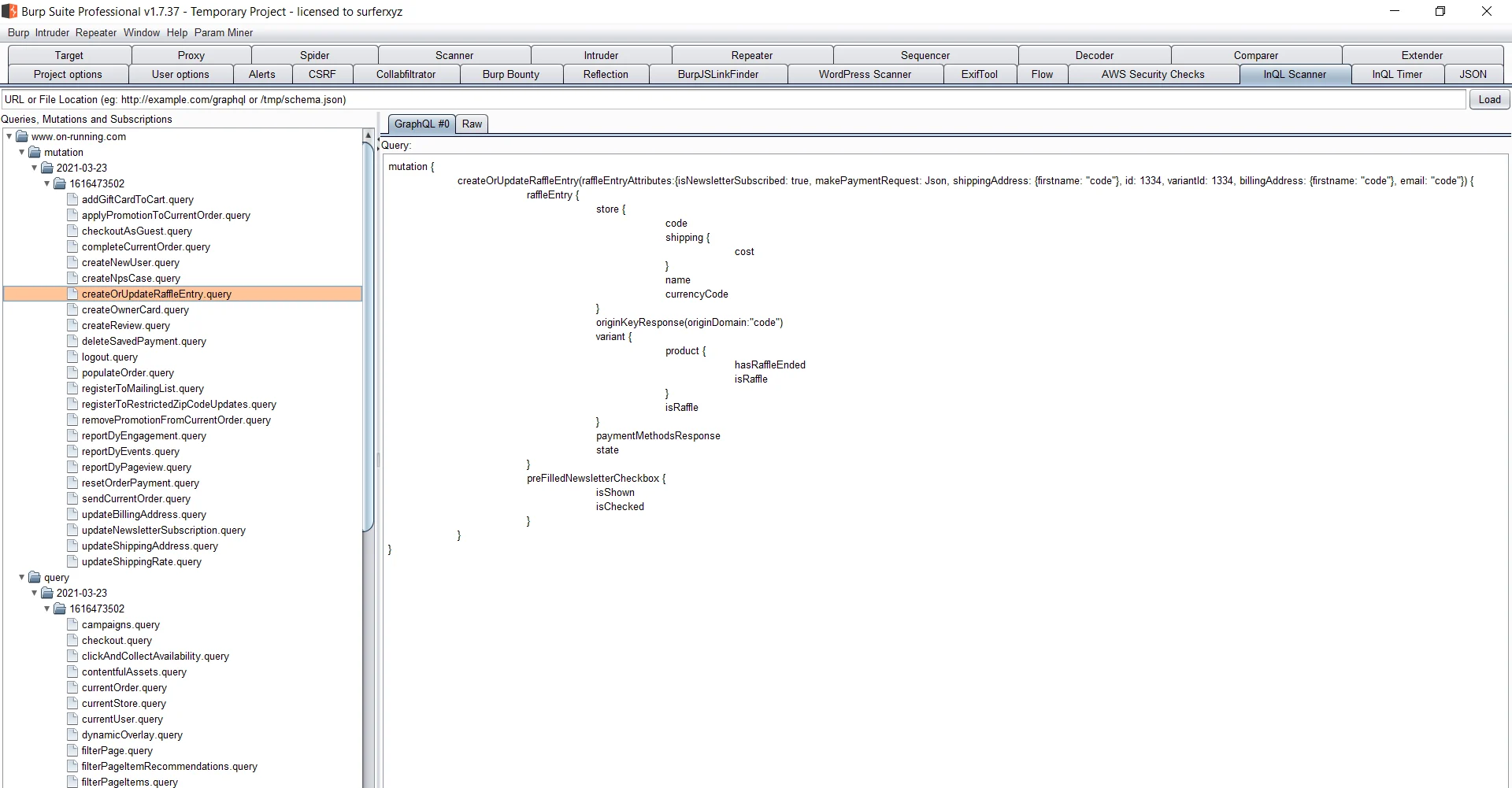
Here in this scenerio the mutations is also available to modify a data on the graphql api , see in the below screenshot that after running a interospection query it has revealed the mutations availabe so the attacker can craft a query to modify the data :
here the issue is the , due to the misconfiguration in graphql api , it is allowing an arbitary user to run interospection query , so here the after running interospection query it is revelaing the api calls available which is a not a good security implimentation and you must have to forbid the user to run a interospection query otherwise an attacker will be able to perform unauthorised api calls .
Impact
if attacker will get available query operation types , fields , mutations so an attacker will be able to modify and list the data and will be able to perform unauthorised api calls
Attachments
Context
On Running exposes a GraphQL API used by the website. The researcher found that the GraphQL endpoint at https://www.on-running.com/en-in/graphql accepts introspection queries from an ordinary user account. Introspection is a legitimate GraphQL feature: it lets a client ask the server to describe its own schema, including the query type, mutation type, subscription type, the full list of types, and the directives the server supports. Tooling such as GraphiQL and code generators rely on it. When it is left open to arbitrary users in production, the same feature hands an attacker a complete map of the API surface.
The report is filed as a low severity misconfiguration against the asset *.on-running.com.
Setup
No special tooling beyond a browser and an intercepting proxy is required. The researcher's steps assume the following preconditions:
- An account on
https://www.on-running.com. - A proxy such as Burp Suite, used to capture the request to the GraphQL endpoint and replay it in Repeater.
Finding it
The researcher identified the GraphQL endpoint https://www.on-running.com/en-in/graphql and tested whether it would answer an introspection query. It did. The response described the schema, its types and fields, and the query operations the API exposes. From the researcher's point of view this is a misconfiguration: an arbitrary user can enumerate the API's available calls, and that enumeration is the first step towards making calls the user was never meant to make.
Exploitation
Step 1: Create an account
Register on https://www.on-running.com so that a normal session against the site exists.
Step 2: Navigate to the endpoint
The GraphQL endpoint is:
https://www.on-running.com/en-in/graphql
Step 3: Capture the request
Visit the endpoint with the proxy running, capture the request in Burp, and send it to Repeater so the body can be edited and resent.
Step 4: Send the introspection query
Place the following introspection query into the request body and send it:
{"query": "query IntrospectionQuery {__schema {queryType { name },mutationType { name },subscriptionType { name },types {...FullType},directives {name,description,args {...InputValue},onOperation,onFragment,onField}}}\nfragment FullType on __Type {kind,name,description,fields(includeDeprecated: true) {name,description,args {...InputValue},type {...TypeRef},isDeprecated,deprecationReason},inputFields {...InputValue},interfaces {...TypeRef},enumValues(includeDeprecated: true) {name,description,isDeprecated,deprecationReason},possibleTypes {...TypeRef}}\nfragment InputValue on __InputValue {name,description,type { ...TypeRef },defaultValue}\nfragment TypeRef on __Type {kind,name,ofType {kind,name,ofType {kind,name,ofType {kind,name}}}}"}
The query asks for the schema's root operation types (queryType, mutationType, subscriptionType), every type via the FullType fragment, and the server's directives. The FullType fragment pulls each type's kind, name, description, fields (including deprecated ones), input fields, interfaces, enum values and possible types. The InputValue and TypeRef fragments resolve argument and field type references, with TypeRef nested four levels deep to unwrap list and non-null wrappers.
The response returned the types of query operations available and the schema, which the researcher says an attacker can use to make unauthorised calls.
The screenshot shows the introspection query being run against the endpoint.
Step 5: Confirm with a real query
As proof, the researcher ran a simple query to check whether a user exists:
query {
	userExists(email:"code")
}
Replace code with an email address. If a user with that email exists the query returns true, otherwise false.
Many more query operations are available, as shown in the next screenshot.
The screenshot lists the query operations the schema exposes.
Step 6: Mutations
Mutations are also available on this GraphQL API. The introspection query revealed the available mutations, which the researcher notes an attacker could use to craft a query that modifies data.
The screenshot shows the mutations revealed by the introspection query.
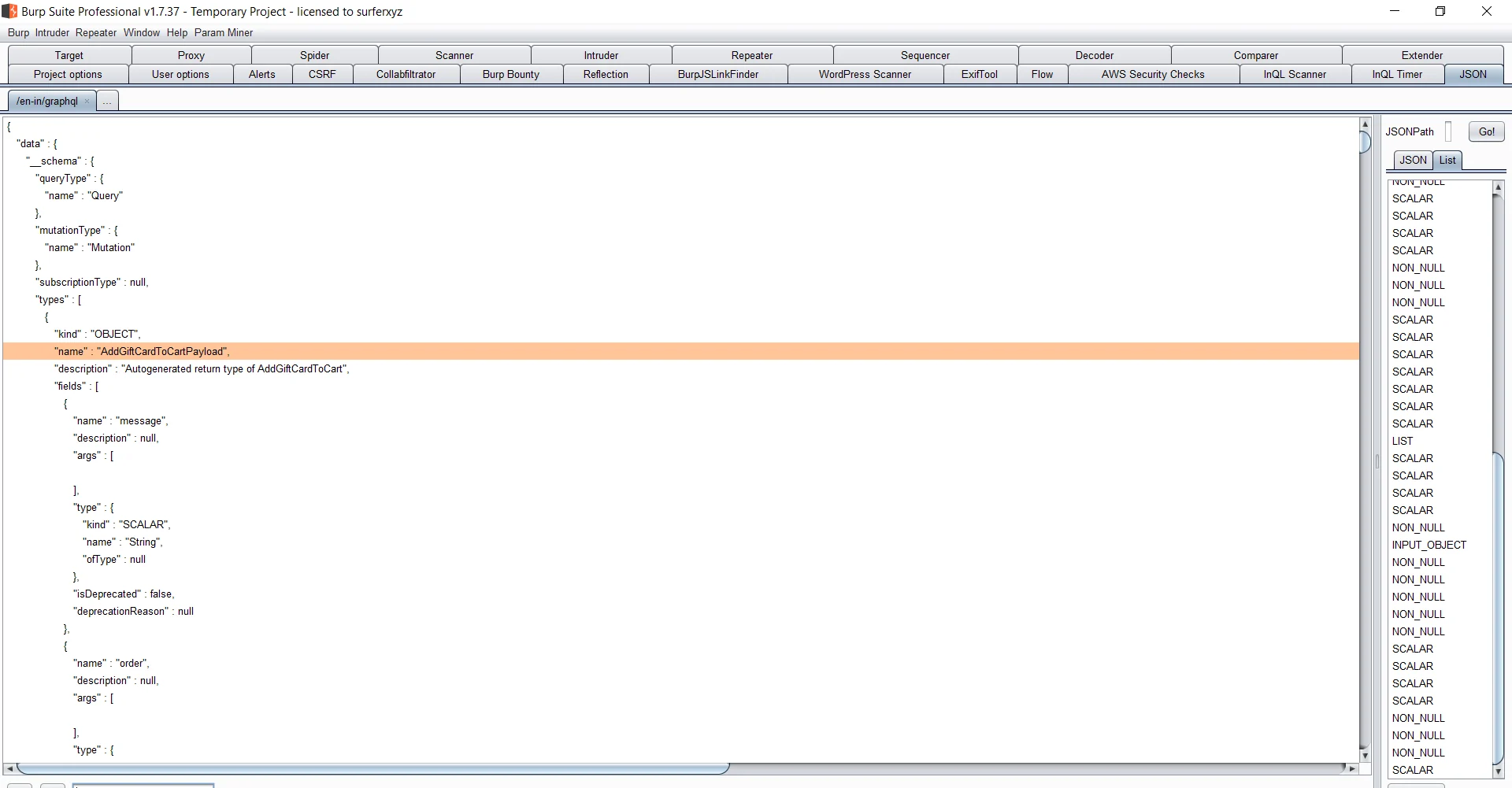
The attachment shows the revealed operations.
Root cause
The GraphQL server answers introspection queries from arbitrary users. Introspection is enabled and answers queries from an ordinary user, so the schema, its types, fields, query operations and mutations are disclosed. The researcher frames this as a security implementation problem: the server should forbid users from running introspection queries.
Impact
With the available query operation types, fields and mutations in hand, an attacker can modify and list data and perform unauthorised API calls, according to the researcher. The demonstrated example is the userExists query, which lets an attacker test whether an account exists for a given email address. The mutation disclosure widens the concern to data modification, though the report does not show a mutation being executed.
Fix
The researcher's recommendation is to forbid arbitrary users from running introspection queries on the GraphQL API. The researcher's recommendation is to forbid users from running introspection queries on the GraphQL API.
Variants to test
- Send the same introspection query to other GraphQL endpoints on the target and look for a populated
__schemaresponse withqueryType,mutationTypeand a full type list. - Try the introspection query without a session and with a low-privilege session; a positive result is a full schema response in either case.
- If introspection is blocked, try field suggestions: send a query with a misspelled field and check whether the error suggests valid field names.
- Enumerate mutations from the schema and check whether any can be called by a low-privilege user; a positive result is a mutation that changes data the user should not control.
- Test queries such as
userExistswith a known and an unknown address; a positive result is a differingtrue/falseanswer that confirms account existence.
What happened, in plain words
On Running's website talks to a server through a GraphQL API. GraphQL is a way for a website to ask a server for exactly the data it needs, a bit like ordering from a menu where you can specify precisely which ingredients you want on your pizza. The researcher found that this API, at a particular web address, will happily answer a special kind of question called an introspection query. Introspection is GraphQL's built-in way of asking the server to describe itself: what kinds of data it holds, what questions (queries) you can ask, and what changes (mutations) you can make. Normally that description is meant for developers and their tools. Here it was open to an ordinary logged-in user. Once you have the full menu, you know every dish the kitchen can make, and that makes it much easier to try ordering things you were never supposed to get.
The report was filed as a low severity misconfiguration against the asset *.on-running.com. "Misconfiguration" means the software was set up in a way that leaves a door open, rather than containing a coding bug. "Low severity" means the platform judged the risk to be limited, though the researcher argues it is the first step towards more serious abuse.
Background you need first
Before walking through the steps, here are the ideas the report relies on, explained from zero.
- API: an API (Application Programming Interface) is the counter where one piece of software places an order with another. Your browser does not fetch data by magic; it sends a request to a server, and the server sends back an answer. An API is the agreed set of requests the server will accept and the shape of the answers it gives.
- GraphQL: a style of API where the client writes a query describing exactly the fields it wants, and the server returns only those fields. Compare it to a restaurant where, instead of picking set meal number 3, you write down "burger, no onions, extra cheese, side of fries" and the kitchen sends back exactly that. The server publishes a description of everything it can do, called the schema.
- Schema: the blueprint of a GraphQL API. It lists the types of data (for example a user, an order, a product), the fields each type has, the queries you can run to read data, and the mutations you can run to change data. Think of it as the restaurant's full menu plus the kitchen's internal recipe list.
- Query: a read-only request in GraphQL. It asks for data and does not change anything, like asking "is there a table free tonight?"
- Mutation: a request in GraphQL that changes data, such as creating, updating or deleting something. It is the equivalent of actually booking the table, not just asking about it.
- Introspection: a feature built into GraphQL servers that lets a client ask the server to describe its own schema. Developer tools use it to offer autocomplete and to generate code. It is legitimate and useful, but when it is left open to the public in a live system, it hands out the full map of the API.
- Endpoint: the specific web address where an API accepts requests. Here it is
https://www.on-running.com/en-in/graphql. - Proxy / Burp Suite: a proxy is a program that sits between your browser and the internet and lets you look at, and change, the requests going out and the responses coming back. Burp Suite is a popular tool for this. Its Repeater tab lets you take a captured request, edit it, and send it again as many times as you like, which is exactly what you need when testing an API by hand.
- Request body: the part of an HTTP request that carries the actual data being sent, as opposed to the address and headers. For a GraphQL request, the query itself lives in the body.
- Session / account: logging in to the site gives your browser a way to prove who you are on each request, so the server can treat you as a known user.
Setting up
The researcher needed only a browser and an intercepting proxy. The preconditions were:
- An account on
https://www.on-running.com. - A proxy such as Burp Suite, used to capture the request to the GraphQL endpoint and replay it in Repeater.
The account exists so that the endpoint can be reached in a normal browsing session. The finding itself is that the introspection query is accepted and answered, not that the account was abused.
Finding it
The researcher located the GraphQL endpoint https://www.on-running.com/en-in/graphql and tested whether it would answer an introspection query. It did. The response described the schema, its types and fields, and the query operations the API exposes. From the researcher's point of view this is a misconfiguration: any user can list the API's available calls, and that listing is the first step towards making calls the user was never meant to make.
Exploitation, step by step
Step 1: Create an account
Register on https://www.on-running.com so that a normal session against the site exists.
Step 2: Navigate to the endpoint
The GraphQL endpoint is:
https://www.on-running.com/en-in/graphql
Step 3: Capture the request
Visit the endpoint with the proxy running, capture the request in Burp, and send it to Repeater so the body can be edited and resent. The reason for this step is that a browser will not let you hand-write an arbitrary GraphQL query into a request easily. A proxy gives you a workbench where you can change the request body and fire it off repeatedly, comparing the answers.
Step 4: Send the introspection query
Place the following introspection query into the request body and send it:
{"query": "query IntrospectionQuery {__schema {queryType { name },mutationType { name },subscriptionType { name },types {...FullType},directives {name,description,args {...InputValue},onOperation,onFragment,onField}}}\nfragment FullType on __Type {kind,name,description,fields(includeDeprecated: true) {name,description,args {...InputValue},type {...TypeRef},isDeprecated,deprecationReason},inputFields {...InputValue},interfaces {...TypeRef},enumValues(includeDeprecated: true) {name,description,isDeprecated,deprecationReason},possibleTypes {...TypeRef}}\nfragment InputValue on __InputValue {name,description,type { ...TypeRef },defaultValue}\nfragment TypeRef on __Type {kind,name,ofType {kind,name,ofType {kind,name,ofType {kind,name}}}}}"}
This is a single JSON object with one key, query, whose value is the GraphQL query as a string. The \n sequences inside the string are newline characters, so the server sees a multi-line query. Line by line, in plain words:
query IntrospectionQuery { ... }starts a read-only query namedIntrospectionQuery. The name is just a label; the important part is what is inside the braces.__schema { ... }asks for the schema itself. Names beginning with two underscores are special built-in GraphQL names, which is why__schemais the entry point for introspection.queryType { name }asks for the name of the type that represents read operations, so you learn what the root of all queries is called.mutationType { name }asks for the name of the type that represents write operations, so you learn whether the API can change data and under what name.subscriptionType { name }asks for the name of the type used for live updates pushed from server to client, if the API has one.types {...FullType}asks for every data type in the schema, with the details filled in by theFullTypefragment defined below.directives {name,description,args {...InputValue},onOperation,onFragment,onField}asks for the server's directives: special annotations that change how a query behaves. For each one it asks for the name, description, arguments, and where the directive may be applied (operations, fragments, fields).fragment FullType on __Type { ... }defines a reusable block of fields to request for each type. Inside it,kind,nameanddescriptiondescribe the type;fields(includeDeprecated: true)lists its fields, including old ones the server still knows about, with each field's name, description, arguments, type, and whether it is deprecated and why;inputFieldslists the fields accepted as input;interfaceslists interfaces the type implements;enumValues(includeDeprecated: true)lists the allowed values if the type is an enumeration; andpossibleTypeslists the concrete types that can appear where this type is expected.fragment InputValue on __InputValue { ... }describes an argument or input field: its name, description, type and default value.fragment TypeRef on __Type { ... }describes a reference to a type. GraphQL wraps types in list and non-null markers, so this fragment nestsofTypefour levels deep to unwrap those wrappers and reach the underlying type name.
The response returned the types of query operations available and the schema, which the researcher says an attacker can use to make unauthorised calls.
The screenshot shows the introspection query being run against the endpoint.
Step 5: Confirm with a real query
As proof, the researcher ran a simple query to check whether a user exists:
query {
userExists(email:"code")
}
This asks the API a yes/no question: does a user with the given email address exist? Replace code with an email address. If a user with that email exists the query returns true, otherwise false. The point of this step is to show that the API answers a simple query about whether a user exists. In other words, the menu is not just a list; the kitchen will actually cook from it.
Many more query operations are available, as shown in the next screenshot.
The screenshot lists the query operations the schema exposes.
Step 6: Mutations
Mutations are also available on this GraphQL API. The introspection query revealed the available mutations, which the researcher notes an attacker could use to craft a query that modifies data. A mutation is the write side of GraphQL: where a query reads, a mutation changes. Knowing the mutation names and their arguments is what would let someone attempt a change they should not be allowed to make.
The screenshot shows the mutations revealed by the introspection query.
The attachment shows the revealed operations.
Root cause
The GraphQL server answers introspection queries from arbitrary users. Introspection is enabled and answers queries from an ordinary user, so the schema, its types, fields, query operations and mutations are disclosed. The researcher frames this as a security implementation problem: the server should forbid users from running introspection queries.
Impact
With the available query operation types, fields and mutations in hand, an attacker can modify and list data and perform unauthorised API calls, according to the researcher. The demonstrated example is the userExists query, which lets an attacker test whether an account exists for a given email address. The mutation disclosure widens the concern to data modification, though the report does not show a mutation being executed.
Fix
The researcher's recommendation is to forbid arbitrary users from running introspection queries on the GraphQL API. The researcher's recommendation is to forbid users from running introspection queries on the GraphQL API.
Variants to test
- Send the same introspection query to other GraphQL endpoints on the target and look for a populated
__schemaresponse withqueryType,mutationTypeand a full type list. - Try the introspection query without a session and with a low-privilege session; a positive result is a full schema response in either case.
- If introspection is blocked, try field suggestions: send a query with a misspelled field and check whether the error suggests valid field names.
- Enumerate mutations from the schema and check whether any can be called by a low-privilege user; a positive result is a mutation that changes data the user should not control.
- Test queries such as
userExistswith a known and an unknown address; a positive result is a differingtrue/falseanswer that confirms account existence.
Glossary
- API: the agreed set of requests one piece of software can send to another, and the shape of the answers it gets back.
- GraphQL: a style of API where the client writes a query naming exactly the fields it wants, and the server returns only those fields.
- Schema: the blueprint of a GraphQL API, listing its data types, fields, queries and mutations.
- Query: a read-only GraphQL request that asks for data without changing anything.
- Mutation: a GraphQL request that changes data, such as creating, updating or deleting something.
- Introspection: a built-in GraphQL feature that lets a client ask the server to describe its own schema.
- Proxy: a program that sits between your browser and the internet so you can inspect and modify the traffic.
- Burp Suite: a popular proxy tool for capturing and replaying web requests; its Repeater tab lets you edit and resend a request repeatedly.
- Request body: the part of an HTTP request that carries the data being sent, such as a GraphQL query.
- Session: the state that lets a server recognise you as a logged-in user across multiple requests.
- Misconfiguration: a security problem caused by how software was set up, rather than by a flaw in its code.
- Severity: a rating of how serious a finding is judged to be, here low.
- Fragment: a reusable block of fields in a GraphQL query, defined once and included elsewhere by name.
- Directive: a special annotation in GraphQL that changes how a query is processed or where it may be applied.
- Enum / enumeration: a type whose allowed values are a fixed list.
- Deprecated: marked as old and discouraged from use, but still present in the schema.
- Field suggestion: an error message that hints at valid field names when a query uses a misspelled one, which can leak schema information even when introspection is blocked.



