No Rate Limit in Login Page
The login page did not limit the number of authentication attempts, so an attacker could send many password guesses in a short time. By observing the different responses, the attacker could tell when a guess was correct and take over the victim's account.
 Originally disclosed on HackerOne
- Triaged in 6 days
- Fixed in 17 months
- Disclosed after 2.1 years
Summary:
A rate limiting algorithm is used to check if the user session (or IP-address) has to be limited based on the information in the session cache. In case a client made too many requests within a given time frame, HTTP-Servers can respond with status code 429: Too Many Requests.
Steps To Reproduce:
- Go to https://partnerbootcamp.on-running.com/
- Now go to login and enter the victim's email id and some random password and click login.
- Now capture this request using burpsuite and send it to the intruder and add the password field to attack.
- Now set the payload.[Here I added 1000 payloads].
- now start the attack.
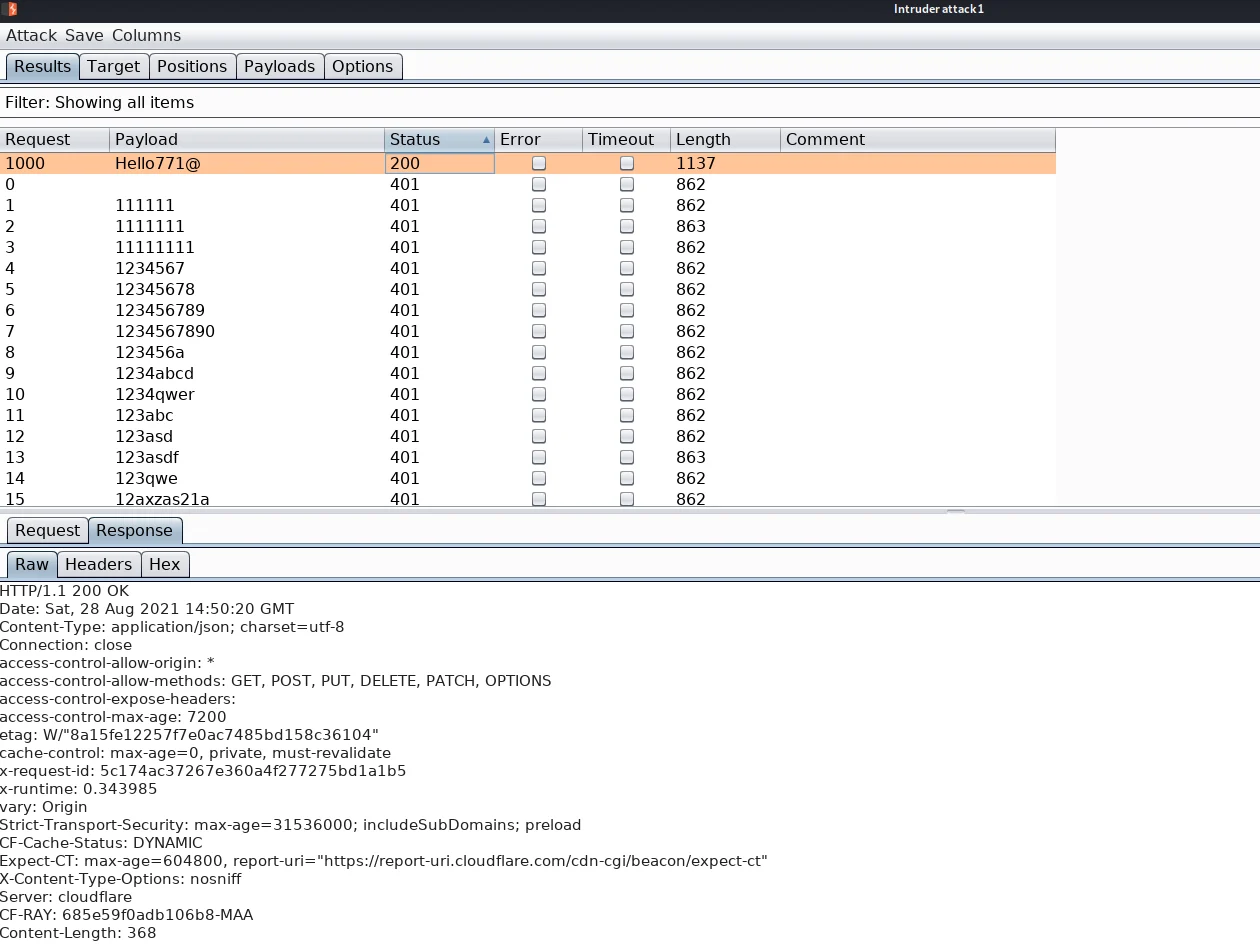
---> All the wrong credential respond with 401 and the correct one respond with the status code 200.
Impact
The attacker can easily takeover to the victim's account using this method.
Mitigation:
As a best practice the site should be implemented with some ratelimit functionalities like after 5 or 10 wrong login attempts the server should block the ip address and should respond with status code 429 "Too Many Requests".
Regards, aaruthra
Attachments
Context
The target is the partner bootcamp login page at https://partnerbootcamp.on-running.com/, part of the *.on-running.com asset scope. The feature under test is the standard email and password login form. A login form is expected to accept a submitted email address and password, verify the pair against stored credentials, and return a success response for a valid pair and a failure response otherwise. Because a login form is the front door to an account, it is also expected to limit how many guesses a single client can make in a given time frame.
The report frames the missing control in terms of rate limiting: a rate limiting algorithm checks whether a user session or IP address has to be limited based on information in the session cache, and when a client makes too many requests within a given time frame the server can respond with HTTP status code 429 (Too Many Requests). On this login page, that behaviour was absent.
Setup
No accounts, roles or special preconditions are described beyond a victim email address and a set of candidate passwords. The tooling named in the report is Burp Suite, used to capture the login request and to drive the attack from the Intruder module. The payload list used contained 1000 entries. No versions are given.
Finding it
The researcher observed that the login endpoint did not restrict repeated authentication attempts. The distinguishing signal is in the responses: every wrong credential produced HTTP 401, while the correct credential produced HTTP 200. That difference gives a clean, machine-readable oracle for a password guessing attack, and nothing in the flow appeared to stop a client from submitting attempt after attempt.
Exploitation
Step 1: reach the login page
Browse to the partner bootcamp site:
https://partnerbootcamp.on-running.com/
Step 2: submit a login attempt
Go to the login form, enter the victim's email address together with some random password, and click login. This produces a normal authentication request that can be captured.
Step 3: capture the request and prepare the attack
Capture the login request using Burp Suite and send it to Intruder. Mark the password field as the attack position so that each request carries a different candidate password while the email address stays fixed.
Step 4: load the payloads
The report states that 1000 payloads were added to the payload set. The payload list itself is not reproduced.
Step 5: start the attack and read the results
Start the attack. The responses separate cleanly by status code: all wrong credentials return 401, and the correct one returns 200. That single 200 among the 401s identifies the valid password for the targeted account.
The attachment shows the outcome of the Intruder run described above.
Root cause
The login endpoint accepts an unbounded number of authentication attempts from the same client. No per-session or per-IP counter is enforced, and no 429 response is returned once a threshold of failures is crossed. Because the endpoint distinguishes failure (401) from success (200) in the status code, each attempt yields an unambiguous answer, so the absence of throttling turns the form into a directly brute-forceable oracle. The report does not describe any other defence, such as a CAPTCHA or account lockout, being present.
Impact
As stated in the report, an attacker can take over the victim's account using this method: by iterating candidate passwords against a known email address, the attacker learns the correct password from the 200 response and can then authenticate as the victim. The impact depends on the targeted account holding a guessable or common password and on the attacker knowing the email address; the report does not qualify it further.
Fix
The report recommends implementing rate limiting as a best practice: after 5 or 10 wrong login attempts, the server should block the IP address and respond with status code 429 (Too Many Requests). The report does not state whether any change was made.
Variants to test
- Per-account throttling. Repeat the same attack with a fixed email address from rotating source IPs. A positive result is that the account is still locked or throttled after the threshold, showing the counter is tied to the account and not only to the client address.
- Per-IP throttling. Send attempts for many different email addresses from one address. A positive result is a 429 once the threshold is crossed, showing the limit is not scoped to a single account.
- Status code oracle elsewhere. Look for other authentication or verification endpoints that return distinct status codes for valid and invalid input. A positive result is a stable difference, such as 401 versus 200, that survives repeated requests.
- Threshold boundary. Send exactly the number of attempts the policy allows and one more. A positive result is that the extra attempt is refused, confirming the limit is enforced rather than merely documented.
Hunting notes
Login forms on secondary or partner-facing subdomains are a common place for this bug, because they are often built separately from the main product and miss controls applied elsewhere. During recon, the signal to look for is an authentication endpoint that answers with a distinct status code for bad credentials and keeps answering the same way after many attempts. The report's case rests on the clean 401 versus 200 split and on a 1000-payload run, which is what makes the missing limit demonstrable rather than theoretical.
What happened, in plain words
On Running runs a partner bootcamp site at https://partnerbootcamp.on-running.com/. That site has a login page where a partner types an email address and a password to get into their account. The researcher found that this login page lets anyone try as many passwords as they like, as fast as they like, without ever being slowed down or blocked.
That matters because a login page is the front door to an account. If the door lets you try a thousand keys in a row, and it tells you clearly each time whether the key was wrong or right, then someone who knows your email address can simply keep guessing until one key fits. In this report the researcher did exactly that: 1000 password guesses against one email address, and the page answered every single one.
A few ideas you need before the rest makes sense:
- A login form is the pair of boxes on a web page where you type your email address and password. When you press the button, your browser sends both values to the website's server, which checks them against what it has stored. If they match, you are let in; if not, you are turned away.
- A server is the computer somewhere in the world that holds the website and answers your browser's requests. Your browser asks, the server answers.
- An HTTP status code is a three-digit number the server attaches to every answer. It is a short label for what happened.
200means "fine, here is what you asked for".401means "you are not allowed in, your credentials were not accepted".429means "you are asking too often, slow down". You normally never see these numbers, but tools can. - Rate limiting is a rule that says "this visitor may only do this action a certain number of times in a certain period". Think of a bouncer at a bar who lets you ask once, twice, three times, and then tells you to wait outside for a while. Without a bouncer, you can ask forever.
- Brute force means guessing a secret by trying every possibility in turn, rather than being clever about it. It is like trying every combination on a bicycle lock instead of picking it.
- Burp Suite is a program that sits between your browser and the website and lets you look at, and change, the requests your browser sends. It is a tool for people who test websites, not something a normal visitor uses.
- Intruder is one part of Burp Suite. You give it one request, mark the part you want to vary (here, the password), give it a long list of values to try, and it sends the request once for each value automatically.
- A payload, in this context, is simply one of those values from the list. A list of 1000 payloads means 1000 candidate passwords.
The target and the feature
The asset in scope is *.on-running.com, which means any subdomain of on-running.com. The specific site tested is the partner bootcamp login page:
https://partnerbootcamp.on-running.com/
A login form is supposed to do two things. First, it takes the email address and password you typed, compares them with the stored credentials, and answers with a success if they match and a failure if they do not. Second, because it is the front door to an account, it is supposed to limit how many guesses one visitor can make in a given time frame. The report describes the missing second part in terms of rate limiting: a rate limiting algorithm checks whether a user session or an IP address has to be limited, based on information kept in a session cache, and when a client makes too many requests within a given time frame the server can answer with status code 429 (Too Many Requests). On this login page, that behaviour was not there.
Two more terms from that paragraph:
- A session is the server's memory of "this is the same visitor as a moment ago". When you log in, the server usually gives your browser a small piece of data to hold on to, so it can recognise you on the next page. A session cache is where the server keeps that memory.
- An IP address is the numeric label of your connection on the internet, roughly like a return address on an envelope. Many rate limits are counted per IP address, so that one visitor cannot hammer the site even if they keep starting over.
Setting up
The report does not describe any accounts, roles or special conditions being needed, beyond a victim email address and a set of candidate passwords. The tool named is Burp Suite, used to capture the login request and to run the attack from the Intruder module. The payload list contained 1000 entries. No versions of anything are given.
Finding it
The researcher noticed that the login endpoint did not restrict repeated login attempts. The clue is in the answers: every wrong credential produced HTTP 401, while the correct credential produced HTTP 200. That difference is what makes the attack practical. A wrong guess and a right guess give two clearly different answers, so a tool can sort through the results and pick out the one that stands apart. Nothing in the flow appeared to stop a client from submitting attempt after attempt.
Exploitation
Step 1: reach the login page
Open the partner bootcamp site in a browser:
https://partnerbootcamp.on-running.com/
This is just the starting point. You need to see the login form before you can capture what it sends.
Step 2: submit a login attempt
Go to the login form, enter the victim's email address together with some random password, and click login. This produces a normal login request that can be captured.
The reason for doing this by hand first is that Burp Suite can only replay and vary a request it has already seen. You make one ordinary, deliberately wrong attempt so that the request exists and can be recorded. The email address stays fixed because the goal is to find the password for that one account; the password is the only thing that will change.
Step 3: capture the request and prepare the attack
Capture the login request using Burp Suite and send it to Intruder. Mark the password field as the attack position, so that each request carries a different candidate password while the email address stays fixed.
In plain terms: you take the recorded request, tell Burp "this is the spot to swap out", and point that spot at the password value. Everything else in the request, including the email address, is sent unchanged every time. That way each attempt is a fair test of one password against the same account.
Step 4: load the payloads
The report states that 1000 payloads were added to the payload set. The payload list itself is not reproduced.
A payload set is the list of values Intruder will substitute, one per request. Here it is 1000 candidate passwords, so the attack will send 1000 login requests, each with the same email address and a different password.
Step 5: start the attack and read the results
Start the attack. The responses separate cleanly by status code: all wrong credentials return 401, and the correct one returns 200. That single 200 among the 401s identifies the valid password for the targeted account.
This is the heart of the finding. If the server had a rate limit, the run would have been interrupted: at some point the answers would have changed to 429, or the attempts would have been refused. The one correct password announced itself with a different status code from all the rest.
The attachment shows the outcome of the Intruder run described above.
Root cause
The login endpoint accepts an unlimited number of login attempts from the same client. No counter is enforced per session or per IP address, and no 429 response is returned once a threshold of failures is crossed. Because the endpoint distinguishes failure (401) from success (200) in the status code, each attempt gives an unambiguous answer, so the absence of throttling turns the form into something that can be brute-forced directly. The report does not describe any other defence, such as a CAPTCHA or account lockout, being present.
- A CAPTCHA is the little puzzle ("tick the traffic lights") that is meant to be easy for a person and hard for a program. It slows down automated guessing.
- Account lockout is a rule that freezes an account after too many failed attempts, so even the real owner has to wait or reset the password.
Neither of those is described here. The only thing standing between an attacker and the account is the password itself.
Impact
As stated in the report, an attacker can take over the victim's account using this method. By trying candidate passwords against a known email address, the attacker learns the correct password from the 200 response and can then log in as the victim. How bad this is depends on the targeted account having a guessable or common password, and on the attacker knowing the email address. The report does not qualify it further.
Fix
The report recommends rate limiting as a best practice: after 5 or 10 wrong login attempts, the server should block the IP address and respond with status code 429 (Too Many Requests).
In everyday terms, the bouncer should be put back on the door: a small number of wrong tries, then a clear "not now, come back later" answer.
Variants to test
These are follow-up checks in the same spirit, useful if you want to see whether a fix is complete rather than only present in one place.
- Per-account throttling. Repeat the same attack with a fixed email address, but from changing source IP addresses. A positive result is that the account is still locked or throttled after the threshold, which shows the counter is tied to the account and not only to the client address.
- Per-IP throttling. Send attempts for many different email addresses from one address. A positive result is a 429 once the threshold is crossed, which shows the limit is not scoped to a single account.
- Status code oracle elsewhere. Look for other login or verification endpoints that return distinct status codes for valid and invalid input. A positive result is a stable difference, such as 401 versus 200, that survives repeated requests.
- Threshold boundary. Send exactly the number of attempts the policy allows, and then one more. A positive result is that the extra attempt is refused, which confirms the limit is actually enforced rather than merely written down.
Hunting notes
Login forms on secondary or partner-facing subdomains are a common place for this bug, because they are often built separately from the main product and miss controls applied elsewhere. During recon, the signal to look for is a login endpoint that answers with a distinct status code for bad credentials and keeps answering the same way after many attempts. This case rests on the clean 401 versus 200 split and on a 1000-payload run, which is what makes the missing limit demonstrable rather than theoretical.
Glossary
- API: a way for one program to talk to another over the internet, sending requests and getting answers back in a fixed format.
- Asset: the specific piece of a company's systems that a test is allowed to target, here
*.on-running.com. - Brute force: guessing a secret by trying possibilities one after another until one works.
- Burp Suite: a tool that sits between your browser and a website so you can inspect and modify the requests being sent.
- CAPTCHA: a small puzzle meant to be easy for a human and hard for an automated program, used to slow down guessing.
- Credential: a piece of information used to prove who you are, such as an email address and password pair.
- Endpoint: a specific address on a server that accepts a particular kind of request, such as the login address.
- HTTP status code: a three-digit number attached to every server answer that labels the outcome, such as 200 for success, 401 for not authorised, 429 for too many requests.
- Intruder: the part of Burp Suite that automatically sends one request many times, swapping in a different value each time.
- IP address: the numeric label of a connection on the internet, used by servers to tell clients apart.
- Login form: the boxes on a page where you type your email address and password to get into an account.
- Oracle: any signal from a system that reliably tells an attacker whether a guess was right or wrong.
- Payload: in this context, one value from a list that a tool substitutes into a request, here one candidate password.
- Payload set: the full list of values a tool will try, one per request.
- Rate limiting: a rule that caps how many times a visitor may perform an action within a period, and refuses further attempts once the cap is reached.
- Recon: the early stage of testing where you look around a target to see what exists and how it behaves.
- Request: the message your browser sends to a server asking for something, such as a login attempt.
- Response: the message the server sends back, including a status code and usually some content.
- Session: the server's memory that several requests come from the same visitor, usually kept by giving the browser a small piece of data to hold.
- Session cache: the place where the server keeps that session memory so it can check it quickly.
- Subdomain: a named part of a larger domain, such as
partnerbootcamp.on-running.cominsideon-running.com. - Takeover: an attacker gaining control of someone else's account.
- Throttling: deliberately slowing down or refusing further attempts once a limit is reached.
- Victim: the person whose account an attacker is trying to get into.