Finding an unseen SQL Injection by bypassing escape functions in mysqljs/mysql
The mysqljs/mysql escape function handles different value types differently, so passing an object as a parameter can turn a quoted identifier into a column reference and bypass authentication. An attacker could log in as an administrator without valid credentials.

It was found that unexpected behaviors in the query’s escape function could cause a SQL injection in mysqljs/mysql (https://github.com/mysqljs/mysql), which is one of the most popular MySQL packages in the Node.js ecosystem.
The full write-up lives on its author's site
It belongs to its author, so we link to it rather than copy it. The other two tabs are our own rewrites, checked against it.
Context
mysqljs/mysql is one of the most widely used MySQL packages in the Node.js ecosystem. Its query escape functions and placeholders are the standard advice given to developers to prevent SQL injection: escape any user-supplied value before putting it into a query, and you are safe. The researcher found that this assumption breaks down because the escape function behaves differently depending on the value type it receives, and an attacker who can control the type of a parameter, not just its contents, can change the meaning of the query.
The affected functions are connection.escape(), mysql.escape() and pool.escape(), all of which share the same approach. The escaping itself is implemented in mysqljs/sqlstring.
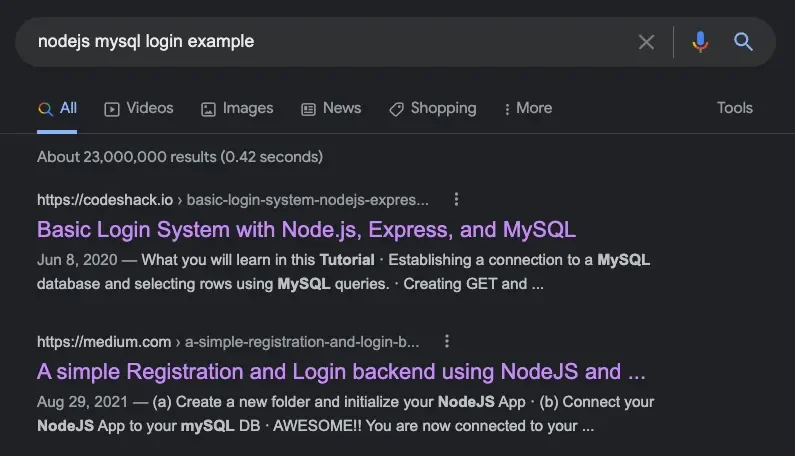
The write-up uses a sample login application built from the top-most Node.js/Express/MySQL tutorial on Google Search, which the researcher packaged so it can be run locally. The same class of bug is described as affecting many Node.js web applications, and the author notes that most automated SQL injection scanners and payloads do not look for this case at the time of writing, which is why the title calls it "unseen".
Setup
The target is a small Express application with a MySQL backend. The researcher published a docker-compose.yml so the project can be run quickly on a local machine, at https://github.com/stypr/vulnerable-nodejs-express-mysql, and also stood up a live instance at https://sqli.blog-demo.flatt.training/ for testing. The demo service may shut down or become inaccessible.
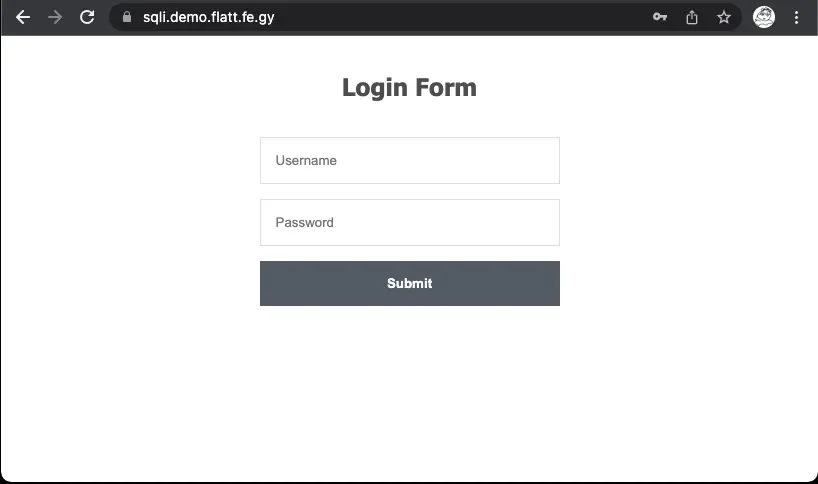
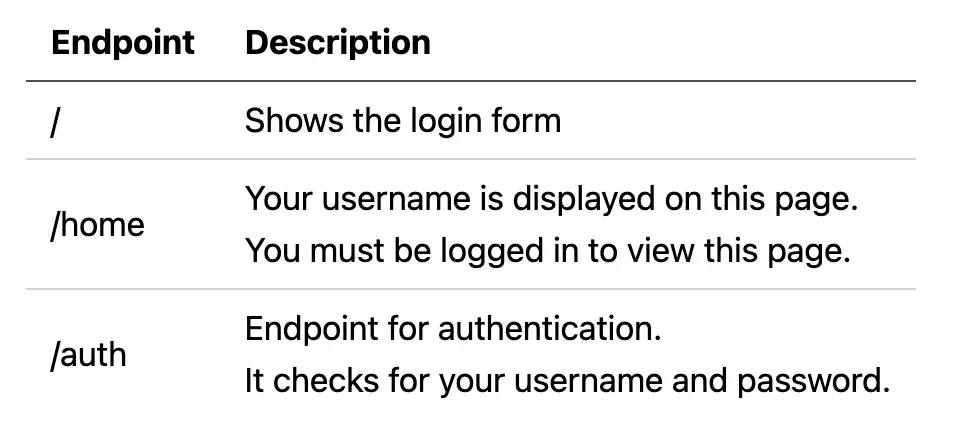
The application exposes three endpoints. There is no registration feature in the source code, so the accounts are pre-seeded.
The accounts table contains the following row.

The authentication flow looks secure at first sight. The whole point of the article is that this appearance is misleading.
No specific versions of Node.js, Express, MySQL or the mysql package are given in the report.
Finding it
The starting observation is in the official documentation of the library, which states that different value types are escaped differently:
- Numbers are left untouched
- Booleans are converted to
true/false - Date objects are converted to
'YYYY-mm-dd HH:ii:ss'strings - Strings are safely escaped
- Objects are turned into
key = 'val'pairs for each enumerable property on the object. If the property's value is a function, it is skipped; if the property's value is an object,toString()is called on it and the returned value is used. undefined/nullare converted toNULL
Because express parses request bodies in a way that lets a client send a parameter as an Object, Boolean or Array rather than a String, the type that reaches the escape function is attacker-controlled. The researcher wrote a small example that passes different value types into a placeholder and confirmed that the generated SQL differs by type. The important detail is that Object types are escaped with quoted identifiers, which are used to reference databases, tables and columns. That gives an attacker a way to reference other columns inside the query.
The reasoning then proceeds by substitution. If the escaped object produces something like password = `obj_key_1` and the key is changed to `password`, the quoted identifier is treated as a column, so the comparison becomes password = password, which is always true, in the same way that 1=1 is. If the value is then changed to the numeric 1, the expression becomes (1=1)=1, which also evaluates to 1. Since 1 is treated as true, the password check always passes.
Exploitation
Step 1: capture the login request
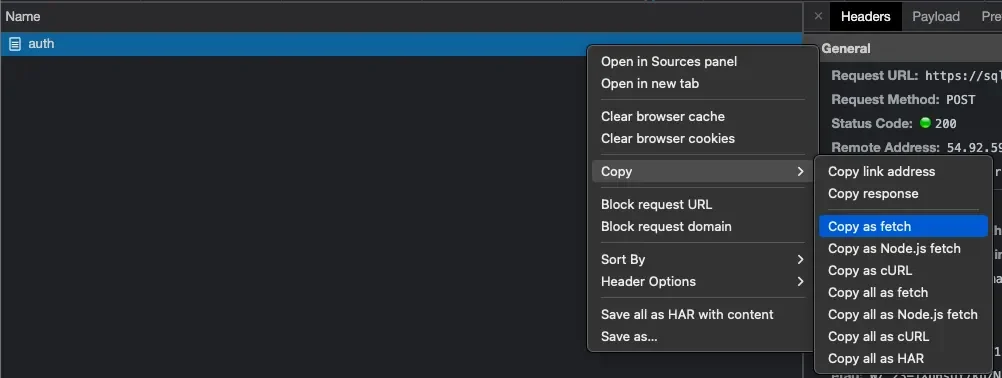
Open the browser's Developer Tools, go to the [Network] tab, and submit a username and password on the site. The auth endpoint appears in the list. Right-click it and choose [Copy] -> [Copy as fetch] to get the request as JavaScript.
Step 2: run the request from the console
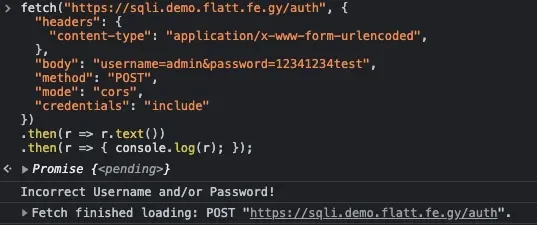
Paste the copied code into the [Console] tab, strip the verbose parts for convenience, and execute it. With an invalid credential the application returns the Incorrect Username and/or Password error, which confirms the request is being processed normally.
Step 3: change the type of the password parameter
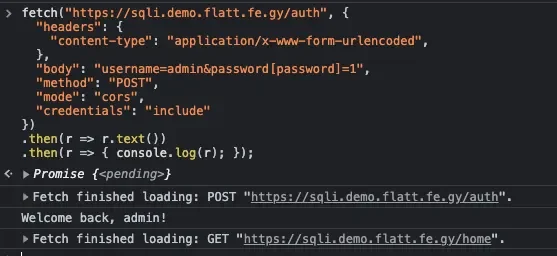
Modify the request so that the password parameter is sent as password[password] instead of a plain string. This makes the value an Object rather than a String when it reaches the server. Running the modified request returns access to an administrator account.
Step 4: confirm the session
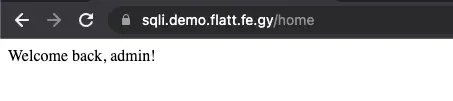
Access the /home endpoint to verify that the session is logged in as admin.
Step 5: the JSON variant
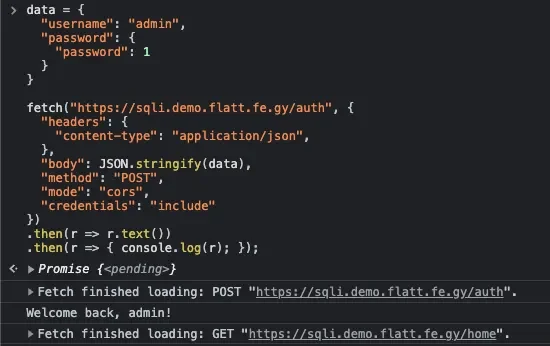
The same bypass works by sending the data as JSON instead of form-encoded parameters.
Root cause
The escape function is not type-safe. It dispatches on the runtime type of the value, and for objects it emits key = 'val' pairs with quoted identifiers. A quoted identifier is not data: it names a column. When the attacker supplies an object whose key is the column name password and whose value is the number 1, the escaped fragment turns the password comparison into a tautology, so the query returns a row and the login succeeds.
The defence did not stop this because escaping is applied to the value, not to the type. Every tutorial and guideline the researcher lists recommends escaping as the fix for SQL injection, and the code does exactly that. The vulnerability lives one layer down, in the dependency, which is why the author describes it as hard to find without digging into the affected library. The same issue applies to connection.escape(), mysql.escape() and pool.escape().
Impact
An attacker who can reach a login or similar query built with this library, and who can control the type of a parameter, can bypass authentication and obtain an administrator session, as demonstrated. More generally, the ability to inject quoted identifiers into a query can be used to reference other tables and columns. The report does not enumerate further impact beyond the authentication bypass and the general statement that unexpected behaviours, including SQL injection, can result. The attack requires that the application passes user-controlled values of non-string types into the escape function, which express permits.
Fix
The report gives two workarounds.
- Add
stringifyObjects: truetomysql.createConnection. This prevents the unexpected escaping output for theObjecttype and is marked as a MUST. The caveat is that it affects all existing queries in the project and can break queries that legitimately pass anObjectparameter. - Add type checks before executing the query. This is marked as a SHOULD. It is stricter, but costs development and maintenance time and can introduce new problems if the code is not fully understood.
The author notes that workaround 1 only blocks the Object case. Other types such as Array, array of Array and Boolean are still escaped differently by type and can still cause unexpected behaviour in rare cases, so type checks are recommended as well. The report shows before and after code for both workarounds but the snippets themselves are not reproduced in the text.
Variants to test
- Send a login parameter as an object with the column name as the key and a numeric value, for example
password[password]=1, and look for a successful login where an invalid credential should fail. - Send the same data as a JSON body rather than form-encoded, and check whether the bypass still works.
- Try other non-string types:
Array, array ofArrayandBoolean, since the report states these are escaped differently and can still cause unexpected behaviour. - Test the same pattern against
connection.escape(),mysql.escape()andpool.escape()wherever they are used directly, not only through placeholders. - Because the author recommends white-box testing for this class of bug, review Node.js services for any place where a user-controlled value reaches a query without a type check, and confirm whether the value can be an object, array or boolean at runtime.
What happened, in plain words
A security researcher found a way to log into a website as an administrator without knowing the administrator's password. The website was built with a very common set of tools for making web applications: Node.js (a way to run JavaScript on a server), Express (a helper for building websites in Node.js) and MySQL (a database, which is an organised store of information). The login code followed what almost every tutorial on the internet tells you to do to keep a login safe. It still failed.
The reason is subtle. The tool the code used to make user input safe, a function called escape, behaves differently depending on the type of the value it is given, not just its contents. A type is what kind of thing a value is: a piece of text (a String), a number, a yes/no value (a Boolean), or a bundle of named values (an Object). The login code assumed the password would always arrive as text. But the web framework lets a visitor send the password as an Object instead, and when that happens the escape function produces something completely different from what the developer expected. The result is a query that always says "the password is correct".
The researcher calls this an "unseen" SQL injection because most automated scanners, the programs that hunt for this kind of bug, do not try changing the type of a value. They only try changing its contents. So the bug slips past them.
The affected functions are connection.escape(), mysql.escape() and pool.escape(), all of which share the same approach. The escaping itself is implemented in a small helper library called mysqljs/sqlstring.
The researcher demonstrated the attack on a sample login application taken from the top-most Node.js/Express/MySQL tutorial on Google Search, packaged so anyone can run it. The same class of bug is described as affecting many Node.js web applications.
Background: the pieces you need to know
Before walking through the attack, here are the ideas it relies on, explained from scratch.
A database and a query. A database is like a very large, very organised set of spreadsheets. Each spreadsheet is called a table, each row is one record (one user account, for example), and each column is one field of that record (the username, the password). To talk to the database, a program sends it a query: a sentence in a special language called SQL that says "find the row where the username is this and the password is that".
SQL injection. SQL injection is what happens when a program builds a query by gluing user input directly into the sentence. If the input contains SQL syntax, the database reads it as part of the instruction rather than as data. Imagine a form that asks for your name and then writes a letter starting "Dear [your name]". If you write your name as "Bob. P.S. Please send all the money to me", the letter now contains an instruction the writer never intended. SQL injection is the same trick, aimed at a database.
Escaping. The standard defence is escaping: before putting user input into a query, the program transforms any characters that have special meaning in SQL so they are treated as plain text. A quote character, for example, gets a backslash in front of it so the database does not think the text has ended. The mysqljs/mysql library offers this through placeholders (a ? in the query that gets replaced by the escaped value) and through the escape() functions.
Value types. In JavaScript, every value has a type. "hello" is a String. 42 is a Number. true is a Boolean. { password: 1 } is an Object, a bundle of named values. [1, 2, 3] is an Array, an ordered list. The type matters because the escape function treats each type differently.
Quoted identifiers. In SQL, there are two kinds of names. Data is the actual content, like the text alice or the number 1. An identifier is the name of a thing in the database: a table, a column, a database itself. Identifiers are often written inside backticks, like `password`, to make clear they are names and not data. This distinction is the heart of the bug: if an attacker can get their input treated as an identifier instead of data, they can point the query at a different column.
Endpoints. A web application exposes endpoints: specific addresses (URLs) that do specific things. One endpoint might show the login page, another might check the password, another might show the logged-in home page.
Cookies and sessions. When you log in, the server needs a way to remember you on your next request. It sends your browser a small piece of data called a cookie, and your browser sends it back with every following request. The server keeps a session: a record on its side that says "the holder of this cookie is logged in as alice". If the server hands you a session that belongs to the administrator, you are the administrator as far as the site is concerned.
Developer Tools. Every modern browser has a built-in toolkit for inspecting what a page does. You open it with a keyboard shortcut or a menu item. Two of its tabs matter here: [Network], which lists every request the page makes to the server, and [Console], where you can type and run JavaScript directly in the page.
Setting up the target
The researcher used a small sample project built from the top-most tutorial on Google Search for a Node.js/Express/MySQL login system.
To make it easy to run, the researcher published a docker-compose.yml (a file that describes how to start a set of programs together, so you do not have to install each one by hand) at https://github.com/stypr/vulnerable-nodejs-express-mysql. There is also a live instance at https://sqli.blog-demo.flatt.training/ for testing. The demo service may shut down or become inaccessible.
The application exposes three endpoints. There is no registration feature in the source code, so the accounts are pre-seeded: they were put into the database in advance.
The accounts table contains the following row.
The authentication flow looks secure at first sight. The whole point of the article is that this appearance is misleading.
No specific versions of Node.js, Express, MySQL or the mysql package are given in the report.
Finding it: why the escape function is not enough
The starting observation is in the official documentation of the library, which states that different value types are escaped differently:
- Numbers are left untouched
- Booleans are converted to
true/false - Date objects are converted to
'YYYY-mm-dd HH:ii:ss'strings - Strings are safely escaped
- Objects are turned into
key = 'val'pairs for each enumerable property on the object. If the property's value is a function, it is skipped; if the property's value is an object,toString()is called on it and the returned value is used. undefined/nullare converted toNULL
Read that list again with the attack in mind. A string is escaped safely, which is what every tutorial assumes will happen. But an object is turned into key = 'val' pairs. That is not escaping data at all; it is building a piece of SQL syntax out of the object's contents. The developer thinks they are passing a password. The library thinks they are passing a set of column assignments.
Because express parses request bodies in a way that lets a client send a parameter as an Object, Boolean or Array rather than a String, the type that reaches the escape function is attacker-controlled. The researcher wrote a small example that passes different value types into a placeholder and confirmed that the generated SQL differs by type. The important detail is that Object types are escaped with quoted identifiers, which are used to reference databases, tables and columns. That gives an attacker a way to reference other columns inside the query.
The reasoning then proceeds by substitution. If the escaped object produces something like password = `obj_key_1` and the key is changed to `password`, the quoted identifier is treated as a column, so the comparison becomes password = password, which is always true, in the same way that 1=1 is. If the value is then changed to the numeric 1, the expression becomes (1=1)=1, which also evaluates to 1. Since 1 is treated as true, the password check always passes.
In plain words: the login query asks the database "is the stored password equal to the password the visitor typed?". The attacker makes the second half of that question point back at the stored password column itself, so the database is asked "is the stored password equal to the stored password?". The answer is always yes.
Exploitation, step by step
Step 1: capture the login request
Open the browser's Developer Tools, go to the [Network] tab, and submit a username and password on the site. The auth endpoint appears in the list. Right-click it and choose [Copy] -> [Copy as fetch] to get the request as JavaScript.
Why this step: the browser already knows how to talk to the login endpoint. Copying the request as fetch() code (a JavaScript function for making web requests) gives you a ready-made script that repeats exactly what the login form did, which you can then edit and run as many times as you like.
Step 2: run the request from the console
Paste the copied code into the [Console] tab, strip the verbose parts for convenience, and execute it. With an invalid credential the application returns the Incorrect Username and/or Password error, which confirms the request is being processed normally.
Why this step: before changing anything, you want to see the normal behaviour. A failed login with a wrong password proves the request is reaching the server and the server is checking credentials. Now you have a baseline to compare against.
Step 3: change the type of the password parameter
Modify the request so that the password parameter is sent as password[password] instead of a plain string. This makes the value an Object rather than a String when it reaches the server. Running the modified request returns access to an administrator account.
Why this works: the square-bracket notation password[password] is a convention that web frameworks understand as "the parameter named password is an object, and that object has a property also named password". So instead of the server receiving plain text, it receives an object with a property named password. The escape function sees an object and produces a column assignment instead of a safely quoted string. The query's password comparison is now comparing the password column to itself.
Step 4: confirm the session
Access the /home endpoint to verify that the session is logged in as admin.
Why this step: getting a successful response from the login endpoint could mean many things. Loading a page that only an administrator should see is stronger evidence that the server really believes you are the administrator and has given you an administrator session.
Step 5: the JSON variant
The same bypass works by sending the data as JSON instead of form-encoded parameters.
Why this matters: form-encoded data (the key=value&key=value format) and JSON (a text format for structured data) are two different ways of sending the same information. If the attack works through both, it is not a quirk of one parser. It is the escape function itself that is at fault.
Root cause
The escape function is not type-safe. It dispatches on the runtime type of the value, and for objects it emits key = 'val' pairs with quoted identifiers. A quoted identifier is not data: it names a column. When the attacker supplies an object whose key is the column name password and whose value is the number 1, the escaped fragment turns the password comparison into a tautology (a statement that is always true), so the query returns a row and the login succeeds.
The defence did not stop this because escaping is applied to the value, not to the type. Every tutorial and guideline the researcher lists recommends escaping as the fix for SQL injection, and the code does exactly that. The vulnerability lives one layer down, in the dependency, which is why the author describes it as hard to find without digging into the affected library. The same issue applies to connection.escape(), mysql.escape() and pool.escape().
A useful comparison: escaping is like putting a lock on the front door. It works, as long as the door is the only way in. Here, the type of the value is a second door that nobody thought to lock, because nobody realised it existed.
Impact
An attacker who can reach a login or similar query built with this library, and who can control the type of a parameter, can bypass authentication and obtain an administrator session, as demonstrated. More generally, the ability to inject quoted identifiers into a query can be used to reference other tables and columns. The report does not enumerate further impact beyond the authentication bypass and the general statement that unexpected behaviours, including SQL injection, can result. The attack requires that the application passes user-controlled values of non-string types into the escape function, which express permits.
Fix
The report gives two workarounds.
- Add
stringifyObjects: truetomysql.createConnection. This prevents the unexpected escaping output for theObjecttype and is marked as a MUST. The caveat is that it affects all existing queries in the project and can break queries that legitimately pass anObjectparameter. - Add type checks before executing the query. This is marked as a SHOULD. It is stricter, but costs development and maintenance time and can introduce new problems if the code is not fully understood.
The author notes that workaround 1 only blocks the Object case. Other types such as Array, array of Array and Boolean are still escaped differently by type and can still cause unexpected behaviour in rare cases, so type checks are recommended as well. The report shows before and after code for both workarounds but the snippets themselves are not reproduced in the text.
In plain words: workaround 1 tells the library "if you are given an object, treat it as a plain string instead of turning it into SQL syntax". Workaround 2 tells your own code "before you build a query, check that every value really is the type you expect, and reject it if not". The first is a one-line change but only covers one type. The second covers everything but takes more work and more care.
Variants to test
- Send a login parameter as an object with the column name as the key and a numeric value, for example
password[password]=1, and look for a successful login where an invalid credential should fail. - Send the same data as a JSON body rather than form-encoded, and check whether the bypass still works.
- Try other non-string types:
Array, array ofArrayandBoolean, since the report states these are escaped differently and can still cause unexpected behaviour. - Test the same pattern against
connection.escape(),mysql.escape()andpool.escape()wherever they are used directly, not only through placeholders. - Because the author recommends white-box testing (testing where you can read the source code, as opposed to black-box testing where you can only see the outside) for this class of bug, review Node.js services for any place where a user-controlled value reaches a query without a type check, and confirm whether the value can be an object, array or boolean at runtime.
Glossary
- API: an agreed way for one program to ask another program to do something, like a menu of requests a service accepts.
- Array: an ordered list of values in JavaScript, written with square brackets, for example
[1, 2, 3]. - Authentication: the process of proving who you are, usually with a username and password.
- Black-box testing: testing a system only through its outside behaviour, without reading its source code.
- Boolean: a value that is either
trueorfalse. - Column: one field of a database table, for example the
passwordcolumn holds every user's password. - Console: a tab in the browser's Developer Tools where you can type and run JavaScript in the current page.
- Cookie: a small piece of data a website asks your browser to store and send back with later requests, often used to identify your session.
- Database: an organised store of information, usually made of tables of rows and columns.
- Dependency: a piece of software your project relies on, written by someone else.
- Developer Tools: the inspection toolkit built into modern browsers, with tabs such as Network and Console.
- Docker Compose: a tool that starts a set of related programs together from a single configuration file, so you do not install each one by hand.
- Endpoint: a specific URL that a web application responds to with a specific action.
- Escaping: transforming user input so that characters with special meaning in a language are treated as plain text.
- Express: a popular helper library for building web applications in Node.js.
- fetch(): a JavaScript function for making web requests from code, the same kind of request a browser makes when you submit a form.
- Identifier: the name of a thing in a database, such as a table or column, as opposed to the data stored inside it.
- JSON: a text format for structured data, made of keys and values, widely used to send data between programs.
- MySQL: a popular database system.
- Node.js: a way to run JavaScript outside a browser, commonly used to build web servers.
- Object: a bundle of named values in JavaScript, written with curly braces, for example
{ password: 1 }. - Placeholder: a marker such as
?in a query that the library replaces with a safely escaped value. - Query: an instruction sent to a database, written in SQL.
- Quoted identifier: a database name written inside backticks, such as
`password`, marking it as a name rather than data. - Row: one record in a database table, for example one user account.
- Session: a record kept on the server that ties a cookie to a logged-in user.
- SQL: the language used to talk to a database.
- SQL injection: a bug where user input is read by the database as part of the instruction rather than as data.
- String: a piece of text in JavaScript, written in quotes, for example
"hello". - Tautology: a statement that is always true, such as
1=1orpassword = password. - Type: the kind of a value, such as String, Number, Boolean, Object or Array.
- White-box testing: testing a system with access to its source code, so you can read how it works from the inside.




