doc.owncloud.org: X-XSS-Protection not enabled
The report notes that the X-XSS-Protection header is missing from doc.owncloud.org, so browsers' built-in reflective XSS filters are not configured. The text does not demonstrate an actual cross-site scripting vulnerability or show how an attacker could exploit the missing header.

- Triaged in under an hour
- Fixed in 3 days
- Disclosed after 3 days
X-Xss-Protection @https://doc.owncloud.org/ has not been set.
This header is used to configure the built in reflective XSS protection found in Internet Explorer, Chrome and Safari (Webkit). Valid settings for the header are 0, which disables the protection, 1 which enables the protection and 1; mode=block which tells the browser to block the response if it detects an attack rather than sanitising the script.
NginX: add_header X-Xss-Protection "1; mode=block" always;
Apache: Header always set X-Xss-Protection "1; mode=block"
IIS:
Attachments
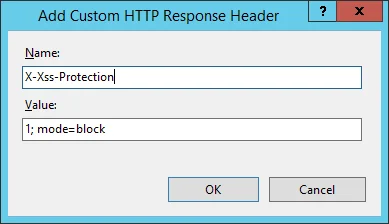
Not written yet. The AI write-up for this report has not been written yet. The Original tab links to the source.
How it worked
Impact
The missing header may leave users of older browsers without the built-in reflective XSS filter, but the report does not show any actual script injection or exploitation.
What the attacker needed
None
The fix
The header should be added at the web server level, for example with the provided Nginx or Apache configuration directives.
Explained by bugbounty.wiki with AI from the original and checked against quotes from it; it can still be wrong. Read the original before relying on a detail.
Not written yet. The AI write-up for this report has not been written yet. The Original tab links to the source.
Browsers have an old built-in filter that tries to stop some cross-site scripting attacks, where a malicious link injects script into a page. A response header called X-XSS-Protection tells the browser whether to use that filter. This report only says the header is missing; it does not show a real attack.
What is XSS?
Script an attacker supplies runs in another user's browser, on the target's origin, with that user's session.




