Authentication Bypass with usage of PreSignedURL
The PreSignedURL feature in ownCloud Infinite Scale incorrectly treats expired URLs as valid, skipping signature verification. An attacker who knows a username and filename could download private files without authentication.

- Triaged in 36 hours
- Fixed in 10 days
- Paid in 24 days
- Disclosed after 55 days
Hello,
Summary
It was identified that ownCloud Infinite Scale (oCIS) is prone to vulnerability that allows access any file without authentication. Prior knowledge of username and filename is needed to access file.
In this instance, vulnerability was result of the default enabled PreSignedURL, which incorrectly checks the expiry date in OC-Date and OC-Expires variables. If the date has expired, the signing key has not been checked and access to file is granted.
Steps to reproduce
-
Login to the ownCloud Infinite Scale instance - e.g.
adminusername was used. -
Create new file - Press "New" and "Plain text file" -
secret.txtfilename was used.
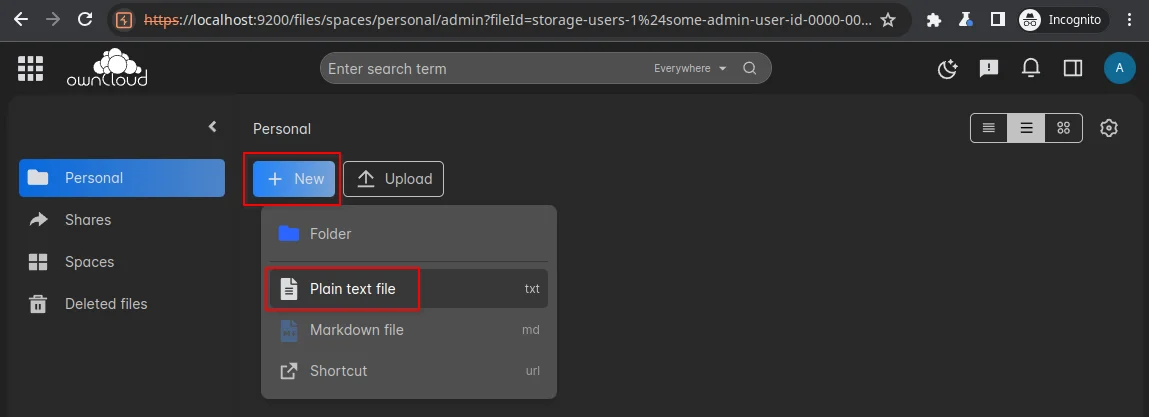
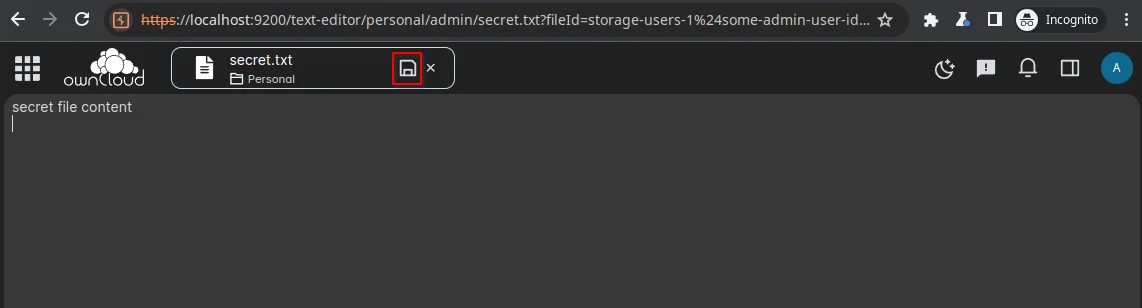
- Add some content to the file - e.g. "secret file content" and save the file.
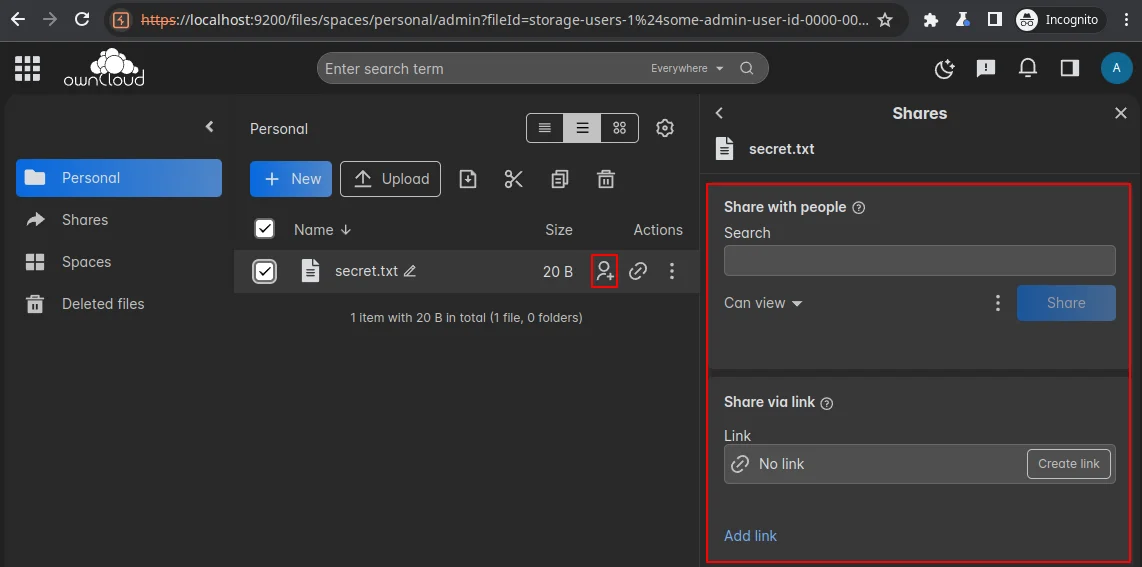
In addition, it is possible to check that the file is not public or shared with anyone.
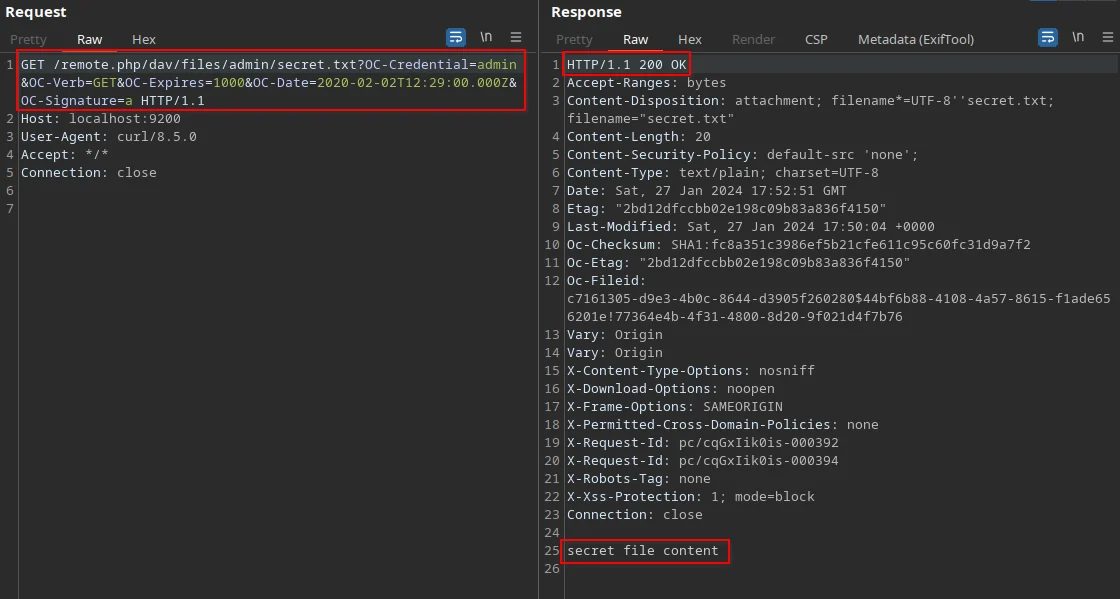
- Access the file without authentication with the following link builded with known username and known filename:
https://{ownload-instance}/remote.php/dav/files/{username}/{filename}?OC-Credential={username}&OC-Verb=GET&OC-Expires=60&OC-Date=2024-01-27T00:00:00.000Z&OC-Signature=notchecked
In particular the following link was used:
https://localhost:9200/remote.php/dav/files/admin/secret.txt?OC-Credential=admin&OC-Verb=GET&OC-Expires=60&OC-Date=2024-01-27T00:00:00.000Z&OC-Signature=notchecked
Details
Default settings for PreSignedURL allows usage of GET requests and therefore download files.
services/proxy/pkg/config/defaults/defaultconfig.go:
		PreSignedURL: config.PreSignedURL{
			AllowedHTTPMethods: []string{"GET"},
			Enabled:            true,
		},
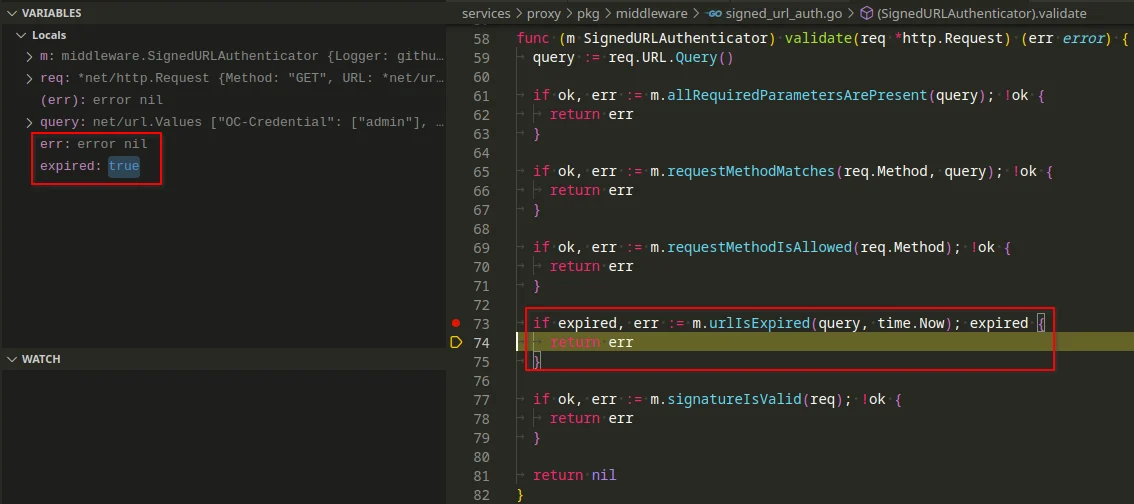
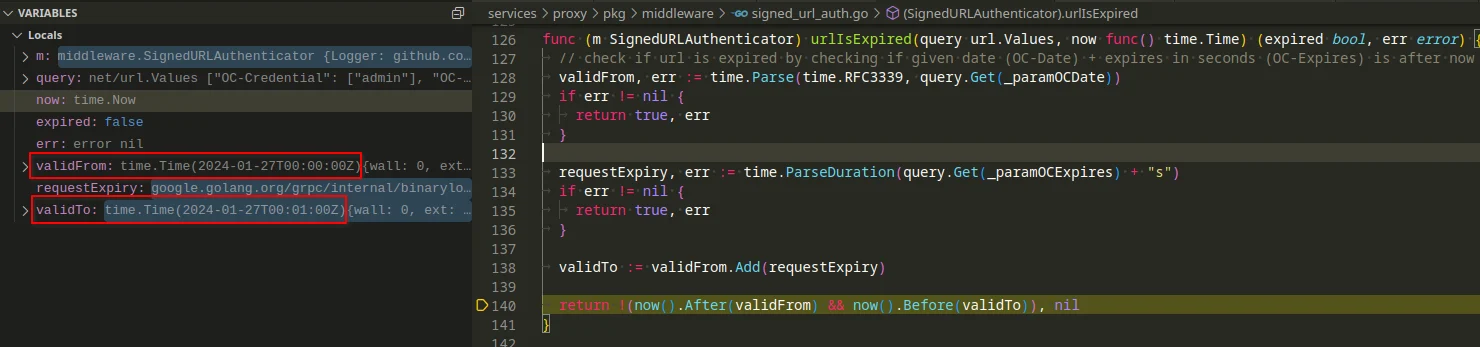
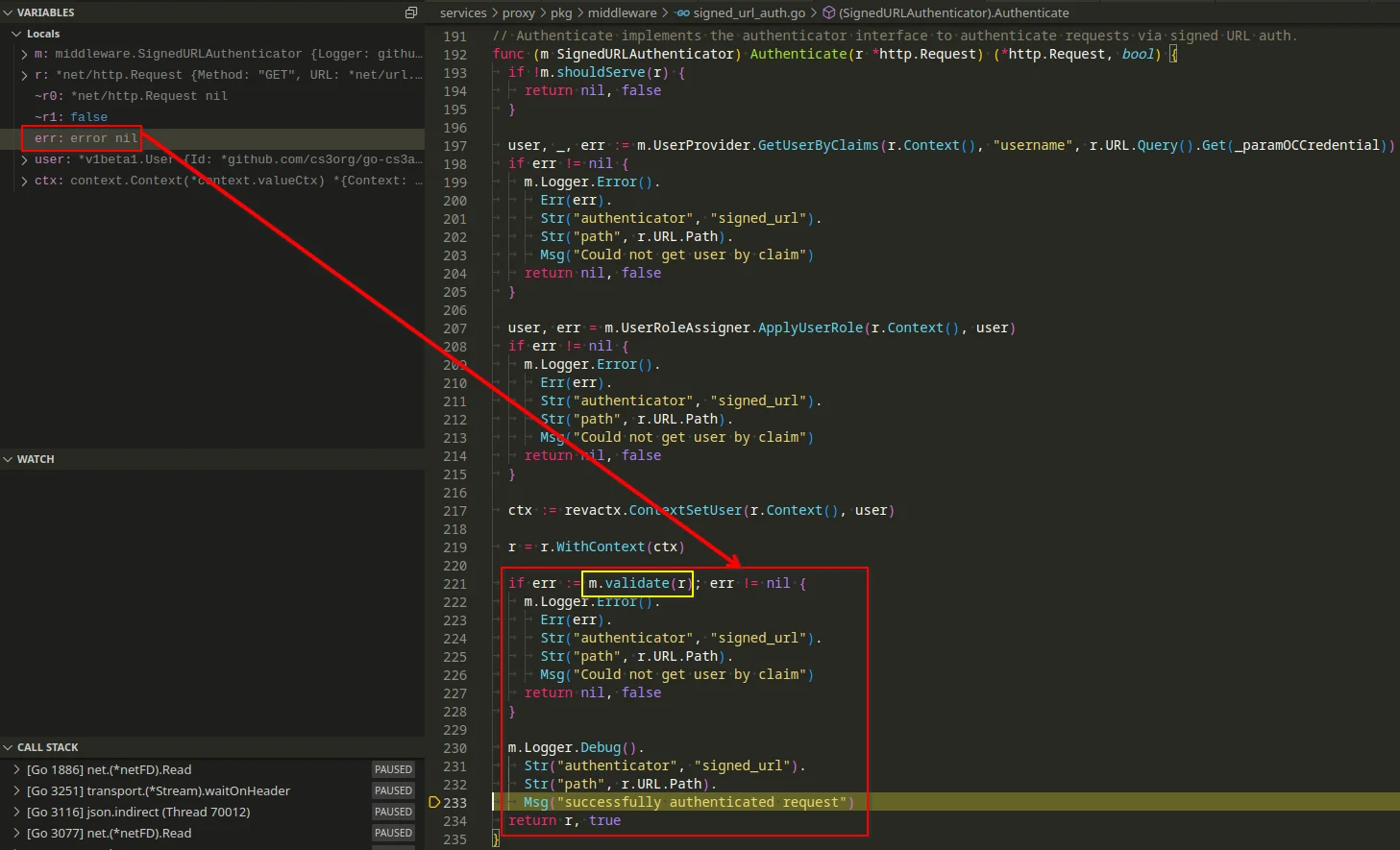
Inside function validate another function urlIsExpired is called to check for expiration of OC-Date and OC-Expires.However, in the case of expired dates, the function returns a null error, resulting in successful authentication of requests without checking the user's signing signature/key.
Vulnerable versions
The following tags on GitHub was found to be vulnerable - it was not tested on different branches/tags:
- v5.0.0-rc.3
- v5.0.0-rc.2
- v4.0.5
Temporary remediation
Disabling PreSignedURLs, e.g. with environment variable PROXY_ENABLE_PRESIGNEDURLS=false blocked unrestricted access to files.
Impact
Broken Access Control vulnerabilities have severe consequences, both for organizations and end-users. Attackers exploiting Broken Access Control can gain access to sensitive data, including personal information, financial records, or confidential documents, compromising user privacy and security. In this instance, it was possible to access the organization's and users' private files without authentication.
Context
ownCloud Infinite Scale (oCIS) is ownCloud's file sync and sharing platform. Among its proxy features is PreSignedURL, a mechanism that lets a client build a URL carrying a credential, a verb, an expiry window and a signature, so that a request can be authorised without a normal session. The proxy validates those parameters before letting the request through to the file service.
The report describes a flaw in that validation: when the supplied date had already expired, the proxy treated the request as valid and never checked the signature. The result was that any file could be downloaded without authentication, provided the attacker knew the username and the filename.
Setup
The researcher worked against an ownCloud Infinite Scale instance, logging in with the admin username. The proof of concept used a local instance reachable at localhost:9200. No special tooling is described; the reproduction is done through the web interface and then a plain URL.
The vulnerable tags found on GitHub were:
- v5.0.0-rc.3
- v5.0.0-rc.2
- v4.0.5
The researcher notes that other branches and tags were not tested.
Finding it
The starting point is the default configuration of the proxy service. PreSignedURL is enabled out of the box and only permits GET:
		PreSignedURL: config.PreSignedURL{
			AllowedHTTPMethods: []string{"GET"},
			Enabled:            true,
		},
Because GET is allowed, a correctly formed pre-signed URL is enough to download a file. The interesting question is what happens when the URL is not correctly formed, in particular when its expiry has passed.
The validate function in the signed URL middleware calls urlIsExpired to check OC-Date and OC-Expires. The researcher found that for expired dates the function returns a null error, so validation succeeds and the request is authenticated without the signing key ever being checked.
Exploitation
Step 1: log in
Log in to the ownCloud Infinite Scale instance. The admin account was used.
Step 2: create a file
Press "New" and choose "Plain text file". The file was named secret.txt.
Step 3: add content
Put some content in the file, for example "secret file content", and save it.
The researcher also confirms that the file is neither public nor shared with anyone, which rules out access through a legitimate sharing path.
Step 4: request the file without authentication
The URL is built from the known username and the known filename:
https://{ownload-instance}/remote.php/dav/files/{username}/{filename}?OC-Credential={username}&OC-Verb=GET&OC-Expires=60&OC-Date=2024-01-27T00:00:00.000Z&OC-[redacted]
The concrete URL used in the test was:
https://localhost:9200/remote.php/dav/files/admin/secret.txt?OC-Credential=admin&OC-Verb=GET&OC-Expires=60&OC-Date=2024-01-27T00:00:00.000Z&OC-[redacted]
The path addresses the file through the WebDAV endpoint for the user's files. OC-Credential names the user, OC-Verb is GET, OC-Expires sets the validity window, and OC-Date carries a date in the past. OC-Signature is deliberately set to the literal string notchecked, which shows that no real signature is required. The screenshot shows the request being made without an authenticated session.
Root cause
The default configuration enables PreSignedURL and allows GET, so the feature is reachable on a stock deployment. The validation logic then fails open. validate calls urlIsExpired to evaluate OC-Date and OC-Expires; when the date has expired, urlIsExpired returns a null error. The caller treats that as a successful check and authenticates the request, so the signing key is never verified. The signature parameter is therefore irrelevant, and the literal value notchecked was accepted.
The debugging screenshots show the sequence: validation of an expired URL produces no error, urlIsExpired reports the URL as expired, and Authenticate/validate still returns no error.
Impact
An unauthenticated attacker who knows a username and a filename can download that file, including private files belonging to the organisation and its users. The report frames this as broken access control, which can expose personal information, financial records or confidential documents. The precondition is prior knowledge of both the username and the filename; without them the URL cannot be constructed.
Fix
No code fix is described in the report. The temporary remediation given is to disable PreSignedURLs, for example with the environment variable:
PROXY_ENABLE_PRESIGNEDURLS=false
This blocked unrestricted access to files.
Variants to test
- A positive result is the file content returned without a session.
- A positive result is any expired or malformed date that still yields the file.
- A positive result is acceptance of a signature that was never generated with the signing key.
- A positive result is a method other than
GETbeing accepted through the same path.
Hunting notes
This bug sits in the authentication middleware of a file-sharing proxy, in the code path that decides whether a pre-signed request is still valid.
The researcher demonstrated impact by creating a file that was neither public nor shared, then fetching it with an unauthenticated request whose signature was the literal string notchecked.
What happened, in plain words
ownCloud Infinite Scale (oCIS) is a product for storing files on a server and sharing them with other people. Think of it as a private online filing cabinet for a company: people log in, and then they can open, upload and share documents.
Normally, to open a file in that cabinet you have to log in first. The server checks who you are, and only then hands over the file. The report describes a way to skip that check entirely: someone who is not logged in at all can download a file, as long as they know two things, the name of the user who owns it and the name of the file.
This kind of flaw is called broken access control. Access control is simply the set of rules about who is allowed to do what. When those rules fail, people get access they should not have. A simple comparison: a hotel gives each guest a key card that opens only their own room. Broken access control is when the door lock accepts any card at all, or accepts a card that expired years ago.
The specific feature involved is called PreSignedURL. A URL is the address you type in a browser, like https://example.com/some/page. A pre-signed URL is an address that carries its own permission slip inside it. Instead of logging in, you hand the server a link that already contains who you claim to be, what you want to do, when the link stops being valid, and a signature that is supposed to prove the server itself created the link. It is like a concert ticket with a barcode: the barcode is the signature, and the door staff scan it to check the ticket is genuine and not out of date.
The bug is that the server got the expiry check backwards. When the date on the ticket had already passed, the server should have said no. Instead it said yes, and it never even looked at the barcode. So anyone can write a fake ticket, put a date in the past on it, write anything they like in the signature field, and walk straight in.
Context
ownCloud Infinite Scale, shortened to oCIS, is ownCloud's platform for syncing and sharing files. A proxy sits in front of the actual file storage. You can picture the proxy as a receptionist: every request from a browser arrives at the receptionist first, the receptionist decides whether the request is allowed, and only then does it pass the request on to the back office where the files live.
One of the proxy's features is PreSignedURL. It lets a client build a URL that carries four things:
- a credential, meaning which user the request claims to be for;
- a verb, meaning what action is being asked for (for example
GET, which in web terms means "give me this thing"); - an expiry window, meaning how long the link should stay valid;
- a signature, a value that is supposed to prove the link was created by someone holding the server's secret signing key.
With all of that in the URL, a request can be authorised without a normal login session. A session is what a website remembers about you after you log in, usually stored in a small piece of data called a cookie that your browser sends with every request. A pre-signed URL is meant to work without any of that.
The proxy is supposed to check those parameters before letting the request through to the file service. The report describes a flaw in that check: when the supplied date had already expired, the proxy treated the request as valid and never checked the signature. The result was that any file could be downloaded without authentication, provided the attacker knew the username and the filename.
Setup
The researcher worked against an ownCloud Infinite Scale instance, logging in with the admin username. The proof of concept used a local instance reachable at localhost:9200. localhost means "this same computer", and 9200 is a port number, a numbered door on the machine where the service listens. No special tooling is described; the reproduction is done through the web interface and then a plain URL.
The vulnerable tags found on GitHub were:
- v5.0.0-rc.3
- v5.0.0-rc.2
- v4.0.5
A tag is a label on a particular version of software in a code repository, so these are three specific releases of oCIS. The researcher notes that other branches and tags were not tested, so we only know for certain that these three are affected.
Finding it
The starting point is the default configuration of the proxy service. Default configuration means the settings a product ships with, before an administrator changes anything. PreSignedURL is enabled out of the box and only permits GET:
		PreSignedURL: config.PreSignedURL{
			AllowedHTTPMethods: []string{"GET"},
			Enabled:            true,
		},
Line by line:
PreSignedURL: config.PreSignedURL{opens the block of settings for the PreSignedURL feature.AllowedHTTPMethods: []string{"GET"},says the only kind of request this feature will carry out isGET.HTTP methodsare the verbs of the web:GETasks for something to be returned, and other methods likePOSTsend data. A list with one entry means only that one verb is allowed.Enabled: true,switches the feature on.trueis the programming word for yes.},closes the block.
Because GET is allowed, a correctly formed pre-signed URL is enough to download a file. The interesting question is what happens when the URL is not correctly formed, in particular when its expiry has passed. That is the question the researcher went on to answer.
The validate function in the signed URL middleware calls urlIsExpired to check OC-Date and OC-Expires. A function is a named block of code that does one job; validate is the one whose job is to decide whether a request is acceptable, and urlIsExpired is a helper whose job is to decide whether a link is past its date. Middleware is code that runs in the middle of a request, between the browser and the final destination, which is exactly where a receptionist-style check belongs.
The researcher found that for expired dates the function returns a null error, so validation succeeds and the request is authenticated without the signing key ever being checked. An error in programming is a value a function hands back to say "something went wrong". A null error means "nothing went wrong". So the helper was reporting "this link is expired" while also handing back "nothing went wrong", and the caller read the second part and let the request through.
Exploitation
Step 1: log in
Log in to the ownCloud Infinite Scale instance. The admin account was used. Logging in here is only for setting up the test: it lets the researcher create a file through the normal interface. The attack itself, in step 4, happens without logging in.
Step 2: create a file
Press "New" and choose "Plain text file". The file was named secret.txt.
The screenshot shows the menu used to create a new plain text file. The point of this step is to have a file that belongs to a user, so that later we can try to fetch it as a stranger.
Step 3: add content
Put some content in the file, for example "secret file content", and save it.
Content matters because it gives us something recognisable to look for in the response. If the file were empty, a successful download would be hard to tell apart from an empty answer.
The researcher also confirms that the file is neither public nor shared with anyone, which rules out access through a legitimate sharing path.
This check is important. If the file were public, anyone could open it by design, and the test would prove nothing. The screenshot shows the file's sharing state, confirming there is no legitimate route to it for an outsider.
Step 4: request the file without authentication
The URL is built from the known username and the known filename:
https://{ownload-instance}/remote.php/dav/files/{username}/{filename}?OC-Credential={username}&OC-Verb=GET&OC-Expires=60&OC-Date=2024-01-27T00:00:00.000Z&OC-[redacted]
Reading this address piece by piece:
https://is the secure web protocol, the same one your browser uses for online banking.{ownload-instance}is a placeholder for the server's address. Curly braces mark a value you fill in yourself./remote.php/dav/files/is the path that leads to the file storage area. WebDAV is a standard way for programs to read and write files over the web, and this path is the WebDAV entry point for users' files.{username}/{filename}is the owner's account name and the file's name, again as placeholders.?marks the start of the query string, the part of a URL that carries extra settings.OC-Credential={username}says which user the request claims to be for.OC-Verb=GETsays the action is a download.OC-Expires=60sets the validity window, here 60.OC-Date=2024-01-27T00:00:00.000Zcarries a date. TheZat the end means the time is in UTC, the world time standard. This date is in the past, which is the whole trick.OC-[redacted] is the signature field, filled with the literal wordnotchecked`.&separates each setting from the next.
The concrete URL used in the test was:
https://localhost:9200/remote.php/dav/files/admin/secret.txt?OC-Credential=admin&OC-Verb=GET&OC-Expires=60&OC-Date=2024-01-27T00:00:00.000Z&OC-[redacted]
Here the placeholders are filled in: the server is localhost:9200, the user is admin, and the file is secret.txt. Everything else is the same. The path addresses the file through the WebDAV endpoint for the user's files. OC-Credential names the user, OC-Verb is GET, OC-Expires sets the validity window, and OC-Date carries a date in the past. OC-Signature is deliberately set to the literal string notchecked, which shows that no real signature is required. The screenshot shows the request being made without an authenticated session.
The screenshot shows the request made without a login session. That is the proof. A stranger who knows the username and the filename can get the file.
Root cause
The default configuration enables PreSignedURL and allows GET, so the feature is reachable on a stock deployment. Stock deployment means a freshly installed system with nothing customised, which is what most real installations start as.
The validation logic then fails open. Fail open means that when something goes wrong, the system lets the request through instead of blocking it. The safe behaviour is to fail closed: if in doubt, say no. validate calls urlIsExpired to evaluate OC-Date and OC-Expires; when the date has expired, urlIsExpired returns a null error. The caller treats that as a successful check and authenticates the request, so the signing key is never verified. The signature parameter is therefore irrelevant, and the literal value notchecked was accepted.
A signing key is a secret value the server uses to stamp links so that it can later tell its own links from forged ones. If the key is never used, the stamp means nothing, which is why a made-up value works just as well as a real one.
The debugging screenshots show the sequence: validation of an expired URL produces no error, urlIsExpired reports the URL as expired, and Authenticate/validate still returns no error.
Impact
An unauthenticated attacker who knows a username and a filename can download that file, including private files belonging to the organisation and its users. The report frames this as broken access control, which can expose personal information, financial records or confidential documents. The precondition is prior knowledge of both the username and the filename; without them the URL cannot be constructed.
In everyday terms: the lock is broken, but you still have to know which door to knock on. So the precondition lowers the danger but does not remove it.
Fix
No code fix is described in the report. The temporary remediation given is to disable PreSignedURLs, for example with the environment variable:
PROXY_ENABLE_PRESIGNEDURLS=false
An environment variable is a named setting that is given to a program when it starts, rather than typed into a settings screen. Here the name says what it controls, the proxy's pre-signed URLs, and false means off. This blocked unrestricted access to files.
Variants to test
These are follow-up ideas for anyone checking similar systems. Each one changes a single part of the request and looks for the same tell: a file coming back without a login.
- A positive result is the file content returned without a session.
- A positive result is any expired or malformed date that still yields the file.
- A positive result is acceptance of a signature that was never generated with the signing key.
- A positive result is a method other than
GETbeing accepted through the same path.
Hunting notes
This bug sits in the authentication middleware of a file-sharing proxy, in the code path that decides whether a pre-signed request is still valid. Authentication is the process of proving who you are; the middleware is where that proof is checked.
Recon, short for reconnaissance, is the early stage of looking around a target to understand how it is built before trying anything.
In plain words: read the code that handles the "this has expired" case, and ask what it hands back to the code that makes the final decision.
The researcher demonstrated impact by creating a file that was neither public nor shared, then fetching it with an unauthenticated request whose signature was the literal string notchecked. A program here means a bug bounty programme, an arrangement where a company pays researchers for reporting security flaws responsibly.
Glossary
- Access control: the rules that decide who may do what with a system's data.
- Authentication: the process of proving who you are, usually by logging in.
- Broken access control: a flaw where those rules fail and someone gets access they should not have.
- Cookie: a small piece of data a website stores in your browser to remember you between requests.
- Default configuration: the settings a product ships with before anyone changes them.
- Environment variable: a named setting passed to a program when it starts.
- Error (in programming): a value a function returns to signal that something went wrong.
- Fail open: when a check goes wrong and the system lets the request through instead of blocking it.
- Function: a named block of code that performs one job.
- GET: the HTTP method that asks a server to return something, such as a file.
- HTTP method: the verb of a web request, such as
GETto fetch orPOSTto send. - HTTPS: the secure version of the web protocol, with traffic encrypted.
- localhost: the name meaning "this same computer".
- Middleware: code that runs in the middle of a request, between the browser and the final destination.
- Null error: a returned value meaning "nothing went wrong".
- oCIS: ownCloud Infinite Scale, ownCloud's file sync and sharing platform.
- Port: a numbered door on a machine where a service listens, such as
9200. - PreSignedURL: a feature where a URL carries its own permission details and signature so it can be used without a login session.
- Program (bug bounty): an arrangement where a company pays researchers for responsibly reported security flaws.
- Proxy: a component that sits in front of a service and decides whether to pass requests on to it.
- Query string: the part of a URL after
?that carries extra settings. - Recon: reconnaissance, the early stage of studying a target before testing it.
- Session: what a website remembers about you after you log in.
- Signing key: a secret value used to stamp links so the server can tell genuine ones from forged ones.
- Tag: a label on a specific version of software in a code repository.
- URL: the address of something on the web.
- UTC: the world time standard, marked by a
Zat the end of a timestamp. - WebDAV: a standard way for programs to read and write files over the web.

