reflected XSS on panther.com
The search page on panther.com reflected unsanitised user input into the HTML response, allowing an attacker to inject arbitrary HTML tags. The reporter claims this could potentially lead to JavaScript execution if the web application firewall is bypassed, which could then be used to steal a user's session.
 Originally disclosed on HackerOne
- Triaged in 7 days
- Fixed in 7 days
- Paid in 7 days
- Disclosed after 38 days
Summary:
When visiting runpanther.io I got redirected to panther.com and the application failed to sanitise user's input resulting into HTML injection and possible XSS.
Steps To Reproduce:
- Go to https://panther.com/search/Users%3Ch1%3EHello,%20I%20am%3C/h1%3E%3Cfont%20color=red%3E%20Ibrahimatix0x01%3C/font%3E
- You will notice that HTML codes in the search form are executed by the browser.
Supporting Material/References:
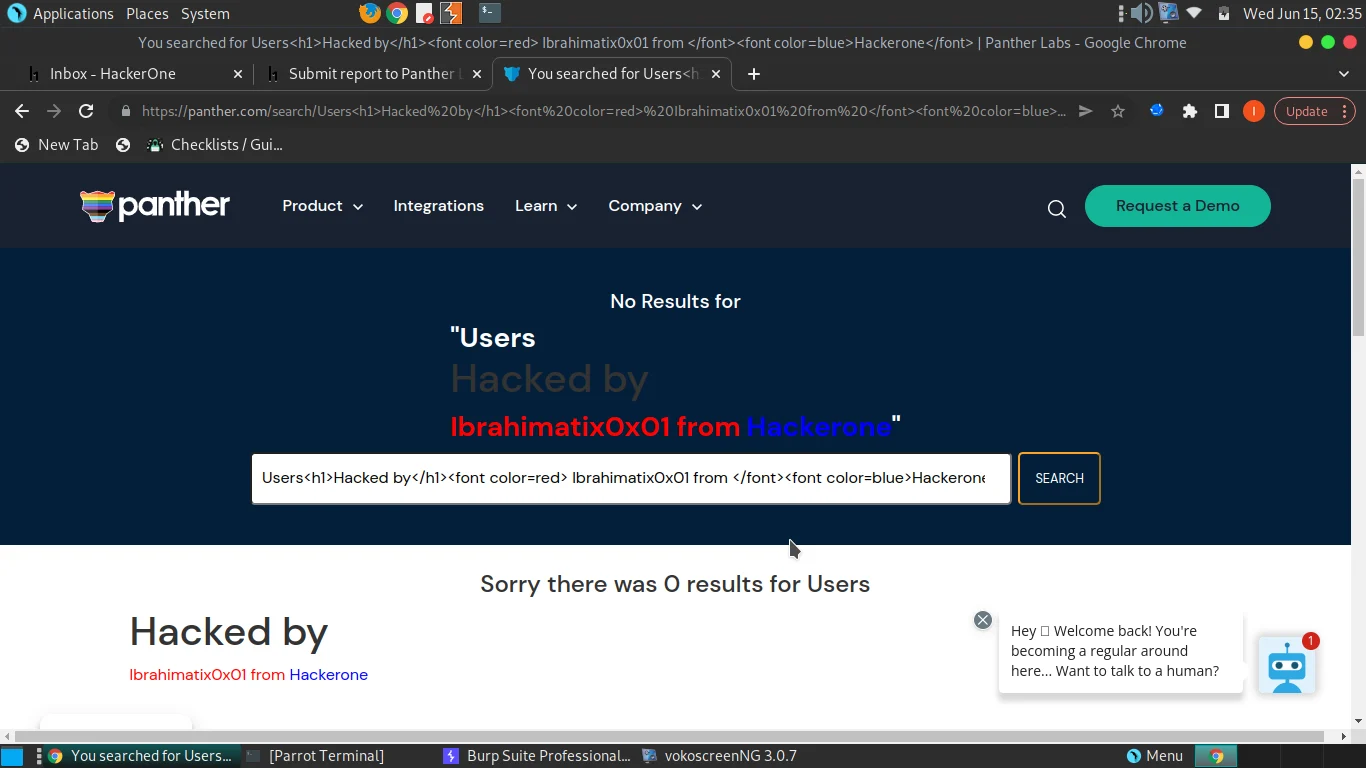
Impact
The vulnerability allow a malicious user to inject html tags and could possibly execute Javascript (if WAF is successfully bypassed)which could lead to steal user's session
What the report shows
The target is Panther Labs, on the asset *.runpanther.io. The researcher notes that visiting runpanther.io redirected to panther.com, and that the application there failed to sanitise user input, which produced HTML injection and a possible XSS. The affected feature is the site search: the search term is reflected back into the page.
The reproduction is a single step. The researcher opened the following URL:
https://panther.com/search/Users%3Ch1%3EHello,%20I%20am%3C/h1%3E%3Cfont%20color=red%3E%20Ibrahimatix0x01%3C/font%3E
The path segment after /search/ is the search term, URL-encoded. Decoded, it is Users<h1>Hello, I am</h1><font color=red> Ibrahimatix0x01</font>. The report says that the HTML in the search form is then executed by the browser, meaning the tags are rendered as markup rather than shown as text.
The report classifies the issue as HTML injection with possible XSS. The platform records it as a medium-severity report under the weakness "Improper Neutralization of Script-Related HTML Tags in a Web Page (Basic XSS)", disclosed on 23 July 2022. The report itself gives no bounty amount and no details of a fix.
Root cause
The report says the application failed to sanitise user input, so the HTML in the search term was executed by the browser. Because the value is placed in the page as markup, any tags in the term are interpreted by the browser. The report demonstrates this with heading and font tags, which change the rendered page.
Impact
The report's own framing is careful: the injection allows a malicious user to insert HTML tags, and could possibly execute JavaScript if the WAF is successfully bypassed. That bypass is not demonstrated. The stated consequence of successful script execution is theft of a user's session.
So the confirmed impact is HTML injection into the search results page. Script execution is conditional on getting past a web application firewall, and the report does not show that happening.
How this kind of bug works
Reflected XSS happens when an application copies a value from the request into the response without context-appropriate encoding. The browser cannot tell data from markup: if the value lands between tags, a < starts an element; inside an attribute, a quote ends the attribute; inside a script block, the rules differ again. Encoding must match the context, which is why a single generic escape is not enough.
The usual defences are output encoding at the point of use, a restrictive Content Security Policy that blocks inline script, and input validation where a value has a known shape. A WAF can reduce the chance of a payload arriving, but it is a filter in front of the application, not a fix for the missing encoding, and filters are routinely bypassed with alternative syntax, encodings or browser quirks.
How to test for it
- Find every place a request value appears in a response: query parameters, path segments, fragment-driven routes, form fields, error messages, redirect targets and search pages. Path-based reflection, as here, is easy to overlook because testers focus on query strings.
- Send a unique alphanumeric marker first and locate every occurrence in the response body, including inside attributes, JavaScript strings and JSON embedded in the page.
- Replace the marker with harmless markup such as a heading or a pair of italic tags. If the browser renders the element rather than showing the characters, the value is being interpreted as HTML.
- Determine the context of each reflection and test the syntax that fits it: a tag break for HTML text, an attribute break for values inside attributes, a string break for values inside script blocks.
- Only then try to prove script execution, and record the exact request and the browser behaviour.
A positive result is markup from the request being rendered as markup. Common false positives are reflections that are already encoded (the response contains < and the browser shows the literal characters), values that appear only in a context where the characters cannot break out, payloads that are blocked by a filter while the underlying encoding is still absent, and self-XSS where the input only affects the sender's own view with no way to deliver it to another user.
How it is fixed
Encode the reflected value for the context it is written into: HTML-entity encoding for text and attribute values, JavaScript-safe encoding inside script blocks, and URL encoding inside URLs. Where the value has a known format, validate it against that format and reject anything else. Add a Content Security Policy that disallows inline script as defence in depth. A WAF rule can be added as an extra layer, but the encoding fix is the one that removes the bug.
Hunting notes
Search pages, 404 and error pages, login and redirect flows, and any route that puts user input into the path are common places for reflection. Single-page applications that read the route and render it into the DOM are worth attention, as are pages that echo a term into a "no results for X" message.
Recon signals include parameters or path segments whose values reappear in the HTML, endpoints that return the same page for arbitrary paths, and responses where the reflected value sits in an attribute or a script block rather than plain text. Comparing the raw response with the rendered page quickly shows whether encoding is applied.
To make a report accepted, show the exact request, the exact response fragment where the value lands, and the browser rendering the injected markup. If script execution is claimed, demonstrate it end to end rather than describing it as possible, and explain who else is affected and how a victim would be made to trigger it.
What happened, in plain words
Panther Labs runs a security product, and this report is about a website connected to it. The researcher found that the site's search feature did not sanitise user input, so HTML in the search term was executed by the browser. That means a visitor could put pieces of web page code into the search box, and the browser would treat those pieces as real page instructions instead of as plain text.
This kind of flaw is called HTML injection. HTML is the language web pages are written in: tags like <h1> mark a heading, and <font> changes text colour. Normally a search box should show what you typed as text, so if you type <h1>, you should see the literal characters <h1> on screen. Here, the site did not do that. It let the tags take effect.
The researcher also notes that visiting runpanther.io redirected to panther.com, so the search feature being tested lives on panther.com. The report is filed against the asset *.runpanther.io.
What the report shows
The affected feature is the site search. The search term is placed in the address of the page itself, after /search/, rather than in a normal search box. The researcher opened this URL:
https://panther.com/search/Users%3Ch1%3EHello,%20I%20am%3C/h1%3E%3Cfont%20color=red%3E%20Ibrahimatix0x01%3C/font%3E
Let us take it apart. Everything after /search/ is the search term, written in a form called URL encoding. In a web address, some characters have special meanings, so they are written as a percent sign followed by two characters. %3C means <, %3E means >, and %20 means a space. Decoded, the term is:
So the term contains a heading tag (<h1>...</h1>) and a font tag that sets the colour to red. If the site had shown this as text, the visitor would see the angle brackets and tag names. Instead, the report says the browser executed the HTML in the search form, meaning it drew a heading and red text on the page.
The report calls the issue HTML injection with possible XSS. XSS, or cross-site scripting, is when an attacker gets their own code (usually JavaScript, the language that makes pages interactive) to run inside another person's browser session on a site. The platform records this as a medium-severity report, under the weakness "Improper Neutralization of Script-Related HTML Tags in a Web Page (Basic XSS)", disclosed on 23 July 2022. The report gives no bounty amount and no details of a fix.
Why it matters
The report's own wording is careful. It says a malicious user can inject HTML tags, and could possibly execute JavaScript if the WAF is successfully bypassed. A WAF, or web application firewall, is a filter that sits in front of a website and tries to block suspicious requests. The report does not show that bypass happening, so the confirmed result is HTML injection into the search results page. Script execution is described as conditional.
The stated consequence of successful script execution is theft of a user's session. A session is how a site remembers that you are logged in, usually via a cookie, a small piece of data your browser stores and sends back with each request. If someone else's script could read that cookie, they could act as you.
In general, how this kind of bug works
Reflected XSS happens when an application copies a value from the request into the response without encoding it for the place it lands. Think of a noticeboard where a clerk copies whatever you hand them onto the board without checking it: if you hand them a fake official stamp, it goes on the board looking official. The browser cannot tell data from instructions. If a value lands between tags, a < starts a new element. Inside an attribute, a quote can end the attribute early. Inside a script block, different rules apply again. That is why encoding must match the context, and why one generic escape is not enough.
The usual defences are output encoding at the point of use, a restrictive Content Security Policy (a header that tells the browser which scripts may run, and blocks inline ones), and input validation where a value has a known shape. A WAF reduces the chance of a payload arriving, but it is a filter in front of the application, not a fix for the missing encoding, and filters are routinely bypassed with alternative syntax, encodings or browser quirks.
In general, how to test for it
- Find every place a request value appears in a response: query parameters, path segments, form fields, error messages, redirect targets and search pages. Path-based reflection, as here, is easy to overlook because testers focus on query strings.
- Send a unique marker first and locate every occurrence in the response body, including inside attributes, JavaScript strings and JSON embedded in the page.
- Replace the marker with harmless markup such as a heading or a pair of italic tags. If the browser renders the element rather than showing the characters, the value is being interpreted as HTML.
- Work out the context of each reflection and test the syntax that fits it: a tag break for HTML text, an attribute break for values inside attributes, a string break for values inside script blocks.
- Only then try to prove script execution, and record the exact request and the browser behaviour.
A positive result is markup from the request being rendered as markup. Common false positives are reflections that are already encoded (the response contains < and the browser shows the literal characters), values that appear only where the characters cannot break out, payloads blocked by a filter while the underlying encoding is still absent, and self-XSS, where the input only affects the sender's own view with no way to deliver it to another user.
In general, how it is fixed
Encode the reflected value for the context it is written into: HTML-entity encoding for text and attribute values, JavaScript-safe encoding inside script blocks, and URL encoding inside URLs. Where the value has a known format, validate it against that format and reject anything else. Add a Content Security Policy that disallows inline script as defence in depth. A WAF rule can be added as an extra layer, but the encoding fix is the one that removes the bug.
In general, where to look
Search pages, 404 and error pages, login and redirect flows, and any route that puts user input into the path are common places for reflection. Single-page applications that read the route and render it into the page are worth attention, as are pages that echo a term into a "no results for X" message. Comparing the raw response with the rendered page quickly shows whether encoding is applied.
To make a report accepted, show the exact request, the exact response fragment where the value lands, and the browser rendering the injected markup. If script execution is claimed, demonstrate it end to end rather than describing it as possible, and explain who else is affected and how a victim would be made to trigger it.
Glossary
- HTML: the language web pages are written in, using tags such as
<h1>for a heading. - HTML injection: when user input containing HTML tags is placed into a page so the browser treats the tags as real markup.
- XSS (cross-site scripting): when an attacker's code runs inside another user's browser session on a website.
- Reflected XSS: XSS where the malicious value is sent in a request and immediately copied back into the response page.
- JavaScript: the programming language that makes web pages interactive and runs in the browser.
- URL encoding: writing special characters in a web address as a percent sign plus two characters, such as
%3Cfor<. - Path segment: a part of a web address between slashes, such as the search term after
/search/. - Sanitise / encode: to convert user input so the browser shows it as text rather than treating it as instructions.
- Context: the place in a page where a value lands (between tags, inside an attribute, inside a script), which decides what encoding is needed.
- WAF (web application firewall): a filter in front of a website that tries to block suspicious requests.
- Bypass: getting a payload past a filter such as a WAF.
- Session: how a site remembers you are logged in, usually via a cookie.
- Cookie: a small piece of data a browser stores for a site and sends back with each request.
- Content Security Policy: a response header that tells the browser which scripts may run and can block inline script.
- Self-XSS: a flaw where the input only affects the sender's own view, with no way to deliver it to someone else.
- False positive: a test result that looks like a bug but is not one.
- Severity: a rating of how serious a vulnerability is, here medium.