Open redirect protection (https://www.pixiv.net/jump.php) is broken for novels
The open redirect protection that wraps external links in a jump page was not applied to links inside novels, even though the preview showed it was. An attacker could craft a novel link that displays a trusted-looking URL but actually redirects the victim to an arbitrary external site.
 Originally disclosed on HackerOne
- Triaged in 4 days
- Fixed in 4 months
- Paid in 4 days
- Disclosed after 5 months
Summary:
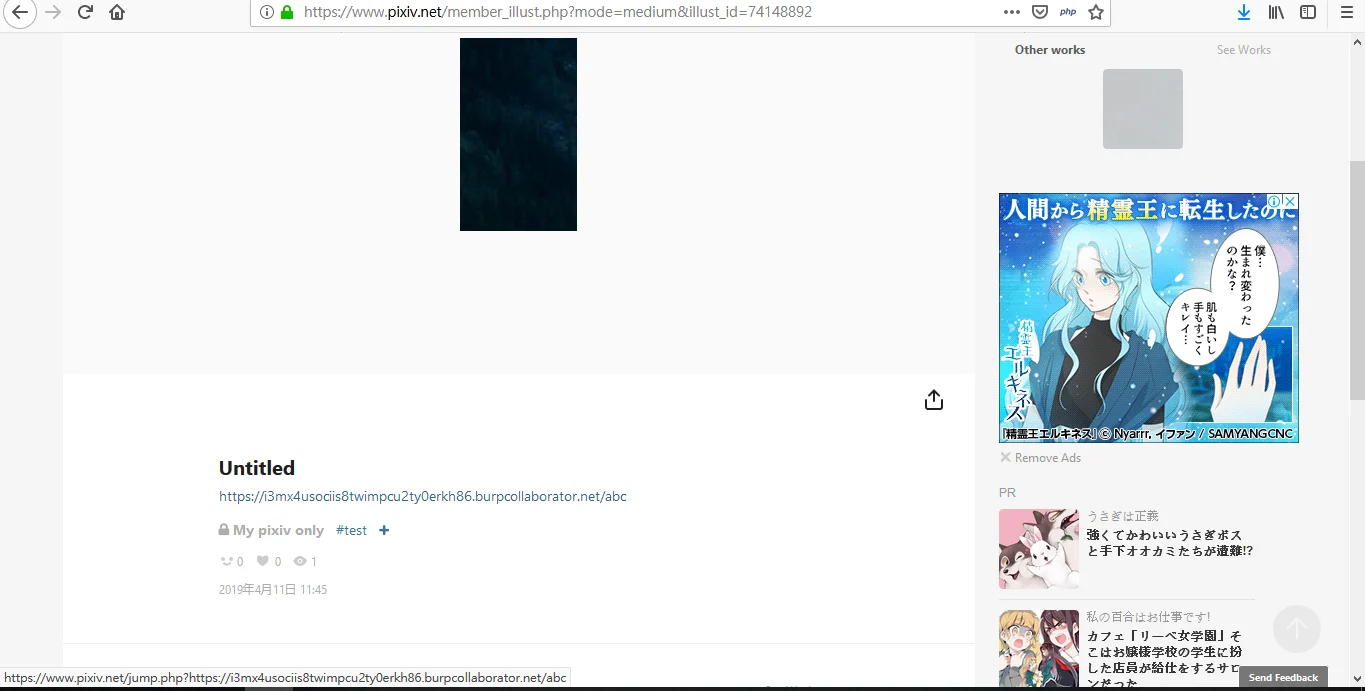
I found that pixiv has a open redirect protection, any external link in illustration is converted to https://www.pixiv.net/jump.php?<link provided by user>. For example https://i3mx4usociis8twimpcu2ty0erkh86.burpcollaborator.net/abc in https://www.pixiv.net/member_illust.php?mode=medium&illust_id=74148892 is converted to https://www.pixiv.net/jump.php?https%3A%2F%2Fi3mx4usociis8twimpcu2ty0erkh86.burpcollaborator.net%2Fabc. See the attachment "illust.png".
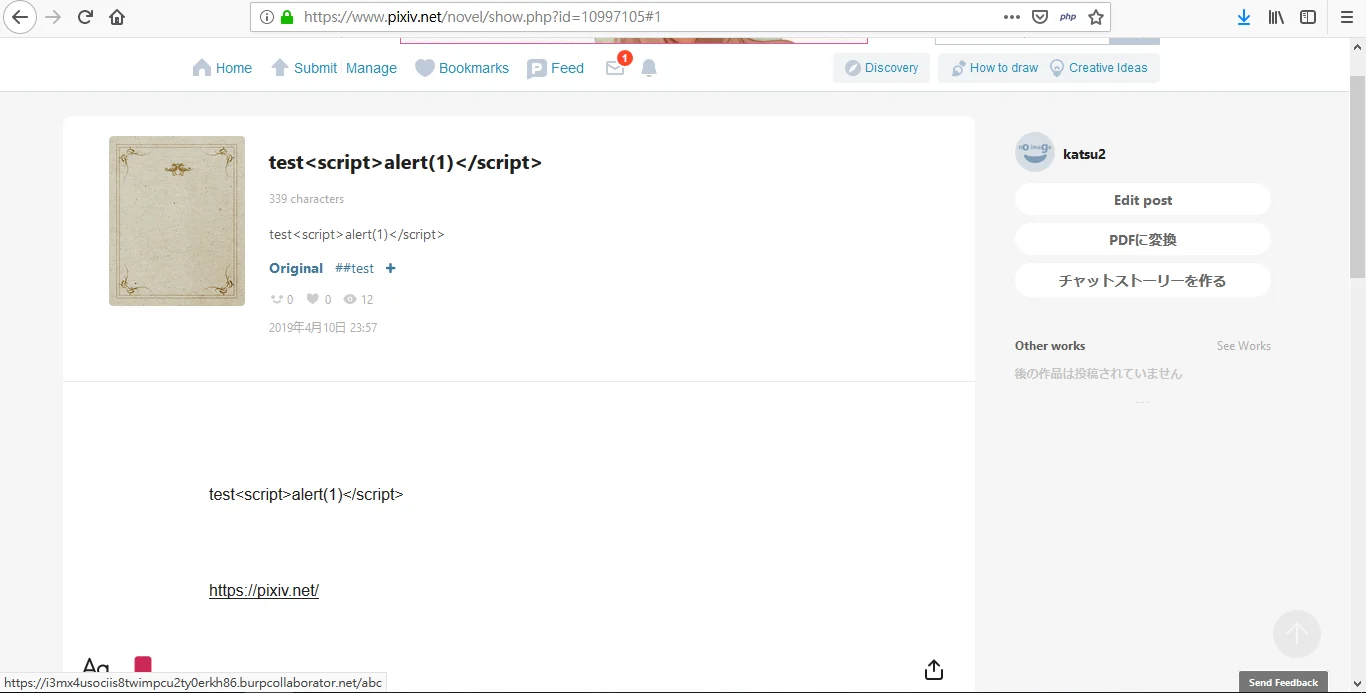
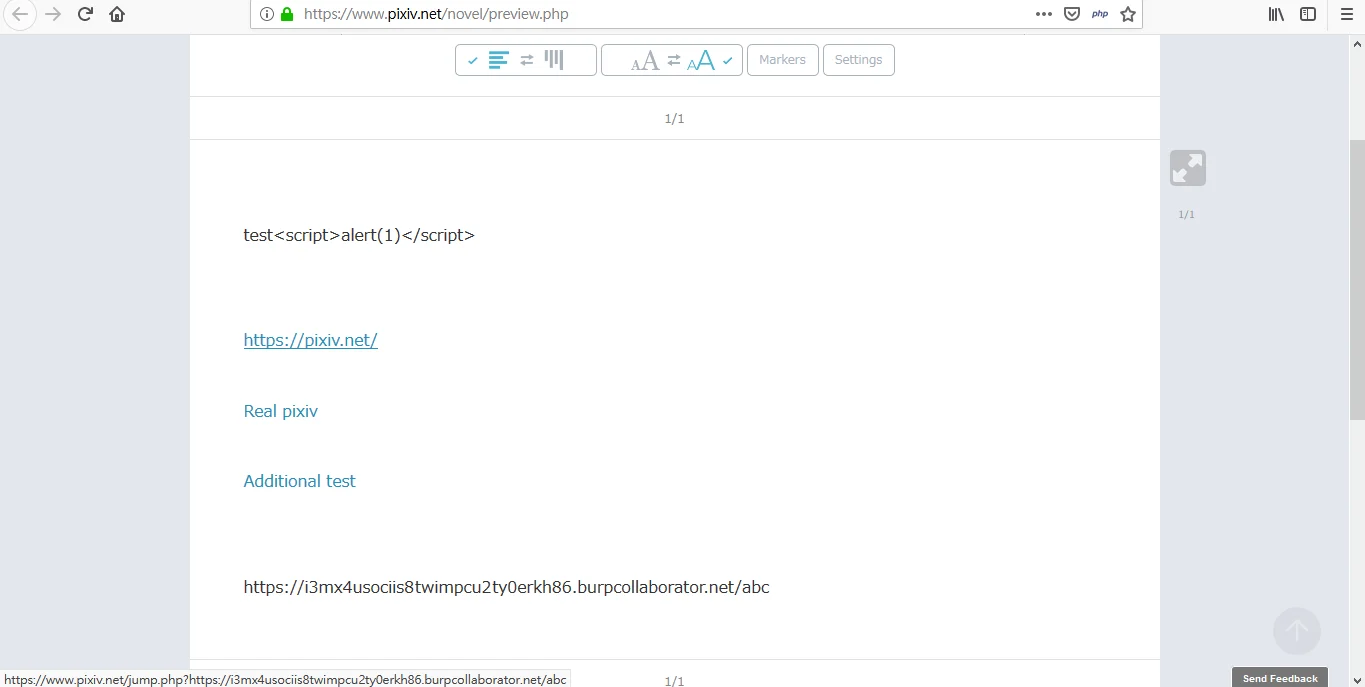
However, that is not true for novels. Links in novel is shown to be converted to jump.php link in preview (see attachment "preview.png") but they actually aren't. See https://www.pixiv.net/novel/show.php?id=109971051 and "novel.png" for an example.
Since the "jump.php" protection mechanism is working for illusts and the preview of novels, I think lacking this protection for novels is not an intended behavior.
Steps To Reproduce:
- Add a novel
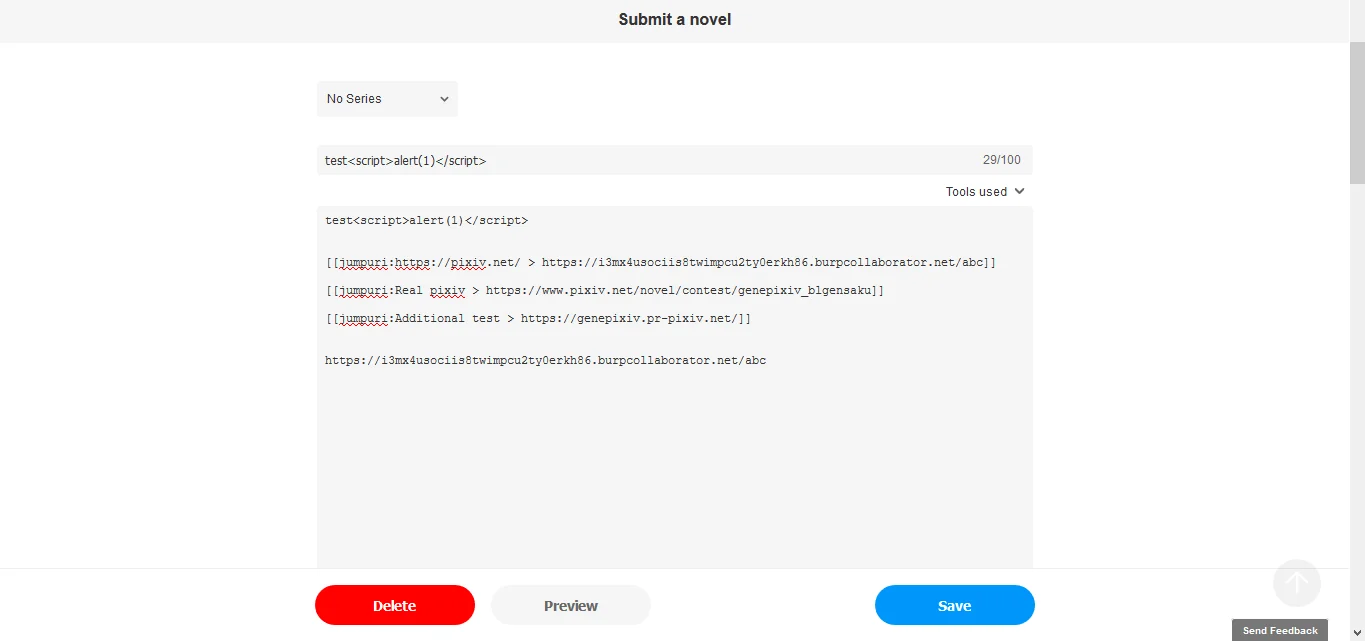
- Choose "Add URL" and edit the content to something like
[[jumpuri:https://pixiv.net/ > https://i3mx4usociis8twimpcu2ty0erkh86.burpcollaborator.net/abc]] - Save
- You will see a link in the novel which reads
https://pixiv.net/but actually it ishttps://i3mx4usociis8twimpcu2ty0erkh86.burpcollaborator.net/abc. Seehttps://www.pixiv.net/novel/show.php?id=10997105for your reference.
Impact
Faking users to the wrong site
Attachments
Context
pixiv is a platform where users publish illustrations and novels. Both content types can contain external links, and the site runs an open redirect protection for them: any external link is rewritten to go through https://www.pixiv.net/jump.php?<link provided by user>, so that the destination is reached via an intermediate page on the pixiv domain rather than directly.
The researcher found that this protection is applied to links in illustrations and to the preview of novels, but not to the links that are actually rendered when a novel is viewed.
Setup
No special accounts, roles, tools or versions are described. The researcher used a Burp Collaborator host (i3mx4usociis8twimpcu2ty0erkh86.burpcollaborator.net) as the external destination to demonstrate the redirect, and created a novel on the site to test the behaviour.
Finding it
The starting observation is that the protection works for illustrations. In an illustration page such as https://www.pixiv.net/member_illust.php?mode=medium&illust_id=74148892, an external link like https://i3mx4usociis8twimpcu2ty0erkh86.burpcollaborator.net/abc is converted to:
https://www.pixiv.net/jump.php?https%3A%2F%[redacted].burpcollaborator.net%2Fabc
The illustration case shows the expected behaviour: the destination is URL-encoded and passed as the query string of jump.php.
For novels, the situation is different. In the preview of a novel, links are shown as converted to a jump.php link, but when the novel is actually viewed they are not. The researcher points to https://www.pixiv.net/novel/show.php?id=109971051 as an example.
Because the jump.php mechanism works for illustrations and for the preview of novels, the researcher concluded that the lack of protection for novels is not intended behaviour.
Exploitation
Step 1: Add a novel
Create a novel on the site.
Step 2: Insert a link with the "Add URL" editor
Choose "Add URL" and edit the content to something like:
[[jumpuri:https://pixiv.net/ > https://i3mx4usociis8twimpcu2ty0erkh86.burpcollaborator.net/abc]]
The report shows this markup but does not explain its syntax. Here the visible text is https://pixiv.net/ while the real target is the Burp Collaborator host.
Step 3: Save
Save the novel.
Step 4: View the novel
The rendered novel contains a link that reads https://pixiv.net/ but actually points to https://i3mx4usociis8twimpcu2ty0erkh86.burpcollaborator.net/abc. The researcher gives https://www.pixiv.net/novel/show.php?id=10997105 as a reference.
Root cause
The report does not describe the implementation. What it establishes is that the jump.php rewriting is applied to illustration links and to the novel preview, but not to the links rendered on the novel view page. The rendered link can show a pixiv URL while pointing elsewhere. The existing defence, the jump.php wrapper, is simply not applied on that rendering path.
Impact
A novel author can make a link display one URL while sending the reader to a different site. The researcher describes the impact as faking users to the wrong site. The report does not go into further consequences such as credential phishing or malware distribution.
Fix
The report does not state what was changed.
Variants to test
- Try the same two-value link markup in other content types on the site (comments, profiles, messages) and check whether the rendered link goes through
jump.php. - Compare preview rendering with final rendering for each content type: a link that is wrapped in preview but not after saving is a strong signal.
- Check whether the displayed text can be set to a trusted-looking domain while the destination is external, as in the
[[jumpuri:... > ...]]example. - Test whether the
jump.phpwrapper itself can be bypassed by encoding or by nesting a URL inside the query string.
Hunting notes
This kind of bug tends to hide where the same content is rendered by more than one code path: a preview, an editor and a public view page can each apply link sanitisation differently. During recon, look for a redirect or interstitial endpoint on the target domain (here jump.php) and then check every place a user-supplied link can appear, comparing what the preview shows with what the saved page actually contains. The researcher showed a link whose visible text was a pixiv URL but whose destination was an external host, and contrasted the working illustration case with the broken novel case to argue the gap was unintended. The report was rated low severity and paid a 200 USD bounty.
Attachments
What happened, in plain words
pixiv is a website where people publish artwork (called illustrations) and written stories (called novels). Both kinds of content can contain links to other websites. Because a link can send a reader anywhere, pixiv has a safety feature: instead of letting a link go straight to an outside site, the site rewrites it so it first passes through a page on pixiv's own address, jump.php. That page then forwards the reader onward. This is called an open redirect protection.
The researcher found that this protection works for links in illustrations, and it even appears to work in the preview of a novel, but it is not applied to the links that are actually shown when someone reads the finished novel. So a novel author can write a link that displays one address (for example a pixiv address) while really sending the reader to a completely different website. The researcher calls the impact "faking users to the wrong site".
The report was rated low severity and paid a 200 USD bounty.
Background you need first
A few everyday ideas make the rest easy to follow.
- A link (URL) is the address you click to go somewhere on the web, like a street address for a page. The part before the first single slash is the domain, the name of the site, for example
www.pixiv.net. - An open redirect is when a website lets you put any destination into a link on its own domain, so the link looks like it belongs to that site but takes you elsewhere. Think of a hotel reception that will forward your post to any address you write on the envelope: the envelope carries the hotel's name, but the letter ends up wherever the sender chose.
- URL encoding is a way of writing special characters so they can travel safely inside a web address. For example a colon
:becomes%3Aand a slash/becomes%2F. It is like spelling out a word letter by letter so nothing gets misread. - A query string is the part of a web address after a question mark
?. It carries extra information to the page, for examplejump.php?something. Here the "something" is the destination the reader should be sent to. - A preview is the draft view an author sees before publishing, showing roughly how the content will look.
- Burp Collaborator is a service used by security testers that gives them a domain they control, so they can see whether a request actually reaches an outside server. The researcher used the host
i3mx4usociis8twimpcu2ty0erkh86.burpcollaborator.netas the "outside website" in the demonstration.
The starting observation: illustrations are protected
The researcher began by looking at how links behave in an illustration. On an illustration page such as https://www.pixiv.net/member_illust.php?mode=medium&illust_id=74148892, an external link like https://i3mx4usociis8twimpcu2ty0erkh86.burpcollaborator.net/abc is converted to:
https://www.pixiv.net/jump.php?https%3A%2F%[redacted].burpcollaborator.net%2Fabc
Line by line, in plain words:
- The first part,
https://www.pixiv.net/jump.php?, is pixiv's own forwarding page. Every protected link starts here, so the reader stays on the pixiv domain for one step. - Everything after the
?is the original destination, but written in URL-encoded form:https%3A%2F%2Fis the encodedhttps://, and%2Fstands for each/. - The destination is encoded and passed as the query string of
jump.php.
This is the expected, working behaviour: the destination is encoded and passed as the query string of jump.php. The illustration screenshot shows it happening.
Where it breaks: novels
For novels the situation is different. In the preview of a novel, links are shown as converted to a jump.php link, but when the novel is actually viewed they are not. The researcher points to https://www.pixiv.net/novel/show.php?id=109971051 as an example.
The preview shows the link converted to a jump.php link, but when the novel is viewed it is not. Because the jump.php mechanism works for illustrations and for the preview of novels, the researcher concluded that the lack of protection for novels is not intended behaviour. In other words, the site already knows how to do this; it just forgets to do it on the page where readers actually click.
Reproducing it step by step
Step 1: Add a novel
Create a novel on the site. This gives you a piece of content of your own to experiment with, so you can see exactly what the site does with the links you write.
Step 2: Insert a link with the "Add URL" editor
Choose "Add URL" and edit the content to something like:
[[jumpuri:https://pixiv.net/ > https://i3mx4usociis8twimpcu2ty0erkh86.burpcollaborator.net/abc]]
Line by line, in plain words:
[[jumpuri:opens a special markup instruction that tells pixiv "make a link here". Markup is a small code-like notation used inside text to describe formatting.https://pixiv.net/is the first value. It is the text the reader will see on the page.>is the separator between the two values.https://i3mx4usociis8twimpcu2ty0erkh86.burpcollaborator.net/abcis the second value, the real destination the reader is sent to when they click.]]closes the instruction.
So the markup takes two values separated by >: the first is the text shown to the reader, the second is the actual destination. Here the visible text is https://pixiv.net/ while the real target is the Burp Collaborator host. This is the heart of the trick: the label on the door and the room behind it are chosen separately.
Step 3: Save
Save the novel. Saving is what turns the draft into the published page, and it is the published page that matters, because that is what readers see.
Step 4: View the novel
The rendered novel contains a link that reads https://pixiv.net/ but actually points to https://i3mx4usociis8twimpcu2ty0erkh86.burpcollaborator.net/abc. The researcher gives https://www.pixiv.net/novel/show.php?id=10997105 as a reference. The link reads https://pixiv.net/ but points to the external host.
Why it happens
The report does not describe the implementation. What it establishes is that the jump.php rewriting is applied to illustration links and to the novel preview, but not to the links rendered on the novel view page. The rendered link can show a pixiv URL while pointing elsewhere. The existing defence, the jump.php wrapper, is simply not applied on that rendering path.
A useful comparison: the same letter is checked at the front desk (the preview) but handed out unchecked at the back door (the published page). The check exists; it is just skipped on one route.
Impact
A novel author can make a link display one URL while sending the reader to a different site. The researcher describes the impact as faking users to the wrong site. The report does not go into further consequences such as credential phishing or malware distribution.
Fix
The report does not state what was changed.
Variants to test
These are follow-up ideas in the same spirit, useful if you want to look for similar gaps:
- Try the same two-value link markup in other content types on the site (comments, profiles, messages) and check whether the rendered link goes through
jump.php. - Compare preview rendering with final rendering for each content type: a link that is wrapped in preview but not after saving is a strong signal.
- Check whether the displayed text can be set to a trusted-looking domain while the destination is external, as in the
[[jumpuri:... > ...]]example. - Test whether the
jump.phpwrapper itself can be bypassed by encoding or by nesting a URL inside the query string.
Hunting notes
This kind of bug tends to hide where the same content is rendered by more than one code path: a preview, an editor and a public view page can each apply link sanitisation differently. Sanitisation means cleaning up user input so it cannot do something unwanted. During recon, meaning the early exploration of a target, look for a redirect or interstitial endpoint on the target domain (here jump.php) and then check every place a user-supplied link can appear, comparing what the preview shows with what the saved page actually contains. The researcher showed a link whose visible text was a pixiv URL but whose destination was an external host, and contrasted the working illustration case with the broken novel case to argue the gap was unintended.
Attachments
Glossary
- URL (link): the address of a page or resource on the web, for example
https://www.pixiv.net/. - Domain: the name of a website, the part of a URL before the first single slash, such as
www.pixiv.net. - Open redirect: a weakness where a site lets a link on its own domain forward the visitor to any destination chosen by the link author.
- Open redirect protection: a defence that routes outgoing links through an intermediate page on the site's own domain, here
jump.php, instead of linking straight out. jump.php: pixiv's forwarding page; a protected link points here first, with the real destination attached as a query string.- Query string: the part of a URL after a
?, carrying extra data to the page. - URL encoding: writing special characters in a URL as
%codes, for example%3Afor:and%2Ffor/. - Illustration: pixiv's term for a piece of artwork published on the site.
- Novel: pixiv's term for a written story published on the site.
- Preview: the draft view of content before or while it is published, showing roughly how it will look.
- Rendered: the final form of content as the browser displays it, after the site has processed the author's input.
- Markup: a small code-like notation inside text that describes formatting or behaviour, such as
[[jumpuri:...]]. jumpuri: the markup instruction used in novels to create a link, taking the displayed text and the destination separated by>.- Burp Collaborator: a testing service that provides a domain the tester controls, used to confirm that a request actually reaches an outside server.
- Sanitisation: cleaning user-supplied input so it cannot cause unwanted behaviour.
- Recon: the early exploration phase of a security test, mapping out what a site does and where its features live.
- Severity: a rating of how serious a bug is; here it was rated low.
- Bounty: a reward paid by a company to a researcher who reports a valid security issue.