Disclose Hidden Comments on Media Section of hub.vroid.com
A user could disable comments on their media post, hiding them from everyone except the admin. However, an attacker could like a hidden comment by its ID and the server response revealed the comment's content and owner, allowing disclosure of hidden comments on any post.

- Triaged in 32 days
- Fixed in 48 days
- Paid in 38 days
- Disclosed after 19 months
I discovered a vulnerability related to hidden comments in the Media section on https://hub.vroid.com. Initially, a user allowed comments on their media post but later disable them, making all comments invisible to everyone except the admin. However, by intercepting a request where a user can like any comment with a specific ID, I found that it is possible to like hidden comments by inputting their IDs. The response from the server not only confirms the like action but also reveals the content of the hidden comment, which should only be visible to the original poster of this media. This vulnerability in the endpoint allows unauthorized disclosure of hidden comments on any posts in the Media section.
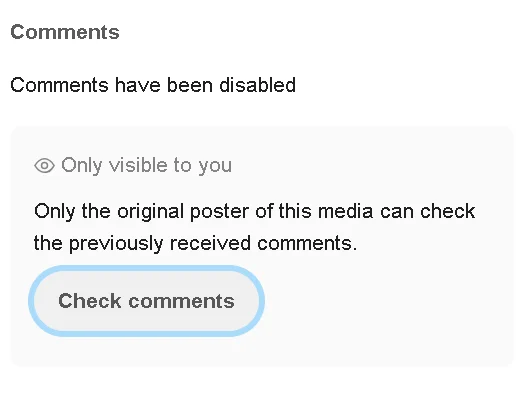
Steps To Reproduce:
UserAttacker UserVictim
- Create two random accounts on https://accounts.pixiv.net/
- Login then both on https://hub.vroid.com
- From UserVictim navigate to submit character and submit a character then scroll down you will see:
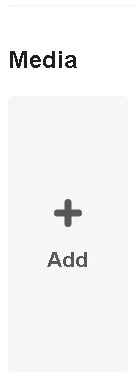
- Upload media here and allow comments
- Post any random comment then disable comments section on the media of the UserVictim
- From UserVictim we need to get the comment ID to use it later (this step only for testing, real attack dont need this step), for that, click ctrl + U to view the page source then ctrl + F and search for entityIds
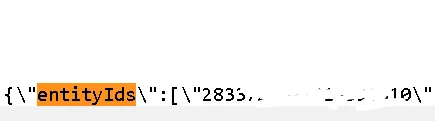
- Save the comment ID to use it later.
- From UserAttacker, intercept any POST request made to https://hub.vroid.com/ and send it to the repeater
- Update the POST request URL and parameter to the below:
POST /api/statuses/PASTE_ID_HERE/hearts HTTP/2
Host: hub.vroid.com
Cookie: ATTACKER_COOKIES
Sec-Ch-Ua: "Opera";v="109", "Not:A-Brand";v="8", "Chromium";v="123"
Accept: application/json, text/plain, */*
Content-Type: application/json
X-Api-Version: 11
Sec-Ch-Ua-Mobile: ?0
Content-Length: 2

{}
- Send the request, and you will find the content of the comment and its owner in the response. In this case, the attacker will be able to disclose any hidden comment.
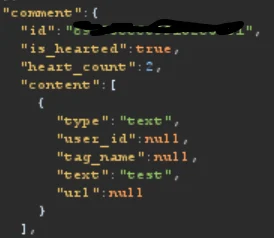
Impact
This vulnerability allows an attacker to disclose hidden comments of any user due to a vulnerable endpoint. These hidden comments should only be visible to the admin.
Context
pixiv runs a service called Vroid Hub at hub.vroid.com, a place where users publish characters and attach media to them. Media posts on the hub can carry a comment section, and the owner of a post controls whether that section is open. When comments are enabled, anyone can read and interact with them. When the owner turns comments off, the comments become invisible to everyone except the administrator.
The report describes an Insecure Direct Object Reference in the endpoint that registers a "heart" (a like) on a comment. The endpoint takes the comment identifier from the URL, and the server accepted IDs for comments the caller should not be able to see. Because the response echoes the comment back, a hidden comment can be read by anyone who knows its ID.
Setup
The researcher used two ordinary accounts, one acting as the attacker and one as the victim. The preconditions are:
- Two accounts created on
https://accounts.pixiv.net/. - Both accounts logged in to
https://hub.vroid.com. - A media post owned by the victim that had comments enabled at some point and was later switched to disabled, so that comments exist but are hidden.
The only capability the attacker needs is the ability to send an authenticated request to the hub, which any logged-in user has.
Finding it
The starting observation is about the lifecycle of the comment setting. A user can allow comments on a media post and later disable them. Disabling does not delete the comments; it makes them invisible to everyone except the admin. The researcher then looked at a request a normal user makes when liking a comment, one that carries a specific comment ID, and noticed that the server accepted IDs for comments the caller should not be able to see. The response did not merely acknowledge the like: it returned the content of the hidden comment. That mismatch between what the caller is authorised to read and what the endpoint returns is the bug.
Exploitation
Step 1: Prepare the two accounts
Create two random accounts on https://accounts.pixiv.net/ and log both of them in to https://hub.vroid.com. One is the attacker, the other the victim.
Step 2: Create a media post as the victim
From the victim account, navigate to submit character, submit a character, and scroll down. The media upload area appears there.
Step 3: Add a comment, then hide the section
Upload media on that page and allow comments. Post any random comment, then disable the comment section on the victim's media. The comment now exists but is hidden from everyone except the admin.
Step 4: Obtain the comment ID
For testing purposes the researcher read the comment ID from the victim's own view of the page. This step is only for testing; a real attack does not need it, because the attacker supplies IDs directly. To do it, press Ctrl+U to view the page source, then Ctrl+F and search for entityIds.
Save the comment ID for the next step.
Step 5: Send the heart request as the attacker
From the attacker account, intercept any POST request made to https://hub.vroid.com/ and send it to the repeater. Change the URL and parameters to the following, substituting the comment ID and the attacker's own cookies:
POST /api/statuses/PASTE_ID_HERE/hearts HTTP/2
Host: hub.vroid.com
Cookie: ATTACKER_COOKIES
Sec-Ch-Ua: "Opera";v="109", "Not:A-Brand";v="8", "Chromium";v="123"
Accept: application/json, text/plain, */*
Content-Type: application/json
X-Api-Version: 11
Sec-Ch-Ua-Mobile: ?0
Content-Length: 2

{}
The comment ID goes into the path segment after /api/statuses/, and the body is an empty JSON object. The request is authenticated with the attacker's session cookie and declares API version 11 through X-Api-Version. Nothing in the request identifies the victim or proves that the attacker is allowed to see the target comment.
Step 6: Read the response
Send the request. The server confirms the like and returns the content of the comment together with its owner. The attacker can therefore disclose any hidden comment whose ID they supply.
Root cause
The endpoint resolves the object named in the URL (/api/statuses/{id}/hearts) and performs the like without checking that the caller is permitted to view that status. Visibility of a comment is a property of the media post's comment setting, but the heart action is authorised only at the level of "is this a logged-in user", not "may this user see this object". The response then serialises the comment, so the missing check turns a write action into a read primitive. The report does not describe the server-side implementation, so the exact location of the missing check is not stated; the behaviour is consistent with an object-level authorisation gap on the status resource.
Impact
An attacker can disclose hidden comments on any post in the Media section, provided they know or can guess the comment ID. These comments are meant to be visible only to the admin. The disclosure is limited to comments whose identifiers the attacker can obtain; the report does not describe any way of enumerating IDs, and its own reproduction step obtains the ID from the victim's page source purely for testing.
Fix
The fix that follows from the finding is to enforce object-level authorisation on the heart endpoint: before acting on a status, check that the caller is allowed to see that status under the current comment setting, and return an error rather than the object when they are not. The same check should apply to the response body, so that a successful like never returns fields the caller could not otherwise read.
Variants to test
- Other actions on the same resource: try endpoints that mutate a comment (edit, delete, report, pin) with an ID the caller should not see, and check whether the response echoes the object.
- Other visibility states: posts that are private, unlisted or draft, rather than comments disabled, and whether the same ID-based access returns their content.
- Identifier handling: supply IDs belonging to other users, other posts, or non-existent values, and compare the responses to see whether the endpoint distinguishes "not found" from "not yours".
- Batch or list endpoints: check whether a request that accepts several IDs returns objects the caller cannot see individually.
- API versioning: replay the same request with different
X-Api-Versionvalues to see whether an older version lacks the check.
A positive result is a response that confirms the action and includes content, such as the comment body or its owner, that the caller cannot see through the normal UI.
Hunting notes
This kind of bug tends to sit on secondary actions attached to an object: likes, hearts, bookmarks, reports and counters. These endpoints are often written as thin wrappers around a lookup by ID, and the developer focuses on the write rather than on what the response returns. Signals during recon are features with a visibility toggle, such as comments that can be disabled, posts that can be made private, or content that becomes hidden after publication, combined with an API that addresses objects by numeric or opaque IDs in the path. If the UI hides an object but the API still accepts its ID, the response body is the place to look.
What happened, in plain words
pixiv runs a website called Vroid Hub at hub.vroid.com. People use it to publish characters they have made, and each character can have media attached to it, such as pictures. Under a media post there can be a comment section, where visitors leave messages. The person who posted the media decides whether that comment section is open or closed.
When comments are open, anyone can read them and interact with them, for example by leaving a like. When the owner closes the comment section, the comments are not deleted. They simply become invisible: only the administrator can still see them.
The researcher found that one specific action on the site, the one that registers a "heart" (a like) on a comment, does not check whether the person sending the request is allowed to see that comment. Worse, the reply from the server contains the text of the comment. So if you know the ID of a hidden comment, you can send a like to it and the server will hand you back the comment's content, even though the website would never show it to you.
This kind of mistake has a name: an Insecure Direct Object Reference, or IDOR. The idea is simple. Imagine a hotel where every room key is just a number written on a card, and the reception never checks whether the room is yours. If you write a different number on your card, the door opens. Here, the "room number" is the comment ID, and the server opens the door without asking whether you are allowed in.
Some background before the steps
A few everyday ideas appear throughout this report, so here they are first.
API. A website like Vroid Hub is not one big page. Behind the scenes, the page in your browser talks to the server using small messages, each asking for one thing: give me this list, save this like, load this picture. That conversation is called the API. Think of a restaurant: the menu and the dining room are the website you see, and the API is the waiter carrying your order to the kitchen and bringing back the plate. When you click a like button, your browser sends one of these messages.
Endpoint. An endpoint is one specific address in that API, one particular thing the waiter can be asked to do. In this report the endpoint is the one that records a heart on a comment. Each endpoint has a shape, and the shape here includes the comment's ID in the address itself.
ID. Every comment, post and user on a site like this has an identifier, a short string of characters that names it uniquely. It is like a ticket number. The website uses IDs internally to know which comment you mean when you click like.
Cookie. When you log in, the server gives your browser a small piece of data called a cookie. Your browser sends it back with every request, and that is how the server recognises you. It works like a wristband at an event: you show it at the door and you are let in without showing your passport again. If someone else gets your cookie, they can act as you, which is why cookies are secret.
Intercepting proxy and repeater. Normally your browser sends a request and you never see it. A proxy is a tool that sits between your browser and the server, so you can look at the request before it leaves and change it if you want. A repeater is a part of such a tool that lets you send the same request again and again, with small edits, and read each reply. Think of it as being able to rewrite a letter before it goes in the postbox, and to post the same letter many times.
POST request. Requests come in kinds. A GET request asks to read something. A POST request asks the server to do something, such as save a like. The heart action is a POST.
JSON. A simple text format for structured data, using curly brackets and colons. {} is an empty JSON object, meaning "no extra data".
CVSS. A standard scoring system for the severity of a security flaw. The report gives this one 4.6, which is medium.
Setting up the test
The researcher used two ordinary accounts: one playing the attacker, one playing the victim. The conditions were:
- Two accounts created on
https://accounts.pixiv.net/. - Both accounts logged in to
https://hub.vroid.com. - A media post owned by the victim that had comments switched on at some point and was later switched off, so that comments exist but are hidden.
The only ability the attacker needs is to send a request while logged in, which every normal user of the site has.
Finding it
The starting point is how the comment setting behaves over time. A user can allow comments on a media post and later disable them. Disabling does not delete anything. It makes the comments invisible to everyone except the admin.
The researcher then watched a request that a normal user makes when liking a comment. That request carries a specific comment ID. The server accepted IDs for comments the person sending the request should not be able to see. And the reply did not just say "like saved": it returned the content of the hidden comment. That gap, between what you are allowed to read and what the server hands back, is the bug.
Exploitation, step by step
Step 1: Prepare the two accounts
Create two random accounts on https://accounts.pixiv.net/ and log both of them in to https://hub.vroid.com. One is the attacker, the other the victim.
Step 2: Create a media post as the victim
From the victim account, go to submit character, submit a character, and scroll down. The media upload area appears there.
Step 3: Add a comment, then hide the section
Upload media on that page and allow comments. Post any random comment, then disable the comment section on the victim's media. The comment now exists but is hidden from everyone except the admin.
That is exactly the situation the bug needs: something that exists, that the website refuses to show you, but that the API still knows about.
Step 4: Obtain the comment ID
For testing purposes the researcher read the comment ID from the victim's own view of the page. This step is only for testing. A real attack does not need it, because the attacker simply supplies IDs directly. To do it, press Ctrl+U to view the page source, then Ctrl+F and search for entityIds.
Ctrl+U opens the raw HTML that the browser received, before it draws the page. The comment ID is written somewhere in that HTML, and searching for the word entityIds finds the spot. Save the ID for the next step.
Why is this only for testing? Because in a real attack the attacker would not have access to the victim's page at all. They would need to know or guess the ID some other way. The report does not describe any way of finding IDs in bulk, so the practical reach of the attack depends on that.
Step 5: Send the heart request as the attacker
From the attacker account, intercept any POST request made to https://hub.vroid.com/ and send it to the repeater. Then change the URL and parameters to the following, putting the comment ID where indicated and the attacker's own cookies where indicated:
POST /api/statuses/PASTE_ID_HERE/hearts HTTP/2
Host: hub.vroid.com
Cookie: ATTACKER_COOKIES
Sec-Ch-Ua: "Opera";v="109", "Not:A-Brand";v="8", "Chromium";v="123"
Accept: application/json, text/plain, */*
Content-Type: application/json
X-Api-Version: 11
Sec-Ch-Ua-Mobile: ?0
Content-Length: 2

{}
Line by line:
POST /api/statuses/PASTE_ID_HERE/hearts HTTP/2is the request line.POSTsays this request asks the server to do something./api/statuses/PASTE_ID_HERE/heartsis the endpoint: the partPASTE_ID_HEREis where the comment ID goes, andheartsis the action, adding a like.HTTP/2is the version of the language the browser and server speak.Host: hub.vroid.comtells the server which website the request is for. One server can host many sites, so it needs to know which one you mean.Cookie: ATTACKER_COOKIESis where the attacker's login cookie goes. This is what makes the server treat the request as coming from the attacker's account. It is a secret, so in a real test you would paste your own value and never share it.Sec-Ch-Ua: "Opera";v="109", "Not:A-Brand";v="8", "Chromium";v="123"is a header in which the browser describes itself. It says the browser is Opera 109, built on Chromium 123. It is not needed for the attack; it is simply what the intercepted request contained.Accept: application/json, text/plain, */*tells the server which reply formats the client can handle, here JSON first, then plain text, then anything.Content-Type: application/jsonsays the body of the request is JSON.X-Api-Version: 11declares which version of the API the client is using. Sites version their APIs so old clients keep working while new behaviour is added.Sec-Ch-Ua-Mobile: ?0says the browser is not on a mobile device.Content-Length: 2says the body is two bytes long, which matches{}.- The empty line separates the headers from the body.
{}is the body: an empty JSON object. The like needs no extra information, because everything the server needs, the comment ID, is already in the URL.
Notice what is missing. Nothing in this request says who the victim is, and nothing proves the attacker is allowed to see the target comment. The only thing identifying the comment is the ID in the URL, and the only thing identifying the caller is the cookie.
Step 6: Read the response
Send the request. The server confirms the like and returns the content of the comment together with its owner. The attacker can therefore disclose any hidden comment whose ID they supply.
This is the moment the bug becomes visible. A normal like would get back a short confirmation. Instead the reply carries the comment text and the person who wrote it, information the website deliberately hides from everyone but the admin.
Why it works
The endpoint looks up the object named in the URL, /api/statuses/{id}/hearts, and records the like without checking whether the caller is allowed to view that status. Whether a comment is visible depends on the media post's comment setting, but the heart action is only checked at the level of "is this a logged-in user", not "may this user see this object". The reply then includes the comment itself, so a missing check on a write action turns into a way to read.
The report does not describe how the server is built, so the exact place where the check is missing is not stated. The behaviour fits an authorisation gap at the level of the individual object.
Impact
An attacker can disclose hidden comments on any post in the Media section, as long as they know or can guess the comment ID. These comments are meant to be visible only to the admin.
The disclosure is limited to comments whose identifiers the attacker can obtain.
Fix
The fix that follows from the finding is to enforce object-level authorisation on the heart endpoint: before acting on a status, check that the caller is allowed to see that status under the current comment setting, and return an error rather than the object when they are not. The same check should apply to the response body, so that a successful like never returns fields the caller could not otherwise read.
Variants to test
- Other actions on the same resource: try endpoints that change a comment (edit, delete, report, pin) with an ID the caller should not see, and check whether the response echoes the object.
- Other visibility states: posts that are private, unlisted or draft, rather than comments disabled, and whether the same ID-based access returns their content.
- Identifier handling: supply IDs belonging to other users, other posts, or non-existent values, and compare the responses to see whether the endpoint distinguishes "not found" from "not yours".
- Batch or list endpoints: check whether a request that accepts several IDs returns objects the caller cannot see individually.
- API versioning: replay the same request with different
X-Api-Versionvalues to see whether an older version lacks the check.
A positive result is a response that confirms the action and includes content, such as the comment body or its owner, that the caller cannot see through the normal interface.
Hunting notes
This kind of bug tends to sit on secondary actions attached to an object: likes, hearts, bookmarks, reports and counters. These endpoints are often written as thin wrappers around a lookup by ID, and the developer focuses on the write rather than on what the response returns. Signals during recon are features with a visibility toggle, such as comments that can be disabled, posts that can be made private, or content that becomes hidden after publication, combined with an API that addresses objects by numeric or opaque IDs in the path. If the interface hides an object but the API still accepts its ID, the response body is the place to look.
Glossary
- API: the set of small messages a website's pages exchange with its server to read and change data.
- Endpoint: one specific address in an API that performs one particular action.
- ID: a short string that uniquely names an object such as a comment or a post.
- Cookie: a small piece of data your browser stores after login and sends with each request so the server recognises you.
- Session: the logged-in state that a cookie represents; whoever holds the cookie acts as that user.
- POST request: a request that asks the server to perform an action, such as saving a like.
- GET request: a request that asks the server to return something to read.
- Header: a labelled line in a request or response carrying extra information, such as the cookie or the content type.
- JSON: a text format for structured data using brackets, quotes and colons.
- Intercepting proxy: a tool placed between browser and server that lets you view and edit requests.
- Repeater: a part of such a tool that resends a request, with edits, and shows the reply.
- IDOR (Insecure Direct Object Reference): a flaw where the server acts on an object named directly by the user, such as an ID, without checking that the user is allowed to access it.
- Authorisation: the check of whether a given user is permitted to do or see something.
- Object-level authorisation: an authorisation check made for each individual object, rather than just for the type of user.
- Visibility toggle: a setting that makes content public or hidden, such as enabling or disabling comments.
- Bounty: a payment a company makes to someone who reports a valid security flaw.
- Recon: the exploratory phase of looking at how a site works before testing it.
- Enumeration: systematically trying many values, such as IDs, to find the ones that exist.