HTML Injection in DAST Trial Request Form Confirmation Email – PortSwigger
The DAST trial request form's First Name field did not sanitise user input before inserting it into confirmation emails, allowing an attacker to inject arbitrary HTML. An attacker could send phishing emails that appear to come from PortSwigger's legitimate mail servers.

- Fixed in 10 days
- Paid in 10 days
- Disclosed after 10 days
Summary
The DAST trial request form at https://portswigger.net/burp/dast/trial is vulnerable to HTML injection through the "First Name" field. User-supplied input is not properly sanitized before being inserted into confirmation emails, allowing attackers to inject arbitrary HTML content that gets rendered in the victim's email client. This vulnerability can be exploited to conduct sophisticated phishing attacks that appear to originate from PortSwigger's legitimate email infrastructure.
Steps to Reproduce
-
Navigate to
https://portswigger.net/burp/dast/trial -
Locate the "Request a tailored demo" form
-
Fill in all required fields with legitimate data
-
In the "First Name" field, insert the following payload:
HTML "<h1><a href="https://zorixu.com">Click here for exclusive offers</a></h1> -
Enter the victim's email address in the email field
-
Submit the form
-
Check the victim's inbox for the confirmation email
-
Observe that the HTML payload is rendered in the email.
Result: The injected HTML is rendered in the email, confirming the vulnerability.
Additional / Details
- Screenshot showing the DAST trial form with the "First Name" field containing the malicious payload
████████
- Screenshot showing the received email with the injected HTML
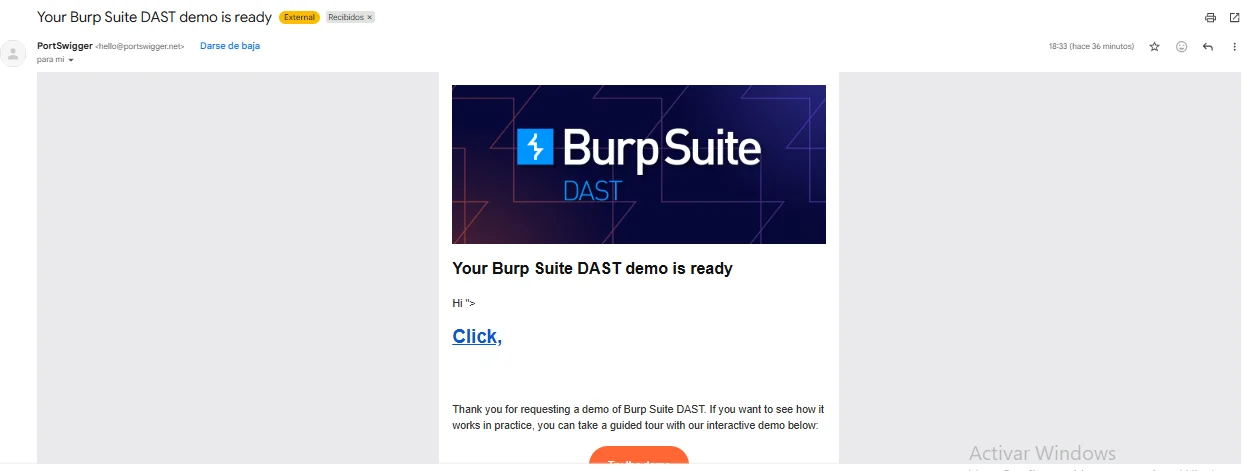
Impact
The vulnerability allows an attacker to inject arbitrary HTML content into emails sent from PortSwigger’s legitimate mail servers. By controlling the content rendered in the email body, an attacker can craft phishing messages that appear fully trusted to the recipient.
Context
PortSwigger runs a trial request page for Burp Suite DAST at https://portswigger.net/burp/dast/trial. The page hosts a form labelled "Request a tailored demo", which collects details about the person asking for the trial and an email address. When the form is submitted, the site sends a confirmation email from PortSwigger's own mail infrastructure to the address supplied in the form.
The report concerns that confirmation email. The "First Name" field is carried from the form into the body of the email, and the value is not sanitised before it is inserted, so HTML supplied in the field is rendered by the recipient's email client.
Setup
No accounts, roles, tooling or versions are described. The only preconditions visible in the report are access to the public trial form and an email address to receive the confirmation, which the researcher refers to as the victim's address. The researcher submitted the form with legitimate data in the other required fields and the payload in "First Name".
Finding it
The researcher identified the "First Name" field as user-controlled input that is later placed into an email body. Because the field is reflected into a message that is sent from PortSwigger's legitimate mail servers, any markup that survives into the email inherits the trust the recipient places in that sender. That combination, unsanitised input plus a trusted delivery channel, is what made the field worth testing.
Exploitation
Step 1: Reach the form
- Navigate to
https://portswigger.net/burp/dast/trial. - Locate the "Request a tailored demo" form.
- Fill in all required fields with legitimate data.
The form is the public entry point for the DAST trial; no authentication step is mentioned.
Step 2: Inject HTML into the First Name field
In the "First Name" field, the researcher inserted the following payload:
"<h1><a href="https://zorixu.com">Click here for exclusive offers</a></h1>
The payload opens with a double quote, then supplies a level-one heading containing an anchor whose href points to an external site and whose link text is "Click here for exclusive offers". The leading quote is part of the submitted value; the report does not explain what it is intended to interact with on the server side.
Step 3: Submit and observe the email
- Enter the victim's email address in the email field.
- Submit the form.
- Check the victim's inbox for the confirmation email.
- Observe that the HTML payload is rendered in the email.
The result, as stated in the report, is that the injected HTML is rendered in the email, confirming the vulnerability. The report describes a first screenshot showing the DAST trial form with the payload in the "First Name" field.
Root cause
The report states that user-supplied input is not properly sanitised before being inserted into confirmation emails. In other words, the value of "First Name" is placed into the email body without encoding or filtering, so the mail is composed with the raw markup the submitter supplied. The report does not describe the server-side code, the templating mechanism or any output-encoding step, so the precise implementation gap is not shown. Existing defences did not stop the payload: whatever processing happens between form submission and email delivery left the <h1> and <a> elements intact and renderable.
Impact
The report describes the impact as the ability to inject arbitrary HTML content into emails sent from PortSwigger's legitimate mail servers. Because the message arrives from that infrastructure, an attacker who controls the rendered body can craft phishing messages that appear fully trusted to the recipient. The researcher characterises this as enabling sophisticated phishing attacks that appear to originate from PortSwigger's legitimate email infrastructure.
The impact therefore rests on the trust conveyed by the sending domain and on the recipient interacting with the injected content.
Fix
Based on the stated root cause, the correction is to sanitise or HTML-encode the "First Name" value before it is inserted into the confirmation email, so that submitted markup is delivered as text rather than rendered as elements.
Variants to test
- Other name and free-text fields on the same form. Submit the same payload in last name, company or any message field and check the confirmation email. A positive result is the heading and link rendering in the message body.
- Different element types. Try markup that changes layout or hides content, such as a styled block or an image element, in the same field. A positive result is the element affecting how the email body displays.
- Other forms that trigger transactional email. Any contact, trial, newsletter or demo form that echoes a submitted value into a message is a candidate. A positive result is the submitted markup appearing as rendered HTML in the delivered email.
- Encoding boundaries. Submit the payload with characters that are commonly escaped, such as angle brackets and quotes, and compare what arrives. A positive result is the markup surviving the transformation chain intact.
Hunting notes
This class of bug hides in features that take user input and reuse it outside the web page, most commonly in transactional email: trial requests, demo requests, contact forms, invitations and notifications. During recon, the signal is a form whose fields are likely to be echoed back in a message you control the destination of, which lets you observe the output directly without needing access to anyone else's inbox.
The researcher established impact by showing the rendered result in the delivered email rather than only in the page response, which ties the injection to the trusted sending domain. That framing, arbitrary HTML in mail from PortSwigger's own servers, is what makes the case for phishing risk and is the part worth reproducing when reporting similar findings.
What happened, in plain words
PortSwigger runs a page where you can ask for a free trial of one of its products, Burp Suite DAST. The page has a form on it, labelled "Request a tailored demo", where you type your details and your email address. When you submit the form, the site sends you a confirmation email from PortSwigger's own mail servers.
The researcher found that one of the fields on that form, "First Name", is copied straight into the body of that confirmation email without being cleaned up first. That means if you type HTML (the code that tells a browser or email program how to lay out a page) into the First Name field, the email program will treat it as real formatting and display it, rather than showing it as plain text.
Why does that matter? Because the email comes from PortSwigger's real mail servers, a recipient is likely to trust it. An attacker could put a link in the email that looks like part of a genuine PortSwigger message, and trick the recipient into clicking it. That kind of trick is called phishing.
This is a beginner-friendly walkthrough of the report. Every technical idea is explained from scratch the first time it appears.
Background: the product, the page and the form
Burp Suite is a set of tools for testing the security of websites. DAST stands for Dynamic Application Security Testing: software that automatically probes a running website for weaknesses. PortSwigger offers a trial of the DAST product, and the trial request page lives at:
https://portswigger.net/burp/dast/trial
On that page there is a form labelled "Request a tailored demo". A form is just the collection of boxes and buttons you fill in on a web page: text boxes for your name, an email box, a submit button. When you press submit, the browser sends what you typed to the website's server (the computer that runs the site).
The form collects details about the person asking for the trial, plus an email address. When it is submitted, the site sends a confirmation email from PortSwigger's own mail infrastructure to the address supplied in the form. "Mail infrastructure" simply means the servers and services a company uses to send email.
The report is about that confirmation email. The value typed into the "First Name" field is carried from the form into the body of the email, and it is not sanitised before it is inserted. Sanitising means cleaning up input so that anything dangerous in it is removed or neutralised. Because that cleaning does not happen, any HTML supplied in the field is rendered by the recipient's email client. "Rendered" means displayed as formatted content: an email client that renders HTML will show a heading as a big bold line, and a link as a clickable link, instead of showing the raw code.
What you need before you start
The report describes no accounts, roles, special tools or software versions. The only things needed are:
- Access to the public trial form, which anyone can reach in a browser.
- An email address to receive the confirmation. The researcher calls this the victim's address.
That is it. You do not need to log in, install anything, or know anything about the server. The researcher filled in the other required fields with legitimate (normal, believable) data and put the payload in "First Name". A payload is simply the piece of input an attacker deliberately crafts to trigger a bug.
How the researcher found it
The researcher looked at the form and asked a simple question: which fields do I control, and where does my input end up afterwards? The "First Name" field is user-controlled input, meaning the visitor decides what goes in it. The report shows that this value is later placed into an email body.
Two things together made this interesting:
- The input is not cleaned before it goes into the email.
- The email is sent from PortSwigger's legitimate mail servers, so the recipient trusts it.
That combination, unsanitised input plus a trusted delivery channel, is what made the field worth testing. A trusted delivery channel is any route by which a message reaches someone who believes it comes from a source they trust. If you can put your own content into such a message, you borrow that trust.
Reproducing it, step by step
Step 1: Reach the form
- Navigate to
https://portswigger.net/burp/dast/trial. - Locate the "Request a tailored demo" form.
- Fill in all required fields with legitimate data.
Why these steps? The form is the public entry point for the DAST trial. There is no login step mentioned anywhere in the report, so anyone with a browser can reach it. Filling the other fields with normal data keeps the test realistic: the form behaves as it would for a genuine visitor, and only the one field under test carries the payload.
Step 2: Put HTML into the First Name field
In the "First Name" field, the researcher inserted this payload:
"<h1><a href="https://zorixu.com">Click here for exclusive offers</a></h1>
Let us take it apart piece by piece.
- The leading
"is a double quote character. It is part of the submitted value. The report does not explain what it is meant to interact with on the server side, so we simply note that it is there. <h1>is an HTML tag that opens a level-one heading, the largest heading style on a page. Everything until the matching closing tag is treated as a heading.<a href="https://zorixu.com">opens a link (an anchor). Thehrefpart says where the link points: here, an external site. Whatever text comes next, up to the closing</a>, becomes the clickable text.Click here for exclusive offersis that clickable text. It is the words the recipient would see and could click.</a>closes the link.</h1>closes the heading.
So the whole payload asks the email program to display a large heading containing a link to an outside website, with inviting wording. If the email program renders HTML, the recipient sees a big clickable line. If the input had been properly sanitised, they would instead see the raw code as harmless text.
Step 3: Submit and check the inbox
- Enter the victim's email address in the email field.
- Submit the form.
- Check the victim's inbox for the confirmation email.
- Observe that the HTML payload is rendered in the email.
Why check the inbox rather than the web page? Because the bug is not on the page itself. The page may look normal. The problem appears later, in the email that the site sends. Looking at the delivered email is the only way to confirm that the markup survived all the way through and was rendered by the email program.
The result, as the report states it, is that the injected HTML is rendered in the email, which confirms the vulnerability. The report describes a first screenshot showing the DAST trial form with the payload in the "First Name" field.
Why it works: the root cause
The report states that user-supplied input is not properly sanitised before being inserted into confirmation emails. In plain terms, the value of "First Name" is dropped into the email body without encoding or filtering. Encoding means converting special characters into a safe form, so that a < becomes something the email program displays as a character rather than treats as the start of a tag. Filtering means removing or blocking dangerous content. Neither happens here, so the email is composed with the raw markup the submitter supplied.
The report does not describe the server-side code, the templating mechanism (the system that builds the email by filling in a template with values) or any output-encoding step. So the precise implementation gap is not shown. What we do know is that existing defences did not stop the payload: whatever processing happens between form submission and email delivery left the <h1> and <a> elements intact and renderable.
What an attacker could do with it
The report describes the impact as the ability to inject arbitrary HTML content into emails sent from PortSwigger's legitimate mail servers. Because the message arrives from that infrastructure, an attacker who controls the rendered body can craft phishing messages that appear fully trusted to the recipient. Phishing is the practice of sending a message that pretends to come from someone trustworthy, to get the recipient to click a link, hand over information or take some other action. The researcher characterises this as enabling sophisticated phishing attacks that appear to originate from PortSwigger's legitimate email infrastructure.
It is worth being precise about what was and was not shown. The report does not demonstrate script execution (running code in the recipient's email program), credential capture (stealing usernames or passwords), or any action beyond the rendering of injected markup and a link. It also does not state which email clients were tested. The impact therefore rests on the trust conveyed by the sending domain and on the recipient interacting with the injected content.
The fix
Based on the stated root cause, the correction is to sanitise or HTML-encode the "First Name" value before it is inserted into the confirmation email, so that submitted markup is delivered as text rather than rendered as elements. In everyday terms: treat what the visitor typed as plain words, never as instructions for how the email should look.
Other places to try the same idea
These are variations suggested for testing similar features. Each one keeps the same basic idea: put markup into a field, then look at the message that comes out.
- Other name and free-text fields on the same form. Submit the same payload in last name, company or any message field, and check the confirmation email. A positive result is the heading and link rendering in the message body.
- Different element types. Try markup that changes layout or hides content, such as a styled block or an image element, in the same field. A positive result is the element affecting how the email body displays.
- Other forms that trigger transactional email. Any contact, trial, newsletter or demo form that echoes a submitted value into a message is a candidate. Transactional email means an automatic message triggered by an action, such as a signup confirmation. A positive result is the submitted markup appearing as rendered HTML in the delivered email.
- Encoding boundaries. Submit the payload with characters that are commonly escaped, such as angle brackets and quotes, and compare what arrives. A positive result is the markup surviving the transformation chain intact.
Notes for anyone hunting similar bugs
This class of bug hides in features that take user input and reuse it outside the web page, most commonly in transactional email: trial requests, demo requests, contact forms, invitations and notifications. During recon (the early stage of exploring a target to see what it does), the signal is a form whose fields are likely to be echoed back in a message you control the destination of. That last part matters: if you can choose the email address that receives the message, you can observe the output directly, without needing access to anyone else's inbox.
The researcher established impact by showing the rendered result in the delivered email rather than only in the page response. That ties the injection to the trusted sending domain. That framing, arbitrary HTML in mail from PortSwigger's own servers, is what makes the case for phishing risk, and it is the part worth reproducing when reporting similar findings.
Glossary
- HTML: the language used to describe the structure and formatting of content on web pages and in HTML emails, using tags such as
<h1>for a heading and<a>for a link. - HTML injection: a bug where input supplied by a user is placed into a page or message without being cleaned, so the input is treated as HTML and rendered instead of shown as text.
- Sanitise: clean up input so that anything dangerous in it is removed or neutralised before it is used.
- Encode (HTML-encode): convert special characters into a safe form so they are displayed as characters rather than interpreted as markup.
- Render: display content as formatted output, for example showing a heading as a large bold line rather than as raw code.
- Payload: the deliberately crafted piece of input an attacker submits to trigger a bug.
- Form: the collection of input boxes and a submit button on a web page that sends what you type to a server.
- Server: the computer that runs a website and processes what visitors send to it.
- Email client: the program or service you use to read and send email, which decides how a message is displayed.
- Mail infrastructure: the servers and services a company uses to send and receive email.
- Transactional email: an automatic message triggered by a user action, such as a signup or trial confirmation.
- Phishing: sending a message that pretends to come from a trustworthy source, to trick the recipient into clicking a link or giving something away.
- Trusted delivery channel: a route by which a message reaches someone who believes it comes from a source they trust.
- User-controlled input: any value on a page that the visitor, rather than the site, decides.
- Templating mechanism: the system that builds a message by filling a template with values.
- Recon: the early stage of exploring a target to understand what it does and where to look for weaknesses.
- DAST: Dynamic Application Security Testing, software that automatically probes a running website for security weaknesses.
- Script execution: running code inside the recipient's program, for example JavaScript inside an email client.
- Credential capture: stealing usernames, passwords or similar login information.




