Web Cache Poisoning in Postmates [$1500]
The login page was cached and served to other users, and the author found that a parameter on a support endpoint could be changed to an XSS payload that was then reflected in the cached login page. An attacker could poison the cache so that other users received the malicious page.
 Published on web.archive.org
{{media:0}}
The full write-up lives on its author's site
It belongs to its author, so we link to it rather than copy it. The other two tabs are our own rewrites, checked against it.
Context
Postmates ran a support site at support.postmates.com. The report does not describe the product or the support feature in any more detail than that. The endpoint at the centre of the finding is an experiments endpoint that takes a requester_type parameter:
https://support.postmates.com/v1/experiments?requester_type=customer
The report does not say what the endpoint normally returns, what the experiments are, or how the login page consumes the response. What it does say is that the response to this endpoint was being cached and served to the login page, and that the cached content included JSON Web Tokens.
Setup
The only tool named in the report is Burp Suite, used to crawl the site. No credentials, roles or special access are described: the work starts from crawling the public site and looking at the login pages it found. The report shows that responses from the experiments endpoint were cached and served to the login page.
Finding it
The researcher had been reading other people's write-ups, including a public HackerOne report about web cache poisoning against Postmates (report 492841), and tried the same idea again. That earlier report was already resolved, so the first attempt did not work.
The next approach was to crawl the site with Burp Suite and look at the login pages it turned up. Something about those login pages looked wrong. The researcher describes the login page as being cached, with pages loaded with JSON values, and notes that JSON Web Tokens can have their JSON value edited. The researcher describes the login page as cached, with pages loaded with JSON values, and notes that JSON Web Tokens can have their JSON value edited.

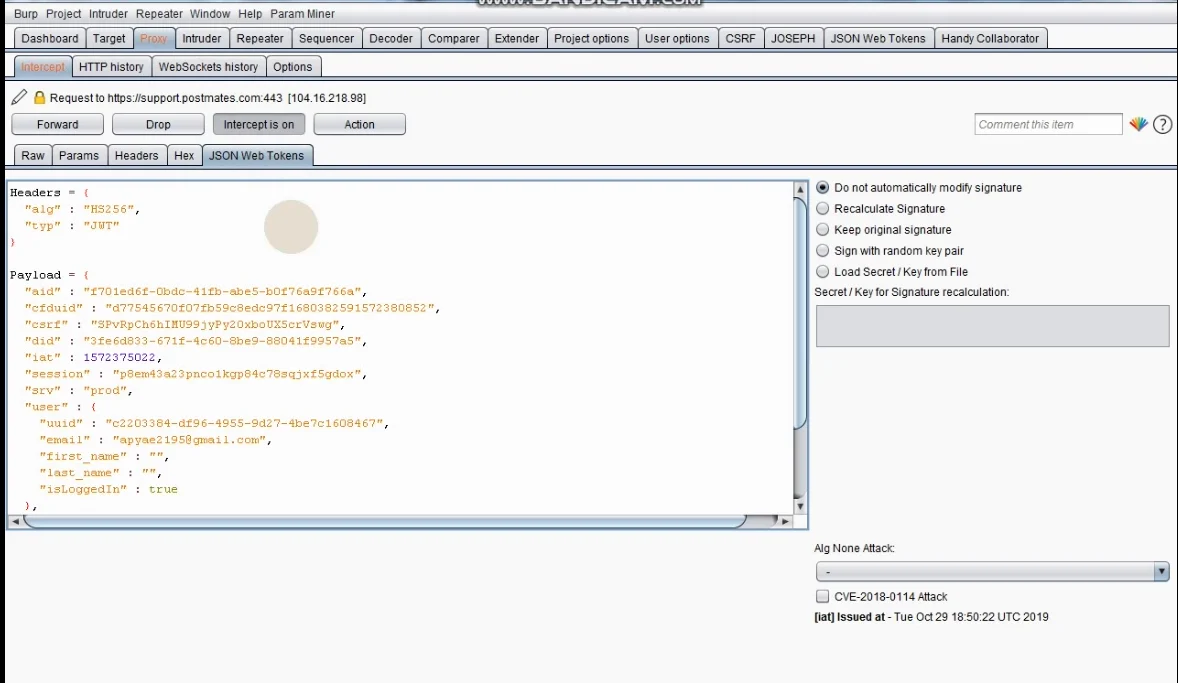
The first edit point tried was the email field, with an XSS payload placed there. The response to that attempt was, in the researcher's words, not strange: nothing useful came back.
Exploitation
Step 1: find a cacheable endpoint from the crawl
Burp's crawl produced a result that looked worth hitting, the experiments URL:
https://support.postmates.com/v1/experiments?requester_type=customer

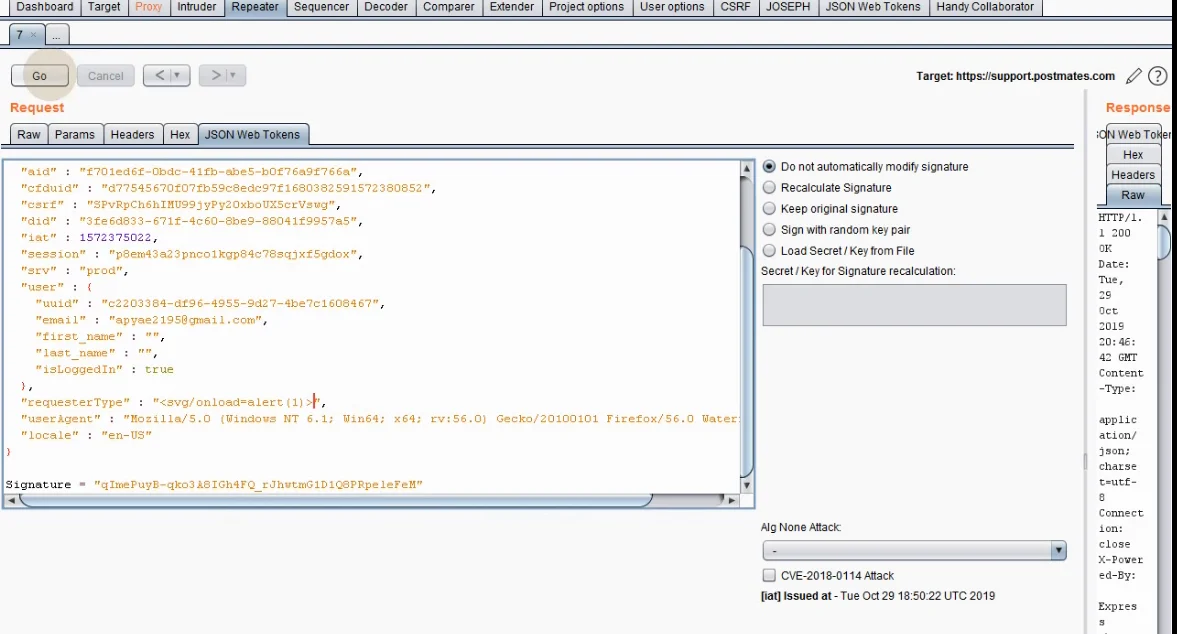
Step 2: move the edit point
Since the email edit had produced nothing, the researcher changed the edit point from the email field to this endpoint. The observation that drove the next step was that the requester_type parameter had the value customer.
Step 3: put the payload in requester_type
The value of requester_type was replaced with an XSS payload. The report does not reproduce the exact payload string. What it does say is that the response was forwarded to the login page: the poisoned response for the experiments endpoint ended up being what the login page received.

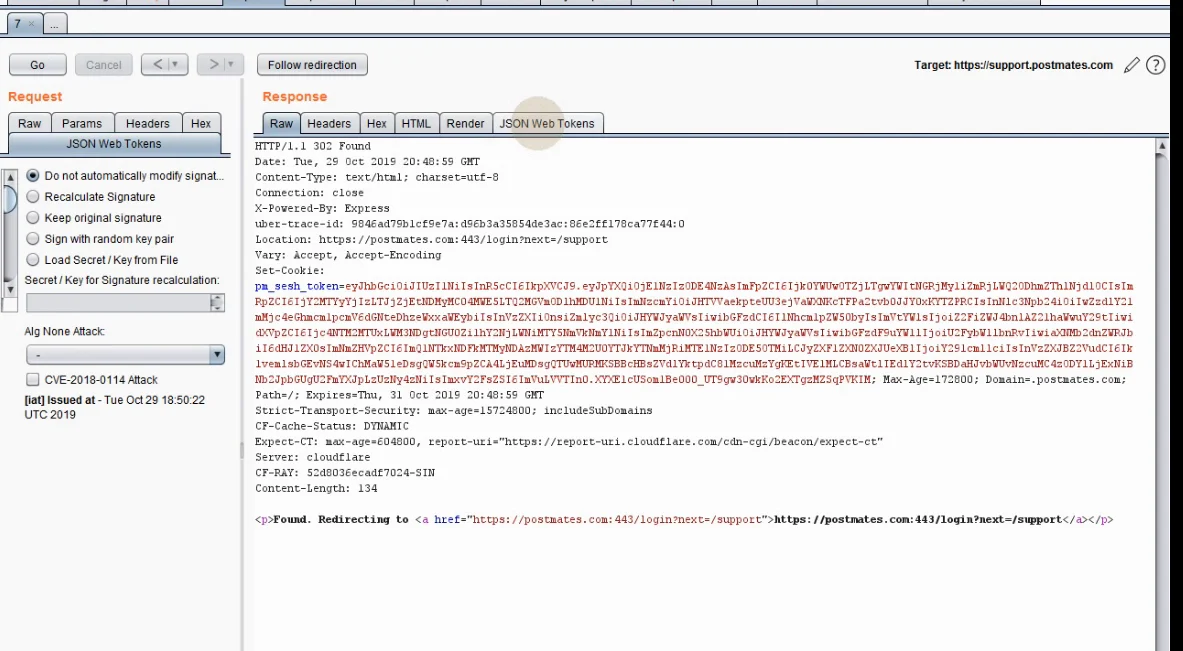
Step 4: read the tokens out of the cached login page
With the payload in place, the researcher describes seeing what they call magic in the JSON Web Tokens. The screenshots that follow show the tokens appearing in the cached login page content.

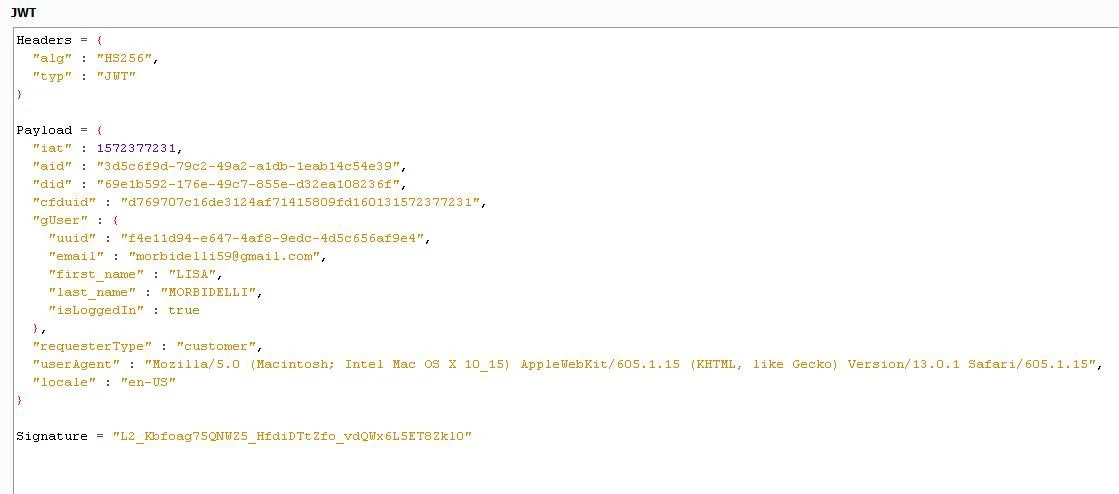

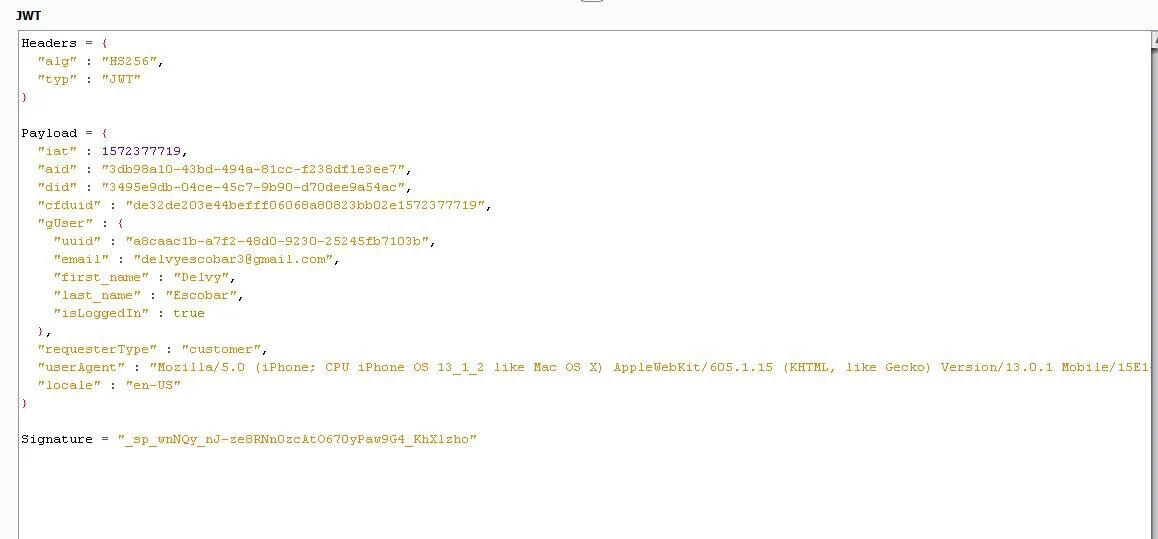

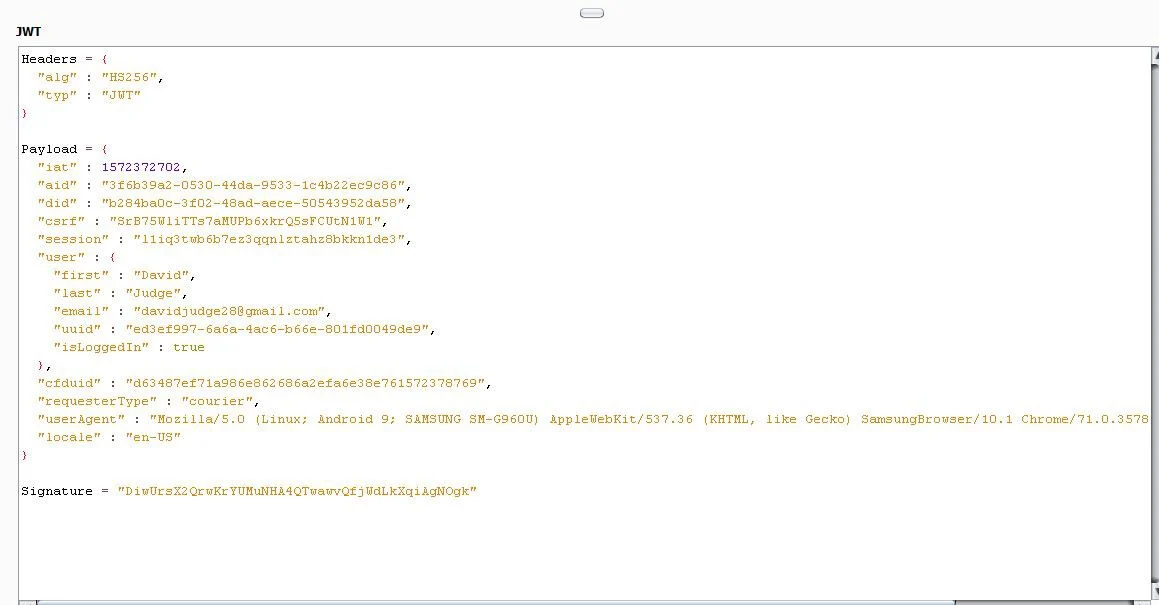
The conclusion drawn is that the login page was cached together with all user information. The report does not enumerate which fields were exposed, how many users were affected, or how long the poisoned entry stayed in the cache.
Root cause
The report does not analyse the server-side cause. The report does not analyse the server-side cause; it only shows the poisoned response reaching the login page. Because the cached response carried JSON Web Tokens, the poisoned entry exposed token material to whoever received it. Whether the tokens belonged to other users, and how the cache was keyed, is not stated in the report; the researcher's own wording is that the login page was in the cache of all user information.
Impact
The researcher's framing is that this was a critical bug and that the cached login page held all user information. The concrete artefact shown is JSON Web Tokens appearing in a cached login page after the requester_type value was replaced with an XSS payload. The report does not quantify the exposure: it gives no user count, no token lifetime, no statement about which accounts the tokens belonged to, and no demonstration of what could be done with them. Any stronger claim than "cached login responses containing tokens could be served to other visitors" goes beyond what the report shows.
Fix
It only records that the issue was reported and that the first bounty of $1500 was paid.
Variants to test
- Crawl for API endpoints whose query parameters look like they select a variant (
requester_type,type,role,lang,country). Send two requests with different values and check whether the second response matches the first. A positive result is a response that reflects the other request's parameter value. - Look for endpoints whose responses are embedded in HTML pages, especially login and account pages. If a poisoned API response shows up in the page body, the cache is shared across those paths.
- Check whether authentication or token material appears in responses to unauthenticated requests to such endpoints. A positive result is a token or session value in a response you did not authenticate for.
- Try the same parameter substitution with a harmless marker first, before any script payload, to confirm cache behaviour without depending on XSS execution.
- Re-test endpoints from previously resolved cache poisoning reports on the same program; the researcher's starting point was exactly such a report.
What happened, in plain words
Postmates ran a support website at support.postmates.com. That site had a flaw in how it stored copies of its pages. The researcher who found it was paid $1500, their first bounty.
To follow the story you need three ideas.
First, a cache. When a website gets the same request over and over, it can keep a copy of the answer and hand that copy to the next person instead of doing the work again. Think of a coffee shop that brews a big pot in the morning and pours from it all day: fast, but if someone slips something into the pot, every later cup has it too. A web cache does exactly this with web responses.
Second, an API endpoint. A website is not only pages you look at. Behind the scenes the page asks the server for data, and those data addresses are called endpoints. They often look like a normal link with a question mark and some settings after it, for example ?requester_type=customer. The part after the ? is a query parameter: a named setting with a value, like a form field filled in for you.
Third, a JSON Web Token, usually shortened to JWT. When you log in, the server needs a way to remember who you are on the next request. It gives your browser a small signed note, the token, and the browser sends it back each time. A JWT is written in JSON, a simple text format of names and values, and it can carry information such as an email address. If someone else gets your token, they can often act as you.
Web cache poisoning is the attack that ties these together. If a cache stores an answer that was shaped by one visitor's input, and then serves that stored answer to everyone else, the attacker has effectively written content into the site for other people. The name comes from the image of dropping something into the shared pot.
The starting point
The report does not describe the support product or its features beyond the site address. What it does describe is one endpoint that takes a requester_type parameter:
https://support.postmates.com/v1/experiments?requester_type=customer
Line by line: https:// means the request travels encrypted. support.postmates.com is the support site's address. /v1/experiments is the path, a data endpoint that appears to hand out experiment settings, with v1 suggesting a first version of that interface. The ? starts the query string, and requester_type=customer is one parameter named requester_type with the value customer, presumably telling the server what kind of visitor is asking.
The report does not say what the endpoint normally returns, what the experiments are, or how the login page uses the answer. What it does say is that the answer to this endpoint was being cached and served to the login page, and that the cached content included JSON Web Tokens.
The tools and the setup
The only tool named is Burp Suite, a program security testers use to watch and change the traffic between a browser and a website. One of its features is a crawler: it walks a site automatically, following links, and builds a map of every page and endpoint it can reach. Think of it as a robot that opens every door in a building and writes down what is behind each one.
The report gives no version, no configuration and no account details. No special access is described: the work starts from crawling the public site and looking at the login pages it found. The report shows that answers from the experiments endpoint were cached and served to the login page.
Finding it
The researcher had been reading other people's write-ups, including a public HackerOne report about web cache poisoning against Postmates, report 492841. HackerOne is a platform where researchers report bugs to companies. The idea was to try the same trick again. That earlier report had already been fixed, so the first attempt did not work.
The next approach was to crawl the site with Burp Suite and look at the login pages it turned up. Something about those login pages looked wrong. The researcher describes the login page as being cached, with pages loaded with JSON values, and notes that JSON Web Tokens can have their JSON value edited. In plain terms: the login page was being handed out from the cache together with token material.
The first edit point tried was the email field, with an XSS payload placed there. XSS, cross-site scripting, means slipping code into a page so that a browser runs it as if the site had written it. The response to that attempt was, in the researcher's words, not strange: nothing useful came back.
Exploitation
Step 1: find a cacheable endpoint from the crawl
Burp's crawl produced a result that looked worth hitting, the experiments URL:
https://support.postmates.com/v1/experiments?requester_type=customer
This is the same address as before. The point of repeating it here is that the crawler is what surfaced it: the researcher did not guess it, the robot found it while mapping the site. The crawler surfaced this URL.
Step 2: move the edit point
Since the email edit had produced nothing, the researcher changed the edit point from the email field to this endpoint. The observation that drove the next step was that the requester_type parameter had the value customer. The researcher noticed the requester_type parameter had the value customer.
Step 3: put the payload in requester_type
The value of requester_type was replaced with an XSS payload. The report does not reproduce the exact payload string. What it does say is that the response was forwarded to the login page: the poisoned answer for the experiments endpoint ended up being what the login page received. In the coffee-shop image, the attacker has now poured something into the pot, and the login page is the next customer being served from it.
Step 4: read the tokens out of the cached login page
With the payload in place, the researcher describes seeing what they call magic in the JSON Web Tokens. The screenshots that follow show the tokens appearing in the cached login page content.
The conclusion drawn is that the login page was cached together with all user information. The report does not list which fields were exposed, how many users were affected, or how long the poisoned entry stayed in the cache.
Root cause
The report does not analyse the server-side cause. If the cache treats a request with requester_type=customer and a request with a different value as identical, it stores the first answer and hands it to the second. Because that stored answer carried JSON Web Tokens, the poisoned entry exposed token material to whoever received it. Whether the tokens belonged to other users, and exactly how the cache was keyed, is not stated; the researcher's own wording is that the login page was in the cache of all user information.
Impact
The researcher's framing is that this was a critical bug and that the cached login page held all user information. The concrete artefact shown is JSON Web Tokens appearing in a cached login page after the requester_type value was replaced with an XSS payload. The report does not quantify the exposure: no user count, no token lifetime, no statement about which accounts the tokens belonged to, and no demonstration of what could be done with them. Any claim stronger than "cached login responses containing tokens could be served to other visitors" goes beyond what the report shows.
Fix
It only records that the issue was reported and that the first bounty of $1500 was paid.
Variants to test
If you want to look for the same class of bug yourself, these are the directions the technical version suggests. Each one is a small experiment you can reason about with the ideas above.
- Crawl for API endpoints whose query parameters look like they select a variant (
requester_type,type,role,lang,country). Send two requests with different values and check whether the second response matches the first. A positive result is a response that reflects the other request's parameter value. - Look for endpoints whose responses are embedded in HTML pages, especially login and account pages. If a poisoned API response shows up in the page body, the cache is shared across those paths.
- Check whether authentication or token material appears in responses to unauthenticated requests to such endpoints. A positive result is a token or session value in a response you did not authenticate for.
- Try the same parameter substitution with a harmless marker first, before any script payload, to confirm cache behaviour without depending on XSS execution.
- Re-test endpoints from previously resolved cache poisoning reports on the same program; the researcher's starting point was exactly such a report.
Glossary
- API: the set of data addresses a website's pages use to talk to its server, separate from the pages themselves.
- API endpoint: one specific address in that set, often with a path and query parameters.
- Bounty: money a company pays a researcher for reporting a security bug.
- Burp Suite: a tool for watching, recording and changing traffic between a browser and a website; includes a crawler.
- Cache: a store of saved answers that are reused instead of being worked out again.
- Cache key: the set of details a cache uses to decide whether two requests count as the same and can share a stored answer.
- Crawler: a program that walks a site automatically, following links, to map its pages and endpoints.
- Cross-site scripting (XSS): slipping code into a page so a browser runs it as if the site had written it.
- Endpoint: a specific address on a server that answers a particular kind of request.
- HackerOne: a platform where researchers report bugs to companies and companies pay bounties.
- HTTP / HTTPS: the language browsers and servers use to exchange requests and responses; HTTPS is the encrypted version.
- JSON: a simple text format of names and values, used to carry data between programs.
- JSON Web Token (JWT): a small signed note a server gives your browser after login so it can recognise you on later requests; it is written in JSON and can carry details such as an email address.
- Parameter (query parameter): a named setting with a value, placed after the
?in a URL. - Payload: the piece of input an attacker sends to try to trigger a bug.
- Query string: everything after the
?in a URL, made of parameters and their values. - Response: what a server sends back for a request.
- Root cause: the underlying reason a bug exists, as opposed to its visible symptom.
- Token: a value that stands in for your identity or session, so you do not have to log in on every request.
- Web cache poisoning: making a cache store an answer shaped by your input so that other visitors receive it.



