Two Factor Authentication Bypass [ $50 ]
The two-factor authentication settings endpoint accepted a request to enable or disable 2FA without a valid verification code. An attacker could turn off 2FA on an account, weakening its security.
 Published on medium.com
{{media:0}}
The full write-up lives on its author's site
It belongs to its author, so we link to it rather than copy it. The other two tabs are our own rewrites, checked against it.
Context
This is a bug bounty write-up from a private program. The researcher does not name the target; the request shown uses www.target.com as the host and the account settings page lives at /settings/account. The feature under test is the account's Two Factor Authentication setting, which the user can switch ON or OFF from the settings page.
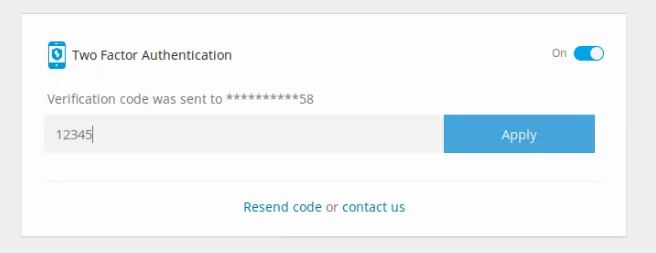
Normally, turning 2FA on requires the user to prove possession of the second factor: the application asks for a 5 digit OTP, and the setting should only change once that code has been verified. The whole point of the feature is that the toggle cannot be flipped without a valid code.
Setup
The report does not describe any special accounts, roles or tooling. The researcher was working against a private program with an authenticated session, capturing the settings request. The only precondition visible in the text is a logged-in account with access to the account settings page.
Finding it
After some unsuccessful testing ("NOTHING FOUND"), the researcher noticed that the Two Factor Authentication ON/OFF action was carried out through a JSON endpoint rather than a plain form post. That endpoint looked like a promising place to try a bypass.
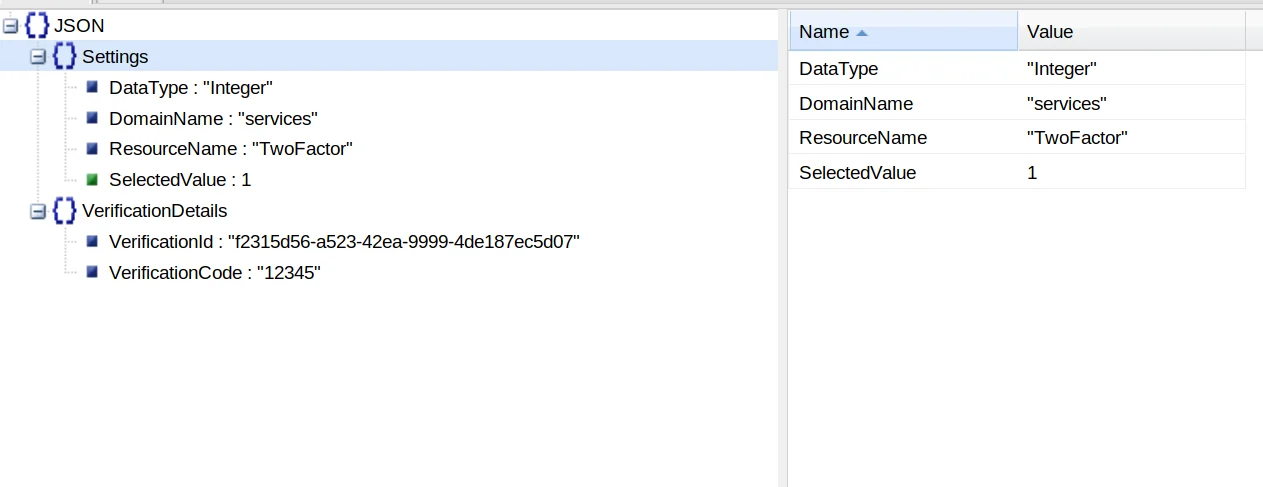
The observation that drove the rest of the work is that the request carries two separate pieces of state: a Settings object containing SelectedValue, and a VerificationDetails object containing the verification id and the OTP. The toggle itself is expressed by SelectedValue, while the OTP lives in a sibling object. That split is what made the researcher suspect the verification could be detached from the state change.
Exploitation
Step 1: capture the legitimate request and send a fake OTP
The researcher turned 2FA on and entered a 5 digit OTP that was not a real value, then captured the resulting request:
PUT /api/sts/v2/settings?client_request_id=b8e69342–2e33–4f53-b323-e9186c97e995 HTTP/1.1
Host: www.target.com
User-Agent: Mozilla/5.0 (X11; Linux x86_64; rv:68.0) Gecko/20100101 Firefox/68.0
Accept: application/json, text/plain, /
Accept-Language: en-US,en;q=0.5
Accept-Encoding: gzip, deflate
Referer: https://www.target.com/settings/account
Content-Type: application/json;charset=utf-8
Content-Length: 105
Connection: close

{"Settings":{"DataType":"Integer","DomainName":"services","ResourceName":"TwoFactor","SelectedValue":1},"VerificationDetails":{"VerificationId":"f2315d56-a523–42ea-9999–4de187ec5d07","VerificationCode":"12345"}}
The important parts:
PUT /api/sts/v2/settingsis the settings update endpoint, with aclient_request_idquery parameter.Settingsidentifies what is being changed:DomainNameisservices,ResourceNameisTwoFactor, andSelectedValueis1.VerificationDetailscarries theVerificationIdand theVerificationCode, here the fake value12345.
Step 2: forward it and read the response
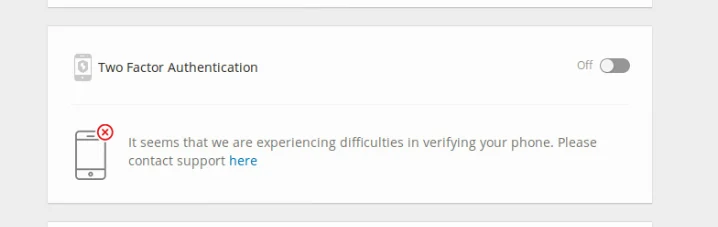
Forwarding the request as captured returned a single message: Invalid verification code. The server returned a single message: Invalid verification code, rejecting the fake value.
Step 3: remove the verification object
The researcher then reasoned about the structure of the body. The 2FA state is driven by SelectedValue (ON is 1, OFF is 2), and that value already sits inside Settings. The VerificationDetails object is a separate, additional part of the same JSON body. If the state change only depends on Settings, then the verification object is just extra data that the client happens to send.
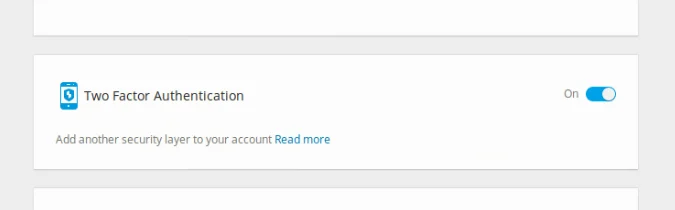
So the researcher removed VerificationDetails from the JSON body entirely and sent the request again. The result was that the Two Factor Authentication setting could be switched ON or OFF without verifying the OTP.
Root cause
The design puts the state change (Settings.SelectedValue) and the proof of the second factor (VerificationDetails) in two independent fields of the same JSON document. Removing VerificationDetails let the setting change without the OTP being verified. When the object is absent, there is nothing to fail validation against, so the update goes through.
Likely, the verification check is written as a validation of VerificationDetails when it is supplied, rather than as a precondition for processing Settings. The Invalid verification code response in step 2 shows the check exists, but it can be skipped by omitting the field it inspects.
Impact
An attacker who holds a session on the account can turn 2FA off without knowing the OTP, which removes the second factor from the account and leaves it protected by the password alone. The same missing check also allows turning 2FA on without verification.
The impact therefore depends on how the session was obtained in the first place.
Fix
The fix implied by the finding is to make verification a precondition for the settings update: reject any request that changes SelectedValue for TwoFactor unless a valid VerificationDetails object with a correct, unexpired code is present in the same request, and treat a missing VerificationDetails as a failure rather than as a reason to skip the check.
Variants to test
- Omit the verification object. On any settings or profile endpoint that carries a state field and a verification field side by side, delete the verification field and resend. A positive result is a success response and the state actually changing.
- Send an empty verification object. Replace
VerificationDetailswith{}or with null values. A positive result is the update being applied without a code being checked. - Send a verification object for a different action. Reuse a
VerificationIdobtained for one operation (for example, enabling 2FA) while performing another (for example, disabling it). A positive result is the second operation succeeding with a code that was never issued for it. - Change
SelectedValuewhile keeping a valid-looking code. Flip the value between1and2with the sameVerificationCode. A positive result is both directions being accepted from a single verification. - Replay the request. Resend a previously accepted request with the same
client_request_idandVerificationId. A positive result is the change being applied again after the code should have expired or been consumed.
Disclosure timeline
The researcher reported the issue to the private program and initially received an Informative rating. After reopening the report, it was rewarded with $50.

What happened, in plain words
A security researcher was testing a private bug bounty program, meaning a company that invites selected researchers to look for security problems in its systems and pays for good findings. The researcher found a way to switch the account's Two Factor Authentication (2FA) setting on or off without ever proving they knew the one-time code that is supposed to protect that change. The company first closed the report as "Informative" (not a real vulnerability), then reopened it and paid a $50 bounty.
To follow the story you only need a browser and a little patience. Everything below explains each idea from scratch.
The feature being tested
Two Factor Authentication is a second lock on an account. Normally you log in with a password (something you know), and then the site asks for a short code (something you have, usually generated by a phone app or sent by SMS). Even if someone steals your password, they still cannot get in without that code.
The setting the researcher was looking at is the switch that turns 2FA on or off for the account. It lives on the account settings page. The request in the report goes to www.target.com, and the settings page is at /settings/account. The real company name is not given.
The important rule of this feature is simple: you should only be able to flip the switch after you have proved you hold the second factor, by typing a valid 5 digit one-time code. If you can flip it without the code, the second lock is worthless.
What an API and a JSON endpoint are
When you click a button on a modern website, your browser often does not load a new page. Instead it quietly sends a small message to the server in the background and the page updates itself. That message goes to an API (Application Programming Interface), which is just a defined doorway on the server that accepts requests and returns data.
Most of these messages are formatted as JSON (JavaScript Object Notation). JSON is a way of writing structured data as text, using curly braces {} for objects (a labelled bundle of values), square brackets [] for lists, and "name": value pairs. Think of it like a very strict shopping list: every item has a label and a value, and the punctuation matters.
A useful everyday comparison: an API request is like a form you hand to a clerk at a counter. The clerk reads the fields, does what the form asks, and hands back a receipt (the response). If a field is missing, a well-built clerk should refuse; a badly built clerk may just ignore the missing field and carry on.
How the researcher found it
The researcher was poking around the site looking for problems and, in their own words, first found nothing:
» NOTHING FOUND »
Then they noticed something interesting. The 2FA on/off action was not a normal form submission; it was sent to a JSON endpoint. That stood out because JSON endpoints often accept more than the website's own pages send, and they are a common place for missing checks.
The key observation was that the request body contains two separate bundles of data:
- a
Settingsobject, which says what to change and to which value; - a
VerificationDetailsobject, which carries the proof (the verification id and the one-time code).
The switch itself is expressed by a value called SelectedValue inside Settings. The code lives in a completely separate object next to it. That separation is what made the researcher suspect the two could be pulled apart: if the server only looks at Settings to decide the new state, then the verification object might be optional.
Step 1: capture the real request and send a fake code
To study the request, the researcher captured the message the browser sent. A proxy sits between your browser and the server and lets you pause, read and edit each message before it is sent. It is like a postal worker who lets you open and rewrite a letter before delivering it.
The researcher turned 2FA on, typed a 5 digit code that was not real, and captured the request that the browser produced:
PUT /api/sts/v2/settings?client_request_id=b8e69342–2e33–4f53-b323-e9186c97e995 HTTP/1.1
Host: www.target.com
User-Agent: Mozilla/5.0 (X11; Linux x86_64; rv:68.0) Gecko/20100101 Firefox/68.0
Accept: application/json, text/plain, /
Accept-Language: en-US,en;q=0.5
Accept-Encoding: gzip, deflate
Referer: https://www.target.com/settings/account
Content-Type: application/json;charset=utf-8
Content-Length: 105
Connection: close

{"Settings":{"DataType":"Integer","DomainName":"services","ResourceName":"TwoFactor","SelectedValue":1},"VerificationDetails":{"VerificationId":"f2315d56-a523–42ea-9999–4de187ec5d07","VerificationCode":"12345"}}
Line by line, in plain words:
PUT /api/sts/v2/settings?...is the first line of an HTTP request.PUTis the method, which here means "update this thing"./api/sts/v2/settingsis the address of the settings endpoint on the server. Everything after the?is the query string, extra data attached to the address; here it is aclient_request_id, a unique label the client attaches to each request so the server can tell requests apart.Host: www.target.comtells the server which website the request is for. One server can host many sites, so it needs to know which one you mean.User-Agent: ...identifies the browser and operating system that sent the request. Servers use it for statistics and compatibility.Accept: application/json, text/plain, /says which response formats the browser is willing to accept. JSON is first on the list.Accept-Language: en-US,en;q=0.5says the browser prefers English (US), with a quality weight of 0.5 for plain English.Accept-Encoding: gzip, deflatesays the browser can accept compressed responses, which saves bandwidth.Referer: https://www.target.com/settings/accounttells the server which page the request came from. Here it confirms the request originated on the account settings page.Content-Type: application/json;charset=utf-8says the body of the request is JSON text encoded in UTF-8 (a standard way of representing characters).Content-Length: 105says the body is 105 bytes long.Connection: closeasks the server to close the network connection after this response instead of keeping it open for reuse.- The blank line separates the headers from the body.
- The body is the JSON itself.
SettingscontainsDataType(Integer),DomainName(services),ResourceName(TwoFactor) andSelectedValue(1).VerificationDetailscontains aVerificationId(a long unique identifier) and aVerificationCode(12345, the fake code).
In short: this request says "set the TwoFactor setting to 1, and here is a verification id and code to prove I am allowed".
Step 2: forward it and read the answer
The researcher let the request through unchanged and looked at the response. The server replied with a single message: Invalid verification code. The server replied with a single message: Invalid verification code, rejecting the fake one.
Step 3: delete the verification object
Now the researcher thought about the shape of the body. The 2FA state is decided by SelectedValue, where 1 means ON and 2 means OFF. That value already sits inside Settings. The VerificationDetails object is a separate, extra part of the same JSON document. If the state change only depends on Settings, then the verification object is just extra data the browser happens to send along.
So the researcher removed VerificationDetails from the JSON body entirely and sent the request again. The result: the Two Factor Authentication setting could be switched ON or OFF without verifying the one-time code.
This is the whole trick. The server checked the code when it was present, but when the field was missing it did not treat that as a failure. It simply applied the setting. In the clerk comparison: the clerk checks your ID when you hand one over, but if you hand over no ID at all, the clerk shrugs and processes the form anyway.
Why it worked
The design puts the state change (Settings.SelectedValue) and the proof of the second factor (VerificationDetails) in two independent fields of the same JSON document. Removing VerificationDetails let the setting change without the OTP being verified. When the object is absent, there is nothing to fail validation against, so the update goes through.
Most likely, the verification check is written as a validation of VerificationDetails when it is supplied, rather than as a precondition for processing Settings. The Invalid verification code response in step 2 shows the check exists, but it can be skipped by omitting the field it inspects. The report does not show the server-side code, so this is an inference from the observed behaviour.
What an attacker could do with it
An attacker who holds a session on the account can turn 2FA off without knowing the code, which removes the second factor and leaves the account protected by the password alone. The same missing check also allows turning 2FA on without verification.
A session here means the logged-in state of a browser: after you log in, the server gives your browser a token (often stored in a cookie) that it presents on every later request so the server knows who you are. The report does not describe any precondition beyond an authenticated session, and does not discuss how an attacker would obtain one. The impact therefore depends on how the session was obtained in the first place.
How to fix it
The fix implied by the finding is to make verification a precondition for the settings update: reject any request that changes SelectedValue for TwoFactor unless a valid VerificationDetails object with a correct, unexpired code is present in the same request, and treat a missing VerificationDetails as a failure rather than as a reason to skip the check.
In plain terms: the clerk must refuse the form if the ID is missing, not only if the ID is wrong.
Other things to try on similar features
These are variations on the same idea, useful when you meet a similar endpoint elsewhere:
- Omit the verification object. On any settings or profile endpoint that carries a state field and a verification field side by side, delete the verification field and resend. A positive result is a success response and the state actually changing.
- Send an empty verification object. Replace
VerificationDetailswith{}or with null values. A positive result is the update being applied without a code being checked. - Send a verification object for a different action. Reuse a
VerificationIdobtained for one operation (for example, enabling 2FA) while performing another (for example, disabling it). A positive result is the second operation succeeding with a code that was never issued for it. - Change
SelectedValuewhile keeping a valid-looking code. Flip the value between1and2with the sameVerificationCode. A positive result is both directions being accepted from a single verification. - Replay the request. Resend a previously accepted request with the same
client_request_idandVerificationId. A positive result is the change being applied again after the code should have expired or been consumed.
What the program said
The researcher reported the issue to the private program and initially received an Informative rating, meaning the company did not treat it as a security bug at first. After reopening the report, it was rewarded with $50.
Glossary
- 2FA (Two Factor Authentication): a login protection that asks for two different proofs, usually a password plus a short one-time code.
- OTP (one-time password): a short code that is valid once, often for a few minutes, used as the second factor.
- API (Application Programming Interface): a defined doorway on a server that accepts requests and returns data, used by web pages and apps behind the scenes.
- JSON (JavaScript Object Notation): a text format for structured data using
{}objects,[]lists and"name": valuepairs. - Endpoint: a specific address on a server that accepts a particular kind of request, such as
/api/sts/v2/settings. - HTTP request: the message a browser sends to a server, made of a method, an address, headers and an optional body.
- HTTP method: the verb of a request, such as
GET(read) orPUT(update). - Header: a labelled line in a request or response carrying metadata, such as
HostorContent-Type. - Query string: the part of a URL after
?, carrying extra parameters such asclient_request_id. - Body: the payload of a request or response, here the JSON document.
- Content-Type: a header saying what format the body is in, for example
application/json. - Content-Length: a header giving the size of the body in bytes.
- User-Agent: a header identifying the browser and operating system that sent the request.
- Referer: a header telling the server which page the request came from.
- UTF-8: a standard way of encoding characters as bytes.
- Session: the logged-in state of a browser, usually tracked by a token or cookie the server issues after login.
- Cookie: a small piece of data a site stores in your browser and sends back on later requests, often used to carry a session token.
- Token: a value that proves who you are or grants access, often stored in a cookie or sent in a header.
- Intercepting proxy: a tool that sits between browser and server and lets you pause, read and edit requests and responses.
- Bug bounty program: an arrangement where a company invites researchers to find security problems and pays for valid findings.
- Private program: a bug bounty program open only to selected researchers, not the public.
- Informative: a report rating meaning the company saw the report but did not treat it as a security vulnerability.
- Bypass: getting past a security check without satisfying it, for example skipping the code check entirely.
- Validation: checking that supplied data is present, well formed and correct before acting on it.
- Precondition: something that must be true before an action is allowed to happen.
- Root cause: the underlying reason a vulnerability exists, as opposed to its visible symptom.
- Impact: the harm an attacker could cause by exploiting a vulnerability.
- Replay: resending a previously captured request to see whether the server accepts it again.
SelectedValue: the field in this request that sets the 2FA state,1for ON and2for OFF.VerificationDetails: the object in this request that carries the verification id and the one-time code.VerificationId: a unique identifier for a particular verification attempt.VerificationCode: the one-time code the user types to prove they hold the second factor.client_request_id: a unique label attached to a request so the server can tell requests apart.