CVE-2023-36934 Analysis: MOVEit Transfer SQL Injection
 Published on blog.projectdiscovery.io
Research Nuclei
The full write-up lives on its author's site
It belongs to its author, so we link to it rather than copy it. The other two tabs are our own rewrites, checked against it.
Context
MOVEit Transfer is a widely used web application for managed file transfer. In July 2023 Progress published a security update for several versions of MOVEit Transfer, addressing multiple vulnerabilities including CVE-2023-36934, an unauthenticated SQL injection. The ProjectDiscovery research team set up both a patched and an unpatched instance of MOVEit Transfer to compare the security release and reproduce the unauthenticated injection.
The vulnerable code path sits in UserEngine::UserProcessPassChangeRequest(), a function reachable from two pages: humans.aspx and machine.aspx. The function builds a query using the MyLoginName variable, and if that variable can be controlled without sanitisation, the query is injectable.
Setup
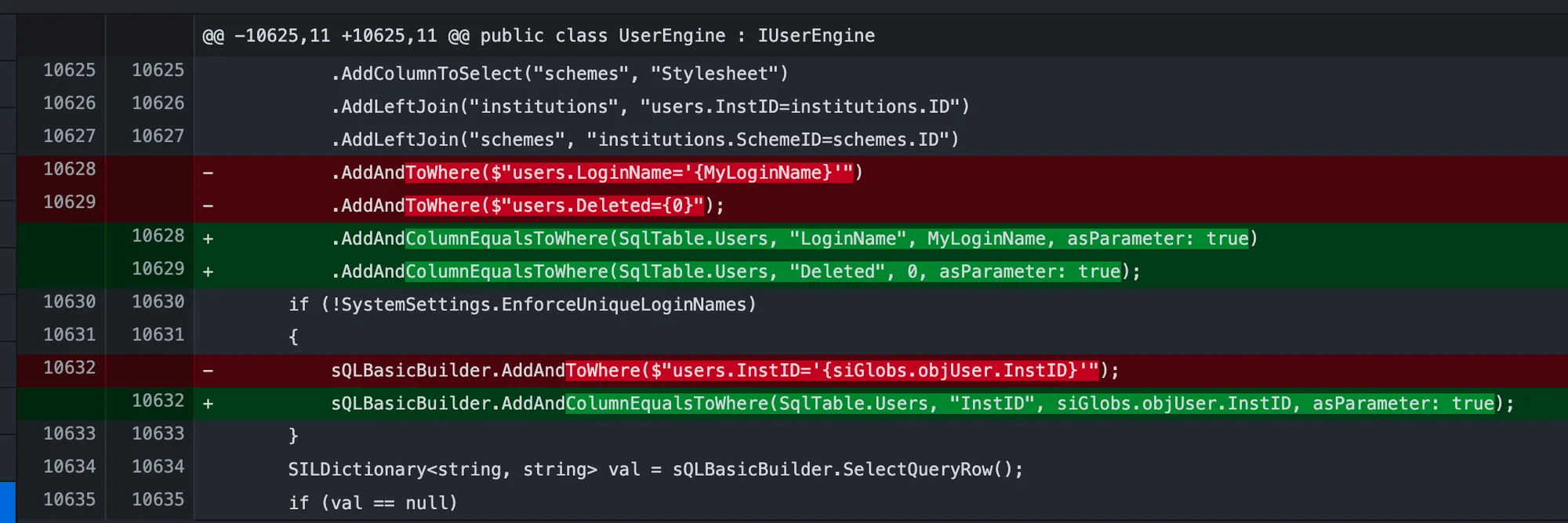
The team deployed an unpatched and a patched version of MOVEit Transfer side by side. Because the advisory offered a hot patch for certain versions as drop-in DLL files, the researchers focused their diff on those DLLs. They decompiled the DLLs of both versions and ran a Git diff over the decompiled C# code, which made the changed functions easy to compare.
No accounts or credentials are needed for the attack itself: the whole chain is unauthenticated, which is why the researchers concentrated on functions associated with unauthenticated actions.
Finding it
The diff pointed at UserEngine::UserProcessPassChangeRequest(), callable from humans.aspx and machine.aspx. Reading the earlier (unpatched) code made it clear that the function was vulnerable to SQL injection if the MyLoginName variable could be controlled.
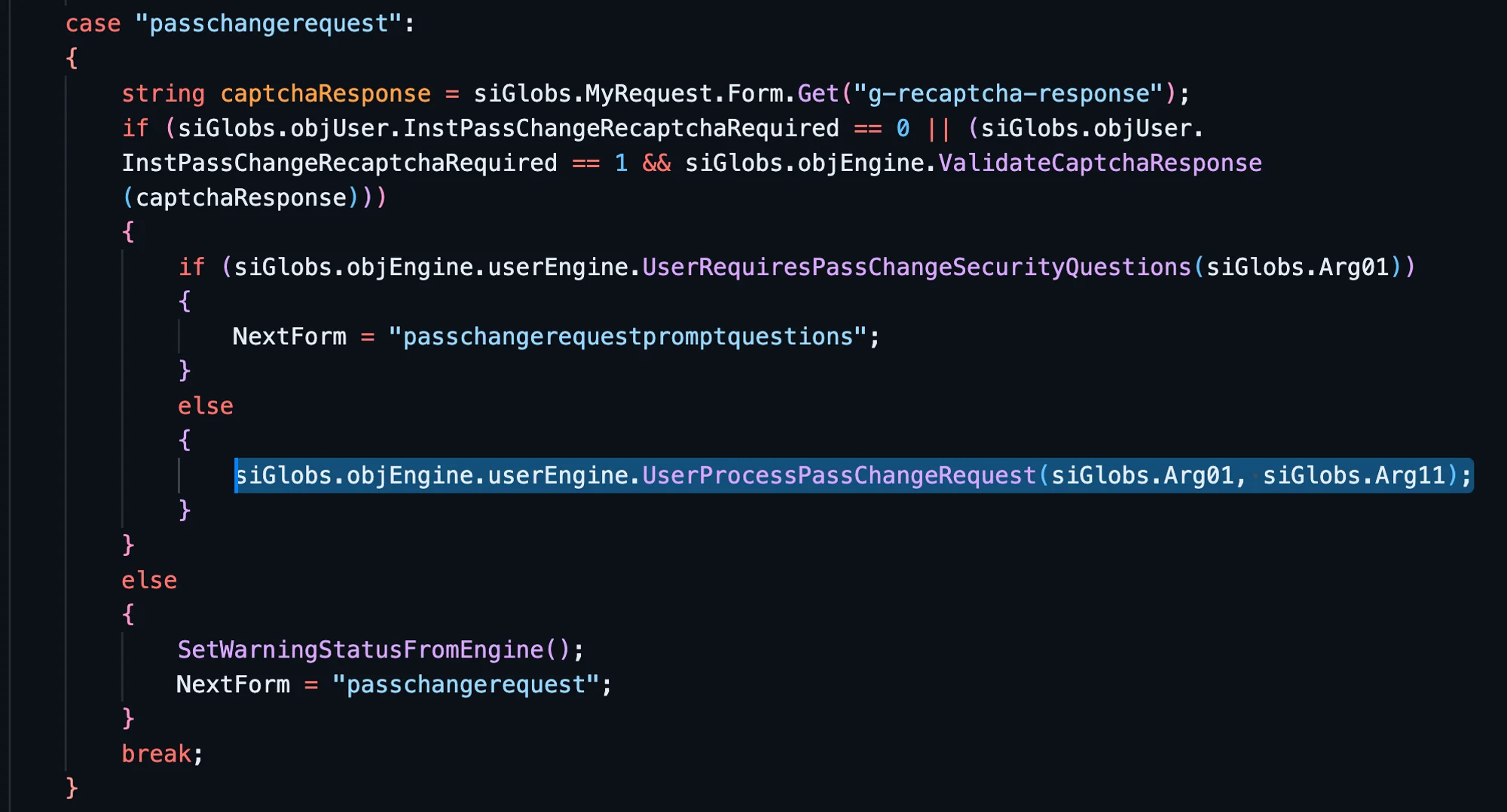
At first sight the obvious route is to inject through the Arg01 parameter of the request. MOVEit blocks that: the value passes through SILUtility.XHTMLClean(), which sanitises it and prevents exploitation of the injection this way. The real problem therefore became how to get an unsanitised value into the variable that ends up in the query.
To understand the options, the researchers looked at how MOVEit processes requests. On humans.aspx, parameter assignment goes through siGlobs.GetIncomingVariables(). That function scans the request and parses parameters from form posts, query strings, multipart forms, encrypted query strings carried in the ep parameter, and finally from the database, if parameters were previously stored in the session as vars.
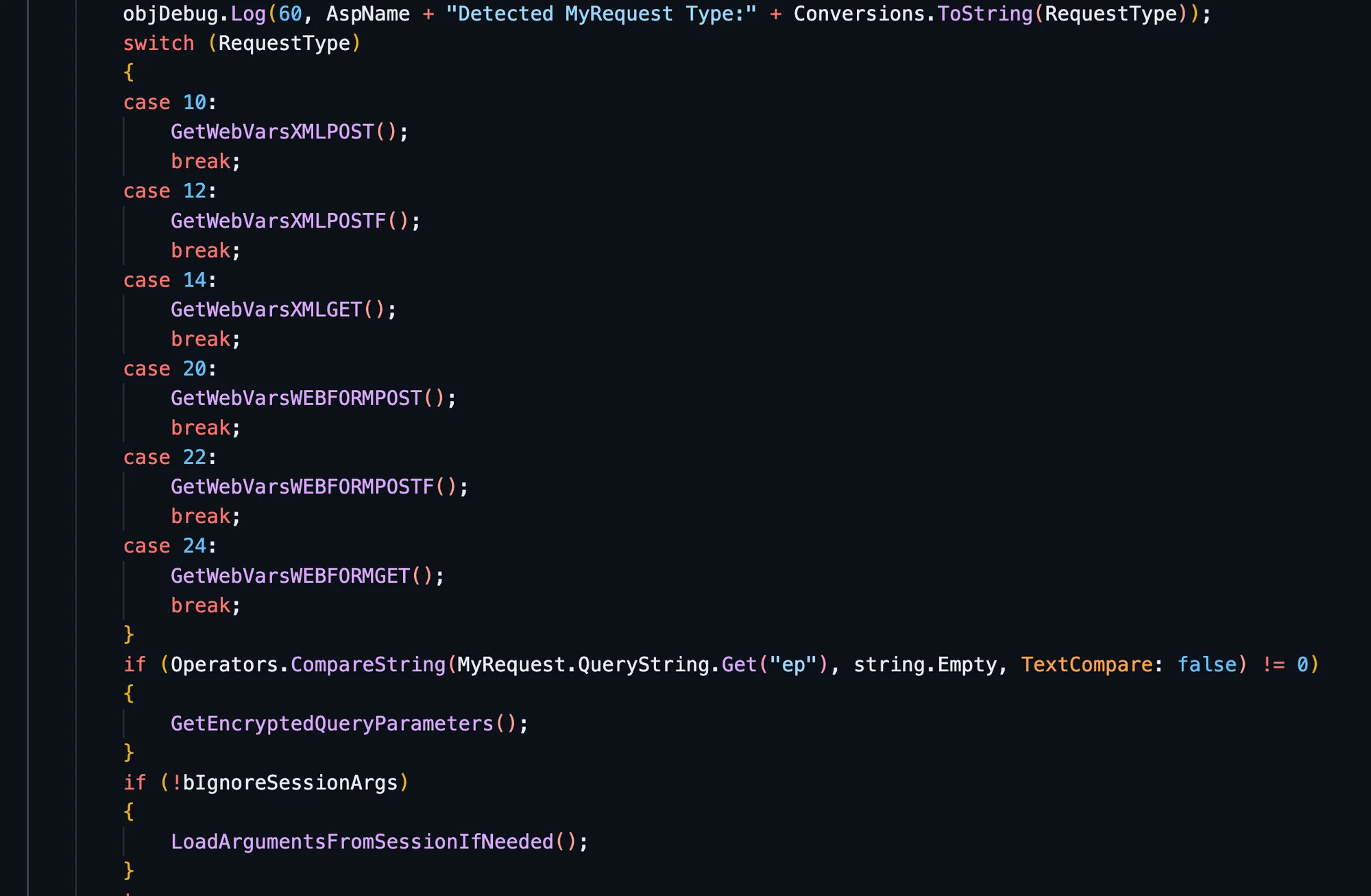
All of these parsing paths apply sanitisation through XHTMLClean() and store the cleaned values in the siGlobs object. The last step retrieves session variables from the database: if a session cookie (ASP.NET_SessionId) is supplied, the backend checks whether variables were previously set for that session, and if they exist they override the parameters received in the current request.
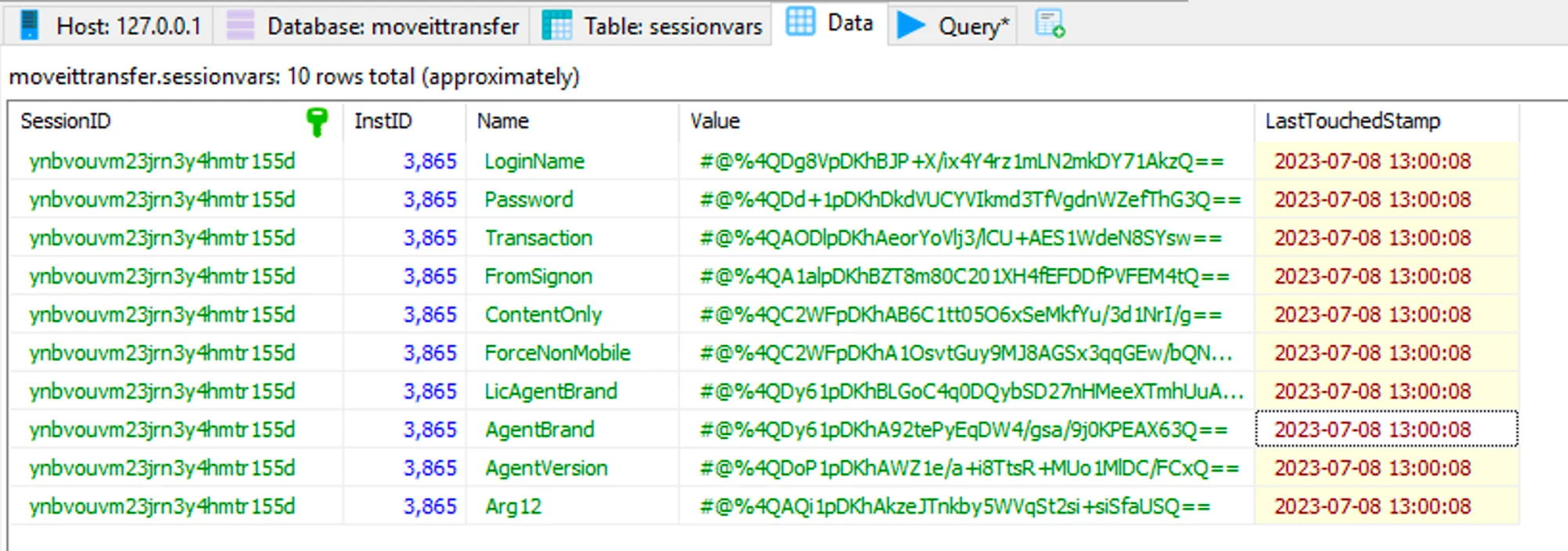
Values are encrypted while inserting and decrypted while reading in app
That override behaviour is the lever. If an attacker can get an unsanitised value stored as a session variable, a later request carrying the same session cookie will use it in place of the sanitised request parameters. The researchers went looking for the points where variables are written to the database and settled on SaveArgumentsToSessionForRedirect(), which is associated with unauthenticated actions.
Exploitation
Attempt #1: Arg01 from the Password variable
Grepping and reading the code turned up a snippet that sets Arg01 from the Password variable. Password is not sanitised, so in this path Arg01 would receive an entirely unsanitised value:
siGlobs.FromSignon = "1";
siGlobs.Transaction = "msgpassword";
siGlobs.Arg01 = siGlobs.Password;
siGlobs.Arg02 = text3;
siGlobs.Password = "";
siGlobs.Arg07 = "";
siGlobs.SaveArgumentsToSessionForRedirect();
The complication is that the same snippet also sets the transaction and FromSignon variables. If the transaction parameter is overridden with msgpassword, the passchangerequest transaction can no longer be executed, which breaks the intended flow.
To test whether the snippet could still store an unsanitised Arg01, the researchers used the Rider debugger and manually removed the transaction variable from the database for their session, so that the transaction came from their own parameter value instead. With special characters in Arg01, the call to UserEngine::UserProcessPassChangeRequest() did not occur. With the special characters removed, the call worked normally. After several hours of debugging, this approach was a dead end.
Attempt #2: machine.aspx and the encrypted ep parameter
Looking at other calls to UserProcessPassChangeRequest, the researchers found another invocation in SILMachine.cs (machine.aspx):
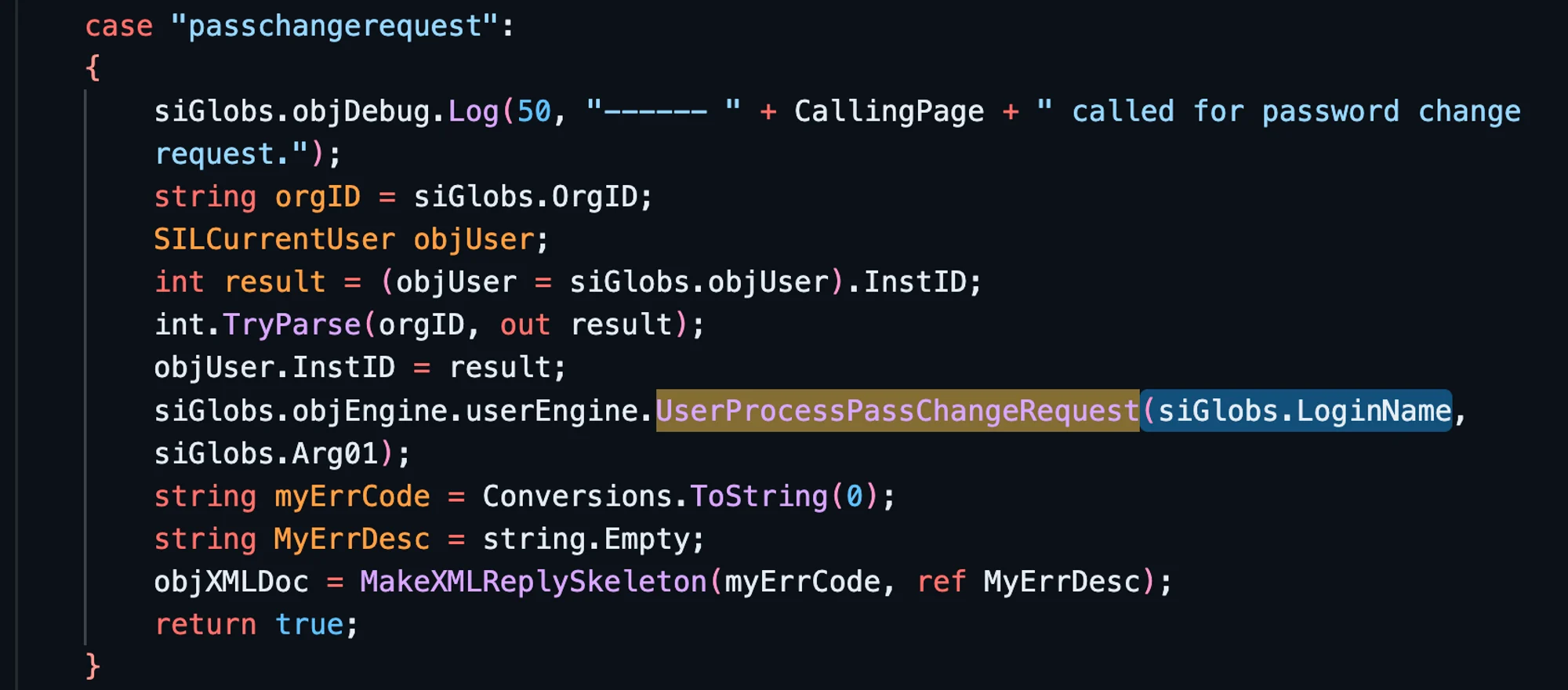
Here too the LoginName variable was sanitised. Revisiting the git diff produced the key finding: an inconsistency in the sanitisation of the Username. After sanitisation, UrlDecode() was called, when it should have run before sanitisation. The wrong order affected the LoginName variable as well.
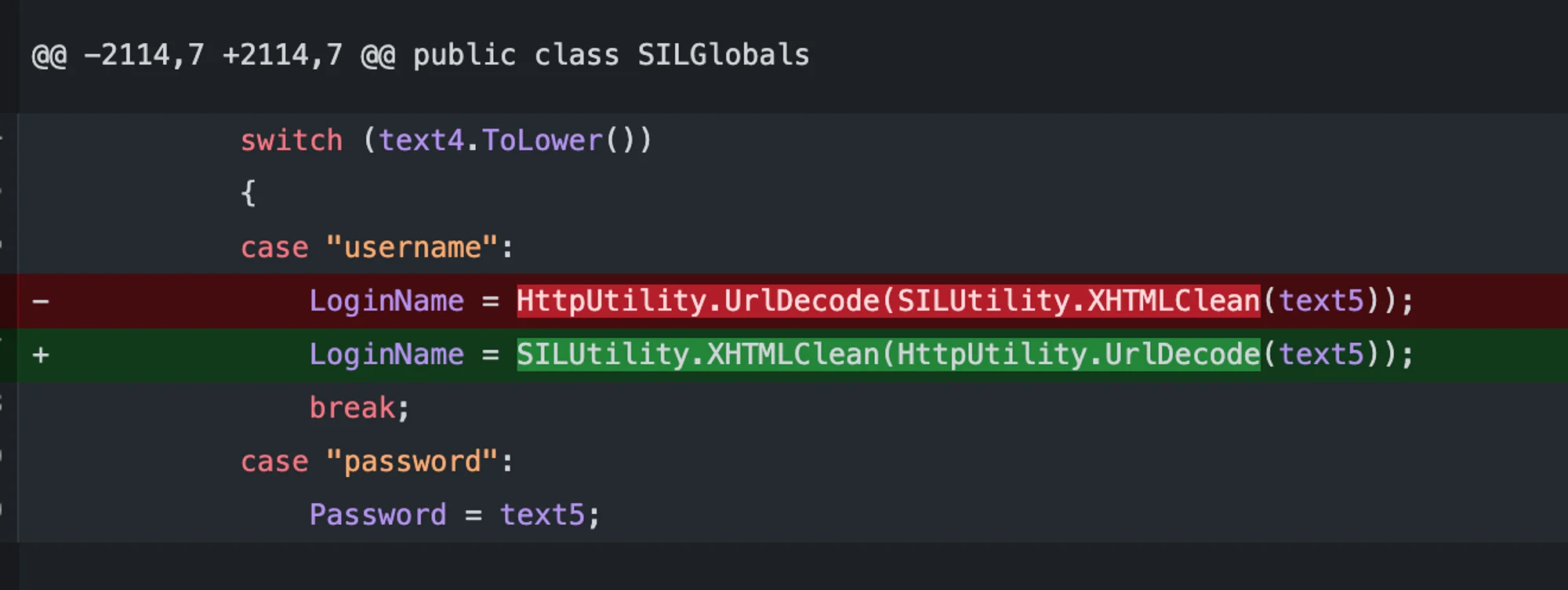
The irregularity appeared only in the GetEncryptedQueryParameters() function. The plan was to use the encrypted ep parameter to assign a URL-decoded LoginName inside siGlobs, and to pass the transaction parameter through a POST parameter, since sending the transaction via query parameters, encrypted or not, was not permitted:
POST /machine.aspx?ep={encrypted{Username=sql%27injection}} HTTP/2
Host: [redacted]
Accept-Language: en-GB,en-US;q=0.9,en;q=0.8
Content-Type: application/x-www-form-urlencoded
Content-Length: 29

Transaction=passchangerequest
The ep value carries an encrypted query string whose Username value contains a URL-encoded single quote (%27), which the flawed order would decode after sanitisation. The body sets the transaction to passchangerequest.
This path failed as well: machine.aspx does not support encrypted query parameters. That functionality exists only on humans.aspx.
The dilemma
With humans.aspx and its encrypted parameter support as the only option, two paths remained:
- Find a method to set the session variables with transaction
passchangerequestand an unsanitisedLoginNamethrough encrypted parameters. - Find a method to set the session variable
LoginNameunsanitised through encrypted parameters without setting the transaction.
Further grepping and code reading ruled out the second option: the transaction variable is only left unset in a specific scenario that occurs after authentication. The researchers pursued the first path.
The final attempt: the InitialPage cookie
With the debugger running, the researchers examined every invocation of SaveArgumentsToSessionForRedirect() and discarded the ones that did not fit. One call, buried in a series of if/switch statements, stood out: just above it, the transaction and LoginName variables were set exactly as needed. Reaching it was the problem.
try
{
	string value3 = siGlobs.MyRequest.Cookies["InitialPage"].Value;
	siGlobs.objDebug.Log(60, string.Format("{0}: InitialPage cookie found: {1}", "Human_Main", value3));
	if (Operators.CompareString(value3, CallingPage, TextCompare: false) == 0)
	{
		break;
	}
	string text6 = "";
	string text7 = value3.ToLower();
	if (Regex.IsMatch(text7, "[a-z0-9]+\\\\.aspx"))
	{
		if (Operators.CompareString(text7, "certtouser.aspx", TextCompare: false) == 0)
		{
			if (!SILUtility.StrToBool(siGlobs.FromCertToUser))
			{
				text6 = MyTarget.Substring(0, MyTarget.LastIndexOf("/") + 1) + value3;
			}
		}
		else
		{
			text6 = MyTarget.Substring(0, MyTarget.LastIndexOf("/") + 1) + value3;
		}
		if (Operators.CompareString(text6, "", TextCompare: false) != 0)
		{
			siGlobs.objDebug.Log(60, string.Format("{0}: Redirecting to {1} due to InitialPage cookie", "Human_Main", value3));
			siGlobs.SaveArgumentsToSessionForRedirect();
			siGlobs.CleanupVariables();
			siGlobs.MyResponse.Redirect(siGlobs.MakeEncryptedURLIfNec(text6));
		}
	}
}
The call requires the InitialPage cookie to hold a value other than the calling page, which in this case is humans.aspx. That was the missing link: with the cookie set to a different value, the code reaches SaveArgumentsToSessionForRedirect().
Sending that request returns a session ID whose stored variables include the transaction set to passchangerequest and LoginName set to the SQL injection payload. That is exactly the state needed to exploit the injection.
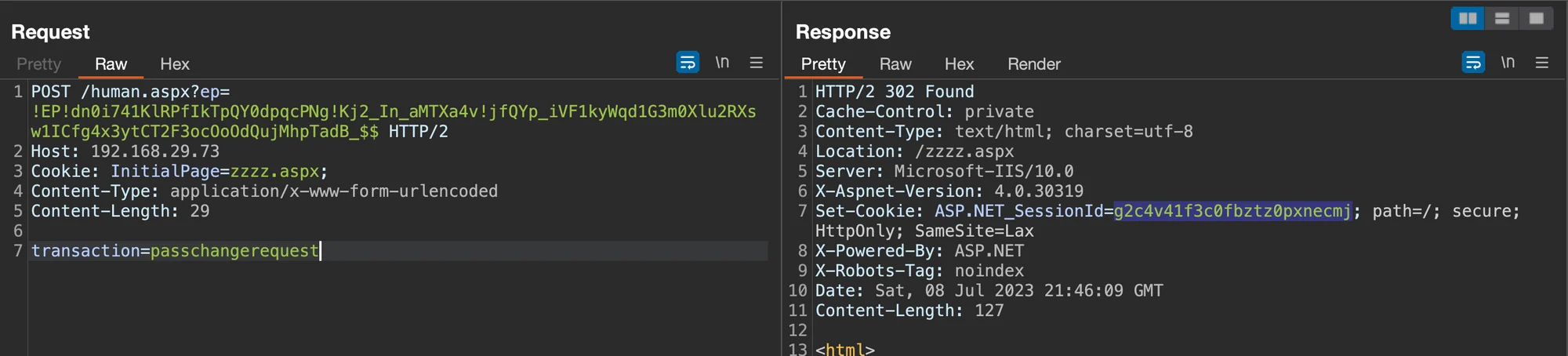
The remaining step is to send the machine.aspx request with that session cookie and observe execution. The session variables are then used, and the injected payload produces an SQL exception error.
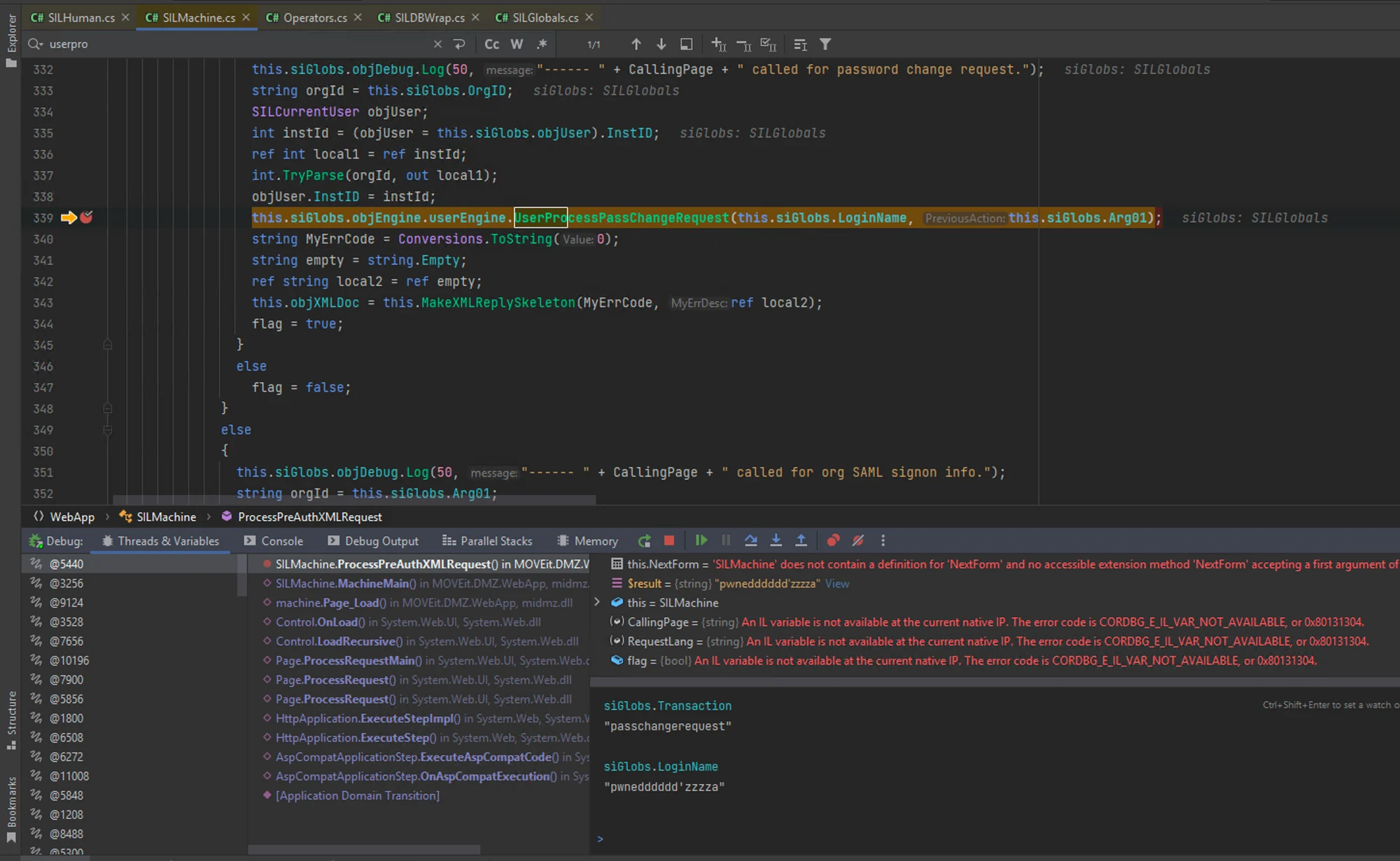
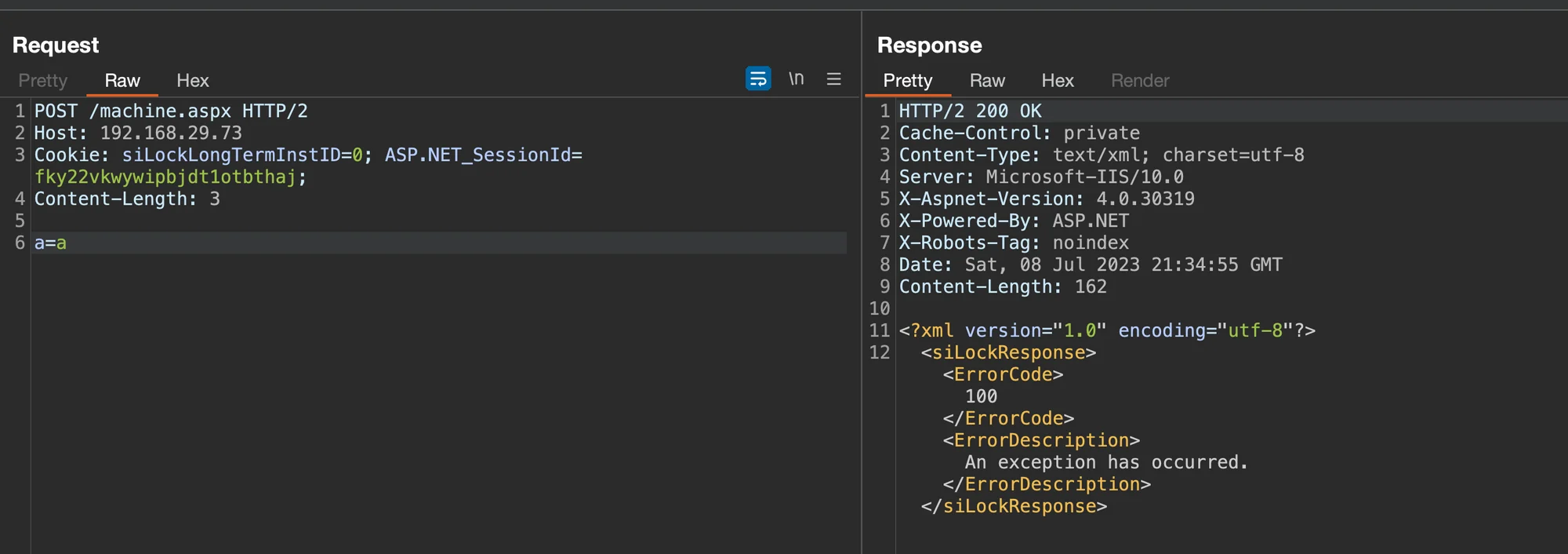
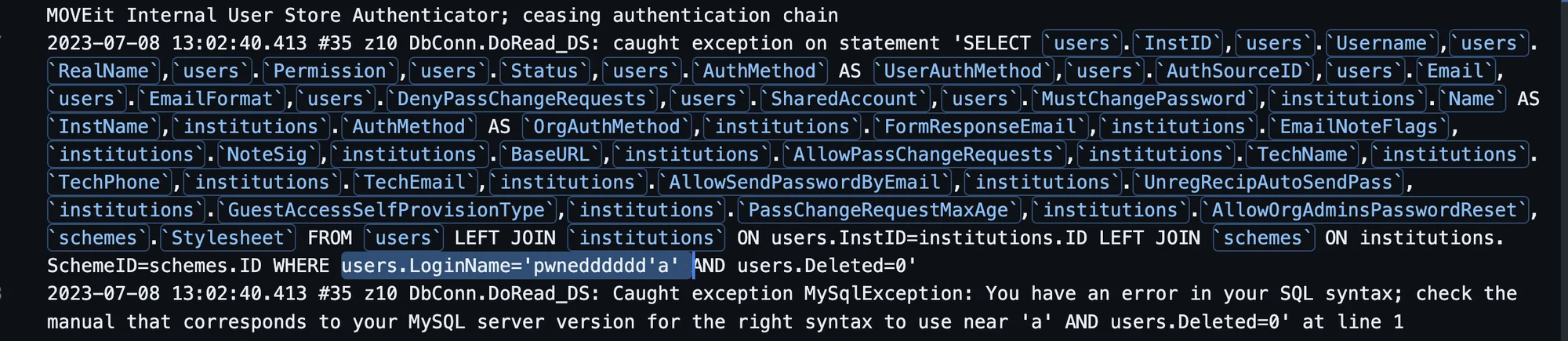
The injection can be taken further: it can be used to insert a new active session into the database. The researchers used Nuclei to fire the consecutive requests and generate a sysadmin session and access token.
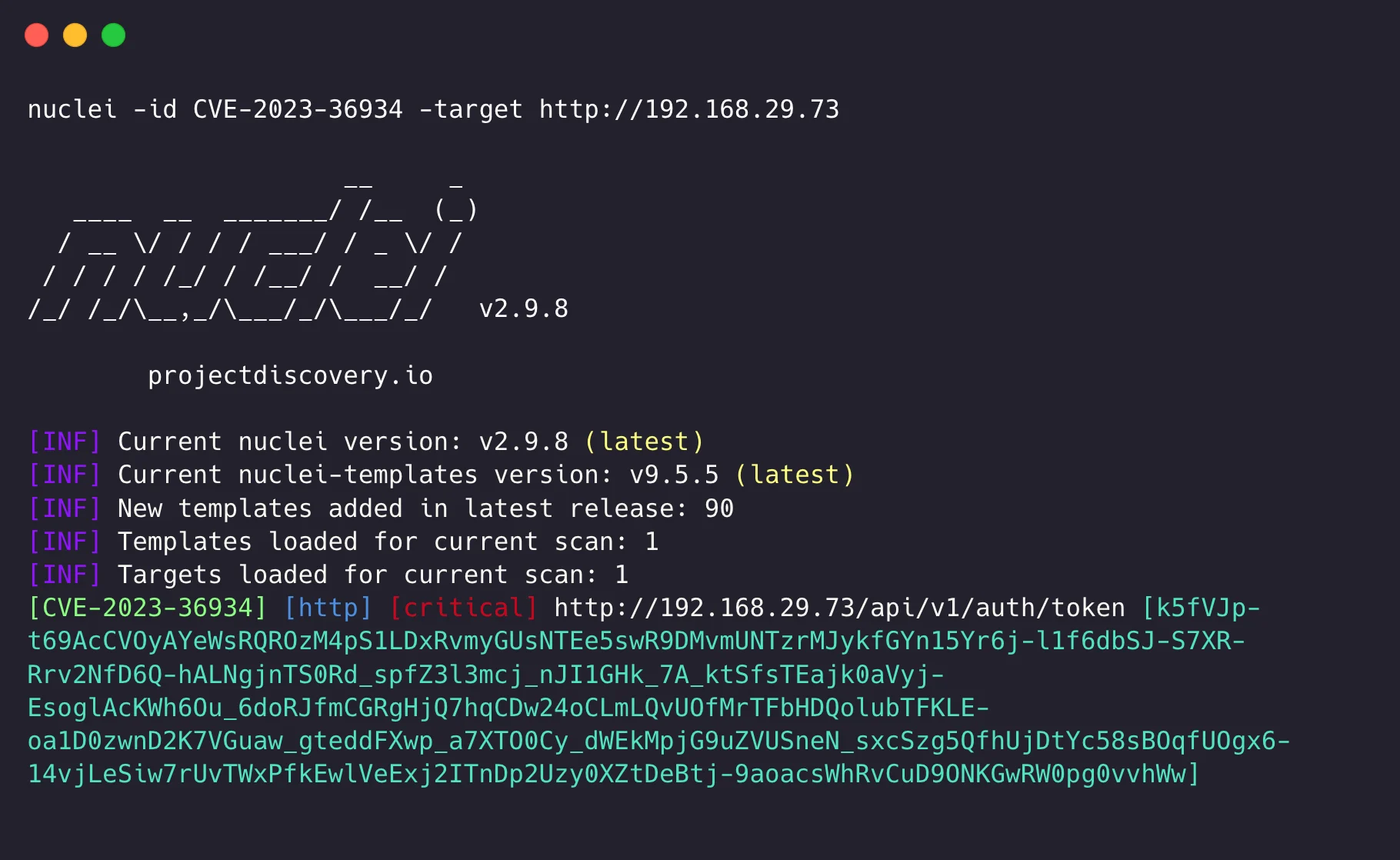
A Nuclei template for the vulnerability, CVE-2023-36934, is available in the nuclei-templates GitHub repository.
Root cause
The mistake is an ordering bug in GetEncryptedQueryParameters(): UrlDecode() is called after XHTMLClean() instead of before it. Sanitisation therefore runs on the still-encoded value, and the subsequent decode reintroduces characters the sanitiser was meant to neutralise. Because the decoded value is what ends up in siGlobs, the LoginName variable reaches UserProcessPassChangeRequest() unsanitised.
The second half of the chain is the session-variable override: variables previously stored for a session are read back from the database and take precedence over the parameters of the current request. SaveArgumentsToSessionForRedirect() writes those variables, and the InitialPage cookie check is the only thing standing between an unauthenticated request and that write. The direct Arg01 path is sanitised by XHTMLClean(); the encrypted-parameter path defeats it because it decodes after cleaning.
Impact
An unauthenticated attacker can inject SQL into the query built by UserProcessPassChangeRequest(). The researchers demonstrated that the injection can insert a new active session into the database and, by chaining the requests, generate a sysadmin session and access token. In the broader terms of the advisory, exploitation of these SQL injection vulnerabilities could grant unauthorised access to the MOVEit Transfer database, allowing attackers to manipulate and expose sensitive information.
Fix
The security release changes UserEngine::UserProcessPassChangeRequest(), and the diff shows the sanitisation order in GetEncryptedQueryParameters() was the flaw: UrlDecode() ran after XHTMLClean() instead of before it. The vendor update, including the drop-in DLL hot patch where offered for a given version, is the remediation the advisory points to.
Variants to test
- Other encrypted-parameter handlers. Look for functions that decode after sanitising, not just
GetEncryptedQueryParameters(). A positive result is a value that contains a decoded metacharacter (such as a single quote) after it has passed the sanitiser. - Other
SaveArgumentsToSessionForRedirect()call sites. Enumerate every invocation and check which ones are reachable unauthenticated and which variables they write. A positive result is a call that stores an unsanitised value under a name later used in a query. - Cookie-gated code paths. Grep for cookie reads that gate a state-changing call, like the
InitialPagecheck. A positive result is a cookie value that lets an unauthenticated request reach a write or redirect path. - Session-variable override behaviour. On any application that restores session variables from a database and lets them override request parameters, try storing a value in one request and reusing it in another. A positive result is the stored value appearing in a later query without re-sanitisation.
- Transaction parameter placement. Test whether a security-relevant parameter is accepted only via POST and not via query string, as with the transaction here. A positive result is a parameter that bypasses a restriction when moved between locations.
What happened, in plain words
MOVEit Transfer is a web application that organisations use to move files between people and systems securely. Think of it as a very large, shared filing cabinet that lives on a server: staff log in through a web page, upload files, download files, and the software keeps track of who is allowed to see what. Because so many organisations rely on it, a security flaw in MOVEit Transfer can affect a lot of people at once.
In July 2023, the company behind MOVEit Transfer, Progress, published a security update for several versions of the product. That update fixed a number of problems, including one tracked as CVE-2023-36934. A CVE is simply a public catalogue number for a known security flaw, so people around the world can refer to the same bug unambiguously. The flaw in question is an unauthenticated SQL injection. We will unpack both halves of that phrase shortly, but in everyday terms: someone who has never logged in, with no username or password, could send a specially crafted request to the MOVEit web pages and trick the software into running database commands of the attacker's choosing.
The research team at ProjectDiscovery set up two copies of MOVEit Transfer side by side: one with the security update applied (the patched version) and one without it (the unpatched version). By comparing the two, they could see exactly what the vendor changed, and from that work out what the flaw was and how to reproduce it. This article walks through that journey step by step, explaining each idea as it comes up.
The ideas you need first
Before following the researchers, here are the basic concepts, explained from zero.
A web application and its pages. When you type an address into your browser, you are asking a server for a page. Some pages are plain documents; others, like MOVEit's, are programs that take your input, do something with it, and send back a result. Two of MOVEit's pages matter here: humans.aspx and machine.aspx. The .aspx ending tells you these pages are built with a Microsoft technology called ASP.NET, which runs code written in a language called C#. One page is meant for people using a browser; the other is meant for automated systems talking to the software.
A request. Every time your browser loads a page or submits a form, it sends a request to the server. A request has a method (like GET to fetch something or POST to send data), a path (which page), optional headers (extra information such as what kind of data is being sent), and sometimes a body (the data itself, for example the contents of a form you filled in).
Parameters. Parameters are the individual pieces of data in a request. They can travel in the query string (the part of a URL after a ?, like page.aspx?name=alice), in the body of a form post, or in other places. The application reads them by name.
Cookies. A cookie is a small piece of text that a website asks your browser to store and send back on every subsequent request to that site. It is how a website recognises you between page loads. The most important cookie here is the session cookie: after you log in (or even before), the server gives your browser an identifier, and on each later request the browser presents it so the server knows which conversation it belongs to. MOVEit's session cookie is called ASP.NET_SessionId.
A session. A session is the server's memory of one ongoing conversation with one browser. Because the web itself is stateless (each request arrives fresh), the server keeps a store of information tied to the session identifier. That store can live in memory or, as here, in a database.
A database and SQL. A database is an organised store of information, and SQL is the language used to ask it questions and tell it to change things. A typical command might mean "find the user whose name is alice". The application builds these commands as text and sends them to the database.
Imagine a form that asks for your name and then builds the instruction "look up the record for NAME". If you type alice, all is well. If you type something clever containing punctuation that the database treats as part of the command rather than as part of the name, you can change what the command does. That is the whole idea: user input escapes its intended role and becomes code.
Sanitisation. Sanitisation (or cleaning) means removing or neutralising dangerous characters from user input before using it. MOVEit does this with a function called XHTMLClean(). If every path that handles input runs it, injection is blocked.
Encoding and URL decoding. Some characters cannot travel safely in a URL, so they are written in an encoded form. A single quote ' becomes %27. URL decoding is the reverse: turning %27 back into '. The order in which you decode and sanitise matters enormously, as this story shows.
Encryption. Encryption scrambles data so that only someone with the right key can read it. MOVEit can carry parameters in an encrypted form, in a parameter called ep (short for encrypted parameters), so that prying eyes cannot read or tamper with them in transit.
A DLL. A DLL is a file containing compiled code that a Windows program loads and uses. MOVEit's logic lives in DLLs. A hot patch is a replacement DLL that fixes a problem without reinstalling the whole product.
Decompiling and diffing. Compiled code is not meant to be read by humans, but a decompiler turns it back into something resembling source code. A diff is a comparison between two versions of a file that highlights exactly what changed. Together they are the standard way to study a security patch.
A debugger. A debugger is a tool that lets a developer pause a running program, inspect the values of its variables, and step through it line by line. The researchers used a debugger called Rider.
Nuclei. Nuclei is an open-source tool from ProjectDiscovery that sends predefined requests (called templates) to a target to check for a specific vulnerability. It is useful for automating a multi-step attack.
Setting up the comparison
The team deployed an unpatched and a patched copy of MOVEit Transfer side by side. The vendor's advisory mentioned that, for certain versions, the fix was available as drop-in DLL files. That is a gift to a researcher: instead of comparing entire installations, you can compare just the handful of files that changed.
They decompiled the DLLs from both versions and ran a Git diff over the resulting C# code. Git is a version-control system normally used to track changes to source code; here it was used simply as a comparison tool. The diff made the changed functions stand out immediately.
Why do this at all? Because the fastest way to understand a security fix is to see what the vendor changed. A fix often points directly at the vulnerable code, and reading the old version next to the new one tells you what the attacker could do.
No accounts or credentials are needed for the attack itself. The whole chain is unauthenticated, which is why the researchers concentrated on functions that can be reached without logging in. That is also what makes the flaw serious: an attacker does not need to be a customer or an employee.
Finding the flaw
The diff pointed at a function called UserEngine::UserProcessPassChangeRequest(). The name suggests it handles a request to change a password. It can be reached from two pages: humans.aspx and machine.aspx. Reading the older, unpatched code made it clear that the function was vulnerable to SQL injection if the MyLoginName variable could be controlled by the attacker.
At first sight, the obvious route is to inject through the Arg01 parameter of the request. MOVEit blocks that: the value passes through SILUtility.XHTMLClean(), which sanitises it and prevents exploitation this way. So the real problem became: how do you get an unsanitised value into the variable that ends up in the database query?
To understand the options, the researchers looked at how MOVEit processes requests. On humans.aspx, parameter assignment goes through siGlobs.GetIncomingVariables(). That function scans the request and parses parameters from several places: form posts, query strings, multipart forms (forms that can carry files), encrypted query strings carried in the ep parameter, and finally from the database, if parameters were previously stored in the session as vars.
All of these parsing paths apply sanitisation through XHTMLClean() and store the cleaned values in an object called siGlobs. Think of siGlobs as a tray of labelled slots that the rest of the code reads from; whatever ends up in the tray is what the application acts on.
The last step retrieves session variables from the database. The logic is: if a session cookie (ASP.NET_SessionId) is supplied, the backend checks whether variables were previously set for that session, and if they exist they override the parameters received in the current request.
Values are encrypted while inserting and decrypted while reading in app
That override behaviour is the lever. Imagine a cloakroom: you hand in a coat and get a ticket. Later, you show the ticket and get back exactly the coat you left, regardless of what you are wearing now. If an attacker can get an unsanitised value stored as a session variable, a later request carrying the same session cookie will use the stored value in place of the sanitised request parameters. The cleaning done on the current request becomes irrelevant.
The researchers went looking for the points where variables are written to the database and settled on SaveArgumentsToSessionForRedirect(), a function whose name says it saves arguments to the session so they survive a redirect. It is associated with unauthenticated actions, which fits the goal.
Exploitation
Attempt #1: Arg01 from the Password variable
Grepping (searching the code for a pattern) and reading the code turned up a snippet that sets Arg01 from the Password variable. Password is not sanitised, so in this path Arg01 would receive an entirely unsanitised value:
siGlobs.FromSignon = "1";
siGlobs.Transaction = "msgpassword";
siGlobs.Arg01 = siGlobs.Password;
siGlobs.Arg02 = text3;
siGlobs.Password = "";
siGlobs.Arg07 = "";
siGlobs.SaveArgumentsToSessionForRedirect();
Line by line:
siGlobs.FromSignon = "1";marks this request as coming from the sign-on flow.siGlobs.Transaction = "msgpassword";sets the transaction type to a password message.siGlobs.Arg01 = siGlobs.Password;copies the password value into the first argument slot, with no cleaning.siGlobs.Arg02 = text3;fills the second argument slot with some other text.siGlobs.Password = "";clears the password from the tray.siGlobs.Arg07 = "";clears the seventh argument slot.siGlobs.SaveArgumentsToSessionForRedirect();writes all of this into the session store so it survives a redirect.
The complication is that the same snippet also sets the transaction and FromSignon variables. If the transaction parameter is overridden with msgpassword, the passchangerequest transaction can no longer be executed, which breaks the intended flow. In plain terms: the code path that gives you an unsanitised value also changes the label on the request, and the label is what decides which function runs later.
To test whether the snippet could still store an unsanitised Arg01, the researchers used the Rider debugger and manually removed the transaction variable from the database for their session, so that the transaction came from their own parameter value instead. With special characters in Arg01, the call to UserEngine::UserProcessPassChangeRequest() did not occur. With the special characters removed, the call worked normally. After several hours of debugging, this approach was a dead end.
Why did it fail? Because the special characters that make SQL injection possible also stopped the code from reaching the vulnerable function at all. The report does not explain why the special characters stopped the call from occurring.
Attempt #2: machine.aspx and the encrypted ep parameter
Looking at other calls to UserProcessPassChangeRequest, the researchers found another invocation in SILMachine.cs (machine.aspx):
Here too the LoginName variable was sanitised. Revisiting the git diff produced the key finding: an inconsistency in the sanitisation of the Username. After sanitisation, UrlDecode() was called, when it should have run before sanitisation. The wrong order affected the LoginName variable as well.
This is the heart of the bug. Picture a security guard who checks bags at the door, and then, after the check, someone hands each visitor a parcel that was posted earlier. The guard checked the bag, not the parcel. Here, the sanitiser checked the still-encoded text (%27), which looks harmless, and only afterwards did UrlDecode() turn %27 back into a real single quote '. The dangerous character was reintroduced after the check.
The irregularity appeared only in the GetEncryptedQueryParameters() function, the code that handles the encrypted ep parameter. The plan was to use ep to assign a URL-decoded LoginName inside siGlobs, and to pass the transaction parameter through a POST parameter, since sending the transaction via query parameters, encrypted or not, was not permitted:
POST /machine.aspx?ep={encrypted{Username=sql%27injection}} HTTP/2
Host: [redacted]
Accept-Language: en-GB,en-US;q=0.9,en;q=0.8
Content-Type: application/x-www-form-urlencoded
Content-Length: 29

Transaction=passchangerequest
Line by line:
POST /machine.aspx?ep={encrypted{Username=sql%27injection}} HTTP/2sends a POST request to machine.aspx. The query string carries theepparameter, whose value is an encrypted blob. Inside that blob, once decrypted, isUsername=sql%27injection. The%27is a URL-encoded single quote, so after decoding the value becomessql'injection, which is the start of an SQL injection.Host: [redacted]names the server being contacted. This is a lab address, not a public one.Accept-Language: en-GB,en-US;q=0.9,en;q=0.8tells the server which languages the client prefers. It is ordinary browser behaviour.Content-Type: application/x-www-form-urlencodedsays the body is a standard HTML form submission.Content-Length: 29says the body is 29 bytes long.- The blank line separates headers from body.
Transaction=passchangerequestis the body: it sets the transaction to the password-change request, which is the function the researchers want to reach.
This path failed as well: machine.aspx does not support encrypted query parameters. That functionality exists only on humans.aspx. The plan was sound in principle but aimed at the wrong page.
The dilemma
With humans.aspx and its encrypted parameter support as the only option, two paths remained:
- Find a method to set the session variables with transaction
passchangerequestand an unsanitisedLoginNamethrough encrypted parameters. - Find a method to set the session variable
LoginNameunsanitised through encrypted parameters without setting the transaction.
Further grepping and code reading ruled out the second option: the transaction variable is only left unset in a specific scenario that occurs after authentication. Since the whole point is to avoid logging in, that scenario is out of reach. The researchers pursued the first path.
The final attempt: the InitialPage cookie
With the debugger running, the researchers examined every invocation of SaveArgumentsToSessionForRedirect() and discarded the ones that did not fit. One call, buried in a series of if/switch statements, stood out: just above it, the transaction and LoginName variables were set exactly as needed. Reaching it was the problem.
try
{
	string value3 = siGlobs.MyRequest.Cookies["InitialPage"].Value;
	siGlobs.objDebug.Log(60, string.Format("{0}: InitialPage cookie found: {1}", "Human_Main", value3));
	if (Operators.CompareString(value3, CallingPage, TextCompare: false) == 0)
	{
		break;
	}
	string text6 = "";
	string text7 = value3.ToLower();
	if (Regex.IsMatch(text7, "[a-z0-9]+\\\\.aspx"))
	{
		if (Operators.CompareString(text7, "certtouser.aspx", TextCompare: false) == 0)
		{
			if (!SILUtility.StrToBool(siGlobs.FromCertToUser))
			{
				text6 = MyTarget.Substring(0, MyTarget.LastIndexOf("/") + 1) + value3;
			}
		}
		else
		{
			text6 = MyTarget.Substring(0, MyTarget.LastIndexOf("/") + 1) + value3;
		}
		if (Operators.CompareString(text6, "", TextCompare: false) != 0)
		{
			siGlobs.objDebug.Log(60, string.Format("{0}: Redirecting to {1} due to InitialPage cookie", "Human_Main", value3));
			siGlobs.SaveArgumentsToSessionForRedirect();
			siGlobs.CleanupVariables();
			siGlobs.MyResponse.Redirect(siGlobs.MakeEncryptedURLIfNec(text6));
		}
	}
}
Line by line:
try {begins a block where errors are caught rather than crashing the page.string value3 = siGlobs.MyRequest.Cookies["InitialPage"].Value;reads the value of a cookie namedInitialPagefrom the incoming request. This is the gate.siGlobs.objDebug.Log(...)writes a debug message recording that the cookie was found and what it contained.if (Operators.CompareString(value3, CallingPage, TextCompare: false) == 0)compares the cookie value with the page that made the call. If they are the same, the next line runs.break;exits the surrounding loop or switch, skipping the rest. So if the cookie matches the calling page, nothing happens.string text6 = "";prepares an empty string to hold a redirect target.string text7 = value3.ToLower();makes a lowercase copy of the cookie value for matching.if (Regex.IsMatch(text7, "[a-z0-9]+\\\\.aspx"))checks that the cookie value looks like a page name ending in.aspx. A regex is a pattern-matching rule.if (Operators.CompareString(text7, "certtouser.aspx", TextCompare: false) == 0)checks for one special page name.if (!SILUtility.StrToBool(siGlobs.FromCertToUser))checks a flag; if it is not set, the next line builds a redirect target from the current path plus the cookie value.else { text6 = ... }handles every other page name the same way: build a redirect target.if (Operators.CompareString(text6, "", TextCompare: false) != 0)runs only if a redirect target was built.siGlobs.objDebug.Log(...)records that a redirect is about to happen because of the cookie.siGlobs.SaveArgumentsToSessionForRedirect();is the important line: it saves the current arguments into the session store.siGlobs.CleanupVariables();tidies up the tray.siGlobs.MyResponse.Redirect(siGlobs.MakeEncryptedURLIfNec(text6));sends the browser to the target page, encrypting the URL if needed.
The call requires the InitialPage cookie to hold a value other than the calling page, which in this case is humans.aspx. That was the missing link: with the cookie set to a different value, the code reaches SaveArgumentsToSessionForRedirect(). In everyday terms, the code was asking "did you come here from somewhere else?" and only doing the save if the answer was yes. Setting the cookie to a different page name makes the answer yes.
Sending that request returns a session ID whose stored variables include the transaction set to passchangerequest and LoginName set to the SQL injection payload. That is exactly the state needed to exploit the injection.
The remaining step is to send the machine.aspx request with that session cookie and observe execution. The session variables are then used, and the injected payload produces an SQL exception error. An SQL exception is the database complaining that the command it was given is malformed, which is the visible sign that the attacker's text reached the database as code rather than as data.
The injection can be taken further: it can be used to insert a new active session into the database. The researchers used Nuclei to fire the consecutive requests and generate a sysadmin session and access token. A sysadmin session is a session belonging to an administrator; an access token is a credential the application issues to prove that identity. Getting one without logging in is a serious outcome.
A Nuclei template for the vulnerability, CVE-2023-36934, is available in the nuclei-templates GitHub repository.
Root cause
The mistake is an ordering bug in GetEncryptedQueryParameters(): UrlDecode() is called after XHTMLClean() instead of before it. Sanitisation therefore runs on the still-encoded value, and the subsequent decode reintroduces characters the sanitiser was meant to neutralise. Because the decoded value is what ends up in siGlobs, the LoginName variable reaches UserProcessPassChangeRequest() unsanitised.
The second half of the chain is the session-variable override: variables previously stored for a session are read back from the database and take precedence over the parameters of the current request. SaveArgumentsToSessionForRedirect() writes those variables, and the InitialPage cookie check is the only thing standing between an unauthenticated request and that write. The direct Arg01 path is sanitised by XHTMLClean(); the encrypted-parameter path defeats it because it decodes after cleaning.
Impact
An unauthenticated attacker can inject SQL into the query built by UserProcessPassChangeRequest(). The researchers demonstrated that the injection can insert a new active session into the database and, by chaining the requests, generate a sysadmin session and access token. In the broader terms of the advisory, exploitation of these SQL injection vulnerabilities could grant unauthorised access to the MOVEit Transfer database, allowing attackers to manipulate and expose sensitive information.
Fix
The security release changes UserEngine::UserProcessPassChangeRequest(), and the diff shows the sanitisation order in GetEncryptedQueryParameters() was the flaw: UrlDecode() ran after XHTMLClean() instead of before it. The vendor update, including the drop-in DLL hot patch where offered for a given version, is the remediation the advisory points to.
Variants to test
- Other encrypted-parameter handlers. Look for functions that decode after sanitising, not just
GetEncryptedQueryParameters(). A positive result is a value that contains a decoded metacharacter (such as a single quote) after it has passed the sanitiser. - Other
SaveArgumentsToSessionForRedirect()call sites. Enumerate every invocation and check which ones are reachable unauthenticated and which variables they write. A positive result is a call that stores an unsanitised value under a name later used in a query. - Cookie-gated code paths. Grep for cookie reads that gate a state-changing call, like the
InitialPagecheck. A positive result is a cookie value that lets an unauthenticated request reach a write or redirect path. - Session-variable override behaviour. On any application that restores session variables from a database and lets them override request parameters, try storing a value in one request and reusing it in another. A positive result is the stored value appearing in a later query without re-sanitisation.
- Transaction parameter placement. Test whether a security-relevant parameter is accepted only via POST and not via query string, as with the transaction here. A positive result is a parameter that bypasses a restriction when moved between locations.
Glossary
- ASP.NET: a Microsoft framework for building web applications, often using C#.
- ASP.NET_SessionId: the name of the cookie MOVEit uses to identify a session.
- Access token: a credential issued by an application to prove an identity, used here to show that a sysadmin session was obtained.
- Body: the part of an HTTP request that carries data, such as a submitted form.
- C#: a programming language used to build ASP.NET applications.
- Cookie: a small piece of text a website asks your browser to store and send back on later requests.
- CVE: a public catalogue number for a known security vulnerability.
- Debugger: a tool that lets a developer pause a running program and inspect its variables.
- Decompiler: a tool that turns compiled code back into something resembling source code.
- Diff: a comparison between two versions of a file showing what changed.
- DLL: a file containing compiled code that a Windows program loads and uses.
- Encryption: scrambling data so only someone with the right key can read it.
- ep: MOVEit's parameter for carrying encrypted query parameters.
- Git: a version-control system, used here as a comparison tool.
- Header: extra information attached to an HTTP request or response.
- Hot patch: a replacement DLL that fixes a problem without reinstalling the product.
- humans.aspx: a MOVEit page intended for people using a browser; supports encrypted parameters.
- InitialPage: a cookie whose value gates a call to
SaveArgumentsToSessionForRedirect(). - machine.aspx: a MOVEit page intended for automated systems; does not support encrypted parameters.
- MOVEit Transfer: a web application for managed file transfer.
- Nuclei: an open-source tool that sends predefined request templates to check for vulnerabilities.
- Parameter: a named piece of data in a request, in the query string or body.
- Patched / unpatched: with or without the security update applied.
- POST: an HTTP method used to send data to a server.
- Query string: the part of a URL after
?, carrying parameters. - Regex: a pattern-matching rule for text.
- Request: a message a browser or tool sends to a server asking for a page or action.
- Rider: a debugger used by the researchers.
- Sanitisation: removing or neutralising dangerous characters from user input.
- Session: the server's memory of one ongoing conversation with one browser.
- Session variable: a value stored in the session and reused on later requests.
- SQL: the language used to query and change databases.
- SQL injection: tricking an application into treating user input as part of a database command.
- Sysadmin: an administrator with the highest level of access.
- Template: a predefined set of requests in Nuclei for checking a specific vulnerability.
- Transaction: a label in MOVEit that decides which function handles a request.
- Unauthenticated: reachable without logging in.
- URL decoding: turning encoded characters such as
%27back into their real form, such as'. - XHTMLClean(): MOVEit's sanitisation function.