Rate Limit Bypass at Readme.com
The password reset endpoint on Readme.com enforced a rate limit of five attempts per IP address, but the server trusted the X-Forwarded-For header to identify the client. An attacker could bypass the limit by changing that header value, enabling unlimited password reset emails and potential brute force of tokens.

I am sharing my experience and knowledge, hope it will add some value to your Bug Hunting. This is my first article, if there are any errors.
The full write-up lives on its author's site
It belongs to its author, so we link to it rather than copy it. The other two tabs are our own rewrites, checked against it.
Context
Readme.com runs a hosted documentation platform, and the account-facing parts of it live on dash.readme.com. The feature in scope here is the password reset flow: a user who has forgotten their password enters the email address they registered with, and the application sends a reset email to that address. Because that endpoint triggers an email to an address supplied by the caller, it is exactly the kind of place where a rate limit matters: without one, the endpoint can be used to send mail repeatedly to a chosen user, and the tokens it issues become a target for guessing.
The write-up describes a rate limit bypass on that forgot-password endpoint. The researcher found that the per-client limit of five attempts could be reset at will by adding an X-Forwarded-For header with a different address, because the server derived the rate-limit key from that header. The report was submitted to the Readme.com security team and closed as a duplicate.
Setup
No special tooling beyond a browser and Burp Suite is needed. The preconditions are:
- A registered account on the platform, created through the public signup page.
- The account's email address confirmed, so the forgot-password flow can be exercised normally.
- Burp Suite configured as an intercepting proxy so the reset request can be captured and replayed in Repeater.
The researcher does not give Burp or browser versions, and the report does not state them.
Finding it
The signal is in the response headers. When the forgot-password request is replayed, the response carries X-Ratelimit-Limit set to 5, and a corresponding remaining counter that decreases with each request. Once the counter reaches 0, the application answers with the message "Too many Attempts". That tells you the server is counting requests per client and enforcing a ceiling of five, which is the expected behaviour.
The interesting part is how the server decides which client a request belongs to. If the counter is keyed on something the client controls, the limit is only a suggestion. The researcher tested this by injecting a forwarding header and watching whether the remaining counter went back up.
Exploitation
Step 1: Create and confirm an account
Register at the signup page:
https://dash.readme.com/signup
Confirm the email address, then go to the forgot-password page.
Step 2: Request a reset for the registered address
Navigate to the forgot-password endpoint and submit the registered email address:
https://dash.readme.com/forgot/
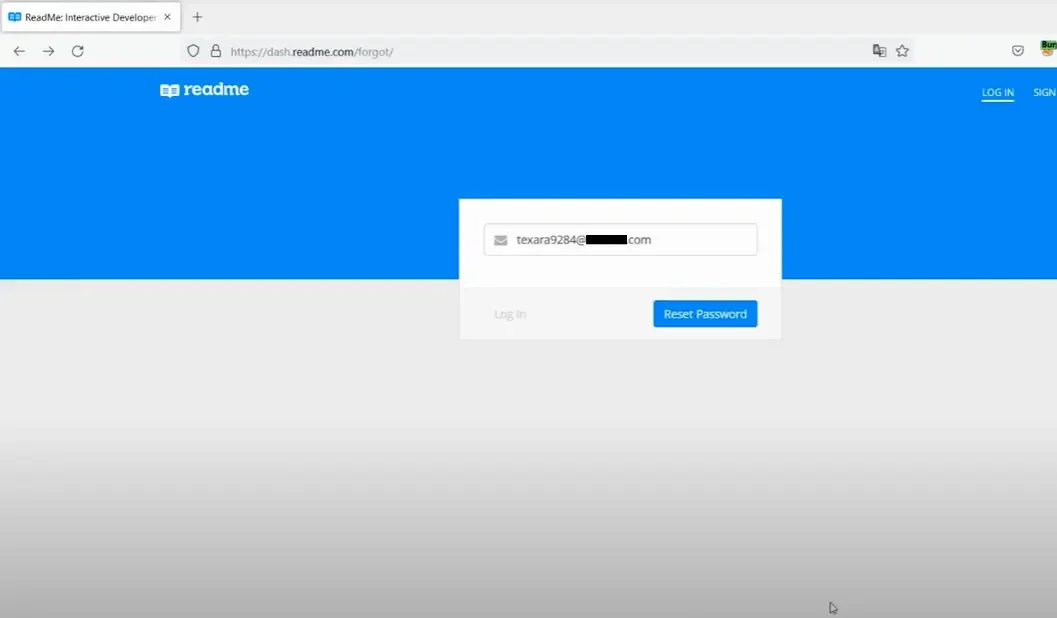
The screenshot accompanies the step of entering the registered email.
Step 3: Capture and replay the request
Intercept the submission with Burp and send it to Repeater. Replaying it repeatedly shows the limit in the response headers: X-Ratelimit-Limit is 5, and once the remaining count reaches 0 the browser responds with "Too many Attempts".
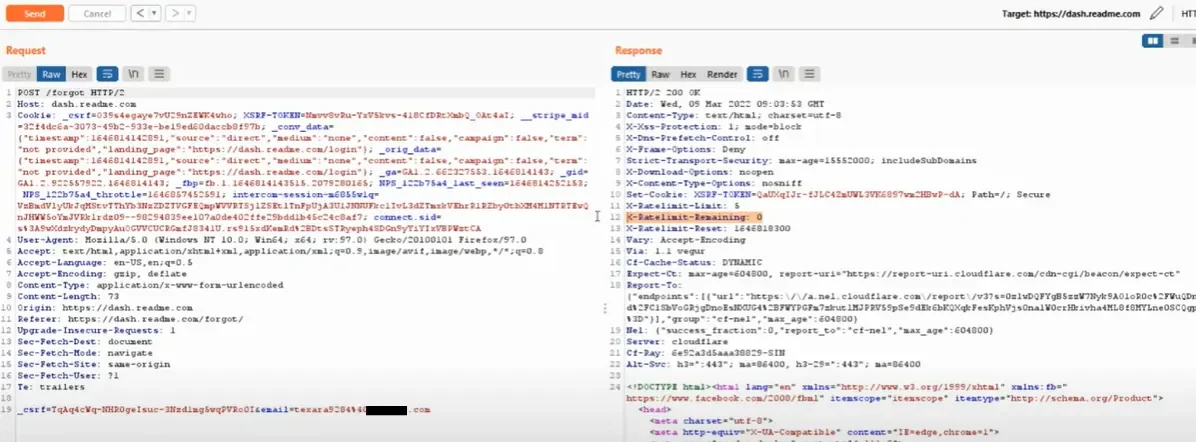
The screenshot accompanies the observation that X-Ratelimit-Limit is set to 5.
Step 4: Add a forwarding header to reset the counter
Add the following header to the request:
X-Forwarded-For: [redacted]
With that header present, five more attempts become available. When the limit is reached again, change the value:
X-Forwarded-For: [redacted]
Another five attempts are added, and so on. Each new value in the header produces a fresh bucket of five attempts, so the ceiling never actually applies to the attacker as a whole.
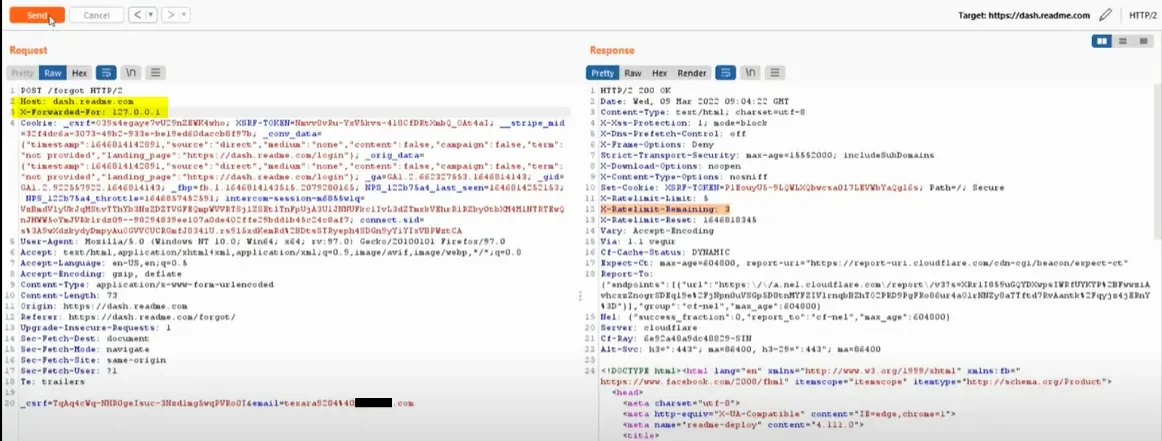
The screenshot shows X-Ratelimit-Remaining increasing again after the header was changed to [redacted].
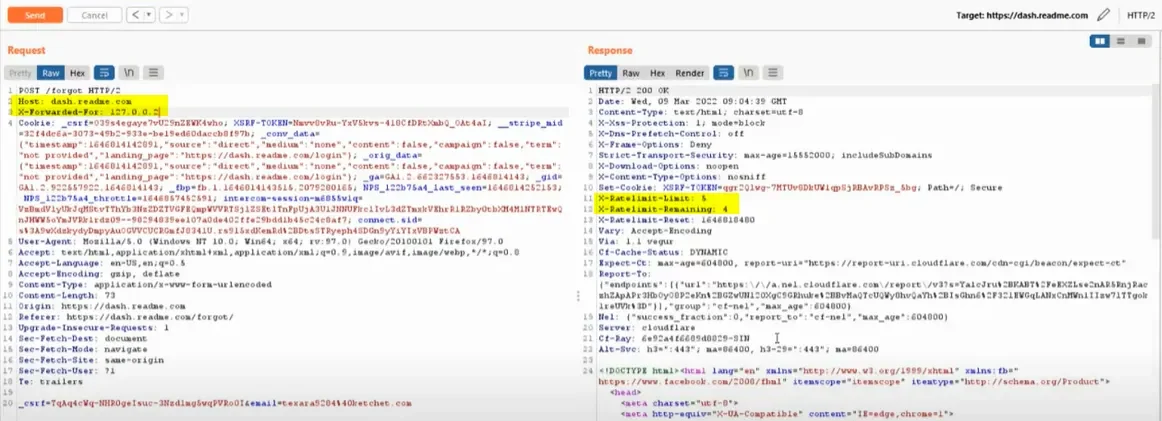
The screenshot shows the same effect after changing the header to [redacted]: the remaining counter is restored once more.
Step 5: Report
The researcher drafted the report and sent it to the Readme.com security team. The team replied that it was a duplicate.
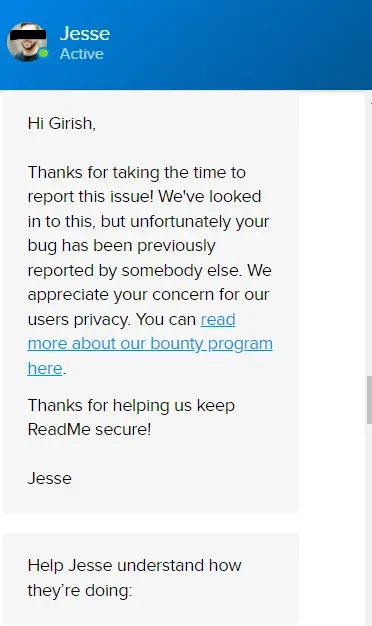
The report ends with the researcher noting the team's duplicate reply.
Root cause
The server trusts a client-supplied header when it builds the key for the rate limiter. X-Forwarded-For is meant to carry the original client address through proxies, but it is only meaningful when a trusted proxy sets or sanitises it. Here the application appears to read the header directly and use its value as the identity of the caller, so any client can present a new identity simply by changing the header. The limit of five is therefore applied per header value rather than per real client, and the attacker can mint as many buckets as they like.
This is likely a configuration or code issue rather than a flaw in the rate-limiting algorithm itself: the counter works, it is just counting the wrong thing. The existing defence (the five-request ceiling) did not stop the attack because the attacker controlled the input that the defence was keyed on.
Impact
The researcher lists three consequences:
- Mass mailing to a targeted user, which degrades the reputation of the company.
- If the company uses a third-party email service API, exceeding the email quota carries a business cost.
- The bypass can be chained into brute-force attacks against OTPs, password tokens and similar values.
These are the researcher's stated impacts. The report does not demonstrate a brute-force attack against a token, and it does not quantify the mailing volume or the cost.
Fix
The report does not describe a fix, and the researcher does not state what Readme.com changed. The general remedy for this class of bug is to derive the rate-limit key from a value the client cannot forge, such as the connection's source address as seen by the edge, and to ignore or overwrite forwarding headers at the trust boundary. Where a proxy chain is legitimate, only the addresses added by trusted infrastructure should be considered, and the header should be stripped from untrusted clients before it reaches the application.
Variants to test
- Other forwarding headers. Try the same technique with headers that proxies and frameworks commonly honour:
X-Originating-IP: IP
X-Forwarded-For: IP
X-Remote-IP: IP
X-Remote-Addr: IP
X-Client-IP: IP
X-Host: IP
X-Forwarded-Host: IP
A positive result is the remaining counter resetting, or the "Too many Attempts" message disappearing, after the header value changes.
- Null and whitespace characters. The researcher suggests trying encoded null and control characters in the value:
%0 , %00 , %09 , %020 , %0a , %0C , %0d%0a
A positive result is the limiter treating the modified value as a new client while the application still processes the request.
-
API version switching. Change the path to a different version of the same endpoint, for example from
/api/v1/users/idto/api/v2/users/id. A positive result is a separate counter for the new path, so the limit on the original path can be bypassed by alternating between versions. -
IP rotation tooling. Use a Burp extension such as IP Rotate, which the researcher describes as spinning up API gateways across multiple regions, so each request appears to come from a different address. A positive result is the limiter never triggering because each request is attributed to a new source.
These variants apply to any endpoint where the limiter is keyed on client-controlled input: login, signup, account verification, 2FA code entry and coupon redemption are all worth checking with the same method.
What happened, in plain words
Readme.com is a company that hosts documentation pages for other companies. Think of it as a service that gives businesses a ready-made website where they can publish their help articles and API guides. To use it, people create an account on dash.readme.com, which is the part of the site where you sign in and manage your own account.
One feature of any account system is the password reset. If you forget your password, you type in the email address you signed up with, and the site sends you an email containing a link that lets you set a new password. This is convenient, but it is also a place where a website needs to be careful. Every time someone submits that form, the site sends an email. If there is no limit on how often the form can be submitted, a person with bad intentions could make the site send hundreds or thousands of emails to one address. That is annoying for the recipient, it can damage the company's reputation (their emails start looking like spam), and if they pay a third-party company to send email on their behalf, it costs them money.
To prevent this, websites use something called a rate limit. A rate limit is a cap on how many times you can do something in a given period. A simple everyday comparison: a coffee shop might say "one free refill per customer". The shop is not stopping you from drinking coffee, it is just making sure one person cannot take unlimited free refills. A rate limit on a website works the same way: after five password reset requests, the site says "that is enough for now, try again later".
The researcher in this report found that Readme.com did have a rate limit of five attempts on the forgot-password form, but that the limit could be reset at will by adding a small piece of extra information to each request. That extra information is called a header, and the specific header was X-Forwarded-For. By changing the value in that header, the researcher could make the server believe each batch of requests came from a different computer, so the five-attempt counter started over every time. In effect, the limit existed but could be sidestepped endlessly.
The researcher wrote up the finding and sent it to the Readme.com security team. The team replied that the issue had already been reported by someone else, which is what "duplicate" means in bug bounty work: the same bug was already known, so no new reward was given. The researcher shared the story anyway so others could learn from it.
Background you need first
Before walking through the steps, here are the ideas that come up, explained from scratch.
What is an API?
An API (Application Programming Interface) is the set of doors a website or app offers so that programs can talk to it. When you fill in a form in your browser and press submit, your browser sends a request to one of those doors, the server does some work, and it sends back a response. You do not see the request itself, only the result on screen. Tools like Burp Suite let you look at the request and the response directly, which is how security researchers examine what is really going on.
What is a request and a response?
A request is the message your browser sends to a server: "please send a password reset email to this address". A response is the message the server sends back: either the page you see, or an error, or some data. Both messages have two parts: a body (the main content, such as the email address you typed) and headers (small labelled pieces of extra information, like the envelope around a letter). Headers carry things like what browser you use, what language you prefer, and, importantly for this story, information about where the request came from.
What is a cookie or a token?
A cookie is a small piece of data a website asks your browser to store and send back with every request, so the site can remember who you are between page loads. A token is similar: a string of characters that acts like a temporary key or ticket. In a password reset flow, the email you receive usually contains a token in the link. Clicking the link proves you received the email, and the token is what lets you set a new password. If an attacker can guess a token, they can take over the account, which is why limiting how many guesses someone can make matters.
What is a rate limit, again?
A rate limit is a rule that says "no more than N actions per client in a time window". The server keeps a counter for each client. When the counter hits the maximum, the server refuses further requests, often with the HTTP status code 429, which literally means "Too Many Requests". The key question in any rate limit is: how does the server decide who the client is? If it uses something the client can change, the limit is easy to dodge.
What is X-Forwarded-For?
When a website grows, it often puts a proxy or load balancer in front of its servers. A proxy is a middleman that receives requests from the internet and passes them on to the actual server. Because the server then only sees the proxy's address, the proxy adds a header called X-Forwarded-For to tell the server the original visitor's address. The header is just text, and unless the server is careful, anyone can put any value in it. If the server trusts that header blindly, a visitor can claim to be any address they like.
What is Burp Suite and Repeater?
Burp Suite is a tool used by security researchers. It sits between your browser and the website and lets you see and edit every request. Repeater is one part of Burp: you send a captured request into it and can then resend it as many times as you like, changing it each time, and watch the response. This is how the researcher tested the rate limit without filling in the form over and over by hand.
Setting up
You need three things before starting:
- A registered account on the platform, created through the public signup page.
- The account's email address confirmed, so the forgot-password flow can be used normally.
- Burp Suite set up as an intercepting proxy, meaning your browser sends its traffic through Burp so Burp can pause and show you each request before it goes to the server.
The report does not give Burp or browser versions.
Finding it
The clue is in the response headers. When the forgot-password request is replayed, the response includes a header called X-Ratelimit-Limit set to 5, and a related counter showing how many attempts are left, which goes down with each request. When the counter reaches 0, the application answers with the message "Too many Attempts". That tells you the server is counting requests per client and enforcing a ceiling of five, which is the expected behaviour.
The interesting question is how the server decides which client a request belongs to. If the counter is based on something the client controls, the limit is only a suggestion. The researcher tested this by adding a forwarding header and watching whether the remaining counter went back up.
Exploitation
Step 1: Create and confirm an account
Register at the signup page:
https://dash.readme.com/signup
This is the public page where anyone can create an account. You need an account because the forgot-password form only makes sense for an email address that is registered. Confirming the email address proves the address is real and lets the reset flow behave as it would for a normal user.
Step 2: Request a reset for the registered address
Go to the forgot-password page and submit the registered email address:
https://dash.readme.com/forgot/
The screenshot accompanies the step of entering the registered email. The reason for doing it once normally is to have a real request to work with: you are not guessing what the request looks like, you are taking the one your browser actually sent.
Step 3: Capture and replay the request
Intercept the submission with Burp and send it to Repeater. Replaying it repeatedly shows the limit in the response headers: X-Ratelimit-Limit is 5, and once the remaining count reaches 0 the browser responds with "Too many Attempts".
The screenshot accompanies the observation that X-Ratelimit-Limit is set to 5. Replaying is how you confirm the limit exists and learn exactly which headers the server uses to report it. Those headers are your measuring instrument for the rest of the test: if the remaining count goes back up, something you changed has reset the counter.
Step 4: Add a forwarding header to reset the counter
Add this header to the request:
X-Forwarded-For: [redacted]
Line by line: X-Forwarded-For is the header name, the label on the envelope. [redacted] is the value, an address that in networking means "this computer" (the loopback address). The researcher is not claiming to really be at that address; the point is simply to put a value in the header that the server has not seen before. If the server uses this header to identify the client, a new value means a new client, and a new client gets a fresh allowance of five attempts.
With that header present, five more attempts become available. When the limit is reached again, change the value:
X-Forwarded-For: [redacted]
Again line by line: same header name, different value. [redacted] is another address in the same local range. Another five attempts are added, and so on. Each new value produces a fresh bucket of five attempts, so the ceiling never applies to the attacker as a whole.
The screenshot shows X-Ratelimit-Remaining increasing again after the header was changed to [redacted].
The screenshot shows the same effect after changing the header to [redacted]: the remaining counter is restored once more. Changing the header value added five more attempts each time.
Step 5: Report
The researcher drafted the report and sent it to the Readme.com security team. The team replied that it was a duplicate.
The team replied that the report was a duplicate.
Root cause
The server trusts a client-supplied header when it builds the key for the rate limiter. X-Forwarded-For is meant to carry the original client address through proxies, but it is only meaningful when a trusted proxy sets or cleans it up. Here the application appears to read the header directly and use its value as the identity of the caller, so any client can present a new identity simply by changing the header. The limit of five is therefore applied per header value rather than per real client, and the attacker can create as many buckets as they like.
This is likely a configuration or code issue rather than a flaw in the rate-limiting algorithm itself: the counter works, it is just counting the wrong thing. The existing defence (the five-request ceiling) did not stop the attack because the attacker controlled the input that the defence was keyed on. A comparison: a bouncer who checks names against a guest list is doing the right thing, but if guests can write their own names on the list, the check is worthless.
Impact
The researcher lists three consequences:
- Mass mailing to a targeted user, which degrades the reputation of the company.
- If the company uses a third-party email service API, exceeding the email quota carries a business cost.
- The bypass can be chained into brute-force attacks against OTPs, password tokens and similar values.
A brute-force attack means trying many guesses in a row until one works. An OTP is a one-time password, the short code often sent by text or email to confirm it is really you. If the site lets you guess codes without limit, guessing becomes practical. These are the researcher's stated impacts. The report does not demonstrate a brute-force attack against a token, and it does not quantify the mailing volume or the cost.
Fix
The report does not describe a fix, and the researcher does not state what Readme.com changed. The general remedy for this class of bug is to derive the rate-limit key from a value the client cannot forge, such as the connection's source address as seen by the edge, and to ignore or overwrite forwarding headers at the trust boundary. Where a proxy chain is legitimate, only the addresses added by trusted infrastructure should be considered, and the header should be stripped from untrusted clients before it reaches the application.
Variants to test
- Other forwarding headers. Try the same technique with headers that proxies and frameworks commonly honour:
X-Originating-IP: IP
X-Forwarded-For: IP
X-Remote-IP: IP
X-Remote-Addr: IP
X-Client-IP: IP
X-Host: IP
X-Forwarded-Host: IP
Each line is a header name followed by a placeholder value. Different servers and frameworks look at different headers when deciding who the client is, so it is worth trying each one. A positive result is the remaining counter resetting, or the "Too many Attempts" message disappearing, after the header value changes.
- Null and whitespace characters. The researcher suggests trying encoded null and control characters in the value:
%0 , %00 , %09 , %020 , %0a , %0C , %0d%0a
These are percent-encoded characters. %00 is a null byte, %09 is a tab, %0a is a newline, %0d%0a is a carriage return plus newline, and so on. The idea is that the limiter might treat a value containing these characters as a different client while the application still processes the request. A positive result is the limiter treating the modified value as a new client while the application still processes the request.
-
API version switching. Change the path to a different version of the same endpoint, for example from
/api/v1/users/idto/api/v2/users/id. Many APIs keep several versions running side by side, and each version may keep its own counter. A positive result is a separate counter for the new path, so the limit on the original path can be bypassed by alternating between versions. -
IP rotation tooling. Use a Burp extension such as IP Rotate, which the researcher describes as spinning up API gateways across multiple regions, so each request appears to come from a different address. A positive result is the limiter never triggering because each request is attributed to a new source.
These variants apply to any endpoint where the limiter is keyed on client-controlled input: login, signup, account verification, 2FA code entry and coupon redemption are all worth checking with the same method.
Glossary
- API: the set of doors a website or app offers so that programs can talk to it.
- Body: the main content of a request or response, such as the email address you typed.
- Brute-force attack: trying many guesses in a row until one works.
- Burp Suite: a tool that sits between your browser and a website so you can see and edit every request.
- Cookie: a small piece of data a website asks your browser to store and send back with every request, so the site can remember who you are.
- Duplicate: in bug bounty work, a report of a bug that someone else has already reported.
- Header: a small labelled piece of extra information sent with a request or response, like the envelope around a letter.
- HTTP status code 429: the code a server sends to mean "Too Many Requests".
- Intercepting proxy: a tool that pauses traffic between your browser and a website so you can inspect and change it.
- IP address: a number that identifies a computer on a network.
- Load balancer: a middleman that receives requests and passes them on to one of several servers.
- Loopback address: the address
[redacted], which means "this computer". - OTP: a one-time password, a short code used once to confirm it is really you.
- Percent-encoding: writing a character as a percent sign plus a code, such as
%00for a null byte. - Proxy: a middleman that receives requests from the internet and passes them on to the actual server.
- Rate limit: a cap on how many times a client can do something in a given period.
- Repeater: the part of Burp Suite where you can resend a captured request as many times as you like, changing it each time.
- Request: the message your browser sends to a server.
- Response: the message a server sends back to your browser.
- Token: a string of characters that acts like a temporary key or ticket, often used in password reset links.
- X-Forwarded-For: a header a proxy adds to tell the server the original visitor's address; it can be forged if the server trusts it blindly.




