Readme.com Account Takeover
The password reset endpoint accepted multiple email parameters, and the application generated a reset link for the first email but sent it to all supplied addresses. An attacker could add their own email to a victim's reset request and receive the victim's password reset link, leading to account takeover.
 Published on medium.com
In this blog post, i will talk about how i was able to compromise user accounts using HTTP parameter pollution vulnerability in the password reset page of a popular company. Below is a description about the vulnerability.
The full write-up lives on its author's site
It belongs to its author, so we link to it rather than copy it. The other two tabs are our own rewrites, checked against it.
Context
ReadMe (readme.com) is a service that helps companies create and manage their documentation, including API documentation, in one place. The researcher names Coinbase, Microsoft, IBM, Mozilla and Trello among its clients and links to the company's customer list. The feature under examination is the password reset flow on the dashboard at dash.readme.io.
Normally the flow works like this: a user submits an email address on the forgot-password page, the application generates a unique reset link tied to that email address, and the link is sent to that address. The researcher describes the link as unique and tied to the particular email address, in the form:
https://dash.readme.io/reset/l2s6ugXXXXXXXXXXXXXVAzLDMeVW
Setup
No special accounts or roles were needed beyond a normal account on dash.readme.io, which the researcher created before browsing the site as a regular user to understand its flow. The only tool mentioned is Burp Proxy, used to intercept and modify the password reset request.
Finding it
After learning about the bug bounty programme from a friend, the researcher did recon on the website and then looked at the password reset mechanism. The first thing tested was whether a reset token could be reused for a different account: the researcher tried resetting other accounts' passwords, but the token was tied to the email address that requested the password, so that did not work.
The researcher then captured the POST request that the forgot-password form sends. That request is the one that triggers the unique reset link email.
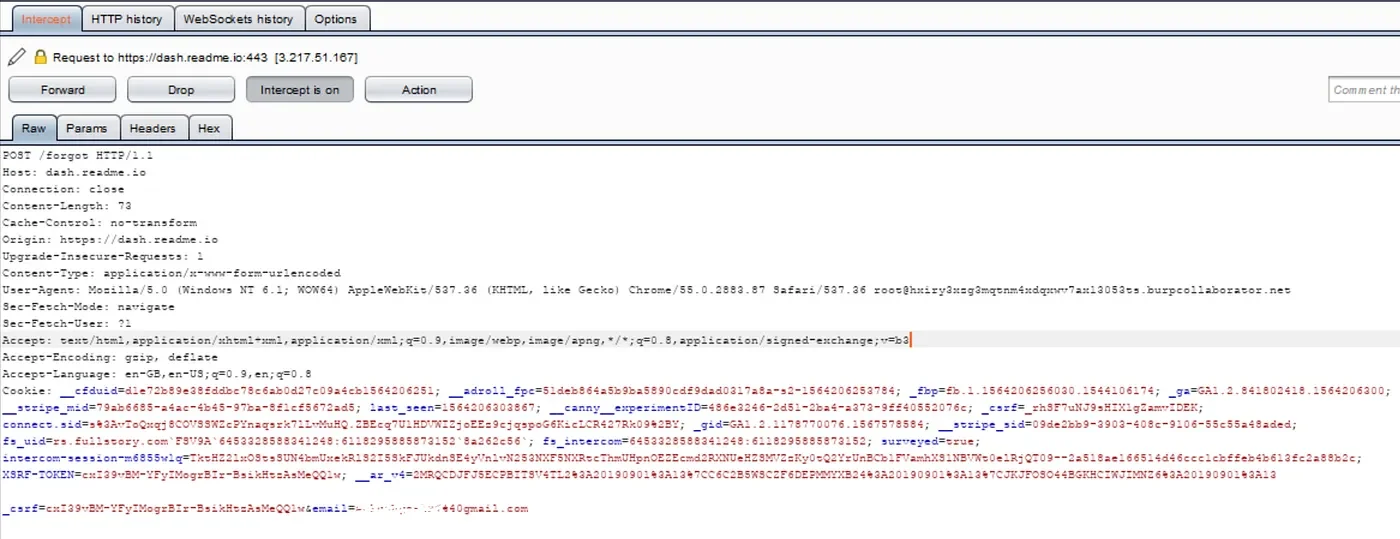
The screenshot shows the password reset request as captured in Burp.
Exploitation
Step 1: Capture the reset request
Go to the forgot-password page and submit an email address with Burp Proxy intercepting traffic:
https://dash.readme.io/forgot/
The captured POST request is the baseline shown above.
Step 2: Add a second email parameter
The request was modified by adding another email parameter carrying the attacker's own email address. The modified request is shown below.

With the extra parameter in place, the application creates the reset link for the first email address in the request but sends the link to both email addresses mentioned in the request. The attacker therefore receives the password reset email for the victim, and the victim receives it too. The link is only valid for 20 minutes.
Step 3: Reset the victim's password
Using the link delivered to the attacker's inbox, the attacker can reset the account password for the victim's email address, which results in account takeover.
The researcher's own step list is:
- Go to
https://dash.readme.io/forgot/. - Start Burp Proxy and start intercepting requests.
- Enter the email address of the victim on the website and click submit.
- Intercept the request in Burp, add another email parameter with the attacker's email address, and forward the request.
- Receive the email from ReadMe regarding the account password reset.
Root cause
The application takes the first email parameter to build the reset token and link, but takes both supplied values when deciding where to send the email. This is HTTP parameter pollution: the server-side code handles duplicate parameters inconsistently between the two operations, so the identity the token is bound to and the recipient of the token diverge.
Impact
The researcher rates the impact as high, at least for ReadMe's customers. Because the customer list is public, an attacker can collect email addresses for a target company and send them through Burp Intruder. Any address that has a ReadMe account yields a password reset link for that account, after which the attacker can reset the password and access the account. From there the attacker can modify the documentation and insert malicious links or misdirect users. The researcher notes that the possibilities are endless.
Fix
The report does not describe the code change. It records that the company acknowledged the bug on 10.04.2019 and fixed it.
Variants to test
- A positive result is a reset or confirmation link arriving at an address you control while the token remains valid for the victim's account.
- A positive result is a message delivered to your address that contains a token or link belonging to another account.
- A positive result is any endpoint where the value used for authorisation differs from the value used for the action.
Disclosure timeline
- 07.30.2019: the company was notified with full details by email. No response.
- 08.02.2019: contacted via support chat. No response.
- 08.04.2019: contacted via Twitter, LinkedIn and Facebook. No response.
- 09.05.2019: still no response from the company.
- 10.04.2019: the company responded, acknowledged the bug and fixed it.
What happened, in plain words
A security researcher found a way to take over other people's accounts on ReadMe, a website that companies use to write and publish their documentation. The trick was in the "forgot my password" page. When you forget your password, a website normally emails you a special link that lets you set a new one. That link is meant to go only to you. On ReadMe, the researcher found that by adding a second email address to the request, the website would build the reset link for the victim's account but send a copy of that link to the attacker's inbox as well. The attacker could then open the link, set a new password, and be logged in as the victim.
This kind of bug is called HTTP parameter pollution. It sounds complicated, but the idea is simple: a web request can carry the same field twice, and different parts of the website can disagree about which copy to use. In this case one part of the code used the first email address to decide whose account the link belongs to, while another part used both addresses to decide where to send the email. That disagreement is the whole bug.
Below I walk through the same story step by step, explaining every term as it comes up, so that someone who has never done security testing can follow along.
Some background: what ReadMe is
ReadMe (readme.com) is a service that helps companies create and manage their documentation, including API documentation, all in one place. An API (Application Programming Interface) is the set of rules that lets one piece of software talk to another. A simple comparison: a restaurant menu is an API. You do not walk into the kitchen and cook; you pick from a list of dishes the kitchen offers, and a waiter carries your order back and forth. API documentation is the menu: it tells developers what they can ask a service to do and how to ask for it. ReadMe hosts that menu for many companies.
The researcher names Coinbase, Microsoft, IBM, Mozilla and Trello among ReadMe's clients and links to the company's customer list. That matters later, because a public list of customers is also a list of possible targets.
The feature under examination is the password reset flow on the dashboard at dash.readme.io. A dashboard is the logged-in area of a website where you manage your account. A password reset flow is the sequence of pages and emails that lets you recover access when you forget your password.
Normally the flow works like this: you type your email address on the forgot-password page, the application generates a unique reset link tied to that email address, and the link is sent to that address. The researcher describes the link as unique and tied to the particular email address, in the form:
https://dash.readme.io/reset/l2s6ugXXXXXXXXXXXXXVAzLDMeVW
What this line means, piece by piece:
https://is the secure version of the protocol browsers use to fetch web pages. Thesmeans the traffic is encrypted, so nobody sitting between you and the site can read it.dash.readme.iois the address of the dashboard. The part before the first dot (dash) is a subdomain, a named section of the mainreadme.iosite, much like a particular department inside a large building./reset/is the path, the part of the address that tells the server which page or action you want.l2s6ugXXXXXXXXXXXXXVAzLDMeVWis the token. A token is a long random string that acts like a temporary key. The comparison is a cloakroom ticket: it is not your name, but whoever holds the matching ticket can collect the coat. Here the ticket is tied to one specific email address, so it should only work for that account.
The X characters in the middle are the researcher's way of hiding part of the real token so that nobody can reuse it. The report does not give the full token.
Setting up
No special accounts or roles were needed beyond a normal account on dash.readme.io, which the researcher created before browsing the site as a regular user to understand its flow. This is worth pausing on: the researcher did not have any insider access. A free, ordinary sign-up was enough.
The only tool mentioned is Burp Proxy. Burp is a program that sits between your browser and a website and lets you read and change the traffic going in both directions. A comparison: imagine sending a letter, but first handing it to a friend who opens the envelope, reads it, and can rewrite it before posting it on. That friend is Burp. A proxy is simply a middleman that passes messages along, and because it sits in the middle it can inspect and edit them.
Finding it
After learning about the bug bounty programme from a friend, the researcher did recon on the website and then looked at the password reset mechanism. A bug bounty programme is a scheme where a company invites outside people to look for security flaws and pays them for reporting the good ones. Recon, short for reconnaissance, means exploring a website the way a curious visitor would, to learn how it is put together before testing anything.
The first thing tested was whether a reset token could be reused for a different account. The researcher tried resetting other accounts' passwords, but the token was tied to the email address that requested the password, so that did not work. In other words, the obvious attack failed: a ticket issued for one coat could not collect another. That is a useful result, because it tells you the token binding itself is sound and the weakness must lie somewhere else.
The researcher then captured the POST request that the forgot-password form sends. A POST request is one of the ways a browser talks to a server. When you fill in a form and press submit, the browser packages what you typed into a request and sends it off. POST is the method used when you are sending data that changes something on the server, such as "please start a password reset". A GET request, by contrast, is what happens when you simply open a page. The request captured here is the one that triggers the unique reset link email.
The screenshot shows the password reset request as captured in Burp. It is the raw form of what your browser sends when you submit the forgot-password page, laid out as a list of field names and values.
Exploitation
Step 1: Capture the reset request
Go to the forgot-password page and submit an email address with Burp Proxy intercepting traffic:
https://dash.readme.io/forgot/
This is the page where you would normally type your email and click submit. The reason to have Burp running first is that you want to catch the request in the moment between your browser sending it and the server receiving it. If Burp is not intercepting, the request goes straight through and you cannot see or change it.
The captured POST request is the baseline shown above. A baseline is the untouched, normal version of a request, kept so you can compare it with what you change later.
Step 2: Add a second email parameter
The request was modified by adding another email parameter carrying the attacker's own email address. A parameter is a named field in a request, like a labelled box on a form: the label here is email and the contents are the address you typed. Normally a form has one box per label. The trick is to add a second box with the same label, so the request now carries two email values.
The modified request is shown below.
The screenshot shows the same request with the extra email parameter added.
With the extra parameter in place, the application creates the reset link for the first email address in the request but sends the link to both email addresses mentioned in the request. The attacker therefore receives the password reset email for the victim, and the victim receives it too.
The link is only valid for 20 minutes. That is a time limit built into the token, and it means the attacker has to act reasonably quickly after triggering the reset.
Step 3: Reset the victim's password
Using the link delivered to the attacker's inbox, the attacker can reset the account password for the victim's email address, which results in account takeover. Account takeover means logging in as someone else and controlling their account.
The researcher's own step list is:
- Go to
https://dash.readme.io/forgot/. - Start Burp Proxy and start intercepting requests.
- Enter the email address of the victim on the website and click submit.
- Intercept the request in Burp, add another email parameter with the attacker's email address, and forward the request.
- Receive the email from ReadMe regarding the account password reset.
A note on step 4: forwarding a request in Burp means letting it continue on to the server after you have edited it. Until you forward it, the request is paused in Burp and the server has not seen it at all.
Root cause
The application takes the first email parameter to build the reset token and link, but takes both supplied values when deciding where to send the email. This is HTTP parameter pollution: the server-side code handles duplicate parameters inconsistently between the two operations, so the identity the token is bound to and the recipient of the token diverge.
To unpack that: HTTP parameter pollution means putting the same parameter into a request more than once, so that different parts of the application read different copies. A comparison is a group of people each reading a different page of the same instruction sheet. One page says "make the key for Alice", another says "post the key to Alice and Bob". Each instruction is followed correctly on its own, but together they hand Bob a key to Alice's door.
The token binding itself was sound, as the earlier attempt to reuse a token for another account showed. The flaw is not that the token is weak, but that the attacker can make the application deliver the victim's token to an address the attacker controls.
Impact
The researcher rates the impact as high, at least for ReadMe's customers. Because the customer list is public, an attacker can collect email addresses for a target company and send them through Burp Intruder. Intruder is the part of Burp that repeats the same request many times, swapping in a different value each time, so you can try a whole list of email addresses without doing it by hand.
Any address that has a ReadMe account yields a password reset link for that account, after which the attacker can reset the password and access the account. From there the attacker can modify the documentation and insert malicious links or misdirect users. The researcher notes that the possibilities are endless.
Fix
The report does not describe the code change. It records that the company acknowledged the bug on 10.04.2019 and fixed it. In plain terms: either refuse the request outright when it carries two email boxes, or make sure the address the key is made for and the address the key is posted to are always the same one.
Variants to test
These are follow-up ideas in the same spirit, useful if you want to look for similar bugs elsewhere.
- A positive result is a reset or confirmation link arriving at an address you control while the token remains valid for the victim's account. Casing matters because some systems treat
emailandEmailas the same field and others do not, which is exactly the kind of disagreement this bug feeds on. - A positive result is a message delivered to your address that contains a token or link belonging to another account.
- A positive result is any endpoint where the value used for authorisation differs from the value used for the action. Authorisation is the check that decides whether you are allowed to do something; if that check looks at one value while the action uses another, you have a gap.
Disclosure timeline
Responsible disclosure is the usual courtesy in security research: tell the company privately, give them time to fix the problem, and only then talk about it in public. The researcher says the company did not follow those guidelines, so the details were published with the company named.
- 07.30.2019: the company was notified with full details by email. No response.
- 08.02.2019: contacted via support chat. No response.
- 08.04.2019: contacted via Twitter, LinkedIn and Facebook. No response.
- 09.05.2019: still no response from the company.
- 10.04.2019: the company responded, acknowledged the bug and fixed it.
Glossary
- API: the set of rules that lets one piece of software talk to another; like a restaurant menu that lists what you can order and how.
- API documentation: the written description of an API, telling developers what they can ask a service to do and how.
- Account takeover: logging in as another person and controlling their account, usually after changing their password.
- Authorisation: the check that decides whether you are allowed to perform an action.
- Baseline: the normal, unmodified version of a request, kept for comparison.
- Bug bounty programme: a scheme where a company invites outside researchers to find security flaws and pays for good reports.
- Burp Intruder: the part of Burp that repeats a request many times with different values, for example a list of email addresses.
- Burp Proxy: a tool that sits between your browser and a website so you can read, pause and edit the traffic.
- Dashboard: the logged-in area of a website where you manage your account.
- Forward (a request): letting a paused request continue on to the server after editing it.
- GET request: a request made when you simply open a page, without changing anything on the server.
- HTTP parameter pollution: putting the same parameter into a request more than once so that different parts of the application read different copies and disagree.
- Parameter: a named field in a request, like a labelled box on a form.
- Password reset flow: the sequence of pages and emails that lets you recover access when you forget your password.
- Path: the part of a web address that tells the server which page or action you want, such as
/reset/. - POST request: a request that sends data to the server and changes something, such as starting a password reset.
- Proxy: a middleman that passes messages between two parties and can inspect or edit them.
- Recon: short for reconnaissance; exploring a website to learn how it is built before testing it.
- Responsible disclosure: telling a company about a flaw privately and giving them time to fix it before publishing details.
- Subdomain: a named section of a main website, such as
dashindash.readme.io. - Token: a long random string that acts as a temporary key, like a cloakroom ticket; whoever holds it can use it.
- Validity window: the period during which a token or link still works; here, 20 minutes.



