HTML injection in "Invite Collaborators"
The first name field of a user profile was inserted into the body of an invitation email without being escaped, so HTML markup in the name was rendered by the recipient's mail client. An attacker could therefore send an email from the service's own address containing custom text and links, which could be used for phishing.

- Triaged in 37 hours
- Fixed in 5 days
- Paid in 5 days
- Disclosed after 35 days
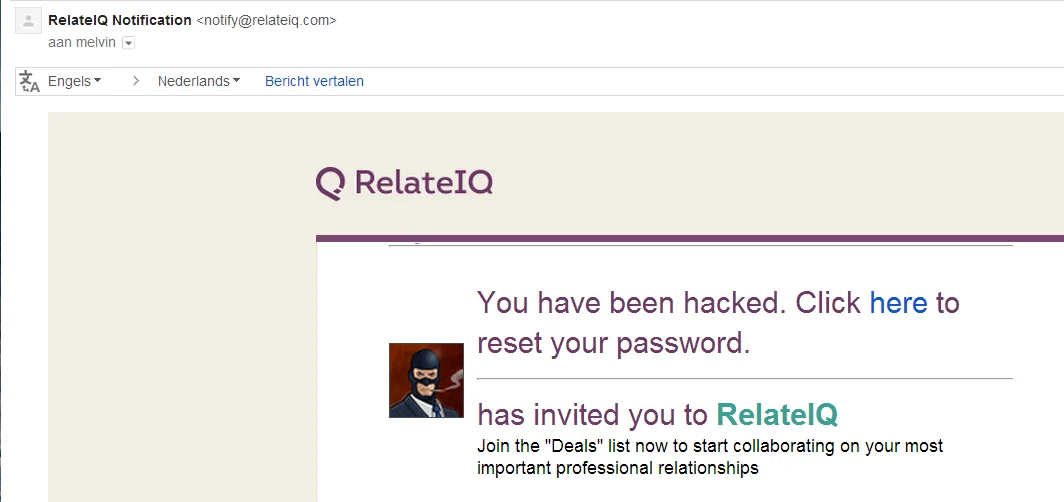
I was able to edit the contents of the "Invite Collaborators" mail, by using HTML code as my first name. By exploiting this vulnerability, an attacker could send an email with custom text/html code from [email protected] (from the RelateIQ server) to any recipient. This can be used for phishing attacks (see attachment: example.png).
Steps to reproduce:
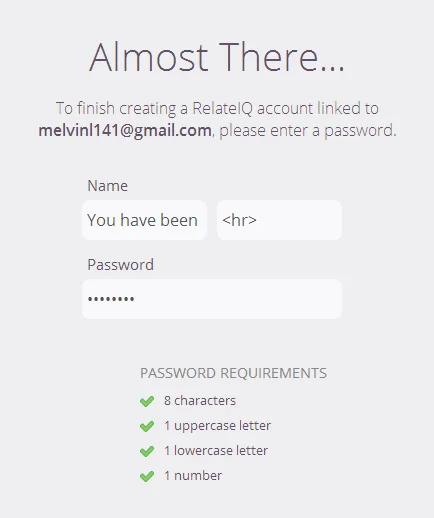
[1] Register as a new user [2] When asked for a name, enter exploit code in first name field (see attachment: step2.png).
For this demonstration I will use a simple example:
You have been hacked. Click <a href="http://phishing-site">here</a> to reset your password.<div style="display:none">
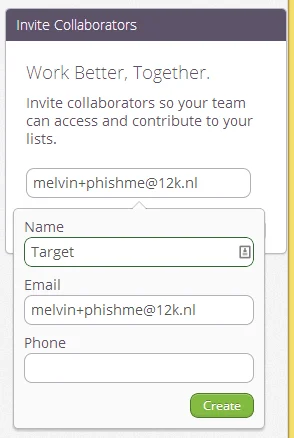
[3] Go through the final steps [4] Go to home and send an invite to the target (see attachment: step4.png)
The target will now receive the phishing email (see attachment: email.png). In this simple example it is obvious that the email is fake, but better exploit code can be easily written.
Attachments
Not written yet. The AI write-up for this report has not been written yet. The Original tab links to the source.
How it worked
Root cause
Likely the first name was concatenated into the invitation email's HTML body without output encoding or sanitisation.
Impact
An attacker could send an email from the service's own address containing arbitrary text and links, which could be used for phishing; the report notes the simple example is obviously fake but that better code could be written.
What the attacker needed
A free account; attacker sends an invite to the victim
How it was found
- Register a new account.
- Enter HTML markup in the first name field during sign-up.
- Complete the remaining sign-up steps.
- From the home page, send an invitation to the target address.
- The target receives the invitation email containing the injected markup.
Explained by bugbounty.wiki with AI from the original and checked against quotes from it; it can still be wrong. Read the original before relying on a detail.
Not written yet. The AI write-up for this report has not been written yet. The Original tab links to the source.
When a website puts something you typed into a page or an email, it should first neutralise any code-like characters so they show up as plain text. Here the first name was dropped into an invitation email as-is, so markup typed as a name became real formatting and links in the message. Because the email came from the company's own address, a recipient would be more likely to trust a fake link inside it.
What is XSS?
Script an attacker supplies runs in another user's browser, on the target's origin, with that user's session.