XSS in main search, use class tag to imitate Reverb.com core functionality, create false login window
HTML entered into the main search field was rendered rather than escaped, so an attacker could inject markup that imitates the site's own styling. By combining tags with the site's CSS classes, the reporter built a fake login box that dims the page and asks the user to click a link to unlock a supposedly locked account.

- Fixed in 30 hours
- Paid in 30 hours
- Disclosed after 4 months
This is an expansion of #349684 which was flagged as a duplicate. In that bug report I explained that several HTML tags end up rendering when entered into the main search. I've since found out that the class attribute of multiple types of tags can be modified to create a realistic imitation of core functionality on the Reverb website.
Example: <a href="http://badwebsite.com"><span class="btn button button--orange button--wide">XSS</a></span>
In the following PoC, I used tags such as <span>, <div>, <a>, and <li> in combinations with the "class" attribute to create a prominent login box (which fades out all content underneath it) that explains that their account has been locked and to click a link in order to unlock it.
Please forgive me if this is still considered a low risk and just "Informative"
Impact
A malicious user with more creativity than me could likely duplicate the appearance of other core pieces of the Reverb.com website in order to phish for user account information.
Attachments
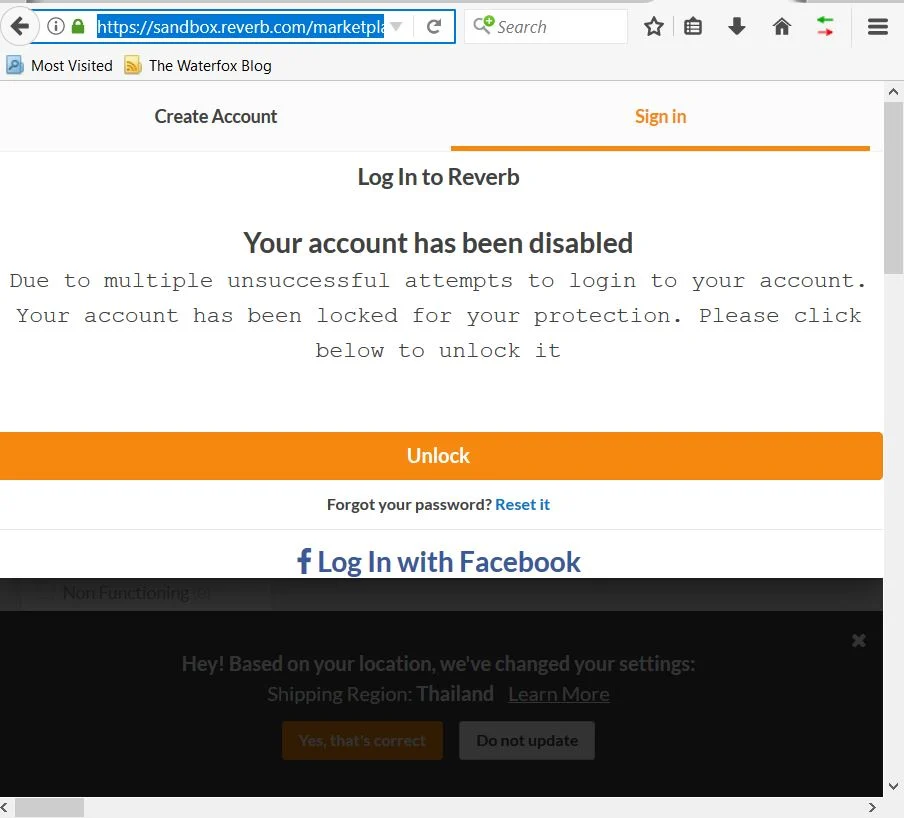
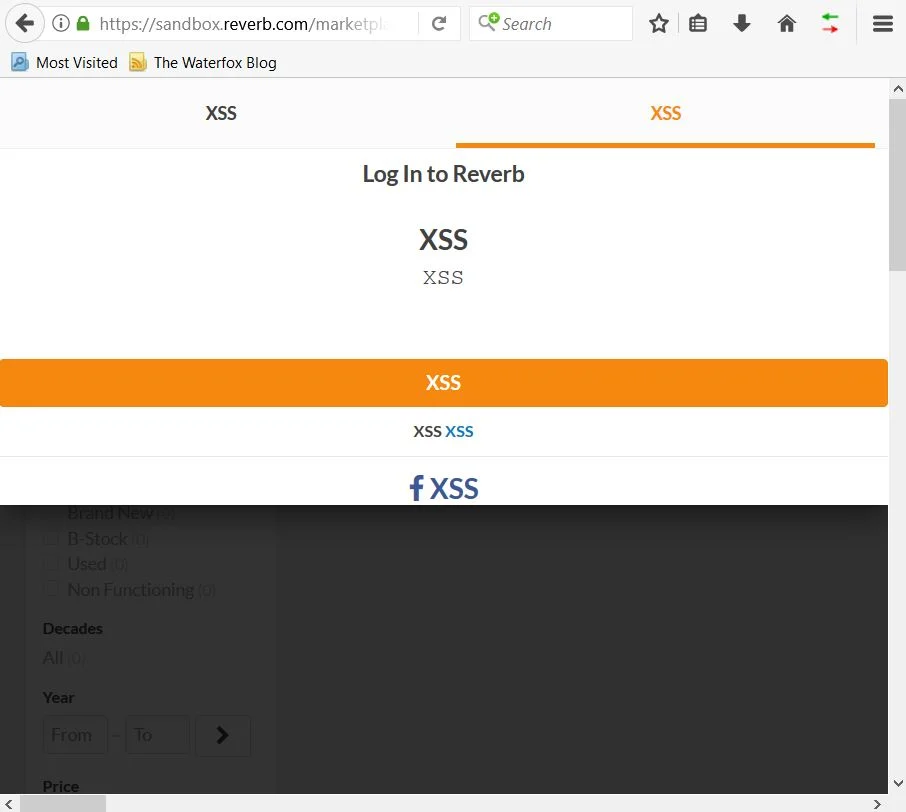
Context
Reverb.com is a marketplace site, and the report concerns its main search feature. The researcher had previously submitted report #349684, which was flagged as a duplicate; that earlier report explained that several HTML tags end up rendering when entered into the main search. This write-up is an expansion of that finding: the researcher discovered that the class attribute of multiple types of tags can be modified to create a realistic imitation of core functionality on the Reverb website. The asset named in the platform metadata is sandbox.reverb.com, and the proof of concept URL points at the marketplace search on that host.
The report is rated medium severity. The title calls it XSS in the main search. The report does not give a CVSS score or a specific weakness classification.
Setup
No accounts, roles, tools or versions are described. The only precondition visible in the report is that the main search renders HTML tags entered into it, which the researcher had already established in the earlier duplicate report. The proof of concept is a single URL to the marketplace search with the payload in the query parameter.
Finding it
The starting point was the earlier observation that several HTML tags render when entered into the main search. Building on that, the researcher found that the class attribute of multiple tag types can be set by the attacker. Because the site's own styling is driven by class names, an attacker who controls the class attribute can borrow the site's real appearance.
A minimal example from the report shows an anchor wrapping a span that carries the site's button classes:
<a href="http://badwebsite.com"><span class="btn button button--orange button--wide">XSS</a></span>
The span carries the classes btn, button, button--orange and button--wide, and the link points to http://badwebsite.com. The malformed nesting (the </a> before the closing </span>) is exactly as written in the report.
Exploitation
Step 1: Build a fake login box from site classes
The researcher combined tags such as <span>, <div>, <a> and <li> with the class attribute to construct a prominent login box. The box fades out all content underneath it and tells the visitor that their account has been locked and that they should click a link to unlock it. The payload uses these class names: fotorama--fullscreen, fancybox-mobile, fancybox-type-html, fancybox-opened, fancybox-skin, fancybox-inner, registration, tabbable, dialog, signup-login-container, mlr-auto, nav-tabs, fluid-row, col-6, tab-content, pt-1, session-form__header, btn, button, button--orange, button--wide, center, small, mt-1, session-form__facebook-link, fa and fa-facebook.
Step 2: Deliver the payload through the search query
The whole structure is URL-encoded and placed in the query parameter of the marketplace search:
Decoded, the payload builds the following structure, which the report gives in full:
What each part does:
- The outer
<span>carries the fancybox fullscreen and opened classes, which produce the overlay that fades out the page content underneath. - The
fancybox-skinandfancybox-innerdivs give the overlay the site's dialog frame. - The inner div with
registration tabbable dialog signup-login-container mlr-autoreproduces the registration and login dialog container. - The
nav-tabs fluid-rowlist with twocol-6items recreates the Create Account and Sign in tabs, with the Sign in tab markedactive. - The
tab-content pt-1div holds the headingLog In to Reverbstyled withsession-form__header, followed by an<h1>readingYour account has been disabled. - A
<code>block carries the social-engineering text: the account has been locked after multiple unsuccessful login attempts and the visitor should click below to unlock it. - The
Unlocklink and theReset itlink both point tohttp://badwebsite.com, and theUnlockcontrol uses the site's orange wide button classes. - A Facebook login link with the
session-form__facebook-linkclass and thefa fa-facebookicon points to the same attacker domain.
Step 3: Observe the rendered result
The payload renders as a login box that covers the page and asks the visitor to unlock a supposedly locked account. The report includes two attachments:
The second attachment is named Reverb_XSS_loginbox_control_made_clear.JPG.
The report does not include the raw HTTP response, only the rendered result in the attachments.
Root cause
The main search reflects user input into the page without neutralising HTML markup, so tags entered into the search render as elements. The report does not describe the server-side code, the templating engine or any specific filter, so the exact mechanism is not stated. What the report does establish is that the class attribute survives on multiple tag types, which is what turns a simple tag injection into a convincing imitation of the site's own interface: the attacker does not need to supply any styling, only the site's class names. Why the existing defences did not stop it is not explained in the report.
Impact
A malicious user with more creativity than the researcher could likely duplicate the appearance of other core pieces of the Reverb.com website in order to phish for user account information. The demonstrated case is a fake login box that fades out the underlying page, claims the account has been locked, and links to http://badwebsite.com through the Unlock, Reset it and Facebook login links.
Fix
The general remedy for this class of issue is to HTML-encode user input before it is placed into the search results page, so that tags and attributes entered into the search are displayed as text rather than parsed as markup.
Variants to test
- Enter a simple tag such as
<b>test</b>into the main search and check whether it renders as bold text rather than literal characters. A positive result is any tag taking effect in the results page. - Enter an element with a site class, for example
<span class="btn button button--orange button--wide">XSS</span>, and check whether it renders with the site's button styling. A positive result is a styled button that links wherever the attacker chooses. - Try overlay classes such as
fancybox-openedandfancybox-skinon a wrapping element and check whether page content is faded out behind it. A positive result is a full-page overlay controlled by the injected markup. - Repeat the class-based injection with other tag types (
<div>,<a>,<li>,<ul>) to see which ones accept aclassattribute in the reflected output. A positive result is any tag type whose class attribute is preserved. - Apply the same technique to other search or filter parameters on the site and to other pages that echo user input. A positive result is reflected markup with attacker-controlled classes anywhere a user-supplied value is displayed.
What happened, in plain words
Reverb.com is a website where people buy and sell musical instruments and other gear. Like most shopping sites, it has a search box at the top of the page: you type a word, press Enter, and the site shows you matching listings. The report is about that search box on sandbox.reverb.com.
The problem is that the search box did not treat what you typed as plain text. Normally, if you type <b>hello</b> into a search field, the site should show you those exact characters back, angle brackets and all, because that is what you typed. Here, the site took the angle brackets seriously and turned them into real page elements. In web terms, the site rendered your input as HTML instead of displaying it as text.
That matters because HTML is not just text: it is the language that describes the structure and appearance of a web page. If a site lets a visitor inject their own HTML into a page that other people see, the visitor can make the page say and show things the site's owners never intended. The report's title calls this cross-site scripting, usually shortened to XSS. The name comes from the idea that an attacker uses one site (the vulnerable one) to run their own content in someone else's browser.
The researcher had already reported a simpler version of this in an earlier report, numbered #349684, which was marked as a duplicate, meaning the site had already received the same finding from someone else. That earlier report showed that several HTML tags render when typed into the main search. This report goes further: the researcher found that not only do tags render, but the class attribute on those tags can be set by whoever types the search. The class attribute is a label you attach to an HTML element so that a stylesheet can find it and style it. Reverb's own look and feel is built from class names, so an attacker who can choose class names can borrow the site's real appearance without writing any styling of their own.
With that, the researcher built a fake login box that covers the page, tells the visitor their account has been locked, and offers buttons that lead to a website the attacker controls. The report says a malicious user could likely use this to phish for user account information.
The report is rated medium severity. It does not give a CVSS score (a standard number for how serious a vulnerability is) or a specific weakness classification.
The setup
The report describes no accounts, roles, tools or software versions. The only precondition it makes visible is the one established in the earlier duplicate report: the main search renders HTML tags that are entered into it. The proof of concept is a single web request to the marketplace search page, with the malicious content carried in the query parameter. A parameter is simply a named value attached to a URL, the part after the ? sign. The proof of concept is given as a single URL to the marketplace search.
Finding it
The starting point was the earlier observation that several HTML tags render when entered into the main search. Building on that, the researcher found that the class attribute of multiple tag types can be set by the attacker. Because the site's own styling is driven by class names, an attacker who controls the class attribute can borrow the site's real appearance.
A small example from the report shows a link wrapping a piece of text that carries the site's button classes:
<a href="http://badwebsite.com"><span class="btn button button--orange button--wide">XSS</a></span>
Line by line:
<a href="http://badwebsite.com">opens a link. Thehrefattribute is the destination, herehttp://badwebsite.com, a domain the attacker controls. Anything between the opening and closing link tags becomes clickable.<span class="btn button button--orange button--wide">opens a span, which is a generic inline container for a piece of text, and gives it four class names. The span carries the classesbtn,button,button--orangeandbutton--wide.XSSis the visible label on the button.</a>closes the link, and</span>closes the span, in that order. The nesting is malformed, with the link closed before the span, exactly as written in the report. Browsers are forgiving about this and still produce a clickable, styled button.
The link points to http://badwebsite.com.
Exploitation
Step 1: Build a fake login box from site classes
The researcher combined tags such as <span>, <div>, <a> and <li> with the class attribute to construct a prominent login box. A <div> is a block container, a <li> is an item in a list, and <ul> is the list itself. The box fades out all content underneath it and tells the visitor that their account has been locked and that they should click a link to unlock it.
The payload uses these class names: fotorama--fullscreen, fancybox-mobile, fancybox-type-html, fancybox-opened, fancybox-skin, fancybox-inner, registration, tabbable, dialog, signup-login-container, mlr-auto, nav-tabs, fluid-row, col-6, tab-content, pt-1, session-form__header, btn, button, button--orange, button--wide, center, small, mt-1, session-form__facebook-link, fa and fa-facebook.
Step 2: Deliver the payload through the search query
The whole structure is URL-encoded and placed in the query parameter of the marketplace search. URL encoding is how special characters travel safely inside a web address: < becomes %3C, > becomes %3E, a space becomes %20, and so on. The browser or the attacker encodes the payload so the server receives it intact.
Line by line:
GET /marketplace?query=...is the request line.GETis the method a browser uses to ask for a page./marketplaceis the search page. Everything after?is the query string, andqueryis the parameter name the search page expects. The long encoded string is the payload.HTTP/1.1states the version of the web protocol being spoken.Host: sandbox.reverb.comtells the server which site the request is for. One server can host many sites, so this header picks the right one.
Decoded, the payload builds the following structure, which the report gives in full:
What each part does:
- The outer
<span>carries the fancybox fullscreen and opened classes, which produce the overlay that fades out the page content underneath. Think of it as a dark curtain drawn over the real page. - The
fancybox-skinandfancybox-innerdivs give the overlay the site's dialog frame, the box that sits on top of the curtain. - The inner div with
registration tabbable dialog signup-login-container mlr-autoreproduces the registration and login dialog container, so the box is positioned and sized like the real one. - The
nav-tabs fluid-rowlist with twocol-6items recreates the Create Account and Sign in tabs, with the Sign in tab markedactiveso it looks selected. - The
tab-content pt-1div holds the headingLog In to Reverbstyled withsession-form__header, followed by an<h1>readingYour account has been disabled. The<h1>is the largest heading level, which makes the alarming message stand out. - A
<code>block carries the social-engineering text: the account has been locked after multiple unsuccessful login attempts and the visitor should click below to unlock it. Social engineering means manipulating a person rather than a machine, and the wording here is chosen to create urgency. - The
Unlocklink and theReset itlink both point tohttp://badwebsite.com, and theUnlockcontrol uses the site's orange wide button classes, so it looks exactly like a real call to action. - A Facebook login link with the
session-form__facebook-linkclass and thefa fa-facebookicon points to the same attacker domain, adding a familiar third option that makes the box feel more genuine.
Step 3: Observe the rendered result
The payload renders as a login box that covers the page and asks the visitor to unlock a supposedly locked account. The report includes two attachments:
The second attachment is named Reverb_XSS_loginbox_control_made_clear.JPG.
The report does not include the raw HTTP response, only the rendered result in the attachments.
Root cause
The main search reflects user input into the page without neutralising HTML markup, so tags entered into the search render as elements. Reflecting means taking a value the user supplied and echoing it straight back into the page. The report does not describe the server-side code, the templating engine or any specific filter, so the exact mechanism is not stated. What the report does establish is that the class attribute survives on multiple tag types, which is what turns a simple tag injection into a convincing imitation of the site's own interface: the attacker does not need to supply any styling, only the site's class names. Why the existing defences did not stop it is not explained in the report. Escaping means converting characters like < into harmless text so the browser shows them instead of acting on them.
Impact
A malicious user with more creativity than the researcher could likely duplicate the appearance of other core pieces of the Reverb.com website in order to phish for user account information. Phishing is the practice of presenting a fake page that looks trustworthy so a victim types in a password or payment detail. The demonstrated case is a fake login box that fades out the underlying page, claims the account has been locked, and links to http://badwebsite.com through the Unlock, Reset it and Facebook login links. A payload that persists would be stored on the server and shown to other visitors automatically; here the report only shows the crafted-link case.
Fix
The general remedy for this class of issue is to HTML-encode user input before it is placed into the search results page, so that tags and attributes entered into the search are displayed as text rather than parsed as markup. HTML encoding replaces the characters that have special meaning in HTML with safe stand-ins, so <b> appears on screen as <b> instead of turning the following text bold.
Variants to test
- Enter a simple tag such as
<b>test</b>into the main search and check whether it renders as bold text rather than literal characters. A positive result is any tag taking effect in the results page. - Enter an element with a site class, for example
<span class="btn button button--orange button--wide">XSS</span>, and check whether it renders with the site's button styling. A positive result is a styled button that links wherever the attacker chooses. - Try overlay classes such as
fancybox-openedandfancybox-skinon a wrapping element and check whether page content is faded out behind it. A positive result is a full-page overlay controlled by the injected markup. - Repeat the class-based injection with other tag types (
<div>,<a>,<li>,<ul>) to see which ones accept aclassattribute in the reflected output. A positive result is any tag type whose class attribute is preserved. - Apply the same technique to other search or filter parameters on the site and to other pages that echo user input. A positive result is reflected markup with attacker-controlled classes anywhere a user-supplied value is displayed.
Glossary
- HTML: the language that describes the structure and content of a web page, using tags such as
<div>and<a>. - Tag: a piece of HTML markup in angle brackets that tells the browser to create an element, for example a link or a heading.
- Attribute: a named setting inside a tag, such as
href(where a link goes) orclass(which styles apply). - Class: a label attached to an element so a stylesheet can find it and style it; the site's own class names carry its look and feel.
- Stylesheet: a file of styling rules that tells the browser how elements should look, for example colours and sizes.
- Cross-site scripting (XSS): a bug where a site lets an attacker's HTML or script run in another visitor's browser, so the attacker's content appears as part of the site.
- Reflection: when a site takes a value the user supplied and echoes it straight back into the page.
- Escaping / HTML encoding: converting characters with special meaning in HTML into harmless text so the browser displays them instead of acting on them.
- Parameter: a named value attached to a URL after the
?, such asqueryin a search address. - Query string: the part of a URL after the
?that carries parameters. - URL encoding: a way of writing special characters in a web address using percent codes, such as
%3Cfor<and%20for a space. - GET request: the method a browser uses to ask a server for a page.
- HTTP: the protocol browsers and servers use to exchange requests and responses.
- Host header: the part of a request that says which site on the server the request is for.
- Overlay: a layer drawn on top of a page that covers or dims the content underneath.
- Phishing: presenting a fake page that looks trustworthy so a victim enters a password or other sensitive information.
- Social engineering: manipulating a person, rather than a machine, into taking an action such as clicking a link.
- Proof of concept (PoC): a concrete demonstration that a vulnerability can be exploited.
- Duplicate report: a report of a bug the site has already received from someone else.
- Severity: a rating of how serious a vulnerability is; this report is rated medium.
- CVSS: a standard scoring system for vulnerability severity; the report gives no score.
- Sandbox: a test copy of a site used for experiments, here
sandbox.reverb.com. - Icon font: a font file whose characters are symbols, used here for the Facebook logo.