[Security Vulnerability Rocket.chat] HTML Injection into Email via Signup
 Originally disclosed on HackerOne
- Triaged in 9 days
- Fixed in 58 days
- Disclosed after 3 months
Description Due to a lack of sanitization and validation in parameter affected, we can input HTML Tag and system will render it into Email victim.
Affected Endpoint
https://chat.oas.greenhost.net/home
Parameter : Name
Step to produce
(image.png)
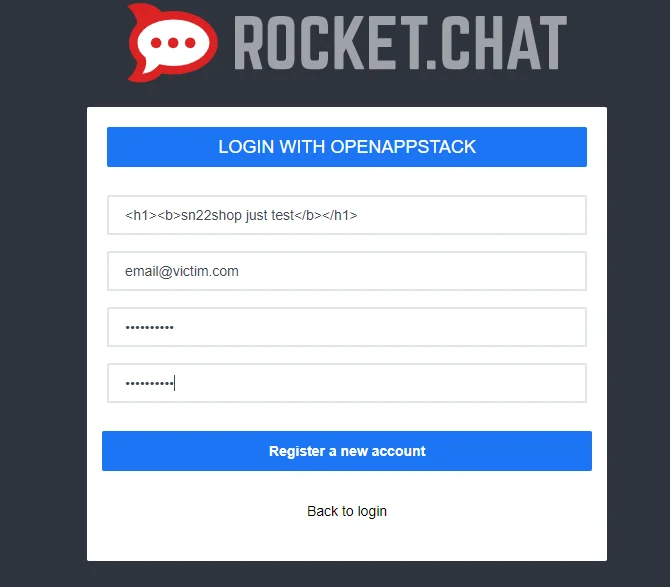
In textbox name, input HTML code like
"><img src=https://www.no-gods-no-masters.com/images_designs/anonymous-gandhi-d001001207265.png>”@x.y "
And in Email, input your victim email. Then click Lets Go / Submit.
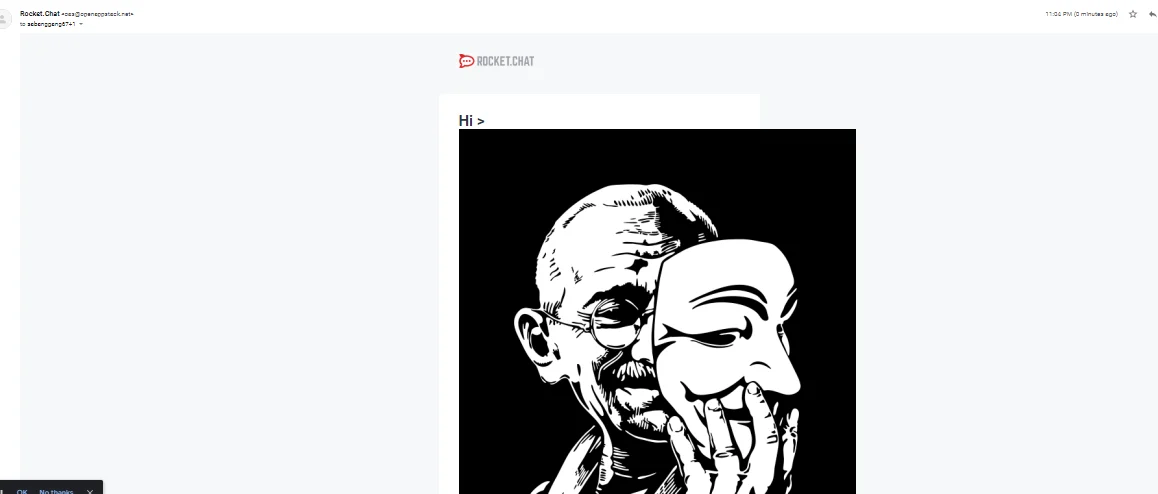
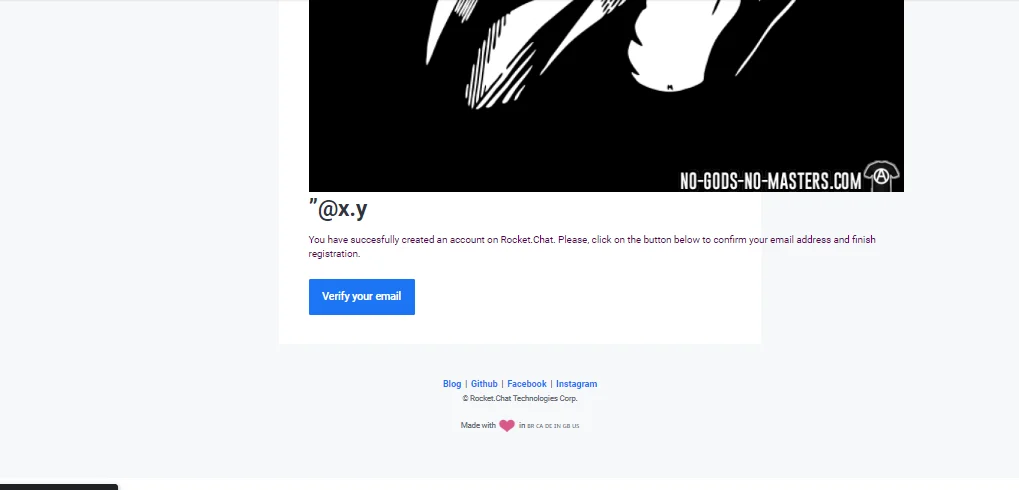
When victim open email from your system, it will look.
(image.png)
(image.png)
Impact
-
Phising
-
Abusing other user
-
Defacing
Fix
Filtering on parameter affected. <font color="#888888"><div><br></div>
<div><br></div> <div><br></div> <div><b>Steven Julian</b></div> <div><b><a href="mailto:[email protected]" target="_blank">[email protected]</a> // +62 89658610626</b></div></font>Impact
-
Phising
-
Abusing other user
-
Defacing
Attachments
Context
Rocket.Chat is a self-hosted team chat platform. The report concerns the signup flow of a Rocket.Chat instance reachable at https://chat.oas.greenhost.net/home, specifically the registration form where a new user supplies a display name and an email address. The name field is meant to hold a plain display name. The report shows that the value is carried into the email the system sends to the address entered at signup, and that HTML placed in the name is rendered by the recipient's mail client rather than shown as text.
The report describes the issue as HTML injection into email via signup.
Setup
No accounts, roles, tools or software versions are described. The only precondition visible in the report is access to the public signup form at the affected endpoint, plus an email address the attacker controls or can read, since the injected markup is delivered to the address typed into the Email field.
Finding it
The researcher attributes the behaviour to a lack of sanitisation and validation on the affected parameter: HTML tags can be entered and the system renders them into the victim's email. The affected endpoint is given as:
https://chat.oas.greenhost.net/home
The affected parameter is the Name field of the signup form.
Exploitation
Step 1: Open the signup form
The researcher starts at the registration form on the affected endpoint. The first screenshot shows the form with the name and email inputs.
Step 2: Put HTML in the Name field
In the name textbox the researcher enters the following value, quoted here exactly as it appears in the report:
The value contains a double quote, an <img> element with an external src, and ends with ”@x.y. The report does not explain what the trailing @x.y is for; it is part of the submitted name value.
Step 3: Enter the recipient address and submit
The Email field is filled with the victim's email address, and the form is submitted with the Lets Go / Submit button. The report does not show the resulting HTTP request or response.
Step 4: The victim opens the email
When the victim opens the email sent by the system, the injected markup is rendered. The report shows the result in two screenshots.
The report does not include the raw email source, so the exact template context in which the name is placed is not shown.
Root cause
The report states the cause plainly: the name parameter is neither sanitised nor validated, and the system renders the value into the email sent to the address supplied at signup. In other words, user-controlled input from the registration form reaches the outgoing email and the mail client parses it as markup. The report does not identify the specific code path or template responsible, and does not say whether any output encoding or content filtering existed elsewhere in the flow.
Impact
The researcher lists three consequences:
- Phishing
- Abusing other users
- Defacing
The injected content arrives in an email sent by the platform to the address entered in the signup form. The report does not demonstrate any effect beyond rendering of the injected image in the email, and does not describe interaction with an authenticated victim's session.
Fix
The recommendation in the report is filtering on the affected parameter. No fix, patch or vendor response is described.
Variants to test
- Other registration fields that end up in email: try the username, company or any free-text field on the signup form with the same
<img>payload and check whether the delivered email renders it. - Other transactional emails: password reset, email verification and invitation flows often embed the display name, and the same lack of encoding may appear there.
- Attribute-context injection: the payload begins with a double quote; try breaking out of other attribute types (single quotes, unquoted values) to see which context the template uses. Try breaking out of other attribute types (single quotes, unquoted values) to see which context the template uses.
- Markup beyond images: test links and other elements to see what the mail client will render, since a rendered link is what makes phishing practical.
A positive result is any signup or account email in which the supplied markup is parsed rather than displayed as literal text.
Hunting notes
This kind of bug hides in flows where user-supplied profile data is interpolated into HTML email templates: signup, invitations, notifications and password resets. During recon, a public signup form that asks for a display name is the signal to watch, because that name is likely to appear in the welcome email. The researcher submitted the payload through the normal form and showed the resulting email as rendered in a mail client.
What happened, in plain words
Rocket.Chat is a chat program that a company can install on its own server, so staff can talk to each other in channels, similar to Slack. When someone new wants to join, they fill in a signup form: a name to show to others and an email address. The system then sends an email to that address.
This report shows that the name you type is copied into that welcome email without being cleaned up first. If you type ordinary text, nothing interesting happens. But if you type pieces of HTML, the language web pages and many emails are built from, the email program of the person who receives the message treats those pieces as instructions and draws them, instead of showing them as plain characters. The researcher submitted an image tag in the name field and showed the resulting email.
The report describes an HTML injection into email through the signup form.
The pieces involved
- The product: Rocket.Chat, a team chat platform that an organisation runs on its own server.
- The feature: the public signup form, where a new user gives a display name and an email address.
- The endpoint: the address of that form on the tested installation,
https://chat.oas.greenhost.net/home. - The parameter: the Name field. A parameter is simply one named input in a form; the browser sends its value to the server when you press the button.
An endpoint is the specific address on a server that handles one job, like a particular counter in a large office. The /home endpoint is the affected endpoint given in the report.
What you need before trying it
No accounts, roles, tools or software versions are described in the report. The only precondition it makes visible is that the signup form is reachable by anyone, and that the person testing can read the mailbox for the address they type into the Email field, because that is where the injected content is delivered.
Finding it
The researcher puts the cause down to a lack of sanitisation and validation on the affected parameter. Sanitisation means cleaning input so that dangerous characters lose their special meaning; validation means checking that the input is of the expected shape at all. Here neither happens: HTML tags can be typed in, and the system renders them into the victim's email.
The affected endpoint is given as:
https://chat.oas.greenhost.net/home
This is the page holding the registration form. The affected parameter is the Name field on that form.
Exploitation
Step 1: Open the signup form
The researcher starts at the registration form on the affected endpoint. The first screenshot shows the form with the name and email inputs.
Opening the form first is simply about seeing what the page asks for. The two boxes that matter are Name and Email, and the screenshot records them as they appeared at the time of testing.
Step 2: Put HTML in the Name field
In the name textbox the researcher enters the following value, quoted here exactly as it appears in the report:
Read from left to right:
"is a double quote. In HTML, quotes wrap the value of an attribute, which is a setting attached to an element, such as the address an image should be loaded from.>closes the tag that was open. A tag is the piece of markup between angle brackets that tells the email program what to draw.<img src=...>is an image tag.srcis the attribute that says where the picture lives, and the address given points at an external image.”@x.yis the tail of the value. The report does not explain what the trailing@x.yis for; it is simply part of the submitted name.
The idea behind the payload is the same as slipping an extra instruction into a form letter: if the letter is assembled by pasting your name into a sentence, a name that contains instructions can change what the finished letter says.
Step 3: Enter the recipient address and submit
The Email field is filled with the victim's email address, and the form is submitted with the Lets Go / Submit button. The report does not show the resulting HTTP request or response.
This step matters because the email goes to whatever address is typed into the Email field.
Step 4: The victim opens the email
When the victim opens the email sent by the system, the injected markup is rendered. Rendering means the email program interprets the markup and draws the result, rather than printing the characters as text. The report shows the result in two screenshots.
The report does not include the raw email source, so the exact template context in which the name is placed is not shown. In other words, we cannot see from the report whether the name sat inside an attribute or between tags in the email's HTML.
Root cause
The report states the cause plainly: the name parameter is neither sanitised nor validated, and the system renders the value into the email sent to the address supplied at signup. User-controlled input from the registration form therefore reaches the outgoing email without being cleaned up. Encoding is the step that turns a character like < into a harmless stand-in such as <, so the email program shows it as text instead of acting on it. Without that step, the mail client parses the name as markup.
The report does not identify the specific code path or template responsible, and does not say whether any output encoding or content filtering existed elsewhere in the flow.
Impact
The researcher lists three consequences:
- Phishing
- Abusing other users
- Defacing
Phishing is a fake message designed to look trustworthy so the reader clicks a link or hands over information. Defacing means changing how something looks so it shows content the owner did not intend. The delivery condition matters: the injected content arrives in an email sent by the platform to the address entered in the signup form, so the attacker picks the recipient by picking that address. The report does not demonstrate any effect beyond the rendering of the injected image in the email, and does not describe interaction with a logged-in victim's session.
Fix
The recommendation in the report is filtering on the affected parameter. No fix, patch or vendor response is described.
Variants to test
- Other registration fields that end up in email: try the username, company or any free-text field on the signup form with the same
<img>payload and check whether the delivered email renders it. - Other transactional emails: password reset, email verification and invitation flows often embed the display name, and the same lack of encoding may appear there.
- Attribute-context injection: the payload begins by closing a quote, which suggests the name is placed inside an HTML attribute. Try breaking out of other attribute types (single quotes, unquoted values) to see which context the template uses.
- Markup beyond images: test links and other elements to see what the mail client will render, since a rendered link is what makes phishing practical.
A positive result is any signup or account email in which the supplied markup is parsed rather than displayed as literal text.
Hunting notes
This kind of bug hides in flows where user-supplied profile data is interpolated into HTML email templates: signup, invitations, notifications and password resets. Interpolation here means dropping a value into a prepared piece of text. During recon, a public signup form that asks for a display name is the signal to watch, because that name is likely to appear in the welcome email. The researcher submitted the payload through the normal form and showed the resulting email as rendered in a mail client.
Glossary
- API: a defined way for one program to ask another to do something, like a service counter with fixed requests it accepts.
- Attribute: a setting attached to an HTML element, such as the address an image loads from.
- Code Injection: a weakness where input supplied by a user is treated as instructions by the system.
- Defacing: changing how a page or message looks so it shows content the owner did not intend.
- Email template: a prepared message with blanks that get filled in with values such as a name.
- Encoding: converting special characters into harmless stand-ins so they are shown as text rather than acted on.
- Endpoint: the specific address on a server that handles one job.
- HTML: the markup language used to build web pages and many emails.
- HTML injection: putting markup into a place that later displays it as markup instead of text.
- Interpolation: dropping a value into a prepared piece of text.
- Parameter: one named input in a form, whose value is sent to the server.
- Phishing: a fake message made to look trustworthy so the reader clicks a link or gives away information.
- Rendering: a program interpreting markup and drawing the result.
- Sanitisation: cleaning input so dangerous characters lose their special meaning.
- Self-hosted: software installed and run on an organisation's own server rather than the vendor's.
- Severity: a rating of how serious a security issue is.
- Signup flow: the sequence of pages and messages involved in creating a new account.
- Tag: the piece of markup between angle brackets that tells a program what to draw.
- Validation: checking that input has the expected shape before using it.




