Self DOM-Based XSS in www.hackerone.com
The contact form's submit handler passed textarea content through a helper that assigned it to innerHTML, so HTML in the message field was parsed and could run script. An attacker could get script to execute in the page, but only if a victim pasted the payload themselves, and the site's CSP blocked inline handlers in normal browsers.

- Triaged in 23 hours
- Fixed in 53 days
- Disclosed after 2 months
Summary: There is a 'self' DOM-based cross-site scripting vulnerability in the contact form available on the www.hackerone.com website. This could allow an attacker to perform cross-site scripting, or other client-side attacks, against users of the application. However, the risk presented by this issue is significantly reduced because exploitation would require an element of social engineering to succeed, and the website's Content Security Policy (CSP) blocked the execution of inline scripts.
Description: The HackerOne contact form is automatically displayed when the string 'contact/' is detected in the URI fragment on any page under the www.hackerone.com domain (for example, https://www.hackerone.com/#contact/). When the 'submit' button is clicked, the following JavaScript functions are executed:
//Marketo Form Code
function strip(html) {
    var tmp = document.createElement("DIV");
    tmp.innerHTML = html;
    return tmp.textContent || tmp.innerText || "";
}

$('form').submit(function() {
    $('textarea').val(function() {
        return strip($(this).val());
    });
});
The 'submit' event handler passes the current value of any 'textarea' elements to the 'strip' function. This function creates a new 'div' element, sets the 'innerHTML' property to the provided value, and then returns the 'textContent' property of the resulting div. This type of code is typically used to remove HTML tags from a string, as the textContent property contains the String which was rendered by the browser when the HTML was parsed. (A reference to this exact function was also found on Stack Overflow: https://stackoverflow.com/questions/12941663/removing-html-tags-from-a-string-and-keeping-colon)
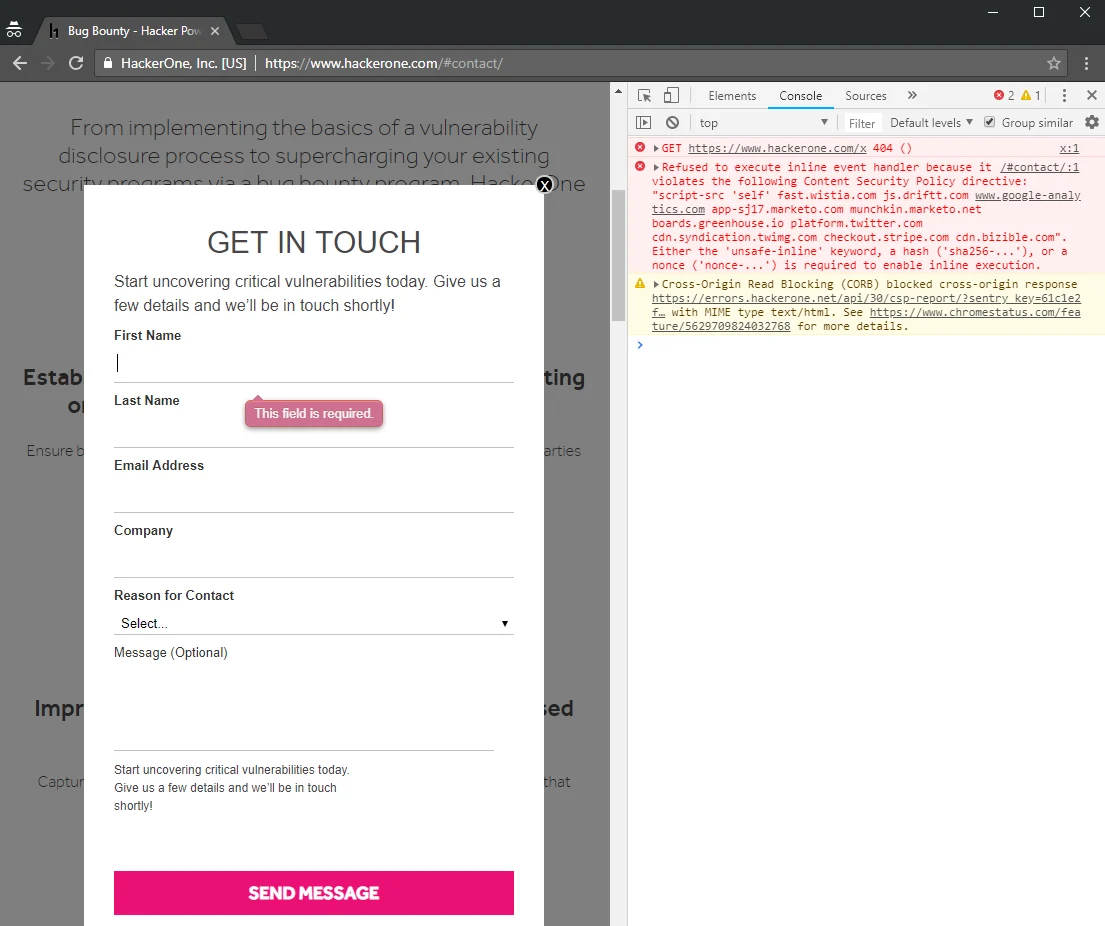
However , this particular method is inherently insecure because it uses 'innerHTML'. When user input is provided to the 'innerHTML' property, it is parsed by the web browser and can therefore lead to the execution of malicious JavaScript. A screenshot has been attached to this report showing the result in the web browser when the following payload was typed into the 'Message' textarea of the HackerOne contact form, and the 'send message' button was clicked:
<img src=x onerror=alert(1) />
The developer console (in Google Chrome) displayed two errors - one which stated that https://www.hackerone.com/x was requested and returned a 404 (due to the src attribute of the img tag), and another which reported a violation of the website's CSP. This second error occurred because the browser attempted to execute the JavaScript code in the 'onerror' attribute, but the website's CSP did not allow it. Performing the same actions in a browser with CSP disabled allowed the JavaScript in the 'onerror' attribute to execute.
An attacker could exploit this vulnerability by convincing a user (ideally with a browser which does not support CSP) to paste a malicious payload into the 'message' field of the contact form and then click the 'send message' button.
It should also be noted that, if the 'strip' function was implemented to prevent an attacker from sending malicious HTML to Marketo or the server, it can be trivially bypassed using an intercepting proxy tool such as Burp Suite. By intercepting the HTTP request sent once the form submission is complete, any HTML 'stripped' by the JavaScript can simply be replaced. In light of this, developers should consider whether the 'strip' function is required - any validation or sanitization should be performed by the server, where it cannot be influenced by an attacker.
If the 'strip' function is required, it is recommended that it is replaced with a solution which does not require the use of 'innerHTML'. A suitable alternative may be the use of a regex to remove common HTML characters.
Steps To Reproduce
- Open the https://www.hackerone.com/#contact/ page and open the browser's developer tools
- Type "<img src=x onerror=alert(1) />" into the 'message' textarea
- Click the 'send message' button
- Check the developer console to view the two errors
(alternatively, disable CSP in your web browser and repeat the steps above. The JavaScript code 'alert(1)' should execute)
Impact
The attacker could achieve XSS in the www.hackerone.com website.
Attachments
Not written yet. The AI write-up for this report has not been written yet. The Original tab links to the source.
How it worked
Root cause
Likely the form's submit handler sanitised user input by writing it into a temporary element's innerHTML, which parses markup and can trigger event handlers instead of just stripping tags.
Impact
Script could run in the site's origin, but only after the victim pastes the payload and submits it, and the site's CSP blocked inline handlers in the tested browser.
What the attacker needed
Victim pastes payload into the form; victim clicks send message; browser without CSP enforcement
The fix
The helper should be replaced with a method that does not use innerHTML, and any validation or sanitisation should be done on the server.
How it was found
- Open the contact form page with the browser developer tools open.
- Type an image tag with an error handler into the message textarea.
- Click the send message button.
- Check the developer console for the two resulting errors.
Explained by bugbounty.wiki with AI from the original and checked against quotes from it; it can still be wrong. Read the original before relying on a detail.
Not written yet. The AI write-up for this report has not been written yet. The Original tab links to the source.
A web page can turn text into real page elements by assigning it to a property called innerHTML. If that text contains an event handler such as an image error handler, the browser may run it as code. Here the site's security policy stopped that code from running, and the victim would also have to paste the text in by hand.
What is XSS?
Script an attacker supplies runs in another user's browser, on the target's origin, with that user's session.



