Users contents on AWS is cacheable
The AWS S3 responses serving user-uploaded files lacked cache-control headers, so browsers stored local copies of private images and downloads. An attacker with access to the same computer could retrieve those cached files after the user viewed or downloaded them.

- Triaged in 36 hours
- Fixed in 47 hours
- Disclosed after 13 days
Hi ,
Background
As I know you are using AWS S3 for saving and serving files . The AWS S3 on https://hackerone-attachments.s3.amazonaws.com are been called every time to show images on hackerone.com .
For example view this report #145392 You will see a request for Frans screenshot like this
Request
https://hackerone-attachments.s3.amazonaws.com/production/000/099/965/94e13ba212b589eca016a39b56ac71ad5a058f1c/Screen_Shot_2016-06-17_at_15.18.36.png?AWSAccessKeyId=AKIAJFXIS7KJADBA4QQA&Expires=1472061826&Signature=CYZi6ZdC2xc4C8G4OpMhmccbKvs%3D

Host: hackerone-attachments.s3.amazonaws.com
User-Agent: Mozilla/5.0 (Windows NT 6.2; WOW64; rv:48.0) Gecko/20100101 Firefox/48.0
Accept: */*
Accept-Language: en-US,en;q=0.5
Accept-Encoding: gzip, deflate, br
Referer: https://hackerone.com/
Connection: keep-alive
If-Modified-Since: *
Response
HTTP/1.1 200 OK
x-amz-id-2: h01s331e54/8lHWaUmHtduvLcIDoriZs9c2dwmfd3kcWxNM9EsqUogYMZYSIa1js84RUtiLifaI=
x-amz-request-id: D8B3214210BC4461
Date: Wed, 24 Aug 2016 17:03:49 GMT
Last-Modified: Fri, 17 Jun 2016 13:18:46 GMT
Etag: "ccae076033025b6bdcfdc5df6aed64cd"
x-amz-server-side-encryption: AES256
Content-Disposition: attachment; filename=""
Accept-Ranges: bytes
Content-Type: image/png
Content-Length: 9710
Server: AmazonS3
The response doesn't give any header to control cache and when no cache header is set the browsers behavior will automatically store a local cached copy of file received from AWS . So this content could be retrieved by other users who have access to the same computer .
There are two affected uses :
-
Photos : because when you use {} to include image or you upload it and open it from attachments you will make the request and local copy of it will be stored without user knowledge .
-
Other files (e.g:video,xml,txt...etc.) : when you download file a copy of it will be stored in cache without user knowledge too. Now this isn't an usability event why you cache a file that you will download ?!
The cache files can be found here :
- Mozilla Firefox:
Unix/Linux: ~/.mozilla/firefox/<profile-id>/Cache/ Windows: C:\Documents and Settings<user_name>\Local Settings\Application Data\Mozilla\Firefox\Profiles<profile-id>\Cache
- Internet Explorer:
C:\Documents and Settings<user_name>\Local Settings\Temporary Internet Files
Tools
- Tools for view cache files :
- FF : http://www.nirsoft.net/utils/mozilla_cache_viewer.html
- Chrome : http://www.nirsoft.net/utils/chrome_cache_view.html
- FF plugin (not recommended ): https://addons.mozilla.org/en-US/firefox/addon/cacheviewer2/?src=api
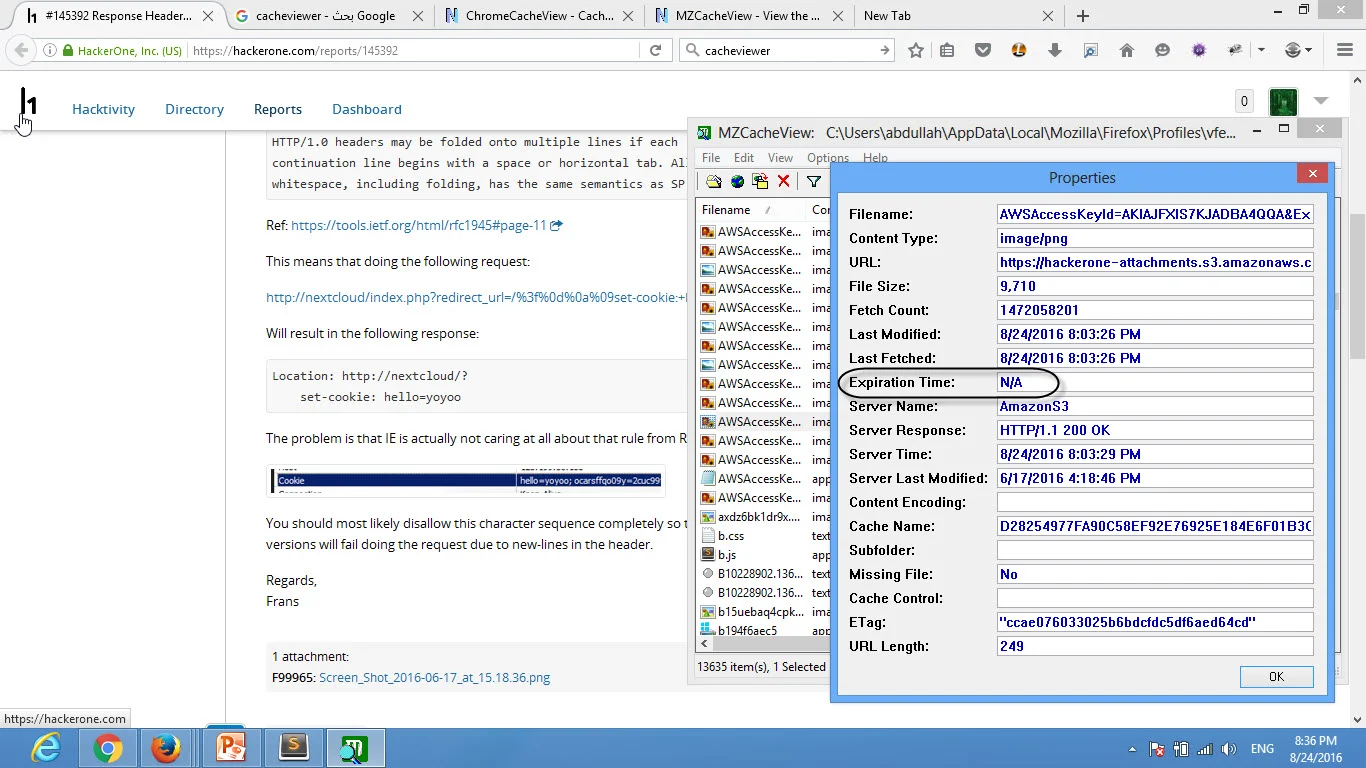
I viewed Frans report using Firefox and the cache viewer got the image I can view it and see the HTTP header
Conclusion
The Images stored just by view it . It is n't a secure practice .
Scenario
1- User view his report in public,friend,company computer will store screen shots and the files he will download and delete it will be stored in cache and can be viewed . 2- Member in a team views reports in public,friend,company computer will store screen shots and the files he will download and delete it will be stored in cache and can be viewed .
Fix
You should set :
- Cache-Control: no-cache, no-store
- Expires: 0
- Pragma: no-cache
Or minimize cache time because it will be stored there forever .
Ref
1- https://www.w3.org/Protocols/rfc2616/rfc2616-sec14.html#sec14.9 2- https://www.owasp.org/index.php/Testing_for_Browser_cache_weakness_(OTG-AUTHN-006)
Thanks for read all of this I am waiting your replay
BR
Context
HackerOne stores and serves the files attached to reports, including screenshots, through Amazon S3. The bucket in question is hackerone-attachments.s3.amazonaws.com, and it is called every time an image is shown on hackerone.com. The researcher's observation concerns what happens on the client side after such a file is fetched: the S3 response carries no cache-control headers, so the browser keeps a local copy of the content.
The report is filed under Information Disclosure and was disclosed on 6 September 2016.
Setup
The researcher viewed a public report in Firefox and then examined the browser cache. To read the browser cache afterwards he used NirSoft's Mozilla Cache Viewer, and he lists the equivalent Chrome tool and a Firefox add-on (which he does not recommend) as alternatives. The precondition is that a user views a report or downloads an attachment on a machine that someone else can later access.
Finding it
The researcher started from the assumption that HackerOne uses S3 for saving and serving files, and that the bucket is queried every time an image is displayed on hackerone.com. Looking at report #145392, he saw a request for a screenshot, reproduced below.
https://hackerone-attachments.s3.amazonaws.com/production/000/099/965/[redacted]/Screen_Shot_2016-06-17_at_15.18.36.png?AWSAccessKeyId=[redacted]&Expires=1472061826&[redacted]

Host: hackerone-attachments.s3.amazonaws.com
User-Agent: Mozilla/5.0 (Windows NT 6.2; WOW64; rv:48.0) Gecko/20100101 Firefox/48.0
Accept: */*
Accept-Language: en-US,en;q=0.5
Accept-Encoding: gzip, deflate, br
Referer: https://hackerone.com/
Connection: keep-alive
If-Modified-Since: *
The URL carries AWSAccessKeyId, Expires and Signature query parameters and points at an object under the production/ prefix. The request is made from the hackerone.com page, as the Referer shows.
The response is where the problem appears.
HTTP/1.1 200 OK
x-amz-id-2: [redacted]
x-amz-request-id: [redacted]
Date: Wed, 24 Aug 2016 17:03:49 GMT
Last-Modified: Fri, 17 Jun 2016 13:18:46 GMT
Etag: "[redacted]"
x-amz-server-side-encryption: AES256
Content-Disposition: attachment; filename=""
Accept-Ranges: bytes
Content-Type: image/png
Content-Length: 9710
Server: AmazonS3
The response contains no header that controls caching. In the researcher's reasoning, when no cache header is set the browser's default behaviour is to store a local cached copy of the file received from AWS, so the content can later be retrieved by other users who have access to the same computer.
He identifies two affected uses:
- Photos: when an image is included with
{}or uploaded and opened from attachments, the request is made and a local copy is stored without the user's knowledge. - Other files such as video, XML or text: when a file is downloaded, a copy is stored in the cache without the user's knowledge. He questions the point of caching a file that is going to be downloaded anyway.
He lists where the cache files live:
- Mozilla Firefox:
- Unix/Linux:
~/.mozilla/firefox/<profile-id>/Cache/ - Windows:
C:\Documents and Settings<user_name>\Local Settings\Application Data\Mozilla\Firefox\Profiles<profile-id>\Cache
- Unix/Linux:
- Internet Explorer:
C:\Documents and Settings<user_name>\Local Settings\Temporary Internet Files
Exploitation
Step 1: view a report containing an attachment
Open a report such as #145392 in Firefox. The page issues the signed S3 request shown above and the browser renders the screenshot.
Step 2: read the cache with a cache viewer
Using the Mozilla Cache Viewer, the researcher retrieved the image from the local cache, viewed it, and could also see the HTTP headers stored with it. The screenshot below shows the cached entry and its headers.
Step 3: recover the content later
Because the copy persists on disk, anyone with access to the same machine can open the cache and view the screenshots and files the user downloaded and deleted.
The researcher frames two scenarios:
- A user views their report on a public, friend's or company computer. The screenshots, and any files downloaded and deleted, are stored in the cache and can be viewed.
- A member of a team views reports on a public, friend's or company computer, with the same result.
Root cause
The S3 response for attachment objects carries no Cache-Control, Expires or Pragma header. With no cache header set, the browser's default behaviour is to store a local copy of the response.
Impact
The exposure is local and requires that another person can use, or later obtain access to, the same computer and its browser cache. Under those conditions, screenshots from reports the user viewed and files the user downloaded can be recovered from the cache, including content the user believed was gone after deleting it. The report does not describe remote retrieval of the cache or any server-side leak.
Fix
The researcher recommends setting the following headers:
Cache-Control: no-cache, no-storeExpires: 0Pragma: no-cache
As an alternative, he suggests minimising the cache time, since otherwise the content is stored there forever. The report does not record which change, if any, was applied.
Variants to test
- Check other object-storage buckets that serve user content for responses lacking
Cache-ControlandExpires. A positive result is a200response with no cache directives and a body that the browser then stores. - Test both inline display and download flows. A positive result is a cached copy appearing in the browser cache for a file that was only downloaded, not rendered.
- Inspect responses that use
Content-Disposition: attachment, as in this report. A positive result is the same absence of cache headers on a download response. - Review cache behaviour on shared profiles after the user deletes the content. A positive result is the file still being readable from the cache directory.
What happened, in plain words
HackerOne is a website where security researchers report bugs to companies. Reports often contain screenshots and other files, and HackerOne keeps those files on Amazon S3, which is Amazon's online storage service. When you open a report and an image appears, your browser quietly fetches that image from S3 and shows it to you.
The researcher noticed something simple but important: when S3 sends the image back, it does not tell the browser how long to keep a copy. When a website gives no instruction about keeping copies, browsers do what they normally do: they save a copy of the file on your computer's disk, in a hidden storage area called the browser cache. That copy stays on disk, and files you downloaded and deleted can still be found in the cache. Anyone who later uses the same computer can open that cache and look at the pictures and files you thought were gone.
This kind of problem is called Information Disclosure: information that should stay private ends up somewhere it can be seen by the wrong person. The report was published on 6 September 2016.
A quick comparison: think of the browser cache as a photocopier in the lobby. Every time you look at a document, the photocopier makes a copy and files it in a drawer. You never asked for the copy, and nobody tells you it exists. If a colleague sits at the same photocopier later, they can open the drawer and read everything you looked at.
Background: what S3 and the cache are
Amazon S3 (Simple Storage Service) is a service for storing files online. Files live in containers called buckets. HackerOne's bucket here is named hackerone-attachments.s3.amazonaws.com, and the researcher says it is called every time an image is shown on hackerone.com.
A URL is the address of something on the internet, like a street address for a file. The URL in this report points at a specific screenshot inside that bucket.
A query string is the part of a URL after the ? sign. It carries extra details, like a note attached to the address. In this case the query string carries three values: AWSAccessKeyId, Expires and Signature. The query string carries three values: AWSAccessKeyId, Expires and Signature. Think of it as a visitor pass with an expiry date printed on it.
A header is a small line of text that travels with every web request and response. Headers are the labels and instructions on the envelope: who is asking, what kind of file is inside, and what the receiver should do with it. Some headers control caching, which means how long a copy may be kept and reused.
Setting up
The researcher opened a public report in Firefox and then used a free tool called Mozilla Cache Viewer (made by NirSoft) to look inside the browser cache. He also mentions a Chrome equivalent and a Firefox add-on, which he does not recommend.
The only precondition is that someone views a report or downloads an attachment on a computer that another person can later reach.
Finding it
The researcher started from the idea that HackerOne uses S3 to store and serve files, and that the bucket is asked for a file every time an image appears on hackerone.com. He opened report #145392 and saw the browser request a screenshot. Here is that request:
https://hackerone-attachments.s3.amazonaws.com/production/000/099/965/[redacted]/Screen_Shot_2016-06-17_at_15.18.36.png?AWSAccessKeyId=[redacted]&Expires=1472061826&[redacted]

Host: hackerone-attachments.s3.amazonaws.com
User-Agent: Mozilla/5.0 (Windows NT 6.2; WOW64; rv:48.0) Gecko/20100101 Firefox/48.0
Accept: */*
Accept-Language: en-US,en;q=0.5
Accept-Encoding: gzip, deflate, br
Referer: https://hackerone.com/
Connection: keep-alive
If-Modified-Since: *
Line by line:
- The first line is the address being fetched. It points at a PNG image (a screenshot) inside the bucket, under a folder path starting with
production/. The?starts the query string with the three values that make this a signed URL:AWSAccessKeyIdidentifies which key signed it,Expiresis the moment the pass stops working, andSignatureis the cryptographic stamp proving the pass is genuine. The key and signature are secrets, so they are redacted here. Hostsays which server the browser is talking to: the S3 bucket.User-Agenttells the server what browser and operating system are asking. Here it is Firefox 48 on 64-bit Windows.Accept: */*means the browser will accept any kind of file back.Accept-Languagesays which languages the user prefers.Accept-Encodinglists the compression formats the browser can unpack.Referersays which page the request came from: hackerone.com. This shows the image was loaded as part of a HackerOne page.Connection: keep-aliveasks to keep the network connection open for further requests.If-Modified-Since: *is a conditional request header, shown here as it appears in the report.
The important part is the response, where the problem appears:
HTTP/1.1 200 OK
x-amz-id-2: [redacted]
x-amz-request-id: [redacted]
Date: Wed, 24 Aug 2016 17:03:49 GMT
Last-Modified: Fri, 17 Jun 2016 13:18:46 GMT
Etag: "[redacted]"
x-amz-server-side-encryption: AES256
Content-Disposition: attachment; filename=""
Accept-Ranges: bytes
Content-Type: image/png
Content-Length: 9710
Server: AmazonS3
Line by line:
HTTP/1.1 200 OKmeans the request succeeded and the file is on its way.x-amz-id-2andx-amz-request-idare internal identifiers Amazon uses to trace the request. They are redacted here.Dateis when the server answered.Last-Modifiedis when the file was last changed on the server.Etagis a fingerprint of the file's contents, used to tell versions apart.x-amz-server-side-encryption: AES256says the file is stored encrypted on Amazon's side.Content-Disposition: attachment; filename=""tells the browser this is a file to download rather than display inline.Accept-Ranges: bytessays the server can send the file in pieces if asked.Content-Type: image/pngsays the file is a PNG image.Content-Length: 9710is the size in bytes.Server: AmazonS3names the server software.
What is missing is the point: there is no header that tells the browser how to handle caching. The researcher's reasoning is that when no cache instruction is set, the browser's default behaviour is to keep a local copy of the file it received from AWS. That copy can later be retrieved by other people who use the same computer.
He identifies two affected uses:
- Photos. When an image is included with
{}or uploaded and opened from attachments, the request is made and a local copy is stored without the user knowing. - Other files such as video, XML or text. When a file is downloaded, a copy is stored in the cache without the user knowing. He asks why a file that is going to be downloaded anyway should be cached at all.
He lists where the cache files live on disk:
- Mozilla Firefox:
- Unix/Linux:
~/.mozilla/firefox/<profile-id>/Cache/ - Windows:
C:\Documents and Settings<user_name>\Local Settings\Application Data\Mozilla\Firefox\Profiles<profile-id>\Cache
- Unix/Linux:
- Internet Explorer:
C:\Documents and Settings<user_name>\Local Settings\Temporary Internet Files
These are ordinary folders on the computer. <profile-id> and <user_name> are placeholders for the real profile folder and Windows user name.
Exploitation
Step 1: view a report containing an attachment
Open a report such as #145392 in Firefox. The page makes the signed S3 request shown above, and the browser displays the screenshot. This step matters because it is the moment the copy is created: simply looking at the page is enough.
Step 2: read the cache with a cache viewer
Using the Mozilla Cache Viewer, the researcher pulled the image back out of the local cache, opened it, and could also see the HTTP headers stored alongside it. The screenshot below shows the cached entry and its headers.
This step shows the copy is there and readable. The cache viewer is a tool that lists the files your browser has saved and lets you open them.
Step 3: recover the content later
Because the copy stays on disk, anyone with access to the same machine can open the cache and view the screenshots and files the user downloaded and deleted. Deleting the visible item does not delete the hidden copy.
The researcher describes two scenarios:
- A user views their report on a public, friend's or company computer. The screenshots, and any files downloaded and then deleted, are stored in the cache and can be viewed.
- A member of a team views reports on a public, friend's or company computer, with the same result.
Root cause
The S3 response for attachment files carries no Cache-Control, Expires or Pragma header. These three headers are the standard way a server tells a browser whether to keep a copy and for how long. With no instruction, the browser falls back to its default habit of keeping a copy on disk.
In other words, the lock on the server door does not stop the browser from photocopying the document once it is inside.
Impact
The exposure is local: it requires that another person can use, or later get access to, the same computer and its browser cache. Under those conditions, screenshots from reports the user viewed and files the user downloaded can be recovered from the cache, including content the user believed was gone after deleting it. The report does not describe any way to retrieve the cache remotely or any leak on the server side.
Fix
The researcher recommends setting these headers:
Cache-Control: no-cache, no-storeExpires: 0Pragma: no-cache
In plain words: no-store tells the browser not to save a copy at all, no-cache tells it to check with the server before reusing anything, Expires: 0 marks the copy as already out of date, and Pragma: no-cache is an older version of the same instruction for older browsers. As an alternative, he suggests keeping the cache time as short as possible, since otherwise the content stays there forever. The report does not record which change, if any, was applied.
Variants to test
- Check other object-storage buckets that serve user content (attachments, avatars, exports) for responses lacking
Cache-ControlandExpires. A positive result is a200response with no cache instructions and a body the browser then stores. - Test both inline display and download flows. A positive result is a cached copy appearing in the browser cache for a file that was only downloaded, not displayed.
- Inspect responses that use
Content-Disposition: attachment, as in this report. A positive result is the same absence of cache headers on a download response. - Review cache behaviour on shared profiles after the user deletes the content. A positive result is the file still being readable from the cache folder.
Glossary
- Amazon S3: Amazon's online file storage service, where files are kept in containers called buckets.
- Bucket: a named container inside S3 that holds files.
- Browser cache: a hidden folder where a browser saves copies of files it has downloaded, so it can show them again quickly.
- Cache-Control: a response header that tells the browser whether and how long to keep a copy.
- Content-Disposition: a response header that tells the browser whether to display a file inline or download it.
- Content-Type: a response header that says what kind of file is being sent, such as an image or text.
- Etag: a fingerprint of a file's contents, used to tell versions apart.
- Expires: a header giving the date after which a cached copy should be considered out of date.
- Header: a line of text sent with a web request or response that carries instructions or details.
- HTTP: the language browsers and servers use to exchange requests and responses.
- Information Disclosure: a weakness where information that should stay private can be seen by the wrong person.
- Pragma: an older header used to give caching instructions to older browsers.
- Query string: the part of a URL after the
?, carrying extra values. - Referer: a request header saying which page the request came from.
- Response: what a server sends back after a request.
- Signed URL: a URL carrying a key, an expiry time and a signature that together prove the holder is allowed to fetch the file.
- User-Agent: a request header saying which browser and operating system are asking.
- URL: the address of something on the internet.