H1514 DOMXSS on Embedded SDK via Shopify.API.setWindowLocation abusing cookie Stuffing
 Originally disclosed on HackerOne
- Triaged in 3 days
- Fixed in 6 months
- Paid in 3 days
- Disclosed after 6 months
Summary by the program
During H1-514, @filedescriptor reported an XSS issue in our Embedded App SDK that allowed for attacking legitimate apps through our platform, due to a missing protocol check on the Shopify.API.setWindowLocation. Since this issue would have allowed realistic attacks against apps using the Embedded App SDK, we decided to award $2500 for this issue. As part of the event, @filedescriptor was also awarded a bonus of $2500 for chaining multiple bugs.
The report
Hi Team!
I'm reporting a rather unusual DOMXSS that allows an attacker to perform a XSS attack on any Shopify apps that use the Embedded SDK. To exploit this, several techniques were chained together: Cookie Stuffing -> Login CSRF -> (Not Open) Redirect -> DOMXSS.
#Details
Inspired by #381192, I decided to check all pages to see if there's any broken origin validation. The results were frustrating since they all seemed to be done properly. However I noticed embedded apps did it in a way that it verifies if the coming origin is the logged-in store. Say if I am an admin on foobar.myshopify.com, then an embedded app will check if in-coming messages originate from https://foobar.myshopify.com. I went ahead to look up some documentations, confirming this is by design (shopOrigin):
ShopifyApp.init({
  shopOrigin: 'https://CURRENT_LOGGED_IN_SHOP.myshopify.com'
[...]
Now this is interesting because by design we can execute any JavaScript on our own stores. That means, I can iframe an embedded app on my store, then post any message to it and it will accept it. So I quickly beautify the SDK source code to see if there's any interesting event. Checking common DOMXSS sinks I found that it registers the Shopify.API.setWindowLocation event that navigates to a said destination.
https://cdn.shopify.com/s/assets/external/app.js
e.setWindowLocation = function(e) {
    return window.location = e
}, e.bindWindowLocation = function() {
    return _Shopify.Messenger.addHandler("Shopify.API.setWindowLocation", function(e) {
        return function(t, n) {
            return e.setWindowLocation(n)
        }
    }(this))
}
By navigate to a javascript: pseudo URL it can lead to XSS. This can be verified by opening any embedded apps and execute the following code in the DevTools' console
$$('iframe')[0].contentWindow.postMessage('{"message":"Shopify.API.setWindowLocation","data":"javascript:alert(document.domain);0[0]"}','*')
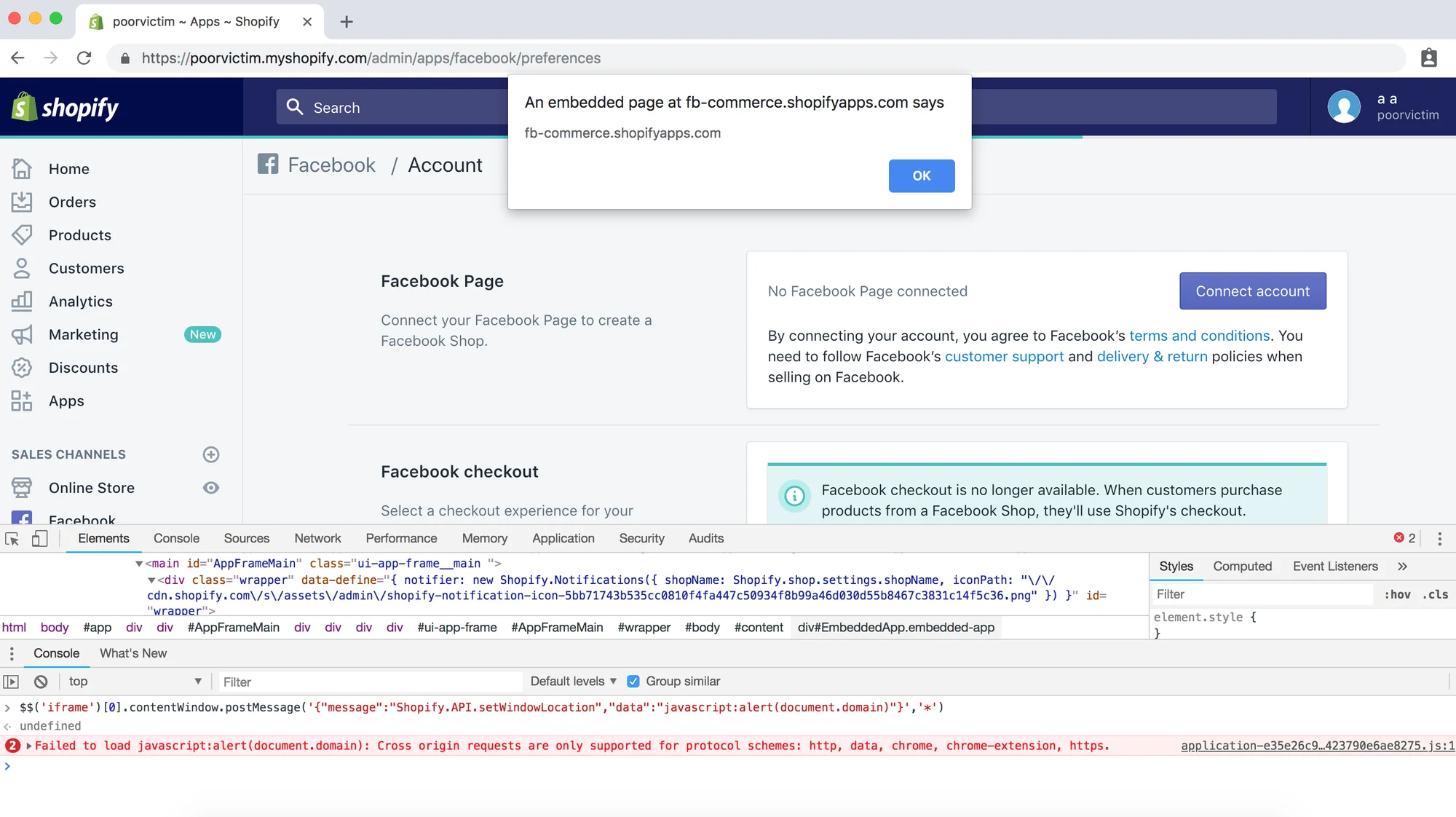
However this XSS is almost useless because the embedded app is authenticated as us, the attacker. When we try to exploit it on a victim it won't work because they are not logged into our store. So you could say this is, a self DOMXSS. Well, almost.
What if we use Login CSRF to force a victim to be logged into our store? After the victim is logged in to our store, we can then instruct user's browser to log into the embedded app as us by navigating to /admin/oauth/authorize. Then the current logged in store will be ours. I came up with an idea to stuff the session cookies using JavaScript.
The session cookies consist of _secure_admin_session_id and _master_udr. While I could simply write _secure_admin_session_id with docuemnt.cookie API, I realized a problem with _master_udr. Unlike _secure_admin_session_id, _master_udr is scoped to .myshopify.com. If we triy to write our _master_udr, then this will happen:
GET https://canvasfoobar.myshopify.com/admin/oauth/authorize?client_id=d25e45407e508f96409c2dd796e9bd95&redirect_uri=https%3A%2F%2Fscript-editor.shopifycloud.com%2Fauth%2Fshopify%2Fcallback&response_type=code&scope=write_scripts%2Cread_products%2Cread_customers&state=a HTTP/1.1
Host: canvasfoobar.myshopify.com
Cookie: _master_udr=LEGIT; _master_udr=EVIL; _secure_admin_session_id=EVIL
The legitimate _master_udr will override our evil one and the server will refuse to authenticate as us. There is a trick fortunately.
“Cookies with longer paths are listed before cookies with shorter paths.” –RFC 6265
By setting a cookie with a very specific (/admin/oauth in this case) we can outrun the original one. The code that we will use to force a login will be:
document.cookie = '_secure_admin_session_id=EVIL;path=/admin/oauth';
document.cookie = '_master_udr=EVIL;path=/admin/oauth';
Another problem is even after all this, the victim will be logged into the embedded app as us. That means, all actions only affect our store.
To solve this we can simply relog in the victim to the embedded app. Since the victim is still logged in their store, we can navigate the victim to https://victim.myshopify.com/admin/oauth/authorize to trigger the auth flow for the embedded app. The drawback is we need to know which store the victim is logged in as. Luckily https://www.shopify.com/path will redirect to the last logged in store of a user, therefore navigating to https://www.shopify.com/admin/oauth/authorize will lead them to https://victim.myshopify.com/admin/oauth/authorize.
Eventually we have our XSS running on the embedded app's domain running with the victim's session.
#Steps to Reproduce
In the PoC, Script Editor will be used as an example.
- Be logged into your store as an admin and have Script Editor installed
- Navigate to https://canvasfoobar.myshopify.com/products/canary
- After the iframe turns grey, click it
- After a while, a fake modal dialog will show up and a New Script will be created
I'm also attaching a video demo.
#Fix
I recommend fixing this issue by validating the URL for Shopify.API.setWindowLocation. The other small issues are by design so they are hard to fix.
Impact
Perform unauthorized actions on a store admin on any embedded apps.
Attachments
Context
Shopify's Embedded App SDK lets an app run inside an iframe on a merchant's admin, on the store's *.myshopify.com domain. The parent admin page and the embedded app talk to each other with postMessage. The SDK exposes a set of named handlers, and one of them, Shopify.API.setWindowLocation, navigates the embedded app's window to a destination supplied in the message.
The report describes a DOM-based XSS in that handler, which on its own only runs against the attacker's own session because the SDK's origin check is tied to the store that is currently logged in. Chaining cookie stuffing, a login CSRF and a redirect turns what starts as a self-XSS into an attack on a victim's session inside a legitimate embedded app.
Setup
To follow the reproduction you need:
- An admin account on your own store, for example
canvasfoobar.myshopify.com. - The Script Editor app installed on that store, used as the example embedded app.
- A browser with DevTools, to run payloads in the console and inspect the iframe.
The researcher's starting point was the design of the SDK's origin validation: an embedded app checks that incoming messages come from the logged-in store's origin, passed in as shopOrigin at initialisation.
Finding it
Inspired by an earlier report (#381192), the researcher went through pages looking for broken origin validation. Most checks were done properly. The embedded apps stood out because they validate against the currently logged-in store rather than a fixed origin. The SDK documentation confirms this is by design:
ShopifyApp.init({
  shopOrigin: 'https://CURRENT_LOGGED_IN_SHOP.myshopify.com'
[...]
The consequence is that anyone who controls a store can iframe an embedded app from that store and post arbitrary messages to it, and the app will accept them. The researcher beautified the SDK source at https://cdn.shopify.com/s/assets/external/app.js and looked for common DOMXSS sinks. The Shopify.API.setWindowLocation handler assigns the message data straight to window.location:
e.setWindowLocation = function(e) {
    return window.location = e
}, e.bindWindowLocation = function() {
    return _Shopify.Messenger.addHandler("Shopify.API.setWindowLocation", function(e) {
        return function(t, n) {
            return e.setWindowLocation(n)
        }
    }(this))
}
A javascript: pseudo URL passed as the destination therefore executes script in the embedded app's context. The researcher verified this by opening an embedded app and running the following in the DevTools console:
$$('iframe')[0].contentWindow.postMessage('{"message":"Shopify.API.setWindowLocation","data":"javascript:alert(document.domain);0[0]"}','*')
The message names the Shopify.API.setWindowLocation handler and puts a javascript: URL in data. The screenshot shows the alert firing.
On its own this is close to useless. The embedded app is authenticated as the attacker, so the XSS only runs against the attacker's own session: a self DOMXSS. To make it matter, the victim has to be logged into the attacker's store and then into the embedded app as the attacker, and finally back into the embedded app as themselves.
Exploitation
Step 1: force the victim into the attacker's store with cookie stuffing
The session cookies involved are _secure_admin_session_id and _master_udr. _secure_admin_session_id can be written with document.cookie. _master_udr is scoped to .myshopify.com, so a naive write produces two cookies with the same name, and the legitimate one wins:
GET https://canvasfoobar.myshopify.com/admin/oauth/authorize?client_id=[redacted]&redirect_uri=https%3A%2F%2Fscript-editor.shopifycloud.com%2Fauth%2Fshopify%2Fcallback&response_type=code&scope=write_scripts%2Cread_products%2Cread_customers&state=a HTTP/1.1
Host: canvasfoobar.myshopify.com
Cookie: _master_udr=LEGIT; _master_udr=EVIL; _secure_admin_session_id=EVIL
With both cookies present, the server refuses to authenticate as the attacker. The trick is cookie path precedence, as stated in RFC 6265: cookies with longer paths are listed before cookies with shorter paths. Setting the stuffed cookies on a more specific path, /admin/oauth, makes them outrank the originals for requests to that path:
document.cookie = '_secure_admin_session_id=EVIL;path=/admin/oauth';
document.cookie = '_master_udr=EVIL;path=/admin/oauth';
This is the login CSRF: the victim's browser now carries the attacker's session for the OAuth authorisation endpoint, so navigating to /admin/oauth/authorize logs the victim into the embedded app as the attacker.
Step 2: log the victim back in as themselves
At this point the victim is inside the embedded app as the attacker, so any action only affects the attacker's store. The fix for that is to re-run the authorisation flow for the victim's own store. The victim is still logged into their own store, so navigating them to https://victim.myshopify.com/admin/oauth/authorize triggers the auth flow again. The remaining problem is not knowing which store the victim is logged into. https://www.shopify.com/path redirects to the user's last logged-in store, so navigating to https://www.shopify.com/admin/oauth/authorize lands the victim on https://victim.myshopify.com/admin/oauth/authorize.
Step 3: run the XSS with the victim's session
With the victim logged into the embedded app under their own session, the javascript: payload delivered through Shopify.API.setWindowLocation now executes in the embedded app's domain with the victim's session.
Steps to reproduce
The report gives the reproduction with Script Editor as the example app:
- Be logged into your store as an admin and have Script Editor installed.
- Navigate to
https://canvasfoobar.myshopify.com/products/canary. - After the iframe turns grey, click it.
- After a while, a fake modal dialog shows up and a New Script is created.
A video demo accompanies the report.
Root cause
The Shopify.API.setWindowLocation handler assigns message data directly to window.location without validating the URL scheme, so a javascript: URL is accepted and executed. The SDK's origin check does not help here: it validates that the message came from the logged-in store, which is by design, and an attacker who owns a store can satisfy that check. The cookie path precedence rule in RFC 6265 lets an attacker's cookies on /admin/oauth outrank the legitimate .myshopify.com cookies for the authorisation endpoint, defeating the natural protection against duplicate cookie names. The redirect from https://www.shopify.com/... to the last logged-in store removes the need to know the victim's store name.
Impact
An attacker can perform unauthorised actions on a store admin on any embedded apps. The report describes the result as a fake modal dialog and the creation of a new script in Script Editor. The program's summary notes that the issue would have allowed realistic attacks against apps using the Embedded App SDK, and awarded $2500 for the issue plus a $2500 bonus for chaining multiple bugs.
Fix
The researcher recommends validating the URL passed to Shopify.API.setWindowLocation. The other issues in the chain are by design and hard to fix.
Variants to test
- Look for other SDK message handlers that write message data into navigation or DOM sinks, such as
location,innerHTMLoreval. A positive result is a handler that accepts ajavascript:URL or HTML from a message and executes it in the embedded app's origin. - Check whether other embedded app SDKs validate the message origin against the logged-in store rather than a fixed origin. A positive result is an app that accepts messages from any store you control.
- Test cookie path precedence on other OAuth or authorisation endpoints where session cookies are scoped to a parent domain. A positive result is a request where your stuffed cookie on a longer path is sent ahead of the legitimate one and the server authenticates you as the attacker.
- Test whether a
wwwor apex domain redirects to the user's last logged-in tenant, ashttps://www.shopify.com/pathdoes. A positive result is a redirect that reveals or lands on the victim's tenant without you knowing it in advance.
What happened, in plain words
A security researcher found a way to make a malicious script run inside a Shopify app that a merchant had installed. On its own, the bug was almost harmless: it only let you attack yourself. By combining four smaller tricks, the researcher turned it into an attack that could run code in a victim merchant's session inside a real Shopify app. The four tricks were: cookie stuffing, a login CSRF, a redirect, and a DOM-based XSS. The program paid $2500 for the issue and a further $2500 bonus for chaining the bugs together.
This article walks through the whole chain from zero. You only need to know how to use a browser. Every technical word is explained the first time it appears, and there is a glossary at the end.
The product and the feature involved
Shopify is a platform that lets people run online shops. Each shop gets an address like your-store.myshopify.com. The person who runs the shop is called a merchant, and the control panel where they manage products, orders and settings is called the admin.
Shopify also lets other companies build apps that plug into the admin. Examples are apps that edit the look of a shop or manage discount codes. Many of these apps do not open as a separate page. Instead they appear inside a frame embedded in the admin page. That frame is called an iframe: a small browser window placed inside another web page. The app running inside the iframe is called an embedded app.
To make this work, Shopify provides developers with a toolkit called the Embedded App SDK. An SDK (software development kit) is a bundle of ready-made code that developers include in their app so they do not have to write common plumbing themselves. One piece of that plumbing is how the outer admin page and the inner app talk to each other.
They talk with a browser feature called postMessage. Because the admin page and the app inside the iframe are technically different websites, the browser normally stops them from reading each other's content. postMessage is the official, controlled way for one window to send a text message to another. The receiving side listens for messages and decides what to do with them.
The SDK listens for messages with names, called handlers. One handler is called Shopify.API.setWindowLocation. When the app receives a message with that name, it takes the destination address from the message and navigates the app's window there. In other words, it is a remote control for "go to this web address".
What kind of bug this is
The bug is a DOM-based XSS. Let us unpack that.
XSS stands for cross-site scripting. It means an attacker manages to get their own JavaScript code to run inside a page that belongs to someone else. JavaScript is the programming language that browsers run to make pages interactive. If an attacker's JavaScript runs on a shop's page, it runs with the same powers as the shop's own code: it can read what the page reads, click what the page can click, and send requests as the logged-in user.
DOM stands for Document Object Model. It is the browser's in-memory model of the page: every element, every attribute, every piece of text. DOM-based means the malicious code never comes from the server. The server sends a perfectly normal page, and the page's own JavaScript takes some input (here, the text of a message) and does something dangerous with it (here, navigating to it). The danger lives entirely in the browser.
A useful comparison: a normal XSS is like someone slipping a forged page into a newspaper delivery. A DOM-based XSS is like the newspaper's own staff reading out a phone number a caller gave them, without checking it, and the number turns out to be a command to burn the building down.
The starting point: how the SDK checks where messages come from
When one window sends a message to another, the receiving window can see which website the message came from. That website is called the origin: the combination of protocol (http or https), host name and port. Checking the origin is the standard defence. If a message claims to come from somewhere unexpected, you ignore it.
The researcher was inspired by an earlier report, #381192, and went looking through Shopify pages for places where this origin check was broken. Most of them were done properly. The embedded apps stood out, because they did not check against a fixed address. They checked against the shop that is currently logged in. The SDK documentation confirms this is intentional. At start-up, the app is given a value called shopOrigin:
ShopifyApp.init({
  shopOrigin: 'https://CURRENT_LOGGED_IN_SHOP.myshopify.com'
[...]
Line by line:
ShopifyApp.init({starts the set-up of the app and opens a list of settings.shopOrigin: 'https://CURRENT_LOGGED_IN_SHOP.myshopify.com'is one setting. It tells the app which shop's messages it should trust. The placeholder stands for whichever shop the person viewing the admin is logged into.[...]means the report has cut the rest of the settings out; there were more lines that do not matter here.
Why does this matter? Because anyone can create their own shop. If you own a shop, you are the logged-in shop when you view your own admin. So you can put an embedded app inside a page on your own shop, send it any message you like, and the app will accept the message as legitimate, because it really did come from the shop that is logged in. The check is working exactly as designed, and that design is the weakness.
Finding the dangerous handler
The researcher then took the SDK's source code, the file served at https://cdn.shopify.com/s/assets/external/app.js, and ran it through a tool that re-indents code to make it readable ("beautify"). The goal was to find sinks: places where a program takes input and does something with it that can be dangerous. Common dangerous sinks in a browser are assigning to window.location (navigate somewhere), setting innerHTML (insert HTML into the page) or calling eval (run text as code).
The handler for Shopify.API.setWindowLocation turned out to be a direct line from the message to navigation:
e.setWindowLocation = function(e) {
    return window.location = e
}, e.bindWindowLocation = function() {
    return _Shopify.Messenger.addHandler("Shopify.API.setWindowLocation", function(e) {
        return function(t, n) {
            return e.setWindowLocation(n)
        }
    }(this))
}
Line by line:
e.setWindowLocation = function(e) {defines a function namedsetWindowLocationthat takes one input, here callede(the destination address).return window.location = eis the dangerous line.window.locationis the browser's "current address" for that window. Assigning to it tells the browser to go to the new address. The input is used with no check at all.}, e.bindWindowLocation = function() {closes that function and starts a second one, which wires the handler up to the messaging system.return _Shopify.Messenger.addHandler("Shopify.API.setWindowLocation", function(e) {registers a listener for messages namedShopify.API.setWindowLocation.return function(t, n) {is the inner function that will be called when such a message arrives.tis the message,nis the data inside it.return e.setWindowLocation(n)passes the message's data straight to the navigation function above.- The closing braces and
}(this))finish the wiring.
Why is this dangerous? Browsers accept more than ordinary web addresses in window.location. They also accept a pseudo URL that starts with javascript:. When a browser is told to navigate to a javascript: address, it does not fetch a page. It runs the text after the colon as JavaScript, in the context of the current page. So if the destination comes from an attacker's message, the attacker's JavaScript runs inside the app.
Proving it works
The researcher opened an embedded app and ran this in the browser's DevTools console. DevTools is the built-in developer panel in browsers; the console lets you type JavaScript that runs on the current page.
$$('iframe')[0].contentWindow.postMessage('{"message":"Shopify.API.setWindowLocation","data":"javascript:alert(document.domain);0[0]"}','*')
Line by line:
$$('iframe')[0]finds all iframes on the page and takes the first one. That is the embedded app..contentWindowreaches into that iframe and gets its window, the thing you can send messages to..postMessage(sends a message to that window.'{"message":"Shopify.API.setWindowLocation","data":"javascript:alert(document.domain);0[0]"}'is the message itself, written as text in JSON format (a standard way of writing structured data as text). It has two fields:message, which names the handler, anddata, which carries the destination.'*'is the origin argument. It means "I do not care which origin receives this".- Inside
data,javascript:alert(document.domain)is the payload.alertpops up a dialog box, anddocument.domainis the current website's address, so the dialog proves which site the code is running on. ;0[0]is extra text appended to the payload string. It is part of the payload as written.- The closing
)finishes the call.
The screenshot shows the result of running the payload. That confirms the attacker's JavaScript is running inside the app.
Why this alone is almost useless
Here is the catch. The embedded app is logged in as whoever is viewing it. When the researcher runs this, the app is logged in as the researcher. The script runs, but it runs in the researcher's own session. It can only do things the researcher could already do. Security people call this a self-XSS: you can attack yourself and nobody else.
For the attack to matter, three things have to be true at once. The victim must be logged into the attacker's shop. Then the victim must be logged into the embedded app as the attacker. And finally the victim must be logged back into the embedded app as themselves, so that the script runs with the victim's powers. The rest of the report is about achieving exactly that sequence.
Step 1: forcing the victim into the attacker's shop with cookie stuffing
First, some background. A cookie is a small piece of text that a website asks the browser to store and to send back on every later request to that site. Cookies are how websites remember that you are logged in. A session is the logged-in state itself, and the cookie that carries it is often called a session cookie. If an attacker can make your browser use the attacker's session cookie, the website will think you are the attacker.
Cookie stuffing means writing cookies into the victim's browser without them noticing, so that their browser starts presenting the attacker's session.
Two cookies are involved here: _secure_admin_session_id and _master_udr. The first one can be written from JavaScript with the document.cookie API. An API is simply a defined way for one piece of software to ask another to do something; document.cookie is the browser's built-in way for a page to read and write cookies.
The second cookie, _master_udr, is scoped to .myshopify.com. Scope (or domain scope) means which addresses a cookie is sent to. A cookie set for .myshopify.com is sent to every shop under that parent domain. That creates a problem: if the attacker simply writes a cookie with the same name, the browser now holds two cookies with the same name, and the server has to pick one. The report shows what happens:
GET https://canvasfoobar.myshopify.com/admin/oauth/authorize?client_id=[redacted]&redirect_uri=https%3A%2F%2Fscript-editor.shopifycloud.com%2Fauth%2Fshopify%2Fcallback&response_type=code&scope=write_scripts%2Cread_products%2Cread_customers&state=a HTTP/1.1
Host: canvasfoobar.myshopify.com
Cookie: _master_udr=LEGIT; _master_udr=EVIL; _secure_admin_session_id=EVIL
Line by line:
GET https://canvasfoobar.myshopify.com/admin/oauth/authorize?...is a request to the authorisation page of the attacker's shop.GETis the standard browser request for fetching a page. The long part after?is a set of parameters:client_ididentifies the app,redirect_uriis where to send the user afterwards,response_type=codeasks for an authorisation code,scopelists the permissions requested, andstate=ais a value the app uses to keep track of the flow.HTTP/1.1is the version of the web protocol being used.Host: canvasfoobar.myshopify.comtells the server which site the request is for.Cookie: _master_udr=LEGIT; _master_udr=EVIL; _secure_admin_session_id=EVILis the crucial line. The browser is sending two_master_udrcookies: the real one (LEGIT) and the attacker's (EVIL), plus the attacker's session cookie. The server picks the legitimate one, so it refuses to log the victim in as the attacker.
So a naive write fails. The report then quotes a rule from RFC 6265, the official document that describes how cookies work:
"Cookies with longer paths are listed before cookies with shorter paths.", RFC 6265
A cookie can be limited to a path, meaning a section of the site's addresses. If a cookie is set for /admin/oauth, it is only sent for addresses under /admin/oauth. The rule says that when several cookies match a request, the ones with the longer, more specific path are sent first. Servers typically use the first matching cookie they see. So a cookie on a longer path can outrank the legitimate one. The researcher used this:
document.cookie = '_secure_admin_session_id=EVIL;path=/admin/oauth';
document.cookie = '_master_udr=EVIL;path=/admin/oauth';
Line by line:
document.cookie = '...'writes a cookie into the browser._secure_admin_session_id=EVILsets the session cookie to the attacker's value.;path=/admin/oauthlimits the cookie to the authorisation section of the site, which is exactly where the login flow happens. Because that path is longer than the default, this cookie is sent ahead of the legitimate one.- The second line does the same for
_master_udr.
Why does this work as an attack? Because the victim's browser now carries the attacker's session for the authorisation endpoint. When the victim's browser is then sent to /admin/oauth/authorize, the server sees the attacker's cookies first and logs the victim in as the attacker. This is a login CSRF. CSRF stands for cross-site request forgery: an attacker makes the victim's browser send a request that the victim did not intend, using the victim's existing trust in the site. Here the goal is not to steal the victim's session but to force the victim into the attacker's session.
Step 2: logging the victim back in as themselves
At this point the victim is inside the embedded app, but as the attacker. Anything the script does only affects the attacker's shop, which is no use. The fix is to run the authorisation flow again, this time for the victim's own shop. The victim is still logged into their own shop in another part of the browser, so sending them to https://victim.myshopify.com/admin/oauth/authorize triggers the flow for their own account.
There is one obstacle: the attacker does not know which shop the victim is logged into, so they cannot write that address. The report notes that https://www.shopify.com/path redirects to the user's last logged-in shop. A redirect is a server telling the browser "the page you want is over there, go to this other address instead". Because of that redirect, sending the victim to https://www.shopify.com/admin/oauth/authorize lands them on https://victim.myshopify.com/admin/oauth/authorize, whatever their shop happens to be. The attacker never needs to know the name.
Step 3: running the XSS with the victim's session
Now the victim is logged into the embedded app under their own account. The same javascript: payload sent through Shopify.API.setWindowLocation now runs in the embedded app's domain with the victim's session. The attacker's code is executing with the victim's powers inside a legitimate app.
Steps to reproduce
The report uses Script Editor as the example app. Script Editor is a Shopify app for writing small programs that customise a shop.
- Be logged into your shop as an admin and have Script Editor installed.
- Navigate to
https://canvasfoobar.myshopify.com/products/canary. - After the iframe turns grey, click it.
- After a while, a fake modal dialog shows up and a New Script is created.
A modal dialog is a box that appears over the page and demands attention. The report describes a fake modal dialog appearing and a new script being created.
A video demo accompanies the report.
Root cause
The handler Shopify.API.setWindowLocation takes the destination from a message and assigns it to window.location without checking what kind of address it is. A javascript: address is therefore accepted and executed. The SDK's origin check does not prevent this, because it checks that the message came from the logged-in shop, and an attacker who owns a shop can satisfy that check honestly. The cookie path rule in RFC 6265 lets the attacker's cookies on /admin/oauth outrank the legitimate .myshopify.com cookies for the authorisation endpoint, which defeats the natural protection against duplicate cookie names. And the redirect from https://www.shopify.com/... to the last logged-in shop removes the need to know the victim's shop name.
Impact
An attacker can perform unauthorised actions on a shop admin on any embedded apps. The report describes the visible result as a fake modal dialog and the creation of a new script in Script Editor. The program's summary notes that the issue would have allowed realistic attacks against apps using the Embedded App SDK, and awarded $2500 for the issue plus a $2500 bonus for chaining multiple bugs.
Fix
The researcher recommends validating the URL passed to Shopify.API.setWindowLocation. The other issues in the chain are by design and hard to fix.
Variants to test
These are directions for further testing, in case you want to look for similar problems yourself.
- Look for other SDK message handlers that write message data into navigation or DOM sinks, such as
location,innerHTMLoreval. A positive result is a handler that accepts ajavascript:URL or HTML from a message and executes it in the embedded app's origin. - Check whether other embedded app SDKs validate the message origin against the logged-in shop rather than a fixed origin. A positive result is an app that accepts messages from any shop you control.
- Test cookie path precedence on other OAuth or authorisation endpoints where session cookies are scoped to a parent domain. A positive result is a request where your stuffed cookie on a longer path is sent ahead of the legitimate one and the server authenticates you as the attacker.
- Test whether a
wwwor apex domain redirects to the user's last logged-in tenant, ashttps://www.shopify.com/pathdoes. A positive result is a redirect that reveals or lands on the victim's tenant without you knowing it in advance.
Glossary
- Admin: the control panel where a merchant manages their shop.
- API: a defined way for one piece of software to ask another to do something.
- Beautify: reformatting source code with indentation so it is easier to read.
- Cookie: a small piece of text a website asks the browser to store and send back on later requests.
- Cookie stuffing: writing cookies into a victim's browser so it starts using the attacker's session.
- CSRF (cross-site request forgery): making a victim's browser send a request they did not intend, using their existing trust in a site.
- DevTools: the developer panel built into browsers, including a console for running JavaScript.
- DOM (Document Object Model): the browser's in-memory model of a page.
- DOM-based XSS: an XSS where the page's own JavaScript turns input into executable code, without the server being involved.
- Embedded app: an app that runs inside an iframe within the Shopify admin.
- Handler: a named function that reacts to a particular kind of message or event.
- iframe: a small browser window placed inside another web page.
- JavaScript: the programming language browsers run to make pages interactive.
- JSON: a standard way of writing structured data as text.
- Login CSRF: a CSRF whose goal is to force the victim into the attacker's session.
- Merchant: the person who runs a Shopify shop.
- Modal dialog: a box that appears over a page and demands attention.
- Origin: the combination of protocol, host name and port that identifies a website.
- Path: the part of a web address after the domain, used to limit which requests a cookie is sent with.
- postMessage: the browser's controlled way for one window to send a text message to another.
- Pseudo URL: an address starting with a scheme like
javascript:that the browser executes rather than fetches. - Redirect: a server telling the browser to go to a different address instead.
- RFC 6265: the official document describing how cookies work.
- Scope: which addresses a cookie is sent to.
- SDK (software development kit): a bundle of ready-made code developers include in their app.
- Self-XSS: an XSS that only affects the person who triggers it.
- Session: the logged-in state of a user on a site.
- Session cookie: the cookie that carries the session.
- Sink: a place in a program where input is used in a way that can be dangerous.
- Tenant: one customer's separate space on a shared platform, here one shop.
- XSS (cross-site scripting): getting an attacker's JavaScript to run inside someone else's page.





