Server-Side Template Injection
A template injection flaw allowed template expressions to be evaluated, and the author states such flaws can lead to remote code execution.

Server-Side Template Injection or SSTI, in short, is considered one of the most critical vulnerabilities nowadays. Mistaken with Cross-Site Scripting, Template Injection can directly attack web servers and obtain Remote Code Execution.
The full write-up lives on its author's site
It belongs to its author, so we link to it rather than copy it. The other two tabs are our own rewrites, checked against it.
Context
Server-Side Template Injection (SSTI) is often confused with Cross-Site Scripting, but it attacks the web server directly and can lead to Remote Code Execution. Template engines are widely used to present dynamic data in web pages and emails, and handling user input in an unsafe manner inside a template can turn that convenience into a vulnerability. This post walks through what SSTI is, how to find it, and a case study in which a friend of the author used user input to reach RCE through SSTI on a private program, for a $1200 bounty.
Setup
The application under test was a three-tier web application: a presentation tier (front end / user interface), an application tier (functional logic) and a data tier (databases). It was a private program, so all illustrations of the vulnerability use the host example.com. The application had a register page where a user could create a new username and password, and a login page to authenticate with them. The login page also had a forgot password option, where a user could request a password change via their email id and username; once a user entered their email id or username, a mail was sent with a link to reset the password.
Finding it
Before the case study, it helps to see why server-side templates are dangerous in the first place. A template engine makes designing HTML pages easier by using static template files which at runtime replace variables and placeholders with actual values. Instead of large code snippets that fetch, say, the username dynamically from a cookie, the template does the work for you. The following code shows the idea:
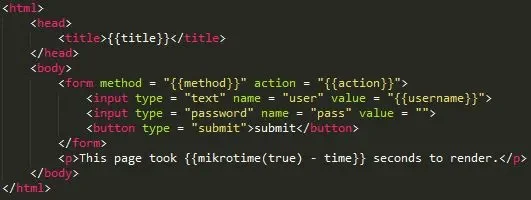
In the backend the code $template->assign('username', getUsernameFromCookie()); does the job automatically, and $template->show(); replaces the value accordingly and prints the HTML code.
That looks harmless, and on its own it is. But if you study it closely, you can execute native functions from the template. The code shows user-controlled input inside a template string, which means users can execute template expressions. A malicious expression could be as simple as {{system('whoami')}}, which would execute the whoami system command.
The methodology has three stages:
- Detect: a simple
{{7*7}}that turns into 49 proves the existence of SSTI. - Identify: work out which template engine is used in the backend. For example, submitting
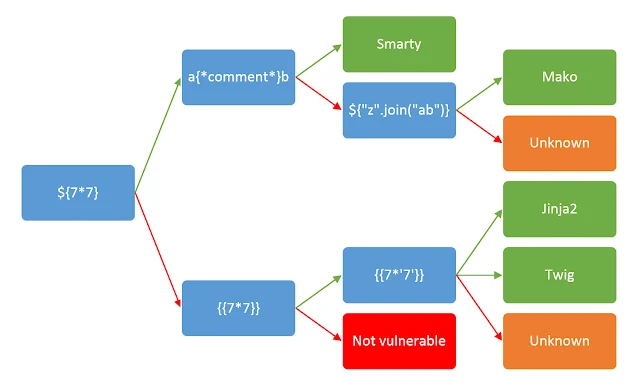
{{7*'7'}}results in 49 in Twig and 7777777 in Jinja2. The image below illustrates how to find the backend engine.
- Exploit: for all the template engines mentioned above, each has an exploit in the PayloadsAllTheThings repository:
https://github.com/swisskyrepo/PayloadsAllTheThings/tree/master/Server%20Side%20Template%20Injection
With that in mind, the researcher started on the register page. A username of {{7*7}} was entered in the username field of the form. The application took the payload as a string everywhere in the application and prevented execution: browsing throughout the application, the username was displayed as "{{7*7}}". Nothing fired there.
The interesting surface was the forgot password flow. When a user enters either their email id or username, a mail is sent to the email address:
Hello,

You requested a new password for the username {{7*7}}

Click here to create your new password
But when the user enters their email id in both the username and email id fields, the email that arrived was different:
Hey there,

Click your username below to reset your password

49
That was completely strange: the payload entered initially had now been evaluated, which is SSTI. This was the detection stage.
Exploitation
Step 1: Detect the injection
The payload {{7*7}} was placed in the username field, and when the email id was entered in both the username and email id fields, the password reset email rendered it as 49. The multiplication was evaluated server-side inside the template that builds the email, which confirms template injection.
Step 2: Identify the engine
The next step was to determine which backend template engine was in use. The payload {{7*'7'}} was passed in the username parameter, and the mail received contained:
Hey there,

Click your username below to reset your password

7777777
A result of 7777777 confirms the backend engine was Jinja2 (Twig would have produced 49 for the same expression).
Step 3: Escalate to RCE
With the engine identified, the bug was exploited for RCE and sent to the program over the weekend. The report does not include the specific RCE payload used. The bug is now in an unresolved stage, with a bounty awarded of $1200.
Root cause
The username value was placed into the template that generates the password reset email and evaluated as template code rather than being treated as data. The same input was safe elsewhere in the application, where it was rendered as the literal string "{{7*7}}", so the flaw was specific to the email generation path. The report does not describe the code behind that path, so the exact mistake is not shown; The report does not describe the code behind that path, so the exact mistake is not shown. The same input was rendered as the literal string "{{7*7}}" on the pages where it was displayed, but it was evaluated in the mail template.
Impact
An attacker who can control the username used in the password reset flow can execute template expressions on the server. The engine was Jinja2 and the bug was exploited for RCE, with a $1200 bounty awarded. The conditions matter: the payload had to be submitted through the forgot password form, and it only fired when the email id was entered in both the username and email id fields. The report does not state which accounts or data were reachable beyond that.
Fix
Variants to test
- Username parameters in password reset pages and any email-triggering endpoints. Send
{{7*7}}as the username and check whether the reset email contains49rather than the literal payload. A positive result is template evaluation in the mail body. - Fuzz the same input into every field of a form. In this case, entering the value in one field did not execute it, but entering it in both the username and email id fields did. Try the payload in each field and in combinations, and watch for a different response.
- Engine fingerprinting with
{{7*'7'}}. A result of 49 points to Twig, 7777777 to Jinja2. Once the engine is known, use the matching payloads from PayloadsAllTheThings to confirm execution. - Old programs. The program in this case was five years old and still had a critical bug on the website, so do not skip mature targets.
- API endpoints. As a general bug bounty tip, try sending an invalid content type in the request and look for hidden endpoints in the response.
The entire credit for the bug goes to Verneet Singh.
What happened, in plain words
A website had a page where you could ask it to send you a password reset email. You typed your username or your email address into a form, and the site sent you a message with a link to choose a new password. That is a very ordinary feature, and most people would never look at it twice.
The researcher typed a small piece of text into the username field: {{7*7}}. On most pages of the site, that text was simply shown back as text, curly brackets and all. But in the password reset email, something different happened. The email arrived with the number 49 where the text should have been. The website had not stored the text; it had done the sum.
That is the whole idea behind Server-Side Template Injection, or SSTI. A website often builds its pages and emails from a template: a fixed piece of text with blanks in it, where the site fills in your name, your username or some other value. If the site puts your input into the template in the wrong way, the template engine treats your input as instructions rather than as plain text. It runs the instructions. In this case the instruction was a multiplication, and the result was 49. With a different instruction, the same mistake can let an attacker run commands on the server itself, which is called Remote Code Execution (RCE).
The researcher then worked out which template engine the site used, by sending a slightly different expression that produces different results in different engines. The answer pointed to Jinja2, a template engine written in Python. With the engine known, the bug was escalated to RCE and reported. The program paid a bounty of $1200. The credit for the find goes to Verneet Singh.
Below is the same story, step by step, with every concept explained from the beginning.
The background: what a template is
When you visit a web page, your browser receives a file written in HTML: the language that describes headings, paragraphs, links, forms and so on. If a site has a million users, it does not keep a million hand-written HTML files. It keeps one template and fills in the parts that change.
A template is a file with placeholders. Think of a printed birthday card with a blank line for the name. The card is the template; the name is the value that gets filled in. A template engine is the software that takes the template, takes the values, and produces the finished page or email.
Server-side means this filling-in happens on the web server, before the result is sent to your browser. Your browser only ever sees the finished HTML. The template engine is one of the programs running on the server.
Template engines are used for web pages, but also for emails. That matters here, because the bug in this story appeared in an email, not on a page.
Why templates can be dangerous
A template engine does more than paste text into blanks. It understands small expressions, so a template can do simple logic: show a different greeting depending on whether the user is logged in, loop over a list of items, and so on. That is what makes templates useful, and it is also what makes them risky. If your input ends up in the template as code, the engine will evaluate it as code.
The post shows the idea with a small piece of template code:
Two lines do the work:
$template->assign('username', getUsernameFromCookie());
$template->show();
Line by line:
$template->assign('username', getUsernameFromCookie());tells the template engine: there is a placeholder calledusername, and its value is whatevergetUsernameFromCookie()returns. The function name says it reads the username from a cookie. A cookie is a small piece of data that a website asks your browser to store and send back with every request, which is how many sites remember who you are between page loads. The important part is that the value comes from the user's side, so the user can influence it.$template->show();tells the engine to take the template, replace the placeholders with their values, and output the finished HTML.
On its own this is harmless. The username is passed as a value, and the engine treats it as data: if the username contains curly brackets, they are printed as curly brackets. The danger appears when the user's input is not passed as a value but pasted into the template itself. Then the engine reads it as part of the template, and template syntax in it gets executed.
The post gives an example of what a malicious expression could look like:
{{system('whoami')}}
system is a function that runs an operating system command. whoami is a command that prints the name of the user the server process is running as. So this expression asks the server to run a command and show the result. If a site evaluates that expression, the attacker has gone from typing text in a form to running commands on the server. That is Remote Code Execution.
How to look for SSTI: three stages
The post lays out a simple method with three stages.
- Detect. Send
{{7*7}}and see whether the site answers with49. If it does, the site evaluated your expression instead of printing it, which proves SSTI exists. The double curly brackets are template syntax in many engines: they mark the start and end of an expression to be evaluated. - Identify. Work out which template engine is running. Different engines handle the same expression differently, so a second test can tell them apart. For example,
{{7*'7'}}gives 49 in Twig and 7777777 in Jinja2. The image below shows this step.
- Exploit. Once you know the engine, you need a payload that works for that engine. A payload is the piece of input that triggers the behaviour you want. The post points to a public collection of payloads for many engines:
https://github.com/swisskyrepo/PayloadsAllTheThings/tree/master/Server%20Side%20Template%20Injection
That address is a folder in a GitHub repository called PayloadsAllTheThings. GitHub is a website where people publish code and notes; a repository is a project folder. The folder holds ready-made test strings for server-side template injection, grouped by engine, so you do not have to invent them yourself.
The case study: a private program
The application under test was a three-tier web application. The three tiers are:
- the presentation tier, which is the front end, the part you see and click in your browser;
- the application tier, which holds the logic, the rules about what happens when you click;
- the data tier, which is the database, where the site keeps its records.
This was a private program, meaning the bug bounty programme was not open to the public; only invited researchers could test it. Because of that, every illustration in the post uses the host example.com instead of the real site. A host is the part of a web address that names the server, like example.com in https://example.com/login.
The application had two ordinary features:
- a register page, where a person could create a new username and password;
- a login page, where those details were used to sign in.
The login page also had a forgot password option. There, a user could ask to change their password by giving their email id and username. Once the user entered their email id or username, the site sent an email with a link to reset the password. An email id here means the email address on the account.
First attempt: the register page
Testing started on the register page. The researcher entered {{7*7}} as the username in the username field of the form.
The application took the payload as a string everywhere in the application and prevented execution. Browsing through the site, the username was displayed as "{{7*7}}", curly brackets and all. In other words, the site treated the input as plain text, which is the safe behaviour. Nothing fired there.
This is worth pausing on. A failed attempt is still information. It tells you that the place where the username is displayed on pages is not vulnerable, and it gives you a baseline: you know what the safe behaviour looks like, so you will recognise the unsafe one when it appears.
The interesting surface: the password reset email
The forgot password flow was the more interesting place to look. When a user enters either their email id or username, a mail is sent to the email address. With the payload as the username, the email read:
Hello,

You requested a new password for the username {{7*7}}

Click here to create your new password
Here the payload came back unchanged, as text. Still nothing.
But when the user enters their email id in both the username and email id fields, the email that arrived was different:
Hey there,

Click your username below to reset your password

49
That was completely strange: the payload entered initially had now been evaluated. The site had done the multiplication and put the answer, 49, into the email. This was the detection stage, and it is the moment the bug was found.
Why would filling in both fields change anything? The post does not explain the code behind it, so the exact reason is not shown. What the behaviour tells us is that the email is built from a template, and that in this particular path the username was placed into the template in a way that let the engine evaluate it. The same value was safe on the pages of the site, where it was printed literally, so the flaw was specific to the email generation path.
Step 1: detect the injection
The payload {{7*7}} was placed in the username field, and when the email id was entered in both the username and email id fields, the password reset email rendered it as 49. The multiplication was evaluated server-side inside the template that builds the email, which confirms template injection.
In plain words: the site was asked to do a sum, and it did the sum. That only happens if the text was read as an instruction. A site that treats your input as data would have printed {{7*7}}.
Step 2: identify the engine
The next step was to work out which backend template engine was in use, because the payloads that work differ from engine to engine. The payload {{7*'7'}} was passed in the username parameter, and the mail received contained:
Hey there,

Click your username below to reset your password

7777777
A result of 7777777 confirms the backend engine was Jinja2. Twig would have produced 49 for the same expression.
Why do the two engines disagree? The expression is seven multiplied by the text '7', a string rather than a number. Twig converts the string to a number and multiplies, giving 49. Jinja2 treats the string as text and repeats it seven times, giving 7777777. The difference is a fingerprint: it tells you which engine you are talking to, and therefore which payloads to try next.
Step 3: escalate to RCE
With the engine identified, the bug was exploited for RCE and sent to the program over the weekend. The report does not include the specific RCE payload used. The bug is now in an unresolved stage, with a bounty awarded of $1200.
"Unresolved" means the report had not been closed as fixed at the time of writing. The bounty is the payment a programme makes for a valid report. The post does not describe which commands were run or what data was reachable beyond that.
Why it worked
The username value was placed into the template that generates the password reset email and evaluated as template code rather than being treated as data. The same input was safe elsewhere in the application, where it was rendered as the literal string "{{7*7}}", so the flaw was specific to the email generation path. The report does not describe the code behind that path, so the exact mistake is not shown; The report does not describe the code behind that path, so the exact mistake is not shown. The same input was rendered as the literal string "{{7*7}}" on the pages where it was displayed, but it was evaluated in the mail template.
Concatenated means joined together as text. If a program glues your input directly into the template file, the engine cannot tell your input apart from the template's own instructions. If instead the program hands your input over as a value for a placeholder, the engine knows it is data and prints it as-is. That difference, value versus source, is the heart of the bug.
What the impact is
An attacker who can control the username used in the password reset flow can execute template expressions on the server. The engine was Jinja2 and the bug was exploited for RCE, with a $1200 bounty awarded. The conditions matter: the payload had to be submitted through the forgot password form, and it only fired when the email id was entered in both the username and email id fields. The report does not state which accounts or data were reachable beyond that.
Remote code execution is the most serious kind of web bug, because the attacker is no longer limited to what the website's forms allow. The server runs the attacker's commands with whatever permissions the web application has.
What the fix would be
An endpoint is a specific address on a server that does one job, like the address that handles the password reset request. Escaping means marking characters that have special meaning so they are treated as ordinary text. If the username is passed as a variable, the curly brackets in it lose their power and are printed as characters.
Things to try on your own targets
- Username parameters in password reset pages and any email-triggering endpoints. Send
{{7*7}}as the username and check whether the reset email contains49rather than the literal payload. A positive result is template evaluation in the mail body. - Fuzz the same input into every field of a form. In this case, entering the value in one field did not execute it, but entering it in both the username and email id fields did. Try the payload in each field and in combinations, and watch for a different response. Fuzzing means trying many variations of input and comparing the results.
- Engine fingerprinting with
{{7*'7'}}. A result of 49 points to Twig, 7777777 to Jinja2. Once the engine is known, use the matching payloads from PayloadsAllTheThings to confirm execution. - Old programs. The program in this case was five years old and still had a critical bug on the website, so do not skip mature targets.
- API endpoints. As a general bug bounty tip, try sending an invalid content type in the request and look for hidden endpoints in the response. An API is the part of a site that programs talk to, rather than people clicking pages; it accepts requests and returns data. Content type is the label on a request saying what format the body is in, such as JSON or a form. Sending a label the server does not expect sometimes makes it reveal addresses it would otherwise keep quiet.
Glossary
- SSTI (Server-Side Template Injection): a bug where user input is evaluated as template code on the server instead of being treated as plain text.
- Template: a file with fixed text and placeholders, used to produce pages or emails.
- Template engine: the software that fills placeholders in a template and evaluates the small expressions inside it.
- Server-side: happening on the web server, before the result reaches your browser.
- RCE (Remote Code Execution): running commands on a remote server, the most severe outcome of many web bugs.
- Payload: the piece of input crafted to trigger a vulnerability.
- Cookie: a small piece of data a site asks your browser to store and send back with each request, often used to remember who you are.
- Host: the part of a web address naming the server, such as
example.com. - Three-tier application: an application split into a front end, a logic layer and a database layer.
- Private program: a bug bounty programme open only to invited researchers.
- Bug bounty: a scheme where organisations pay researchers for reporting valid security bugs.
- Bounty: the payment made for a valid report.
- Endpoint: a specific address on a server that performs one function.
- Parameter: a named input a request sends to the server, such as a username field.
- Fuzzing: trying many input variations and comparing the responses.
- Fingerprinting: identifying which software or version a server runs, from its behaviour.
- Jinja2: a template engine written in Python; it repeats a string when multiplied by a number.
- Twig: a template engine that converts a numeric string and multiplies it.
- Concatenation: joining pieces of text end to end.
- Escaping: marking special characters so they are treated as ordinary text.
- API: the part of a site that programs talk to, accepting requests and returning data.
- Content type: the label on a request saying what format its body is in.
- Repository: a project folder, often hosted on a site such as GitHub.
- PayloadsAllTheThings: a public collection of test payloads for many kinds of vulnerability.