CVE-2024-0685 Ninja Contact Forms Data Export SQLi
The Ninja Forms plugin is susceptible to SQL injection when processing data export requests, which could pose a privacy risk.
 Published on sec.stealthcopter.com
The Ninja Forms Contact Form Plugin for WordPress is susceptible to an SQL injection vulnerability when processing data export requests.
The full write-up lives on its author's site
It belongs to its author, so we link to it rather than copy it. The other two tabs are our own rewrites, checked against it.
Context
Ninja Forms is a drag-and-drop form builder plugin for WordPress, used on more than 800,000 active installations according to the report. Among its features is a data export function: when someone asks for a copy of the data held about them, an administrator runs an export that gathers the submissions associated with that person's email address.
The vulnerability described here is a second-order SQL injection in that export path, tracked as CVE-2024-0685. The affected versions are <=3.7.1, and the report gives a CVSS score of 5.9. Wordfence paid a bounty of $165 for it.
Setup
The report does not describe a lab setup, accounts or tooling. The relevant precondition is simply that the plugin is installed at an affected version and that an administrator performs a data export for an email address supplied by a user. The researcher notes that testing with a custom domain on ProtonMail showed that provider allowed the special characters needed and a maximum length of around 250 characters.
Finding it
The starting point is the function get_subs_by_email, which is called when a data export request is processed. The user's email address is inserted directly into a raw SQL statement:
private function get_subs_by_email( $email_address ) { global $wpdb; // query to find any submission with our requester's email as value $anon_subs_query = "SELECT DISTINCT(m.post_id) FROM `" . $wpdb->prefix . "postmeta` m JOIN `" . $wpdb->prefix . "posts` p ON p.id = m.post_id WHERE m.meta_value = '" . $email_address . "' AND p.post_type = 'nf_sub'";
The email address is concatenated between single quotes in the WHERE clause, with no prepared statement. That is the classic shape of an injection: developer code that assumes the value is already safe because it is "just" an email address.
The researcher then looks at what an email address is actually allowed to contain. Two RFCs define the format: RFC 5321 governs the domain part (after the @) and RFC 5322 the local part (before the @); both supersede the older RFC 822. Under RFC 5322, the local part may contain several special characters, including single quotes, forward slashes and asterisks. That opens up attack vectors beyond SQL injection, such as XSS and path traversal, though this report focuses on SQL injection. Not every provider permits all of these characters, which is why the ProtonMail observation matters.
Exploitation
Step 1: craft an email address that escapes the string
Because a single quote is legal in the local part, it can be used to close the string literal in the query. Spaces are not valid in an email address, so SQL comments /**/ are used in place of spaces to separate keywords. The resulting address looks like this:
QuiRkyEmAil'/**/OR/**/1!='@stealthcopter.com
Step 2: see what the query becomes
The injected value turns the WHERE clause into the following:
WHERE m.meta_value = 'QuiRkyEmAil'/**/OR/**/1!='@stealthcopter.com'
The report states that this results in every single row in the table being returned. The result is that every single row in the table is returned.
Step 3: get an administrator to run the export
The export is typically a manual action performed by an admin-level user, which makes the attack look unlikely at first. The researcher argues the opposite: under GDPR and similar regulations, data export requests must be performed when users ask for them, so an attacker can legitimately cause the export to run with an address of their choosing.
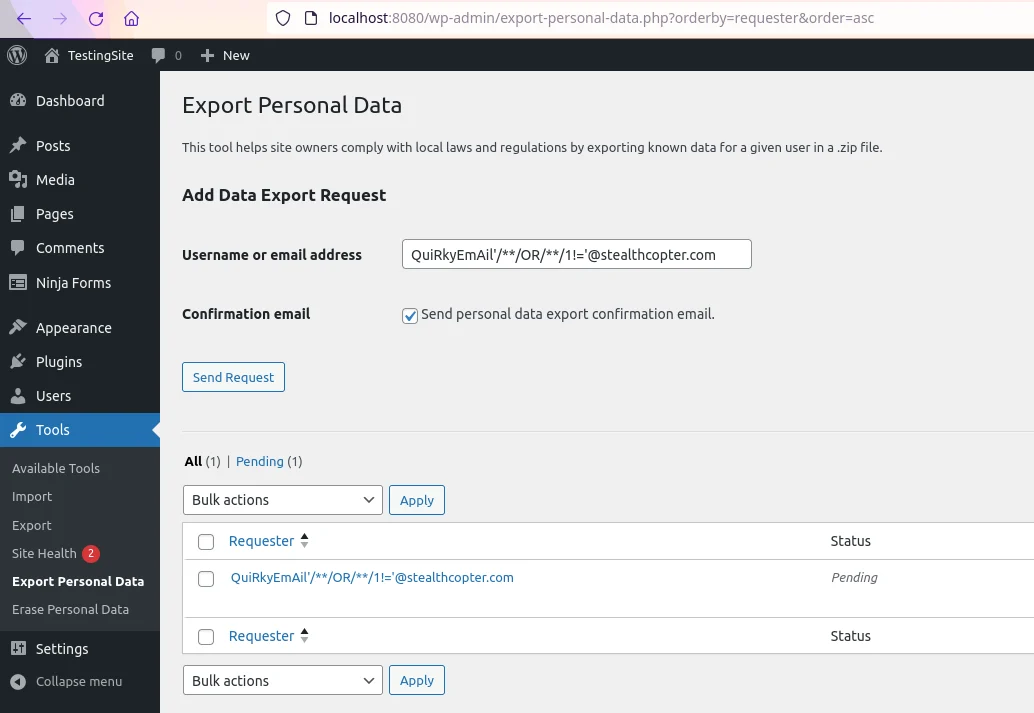
Step 4: read the exported data
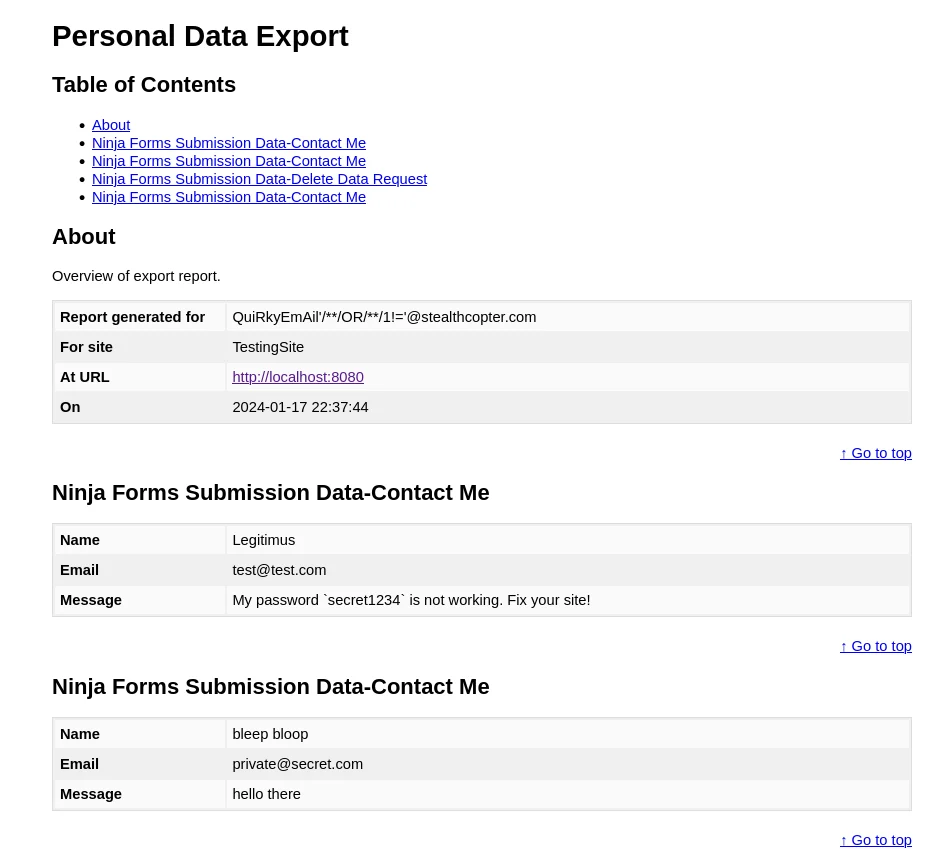
A successful exploit produces a data export containing all user data, which the researcher describes as a significant privacy and security risk. The export below shows the result:
Root cause
The mistake is concatenating user-controlled input into a raw SQL statement instead of using a prepared statement. SQL injections often occur where developers assume data is already safe and concatenate instead of using prepared statements.
The existing validation does not reliably stop it. WordPress's is_email does not follow the RFC standard and rejects addresses containing single quotes. WordPress's sanitize_email, while still not fully RFC-conformant, permits some special characters including single quotes. PHP's filter_var with FILTER_VALIDATE_EMAIL is closer to the RFCs and allows all valid email addresses, including the malicious one. The report describes how each of these three functions treats such an address.
This is a second-order injection: the payload is not dangerous at the point of input, but at a later stage when the stored value is placed into a query during export.
Impact
An attacker who can get an administrator to run a data export for a crafted address receives an export containing all user data. The report frames this as a privacy and security risk. The practical condition is that the export must actually be performed, which the GDPR argument makes much more likely. The report does not describe other consequences such as authentication bypass or code execution.
Fix
Ninja Forms published a fix in version 3.7.2. The general remedy it recommends is to use parameterised queries or prepared statements so that user input is never concatenated into SQL.
Variants to test
- Other export and lookup features. Look for functions that take an email address and build a query by concatenation, such as
get_subs_by_email. A positive result is a query where a single quote in the address changes theWHEREclause and returns rows beyond the intended one. - Other RFC-legal special characters. Try addresses containing forward slashes, asterisks and other characters permitted by RFC 5322 in the local part. A positive result is any of them reaching a query, file path or HTML output unsanitised.
- Validation gaps between functions. Compare how
is_email,sanitize_emailandfilter_varwithFILTER_VALIDATE_EMAILtreat the same address. A positive result is an address accepted by the validation in use but still dangerous downstream. - Space-free payloads. Where spaces are rejected, substitute
/**/between SQL keywords. A positive result is a syntactically valid injected clause that alters the result set. - Second-order paths. Submit a crafted address through a normal form and wait for an administrative action that reuses it, such as an export or report. A positive result is the payload taking effect at that later stage rather than at input time.
What happened, in plain words
A popular plugin for the WordPress website system, called Ninja Forms, lets a website owner build forms (contact forms, sign-up forms and so on) by dragging and dropping fields. According to the report it is installed on more than 800,000 active sites. One of its features is a data export: when someone asks the site for a copy of the information it holds about them, an administrator runs an export that collects the form submissions linked to that person's email address.
The problem is in how that export looks up submissions by email address. The email address is pasted straight into a database question (a query) without being treated as data. Because an email address is allowed to contain a single quote character, a person can type an address that breaks out of the place where the address is supposed to sit and adds extra instructions of their own. The database then answers a different question than the one the developer intended, and hands back every submission in the table rather than just the ones belonging to that address.
This is called SQL injection. SQL is the language used to talk to the database that stores a website's content, and injection means slipping your own SQL into a place where the program expected only a plain value. It is a "second-order" injection because the dangerous text is not used at the moment it is typed in; it sits there until a later step (the export) puts it into a query.
The report tracks the issue as CVE-2024-0685. A CVE is a public catalogue number given to a known security flaw so people can refer to it unambiguously. Affected versions are <=3.7.1, the report gives a CVSS score of 5.9, and Wordfence paid a bounty of $165. CVSS is a scoring system that tries to express how serious a flaw is on a scale, and a bounty is money a security programme pays someone who reports a flaw responsibly.
The product and the feature
WordPress is a system for building websites. It is extended with plugins, which are add-on pieces of software. Ninja Forms is one such plugin: a form builder. You place fields on a form, visitors fill them in, and the answers are stored in the site's database as submissions.
A database is an organised store of information, a bit like a very large set of spreadsheets. Each spreadsheet is a table, each column is a field (such as an email address), and each row is one record. To read or change records, software sends the database a query written in SQL, for example "give me every row where the email column equals this value".
The feature at the centre of this report is the data export. Many privacy laws, GDPR being the best known, give people the right to ask an organisation for a copy of the personal data it holds about them. GDPR is the European Union's General Data Protection Regulation. To satisfy such a request, an administrator uses the export to pull together the submissions tied to the requester's email address.
Finding it
The researcher started at the function get_subs_by_email, which runs when a data export request is processed. A function is a named block of code that does one job; this one's job is to find submissions by email address. Here is the code as the report shows it:
private function get_subs_by_email( $email_address ) { global $wpdb; // query to find any submission with our requester's email as value $anon_subs_query = "SELECT DISTINCT(m.post_id) FROM `" . $wpdb->prefix . "postmeta` m JOIN `" . $wpdb->prefix . "posts` p ON p.id = m.post_id WHERE m.meta_value = '" . $email_address . "' AND p.post_type = 'nf_sub'";
Line by line, in plain words:
private function get_subs_by_email( $email_address )declares the function. It takes one input,$email_address, which is whatever email address the export is being run for.global $wpdb;makes WordPress's database helper available inside the function.$wpdbis the object through which WordPress code talks to the database.- The long line builds a text string,
$anon_subs_query, which is the SQL query.SELECT DISTINCT(m.post_id)asks for the list of submission identifiers, without duplicates.FROM ... postmeta m JOIN ... posts p ON p.id = m.post_idsays to combine two tables, one holding extra information about each record and one holding the records themselves, matching them up on their identifiers.WHERE m.meta_value = 'starts a condition: the stored value must equal whatever comes next. - The crucial part is
'" . $email_address . "'. The dot is how PHP (the programming language WordPress is written in) glues pieces of text together. So the email address is dropped directly between two single quote characters, with no separation between code and data. AND p.post_type = 'nf_sub'narrows the result to records that are form submissions.
The everyday comparison: imagine a librarian with a note that reads "fetch the file whose label is 'NAME'", where NAME is filled in by whoever asks. If someone writes a name containing a quote and extra instructions, the librarian reads the whole note as one instruction and fetches the wrong files. The code above is that note, and the email address is the part filled in by the requester.
SQL injections often appear where developers assume the data is already safe and therefore glue strings together instead of using prepared statements. A prepared statement is a way of sending a query where the structure is fixed first and the values are handed over separately, so a value can never be mistaken for an instruction.
What an email address is actually allowed to contain
The researcher then asked a simple question: what characters may legally appear in an email address? Two documents, called RFCs, define the format. An RFC is a published technical standard. RFC 5321 governs the domain part, the bit after the @, and RFC 5322 governs the local part, the bit before the @. Both replace an older standard, RFC 822.
Under RFC 5322, the local part may contain several special characters, including single quotes, forward slashes and asterisks. That gives interesting potential attack vectors, in other words possible ways to attack a system, including but not limited to cross-site scripting (XSS, where an attacker gets their own code to run in another person's browser), SQL injection and path traversal (tricking a program into reading files it should not). This report concentrates on SQL injection.
Not every email provider allows all of these characters. The researcher notes that testing with a custom domain on ProtonMail showed that provider allowed them, with a maximum length of around 250 characters. That matters because the attack only works if the address can actually be created and used.
Exploitation
Exploitation means turning a weakness into an actual result. The report walks through it in steps.
Step 1: craft an email address that escapes the string
Because a single quote is legal in the local part of an address, it can be used to close the string in the query early. Spaces are not valid in an email address, so SQL comments /**/ are used in place of spaces to separate keywords. In SQL, /**/ is a comment, which the database ignores as content but which still separates words. The resulting address looks like this:
QuiRkyEmAil'/**/OR/**/1!='@stealthcopter.com
Reading it piece by piece: QuiRkyEmAil is an ordinary-looking name. The ' is the single quote that will close the string in the query. /**/ stands in for a space. OR is the SQL keyword that makes a condition true if either side is true. /**/ again stands in for a space. 1!='@stealthcopter.com compares the number 1 with the text that follows the @, and because those are not equal, that part is true. The whole thing is still shaped like an email address, with a local part before the @ and a domain after it.
Step 2: see what the query becomes
The injected value turns the WHERE clause into the following:
WHERE m.meta_value = 'QuiRkyEmAil'/**/OR/**/1!='@stealthcopter.com'
Line by line: WHERE m.meta_value = 'QuiRkyEmAil' is the comparison the developer intended, now closed off early by the quote inside the address. /**/ is ignored by the database but keeps the words apart. OR means the overall condition is true if either side is true. 1!='@stealthcopter.com' is the second side, and it is true because the number 1 is not equal to that text. Since one side of an OR is true, the condition is true for every row, so every single row in the table is returned.
Step 3: get an administrator to run the export
The export is typically a manual action performed by an admin-level user. An administrator is a user account with full control over the site. At first glance this makes the attack look unlikely: why would an administrator run an export for an address an attacker chose?
The researcher argues the opposite. Under GDPR and similar regulations, data export requests must be performed when users ask for them. So an attacker can ask the site for a copy of their data, and under GDPR the export request must be performed. The everyday comparison: a shop is legally required to hand you a copy of your file when you ask, so you get to choose what name is written on the request form.
Step 4: read the exported data
A successful exploit produces a data export containing all user data, which the researcher describes as a significant privacy and security risk. Instead of receiving only their own records, the requester receives everyone's.
Why the usual checks do not stop it
It is reasonable to ask why the site's existing validation did not reject the address. Validation means checking that input looks like what it is supposed to be. The report compares three functions that are commonly used for email addresses.
- WordPress's
is_emaildoes not follow the RFC standard and rejects addresses containing single quotes. If this function were the one in use, the payload would be stopped. - WordPress's
sanitize_email, while still not fully conforming to the RFC, permits some special characters, including single quotes. Sanitising means cleaning input up rather than rejecting it outright, and here the cleaning leaves the dangerous character in place. - PHP's
filter_varwithFILTER_VALIDATE_EMAILis more aligned with the RFC standards and allows all valid email addresses, including the malicious one.
The report describes how each of these three functions treats such an address. The everyday comparison: three door staff with three different lists of who is allowed in. The address only needs to find the door whose list is the most permissive.
This is a second-order injection: the payload is not dangerous at the point of input, but at a later stage, when the stored value is placed into a query during the export. The input step and the dangerous step are separated in time, which is exactly why the developer may not have seen the risk.
Impact
An attacker who can get an administrator to run a data export for a crafted address receives an export containing all user data. The report frames this as a privacy and security risk. The practical condition is that the export must actually be performed, which the GDPR argument makes much more likely. The report does not describe other consequences such as authentication bypass (getting in without valid credentials) or code execution (making the server run the attacker's code).
The fix
Ninja Forms published a fix in version 3.7.2. The report does not describe the code change itself. The general remedy it recommends is to use parameterised queries or prepared statements, so that user input is never glued into SQL. In the librarian comparison, the note would no longer have the name written into the instruction; the name would be handed over on a separate slip that can only ever be treated as a name.
Timeline
- 17/01/24 (0 day) - Discovery and disclosure to Wordfence. A 0 day here means the flaw was not yet publicly known when it was reported.
- 18/01/24 (+1 day) - Wordfence validated the report but marked it as out of scope, because an admin-level user must perform the exploit. Out of scope means it fell outside the rules of what the bounty programme pays for.
- 19/01/24 (+2 days) - Wordfence agreed to raise the impact because of the GDPR argument, giving a bounty of $165.
- 29/01/24 (+12 days) - Ninja Forms fix published (version 3.7.2).
- 01/02/24 (+15 days) - Vulnerability published.
Variants to test
Each one is a way of asking "does the same mistake appear somewhere else?".
- Other export and lookup features. Look for functions that take an email address and build a query by gluing text together, such as
get_subs_by_email. A positive result is a query where a single quote in the address changes theWHEREclause and returns rows beyond the intended one. - Other RFC-legal special characters. Try addresses containing forward slashes, asterisks and other characters permitted by RFC 5322 in the local part. A positive result is any of them reaching a query, a file path or HTML output without being cleaned.
- Validation gaps between functions. Compare how
is_email,sanitize_emailandfilter_varwithFILTER_VALIDATE_EMAILtreat the same address. A positive result is an address accepted by the validation in use but still dangerous further down the line. - Space-free payloads. Where spaces are rejected, substitute
/**/between SQL keywords. A positive result is a syntactically valid injected clause that changes the result set. - Second-order paths. Submit a crafted address through a normal form and wait for an administrative action that reuses it, such as an export or a report. A positive result is the payload taking effect at that later stage rather than at input time.
Conclusion
The report's own conclusion is that all user input needs sanitising, even input developers assume is safe, such as an email address. It is a classic example of second-order SQL injection, where the exploit happens not when the data is entered but later, when it is handled. Developers should always use parameterised queries or prepared statements. Security is a continuous process that needs attention at every stage of development and data processing.
Glossary
- API: a defined way for one piece of software to ask another to do something, like a service counter with a fixed set of requests you can make.
- Administrator: a user account with full control over a WordPress site, including running data exports.
- Bounty: money a security programme pays someone who reports a flaw responsibly.
- Concatenation: gluing pieces of text together into one string, which is how the email address ends up inside the SQL query here.
- Cookie: a small piece of data a website stores in your browser so it can recognise you on later requests.
- Cross-site scripting (XSS): an attack where someone gets their own code to run in another person's browser.
- CVSS: a scoring system that expresses how serious a security flaw is on a scale.
- CVE: a public catalogue number given to a known security flaw so it can be referred to unambiguously.
- Database: an organised store of information, made of tables of rows and columns.
- Data export: a feature that gathers the data held about a person and produces a copy for them.
- Domain part: the portion of an email address after the
@, governed by RFC 5321. - GDPR: the European Union's General Data Protection Regulation, which among other things gives people the right to request a copy of their data.
- Injection: slipping your own instructions into a place where a program expected only a plain value.
- Local part: the portion of an email address before the
@, governed by RFC 5322. - Out of scope: outside the rules of what a bounty programme pays for.
- Parameterised query / prepared statement: a way of sending a database query where the structure is fixed first and the values are handed over separately, so a value can never be treated as an instruction.
- Path traversal: tricking a program into reading files it should not.
- PHP: the programming language WordPress is written in.
- Plugin: add-on software that extends a WordPress site.
- Query: a request written in SQL asking a database to read or change records.
- RFC: a published technical standard.
- Sanitising: cleaning input up so it is safe to use, rather than rejecting it outright.
- Second-order injection: an injection where the dangerous text is harmless when entered and only takes effect later, when it is reused.
- SQL: the language used to talk to a database.
- SQL injection: inserting your own SQL into a query through a value the program failed to keep separate.
- Table: one spreadsheet-like collection of records inside a database.
- Token: a piece of data used to prove identity or authorise an action, similar in spirit to a cookie.
- Validation: checking that input looks like what it is supposed to be.
- WordPress: a system for building websites, extended through plugins.





