Self xss in product reviews
 Originally disclosed on HackerOne
- Triaged in 17 hours
- Fixed in 5 days
- Paid in 3 days
- Disclosed after 11 days
Summary by the program
@tomorrow_future reported an issue where an unauthenticated user could reflect JavaScript on a product page for a very small number of shop configurations. This issue did not fall under our typical Storefront cross-site scripting exclusion because the input is provided by a visitor to the store, not an authenticated administrator.
The report
1、install app Product Reviews
2、Open a product and write a review
3、Press F12 on the keyboard,Change the type of email to text.
4、Write in email"><img src=a onerror=alert(1)>[email protected].
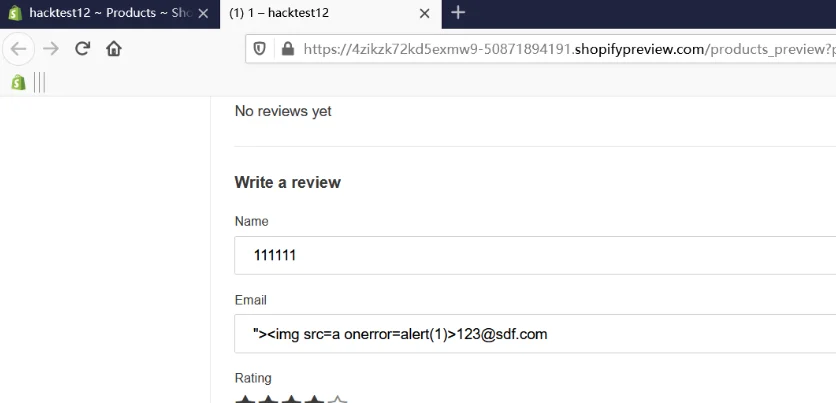
5、Write other required fields,then submit.
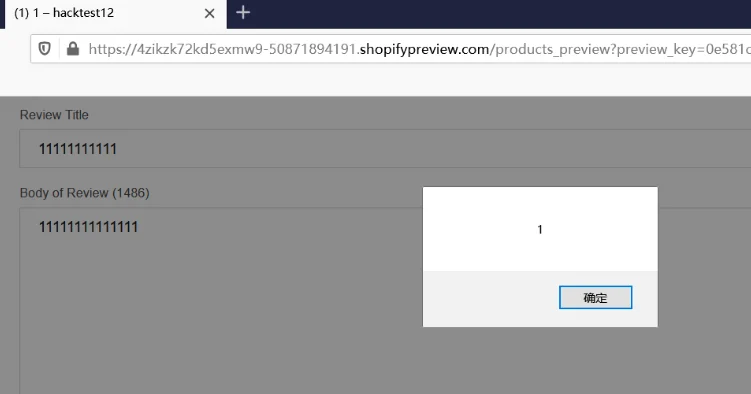
Impact
Self xss
Attachments
What the report shows
The target is a Shopify storefront at your-store.myshopify.com, and the feature under test is the product review form supplied by the Product Reviews app. The researcher, tomorrow_future, reported a self cross-site scripting issue that the program rated medium severity with a CVSS score of 4.8, disclosed on 19 November 2020. The program's own summary notes that the issue affected a very small number of shop configurations and that it did not fall under the usual Storefront XSS exclusion, because the input comes from a visitor to the store rather than an authenticated administrator.
The reproduction steps are short and entirely client-side:
- Install the
Product Reviewsapp. - Open a product and write a review.
- Press F12 and change the type of the email field to text.
- Enter the following value in the email field:
"><img src=a onerror=alert(1)>[redacted]
- Fill in the other required fields and submit the review.
The first screenshot accompanies the step of installing the app.
The second screenshot accompanies the step of entering the payload in the email field.
The third screenshot accompanies the submission step.
The report's impact section says only "Self xss", and the attached video walks through the same sequence.
The report does not describe a fix, a bounty amount or any server-side detail beyond the steps above.
Root cause
The report does not state a root cause. Browsers refuse to submit a value that does not look like an email address in an email input, so the form appears to constrain what can be sent. Once the type is changed to text in the developer tools, that constraint disappears and the value reaches the server unchanged.
Impact
The researcher classifies the issue as self XSS: the payload only affects the person who submits it, because the attacker has to convince a victim to modify their own form and submit the review. That limits the practical impact considerably, and the program's summary reflects this by noting the narrow set of shop configurations involved. The report does not claim stored execution for other visitors, session theft or administrative compromise, and none of those should be assumed from it.
How this kind of bug works
Self XSS is the same injection flaw as reflected or stored XSS, but the input path runs through the victim's own browser rather than through a crafted URL or a shared page. The classic pattern is a form that relies on HTML5 input types, maxlength, pattern attributes or JavaScript validation for safety. Those controls are all client-side and all editable: a user can change an input's type, remove attributes or call the endpoint directly. If the server performs no validation of its own and later writes the value into an HTML context without encoding, the injection succeeds.
The reason this is usually rated low is the delivery problem. An attacker cannot simply send a link; they must persuade the victim to open developer tools, alter the form and paste a payload. That social engineering step is the barrier, and it is why many programs treat self XSS as informational. It becomes more serious when the stored value is later displayed to other users, such as staff reviewing submissions in an admin panel, at which point the same flaw is effectively stored XSS with a privileged audience.
How to test for it
- Map every form that accepts free text: reviews, comments, profiles, support tickets, addresses, coupon codes.
- Note which fields have client-side restrictions:
type="email",type="url",type="number",maxlength,pattern, disabled or readonly attributes. - Submit the form normally first and observe where the value is reflected: the confirmation page, the listing page, an admin view, an email notification.
- For each restricted field, remove or alter the restriction in the browser and submit a benign marker such as a unique string with angle brackets and quotes. Watch whether the server rejects it or accepts it.
- If the marker is accepted, check how it is rendered. A positive result is the marker appearing unencoded in an HTML context, or a handler firing when the page loads.
- Test the endpoint directly with a request that bypasses the form entirely, since that is what an attacker would do.
Common false positives: the payload appears encoded in the response but the browser still shows it decoded in the DOM inspector; the value is reflected only inside a JavaScript string that is correctly escaped; the alert fires only because the payload was pasted into the console rather than submitted; or the reflection is in a context the victim never sees. Confirm execution in a real page load, not in the console.
How it is fixed
The standard fix is server-side validation and context-aware output encoding. The server should validate the email field as an email address regardless of what the client sent, rejecting anything else. When the value is rendered, it should be HTML-encoded for the attribute or element context it lands in, and attribute values should be quoted. A Content Security Policy that disallows inline event handlers adds defence in depth. Client-side validation can stay for usability, but it must never be the only check.
Hunting notes
Self XSS tends to hide in third-party apps and widgets embedded in a larger platform, where the host's own validation does not cover the app's forms. Review and rating widgets, newsletter signups, contact forms and custom checkout fields are common places. Recon signals include forms whose fields carry HTML5 type restrictions, apps installed from a marketplace, and endpoints that echo submitted values back on the same page.
To get a self XSS accepted, show that the stored value reaches another user or a privileged view, or demonstrate a realistic delivery path.
What happened, in plain words
This report is about a bug in a Shopify online store, at an address like your-store.myshopify.com. A store is a website where a shop sells things; Shopify is a service that lets anyone set one up. The feature involved is the product review form, the box where a customer writes a few words and a star rating about an item. That form comes from an add-on called Product Reviews, which a shop owner installs to get reviews on their pages.
The researcher, tomorrow_future, found that the review form could be made to run JavaScript, the programming language that web pages use to do things in your browser. The program rated the issue medium severity with a CVSS score of 4.8. CVSS is a standard scoring system for how serious a security flaw is; 4.8 out of 10 sits in the middle. The report was disclosed on 19 November 2020.
Shopify's own summary adds two useful details. The problem only appeared on a very small number of shop configurations, and it did not fall under their usual Storefront cross-site scripting exclusion. That exclusion is a rule saying "we do not pay for XSS on storefronts"; here it did not apply because the input comes from a visitor to the store, not from an authenticated administrator. An administrator is someone with a login and extra powers over the shop; a visitor is just a shopper with no account.
The steps
The reproduction is short and happens entirely in the browser:
- Install the
Product Reviewsapp. - Open a product and write a review.
- Press F12 and change the type of the email field to text.
- Enter this value in the email field:
"><img src=a onerror=alert(1)>[redacted]
- Fill in the other required fields and submit the review.
The first screenshot accompanies the step of installing the app.
Step 3 is where the trick happens. F12 opens the browser's developer tools, a panel built into every browser that lets you look at and edit the page you are viewing. The email field is an HTML input whose type the researcher changed to text. Changing the type to text removes that check. This matters because it shows the restriction was never real protection, only a convenience in the browser that anyone can switch off.
The payload in step 4 is worth reading piece by piece:
">closes the HTML attribute the value is being placed into, and the>ends the tag. Think of it as shutting a door that was meant to keep your text inside a box, so the text can now become part of the page's structure.<img src=a onerror=alert(1)>adds an image element.src=apoints at a file that does not exist, so the image fails to load.onerror=alert(1)says: when that failure happens, run the JavaScriptalert(1), which pops up a small dialog box with the number 1 in it.[redacted]is an email address appended after the payload.
The second screenshot accompanies the step of entering the payload.
The third screenshot accompanies the submission step.
The impact section says only "Self xss", and the attached video walks through the same sequence.
In general, this kind of bug
Cross-site scripting, usually shortened to XSS, is when someone manages to get their own JavaScript into a page that other people view, so the browser runs it as if the site had written it. A simple comparison: a website is a noticeboard, and the site is supposed to pin up only its own notices. XSS is sneaking your own notice onto the board, written so that readers treat it as official.
Self XSS is the same flaw with a catch: the only person who gets attacked is the one who types the payload in. The attacker cannot simply send a link. They have to persuade the victim to open the developer tools, change the form and paste something in. That social engineering step is a big barrier, which is why many programs treat self XSS as informational rather than a paid finding.
The usual root cause is a form that relies on browser-side checks for safety: input types like email, url or number, a maxlength limit, a pattern rule, or some JavaScript validation. All of these live in the visitor's browser and all of them can be edited or removed. If the server does no checking of its own and later writes the value into a page without encoding it, the injection works. Encoding means converting characters like < and " into harmless codes so the browser displays them as text instead of treating them as page structure.
It becomes more serious when the stored value is later shown to someone else, for example staff reading reviews in an admin panel. At that point the same flaw is effectively stored XSS with a privileged audience, and it is worth reporting as such.
How to test for it
- List every form that accepts free text: reviews, comments, profiles, support tickets, addresses, coupon codes.
- Note which fields have browser-side restrictions:
type="email",type="url",type="number",maxlength,pattern, disabled or readonly attributes. - Submit the form normally first and watch where the value appears: a confirmation page, a listing page, an admin view, an email notification.
- For each restricted field, remove or change the restriction in the browser and submit a harmless marker, such as a unique string containing angle brackets and quotes. See whether the server rejects it or accepts it.
- If the marker is accepted, check how it is displayed. A good sign is the marker appearing unencoded in the page's HTML, or a handler firing when the page loads.
- Test the endpoint directly with a request that skips the form entirely, since that is what an attacker would do. A request is simply the message your browser sends to a server asking for a page or sending data.
Watch for false positives. The payload may look encoded in the response but show decoded in the browser's DOM inspector, the panel where you view the live page structure. It may sit inside a JavaScript string that is correctly escaped. The alert may fire only because you pasted the payload into the console, the command line inside developer tools, rather than submitting it. Or the reflection may be in a place the victim never sees. Confirm execution on a real page load.
How it is fixed
The standard fix is server-side validation plus context-aware output encoding. The server should check the email field as an email address no matter what the browser sent, and reject anything else. When the value is displayed, it should be HTML-encoded for the exact place it lands, and attribute values should be quoted. A Content Security Policy, a header that tells the browser which scripts are allowed to run, can block inline event handlers as an extra layer. Browser-side validation can stay for convenience, but it must never be the only check.
Where to look
Self XSS tends to hide in third-party apps and widgets embedded in a larger platform, where the host's own checks do not cover the app's forms. Review and rating widgets, newsletter signups, contact forms and custom checkout fields are common spots. Signals worth noting are forms whose fields carry HTML5 type restrictions, apps installed from a marketplace, and endpoints that echo submitted values back on the same page. To get a self XSS accepted, show that the stored value reaches another user or a privileged view, or demonstrate a realistic way to deliver it. Otherwise expect a low or informational rating.
Glossary
- Storefront: the public, shopper-facing part of an online shop.
- App: an add-on installed into a shop to add a feature, here the product review form.
- JavaScript: the programming language browsers run to make pages interactive.
- XSS (cross-site scripting): getting your own JavaScript into a page so a browser runs it as part of the site.
- Self XSS: XSS where the payload only runs for the person who enters it themselves.
- Stored XSS: XSS where the payload is saved on the server and later shown to other visitors.
- Payload: the crafted piece of text or code used to trigger a bug.
- Developer tools: the panel built into browsers, opened with F12, for inspecting and editing a page.
- Input type: the HTML attribute that tells the browser what kind of value a field expects, such as
emailortext. - Attribute: a setting inside an HTML tag, such as
srcoronerroron an image element. - Event handler: code that runs when something happens, such as an image failing to load.
- Encoding: converting special characters into harmless codes so they display as text rather than acting as page structure.
- Request: the message a browser sends to a server to fetch a page or submit data.
- Endpoint: the specific address on a server that receives a request.
- DOM inspector: the part of developer tools that shows the live structure of the page.
- Console: the command line inside developer tools where you can run JavaScript directly.
- Content Security Policy: a header that restricts which scripts a browser is allowed to run on a page.
- CVSS: a standard scoring system for the severity of a security flaw, from 0 to 10.
- Administrator: a user with a login and elevated control over a shop.
- False positive: a result that looks like a bug but is not actually exploitable.





