After changing the storefront password, the preview link is still valid
A preview link generated for a password-protected Shopify storefront remained valid after the storefront password was changed. Someone holding an old preview link could keep viewing the storefront even though the password had been rotated.
 Originally disclosed on HackerOne
- Triaged in 4 days
- Fixed in 4 months
- Paid in 8 days
- Disclosed after 6 months
##Description:
- The user needs to know the storefront password to generate the preview link.
- After the administrator changes the storefront password, users can still access the storefront through the preview link.
3.reason: (1)User can generate preview link. (2)Simply changing the password will not invalidate the preview link. Only after closing and restarting the storefront password, the previous preview link will become invalid.
##Step:
- Visit the storefront and enter the password.
2.Search shopify.theme in the web development tool of the browser to get the theme ID value.
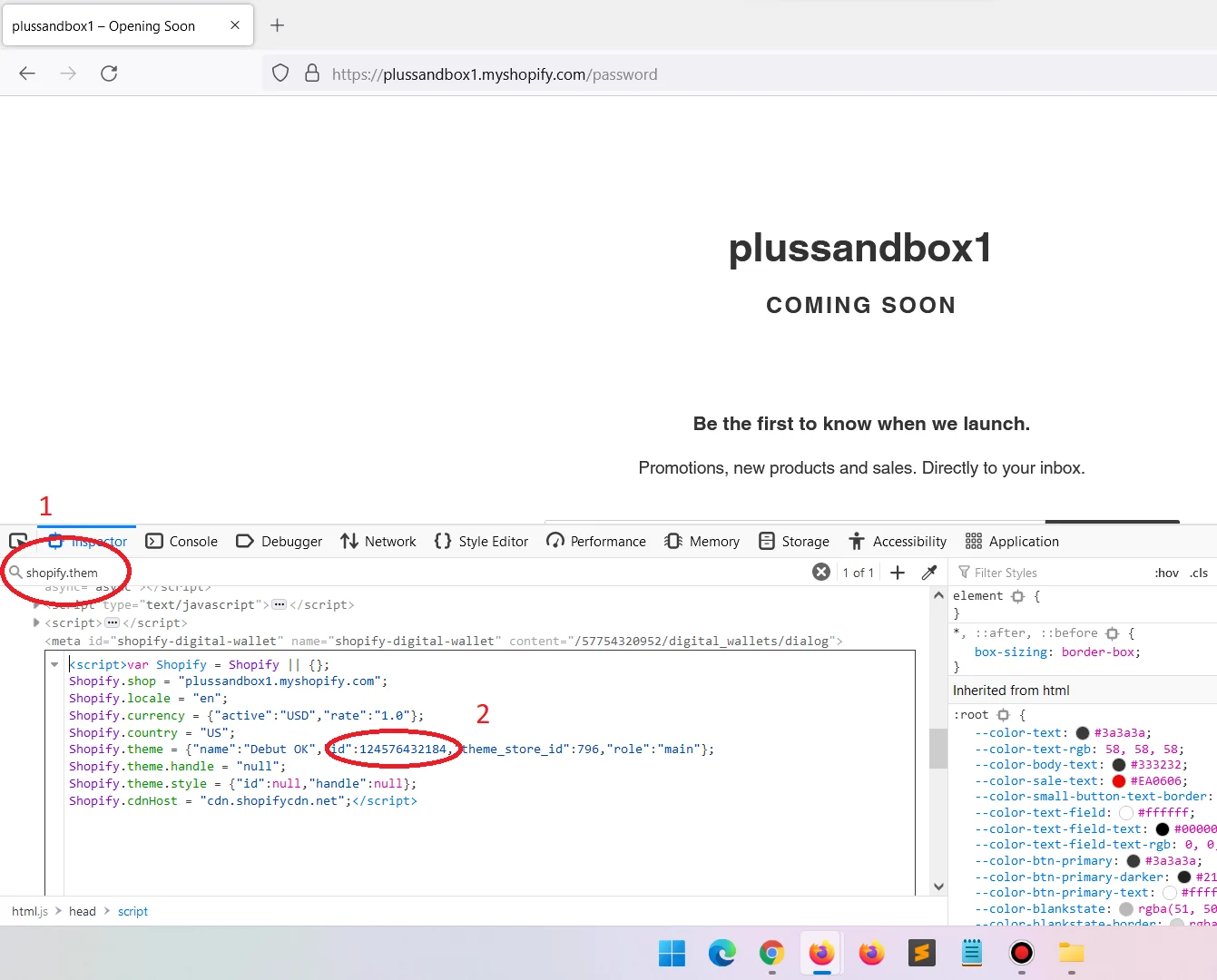
3.Replace the value of the preview_theme_id parameter.
https://your-store.myshopify.com.myshopify.com/?_ab=0&_fd=0&_sc=1&preview_theme_id=xxxxxxxx
- Access the preview link, when the storefront password is changed, the preview link is still valid.
5.Video:
Impact
After changing the storefront password, the preview link is still valid
Not written yet. The AI write-up for this report has not been written yet. The Original tab links to the source.
How it worked
Root cause
Likely the preview link is authorised by a theme identifier rather than by the current storefront password, so rotating the password does not revoke existing preview access.
Impact
An old preview link could continue to expose the storefront after the password was changed, until the storefront password feature is closed and restarted.
What the attacker needed
Knowledge of the storefront password; access to browser developer tools
How it was found
- Visit the storefront and enter the storefront password.
- Find the theme ID value in the browser's developer tools.
- Build a preview link using that theme ID as the preview theme parameter.
- Open the preview link, then change the storefront password and confirm the link still works.
Explained by bugbounty.wiki with AI from the original and checked against quotes from it; it can still be wrong. Read the original before relying on a detail.
Not written yet. The AI write-up for this report has not been written yet. The Original tab links to the source.
A storefront password is a shared secret that stops the public from seeing an online shop before launch. A preview link is a special address that lets someone look at the shop's design without that password. The report says changing the password did not cancel old preview links, so anyone who saved one could still browse the shop.
What is Access control?
A user can do something their role should not allow: reach an admin function, act on a feature they have not paid for, or skip a permission check. IDOR is the special case where the object belongs to someone else.


