LFI to RCE on deutche telekom bugbounty
 Published on medium.com
Few months ago I did a little subdomain bruteforce on telekom.de , to see if there are new subdomains which, if I’m luck enough, could have some high severity vulnerabilities, since Deutche telekom only accepts SQL injection and Remote Code Execution.
The full write-up lives on its author's site
It belongs to its author, so we link to it rather than copy it. The other two tabs are our own rewrites, checked against it.
Context
Deutsche Telekom runs a bug bounty programme that, according to the researcher, only accepts SQL injection and Remote Code Execution submissions. That constraint shaped the whole investigation: finding a local file inclusion was interesting but not payable on its own, so the goal from the start was to turn file read into command execution.
The target was a host at netweb.telekom.de, running a web GUI under /netweb/gui/. The feature that mattered is a help page, help.php, which takes a HELPFILE parameter naming the help file to display. Normally that parameter would carry a value such as logon.hlp, and the page would render the corresponding help content.
Setup
The work started with subdomain enumeration on telekom.de, looking for new subdomains that might hold high severity issues. The tools used for collection were aquatone, dnsenum, recon-ng and sublist3r. The results were deduplicated, and a simple bash script iterated over every subdomain and ran dirb against it.
No accounts or credentials are described. The only precondition that mattered later was a phpinfo() page reachable at the site root, which the researcher found through the dirb run.
Finding it
A few hours into the dirb run, one subdomain stood out because it exposed an info.php page. The researcher's reasoning was that PHP developers often leave something behind, and a phpinfo() page is exactly the kind of leftover that becomes useful later, in this case for locating log files.
Opening the site itself presented a login page. BurpSuite was used to spider the application, and shortly afterwards a URL appeared in Burp that carried a file name in a parameter:
https://netweb.telekom.de/netweb/gui/help.php?HELPFILE=logon.hlp
A parameter that names a file and is passed straight to the filesystem is the classic shape of a local file inclusion, so the next step was to replace the help file name with a path traversal.
Exploitation
Step 1: confirm local file inclusion
The value logon.hlp was replaced with a traversal to /etc/passwd:
https://netweb.telekom.de/netweb/gui/help.php?SID&HELPFILE=../../../../../../../../etc/passwd
The HELPFILE parameter now points up through several directories and into /etc/passwd, and the page returned the file contents.
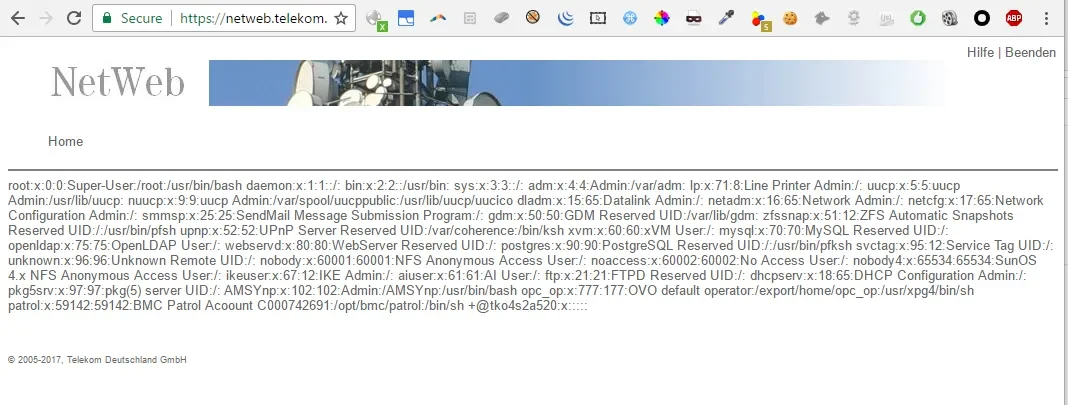
The screenshot shows the /etc/passwd output returned by the help page.
Further files were read the same way:
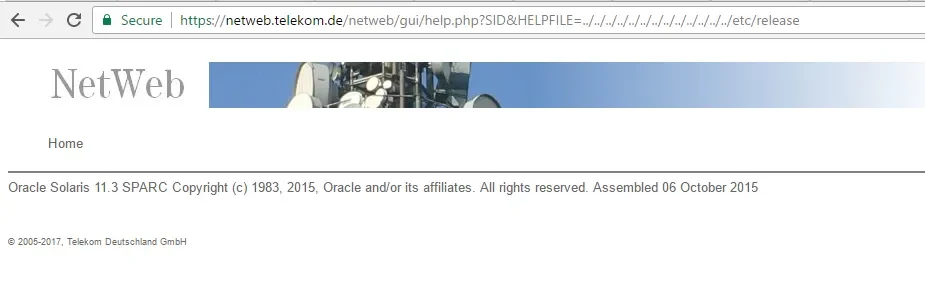
This one shows the output of /etc/release.
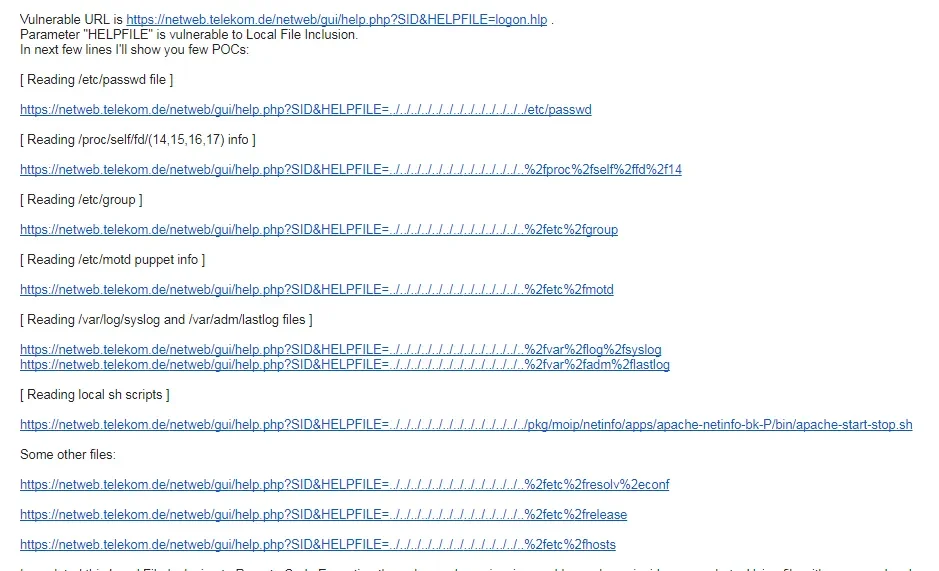
A section of the report itself, listing the LFI examples.
At this point the researcher had arbitrary file read, but LFI was not in scope. The next objective was command execution, and the chosen route was log poisoning.
Step 2: locate the error log
The info.php page found earlier gave the location of the Apache error log, which removed the guesswork. The standard error log paths from the SecList LFI wordlist had produced no hits, but phpinfo() disclosed the real path, and the help page could read it:
https://netweb.telekom.de/netweb/gui/help.php?HELPFILE=../../../../../../../../../../../../../pkg/moip/netinfo/logs/apache-netweb-P/error.log
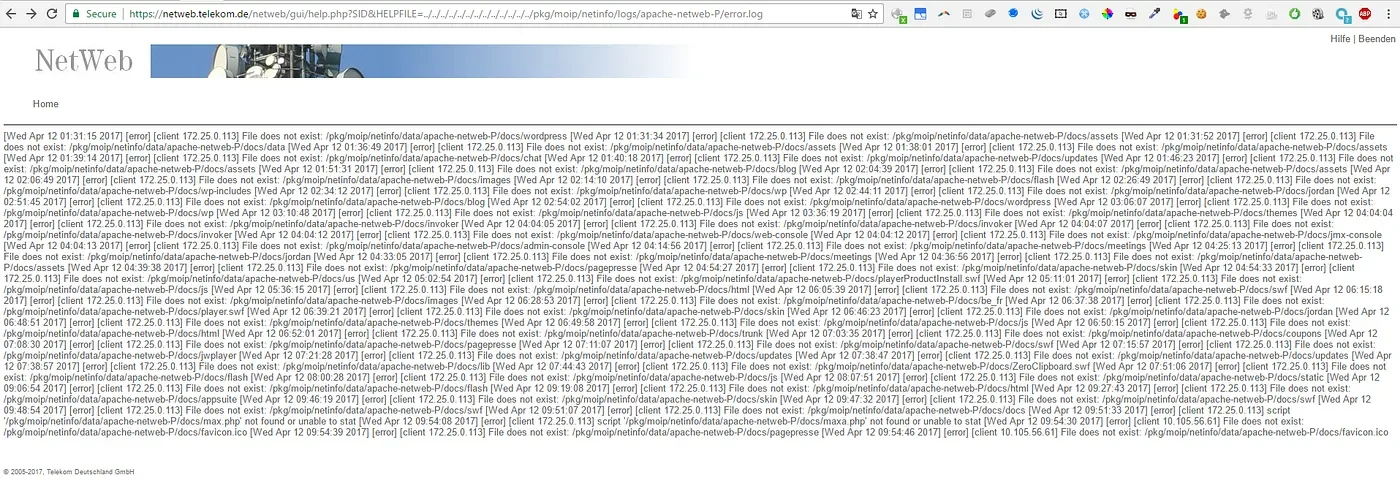
The error log contents as returned through help.php.
Step 3: find a way to write into the log
While dirb was running against the host it also found soap.php. That script produced errors which ended up in error.log, and one of the values recorded in the log entry was the Referer header.
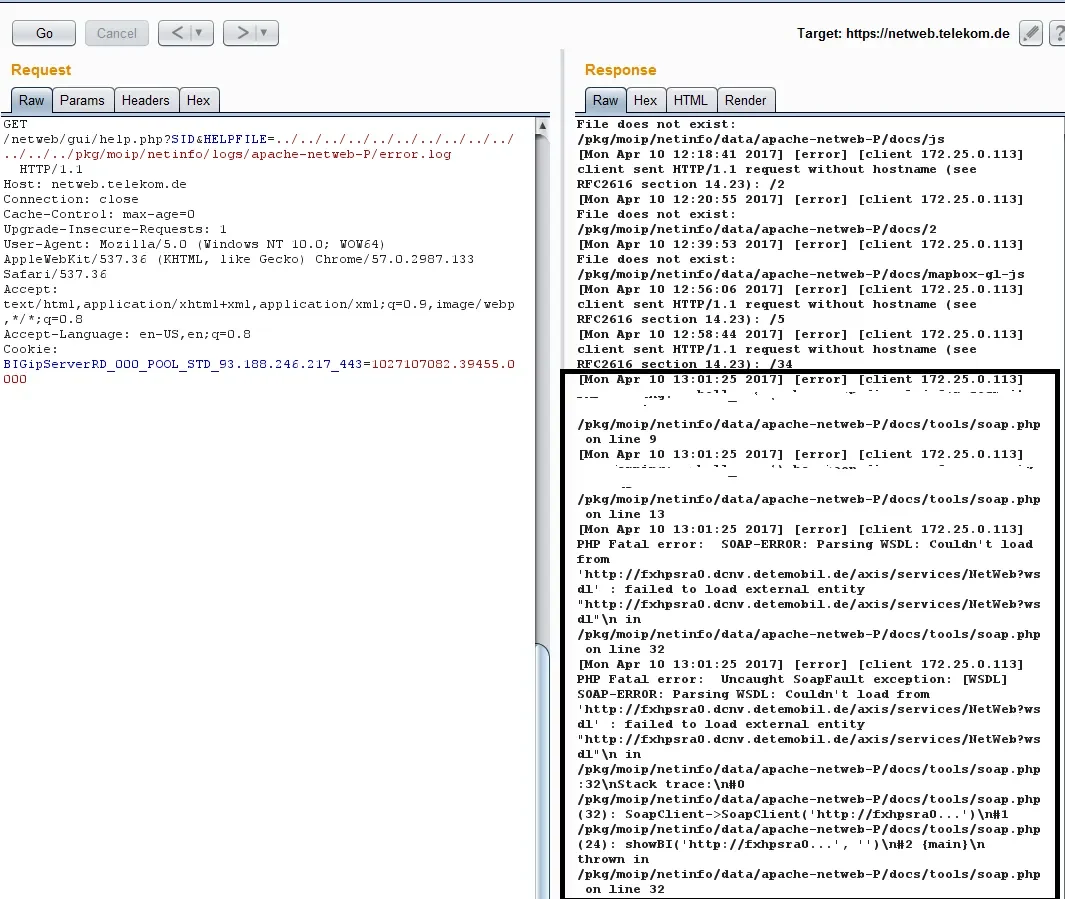
The soap.php error as it appears inside error.log, including the Referer value.
A request header that is written verbatim into a file the attacker can read is a direct path to PHP code execution: put PHP code in the header, read the log through the LFI, and the code is interpreted.
Step 4: verify that the Referer is evaluated
A simple arithmetic test was sent first, to check whether the Referer value is executed rather than merely stored. The test used a Referer of 58-8, and the check was whether the value 50 appeared in the output.
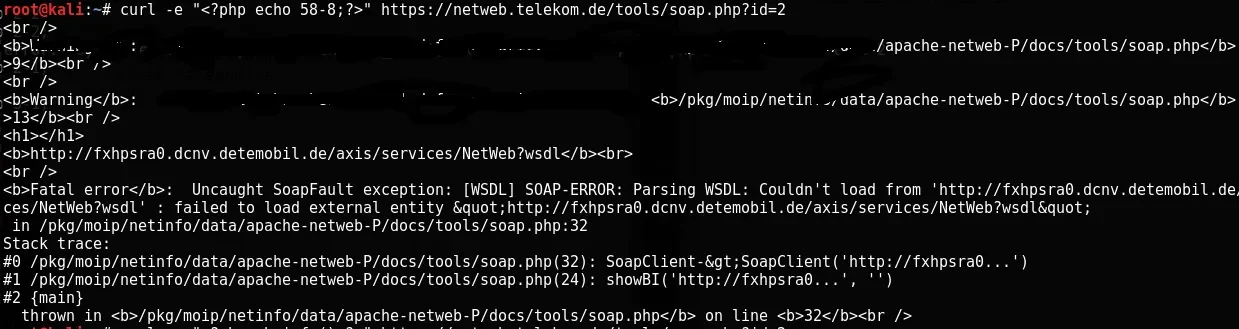
The curl request with the Referer value 58-8.
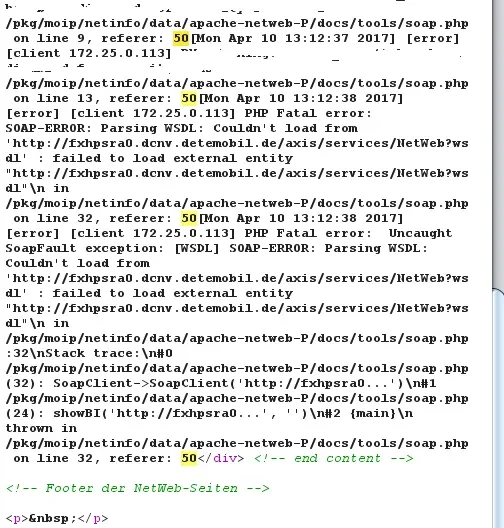
Step 5: prove code execution with phpinfo()
With evaluation confirmed, the Referer was set to a phpinfo() call.
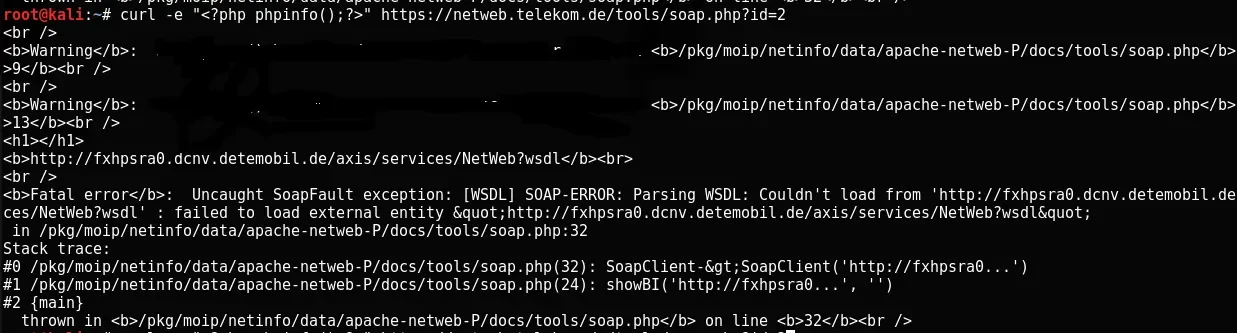
The request with the Referer set to phpinfo().
Reading the log through the LFI then executed the payload:
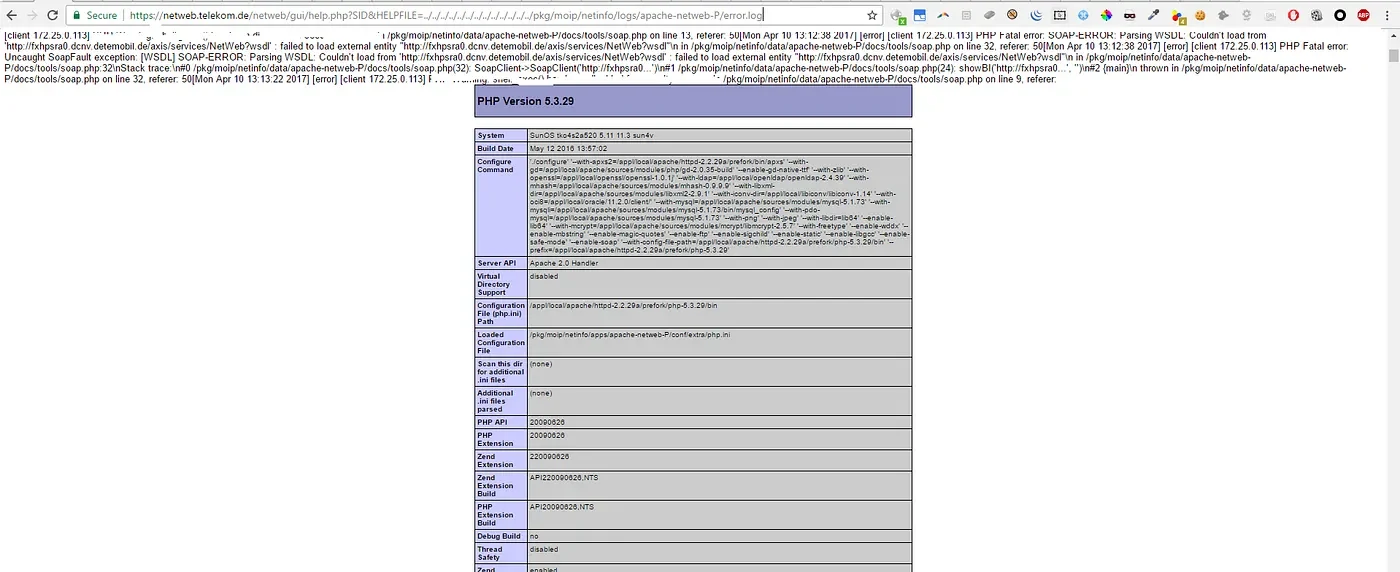
phpinfo() executed from inside the error.log file.
That completed the chain from file read to code execution. The full report submitted to the programme is shown here:
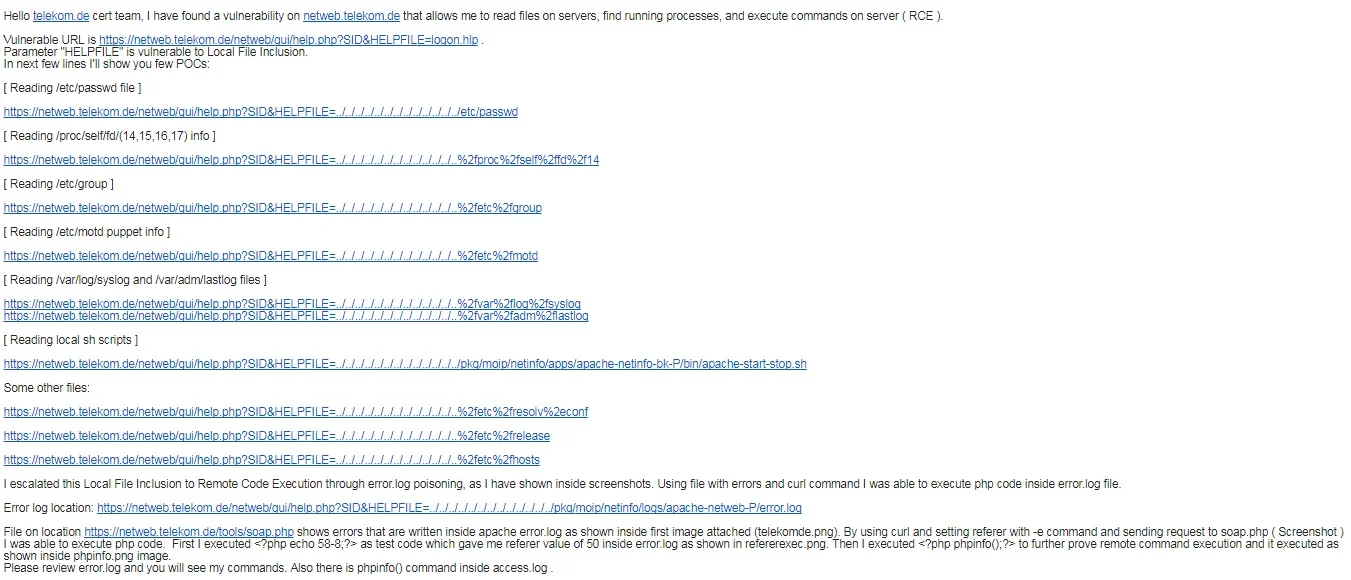
The complete report as sent to the Deutsche Telekom bug bounty programme.
The report was reported on 10 April 2017 and fixed sometime in August.
Root cause
Two weaknesses combine. First, help.php takes the HELPFILE parameter and uses it as a filesystem path without constraining it to the help directory, so traversal sequences reach arbitrary files readable by the web server user. Second, soap.php writes error details, including the attacker-controlled Referer header, into error.log without neutralising PHP syntax, and that log sits inside a path the web server will execute as PHP when it is requested through the LFI.
The phpinfo() page at the site root made the second half much easier by disclosing the exact log path, which the standard wordlist entries did not match. The report does not describe any input validation, open_basedir restriction or log sanitisation that would have stopped either step.
Impact
An unauthenticated attacker could read arbitrary files readable by the web server process, and, by poisoning the error log through the Referer header and then including that log, execute PHP code on the host. The researcher's own framing is that the programme only paid for SQL injection and RCE, so the LFI alone was out of scope and the value of the finding rested on reaching command execution. The report does not state what privileges the web server ran with, nor what the programme awarded.
Fix
The report says only that the issue was fixed sometime in August, without describing the change. The measures that would address it are to constrain HELPFILE to a fixed set of known help files or to a base directory with traversal rejected, and to stop writing unsanitised request headers into a log file that is reachable and executable through the web server.
Variants to test
- Other file-naming parameters. Look for parameters such as
file,page,template,langordocthat take a bare file name. A positive result is the contents of/etc/passwdor another known file returned in the response. - Log poisoning via other headers. Try
User-Agent,X-Forwarded-Forand request URIs in addition to Referer, wherever an application writes them into a log. A positive result is a PHP expression in the header being evaluated when the log is included. - phpinfo() disclosure. Check for
info.php,phpinfo.phpand similar at the root and in subdirectories. A positive result is a fullphpinfo()page, which typically discloses log paths, document roots and disabled functions. - Log path discovery. When wordlist paths fail, use any disclosed path from
phpinfo()or error messages, then read it through the LFI. A positive result is the log content appearing in the response. - Error-generating scripts. Look for scripts such as
soap.phpthat emit errors containing request data. A positive result is a log entry that echoes back a value you control. - Arithmetic canary. Before sending a full payload, put an expression such as
58-8in the header and check for50in the included log. A positive result confirms evaluation without needing a working PHP payload.
What happened, in plain words
A security researcher found a way to make a Deutsche Telekom web server hand over files it was never meant to hand over, and then turned that into the ability to run his own code on the server. The programme he reported to only paid for two kinds of bug, SQL injection and Remote Code Execution, so simply reading files was not enough on its own. The whole investigation was shaped by that rule: the goal from the first minute was to climb from reading a file to running commands.
Here is the story in the simplest terms. A website had a help page that took a file name from the address bar and showed that file. Nobody checked the file name, so instead of a help document you could ask for a system file such as /etc/passwd, and the server would read it out to you. That is called local file inclusion. On its own it is a serious information leak but not code execution. The researcher then found that another script on the same server wrote error messages into a log file, and that one of the things it wrote into the log was a value the visitor controls, the Referer header. Because the log file could also be read through the help page, and because the server treats files ending in .php as programs, putting PHP code into the log and then reading the log made the server run that code. That is the jump from file read to Remote Code Execution.
Before going further, a few words on the vocabulary you will meet, because the rest of the article leans on them.
- A subdomain is a name in front of the main domain, like
shop.example.comnext toexample.com. Companies own many of them, and each one is a separate website that may be built and maintained differently. - A bug bounty programme is a scheme where a company invites outsiders to look for security flaws and pays for good reports. Each programme publishes a scope, a list of what it will accept. Anything outside the scope is usually not paid, even if it is a real bug.
- SQL injection is a bug where text typed into a website is pasted into a database command, letting an attacker change that command. Remote Code Execution, usually shortened to RCE, is the strongest kind of bug: the attacker gets the server to run code of their choosing.
- A parameter is a named value in a web address, the part after the
?. Inpage.php?name=ana, the parameter isnameand its value isana. - A header is a small line of extra information that a browser sends along with every request, or that a server sends back. The Referer header tells the server which page you came from when you clicked a link. It is spelled that way, with one r in the middle, in the HTTP standard.
- A log file is a text file where a program writes a running diary of what happened, including errors. Server software writes logs constantly, and they are ordinary files on disk.
- PHP is a programming language used to build web pages. A file ending in
.phpis not shown to the visitor as text; the server runs it as a program and sends back whatever it prints. phpinfo()is a PHP function that prints a long page of technical details about the server: where files live, which settings are on, which modules are loaded. Developers use it for debugging and often forget to remove it./etc/passwdis a standard file on Linux and Unix systems that lists user accounts. It is the classic proof that you can read files you should not be able to read, because it exists on almost every such machine and is world readable.
With that in hand, here is how the investigation went, step by step.
Setting up the search
The researcher started by looking for subdomains of telekom.de, hoping to find new ones that might hold high severity issues. Since the programme only accepted SQL injection and RCE, anything less severe would not be worth submitting.
Four tools were used to collect subdomain names: aquatone, dnsenum, recon-ng and sublist3r. You do not need to know how each one works to follow the story. They are all programs that gather lists of host names from public sources and from the domain name system, the internet's phone book. The results were merged and duplicates removed, so the list contained each subdomain once.
Then a small bash script was written to walk through that list and run dirb against every subdomain. dirb is a program that tries a long list of common file and folder names against a website, one after another, and reports which ones exist. Think of it as knocking on every door in a building to see which ones open. While that ran in the background, the researcher went back to reading security news.
No accounts or passwords are involved anywhere in this story. The only thing that mattered later was a page the dirb run turned up.
Finding the door
A few hours later, one subdomain stood out because it had an info.php page. That is a page that calls phpinfo() and prints all those server details. The researcher's reasoning was that PHP developers often leave something behind, and a phpinfo() page is exactly the kind of leftover that becomes useful later. In this case it would later reveal where the log files live.
Opening the site itself showed a login page. To explore the parts of the site that sit behind links, the researcher used BurpSuite, a tool that sits between your browser and the website and records every request and response. Its spider feature follows links automatically and builds a map of the site. A few seconds later a URL appeared in Burp that carried a file name in a parameter:
https://netweb.telekom.de/netweb/gui/help.php?HELPFILE=logon.hlp
Line by line: https:// is the secure web protocol. netweb.telekom.de is the subdomain. /netweb/gui/help.php is the script being called, a help page. After the ? comes the parameter HELPFILE, whose value is logon.hlp, the name of a help file. The page's job is to look up that file and show it.
A parameter that names a file and is passed straight to the filesystem is the classic shape of a local file inclusion. If the script simply glues the value onto a folder path and opens the result, then a value containing ../ can climb out of that folder. Two dots and a slash mean "go up one directory" in every operating system. So the next step was to replace the help file name with a path that walks up and out.
Exploitation
Step 1: confirm local file inclusion
The value logon.hlp was replaced with a traversal to /etc/passwd:
https://netweb.telekom.de/netweb/gui/help.php?SID&HELPFILE=../../../../../../../../etc/passwd
Line by line: the script is the same help.php. The parameter SID appears with no value, which is how the original request looked. Then HELPFILE is set to a series of ../ sequences, which climb up from wherever the help files live, followed by etc/passwd, the account file. If the script does not check the value, it will open that file and print it.
It did. The page returned the contents of /etc/passwd.
The screenshot shows the /etc/passwd output returned by the help page.
Further files were read the same way:
This one shows the output of /etc/release.
A section of the report itself, listing the LFI examples.
At this point the researcher could read any file the web server process was allowed to read. That is a serious finding, but local file inclusion was not in scope. The next objective was command execution, and the chosen route was log poisoning: put code into a log file, then read the log through the file inclusion so the server runs the code.
Step 2: locate the error log
The info.php page found earlier gave the location of the Apache error log, which removed all the guesswork. Apache is the web server software; its error log records problems it hits while serving pages. The standard error log paths from the SecList LFI wordlist, a well known public list of file paths that people try, had produced no hits. But phpinfo() disclosed the real path, and the help page could read it:
https://netweb.telekom.de/netweb/gui/help.php?HELPFILE=../../../../../../../../../../../../../pkg/moip/netinfo/logs/apache-netweb-P/error.log
Line by line: same script, same parameter. This time the traversal climbs many more levels, and the target is pkg/moip/netinfo/logs/apache-netweb-P/error.log, the exact log file path that phpinfo() had revealed. Reading it proves the log is reachable through the same flaw.
The error log contents as returned through help.php.
Step 3: find a way to write into the log
While dirb was running against the host it also found soap.php. SOAP is an older protocol for web services talking to each other; a soap.php script handles those messages. This one produced errors, and those errors ended up in error.log. One of the values recorded in the log entry was the Referer header, the address of the page the visitor came from.
The soap.php error as it appears inside error.log, including the Referer value.
Why does this matter? A request header that is written verbatim into a file the attacker can read is a direct path to PHP code execution. Put PHP code in the header, read the log through the file inclusion, and the server treats the log as a PHP program and runs the code. The log becomes a delivery mechanism for code.
Step 4: verify that the Referer is evaluated
Before sending a full payload, a simple arithmetic test was sent, to check whether the Referer value is executed rather than merely stored. The test used a Referer of 58-8, and the check was whether the value 50 appeared in the output. If the log merely stores the text, you will see 58-8. If the server runs it as PHP, you will see 50.
The curl request with the Referer value 58-8. curl is a command line tool for sending web requests by hand, which lets you set any header you like.
Step 5: prove code execution with phpinfo()
With evaluation confirmed, the Referer was set to a phpinfo() call.
The request with the Referer set to phpinfo().
Reading the log through the file inclusion then executed the payload:
phpinfo() executed from inside the error.log file.
That completed the chain from file read to code execution. The full report submitted to the programme is shown here:
The complete report as sent to the Deutsche Telekom bug bounty programme.
The report was reported on 10 April 2017 and fixed sometime in August.
Root cause
Two weaknesses combine. First, help.php takes the HELPFILE parameter and uses it as a filesystem path without constraining it to the help directory, so traversal sequences reach arbitrary files readable by the web server user. Second, soap.php writes error details, including the attacker-controlled Referer header, into error.log without neutralising PHP syntax, and that log sits inside a path the web server will execute as PHP when it is requested through the file inclusion.
The phpinfo() page at the site root made the second half much easier by disclosing the exact log path, which the standard wordlist entries did not match. The report does not describe any input validation, open_basedir restriction or log sanitisation that would have stopped either step.
Impact
An unauthenticated attacker could read arbitrary files readable by the web server process, and, by poisoning the error log through the Referer header and then including that log, execute PHP code on the host. The researcher's own framing is that the programme only paid for SQL injection and RCE, so the file inclusion alone was out of scope and the value of the finding rested on reaching command execution. The report does not state what privileges the web server ran with, nor what the programme awarded.
Fix
The report says only that the issue was fixed sometime in August, without describing the change. The measures that would address it are to constrain HELPFILE to a fixed set of known help files or to a base directory with traversal rejected, and to stop writing unsanitised request headers into a log file that is reachable and executable through the web server.
Variants to test
- Other file-naming parameters. Look for parameters such as
file,page,template,langordocthat take a bare file name. A positive result is the contents of/etc/passwdor another known file returned in the response. - Log poisoning via other headers. Try
User-Agent,X-Forwarded-Forand request URIs in addition to Referer, wherever an application writes them into a log. A positive result is a PHP expression in the header being evaluated when the log is included. - phpinfo() disclosure. Check for
info.php,phpinfo.phpand similar at the root and in subdirectories. A positive result is a fullphpinfo()page, which typically discloses log paths, document roots and disabled functions. - Log path discovery. When wordlist paths fail, use any disclosed path from
phpinfo()or error messages, then read it through the file inclusion. A positive result is the log content appearing in the response. - Error-generating scripts. Look for scripts such as
soap.phpthat emit errors containing request data. A positive result is a log entry that echoes back a value you control. - Arithmetic canary. Before sending a full payload, put an expression such as
58-8in the header and check for50in the included log. A positive result confirms evaluation without needing a working PHP payload.
Glossary
- Subdomain: a name in front of a main domain, such as
netweb.telekom.denext totelekom.de, that points to its own website. - Bug bounty programme: a scheme where a company invites outsiders to find security flaws and pays for good reports.
- Scope: the list of targets and bug types a programme will accept.
- SQL injection: a bug where user input is pasted into a database command, letting an attacker change that command.
- Remote Code Execution (RCE): a bug that lets an attacker run their own code on a server.
- Local file inclusion (LFI): a bug where a page takes a file name from the user and reads that file from the server's disk.
- Path traversal: using
../sequences to climb out of the intended folder and reach other files. - Parameter: a named value in a web address, after the
?. - Header: a line of extra information sent with a web request or response.
- Referer: the header that tells a server which page the visitor came from.
- Log file: a text file where a program records what happened, including errors.
- Log poisoning: writing code into a log file and then getting the server to run that log as a program.
- PHP: a programming language used to build web pages;
.phpfiles are run by the server, not shown as text. phpinfo(): a PHP function that prints detailed server configuration, often left on by mistake./etc/passwd: a standard Linux file listing user accounts, used as proof of file read.- Apache: web server software that serves pages and writes error logs.
- SOAP: an older protocol for web services exchanging messages.
- curl: a command line tool for sending web requests by hand, including custom headers.
- dirb: a program that tries common file and folder names against a website to find what exists.
- BurpSuite: a tool that sits between browser and website, recording and replaying requests.
- Spider: a feature that follows links automatically to map a site.
- Wordlist: a list of common names or paths that tools try one by one.
- SecList: a well known public collection of wordlists used in security testing.
open_basedir: a PHP setting that restricts which folders a script may read.- Unauthenticated: without logging in or having any account.
- Canary: a small harmless test value sent first to see whether something happens, before sending the real payload.