Header modification results in disclosure of Slack infra metadata to unauthorized parties
The files.slack.com server honoured the X-Forwarded-Host header instead of the Host header, and a host validation could be bypassed by appending an @ to the hostname. An attacker could use this to make the backend server send requests to arbitrary internal addresses, enabling blind SSRF such as port scanning.

- Triaged in 13 days
- Fixed in 3 months
- Paid in 21 days
- Disclosed after 19 months
I found files.slack.com domain will honor the X-Forwarded-Host header, instead of host header. Although file.slack.com has host validation to return 500 Internal server error when host is not files.slack.com, I can bypass the validation by appending @ at the end of host name. Also, the server will send request to the host in X-Forwarded-Host. And, we can see the server sent request is not the front end server (not from cloudfront.net), it is from the back end server(from amazonaws.com). So, with the blind SSRF vulnerability, the attackers can send arbitrary requests to the intranet, ex: port scanning by identifying the response delay time, to know 169.265.169.254:443 is closed, 169.265.169.254:80 is opened...and so on.
Reproduce steps:
- upload a file onto the slack, find the original image path via Open original. Intercept this original path (i.e. https://files.slack.com/files-pri/TNXC4JD70-FPSL307RB/test.png) on burp suite
- Send to repeater, make sure it works fine by clicking send directly
- Add a header X-Forwarded-Host: xxx.com, make sure server returned 500 error
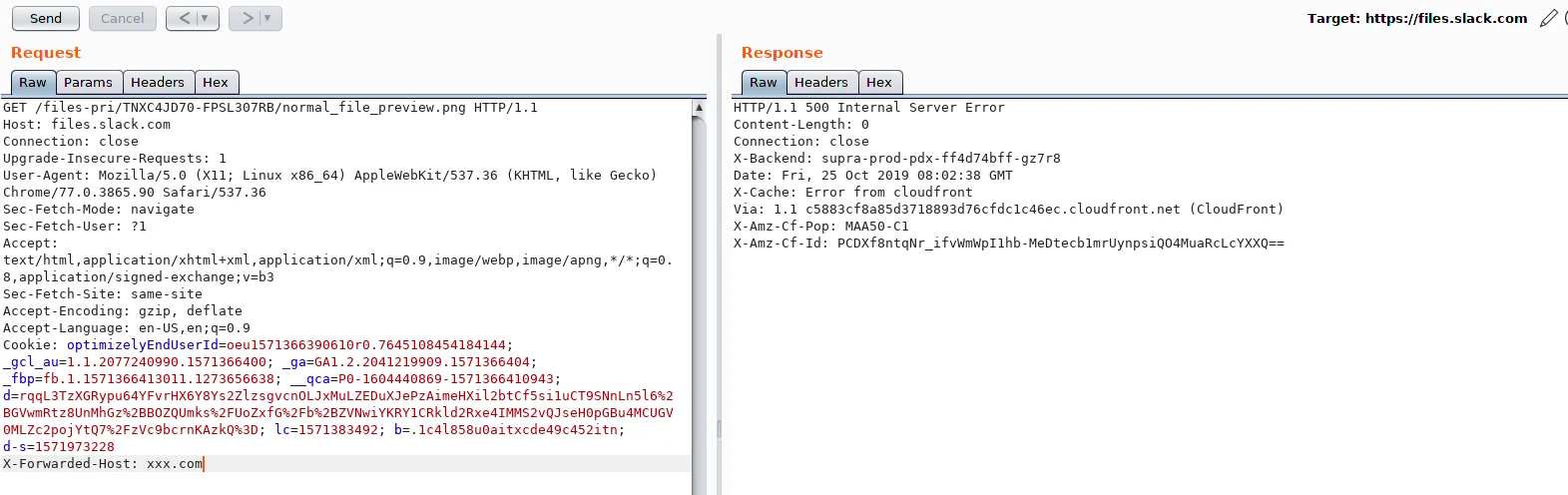
- Update header to X-Forwarded-Host: files.slack.com@YOUR_DOMAIN, make sure server response with 302, and the location is YOUR_DOMAIN/files-pri/....
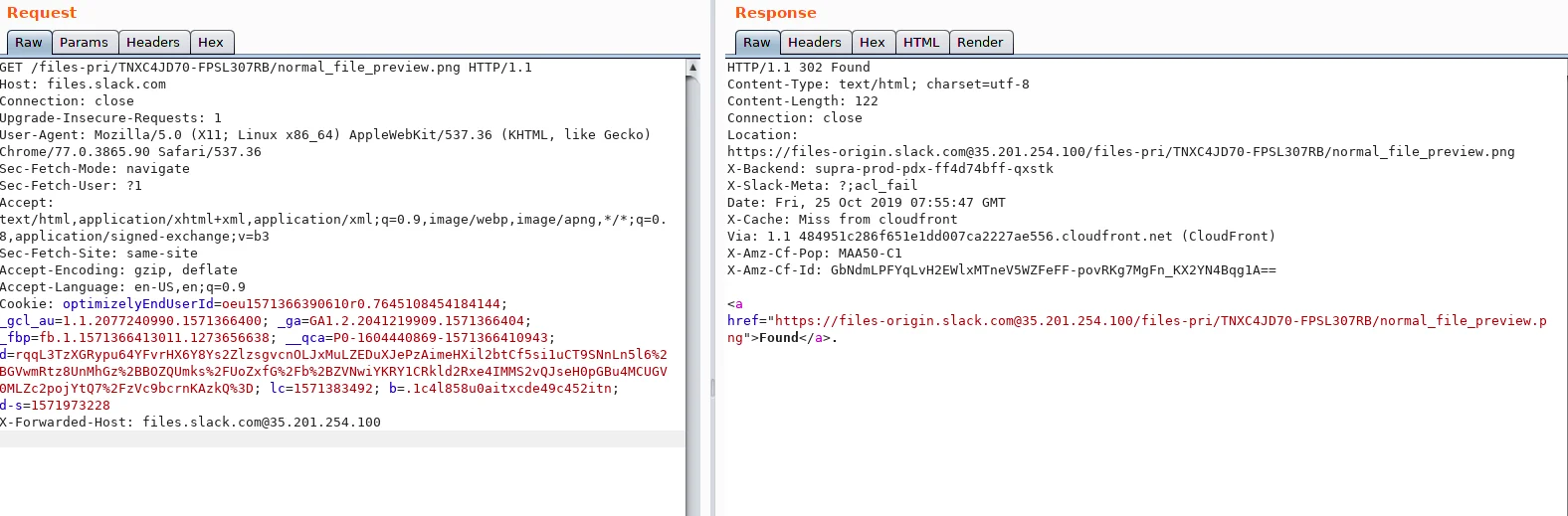
- Make sure the request did sent to your domain, and the server is from xxx.amazonaws.com
- change YOUR_DOMAIN into intranet ip, ex: 169.254.169.254:PORT, change the port to check the response delay time.
Here's the demo video: https://youtu.be/j5_WicLwwC4
Impact
With the blind SSRF vulnerability, the attackers can send arbitrary requests to the intranet, ex: port scanning by identifying the response delay time. To mitigate it, the server should always honor the Host header, not others. Thank you.
Not written yet. The AI write-up for this report has not been written yet. The Original tab links to the source.
How it worked
Root cause
Likely the server used the X-Forwarded-Host header for routing or validation instead of the Host header, and its host check could be bypassed with an @ character.
Impact
An attacker could use the blind SSRF to send arbitrary requests to the intranet, for example port scanning by identifying response delay time.
What the attacker needed
A Slack account to upload a file; ability to intercept HTTP requests; a domain or IP to receive requests
The fix
The server should always honour the Host header and not other headers such as X-Forwarded-Host.
How it was found
- Upload a file to Slack and find its original image path via 'Open original'.
- Intercept that original path request in Burp Suite and send it to Repeater.
- Confirm the request works by sending it directly.
- Add an X-Forwarded-Host header with an arbitrary domain and observe a 500 error.
- Change the header value to files.slack.com@YOUR_DOMAIN and observe a 302 redirect to YOUR_DOMAIN.
- Replace YOUR_DOMAIN with an intranet IP and port, and use response delay to infer port state.
Explained by bugbounty.wiki with AI from the original and checked against quotes from it; it can still be wrong. Read the original before relying on a detail.
Not written yet. The AI write-up for this report has not been written yet. The Original tab links to the source.
A web server normally uses the Host header to know which site the browser wants. Here the server trusted a different header (X-Forwarded-Host) that an attacker can set freely. By adding an @ sign, the attacker tricked the validation and made the server fetch a URL of their choosing, which could be an internal address not reachable from the internet.
What is SSRF?
The server can be made to fetch an address the attacker chooses, reaching internal services, cloud metadata or other customers' data.




