How we abused Slack's TURN servers to gain access to internal services
Slack's TURN servers allowed relaying of TCP and UDP traffic to internal Slack network and AWS metadata services. An attacker with temporary TURN credentials could access internal services and obtain IAM credentials.
 Published on rtcsec.com
Sandro Gauci, Enable Security
The full write-up lives on its author's site
It belongs to its author, so we link to it rather than copy it. The other two tabs are our own rewrites, checked against it.
Context
Slack uses WebRTC for its calls, and like many WebRTC deployments it relies on TURN (Traversal Using Relays around NAT) servers to relay media between peers when a direct path is blocked by NAT or a firewall. TURN is an extension of STUN, specified in RFC 5766, with an IPv6 update in RFC 6156 and a URI scheme in RFC 7065. For TCP relaying it uses a connect message (method 0x000A in RFC 6062); for UDP it uses a send indication (method 0x006 in RFC 5766), and the channel method in RFC 5766 section 11 offers a similar function.
In most deployments TURN is a last resort. In Slack's case, as the author observed while testing, TURN was always used to establish the media, which is passed over SRTP. That detail had already been described by the webrtcHacks article Is Slack's WebRTC Really Slacking? by Yoshimasa Iwase in 2016. The important consequence is that Slack's TURN server sits in a critical position in its infrastructure rather than at the edge as a fallback.
The finding concerned that TURN server. The finding: it could be abused to relay TCP and UDP traffic to the TURN server itself and to internal addresses on Slack's AWS infrastructure. Slack awarded $3,500 for the bug-bounty report on HackerOne (report 333419).
Setup
The testing was done from a normal web browser configured to send traffic through Burp proxy, so that the WebRTC signalling could be inspected. The relay abuse itself was carried out with stunner, an internal Enable Security tool developed to test STUN and, by extension, TURN for protocol vulnerabilities. The relevant subcommands were turn peer scanner, which runs a port scan through a TURN relay against a particular peer address, and turn peer httpproxy, which implements an HTTP proxy so that a browser can be pointed at stunner; stunner then proxies HTTP requests and responses to the TURN server speaking its protocol, and the TURN server relays that HTTP traffic back and forth to stunner.
Stunner is not publicly available: it is used during Enable Security's penetration test services and, at the time of writing, could not be released outside the company.
Finding it
TURN servers are not unauthenticated. Each WebRTC session gets fresh temporary TURN credentials generated and returned by the system, so an attacker first has to retrieve them.
Testing showed exactly that. Slack's TURN servers could be abused to relay TCP and UDP traffic to the TURN server itself and to internal addresses on Slack's AWS infrastructure. To a webapp tester this resembles SSRF, but with an important difference: the abuse is not limited to HTTP-based protocols or to targets that respond to HTTP. It is closer to abusing an open proxy, such as a SOCKS proxy or a web proxy with the CONNECT method.
Concretely, the researcher lists what an attacker could do:
- Connect to the AWS meta-data service at
http://[redacted]and obtain IAM temporary credentials - Connect to open ports on localhost that are usually not exposed to the Internet (for example node exporter): 22, 25, 53, 443, 515, 5666, 8500, 8888, 9090 and 9100
- Port-scan the Slack AWS infrastructure on
[redacted]/16and find server management applications, and possibly abuse such "trusted" services
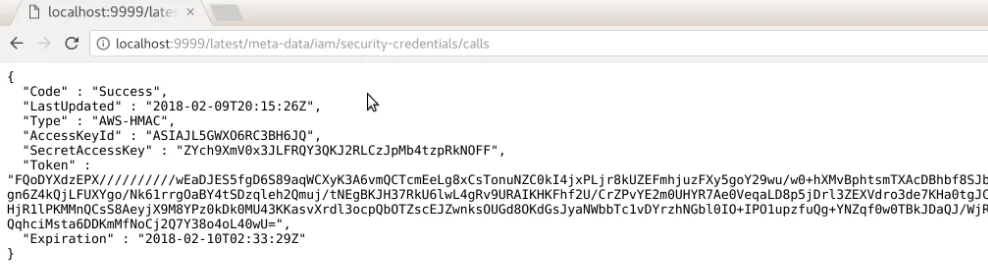
The screenshot shows obtaining IAM temporary credentials from the AWS meta-data service through the relay.
Exploitation
Step 1: capture the temporary TURN credentials
- Configure the web browser to use Burp proxy.
- In the Proxy > HTTP history tab, filter for the keyword screenhero.
- Start a call by pressing the call button.
- Observe the TURN details returned in the call to
/api/screenhero.rooms.create, which include the temporary username and password, TURN hostname and ports. - Pass these details to stunner.
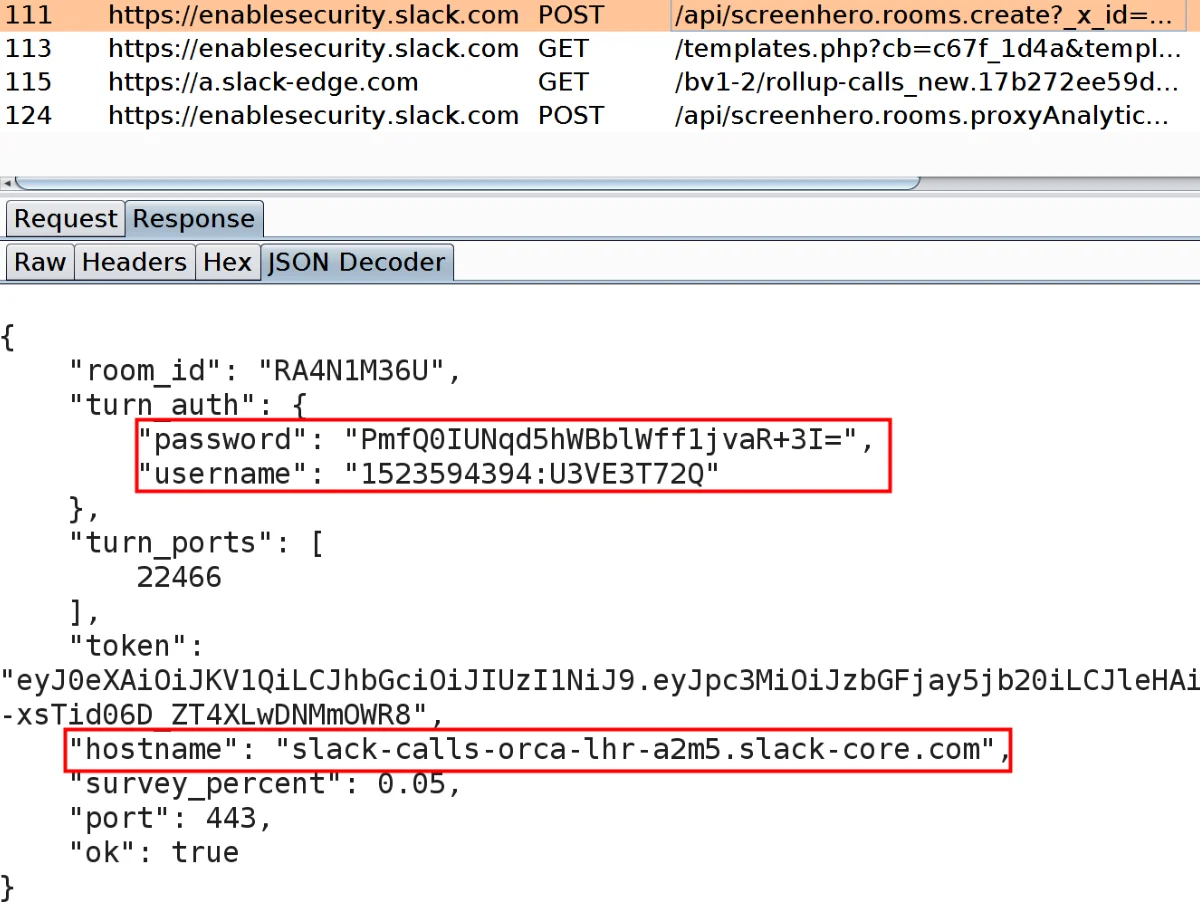
The image shows how the TURN credentials were generated from the details returned by that API call.
Step 2: relay through the TURN server
With the credentials in hand, stunner speaks TURN to the Slack server and asks it to connect to a chosen peer address. The turn peer scanner subcommand runs a port scan through the relay against a particular peer address. The turn peer httpproxy subcommand turns the relay into an HTTP proxy: the browser sends HTTP to stunner, stunner proxies the request and response to the TURN server using the TURN protocol, and the TURN server relays the HTTP traffic back and forth to stunner.
The video demonstration shows three things: how to obtain the TURN credentials, testing relaying to the Internet through the TURN server by checking the IP address, and connecting to internal network and meta-data services on Slack's AWS infrastructure.
Root cause
The TURN server could be abused to relay traffic to the server itself and to internal addresses on Slack's AWS infrastructure. The relay could reach the server itself, the AWS meta-data address and internal addresses on Slack's AWS infrastructure. Authentication was present and working, but authentication only proves the client is entitled to a relay; it says nothing about which peers the relay may reach. The missing control is authorisation on the peer address, and that is what turned a media relay into an internal proxy.
Impact
An attacker holding valid temporary TURN credentials could reach internal Slack services from the TURN server's network position. That includes the AWS meta-data service at http://[redacted], from which IAM temporary credentials could be obtained, services listening on localhost that are not exposed to the Internet, and hosts in [redacted]/16, which could be port-scanned to find management applications that might then be abused as trusted services. The abuse is not limited to HTTP, since TCP and UDP relaying are both available.
Fix
The recommendation is to place access control rules on the TURN server itself, blocking non-public addresses from being specified as the XOR-PEER-ADDRESS in TURN messages. Most systems, including Slack's, use Coturn, and the recommended options are:
no-multicast-peers
denied-peer-ip=[redacted]-[redacted]
denied-peer-ip=[redacted]-[redacted]
denied-peer-ip=[redacted]-[redacted]
denied-peer-ip=[redacted]-[redacted]
denied-peer-ip=[redacted]-[redacted]
denied-peer-ip=[redacted]-[redacted]
denied-peer-ip=[redacted]-[redacted]
denied-peer-ip=[redacted]-[redacted]
denied-peer-ip=[redacted]-[redacted]
denied-peer-ip=[redacted]-[redacted]
denied-peer-ip=[redacted]-[redacted]
denied-peer-ip=[redacted]-[redacted]
denied-peer-ip=[redacted]-[redacted]
denied-peer-ip=[redacted]-[redacted]
The latest Coturn no longer allows peering with [redacted] or ::1 by default; on older versions the no-loopback-peers option may also be needed. The author later published a follow-up on CVE-2020-26262 with an updated configuration and further details.
One caveat: even once relaying to internal addresses is blocked, TURN servers can still be used for purposes other than their intended one, in the same way open SOCKS and HTTP proxies are abused. That is a feature, not a bug.
Variants to test

Sandro Gauci is CEO and Chief Mischief Officer at Enable Security, original developer of SIPVicious OSS, and focuses on offensive security tools and research.
What happened, in plain words
Slack is a chat application that many workplaces use. Besides typing messages, you can also make voice and video calls inside it. Those calls are built on a technology called WebRTC, which lets two browsers send audio and video directly to each other.
Sometimes two browsers cannot talk directly, because of the way home and office networks are built. When that happens, the call software uses a helper server in the middle, called a TURN server, which passes the audio and video back and forth between the two people. Think of it as a postal sorting office: neither person can reach the other's house, so both send their parcels to the sorting office, and it forwards them.
A security researcher, Sandro Gauci, tested Slack's TURN server and found that it could relay traffic to the server itself and to internal addresses on Slack's AWS infrastructure, not just to the other person on the call. That included Slack's own internal network and a special cloud service that hands out access keys. In effect, a helper meant to relay phone calls had become a door into Slack's private systems. Slack paid a $3,500 bug bounty for the report, filed on HackerOne as report 333419.
This article walks through the whole story from zero: what the pieces are, how the researcher found the problem, what an attacker could have done with it, and how to fix it.
A very brief introduction to the TURN protocol
Before the details, a few words on the protocol itself. The report quotes Wikipedia, which explains it like this:
Traversal Using Relays around NAT (TURN) is a protocol that assists in traversal of network address translators (NAT) or firewalls for multimedia applications. It may be used with the Transmission Control Protocol (TCP) and User Datagram Protocol (UDP). It is most useful for clients on networks masqueraded by symmetric NAT devices. TURN does not aid in running servers on well known ports in the private network through a NAT; it supports the connection of a user behind a NAT to only a single peer, as in telephony, for example.
TURN is specified by RFC 5766. An update to TURN for IPv6 is specified in RFC 6156. The TURN URI scheme is documented in RFC 7065.
Some of those words need unpacking.
- Protocol: an agreed set of rules for how two computers exchange information, like the etiquette of a phone call (who speaks first, how you say goodbye).
- NAT (Network Address Translation): the mechanism in most home and office routers that lets many devices share one public internet address. From the outside, the whole household looks like a single address, and the router has to remember which internal device each reply belongs to. This is why two computers often cannot open a direct connection to each other.
- TCP and UDP: the two main ways computers send data. TCP is like a recorded delivery: ordered, confirmed, nothing lost. UDP is like shouting across a room: fast, no confirmation. Calls use both.
- RFC: a numbered public document that describes how an internet standard works. RFC 5766 is the original TURN specification; RFC 6156 adds support for the newer IPv6 addressing scheme; RFC 7065 describes how a TURN server is named in a web address.
- Peer: the other end of a connection. In a call, your peer is the person you are talking to.
TURN is not a standalone protocol. It is an extension of an older one called STUN (Session Traversal Utilities for NAT). STUN's job is to help a computer discover how it looks from the outside internet. TURN builds on that and adds relaying: when a direct path is impossible, the TURN server passes the traffic for you.
From a penetration tester's point of view, a TURN server is essentially a proxy: a middleman that forwards traffic on your behalf. The report notes the specific message types TURN uses for this. For TCP relaying it uses a connect message, method 0x000A in RFC 6062. For UDP it uses a send indication, method 0x006 in RFC 5766, and the channel method in RFC 5766 section 11 does something similar. You do not need to memorise these numbers; the point is that TURN has explicit, standardised instructions for "please connect me to this address", and those instructions are what the researcher abused.
Introduction to TURN in the WebRTC infrastructure context
Why does any of this exist? With WebRTC, and with internet calling in general, one of the long-standing headaches is getting the media stream from one person to another. The media stream is the flow of RTP packets, which carry the actual audio and video. Two people on the internet each sit behind their own router, and finding a path between them is not obvious.
The usual approach is to try STUN first, which often lets the two sides discover a direct route. When that fails, the software falls back to TURN, which is normally the last resort before giving up on the call. The protocol that ties STUN and TURN together and decides which to try is called ICE (Interactive Connectivity Establishment). TURN was designed to work with ICE from the start.
So in a typical WebRTC system, the TURN server is a safety net: present, but rarely used.
How Slack uses TURN
Slack is not typical. When the researcher tested Slack, he noticed that TURN was always used to establish the media, which then travels over SRTP. SRTP is the encrypted version of RTP, the audio and video stream format mentioned above.
This behaviour had already been documented publicly: the webrtcHacks blog covered it in an article called Is Slack's WebRTC Really Slacking? by Yoshimasa Iwase, back in 2016, so the report does not repeat the explanation.
What matters is the consequence. If a server is only a rarely used fallback, breaking it is annoying. If every single call depends on it, that server sits in a critical position in the infrastructure. That is exactly where Slack's TURN server sat, and that is why it was worth testing.
What we found when testing Slack's TURN servers
The tests showed that Slack's TURN servers could be abused to relay TCP and UDP traffic to two kinds of destination: the TURN server itself, and internal addresses on Slack's AWS infrastructure. AWS is Amazon Web Services, the cloud platform Slack runs on; "internal addresses" are the private network locations that are not meant to be reachable from the public internet.
If you have done web application security before, this sounds like SSRF, which stands for server-side request forgery. SSRF is a class of bug where an attacker can make a server send a request to a destination of the attacker's choosing, instead of the destination the application intended. A simple comparison: a hotel concierge who will fetch anything you ask for, including the keys to the staff room.
But there is an important difference here. Classic SSRF is usually limited to HTTP, the protocol of web pages, or to targets that happen to answer HTTP requests. This abuse was not limited that way. It was closer to abusing an open proxy: a proxy server that will forward traffic for anyone, to anywhere. Examples are a SOCKS proxy (a general-purpose forwarding protocol) or a web proxy that supports the CONNECT method (the instruction a browser sends to a proxy when it wants a tunnel to an arbitrary host and port, not just a web page).
So what could an attacker actually do with this? The report lists three things:
- Connect to the AWS meta-data services at
http://[redacted]and obtain IAM temporary credentials - Connect to open ports on localhost that are usually not exposed to the Internet (e.g. node exporter): 22, 25, 53, 443, 515, 5666, 8500, 8888, 9090 and 9100
- Port-scan the Slack AWS infrastructure on
[redacted]/16and find server management applications; possibly abuse such "trusted" services
Each of these deserves a plain explanation.
The meta-data service. Cloud providers give each virtual machine a special internal address, [redacted], that only the machine itself can reach. Software on the machine asks that address questions about itself: what is my hostname, what am I allowed to do. Crucially, it can also hand out temporary credentials for the cloud account. IAM (Identity and Access Management) is AWS's system for permissions, and its temporary credentials are short-lived keys that let software act with certain rights in the account. If an outsider can reach that address through a relay, they can ask for keys too.
Localhost. Every computer has a private address for itself, usually [redacted], often called localhost. Services can listen there and be reachable only from the machine itself, never from the internet. The report gives node exporter as an example, a monitoring tool that reports system statistics. The listed numbers are port numbers: 22 is normally SSH (remote login), 25 mail, 53 DNS (name lookup), 443 HTTPS, and the rest are various services. A service bound to localhost is assumed safe because nobody outside can connect. A relay running on that same machine breaks that assumption.
The private network. [redacted]/16 is a range of private addresses, written in the shorthand called CIDR notation. The /16 means the first two numbers are fixed and the last two can vary, so this covers a large block of internal machines. Port-scanning means trying many ports on many addresses to see which ones answer, which reveals what services are running. Server management applications are tools for administering machines, and if they trust anyone coming from inside the network, reaching them through the relay could let an attacker control them.
The screenshot shows the first of these: obtaining IAM temporary credentials from the AWS meta-data service through the relay.
Our methodology for testing for open TURN relay abuse
At this point you might assume TURN servers have no authentication at all. They do. Authentication means proving who you are, like showing a membership card at a club. Authorisation is a separate question: what you are allowed to do once inside. Keep that distinction in mind, because it is the heart of this bug.
Each time there is a WebRTC session, the system generates new temporary TURN credentials and returns them to the client. A credential here is a temporary username and password pair, a bit like a day pass rather than a permanent membership. An attacker must therefore first retrieve these credentials. The researcher's steps were:
- Configure the web browser to use Burp proxy.
- In the Proxy > HTTP history tab, filter for the keyword screenhero.
- Start a call by pressing the call button.
- Observe the TURN details returned in the call to
/api/screenhero.rooms.create, which include the temporary username and password, TURN hostname and ports. - Pass these details to stunner.
Why each step?
- Burp proxy is a tool that sits between your browser and the internet and records every request and response. It is like putting a recording device on your phone line. You point the browser at Burp, and Burp forwards everything onward while keeping a copy.
- Filtering for screenhero narrows that recording to the relevant traffic. An API (Application Programming Interface) is the set of addresses a program offers so other programs can ask it to do things; here, the web page asks Slack's servers to set up a call. Filtering is simply searching the recorded list for a keyword.
- Starting a call triggers the browser to ask Slack for everything it needs, including the TURN credentials. You cannot observe the request without causing it.
- The call to
/api/screenhero.rooms.createis that request. The response contains the temporary username and password, the TURN server's hostname (its name on the network) and the ports to use. This is the day pass, handed out by the normal, legitimate flow. - Passing the details to stunner is where the testing tool takes over. Stunner is an internal Enable Security tool built to test STUN and, by extension, TURN for protocol-level weaknesses.
The image shows how the TURN credentials were generated from the details returned by that API call.
Stunner has two subcommands relevant here. turn peer scanner runs a port scan through a TURN relay against a particular peer address. turn peer httpproxy implements an HTTP proxy, so a web browser can be configured to send its traffic through stunner; stunner then proxies the HTTP requests and responses to the TURN server speaking its protocol, and the TURN server relays that HTTP traffic back and forth to stunner. In other words, the browser thinks it is talking to a normal proxy, while underneath, the traffic is being carried inside TURN messages and pushed out the other side by Slack's own relay.
Stunner is not public. The team uses it during penetration test services, and at the time of writing it could not be released outside Enable Security.
Exploitation
Step 1: capture the temporary TURN credentials
The five steps above are the whole of this stage. The reasoning is worth restating: the TURN server is not open to anonymous use, so the researcher did not try to break the authentication. He simply used the front door, made a call like any user, and took the credentials the system handed him. The interesting question was not whether he could get a credential, but what that credential allowed.
Step 2: relay through the TURN server
With the credentials in hand, stunner speaks TURN to the Slack server and asks it to connect to a chosen peer address. That address is the attacker's choice, not the other person on the call. The turn peer scanner subcommand runs a port scan through the relay against a particular peer address. The turn peer httpproxy subcommand turns the relay into an HTTP proxy: the browser sends HTTP to stunner, stunner proxies the request and response to the TURN server using the TURN protocol, and the TURN server relays the HTTP traffic back and forth to stunner.
The video demonstration shows three things: how to obtain the TURN credentials, testing relaying to the Internet through the TURN server by checking the IP address, and connecting to internal network and meta-data services on Slack's AWS infrastructure. Checking the IP address is a simple sanity test: if you ask an external website what address it sees you coming from, and the answer is the TURN server's address rather than your own, the relay is working.
Root cause
Why did this happen? The TURN server could be abused to relay traffic to the server itself and to internal addresses on Slack's AWS infrastructure. The XOR-PEER-ADDRESS field in TURN messages is where the client names the destination it wants to reach. The relay could reach the server itself, the AWS meta-data address and internal addresses on Slack's AWS infrastructure.
Authentication was present and working. But authentication only proves the client is entitled to a relay; it says nothing about which peers the relay may reach. The missing control is authorisation on the peer address. That gap is what turned a media relay into an internal proxy. Returning to the club comparison: the membership card was checked at the door, but nobody asked which rooms the member was allowed to walk into.
Impact
An attacker holding valid temporary TURN credentials could reach internal Slack services from the TURN server's network position. That position matters: the relay sits inside Slack's network, so requests coming from it look like they come from a trusted machine.
Specifically, the attacker could reach:
- the AWS meta-data service at
http://[redacted], from which IAM temporary credentials could be obtained; - services listening on localhost that are not exposed to the internet;
- hosts in
[redacted]/16, which could be port-scanned to find management applications that might then be abused as trusted services.
The abuse is not limited to HTTP, since TCP and UDP relaying are both available. That widens the set of reachable services considerably: anything that speaks TCP or UDP is fair game, not just web servers.
Fix
The recommendation is to place access control rules on the TURN server itself, blocking non-public addresses from being specified as the XOR-PEER-ADDRESS in TURN messages. In plain terms: keep the relay, but give it a list of destinations it is not allowed to forward to.
Most systems, including Slack's, use Coturn, a widely used open-source TURN server. The recommended configuration options are:
no-multicast-peers
denied-peer-ip=[redacted]-[redacted]
denied-peer-ip=[redacted]-[redacted]
denied-peer-ip=[redacted]-[redacted]
denied-peer-ip=[redacted]-[redacted]
denied-peer-ip=[redacted]-[redacted]
denied-peer-ip=[redacted]-[redacted]
denied-peer-ip=[redacted]-[redacted]
denied-peer-ip=[redacted]-[redacted]
denied-peer-ip=[redacted]-[redacted]
denied-peer-ip=[redacted]-[redacted]
denied-peer-ip=[redacted]-[redacted]
denied-peer-ip=[redacted]-[redacted]
denied-peer-ip=[redacted]-[redacted]
denied-peer-ip=[redacted]-[redacted]
Line by line, in plain words:
no-multicast-peerstells the server not to relay to multicast addresses, which are a way of sending one message to many machines at once. Relaying there makes no sense for a call and could be abused.- Each
denied-peer-ip=line adds a range of addresses the server must refuse to connect to. The two numbers either side of the hyphen are the start and end of the range. [redacted]-[redacted]covers the "this network" block, addresses that are not real destinations.[redacted]-[redacted]is one of the private ranges used inside organisations, the same kind of range as Slack's[redacted]/16.[redacted]-[redacted]is a shared range used by some carriers and internal networks.[redacted]-[redacted]is loopback, the machine talking to itself, including[redacted].[redacted]-[redacted]is link-local, the range that contains the cloud meta-data address[redacted].[redacted]-[redacted]and[redacted]-[redacted]are the other common private ranges found in homes and offices.[redacted]-[redacted],[redacted]-[redacted],[redacted]-[redacted]and[redacted]-[redacted]are special-purpose blocks, including the ranges reserved for documentation and examples, which should never be real destinations.[redacted]-[redacted]is a reserved block historically used for a transition mechanism between old and new addressing.[redacted]-[redacted]is reserved for benchmarking and testing.[redacted]-[redacted]is reserved space that is not valid as a normal destination.
The latest Coturn no longer allows peering with [redacted] or ::1 by default; ::1 is the IPv6 equivalent of localhost. On older versions the no-loopback-peers option may also be needed. The author later published a follow-up on CVE-2020-26262 with an updated configuration and further details. CVE numbers are public identifiers for known vulnerabilities, so people can look them up and track fixes.
One caveat: even once relaying to internal addresses is blocked, TURN servers can still be used for purposes other than their intended one, in the same way open SOCKS and HTTP proxies are abused. That is a feature, not a bug. A relay that forwards to the public internet is doing its job; the problem was only ever the internal destinations.
Slack pushed a patch to its live servers in May 2018, which Enable Security retested.
Variants to test
Our timeline
- November 2017: added TURN abuse to our stunner toolset
- December 2017: discovered and reported TURN vulnerability in private customer of Enable Security
- February 2018: briefly tested Slack and discovered the vulnerability
- April 2018: submitted our report to Slack, helped them reproduce and address the issue through various rounds of testing
- May 2018: Slack pushed patch to live servers which was retested by Enable Security
- January 2020: asked to publish report
- February 2020: disclosure delayed by HackerOne/Slack
- March 2020: report published
Thanks
The report thanks the Slack security team, who handled the report and provided test systems to check their security fixes, and Alfred Farrugia for his work on stunner and for reproducing the vulnerability reliably.
FAQ
Who first discovered the TURN open relay abuse vulnerability?
From public records, it looks like that would be Cisco, who released an advisory for Cisco Meeting Server back in 2017 September 13. An advisory is a public notice from a vendor about a security problem and what to do about it.
The author properly identified the issue separately, apparently in late 2016, by reading the TURN RFC and eventually proving the actual vulnerability by adding features within the internal toolset, stunner, to abuse it. Since then, the team has discovered various instances of the same vulnerability during WebRTC penetration test engagements.
Is stunner available?
It is used during penetration test services but, at that stage, could not be made available outside Enable Security.
Sandro Gauci is CEO and Chief Mischief Officer at Enable Security, original developer of SIPVicious OSS, and focuses on offensive security tools and research.
Glossary
- API (Application Programming Interface): the set of addresses and rules a program offers so other programs can ask it to do things, such as creating a call room.
- Authentication: proving who you are, like showing a membership card.
- Authorisation: what you are allowed to do once you have proved who you are.
- AWS (Amazon Web Services): Amazon's cloud platform, where Slack's infrastructure runs.
- Banner: the greeting some network services send when you connect, which can identify the service.
- Bug bounty: a programme that pays researchers for reporting security problems responsibly.
- Burp proxy: a tool that sits between a browser and the internet, recording and allowing modification of requests and responses.
- CIDR notation: a shorthand for a range of IP addresses, such as
[redacted]/16, where the number after the slash says how many leading bits are fixed. - Coturn: a widely used open-source TURN server.
- Credential: a temporary username and password pair that proves entitlement to use a service.
- CVE: a public identifier for a known vulnerability, so people can look it up and track fixes.
- DNS: the system that turns names like example.com into IP addresses.
- HackerOne: a platform where security researchers report vulnerabilities to companies and bug bounties are handled.
- HTTP: the protocol browsers and web servers use to exchange pages and data.
- HTTPS: HTTP carried over an encrypted connection.
- IAM (Identity and Access Management): AWS's system for permissions and access keys.
- ICE (Interactive Connectivity Establishment): the protocol that ties STUN and TURN together and decides which path a call uses.
- Link-local: a range of addresses, including
[redacted]/16, used for communication on a local segment; the cloud meta-data address lives here. - Localhost: the name for the machine's own address, usually
[redacted](or::1in IPv6), reachable only from the machine itself. - Media stream: the flow of audio and video data in a call, carried in RTP packets.
- Meta-data service: a special internal address,
[redacted]on AWS, that a cloud machine can query about itself and that can hand out temporary credentials. - Multicast: sending one message to many machines at once.
- NAT (Network Address Translation): the router mechanism that lets many devices share one public address, and the reason direct connections between peers often fail.
- Node exporter: a monitoring tool that reports system statistics, often listening only on localhost.
- Open proxy: a proxy that forwards traffic for anyone, to anywhere, without restricting destinations.
- Peer: the other end of a connection; in a call, the person you are talking to.
- Penetration test: an authorised security assessment in which testers try to break into a system, with permission.
- Port: a numbered channel on a computer that a particular service listens on; 22 is SSH, 443 is HTTPS, and so on.
- Port scan: trying many ports on many addresses to see which ones answer, revealing what services are running.
- Private range: blocks of IP addresses reserved for internal networks, such as
[redacted]/8,[redacted]/12and[redacted]/16. - Protocol: an agreed set of rules for how computers exchange information.
- Proxy: a middleman that forwards traffic on your behalf.
- RFC: a numbered public document describing an internet standard, such as RFC 5766 for TURN.
- RTP (Real-time Transport Protocol): the format used to carry audio and video in calls.
- Screenhero: a screen-sharing product acquired by Slack, whose name still appears in the API paths used for calls.
- SOCKS proxy: a general-purpose proxy protocol that forwards arbitrary connections, not just web traffic.
- SRTP: the encrypted version of RTP.
- SSH: a protocol for logging into a remote machine securely, usually on port 22.
- SSRF (server-side request forgery): a bug where an attacker makes a server send a request to a destination of the attacker's choosing.
- STUN (Session Traversal Utilities for NAT): a protocol that helps a computer discover how it looks from the outside internet; TURN is an extension of it.
- Subcommand: a named action within a command-line tool, such as
turn peer scannerwithin stunner. - TCP: a reliable, ordered way of sending data, with confirmation.
- TURN (Traversal Using Relays around NAT): a protocol and server that relay call traffic between peers when a direct path is impossible.
- UDP: a fast, connectionless way of sending data, without confirmation.
- WebRTC: the browser technology that enables voice and video calls directly between browsers.
XOR-PEER-ADDRESS: the field in a TURN message where the client names the destination it wants the relay to reach.::1: the IPv6 address for localhost.



