User can start call in a channel of an unpaid account
A user on an unpaid account could start a call in a channel by intercepting and modifying a request to create a call room, changing the channel parameter to a channel ID. This allowed bypassing the UI restriction that normally prevents calls in unpaid accounts.

- Triaged in 41 hours
- Fixed in 51 days
- Paid in 51 days
- Disclosed after 3 months
Found a super minor issue that allows a user to start a call in a channel of an unpaid account. Besides the minor financial incentive for an attacker, this doesn't have a super high impact. Wanted to let you know anyway since it's not possible through the UI by default. To reproce it, start by signing in to a user that is part of an unpaid account and start intercepting your network traffic (I used Burp Suite).
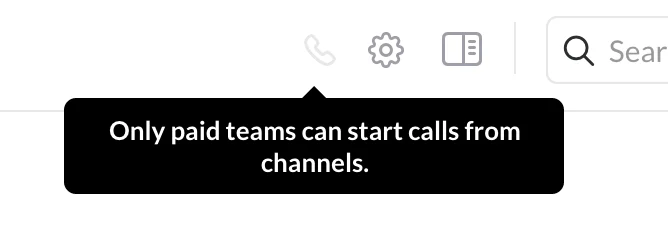
- Go to a channel, in the top bar, you'll see that the Call feature is not available.
- Go to a private chat window of another user
- Intercept your network traffic and click the "Call" button in the top bar. The first request will be to https://account.slack.com/call/ID. Forward this request.
- The next request will look like this:
POST /api/screenhero.rooms.create?_x_id=<ID> HTTP/1.1
Host: account.slack.com
...

------WebKitFormBoundaryoqDvFcsV6Y4A1ByJ
Content-Disposition: form-data; name="regions"

west|east|ap|eu
------WebKitFormBoundaryoqDvFcsV6Y4A1ByJ
Content-Disposition: form-data; name="protocol"

1.0
------WebKitFormBoundaryoqDvFcsV6Y4A1ByJ
Content-Disposition: form-data; name="channel"

D1CCM92P5
------WebKitFormBoundaryoqDvFcsV6Y4A1ByJ
Content-Disposition: form-data; name="token"

<SLACK API TOKEN>
------WebKitFormBoundaryoqDvFcsV6Y4A1ByJ--
- Change the
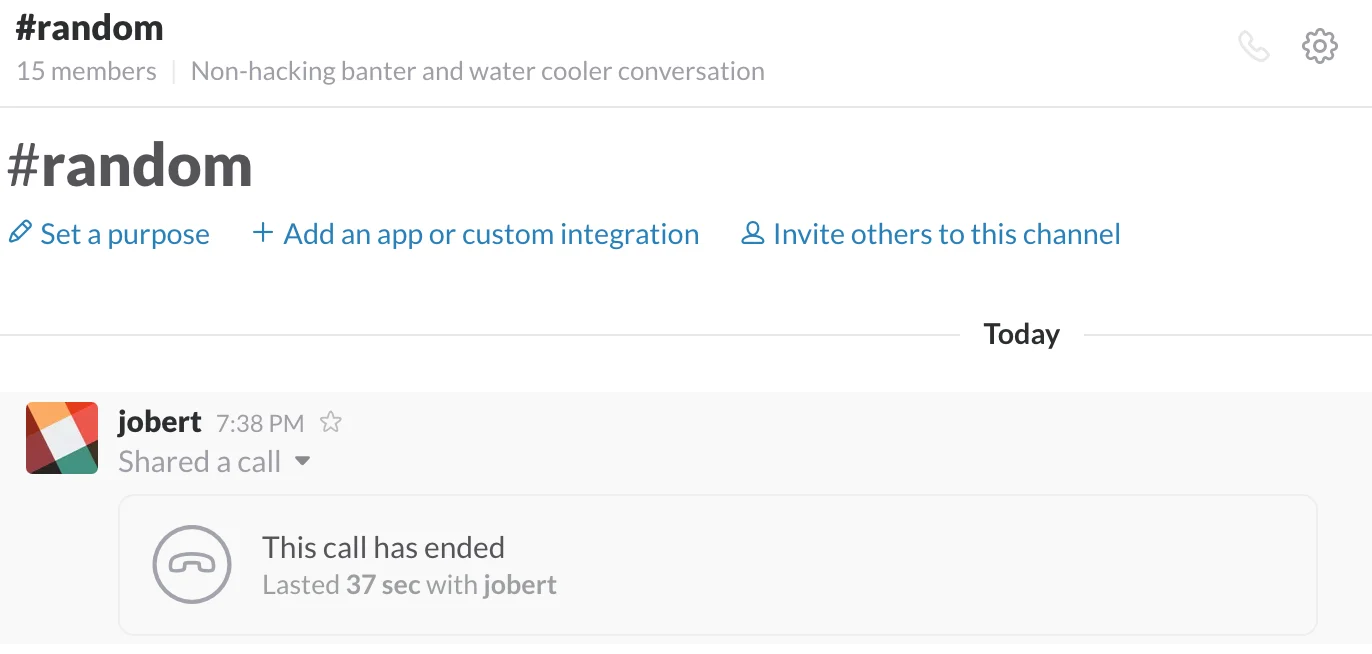
channelvalue to the ID of the a channel. This ID can be obtained by clicking on a channel in the left column and copy it from the WebSocket data being sent to Slack. Now forward the requests and stop intercepting traffic. - The call will be posted in the channel:
Context
Slack's calling feature lets users start voice or video calls from a channel or a private chat. On an unpaid account, the Call feature is not available in channels: the top bar of a channel simply does not offer it. Calls in private chats are a separate path, and that path is where this report lives.
The researcher describes the issue as "super minor": a user on an unpaid account can start a call in a channel, which should not be possible. The report notes a minor financial incentive for an attacker but states that the impact is not high. It was reported anyway because the action is not possible through the UI by default.
Setup
- A user account that is part of an unpaid account.
- A second user to open a private chat with.
- A proxy to intercept and modify traffic. The researcher used Burp Suite.
No versions, endpoints beyond those shown, or account configuration details are given.
Finding it
The starting observation is simple: in a channel on an unpaid account, the Call feature is not available in the top bar. The researcher then looked at the private chat window, where the Call button is present, and intercepted the requests it produces. The call creation flow sends a request to https://account.slack.com/call/ID followed by a second request to screenhero.rooms.create. That second request carries the channel identifier as a form field, and the server accepts it, which the report presents as the bug.
Exploitation
Step 1: Confirm the feature is missing in channels
Sign in as a user on an unpaid account and open a channel. In the top bar, the Call feature is not available.
The screenshot shows the channel top bar without the Call option, which establishes the baseline behaviour the researcher is trying to bypass.
Step 2: Open a private chat and intercept the call request
Open a private chat window with another user, start intercepting traffic, and click the "Call" button in the top bar. The first request goes to:
https://account.slack.com/call/ID
Forward this request. The ID is the identifier used in the call URL; the report does not describe how it is formed.
Step 3: Inspect the room creation request
The next request is the one that creates the call room:
POST /api/screenhero.rooms.create?_x_id=<ID> HTTP/1.1
Host: account.slack.com
...

------[redacted]
Content-Disposition: form-data; name="regions"

west|east|ap|eu
------[redacted]
Content-Disposition: form-data; name="protocol"

1.0
------[redacted]
Content-Disposition: form-data; name="channel"

D1CCM92P5
------[redacted]
Content-Disposition: form-data; name="token"

<SLACK API TOKEN>
------[redacted]--
The important parts:
_x_idis a query parameter carried over from the client.regionslists the regions offered for the room (west|east|ap|eu).protocolis set to1.0.channelholds the identifier of the conversation the call belongs to. In the private chat flow this is the direct message ID, hereD1CCM92P5.tokenis the Slack API token for the session, shown in the report as a placeholder.
Step 4: Swap the channel identifier
Change the channel value to the ID of a channel. The report explains how to obtain that ID: click on a channel in the left column and copy the ID from the WebSocket data being sent to Slack. Then forward the requests and stop intercepting traffic.
Step 5: Observe the call in the channel
The call is posted in the channel.
The screenshot shows the call appearing in the channel, which is the outcome the UI does not allow on an unpaid account.
Root cause
The client sends the target conversation identifier in the channel field of screenhero.rooms.create, and the server creates the room for whatever identifier it receives. The Call button is hidden in channels on unpaid accounts, yet the request succeeds when a channel ID is substituted. Because the private chat flow is allowed, the same endpoint can be reached with a channel identifier substituted in. The report does not include any server-side validation logic, so the exact check that is missing is inferred from behaviour rather than shown.
Impact
A user on an unpaid account can start a call in a channel, which the product reserves for paid accounts. The researcher characterises this as a minor financial incentive for an attacker and explicitly states the impact is not high. The action requires an authenticated user on an unpaid account and the ability to intercept and modify their own traffic. No other impact, such as access to other users' data or calls, is described.
Fix
The report does not describe a fix or a vendor response.
Variants to test
- Other entitlement-gated actions in the same product. Look for features hidden in the UI on unpaid or lower-tier accounts but backed by endpoints that accept a target object identifier. A positive result is the action succeeding against an object the UI does not offer it for.
- Identifier substitution in room or resource creation. Where a request carries a conversation or resource ID taken from a permitted context, replace it with one from a context where the feature is not offered. A positive result is the resource being created for the substituted ID.
- Cross-context reuse of permitted flows. Use a flow that is allowed (here, a private chat call) as a template and change only the context field. A positive result is the server accepting the modified context without an entitlement check.
Hunting notes
This kind of bug tends to sit where a feature is gated by plan or role in the interface but the backing API takes the target identifier from the request body. During recon, compare what the UI offers in each context (channel versus private chat, free versus paid) and intercept the requests from the context where the feature is available. The signal is a request field naming the conversation or resource that the server appears to trust. The researcher demonstrated impact by showing the call posted in the channel, which is the visible outcome the UI forbids; the report itself does not describe the triage discussion or why the program accepted it.
What happened, in plain words
Slack is a chat application. Besides sending text messages, it lets people talk to each other by voice or video, and that is called a call. Calls can happen in two places: inside a channel (a shared room where a group of people talks, like a group chat) or inside a private chat (a one-to-one conversation between two people).
Slack is free to use, but some features are reserved for accounts that pay. On an unpaid account, the Call feature is not offered inside channels: if you open a channel, the top bar of the window simply has no Call button. Calls in private chats are a different path, and that path is where this report lives.
The researcher found that a user on an unpaid account can still start a call in a channel, even though the interface does not allow it. He describes the issue as "super minor": there is a small financial incentive for an attacker (getting a paid feature for free), but the impact is not high. He reported it anyway because the action is not possible through the normal interface.
The reason it works is a classic pattern in web security. The browser (the client) is the part that hides the Call button in channels. But the browser is under the user's control: anyone can use a tool to watch and change the messages the browser sends to Slack's servers. The server accepted a request that named a channel as the place for the call, even though the interface does not offer calls in channels on an unpaid account. In security terms, this is a privilege escalation: doing something with more rights than you should have. The interface hides the Call button in channels, but the request still succeeded.
The setup
To follow along, the researcher needed:
- A user account that is part of an unpaid account.
- A second user, so there is someone to open a private chat with.
- A proxy, which is a tool that sits between your browser and the website and lets you read and change every message that passes. The researcher used Burp Suite, a popular proxy for this kind of work.
The report does not give versions, extra endpoints or account configuration details.
Finding it
Step 1: Confirm the feature is missing in channels
Sign in as a user on an unpaid account and open a channel. In the top bar, the Call feature is not available.
The screenshot shows the channel top bar without the Call option. This is the baseline: it is what the product is supposed to look like on an unpaid account, and it is the behaviour the researcher is trying to get around.
Step 2: Open a private chat and intercept the call request
Open a private chat window with another user, start intercepting traffic, and click the "Call" button in the top bar. The first request goes to:
https://account.slack.com/call/ID
A request is a message your browser sends to a server asking it to do something. Here the browser is asking Slack's account server to set up a call. account.slack.com is the part of Slack that handles account-level actions, and /call/ID is the address of the call action, where ID stands for some identifier. The report does not describe how that ID is formed. Forward this request, meaning let it continue to the server unchanged, so the flow can move on to the next step.
Step 3: Inspect the room creation request
The next request is the one that actually creates the call room. A room is the virtual space where the call happens; think of it as opening a meeting room and then inviting people into it.
POST /api/screenhero.rooms.create?_x_id=<ID> HTTP/1.1
Host: account.slack.com
...

------[redacted]
Content-Disposition: form-data; name="regions"

west|east|ap|eu
------[redacted]
Content-Disposition: form-data; name="protocol"

1.0
------[redacted]
Content-Disposition: form-data; name="channel"

D1CCM92P5
------[redacted]
Content-Disposition: form-data; name="token"

<SLACK API TOKEN>
------[redacted]--
Line by line, in plain words:
POST /api/screenhero.rooms.create?_x_id=<ID> HTTP/1.1is the first line of the request.POSTis the method, the verb that says "create something"./api/screenhero.rooms.createis the address of the action on the server. An API (application programming interface) is the set of addresses and rules a program uses to talk to a server; here the browser is calling the API that creates call rooms._x_idis a query parameter, a small piece of information attached to the address, carried over from the client.HTTP/1.1is the version of the language used for the conversation.Host: account.slack.comtells the server which site the request is for. One server can host many sites, so the request names the one it wants....stands for the other headers, the extra lines of information the browser normally sends (things like which browser it is). The report leaves them out.- The lines starting with
------WebKitFormBoundary...are boundaries. This request uses a format called multipart form data, which packs several fields into one message, each separated by a boundary line, like dividers in a folder.WebKitis the engine inside the browser that produced the request. Content-Disposition: form-data; name="regions"followed bywest|east|ap|euis the first field. It lists the regions offered for the room: west, east, ap and eu, separated by vertical bars.Content-Disposition: form-data; name="protocol"followed by1.0is the second field, setting the protocol version to1.0.Content-Disposition: form-data; name="channel"followed byD1CCM92P5is the important field. It holds the identifier of the conversation the call belongs to. In the private chat flow this is the direct message ID, hereD1CCM92P5.Content-Disposition: form-data; name="token"followed by<SLACK API TOKEN>is the last field. A token is a long string of characters that proves who you are, like a wristband you get at an event: show it and the server knows which account is asking. The report shows it as a placeholder rather than the real value.- The final boundary line with two trailing dashes marks the end of the message.
Step 4: Swap the channel identifier
Change the channel value to the ID of a channel. The report explains how to obtain that ID: click on a channel in the left column and copy the ID from the WebSocket data being sent to Slack. A WebSocket is a connection that stays open between the browser and the server so they can keep exchanging messages in real time; the browser's developer tools let you watch that traffic. Then forward the requests and stop intercepting traffic.
Why this step matters: the private chat flow is allowed, so the server happily creates a room for it. The only thing that says where the call belongs is the channel field. By replacing the direct message ID with a channel ID, the researcher turns an allowed request into one the interface would never send. By replacing the direct message ID with a channel ID, the researcher turns an allowed request into one the interface would never send, and the server accepts it.
Step 5: Observe the call in the channel
The call is posted in the channel.
The screenshot shows the call appearing in the channel. That is the visible outcome the interface forbids on an unpaid account, and it is the proof that the action succeeded.
Why it works
The client sends the target conversation identifier in the channel field of screenhero.rooms.create, and the server creates the room for whatever identifier it receives. The interface hides the Call button in channels on unpaid accounts, but the request still succeeds when a channel ID is substituted. Because the private chat flow is allowed, the same endpoint can be reached with a channel identifier substituted in. The report does not include any server-side validation logic, so the exact check that is missing is inferred from behaviour rather than shown.
What the impact is
A user on an unpaid account can start a call in a channel, which the product reserves for paid accounts. The researcher characterises this as a minor financial incentive for an attacker and explicitly states the impact is not high. The action requires an authenticated user on an unpaid account (someone signed in with a valid account) and the ability to intercept and modify their own traffic. No other impact, such as access to other users' data or calls, is described.
How it should be fixed
Similar things to test
- Other entitlement-gated actions in the same product. Look for features hidden in the interface on unpaid or lower-tier accounts but backed by endpoints that accept a target object identifier. A positive result is the action succeeding against an object the interface does not offer it for.
- Identifier substitution in room or resource creation. Where a request carries a conversation or resource ID taken from a permitted context, replace it with one from a context where the feature is not offered. A positive result is the resource being created for the substituted ID.
- Cross-context reuse of permitted flows. Use a flow that is allowed (here, a private chat call) as a template and change only the context field. A positive result is the server accepting the modified context without an entitlement check.
Notes for hunting
This kind of bug tends to sit where a feature is gated by plan or role in the interface but the backing API takes the target identifier from the request body. During recon (the early phase of looking around a target), compare what the interface offers in each context (channel versus private chat, free versus paid) and intercept the requests from the context where the feature is available. The signal is a request field naming the conversation or resource that the server appears to trust. The researcher demonstrated impact by showing the call posted in the channel, which is the visible outcome the interface forbids; the report itself does not describe the triage discussion or why the program accepted it.
Glossary
- API: the set of addresses and rules a program uses to talk to a server, like a menu of actions a website offers to other software.
- Authenticated user: someone who has signed in and proved which account they belong to.
- Boundary: a divider line in a multipart request that separates one field from the next.
- Burp Suite: a tool that sits between a browser and a website so you can read and change the traffic.
- Channel: a shared conversation room in Slack where a group of people talks.
- Client: the program on your side, usually the browser, that sends requests to a server.
- Direct message ID: the identifier of a one-to-one private conversation.
- Endpoint: a specific address on a server that performs one action.
- Entitlement: the right, usually tied to a paid plan or a role, to use a feature.
- Form data: a way of packing several named fields into one request, each separated by a boundary.
- Header: an extra line of information sent with a request, such as which browser is being used.
- Host: the part of the request that names which site on the server is being addressed.
- HTTP: the language browsers and servers use to exchange requests and responses.
- Identifier (ID): a short string that uniquely names something, such as a conversation or a call.
- Intercept: to pause traffic in a proxy so you can read or change it before it continues.
- Multipart: a request format that carries several fields in one message.
- POST: the HTTP method used to create or send something to a server.
- Privilege escalation: doing something with more rights than your account should have.
- Protocol: here, a version number sent as a field in the request; more generally, the agreed rules for how two systems communicate.
- Proxy: a tool or server that sits between your browser and a website and passes messages through, optionally letting you inspect and edit them.
- Query parameter: a small piece of information attached to the end of an address after a question mark.
- Recon: the early phase of exploring a target to understand what it does and where to look.
- Request: a message a browser sends to a server asking it to do something.
- Room: the virtual space where a call happens.
- Server: the computer that receives requests and performs the actions.
- Token: a long string that proves which account is making a request, like a wristband at an event.
- UI (user interface): the buttons, menus and screens you see and click in a product.
- Unpaid account: a free Slack account without the paid features.
- WebSocket: a connection that stays open between browser and server so they can keep exchanging messages in real time.





