[spectacles.com] Bypassing quantity limit in orders
The website enforced a purchase quantity limit only in the user interface, not on the server. By editing the cart URL, an attacker could set accessory quantities far above the allowed maximum and proceed to the payment step.

- Triaged in 4 days
- Fixed in 5 days
- Paid in 5 days
- Disclosed after 36 days
Hi Snapchat team, In the https://www.spectacles.com the quantity of orders has limited (for spectacles is 6 and for accessories is 10 according to help support page). But it can easily be manipulated by editing the URL.
Problem originates from limiting the quantity of the items is with just the UI elements just before adding to cart. After adding to cart step there is no checking step. (The last payment step is included!)
Let me show you PoC to reproduce this issue;
- First add a single spectacle to cart,
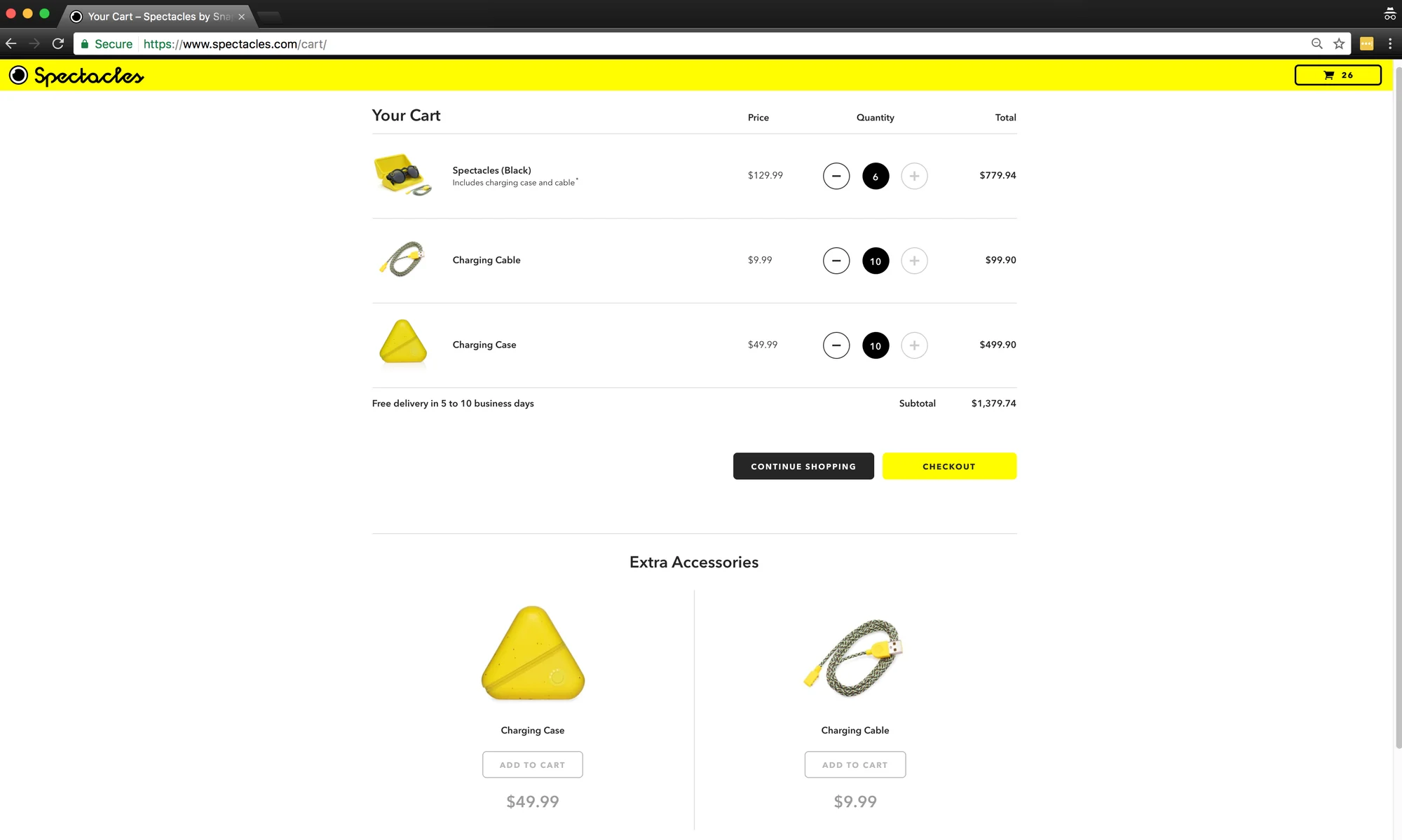
- i.e. Make the quantity of spectacles 6 and add both two accessories with quantity 10.
- You will see the "+" buttons will be inactive.
- Then copy the link address of "CHECKOUT" button
- Paste it to a new tab of browser and you will see something like that;
https://orders.spectacles.com/cart/24637376965:6,24637373189:10,24637375493:10?attributes[delivery-min-days]=7&attributes[delivery-max-days]=14&attributes[locale]=en-US&checkout[shipping_address][country]=US&access_token=XXXXXXXXXXXXXXXXXXXXXXXXXXXXXXXX&_fd=0&_ga=X.XXXXXXXXX.XXXXXXXXXX.XXXXXXXXXX-XXXXXXXXX.XXXXXXXXXX
- To make an example change these values
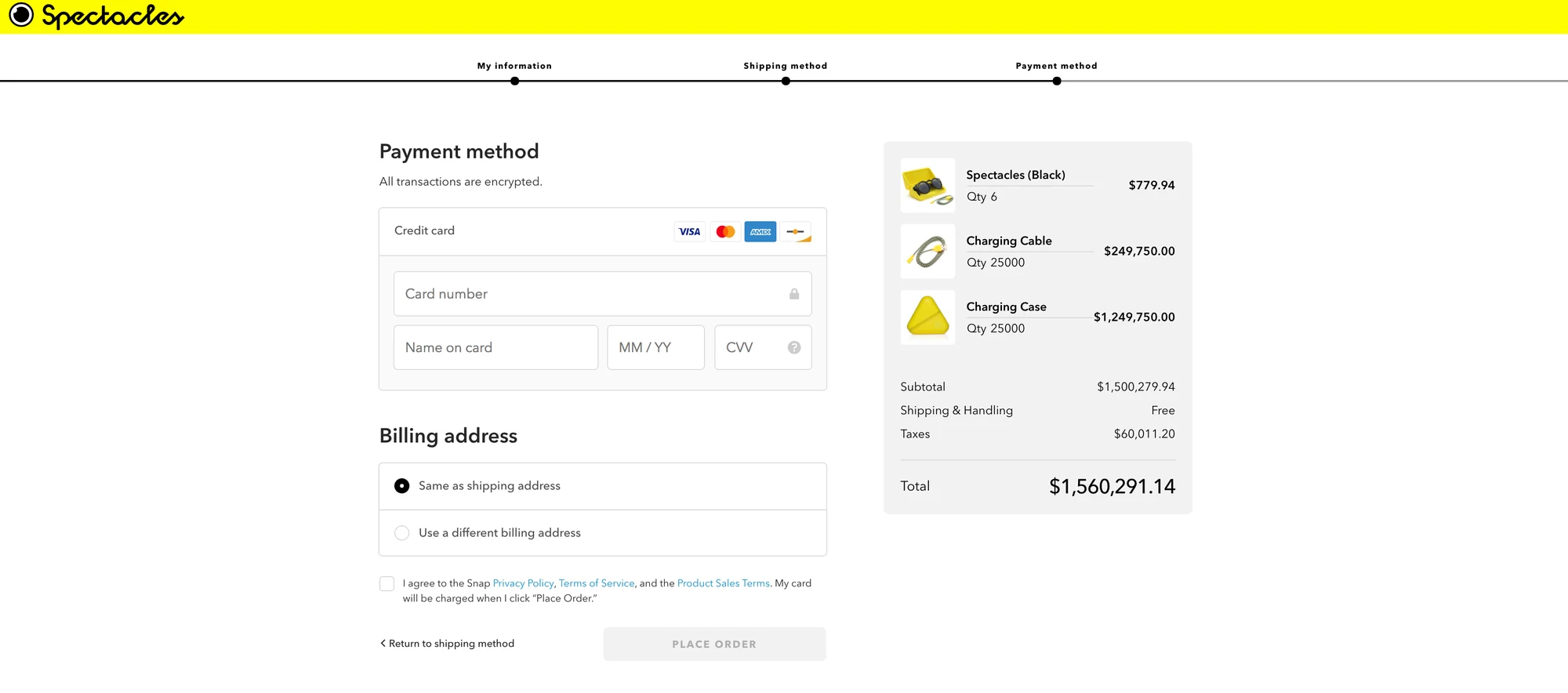
24637376965:6,24637373189:10,24637375493:10with these24637376965:6,24637373189:2500,24637375493:25000then enter - You will see the accessories quantity will be 25000 and the price will be updated according to that.
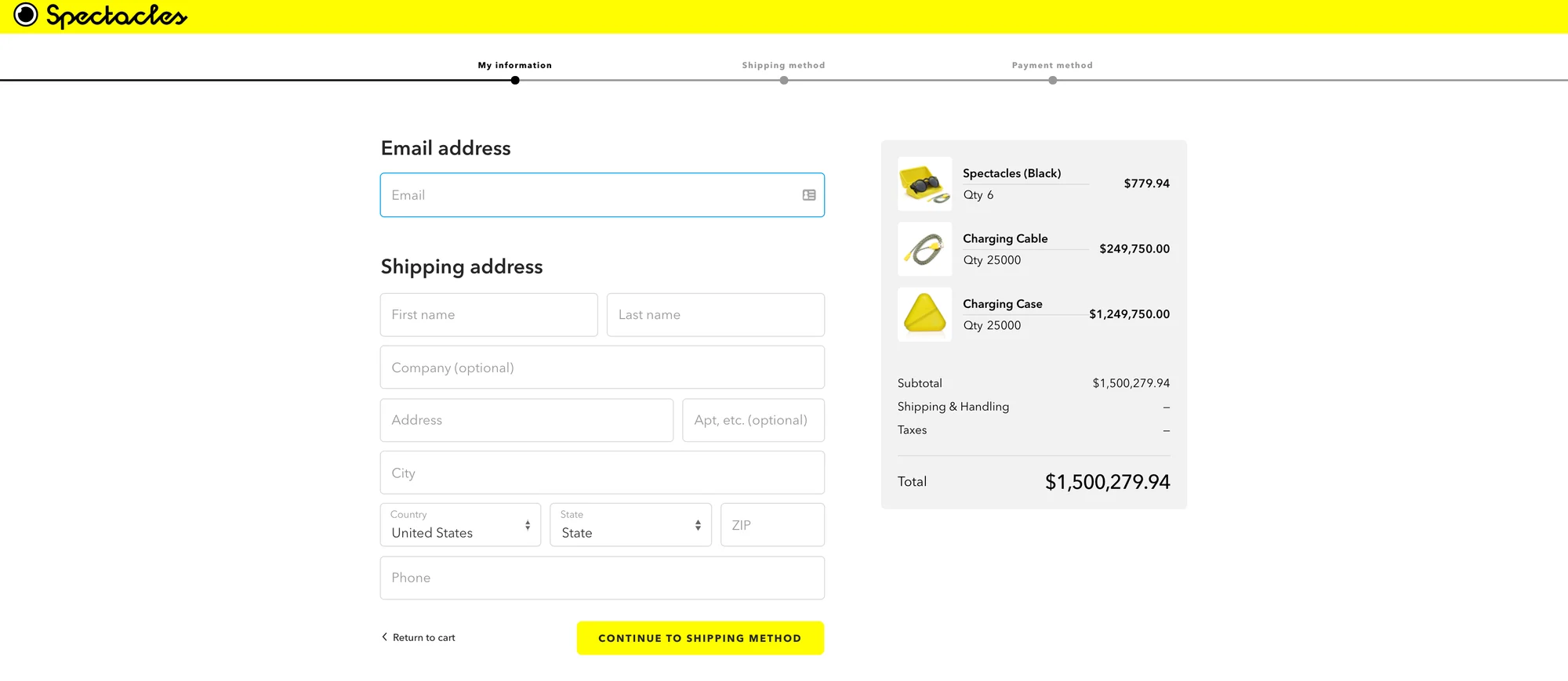
- And you can pass to the last payment step with writing shipping information.
In the screenshots it will be clear and it is easy to reproduce the issue you can easily check this out.
To prevent this issue, a checking operation can be implemented to shopping web app.
Lots of thanks.
hiorws
Attachments
Context
Snapchat's Spectacles storefront at https://www.spectacles.com sells Spectacles and accessories through a cart and checkout flow. The store enforces a per-item purchase limit: according to the help and support page, six Spectacles and ten accessories per order.
The report is about how that limit is enforced, and where it is not. The researcher found that the cap is applied only in the user interface, just before an item is added to the cart, and that nothing downstream re-checks it. The cart and the payment step accept whatever quantity the URL asks for.
Setup
No special accounts, roles or tooling are described. The researcher worked with an ordinary browser session against the public storefront, using the cart and the checkout button. The only precondition is being able to add items to a cart and reach the checkout link, which any shopper can do.
Finding it
The researcher started from the documented limits: six Spectacles and ten accessories. Adding items up to those limits in the UI behaves as expected, and the + buttons become inactive once the cap is reached. That is the tell: the restriction lives in the page, not in the order pipeline.
The reasoning in the report is that the quantity limit is applied "with just the UI elements just before adding to cart", and that "after adding to cart step there is no checking step", including at the final payment step. If the quantity is carried in the checkout URL, then editing that URL should carry an arbitrary quantity all the way through.
Exploitation
Step 1: Build a cart at the allowed limits
Add a single Spectacles item to the cart, then set the Spectacles quantity to six and add two accessories at quantity ten each. At this point the + buttons are inactive, confirming the UI cap is in force.
Step 2: Copy the checkout link
Copy the link address of the CHECKOUT button. The URL looks like this:
https://orders.spectacles.com/cart/24637376965:6,24637373189:10,24637375493:10?attributes[delivery-min-days]=7&attributes[delivery-max-days]=14&attributes[locale]=en-US&checkout[shipping_address][country]=US&access_token=XXXXXXXXXXXXXXXXXXXXXXXXXXXXXXXX&_fd=0&_ga=X.XXXXXXXXX.XXXXXXXXXX.XXXXXXXXXX-XXXXXXXXX.XXXXXXXXXX
The cart is encoded in the path as a comma-separated list of item:quantity pairs: 24637376965:6 is the Spectacles line at six units, and 24637373189:10 and 24637375493:10 are the two accessories at ten units each. The query string carries delivery window attributes, locale, the shipping country and an access token, plus analytics parameters. The quantities are plain numbers in the URL, and editing them changes the cart.
Step 3: Edit the quantities
Paste the link into a new browser tab and change the cart segment. Replace:
24637376965:6,24637373189:10,24637375493:10
with:
24637376965:6,24637373189:2500,24637375493:25000
Then load the URL. The accessories quantities become 2500 and 25000, and the price is recalculated to match. The Spectacles line stays at six, so the change is confined to the accessory lines.
Step 4: Proceed to payment
The researcher then continues through checkout, entering shipping information, and reaches the last payment step with the inflated quantities still in place. No server-side check rejects the order at the cart, the shipping step or the payment step.
The screenshots show the manipulated cart and the checkout flow. The report includes three screenshots of the issue:
Root cause
The quantity limit is a client-side control. The UI disables the + button at the cap, but the quantity that actually reaches the order system is taken from the cart URL, and the server trusts it. There is no validation step after the item is added to the cart, and none at the payment step, so the only thing standing between a shopper and an arbitrary quantity is a disabled button in the browser.
Because the cart contents are expressed as item:quantity pairs in the path, the client can rewrite them freely.
Impact
The researcher demonstrates that a buyer can order accessories far beyond the documented limit, in the example 2500 and 25000 units, and carry the order through to the payment step with the price updated to match. The practical effect is that the purchase limit can be bypassed by anyone who can edit a URL, which undermines whatever business rule the limit was meant to enforce (stock control, fair allocation or resale prevention). The report does not describe any further consequence beyond placing an over-limit order, and the payment step is reached but the report does not say the order was completed or paid.
Fix
The researcher's recommendation is that a checking operation can be implemented in the shopping web app.
Variants to test
- Change a quantity to a negative number or zero in the
item:quantitylist and see whether the total price drops or the line is dropped. A positive result is a cart total that no longer matches the items. - Add an item ID that was never in the cart, or duplicate an existing ID, and check whether the server accepts it. A positive result is a new line appearing in the cart or the same item counted twice.
- Push a quantity to an extreme value and watch for overflow, rounding or a server error. A positive result is a price or quantity that wraps, truncates or errors in a way that reveals missing bounds checks.
- Replay the edited checkout URL in a fresh session with the same access token to see whether the quantities persist server-side. A positive result is the inflated cart surviving a reload without the URL.
- Apply the same pattern to other parameters in the query string, such as the delivery window attributes, and check whether they are validated server-side. A positive result is an accepted value outside the intended range.
Hunting notes
This class of bug hides wherever a business rule is enforced only in the browser: quantity caps, discount limits, coupon reuse, minimum or maximum order values, and per-customer purchase limits. The signal during recon is a checkout or cart URL that encodes state in the path or query, especially as readable id:quantity pairs. If the UI disables a control at a boundary, copy the underlying request or link and edit the value directly.
The researcher made the impact easy to accept by showing the full chain: the documented limit, the UI enforcing it, the URL edit, the recalculated price, and the order reaching the payment step. That end-to-end demonstration, with screenshots at each stage, is what turns a disabled button into a reportable finding.
A note on classification: the platform records this report under HTTP request smuggling with a CVSS of 5.3 and a bounty of 250 USD, disclosed on 12 August 2017. The technique in the report itself is parameter tampering on the cart URL, not request smuggling.
What happened, in plain words
Snapchat sells Spectacles (camera sunglasses) and accessories through a website at https://www.spectacles.com. Like many shops, it has a cart and a checkout. The shop says you can buy at most six Spectacles and ten accessories in one order. That limit is written on the help and support page.
The researcher found that this limit is only enforced by the web page you see in your browser. The page greys out the + button when you reach the maximum. But the actual quantity that gets ordered is written in the web address (URL) of the checkout page. If you copy that address and change the numbers in it, the shop accepts the new numbers. It does not check them again, not when the cart is built, not when you enter shipping details, and not at the payment step.
In the example, the researcher changed the accessory quantities from 10 each to 2500 and 25000. The price updated to match, and the order could be carried all the way to the payment step. The report recommends adding a check on the server side.
Background: the shop, the cart and the limit
The Spectacles store is a normal online shop. You browse items, add them to a cart, then go to checkout, where you enter a shipping address and pay. The shop enforces a purchase limit per item: six Spectacles and ten accessories per order. The help page states these numbers.
The report is about where that limit is checked, and where it is not. The researcher found that the cap is applied only in the user interface (the buttons and fields you see on the page), just before an item is added to the cart. Nothing later in the process re-checks it. The cart and the payment step accept whatever quantity the URL asks for.
Setting up
The report does not describe any special accounts, roles or tools. The researcher used an ordinary browser session on the public shop, with the cart and the checkout button. The only thing you need is the ability to add items to a cart and reach the checkout link, which any shopper can do.
Finding the weakness
The researcher started from the documented limits: six Spectacles and ten accessories. Adding items up to those limits in the page works as expected, and the + buttons become inactive once the cap is reached. That is the clue: the restriction lives in the page, not in the order system behind it.
The reasoning in the report is that the quantity limit is applied "with just the UI elements just before adding to cart", and that "after adding to cart step there is no checking step", including at the final payment step. If the quantity is carried in the checkout URL, then editing that URL should carry any quantity you like all the way through.
Exploitation
Step 1: Build a cart at the allowed limits
Add a single Spectacles item to the cart, then set the Spectacles quantity to six and add two accessories at quantity ten each. At this point the + buttons are inactive, which confirms the page is enforcing the cap.
Why this step: you need a real cart to get a real checkout link. Starting at the allowed limits also shows that the page does stop you at the cap, so the weakness is not in the page but in what happens after it.
Step 2: Copy the checkout link
Copy the link address of the CHECKOUT button. The URL looks like this:
https://orders.spectacles.com/cart/24637376965:6,24637373189:10,24637375493:10?attributes[delivery-min-days]=7&attributes[delivery-max-days]=14&attributes[locale]=en-US&checkout[shipping_address][country]=US&access_token=XXXXXXXXXXXXXXXXXXXXXXXXXXXXXXXX&_fd=0&_ga=X.XXXXXXXXX.XXXXXXXXXX.XXXXXXXXXX-XXXXXXXXX.XXXXXXXXXX
Line by line, in plain words:
https://orders.spectacles.comis the address of the order system./cart/24637376965:6,24637373189:10,24637375493:10is the path. It lists the cart contents as a comma-separated list ofitem:quantitypairs.24637376965:6means item number 24637376965 at quantity 6 (the Spectacles).24637373189:10and24637375493:10are the two accessories at quantity 10 each.- The
?starts the query string, which carries extra settings.
The important part is that the quantities are plain numbers in the URL that can be edited. Anyone who can edit the URL can change them.
Why this step: the URL is the request the browser sends to the order system. If the order system trusts the URL, then the URL is the place to change.
Step 3: Edit the quantities
Paste the link into a new browser tab and change the cart segment. Replace:
24637376965:6,24637373189:10,24637375493:10
with:
24637376965:6,24637373189:2500,24637375493:25000
Then load the URL. The accessory quantities become 2500 and 25000, and the price is recalculated to match. The Spectacles line stays at six, so the change is confined to the accessory lines.
Why this step: you are not touching the page's buttons at all. You are sending the order system a cart that the page would never have produced. If the order system accepts it, the limit was only ever a page decoration.
Step 4: Proceed to payment
The researcher then continues through checkout, entering shipping information, and reaches the last payment step with the inflated quantities still in place. No server-side check rejects the order at the cart, the shipping step or the payment step.
The screenshots show the manipulated cart and the checkout flow. The report includes three screenshots of the issue:
Why this step: reaching the payment step proves the order system did not reject the inflated quantities at any earlier stage. It is the difference between a page that looks wrong and an order that the shop is actually willing to process.
Root cause
The quantity limit is a client-side control. The page disables the + button at the cap, but the quantity that actually reaches the order system is taken from the cart URL, and the server trusts it. There is no validation step after the item is added to the cart, and none at the payment step. The only thing standing between a shopper and any quantity is a disabled button in the browser.
Because the cart contents are written as item:quantity pairs in the path, the client can rewrite them freely.
Impact
The researcher shows that a buyer can order accessories far beyond the documented limit, in the example 2500 and 25000 units, and carry the order through to the payment step with the price updated to match. The practical effect is that the purchase limit can be bypassed by anyone who can edit a URL. That undermines whatever business rule the limit was meant to enforce, such as stock control, fair allocation or preventing resale. The report does not describe any further consequence beyond placing an over-limit order.
Fix
The researcher's recommendation is that a checking operation can be implemented in the shopping web app.
Variants to test
- Change a quantity to a negative number or zero in the
item:quantitylist and see whether the total price drops or the line is dropped. A positive result is a cart total that no longer matches the items. - Add an item ID that was never in the cart, or duplicate an existing ID, and check whether the server accepts it. A positive result is a new line appearing in the cart or the same item counted twice.
- Push a quantity to an extreme value and watch for overflow, rounding or a server error. A positive result is a price or quantity that wraps, truncates or errors in a way that reveals missing bounds checks.
- Replay the edited checkout URL in a fresh session with the same access token to see whether the quantities persist on the server. A positive result is the inflated cart surviving a reload without the URL.
- Apply the same pattern to other parameters in the query string, such as the delivery window attributes, and check whether they are validated on the server. A positive result is an accepted value outside the intended range.
Hunting notes
This class of bug hides wherever a business rule is enforced only in the browser: quantity caps, discount limits, coupon reuse, minimum or maximum order values, and per-customer purchase limits. The signal during recon is a checkout or cart URL that encodes state in the path or query, especially as readable id:quantity pairs. If the page disables a control at a boundary, copy the underlying request or link and edit the value directly.
The researcher made the impact easy to accept by showing the full chain: the documented limit, the page enforcing it, the URL edit, the recalculated price, and the order reaching the payment step. That end-to-end demonstration, with screenshots at each stage, is what turns a disabled button into a reportable finding.
A note on classification: the platform records this report under HTTP request smuggling with a CVSS of 5.3 and a bounty of 250 USD, disclosed on 12 August 2017. The technique in the report itself is parameter tampering on the cart URL, not request smuggling.
Glossary
- API: a way for one piece of software to talk to another, like a waiter taking your order to the kitchen.
- Access token: a long string that proves a session belongs to you, like a cloakroom ticket. In the URL above it is
access_token=.... - Cart: the list of items you intend to buy, held by the shop until you check out.
- Checkout: the step where you confirm the order, enter shipping details and pay.
- Client-side control: a restriction enforced by the browser or page, which the user can change or bypass. The disabled
+button is one. - CVSS: a scoring system for the severity of a security issue. This report is scored 5.3.
- HTTP request smuggling: a class of attack where two servers disagree about where one HTTP request ends and the next begins. The platform labels this report that way, but the technique here is parameter tampering.
- Parameter tampering: changing values in a request (such as numbers in a URL) to make the server do something it should not.
- Path: the part of a URL after the host name and before the
?, for example/cart/.... - Query string: the part of a URL after the
?, made ofname=valuepairs separated by&. - Recon: the information-gathering phase before attacking, where you look at how a site is built.
- Server-side check: a validation performed by the server, which the user cannot change from the browser.
- Session: a period of interaction with a site, usually tied to a token or cookie so the site remembers who you are.
- Token: see access token.
- UI (user interface): the buttons, fields and pages you see and interact with in the browser.
- URL: the address of a web page or resource, such as
https://orders.spectacles.com/cart/.... - Validation: checking that a value is allowed before using it.





