DOM XSS on app.starbucks.com via ReturnUrl
The ReturnUrl parameter on the sign-in page was not properly sanitised, allowing an attacker to inject a JavaScript URL using tab characters. An attacker could execute script in the victim's browser after they sign in, potentially stealing their account.

- Triaged in 13 days
- Fixed in 6 months
- Paid in 28 days
- Disclosed after 11 months
Summary by the program
gamer7112 discovered a DOM reflected cross-site scripting vulnerability on app.starbucks.com due to a hex character bypass/blank injections of the ReturnUrl parameter.
@gamer7112 — thank you for reporting this vulnerability.
The report
Summary: XSS Can be achieved via the ReturnUrl when signing in on app.starbucks.com
Platform(s) Affected: app.starbucks.com
Steps To Reproduce:
- Visit https://app.starbucks.com/account/signin?ReturnUrl=%09Jav%09ascript:alert(document.domain)
- Sign in
Supporting Material/References:
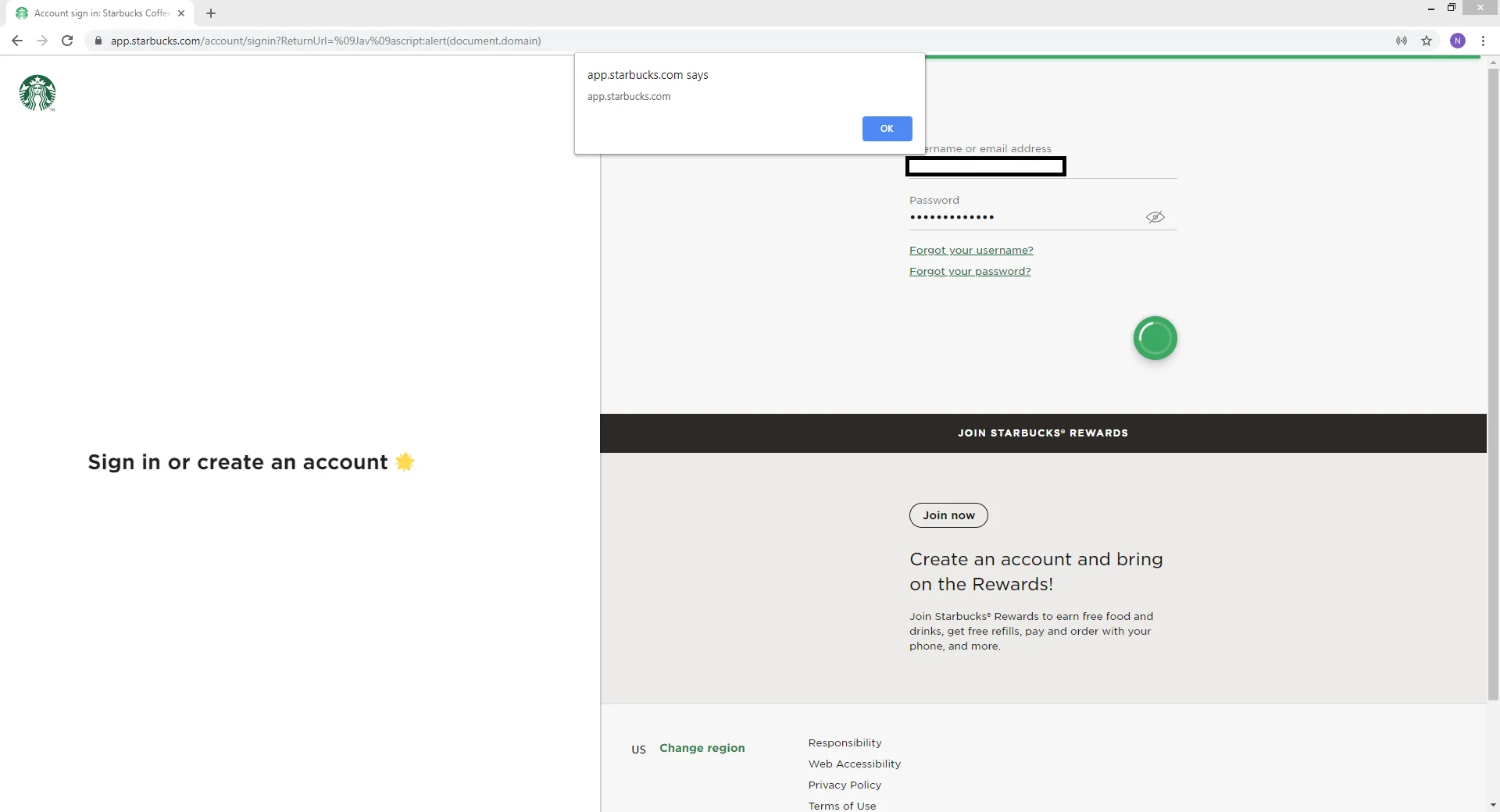
How can the system be exploited with this bug?
XSS could be used to steal the account of any victim that signs in via the url.
How did you come across this bug ?
Retesting report #438240
Recommendations for fix
Improve the checks on ReturnUrl such as not allowing hex characters 00-1F
Impact
As with any xss, it could be used to steal the cookies of the victim to gain access to their account.
Context
app.starbucks.com is the Starbucks web application where customers sign in to their account. The sign-in page at /account/signin accepts a ReturnUrl parameter, which tells the application where to send the user after a successful sign-in. That parameter is a classic redirect target, and here it was also being consumed by client-side code, which is where the problem lay.
The report describes a DOM reflected cross-site scripting issue in ReturnUrl. The researcher, gamer7112, found that the value of the parameter was not properly validated before being used, and that a hex character bypass and blank injections let a javascript: payload survive the checks. The program rated the issue medium severity with a CVSS score of 5.7, and it was disclosed on 17 March 2020.
Setup
No special accounts, roles, tools or versions are described. The only precondition is a victim who signs in through a crafted sign-in URL, which is what the exploitation section below relies on.
Finding it
The researcher came across the bug while retesting report #438240. The payload inserts tab characters (hex 09) into the scheme, so that javascript: is written with tabs inside it.
Exploitation
Step 1: Visit the crafted sign-in URL
The researcher supplies the payload directly in the ReturnUrl parameter of the sign-in page:
https://app.starbucks.com/account/signin?ReturnUrl=%09Jav%09ascript:alert(document.domain)
The ReturnUrl value is %09Jav%09ascript:alert(document.domain). The %09 sequences are URL-encoded tab characters. One sits before the scheme and one sits between Jav and ascript, so the decoded value is a tab, then Jav, then a tab, then ascript:alert(document.domain). The decoded value contains tabs inside the scheme, and the payload executes after sign-in.
Step 2: Sign in
The second step is simply to sign in. The second step is simply to sign in. The payload used is alert(document.domain), which demonstrates execution in the target origin.
Root cause
The application takes the ReturnUrl parameter and uses it without adequate validation. The check in place did not account for control characters embedded in the value: inserting hex characters such as 09 (tab) inside the scheme defeats the filter, because the filter does not normalise or reject those characters before deciding whether the value is safe. The weakness is classified as DOM XSS.
The researcher's own recommendation points at the same gap: the checks on ReturnUrl need to reject hex characters in the 00 to 1F range.
Impact
As with any XSS, the payload runs in the origin of the site. The researcher states that it could be used to steal the cookies of the victim to gain access to their account, and more generally to steal the account of any victim who signs in via the crafted URL. The report describes what the bug could be used for.
Fix
The report recommends improving the checks on ReturnUrl, specifically by not allowing hex characters 00 to 1F. The report does not say what change, if any, was actually made.
Variants to test
- Other control characters in the scheme. The report names the
00to1Frange as the class of characters to block. Try other members of that range in place of%09insidejavascript:and see whether the payload still executes; a positive result is the alert firing on the target origin. - Control characters elsewhere in the value. The payload here places tabs before the scheme and inside it. Try inserting them at other positions in the
ReturnUrlvalue and check whether validation still passes while the browser still resolves the scheme. - Other redirect-style parameters. Any parameter that feeds a post-login redirect or navigation is worth the same treatment. A positive result is the value being used for navigation without being normalised first.
Hunting notes
This bug sat in a post-authentication redirect parameter, a place where validation is often written as a simple scheme check and where the browser's own parsing rules differ from the filter's. The retest angle matters too: the researcher found this while retesting an earlier report on the same parameter, which is a reminder that a fix for a scheme filter is worth re-testing with encoded control characters.
What happened, in plain words
Starbucks has a website where customers sign in to their account, at app.starbucks.com. When you sign in, the site needs to know where to send you afterwards. It does this with a value in the web address called ReturnUrl: you tell the site "after I sign in, take me to this page".
Because that value comes from whoever types the web address, it is a place where an attacker can put their own instructions. In this case, the site took the ReturnUrl value and used it without checking it properly. By inserting a small invisible character inside the value, the researcher bypassed the check on it. The report says XSS could be used to steal the account of any victim that signs in via the URL.
That kind of bug is called cross-site scripting, or XSS. The program rated it medium severity with a CVSS score of 5.7, and it was disclosed on 17 March 2020. The researcher is gamer7112.
The pieces you need to know first
Before the steps make sense, here are a few everyday ideas.
- A web address with a question mark. Everything after the
?in a URL is a set of named values, called parameters, that the page receives. In...?ReturnUrl=something, the parameter name isReturnUrland its value issomething. Think of it like a form field that is filled in by whoever writes the link, not by the site. - A redirect. After you log in, a site often sends you to another page, for example the one you were trying to reach before it asked you to sign in. The
ReturnUrlparameter is exactly that: the destination for after sign-in. - A cookie. When you sign in, the site gives your browser a small piece of data called a cookie, which the browser sends back with every request so the site knows who you are. If someone else gets your cookie, they can often act as you. That is why stealing cookies matters.
- JavaScript. The programming language that runs inside your browser and makes pages interactive. A web address that starts with
javascript:is not a normal page address: it tells the browser to run the text after it as code.alert(document.domain)is a tiny piece of JavaScript that pops up a box showing the site's domain name. It is a harmless way to prove that code ran on a given site. - DOM-based XSS. The DOM is the browser's in-memory model of the page. In a DOM-based XSS bug, the dangerous value is handled by code running in the browser rather than being echoed back by the server. The site's own client-side code takes the value and uses it, and that is where the problem lives.
- URL encoding. Some characters cannot appear literally in a web address, so they are written as a percent sign and two hex digits.
%09means the tab character, an invisible bit of whitespace. Hex here just means the numbering system used for those two digits.
Finding it
The researcher did not stumble on this from nothing: they were retesting report #438240, an earlier report about the same area. Retesting means going back to a bug that was supposedly fixed and checking whether the fix really holds. The researcher was retesting report #438240.
The trick is to put tab characters inside the word javascript:. Written with tabs, it becomes Jav, then a tab, then ascript:. The value contains tabs inside the word javascript:. Two pieces of software read the same text differently, and that gap is the bug.
Exploitation
Step 1: Visit the crafted sign-in URL
The researcher put the payload straight into the ReturnUrl parameter of the sign-in page:
https://app.starbucks.com/account/signin?ReturnUrl=%09Jav%09ascript:alert(document.domain)
Line by line, in plain words:
https://app.starbucks.com/account/signinis the normal Starbucks sign-in page.?starts the list of parameters.ReturnUrl=is the parameter the site uses to decide where to send you after sign-in.%09is a URL-encoded tab character. There is one beforeJavand one betweenJavandascript.Javandascript:alert(document.domain)are the two halves of the wordjavascript:with the tab in the middle, followed by the small demonstration script.
When the browser decodes the value, it becomes a tab, then Jav, then a tab, then ascript:alert(document.domain). The site's validation does not treat that as a javascript: address.
Why this step: the attacker needs the dangerous value to be in the page's address so that the site picks it up. Putting it in ReturnUrl is the way in.
Step 2: Sign in
The second step is just to sign in. The second step is just to sign in. The payload is alert(document.domain), which proves the code ran on the target site: the pop-up shows the site's own domain.
Why it works
The application takes the ReturnUrl value and uses it without adequate validation. The check that was in place did not account for control characters embedded in the value. Inserting hex characters such as 09 (tab) inside the scheme defeats the filter, because the filter does not normalise or reject those characters before deciding whether the value is safe. The weakness is classified as DOM XSS.
The researcher's own recommendation points at the same gap: the checks on ReturnUrl should reject hex characters in the 00 to 1F range. That range is the set of control characters, invisible characters like tab and newline.
Impact
As with any XSS, the payload runs in the origin of the site, meaning it runs with the site's own identity in the browser. The researcher states that it could be used to steal the cookies of the victim to gain access to their account, and more generally to steal the account of any victim who signs in via the crafted URL. The report describes what the bug could be used for.
Fix
The report recommends improving the checks on ReturnUrl, specifically by not allowing hex characters 00 to 1F. The report does not say what change, if any, was actually made.
Other things worth trying
- Other control characters in the scheme. The report names the
00to1Frange as the class of characters to block. Try other members of that range in place of%09insidejavascript:and see whether the payload still runs; a positive result is the alert popping up on the target site. - Control characters elsewhere in the value. Here the tabs sit before the scheme and inside it. Try putting them at other positions in the
ReturnUrlvalue and check whether validation still passes while the browser still treats the value as ajavascript:address. - Other redirect-style parameters. Any parameter that feeds a post-login redirect or navigation is worth the same treatment. A positive result is the value being used to navigate without being cleaned up first.
Notes for anyone hunting similar bugs
This bug sat in a post-authentication redirect parameter, a place where validation is often written as a simple scheme check and where the browser's own parsing rules differ from the filter's. The retest angle matters too: the researcher found this while retesting an earlier report on the same parameter, which is a reminder that a fix for a scheme filter is worth re-testing with encoded control characters.
Glossary
- XSS (cross-site scripting): a bug where an attacker gets their own code to run inside another site's pages, in a victim's browser.
- DOM-based XSS: XSS where the dangerous value is handled by code running in the browser (the DOM) rather than being echoed back by the server.
- DOM: the browser's in-memory model of a web page, which scripts read and change.
- Parameter: a named value in a web address, after the
?, such asReturnUrl. - ReturnUrl: the parameter that tells the sign-in page where to send the user after a successful sign-in.
- Redirect: sending the browser from one page to another automatically.
- Payload: the piece of attacker-controlled text or code that is meant to be executed or interpreted.
javascript:scheme: a web address form that tells the browser to run the text after it as JavaScript instead of loading a page.alert(document.domain): a small JavaScript expression that pops up a box showing the current site's domain, used to prove code ran on that site.- Origin: the combination of scheme, host and port that identifies a site to the browser; code running in a site's origin can act with that site's identity.
- Cookie: a small piece of data a site stores in your browser and receives back on each request, often used to keep you signed in.
- URL encoding: writing characters in a web address as a percent sign plus two hex digits, for example
%09for a tab. - Hex: the base-16 number system used for those two digits.
- Control character: an invisible character such as a tab (
09) or newline, in the00to1Frange. - Validation / filter: the check a site performs on a value before using it, meant to reject dangerous input.
- Normalise: to convert a value into a standard form before checking it, so that hidden characters cannot slip past.
- CVSS: a standard scoring system for the severity of a security bug; 5.7 is in the medium range.
- Retest: going back to a previously reported bug to check whether its fix actually works.
- Recon: the information-gathering phase of security testing, looking for interesting parameters and behaviour.
- Account takeover: gaining control of someone else's account, for example by using their stolen cookie.