[stagecafrstore.starbucks.com] CRLF Injection, XSS

- Triaged in 10 days
- Fixed in 10 months
- Disclosed after 13 months
Chrome PoC
http://stagecafrstore.starbucks.com/%3f%0d%0aLocation:%0d%0aContent-Type:text/html%0d%0aX-XSS-Protection%3a0%0d%0a%0d%0a%3Cscript%3Ealert%28document.domain%29%3C/script%3E
FireFox PoC
http://stagecafrstore.starbucks.com/%3f%0D%0ALocation://x:1%0D%0AContent-Type:text/html%0D%0AX-XSS-Protection%3a0%0D%0A%0D%0A%3Cscript%3Ealert(document.domain)%3C/script%3E
HTTP Response
HTTP/1.1 301 Content-moved
Date: Tue, 20 Dec 2016 08:40:11 GMT
Server: WebServer
X-Original-link: /%3f%0D%0ALocation://x:1%0D%0AContent-Type:text/html%0D%0AX-XSS-Protection%3a0%0D%0A%0D%0A%3Cscript%3Ealert(document.domain)%3C/script%3E
X-XSS-Protection: 0
Location: //x:1
Content-Type: text/html
Content-Length: 98

<script>alert(document.domain)</script>
Content-Length: 0
X-OneLinkServiceType: onelink.fcgi
Attachments
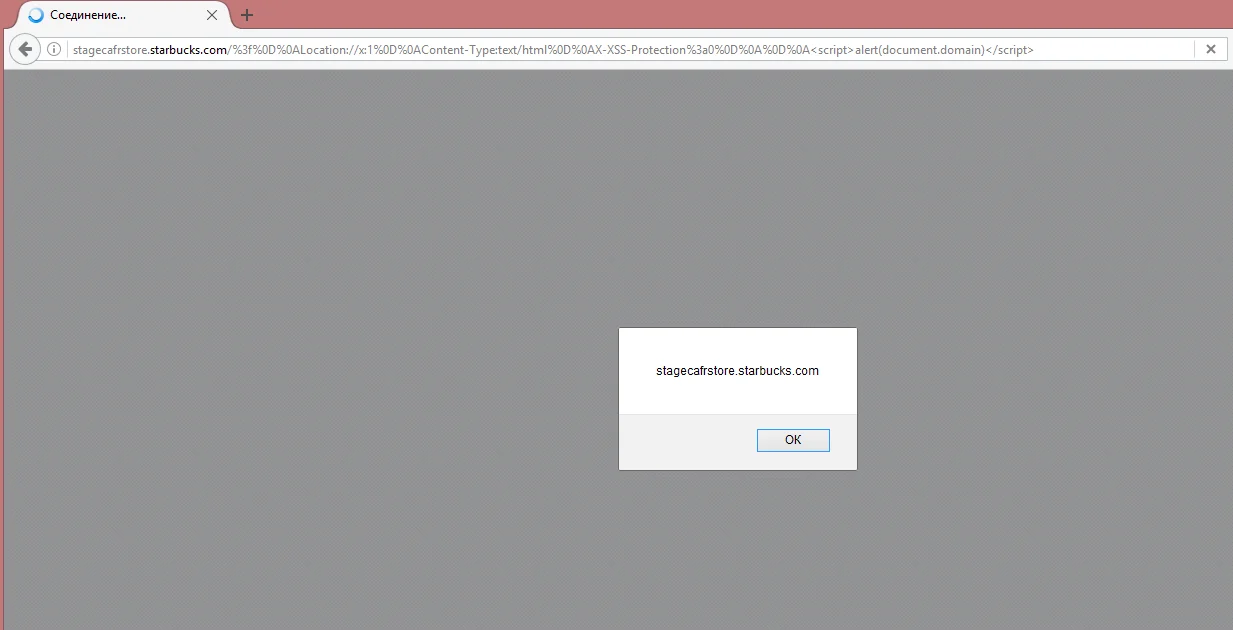
What the report shows
The target is the host stagecafrstore.starbucks.com. The researcher found that a crafted path could inject carriage return and line feed characters into the response headers, and that the resulting response could be made to carry a script. The report gives two proof-of-concept URLs, one aimed at Chrome and one at Firefox.
Chrome PoC:
http://stagecafrstore.starbucks.com/%3f%0d%0aLocation:%0d%0aContent-Type:text/html%0d%0aX-XSS-Protection%3a0%0d%0a%0d%0a%3Cscript%3Ealert%28document.domain%29%3C/script%3E
FireFox PoC:
http://stagecafrstore.starbucks.com/%3f%0D%0ALocation://x:1%0D%0AContent-Type:text/html%0D%0AX-XSS-Protection%3a0%0D%0A%0D%0A%3Cscript%3Ealert(document.domain)%3C/script%3E
Both payloads are percent-encoded. Decoded, the path begins with a question mark, then a CRLF pair, then a Location header, a Content-Type header, an X-XSS-Protection header set to 0, a blank line, and finally a <script> block that calls alert(document.domain). The Firefox variant uses Location://x:1 rather than a bare Location: value.
The report includes the server response to the Firefox payload:
HTTP/1.1 301 Content-moved
Date: Tue, 20 Dec 2016 08:40:11 GMT
Server: WebServer
X-Original-link: /%3f%0D%0ALocation://x:1%0D%0AContent-Type:text/html%0D%0AX-XSS-Protection%3a0%0D%0A%0D%0A%3Cscript%3Ealert(document.domain)%3C/script%3E
X-XSS-Protection: 0
Location: //x:1
Content-Type: text/html
Content-Length: 98

<script>alert(document.domain)</script>
Content-Length: 0
X-OneLinkServiceType: onelink.fcgi
The response shows the injected headers taking effect: the status line is followed by a Location: //x:1 header, a Content-Type: text/html header and an X-XSS-Protection: 0 header, then a blank line and the injected script as the body. The original request path is echoed back in the X-Original-link header, and the response also carries X-OneLinkServiceType: onelink.fcgi, which points to the component handling the redirect. The trailing Content-Length: 0 after the body is part of the captured response as shown.
It does not describe a fix, and it gives no bounty figure.
Root cause
Because the value is reflected into header context, an encoded %0d%0a sequence is decoded and treated as the end of one header and the start of the next. That lets the attacker add arbitrary headers, including a Content-Type and a body, and in this case a script that the browser then renders as HTML. The X-Original-link header in the response shows the raw path being carried through, which is consistent with reflection rather than a fixed redirect target.
Impact
An attacker who can get a victim to follow such a link can have script run in the context of the affected host, as the payload calls alert(document.domain). In practice that means script execution under the site's origin, with access to cookies not marked HttpOnly, to the DOM of pages on that origin, and to actions the victim can perform there. The report demonstrates execution with an alert only; it does not show theft of data or a specific account takeover.
How this kind of bug works
HTTP headers are line-based: each header is a name, a colon and a value, terminated by CRLF, and a blank line ends the header block and starts the body. If user input reaches a header value unfiltered, an injected CRLF ends the current header early and lets the attacker write new headers and, after a second CRLF, a body. This is HTTP response splitting. When the injected headers include a Content-Type that makes the browser treat the response as HTML, and the injected body contains markup, the result is reflected cross-site scripting. Browsers and intermediaries have grown stricter about bare CR and LF in header values, and some reject such responses outright, and the report carries separate payloads for Chrome and Firefox.. The X-XSS-Protection: 0 header in the payload is there to switch off the browser's legacy XSS filter so it does not block the injected script.
How to test for it
- Find parameters, path segments or filenames that end up in a response header: redirect
Locationvalues,Set-Cookie, custom headers such as tracing or original-URL headers, and content disposition filenames. - Send a value containing an encoded CRLF pair followed by a harmless marker header, for example a path segment with
%0d%0aand a header name and value. Watch the raw response, not the rendered page. - A positive result is the marker appearing as its own header line in the response, or the response splitting into two responses where a proxy is involved.
- Escalate to a body: inject a
Content-Type: text/htmlheader, a blank line and a short script, and check whether the browser executes it. - Test both
%0d%0aand%0D%0A, and try variants such as a leading%3for a scheme-like value afterLocation:, since different parsers and browsers handle them differently.
Common false positives: the marker appears URL-encoded or inside an existing header value rather than as a new header; the server normalises or rejects the request with a 400; a proxy strips the injected lines before they reach the client; or the browser refuses to render the body because of its content type. Always confirm execution in a real browser rather than trusting the raw response alone.
How it is fixed
The standard fix is to never place raw user input into header values. Strip or reject CR and LF characters from anything written into a header, and validate path and query input against an allowlist. Where a redirect target is built from input, map it to a known set of destinations rather than echoing the path. Frameworks and web servers often provide header-setting APIs that reject control characters; use those instead of string concatenation. As defence in depth, set a restrictive Content-Type and a Content-Security-Policy that blocks inline script, and keep the platform and its HTTP libraries patched against response splitting.
Hunting notes
Response splitting tends to hide in redirectors, URL shorteners, download endpoints that set Content-Disposition, language or locale switchers, and any custom header that echoes the request path, such as the original-link header seen here. Staging and legacy hosts are good places to look because they often run older stacks with looser header handling. Recon signals include custom X- headers that reflect input, redirect endpoints that accept a path or URL, and servers or frameworks with known CRLF issues. To get a report accepted, show the raw response with the injected header and body, then show the script executing in a browser and state clearly what an attacker gains, such as reading a session cookie or performing an action as the victim. Keep the demonstration minimal and avoid touching other users' data.
What happened, in plain words
A security researcher found a bug on stagecafrstore.starbucks.com. The bug let a specially crafted web address make the server send back a response that contained a script written by the attacker. When a victim opened that address, their browser ran the script as if it came from the Starbucks site.
The trick relies on how web servers and browsers talk to each other. Every time you load a page, your browser sends a request and the server sends back a response. The response starts with a block of lines called headers, which are instructions such as "this is a redirect" or "this content is HTML". A blank line ends the headers, and whatever comes after is the body, the actual page content.
Headers are separated by two invisible characters: carriage return (CR) and line feed (LF). If a server copies part of the web address into a header without cleaning it, an attacker can sneak in their own CR and LF characters. That ends the current header early and lets the attacker add new headers and even a body. This is called HTTP response splitting. When the injected body is HTML containing a script, the browser runs it. That is cross-site scripting, or XSS.
The researcher supplied two proof-of-concept (PoC) URLs, one for Chrome and one for Firefox, plus the server's raw response to the Firefox one. It does not describe a fix or a bounty amount.
The proof of concept, step by step
Both URLs are percent-encoded. That means special characters are written as % followed by two hexadecimal digits, so they can travel safely inside a URL. For example, %0d is CR, %0a is LF, %3c is < and %3e is >. The server decodes these when it processes the request.
Chrome PoC:
http://stagecafrstore.starbucks.com/%3f%0d%0aLocation:%0d%0aContent-Type:text/html%0d%0aX-XSS-Protection%3a0%0d%0a%0d%0a%3Cscript%3Ealert%28document.domain%29%3C/script%3E
FireFox PoC:
http://stagecafrstore.starbucks.com/%3f%0D%0ALocation://x:1%0D%0AContent-Type:text/html%0D%0AX-XSS-Protection%3a0%0D%0A%0D%0A%3Cscript%3Ealert(document.domain)%3C/script%3E
Decoded, the path starts with a question mark (%3f), then a CRLF pair, then a Location header, a Content-Type header, an X-XSS-Protection header set to 0, a blank line, and finally a <script> block that calls alert(document.domain). The Firefox variant uses Location://x:1 instead of a bare Location: value.
Why each piece matters:
- The first
%0d%0aends the header the server is writing and starts a new one. Location:tells the browser to redirect.Content-Type:text/htmltells the browser to treat the response body as HTML, so any markup in it will be rendered and scripts will run.X-XSS-Protection:0switches off an old browser filter that might otherwise block the injected script.- The second
%0d%0a%0d%0ais a blank line, which ends the headers and starts the body. - The body is
<script>alert(document.domain)</script>.document.domainis the current site's domain, so the alert proves the script is running in the context ofstagecafrstore.starbucks.com.
The server's response to the Firefox payload:
HTTP/1.1 301 Content-moved
Date: Tue, 20 Dec 2016 08:40:11 GMT
Server: WebServer
X-Original-link: /%3f%0D%0ALocation://x:1%0D%0AContent-Type:text/html%0D%0AX-XSS-Protection%3a0%0D%0A%0D%0A%3Cscript%3Ealert(document.domain)%3C/script%3E
X-XSS-Protection: 0
Location: //x:1
Content-Type: text/html
Content-Length: 98

<script>alert(document.domain)</script>
Content-Length: 0
X-OneLinkServiceType: onelink.fcgi
Reading it line by line:
HTTP/1.1 301 Content-movedis the status line. A 301 normally means a permanent redirect.Date,ServerandX-Original-linkare ordinary headers.X-Original-linkechoes the original request path, which shows the server is reflecting user input.X-XSS-Protection: 0,Location: //x:1andContent-Type: text/htmlare the injected headers. They appear as separate lines, which proves the CRLF injection worked.- The blank line ends the headers.
<script>alert(document.domain)</script>is the injected body. The browser will parse it as HTML and run the script.- The trailing
Content-Length: 0andX-OneLinkServiceType: onelink.fcgiare part of the captured response as shown. The latter points to the component handling the redirect.
Why it matters
If an attacker can get a victim to open such a link, script runs under the site's origin. That means it can read cookies that are not marked HttpOnly, inspect and change the page, and perform actions the victim is allowed to perform. The report demonstrates execution with an alert only; it does not show data theft or account takeover.
In general, how this kind of bug works
HTTP headers are line-based: each header is a name, a colon and a value, terminated by CRLF, and a blank line ends the header block and starts the body. If user input reaches a header value unfiltered, an injected CRLF ends the current header early and lets the attacker write new headers and, after a second CRLF, a body. This is HTTP response splitting. When the injected headers include a Content-Type that makes the browser treat the response as HTML, and the injected body contains markup, the result is reflected cross-site scripting. Browsers and intermediaries have grown stricter about bare CR and LF in header values, and some reject such responses outright, and the report carries separate payloads for Chrome and Firefox.. The X-XSS-Protection: 0 header in the payload is there to switch off the browser's legacy XSS filter so it does not block the injected script.
In general, how to test for it
- Find parameters, path segments or filenames that end up in a response header: redirect
Locationvalues,Set-Cookie, custom headers such as tracing or original-URL headers, and content disposition filenames. - Send a value containing an encoded CRLF pair followed by a harmless marker header, for example a path segment with
%0d%0aand a header name and value. Watch the raw response, not the rendered page. - A positive result is the marker appearing as its own header line in the response, or the response splitting into two responses where a proxy is involved.
- Escalate to a body: inject a
Content-Type: text/htmlheader, a blank line and a short script, and check whether the browser executes it. - Test both
%0d%0aand%0D%0A, and try variants such as a leading%3for a scheme-like value afterLocation:, since different parsers and browsers handle them differently.
Common false positives: the marker appears URL-encoded or inside an existing header value rather than as a new header; the server normalises or rejects the request with a 400; a proxy strips the injected lines before they reach the client; or the browser refuses to render the body because of its content type. Always confirm execution in a real browser rather than trusting the raw response alone.
In general, how it is fixed
The standard fix is to never place raw user input into header values. Strip or reject CR and LF characters from anything written into a header, and validate path and query input against an allowlist. Where a redirect target is built from input, map it to a known set of destinations rather than echoing the path. Frameworks and web servers often provide header-setting APIs that reject control characters; use those instead of string concatenation. As defence in depth, set a restrictive Content-Type and a Content-Security-Policy that blocks inline script, and keep the platform and its HTTP libraries patched against response splitting.
In general, where to look
Response splitting tends to hide in redirectors, URL shorteners, download endpoints that set Content-Disposition, language or locale switchers, and any custom header that echoes the request path, such as the original-link header seen here. Staging and legacy hosts are good places to look because they often run older stacks with looser header handling. Recon signals include custom X- headers that reflect input, redirect endpoints that accept a path or URL, and servers or frameworks with known CRLF issues. To get a report accepted, show the raw response with the injected header and body, then show the script executing in a browser and state clearly what an attacker gains, such as reading a session cookie or performing an action as the victim. Keep the demonstration minimal and avoid touching other users' data.
Glossary
- Header: a line in an HTTP request or response that carries metadata, such as
Content-TypeorLocation. - Body: the part of an HTTP message after the blank line, containing the actual content such as HTML.
- CRLF: carriage return (CR,
\r,%0d) followed by line feed (LF,\n,%0a); the standard line ending in HTTP headers. - Percent-encoding: writing special characters as
%plus two hexadecimal digits so they can travel in a URL. - HTTP response splitting: injecting CRLF into a header value to create new headers and a body.
- Cross-site scripting (XSS): running attacker-supplied script in the context of a trusted website.
- Reflected XSS: XSS where the malicious input is echoed back in the response rather than stored on the server.
- Origin: the combination of scheme, host and port that defines a security boundary in the browser.
- Cookie: a small piece of data a site stores in the browser, often used to identify a session.
- HttpOnly: a cookie flag that prevents JavaScript from reading the cookie.
- DOM: the browser's in-memory model of the page, which scripts can read and modify.
- Content-Type: a header that tells the browser what kind of content follows, such as
text/html. - Location: a header used in redirects to tell the browser where to go next.
- X-XSS-Protection: a legacy header that controls an old browser XSS filter;
0disables it. - Content-Security-Policy: a header that restricts what resources and scripts a page may load or run.
- Allowlist: a list of permitted values; anything not on the list is rejected.
- Staging: a test environment that mirrors production but is not the live site.
- Proof of concept (PoC): a minimal demonstration that a vulnerability exists.
- False positive: a test result that looks like a vulnerability but is not exploitable.