Critical vulnerability on TP-Link service or how I got 0$
A TP-Link business customer portal allowed bypassing manual account approval by using the password reset flow, and an API endpoint returned plaintext passwords for any user ID, enabling access to all user credentials including admins. An attacker could take over accounts and compromise sensitive data.
 Published on infosecwriteups.com
As a dedicated security researcher, I often devote my spare time to exploring the world of bug bounty programs. While traditional platforms offer valuable opportunities, I also extend my investigations to public systems of popular vendors.
The full write-up lives on its author's site
It belongs to its author, so we link to it rather than copy it. The other two tabs are our own rewrites, checked against it.
Context
TP-Link runs a subdomain dedicated to business customer service. The researcher registered there as an ordinary user and found that the registration flow is gated by a manual review: new accounts are not usable until a human approves them. The account area exposes an API that returns the signed-in user's profile, and that profile response contains the user's password in plaintext. The profile lookup is keyed by a numeric user ID.
The write-up describes two flaws chained together: a way to skip the manual approval step entirely, and an IDOR on the profile endpoint that lets any authenticated user read any other user's profile, including an administrator's credentials. The issue was reported to TP-Link, fixed before publication, and the researcher received no monetary reward.
Setup
No tooling, versions or special preconditions are described beyond a browser and an email address. The researcher used an email address for registration and for the password reset flow. The researcher's own freshly registered, still unapproved account is the starting point.
Finding it
Registration on the business customer service subdomain completed normally, but the account could not be used: a message stated that accounts are reviewed manually before approval, and a login attempt with the new account failed.
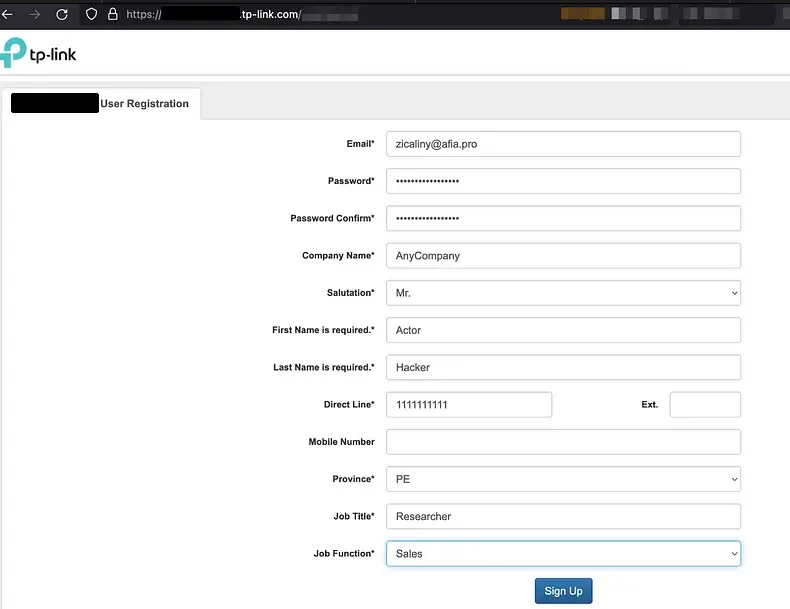
Registering
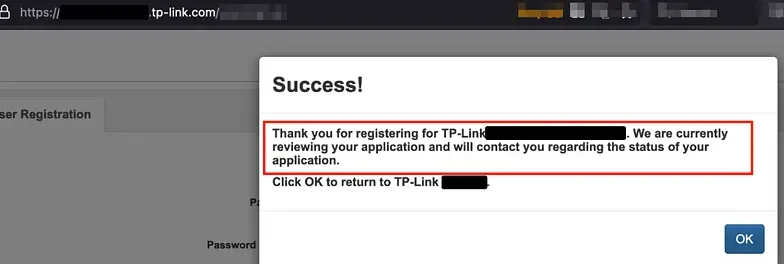
Manual approval is required
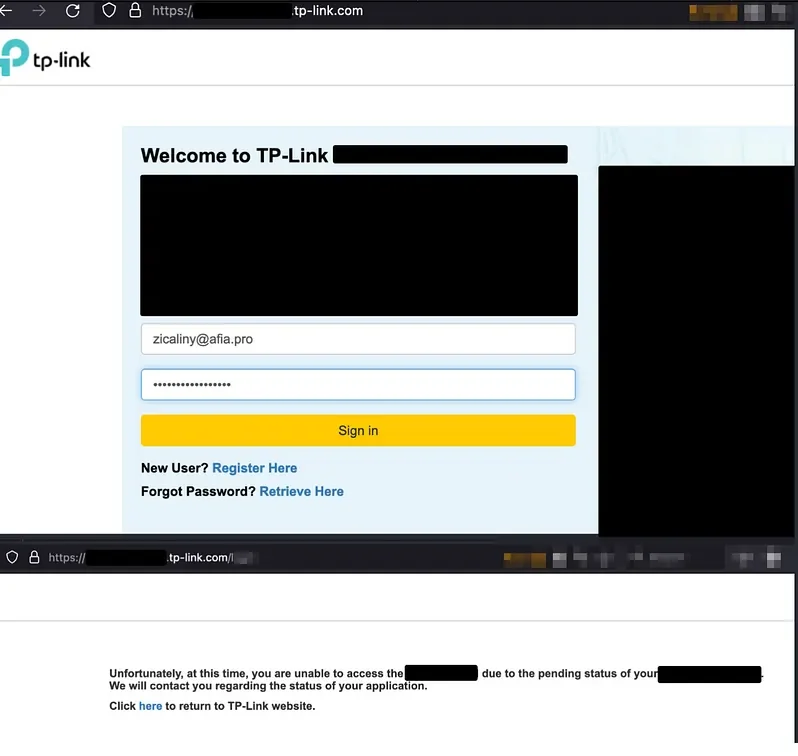
Logging in
The researcher decided to try to bypass the account verification stage.
Exploitation
Step 1: bypass the manual approval with the password reset flow
The researcher opened the "forgot password" page and submitted the email address used at registration.
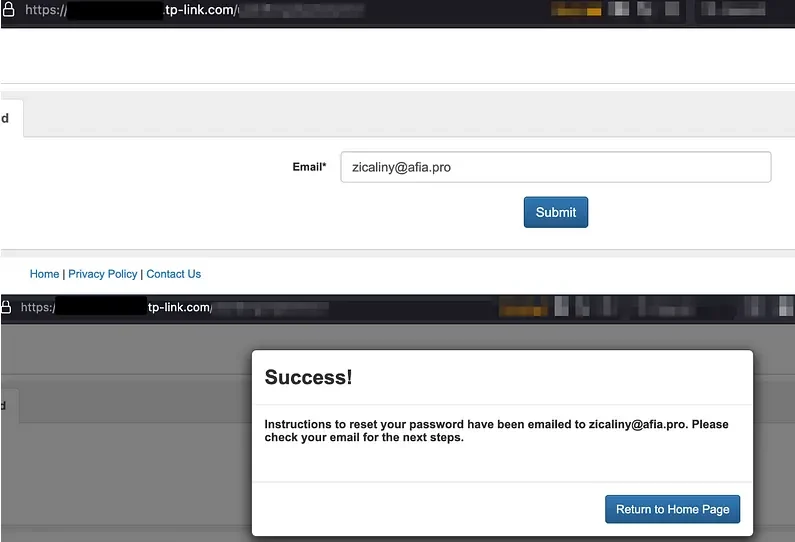
Restoring a password
An email arrived containing a new temporary password.
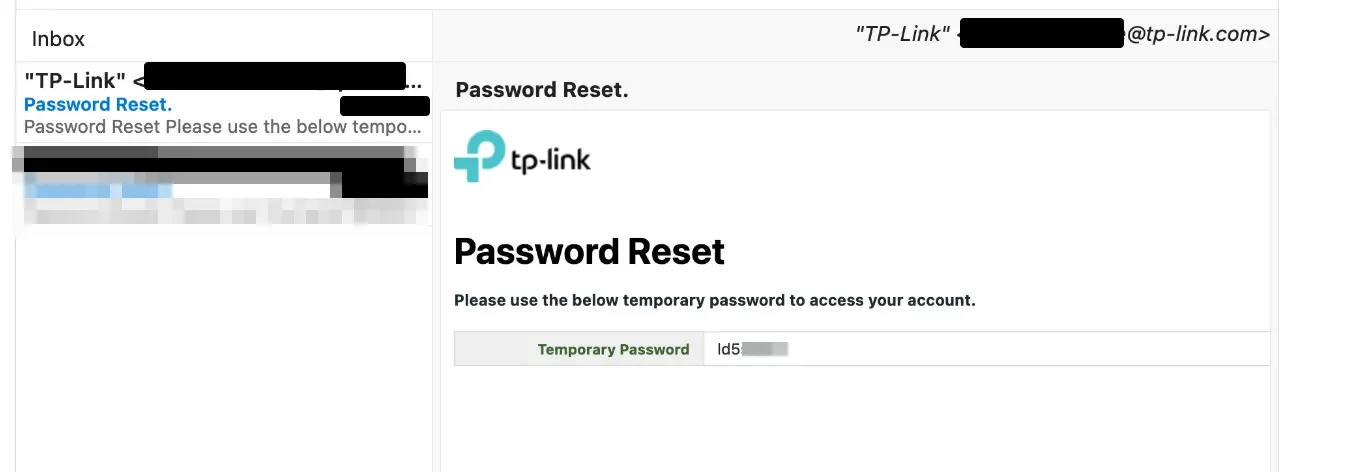
Temporary login password email
Logging in with that temporary password worked, and the application redirected to the profile edit page to choose a new password.
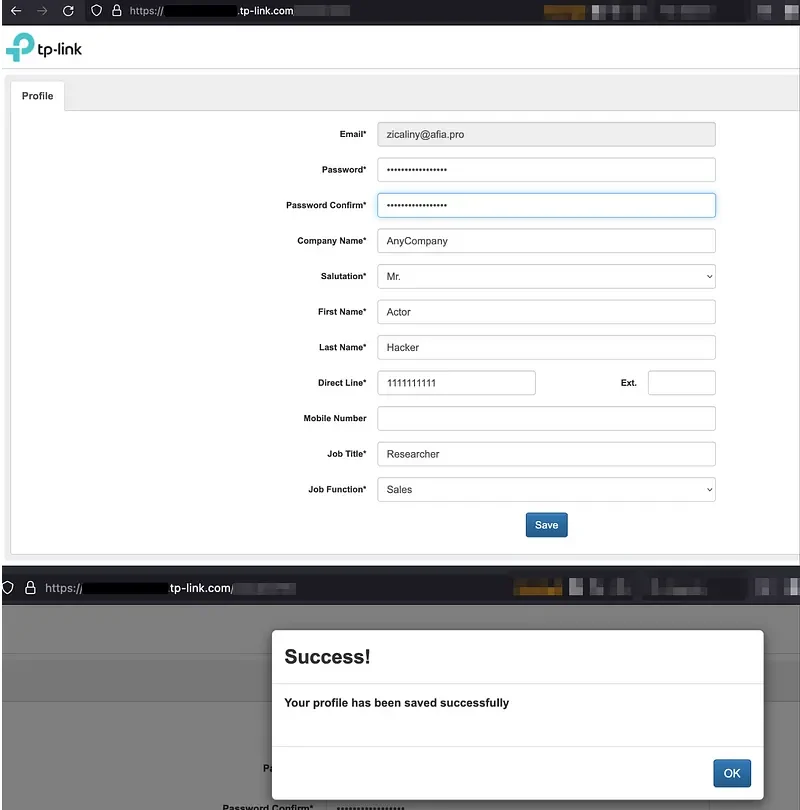
Setting up a new password
The reset flow therefore issues a working session for an account that has not been approved. The reset flow therefore issues a working session for an account that has not been approved, so the account becomes usable without any reviewer involvement.
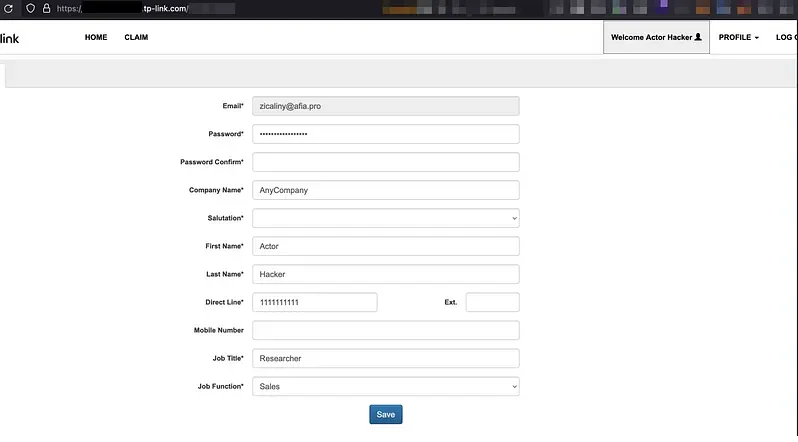
Successful login
Step 2: read the profile response
Once inside, the researcher inspected the API calls the application makes. The request that retrieves profile information returns the account's password in plaintext, and it is keyed by a user ID that looked like a simple iterator.
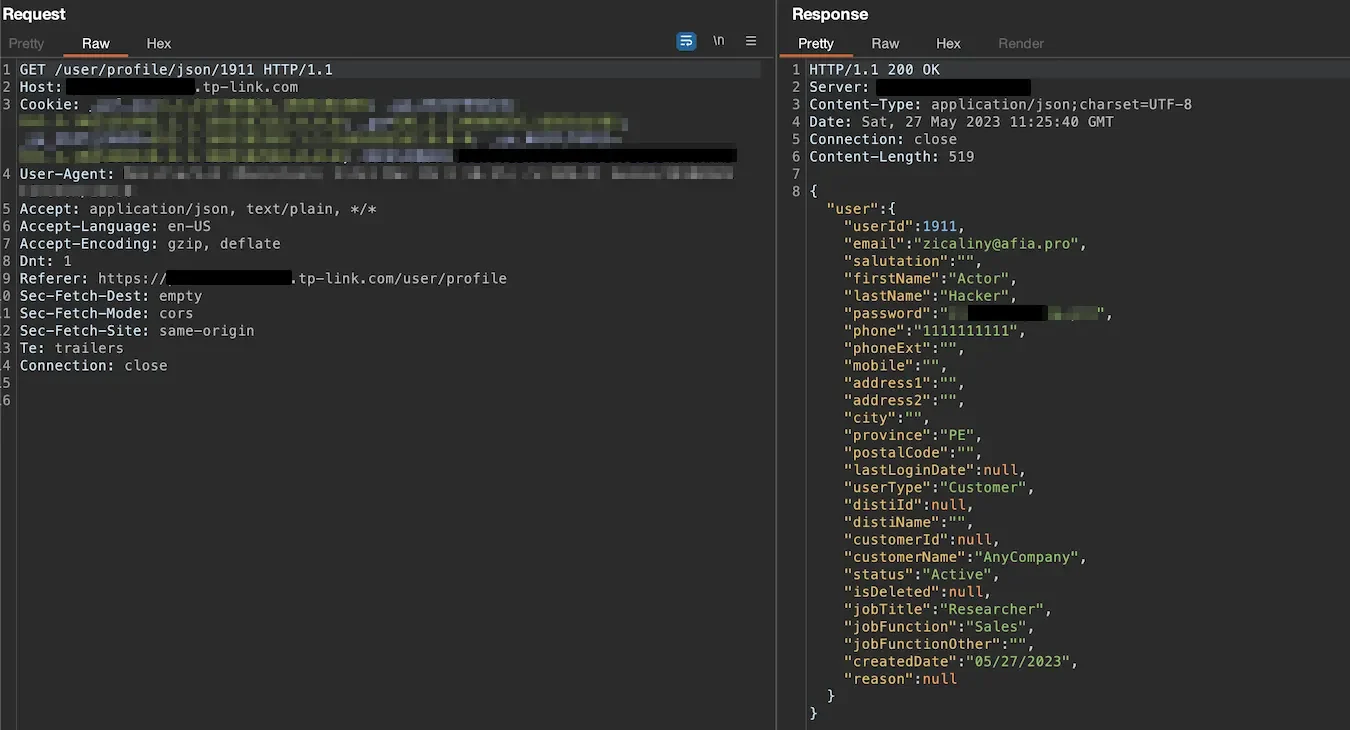
Getting current profile information
Step 3: enumerate other users through the IDOR
The researcher substituted different numbers for the user ID in the profile request. The endpoint returned the corresponding user's information, including an administrator's credentials. No authorisation check tied the requested ID to the session's own account.
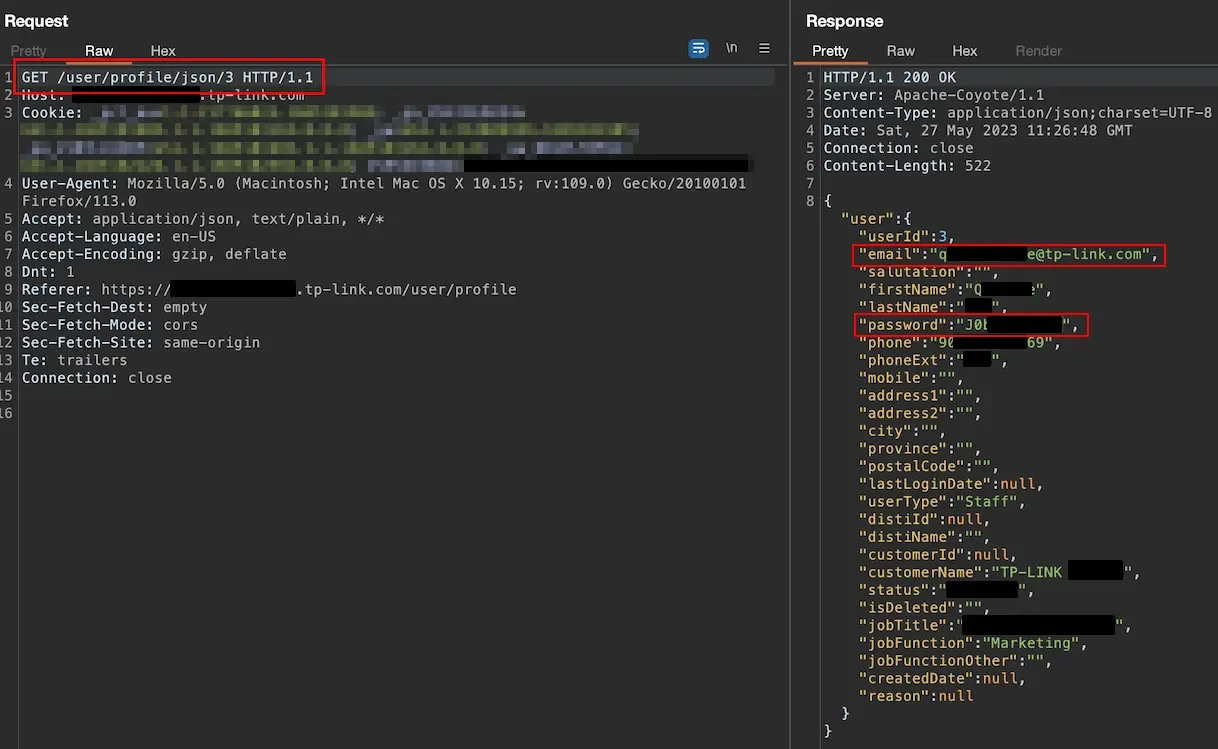
Admin user credentials exposed
Because the identifier is sequential, a simple intruder-style run over the ID space would download every user profile together with its password. The researcher notes that the resource is actively used by TP-Link business customers, which raises the exposure.
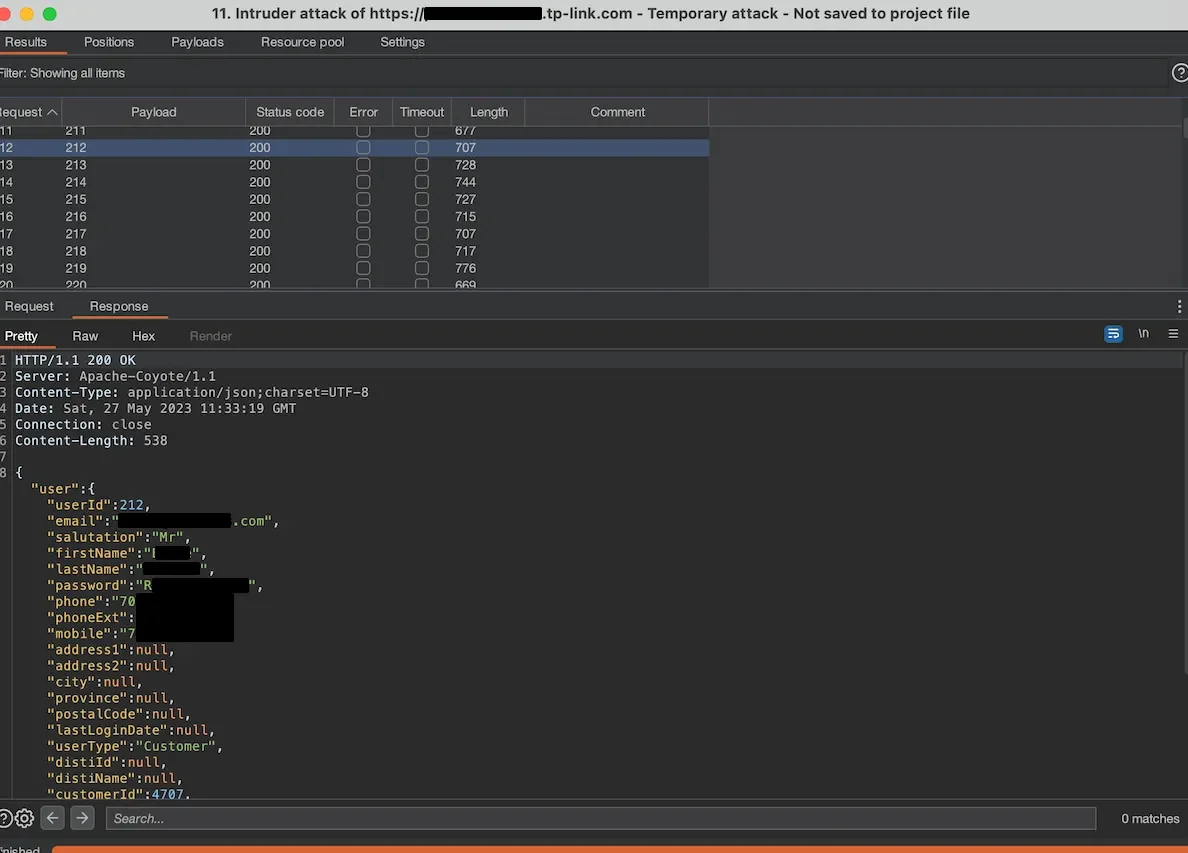
Automating the attack
Root cause
Two design mistakes combine here. First, the password reset path issues a session for an unapproved account, bypassing the manual review. Second, the profile endpoint returns any user's data when the user ID is changed, which is a classic IDOR. On top of both, the profile object carries the password in plaintext, so reading any profile hands over that user's credentials directly. The report does not describe the server-side code, so the exact implementation is not shown; the behaviour above is what the researcher observed.
Impact
An attacker who can register an email address can obtain a working session without waiting for manual approval, then enumerate the user ID space and collect every profile, including plaintext passwords and administrator credentials. The researcher lists the consequences:
- Account takeover: compromised credentials give full control of user accounts, including settings changes.
- Data breach: leaked personal data, including plaintext passwords, enables identity theft and financial fraud.
- Social engineering: attackers can impersonate legitimate users and use that trust to extract further information.
- Password reuse: harvested credentials can be tried against other services where users reused them.
- System compromise: administrative credentials may allow control over the underlying infrastructure, unauthorised modification or data manipulation.
The severity is amplified because the subdomain is an active resource used by TP-Link business customers. The report gives no CVSS score or formal severity rating.
Fix
The researcher reported the issue to TP-Link support, which acknowledged it and took immediate action. A retest after the fix suggested the necessary measures were in place, and the researcher states the flaw has been rectified. The report does not describe which specific changes were made, so the following are the changes the behaviour calls for rather than a record of what was deployed: enforce the approval state on the password reset path as well as on login, authorise the profile endpoint against the session's own user rather than a client-supplied ID, and stop returning the password in the profile response at all.

Measures are taken
Variants to test
- Reset flow on other gated registrations. Register on a service with manual or email approval, then run the forgot-password flow before approval. A positive result is a temporary password that logs you in and lands you on the profile or dashboard page.
- Sequential IDs on profile endpoints. With an authenticated session, change the user ID in a profile request to neighbouring values. A positive result is another user's data coming back instead of an authorisation error.
- Sensitive fields in profile responses. Inspect the full JSON of your own profile for passwords, tokens or other secrets. A positive result is any credential material returned to the client.
- Bulk enumeration. If IDs are sequential, run an intruder-style sweep across the range and count distinct users returned. A positive result is a large set of profiles returned without an authorisation check.
- Privileged accounts in the same space. Check whether low IDs or known admin accounts resolve through the same endpoint. A positive result is an administrator profile returned to an ordinary user.

No bounty this time: (
What happened, in plain words
A security researcher found a serious problem on a TP-Link website used by business customers. The site let people register for an account, but a human had to approve each new account before it could be used. The researcher discovered that the "forgot password" feature skipped that approval step: by resetting the password, you could log in immediately, even though no one had approved you.
Once inside, the researcher looked at how the website fetches your profile information. The website asked a server for data using a number that identified the user. By changing that number, the researcher could read other people's profiles, including an administrator's. Worse, each profile contained the user's password in plain text, not hidden or scrambled.
This is a beginner-friendly retelling of the researcher's write-up. It explains every technical idea from scratch, so you only need to know how to use a browser. The original report was published after TP-Link fixed the issues. The researcher received no money for the finding.
Background: what the site does and what went wrong
TP-Link runs a subdomain (a subdomain is a section of a website, like shop.example.com is a subdomain of example.com) dedicated to business customer service. The researcher signed up there as an ordinary user. The registration process looked normal, but after signing up, the site said the account needed manual review before it could be used. That means a person at TP-Link had to look at the new account and approve it. Until then, logging in failed.
The account area uses an API. An API (Application Programming Interface) is a way for a website's pages to talk to a server behind the scenes. When you click something, your browser sends a request to the server, and the server sends back data, often in a format called JSON (JavaScript Object Notation), which is just text organised with curly braces and labels. The API returned the signed-in user's profile, and that profile included the user's password in plain text. The profile lookup used a numeric user ID, a number that identifies each user.
The researcher found two flaws that worked together:
- A way to skip the manual approval step entirely by using the password reset feature.
- An IDOR (Insecure Direct Object Reference) on the profile endpoint. IDOR means the server lets you ask for data by its internal identifier (like a user ID) without checking that you are allowed to see it. So any logged-in user could read any other user's profile, including an administrator's credentials.
The issue was reported to TP-Link, fixed before the write-up was published, and the researcher received no monetary reward.
Setting up
The report does not describe any special tools, software versions, or preconditions beyond a browser and an email address. Intercepting means catching the request your browser sends to the server before it leaves, so you can look at it and change it. Replaying means sending that request again, possibly with modifications. The researcher used an email address for registration and for the password reset flow. The starting point is the researcher's own freshly registered account, which is still waiting for approval.
Finding the problem
Registration on the business customer service subdomain completed normally. But the account could not be used: a message said accounts are reviewed manually before approval, and a login attempt with the new account failed.
Registering
Manual approval is required
Logging in
The researcher decided to try to bypass the account verification stage.
Exploitation
Step 1: bypass the manual approval with the password reset flow
The researcher opened the "forgot password" page and submitted the email address used at registration.
Restoring a password
An email arrived containing a new temporary password.
Temporary login password email
Logging in with that temporary password worked, and the application redirected to the profile edit page to choose a new password.
Setting up a new password
The reset flow therefore issues a working session for an account that has not been approved. A session is like a temporary pass that the server gives your browser after you log in, so you don't have to type your password on every page. The password reset path issues a working session for an account that has not been approved. So the account becomes usable without any reviewer involvement.
Successful login
Step 2: read the profile response
Once inside, the researcher inspected the API calls the application makes. Inspecting means using the browser's developer tools (usually opened with F12) to see the requests and responses. The request that retrieves profile information returns the account's password in plaintext, and it is keyed by a user ID that looked like a simple iterator. An iterator is a number that goes up by one each time, like 1, 2, 3, and so on.
Getting current profile information
Step 3: enumerate other users through the IDOR
The researcher substituted different numbers for the user ID in the profile request. The endpoint returned the corresponding user's information, including an administrator's credentials. No authorisation check tied the requested ID to the session's own account. Authorisation is the process of checking whether you are allowed to do something. Here, the server did not check that the user ID in the request belonged to the person making the request.
Admin user credentials exposed
Because the identifier is sequential, a simple intruder-style run over the ID space would download every user profile together with its password. An intruder-style run means trying many values automatically, one after another. The researcher notes that the resource is actively used by TP-Link business customers, which raises the exposure.
Automating the attack
Root cause
Two design mistakes combine here. First, the password reset path issues a session for an unapproved account, bypassing the manual review. Second, the profile endpoint returns any user's data when the user ID is changed, which is a classic IDOR. On top of both, the profile object carries the password in plaintext, so reading any profile hands over that user's credentials directly. The report does not describe the server-side code, so the exact implementation is not shown; the behaviour above is what the researcher observed.
Impact
An attacker who can register an email address can obtain a working session without waiting for manual approval, then enumerate the user ID space and collect every profile, including plaintext passwords and administrator credentials. The researcher lists the consequences:
- Account takeover: compromised credentials give full control of user accounts, including settings changes.
- Data breach: leaked personal data, including plaintext passwords, enables identity theft and financial fraud.
- Social engineering: attackers can impersonate legitimate users and use that trust to extract further information.
- Password reuse: harvested credentials can be tried against other services where users reused them.
- System compromise: administrative credentials may allow control over the underlying infrastructure, unauthorised modification or data manipulation.
The severity is amplified because the subdomain is an active resource used by TP-Link business customers. The report gives no CVSS score or formal severity rating.
Fix
The researcher reported the issue to TP-Link support, which acknowledged it and took immediate action. A retest after the fix suggested the necessary measures were in place, and the researcher states the flaw has been rectified.
Measures are taken
Variants to test
- Reset flow on other gated registrations. Register on a service with manual or email approval, then run the forgot-password flow before approval. A positive result is a temporary password that logs you in and lands you on the profile or dashboard page.
- Sequential IDs on profile endpoints. With an authenticated session, change the user ID in a profile request to neighbouring values. A positive result is another user's data coming back instead of an authorisation error.
- Sensitive fields in profile responses. Inspect the full JSON of your own profile for passwords, tokens or other secrets. A positive result is any credential material returned to the client.
- Bulk enumeration. If IDs are sequential, run an intruder-style sweep across the range and count distinct users returned. A positive result is a large set of profiles returned without an authorisation check.
- Privileged accounts in the same space. Check whether low IDs or known admin accounts resolve through the same endpoint. A positive result is an administrator profile returned to an ordinary user.
No bounty this time: (
Glossary
- API: Application Programming Interface; a way for software to talk to a server, often exchanging data in JSON.
- JSON: JavaScript Object Notation; a text format for structured data, using curly braces and labels.
- Subdomain: a section of a website, like
shop.example.comunderexample.com. - Manual review: a human checks and approves something, such as a new account, before it can be used.
- Session: a temporary pass given by a server after login, so the browser can access protected pages without re-entering the password each time.
- Password reset flow: the process of requesting a new password by email and using it to log in.
- IDOR: Insecure Direct Object Reference; when a server lets you access data by its internal identifier without checking you are allowed to.
- User ID: a number or string that uniquely identifies a user in a system.
- Iterator: a number that increases by one each time, like 1, 2, 3.
- Plaintext: data that is not encrypted or hashed; readable as-is.
- Endpoint: a specific URL or address on a server that an API request is sent to.
- Authorisation: the process of checking whether a user is allowed to perform an action or access a resource.
- Intruder-style run: trying many values automatically, one after another, to find one that works.
- Account takeover: when an attacker gains control of someone else's account.
- Data breach: unauthorised access to and exposure of sensitive data.
- Social engineering: manipulating people into revealing information or taking actions.
- Password reuse: using the same password on multiple services.
- CVSS: Common Vulnerability Scoring System; a standard way to rate the severity of a security flaw.



